
NotebookLM has become a popular research tool for students, professionals, and content creators. But one question keeps coming up: how many sources can you actually add?
The answer depends on your plan. The free version caps you at 50 sources per notebook. Paid tiers raise that, and the top Ultra tier goes up to 600 sources per notebook.
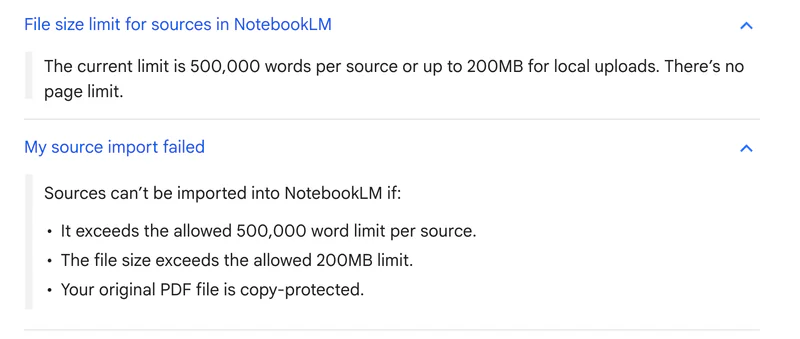
One number stays the same on every plan, though. Each single source is capped at 500,000 words or 200MB, with no page limit. So the real wall is often one giant file, not your plan.
This guide breaks down every NotebookLM limit by plan, what each one means for your work, and what to do when you hit them.
Quick answer
- Yes, there are two kinds of limits. Storage limits are fixed by plan: 50 sources per notebook and 100 notebooks on the free plan.
- Paid plans raise the source cap up to 600 per notebook (Ultra), with more notebooks.
- Usage limits changed on September 2, 2026. There is no fixed daily chat count any more. Your usage budget refreshes every 5 hours, up to a weekly limit, and heavier work uses more of it. Plus gets 2x the free budget and Pro gets 4x.
- Every plan caps each single source at 500,000 words or 200MB, with no page limit. This never changes with a higher plan.
- Copy-protected PDFs will not import on any tier. As of June 2026, NotebookLM runs on Gemini 3.
- For confidential files, a private Mac alternative like Elephas keeps your data on your device. Pricing starts at $19 a month with a free trial.
Is Gemini Notebook the Same as NotebookLM?
Yes. Google renamed NotebookLM to Gemini Notebook on July 16, 2026. Same tool, same plans, same limits: only the name and the address changed, and old notebooklm.google.com links redirect to notebook.google.com automatically. Google's reason for the change is simple: it wants one Gemini brand across all of its AI products. Every number on this page was re-checked against Google's help pages in September 2026. This guide uses both names.
NotebookLM limits by plan in 2026
Here is every NotebookLM tier side by side, checked against Google's help pages in September 2026. The source, notebook, and usage limits scale with the plan, but the per-source ceiling does not.
| Plan | Price | Notebooks | Sources / notebook | Usage budget |
|---|---|---|---|---|
| Free | $0 | 100 | 50 | Standard |
| Plus (Google AI Plus) | $4.99/mo | 200 | 100 | 2x standard |
| Pro (Google AI Pro) | $19.99/mo | 500 | 300 | 4x standard |
| Ultra 20TB (Google AI Ultra) | $99.99/mo | 500 | 500 | 5x or 20x Pro |
| Ultra 30TB (Google AI Ultra) | $199.99/mo | 500 | 600 | 5x or 20x Pro |
NotebookLM was restructured at Google I/O in May 2026, so these tiers now bundle into Google AI subscriptions. Limits can change, so check the official NotebookLM support page for the latest.
No matter which plan you choose, each source is capped at 500,000 words, or 200MB for local uploads, with no page limit per source. A source will not import if it exceeds either limit, or if the original PDF is copy-protected.
How the new 5-hour usage limits work
On September 2, 2026, Google replaced the old daily caps, such as 50 chats a day on the free plan, with compute-based usage limits. Instead of counting how many times you ask a question, Gemini Notebook now measures how much work each request takes. Google says the limit factors in prompt complexity, chat length, the number of sources, and the features you use.
Your budget refreshes every 5 hours until you reach a weekly limit. A short question costs little. A long chat across many sources, or a Video Overview, costs much more. When you run out, a message tells you when features come back.
- Free: standard limits
- Plus: 2x the standard limits
- Pro: 4x the standard limits
- Ultra: 5x or 20x the Pro limits, depending on your Ultra tier
To see what you have left, open Gemini Notebook and go to Settings, then Usage. On the web, you can also choose Generate later for Studio outputs like Video Overviews and Slide Decks, and they are created once your budget refreshes. Google's plan comparison table still lists older per-day counts, so treat those as a rough guide and the usage limits page as the current rule.
What the NotebookLM free plan limits are
The free plan is enough for most casual research. You get the full studio tools, just with lower caps. New to the tool? Start with what is NotebookLM.

Source limits:
- 50 sources per notebook
- 100 notebooks total
- 500,000 words per source
- 200MB maximum per uploaded file
Usage limits:
- A standard usage budget that refreshes every 5 hours, up to a weekly limit
- Chat and Studio tools like Audio Overviews and Deep Research all draw from it
For casual users exploring a single topic with a handful of documents, these caps work fine. For researchers building a large knowledge base, hitting walls becomes routine.
The 50-source cap means you cannot add a whole book collection or full course to one notebook. You end up deciding which sources to keep and which to delete. When that happens, here is how to upload more files, and the full breakdown of daily usage limits.
What NotebookLM Plus gives you for $4.99
Plus is the entry paid tier, bundled into Google AI Plus at $4.99 a month. It roughly doubles the free caps, so it suits light professional use.

You cannot buy Plus on its own. It comes with the wider Google AI Plus subscription.
Source limits:
- 100 sources per notebook (2x free)
- 200 notebooks total (2x free)
- 500,000 words per source (same as free)
- 200MB maximum per uploaded file (same as free)
Usage limits:
- 2x the free usage budget
- Same 5-hour refresh and weekly limit
Plus removes the immediate friction for everyday research. A hundred sources and twice the free usage budget mean you stop watching a counter. If you run bigger projects, Pro is the next step.
Not sure Plus is enough? Compare it against the free plan and read whether the paid upgrade is worth it.
What NotebookLM Pro adds at $19.99
Pro holds the price the old Plus tier used to sit at. It bundles into Google AI Pro at $19.99 a month and is the sweet spot for heavier research.

Source limits:
- 300 sources per notebook (6x free)
- 500 notebooks total (5x free)
- 500,000 words per source (same as free)
- 200MB maximum per uploaded file (same as free)
Usage limits:
- 4x the free usage budget
- A small number of Cinematic Video Overviews
Pro handles most serious research projects. Three hundred sources per notebook covers a full course or a large case file, and its usage budget is four times the free plan's.
What the NotebookLM Ultra limits and price are
Ultra is the highest tier, bundled into Google AI Ultra from $99.99 a month, with a 30TB option around $199.99 a month. It has the highest Cinematic Video Overview limits of any plan.

Source limits:
- 500 to 600 sources per notebook, depending on the storage tier
- 500 notebooks total
- 500,000 words per source (same across all plans)
- 200MB maximum per uploaded file (same across all plans)
Usage limits:
- 5x or 20x the Pro usage budget, depending on your Ultra tier
- The highest Cinematic Video Overview limits of any plan
Ultra targets organizations and heavy professional users. The 600-source cap is the highest NotebookLM offers, but the per-source word limit stays the same. Even Ultra cannot import a single file over 500,000 words.
Why the per-source ceiling matters most
The cap people forget is the one inside each file. Every source tops out at 500,000 words or 200MB, whichever comes first, and no plan lifts it.
Three smaller caps hide inside a single source, and no plan raises them: a Google Slides source can hold at most 100 slides, a Google Sheets source is read up to 100,000 tokens, and copy-protected PDFs will not import on any tier.
That means a higher tier buys you more sources, not bigger ones. A scanned book, an image-heavy PDF, or a large dataset can blow past 200MB and refuse to import.
If a file is too big, you have to split it into parts before uploading. Copy-protected PDFs will not import at all, on any plan.
The structural limits no upgrade removes
Source caps are not the only limit. Three structural ones affect every NotebookLM plan, free or paid, and no upgrade removes them.
- Cloud-only. NotebookLM needs an internet connection. There is no offline mode on any plan, and your files are processed on Google servers.
- One AI provider. You only get Google Gemini models. You cannot bring your own key or pick a different provider.
- Limited integrations. It connects mainly to Google apps like Drive, Docs, and Sheets. Notes in Apple Notes, Obsidian, or Notion need a manual export and re-upload.
- Each notebook works on its own, so you cannot link two notebooks or query across all of them at once.
For users with privacy needs, offline needs, or notes outside Google, these matter more than source counts.
How to handle hitting a NotebookLM limit
When you run into a cap, you have a few options. Most of them are about housekeeping rather than spending more.
- Delete older or duplicate sources to free up room in the notebook.
- Split your material across more notebooks instead of one packed notebook.
- Combine small related files so each one carries more before you reach the source count.
- Wait for your usage budget to refresh, which happens every 5 hours until your weekly limit.
- Upgrade to a higher plan if you genuinely need more sources or a bigger usage budget.
None of this fixes the per-source ceiling. For a single very large file, no plan helps, so a tool that processes files locally is the cleaner path.
How NotebookLM compares with Elephas on limits
NotebookLM caps you at 50 to 600 sources depending on your plan, and even Ultra maxes out at 600 per notebook. Elephas does not cap your notebook by source count the way NotebookLM does.

Your Super Brain in Elephas grows with your document collection, so you are not deleting older files to make room for new ones.
NotebookLM stores everything on Google servers. Google says it does not train models on your data, but your documents still leave your device for processing.
NotebookLM also has no offline mode on any plan. You need an internet connection to use it. Elephas provides built-in local LLM models that run entirely on your Mac, so no data is sent to any server.
| Feature | NotebookLM | Elephas |
|---|---|---|
| Source limit | 50 to 600 (by plan) | No per-notebook source cap |
| File size cap | 200MB / 500,000 words per source | Limited only by your Mac |
| Offline mode | Not available | Built-in local LLM models |
| Data location | Google servers | Your Mac only |
| Platform | Web browser only | Mac, iPhone, iPad |
| Own API keys | Not supported | ChatGPT, Claude, Gemini, Perplexity (sensitive details redacted before sending) |
| Pricing | Free, or $4.99 to $199.99/mo | From $19/month, free trial |
NotebookLM works well for users who stay within its limits and are invested in Google's ecosystem. Elephas fits Mac users with large document collections who want privacy and offline access.
A private Mac alternative: Elephas
If NotebookLM's caps or its cloud-only setup do not work for you, Elephas is worth a look. It is a privacy-first AI knowledge assistant for Mac, built for people who need control over where their files go and which AI model runs their work.

Elephas lets you build a Super Brain from your documents. You add files and Elephas indexes them on your device, then you chat with that knowledge base and get answers with citations, much like NotebookLM but processed on your own Mac.
- Reads PDFs, Word, Excel, Markdown, CSV, JSON, web pages, and YouTube URLs, with connections to Apple Notes, Obsidian, Notion, Roam, and Bear.
- Works offline using built-in local LLM models, so processing happens on device and your data is not sent anywhere.
- Or bring your own key for ChatGPT 5.5, Claude Opus 4.7, Gemini, and Perplexity (sensitive details redacted before sending).
- Native app for Mac, iPhone, and iPad, with system-wide keyboard shortcuts so you can query your Super Brain from any app.
Smart Redaction for cloud privacy
Most tools send your raw text straight to the cloud model. Elephas does not. When you use a cloud provider like ChatGPT, Claude, or Gemini through your own API key, Smart Redaction first removes personal and sensitive details, names, emails, phone numbers, and other identifiers, and replaces them with placeholders. Only the cleaned text leaves your Mac.
The real details are restored locally in your final answer, so the cloud provider never sees them, and Elephas keeps zero data retention. Smart Redaction works on every Elephas plan, including the free one.


For lawyers, healthcare workers, or anyone handling sensitive files, that on-device approach matters more than any source count. Pricing starts at $19 a month with a free trial. See the live list on the Elephas pricing page.
Who each tool fits best
Both tools serve different needs. Here is a quick way to decide.

Stick with NotebookLM if:
- Your projects stay under 50 sources, or you are happy on a paid tier.
- You prefer browser-based tools over native apps.
- Cloud storage for your documents is fine for you.
- You already use Google Workspace for everything.
- You want audio and video overview generation.
Consider Elephas if:
- You keep hitting NotebookLM's source or notebook caps.
- You work with sensitive files that should not sit on Google servers.
- You want offline access without an internet dependency.
- You prefer native Mac apps over web tools.
- You want to use your own API keys with redaction in front of them.
What the limits add up to
NotebookLM's source limits run from 50 on the free tier to 600 on Ultra. The per-source ceiling of 500,000 words or 200MB never changes, no matter which plan you buy.
For most casual users exploring single topics, the free tier handles things fine. If you keep managing which sources to keep, need offline access, or handle files that should not leave your device, those caps become obstacles.
Elephas takes a different approach: local processing, built-in local LLM models, and Smart Redaction in front of any cloud provider you choose. Pricing starts at $19 a month with a free trial.