NotebookLM keeps your notebooks organized at scale through clear naming conventions, topic-based grouping, and splitting into multiple notebooks when a project outgrows the source limit.
Each notebook holds up to 50 sources on the free plan, 100 on Plus, 300 on Pro, and up to 600 on Ultra. That structure works fine for single-topic research. But managing 20+ notebooks across multiple projects creates real problems with naming chaos and source sprawl.
Large projects often need multiple notebooks working together. NotebookLM treats every notebook as an isolated container. There's no global search, no cross-referencing, and no way to link notebooks together. Planning your organization system before your research grows saves hours of restructuring later.
Some tools handle scale without these structural limits. If NotebookLM is your platform, these practices keep things manageable, and I'll cover the current 2026 limits, plans, and a private alternative at the end.
Quick answer
- NotebookLM keeps large projects organized through clear naming conventions, topic-based grouping, and splitting into multiple notebooks before you hit the source cap.
- As of June 2026, one notebook holds 50 sources on Free, 100 on Plus, 300 on Pro, and up to 600 on Ultra. Each source can be up to 500,000 words or 200MB.
- The Free plan gives 100 notebooks; paid plans give up to 500. There is no folder system, no tagging, and no search across notebooks.
- Plans bundle into Google AI: Plus is $4.99 a month, Pro is $19.99 a month, and Ultra starts at $99.99 a month. NotebookLM runs on Gemini 3.
- For confidential files, a private Mac alternative like Elephas keeps your data on your device. Pricing starts at $19 a month with a free trial.
Why NotebookLM Needs an Organization System
NotebookLM caps how much each notebook can hold, and that cap is what forces you to organize. As of June 2026, one notebook holds 50 sources on Free, 100 on Plus, 300 on Pro, and up to 600 on Ultra. Each source can be up to 500,000 words or 200MB.
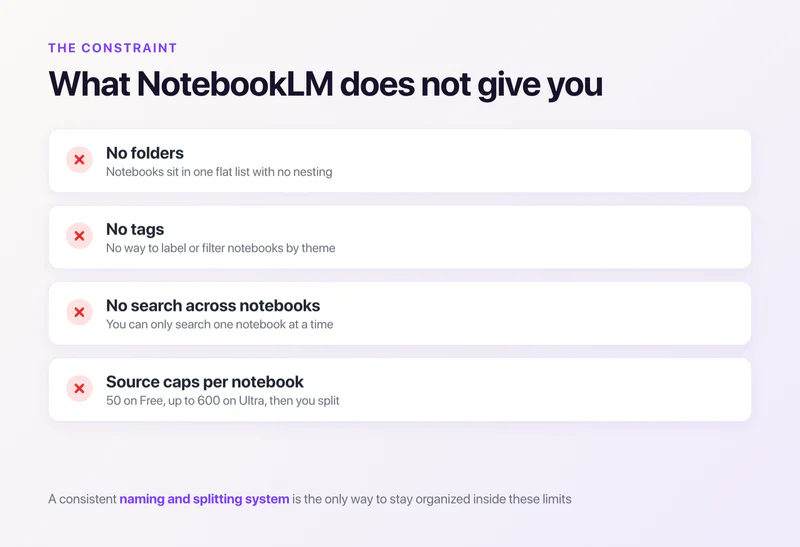
On top of the caps, there is no folder system, no tagging, and no search across notebooks. That combination is why large projects sprawl into dozens of separate containers that get hard to track.
For the full tier-by-tier numbers and pricing, see the source limits guide, the usage limits, and free vs Plus. The rest of this guide is about keeping that sprawl under control.
Notebook Naming Conventions That Work
Good naming is the single most effective way to stay organized in NotebookLM, because the app has no folders and no tags. A consistent name pattern is your only sort-and-find tool inside a notebook list.
![A NotebookLM naming convention that sorts itself: [CODE] Topic [YYYY-MM], with good examples versus vague names to avoid](https://prod.superblogcdn.com/site_cuid_cl495vqej08071jpawt8inf39/images/nbnaming-1782222108839-compressed.webp)
A notebook named "Research Stuff" becomes useless when you have 40 of them.
Start with a project code or client name. This puts related notebooks next to each other in the alphabetical list. "PROJ-A Marketing Competitors" sorts next to "PROJ-A Market Sizing" automatically.
Add date stamps in YYYY-MM format for time-sensitive research. "2026-01 Industry Report Analysis" tells you when the research happened at a glance.
This matters because NotebookLM creates static copies of your sources. A notebook from six months ago may contain outdated information, and there's no automatic syncing for most source types (only Google Docs and Slides can sync with their Drive originals).
Rules that work across large notebook collections:
- Keep names under 50 characters so they display fully in the sidebar without truncation
- Use descriptors that tell you what's inside: "Marketing Q1 Competitors" instead of "Research 2"
- Avoid special characters like slashes, ampersands, and brackets that may cause display issues
- Build templates for recurring project types, something like "[CLIENT] [TOPIC] [YYYY-MM]"
- Prefix related notebooks with the same code so they cluster together in sorted lists
- If the name doesn't tell you what's inside at a glance, rename it
- No duplicate notebook button exists yet, so to reuse a structure, build a template notebook and copy its name pattern and source set by hand
Consistent naming pays off most when you're managing 20+ notebooks and need to find something specific.
Organization Strategies for Large Research Projects
There is no single correct way to organize research notebooks. The right approach depends on your project structure, how you think about the material, and how many people need access.

Here are the three organization patterns that work, and when to pick each:
- Topic-based. One notebook per major subject. A market research project gets separate notebooks for competitor analysis, customer interviews, industry reports, and pricing data. Focused notebooks give better answers, since the model only draws from relevant sources.
- Phase-based. One notebook per stage: raw research, then analysis and synthesis, then final outputs and references. This fits academic work and long-form content that moves through distinct stages.
- Source-type. Group by format: all PDFs in one notebook, all web sources in another, all transcripts in a third. Useful when you cross-check specific source types or when certain formats need different handling.
Most large projects end up with a hybrid approach. Topic-based at the top level, with phase-based splits within each topic when a single notebook fills up.
Beyond picking a strategy, these practices apply regardless of which approach you choose:
- Create a "master index" notebook with notes describing what lives in each sub-project notebook, what date range it covers, and what key findings it holds
- Document your organization system somewhere outside NotebookLM (a Google Doc, spreadsheet, or project management tool)
- Review and archive completed notebooks regularly (see is Plus worth it), and delete notebooks you no longer reference to stay within your plan's limits
- Plan your structure before you start adding sources; restructuring 30 notebooks after the fact takes significantly longer than deciding the structure upfront
When to Split Into Multiple Notebooks
Split a notebook when you reach about 80% of its source cap, when topics get too broad and answers go vague, when team members need different access, or when response quality drops. Splitting at 80% leaves room before deletions, and deletions are permanent.

NotebookLM's source cap forces splits whether you planned for them or not. But source limits aren't the only reason to break a notebook apart.
Split a notebook when any of these is true:
- You're near 80% of the source cap. That's 40 sources on Free, 80 on Plus, 240 on Pro. Running at the cap leaves no room for new sources, and deletion is permanent with no recycle bin.
- Topics got too broad. A notebook stuffed with marketing, product, and finance sources produces vague answers, because the model pulls from everything. Focused notebooks generate better ones.
- People need different access. Sharing is all-or-nothing per notebook, so separate notebooks let you control who sees what. Personal Gmail accounts can share with up to 50 users; Enterprise and Education accounts share with everyone in the organization.
- Answer quality drops. Generic summaries or conflated topics mean the notebook has outgrown one container.
After splitting, keep related notebooks grouped with matching naming prefixes. "PROJ-A Research Sources" and "PROJ-A Analysis Notes" are obviously related. "Research V2" and "Notes Final" are not.
Cross-referencing between notebooks requires manual work. Copy key findings into the relevant notebook, or maintain a shared index document. NotebookLM cannot search across notebooks or pull information from one notebook into another.
Google has introduced a daily limit workaround where you can add multiple notebooks to a Gemini chat on the web, which bridges the gap for cross-referencing. But that's a separate tool, not a built-in feature.
The Hidden Costs of Notebook Sprawl
More notebooks mean more coordination overhead: no search across notebooks, duplicate sources eating your limits, and team context scattered across containers you may not share. The fixes are an outside index and disciplined naming.

As your research scales, notebook sprawl creates a few specific costs:
- No search across notebooks. NotebookLM searches one notebook at a time. With 50 notebooks, finding a source you can't place becomes a project in itself.
- Each notebook is blind to the others. A question that needs two notebooks means asking twice and stitching the answers yourself.
- Duplicate sources waste limits. Five notebooks sharing the same 10 background sources burns 50 source slots on duplicates.
- Tracking is its own job. Knowing which notebooks are current and which findings contradict each other needs a tracker outside NotebookLM.
- Collaboration fragments. Teammates miss context that lives in notebooks they can't access, and knowledge silos form fast.
These problems compound as your research scales up. An organization system that works at 5 notebooks becomes unmanageable at 30. If you're regularly hitting these walls, it may be worth looking at NotebookLM alternatives that don't impose these structural limits.
What Is Elephas?

Elephas is a privacy-first AI knowledge assistant for Mac, iPhone, and iPad. It is similar to NotebookLM in that you chat with your own documents, but it takes a local-first approach: it processes and stores everything on your device instead of cloud servers, and it lets you pick which AI model runs your work.
The core feature is Super Brain, which lets you build personal knowledge bases from your documents. Upload files, and Elephas indexes them locally on your Mac. Then you chat with your knowledge base and get answers with source citations. The concept is similar to NotebookLM but without source caps or notebook limits.
Elephas supports 20+ file formats: PDFs, Word documents, Excel files, Markdown, Apple Notes, Notion exports, Obsidian vaults, web pages, YouTube transcripts, and Zoom recordings. It connects directly to note-taking tools most professionals already use instead of requiring everything to funnel through one ecosystem.
Over 3,000 professionals use Elephas for research, writing, and knowledge management. Pricing starts at $19 a month, and there's a free trial so you can test it on your own files first.
Smart Redaction for cloud privacy
Most tools send your raw text straight to the cloud model. Elephas does not. When you use a cloud provider like ChatGPT, Claude, or Gemini through your own API key, Smart Redaction first removes personal and sensitive details, names, emails, phone numbers, and other identifiers, and replaces them with placeholders. Only the cleaned text leaves your Mac.
The real details are restored locally in your final answer, so the cloud provider never sees them, and Elephas keeps zero data retention. Smart Redaction works on every Elephas plan, including the free one.


How Elephas Handles Large Research Differently
The structural problems NotebookLM creates at scale don't apply to Elephas. The two tools differ on every dimension that matters when research grows.

NotebookLM caps sources at 50 to 600 depending on your plan. Elephas has no source limits. Add as many documents as your Mac can store. Your knowledge base grows without forcing deletions or splits.
NotebookLM requires an internet connection for every interaction. Elephas includes built-in local LLM models that run entirely on your Mac with no data sent to any server, so no separate install is needed.
NotebookLM stores your documents on Google's servers. Google says they don't train models on your data, but your content still leaves your device for processing.
Elephas keeps everything on your Mac. For lawyers, healthcare professionals, or anyone handling confidential research, local storage is a requirement rather than a preference.
NotebookLM demands careful organization planning because of its structural limits. Elephas Super Brain handles scale naturally. One knowledge base can hold your entire document collection without splitting, naming schemes, or manual cross-referencing.
NotebookLM's paid plans run from $4.99 a month (Plus) to $99.99 and up (Ultra). Elephas pricing starts at $19 a month with a free trial. For the live list, check Elephas pricing.
Features NotebookLM Lacks for Large Projects
NotebookLM connects to Google apps only: Drive, Docs, Slides, and Sheets. It now also reads .docx files, images (with OCR), and CSV files. But if your notes live in Apple Notes, Obsidian, or Notion, you export and re-upload manually.

Elephas integrates directly with Apple Notes, Obsidian, Notion, LogSeq, Roam Research, and DEVONthink. Content syncs from your existing tools without manual file transfers.
NotebookLM has no workflow automation. It handles chat and Audio/Video Overview generation, but that's where its capabilities stop. Elephas offers AI agents that handle multi-step tasks: automated document processing, research synthesis, content generation pipelines, and email workflows.
NotebookLM locks you into Google's Gemini models. Elephas lets you choose between local AI for privacy or bring your own key for ChatGPT 5.5, Claude Opus 4.7, Gemini, and others (sensitive details redacted before sending). Different tasks can use different models based on what works best for that specific job.
NotebookLM supports about 10 source types (Google Docs, Slides, Sheets, PDFs, .docx, text, Markdown, web URLs, YouTube videos, and audio files).
Elephas handles 20+ file formats including Word, Excel, PowerPoint, CSV, RTF, code files, and Zoom recordings with automatic transcription. Meeting-heavy research benefits from built-in Zoom transcript support that NotebookLM doesn't offer.
NotebookLM vs Elephas Comparison Table
| Feature | NotebookLM | Elephas |
|---|---|---|
| Source limit | 50 to 600 per notebook | Unlimited |
| Offline mode | No | Yes (built-in local LLM models) |
| Data storage | Google servers | Your Mac only |
| Platform | Web browser, iOS, Android | Mac, iPhone, iPad |
| Pricing | Free / $4.99 to $99.99+ monthly | From $19/month, free trial |
| Own API keys | No | ChatGPT 5.5, Claude Opus 4.7, Gemini, more (sensitive details redacted before sending) |
| Workflow automation | No | Yes, with AI agents |
| Integrations | Google apps only | Apple Notes, Obsidian, Notion, more |
| Cross-notebook search | No | Yes, via Super Brain |
NotebookLM works well for smaller, cloud-based projects within Google's ecosystem. Its Audio Overview feature is genuinely useful and has no direct equivalent in Elephas. Elephas removes the scaling headaches entirely for users who need unlimited documents, local processing, and privacy.
Which Tool Fits Your Research Needs?

Choose NotebookLM if:
- Your projects stay under 50 sources and rarely need more
- You already work within Google Workspace daily
- You prefer browser-based tools accessible from any device
- Audio Overviews are important for your workflow
- Monthly subscriptions work for your budget
Choose Elephas if:
- Your research regularly exceeds source limits and you're tired of managing caps
- Privacy matters for your work and you want data stored locally
- You need offline access without internet dependency
- You want files to stay on your device, with Smart Redaction in front of any cloud model
- You use Apple Notes, Obsidian, Notion, or DEVONthink for note-taking
- You need workflow automation for repetitive research tasks
- You want to pick your own AI models instead of being locked into one provider
Related NotebookLM Guides
New to the tool? Start with what is NotebookLM for the full overview, then dig into source limits and the usage limits. Choosing a plan? Compare free vs Plus and is Plus worth it. Hitting upload caps? Here's how to upload more files.
Organizing NotebookLM at Scale: The Verdict
Organizing NotebookLM notebooks at scale requires deliberate planning around its structural limits. Naming conventions, topic-based splitting, and regular archiving all help. But they also add management overhead that grows with every new notebook.
For research that stays small and lives within Google's ecosystem, NotebookLM handles things fine. For research that keeps growing, tools without source caps and notebook walls save the time you'd otherwise spend reorganizing.
Elephas offers that freedom with privacy built in: no source limits, no cloud dependency, and processing on device with Smart Redaction in front of any cloud model.
Pricing starts at $19 a month with a free trial. If NotebookLM's organizational burden is slowing your research down, try Elephas free and skip the limits entirely.