NotebookLM's free version gives you 100 notebooks, 50 sources per notebook, and a standard usage budget that refreshes every 5 hours, with audio and video overviews included. Google keeps the free plan running with no time limit. You just need a Google account.
The free tier handles light research and small projects well enough. But if you work with lots of documents, need offline access, or prefer keeping your data off Google's servers, tools like Elephas give you more flexibility without the caps.
Here is the full picture for 2026: what the free plan covers, where the paid tiers fit, what each one costs now, and a private Mac alternative for sensitive files. If NotebookLM is new to you, the full overview lives in what is NotebookLM.
Quick answer
- Yes, NotebookLM is free with a Google account. The free plan gives you 100 notebooks, 50 sources per notebook, and a usage budget that refreshes every 5 hours. There is no time limit on the free plan.
- Paid tiers are bundled into Google AI plans: Plus at $4.99/mo, Pro at $19.99/mo, and Ultra from $99.99/mo. There is no standalone NotebookLM subscription.
- Every tier runs on Gemini 3 and the same source ceiling: 500,000 words or 200MB per source. No page limit.
- Audio and video overviews are on the free plan. Cinematic Video Overviews need a Pro or Ultra plan.
- NotebookLM has no offline mode and processes your files on Google servers, so it is not the best fit for confidential work.
- For confidential files, a private Mac alternative like Elephas keeps your data on your device. Pricing starts at $19 a month with a free trial.
Is Gemini Notebook the Same as NotebookLM?
Yes. Google renamed NotebookLM to Gemini Notebook on July 16, 2026. Same tool, same plans, same limits: only the name and the address changed, and old notebooklm.google.com links redirect to notebook.google.com automatically. Google's reason for the change is simple: it wants one Gemini brand across all of its AI products. One price did move separately: Google AI Plus dropped from $7.99 to $4.99 a month in June 2026, and this page reflects that. This guide uses both names.
What You Get on the NotebookLM Free Plan
The free plan is generous, and most people never need to pay. Here is exactly what it includes as of September 2026:
- 100 notebooks total.
- 50 sources per notebook, each up to 500,000 words or 200MB.
- A standard usage budget that refreshes every 5 hours, up to a weekly limit.
- Audio Overviews (podcast-style) and Video Overviews from your sources.
- Mind maps, flashcards, quizzes, reports, and study guides.
- Deep Research, image OCR, and CSV sources.
- Saved chat history between sessions.
Everything runs on Gemini 3 in your browser. For the full caps and how the 5-hour refresh works, see free plan limits and usage limits.
NotebookLM Free vs Plus vs Pro vs Ultra (2026 Pricing)
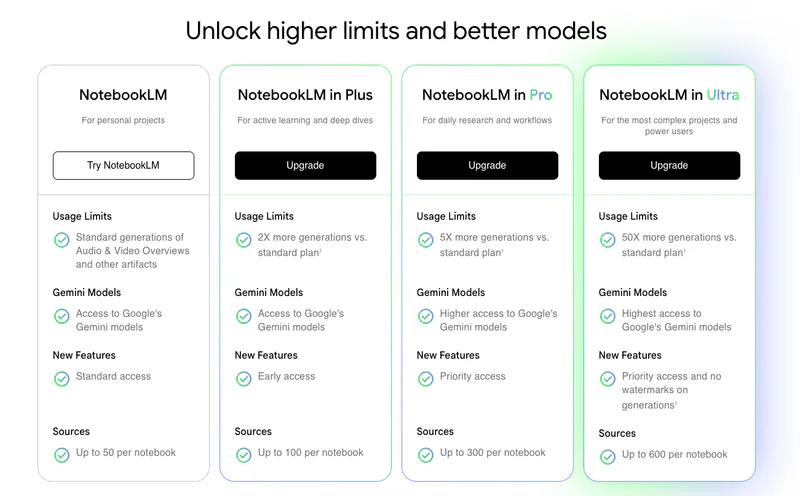
At Google I/O in May 2026, NotebookLM was folded into Google AI subscriptions. There are four tiers now: Free, Plus, Pro, and Ultra. Each maps to a Google AI plan, and the limits scale up as you move through them.
The free plan covers notebook creation, source uploads, document chat, and audio and video overviews. Everything runs on Gemini 3 in your browser, and the core studio features (Deep Research, Audio and Video Overviews, Slide Decks) are on every tier. The only studio feature missing from the free and Plus plans is the Cinematic Video Overview, a fully animated video that needs Pro or Ultra.
NotebookLM Plus now comes with Google AI Plus at $4.99 a month. It raises sources to 100 per notebook, doubles your usage budget, and adds early access to new features. This is the tier most casual users upgrade to first. See whether the step up is worth it.
NotebookLM Pro is bundled with Google AI Pro at $19.99 a month. You can't buy it on its own. The plan also includes Gemini across Google apps and 5TB of cloud storage, raised from 2TB in April 2026, and it raises sources to 300 per notebook with four times the free usage budget.
NotebookLM Ultra comes with Google AI Ultra, starting at $99.99 a month (a higher 30TB tier runs $199.99 a month). It gives the highest limits: 500 to 600 sources per notebook, a usage budget 5x or 20x higher than Pro, and the most Cinematic Video Overviews.
| Plan | Price | Notebooks | Sources / notebook | Usage budget |
|---|---|---|---|---|
| Free | $0 | 100 | 50 | Standard |
| Plus (Google AI Plus) | $4.99/mo | 200 | 100 | 2x standard |
| Pro (Google AI Pro) | $19.99/mo | 500 | 300 | 4x standard |
| Ultra 20TB (Google AI Ultra) | $99.99/mo | 500 | 500 | 5x or 20x Pro |
| Ultra 30TB (Google AI Ultra) | $199.99/mo | 500 | 600 | 5x or 20x Pro |
What the $19.99 a month Google AI Pro bundle includes beyond NotebookLM Pro:
- Gemini access across all Google apps
- AI-powered features inside Gmail, Docs, and Sheets
- 5TB of Google cloud storage
- A free trial for new subscribers
The free plan works for testing and occasional use. Plus adds breathing room for regular users. Pro removes friction for daily professional work. Ultra is built for organizations and power users running large-scale research.
Is NotebookLM Free, and What Do You Pay For?
Yes, NotebookLM is free, and the free plan is enough for most people. You only pay when you keep hitting the source caps or your usage limit, or when you want paid-only features like Cinematic Video Overviews.
Here is the free vs paid split in plain terms:
- Free covers casual research and study: 100 notebooks, 50 sources each, a standard usage budget, audio and video overviews.
- Plus ($4.99/mo) is the first real upgrade: double the notebooks, 100 sources each, and twice the usage budget.
- Pro ($19.99/mo) is for daily professional work: 300 sources per notebook and four times the free usage budget.
- Ultra (from $99.99/mo) is for power users: the highest limits and Cinematic Video Overviews.
How Many Sources Can You Add on the Free Plan?

Short answer: up to 50 sources per notebook, across a maximum of 100 notebooks. Each source can hold up to 500,000 words or 200MB, and there is no page limit. That same per-source ceiling applies on every tier, free or paid.
NotebookLM accepts a wide range of source types. Here's what you can upload and what to know about each:
- Google Docs, Google Slides, and Google Sheets pull in directly from your Drive
- PDFs and .docx files upload from your Mac (copy-protected PDFs will fail)
- Plain text and Markdown files work without issues
- Web page URLs import text content only; images, embedded videos, and nested pages get skipped
- YouTube video URLs must be public with captions enabled, or the import fails
- Audio files support 20+ formats including MP3, WAV, AAC, OGG, and OPUS (must contain clear speech, no music-only files)
- Images now import with OCR, so NotebookLM can read text inside scanned files, and CSV files import as sources too
- Google Drive URLs link directly from your cloud storage
- Copy-pasted text lets you manually add content without a file
Paywalled pages and sites that block web scraping won't import at all.
Fifty sources per notebook is enough if you're researching a single topic or organizing reference material for a writing project.
It gets tight when you're building a knowledge base from hundreds of documents (research papers, meeting recordings, legal files) because you start choosing which sources to keep and which to drop.
Need more room? Here are the upload workarounds, plus the full source limits guide.
Audio and Video Overviews on the Free Plan

Audio and video overviews are both on the free plan now, and they draw from the same usage budget as chat, which scales by plan.
Audio Overviews convert your uploaded sources into podcast-style discussions between two AI hosts. They summarize key topics, break down complex ideas in conversational language, and can turn a 100-page document into a roughly 15-minute audio discussion.
Paid tiers raise the usage budget, so you can generate more of them, as the pricing table above shows. Video Overviews work the same way, and the fully animated Cinematic Video Overviews need a Pro or Ultra plan.
There's also an Interactive mode that lets you participate in the conversation while it's happening. You select "Join" while listening, then ask questions by voice or text. The AI hosts respond based on your source material and then pick up where they left off.
Key details about Interactive mode that are easy to miss:
- It only works on newly generated Audio Overviews, not previously saved ones
- English is the only supported language for Interactive mode right now
- You may experience slight delays after joining or after asking a question
- Voice and transcribed interactions aren't stored or shared by Google
- The mobile app may have limited Interactive mode support
Audio Overviews themselves are available in over 50 languages, but the Interactive feature stays English-only for now.
Since September 2, 2026, your usage budget refreshes every 5 hours, up to a weekly limit, instead of once a day. If you run out, you can queue an overview with Generate later on the web. More on how it works in the usage limits guide.
Main Limitations of the Free Version

Source and audio caps get the most attention, but the free plan has structural constraints that affect how useful the tool actually is.
On the usage side, the standard usage budget means heavy research sessions can get cut short, and Deep Research and overviews use it up quickly.
Beyond the usage limits, there are bigger structural issues that apply to all NotebookLM plans, not just the free tier:
- No offline mode exists on any plan. Every action requires an active internet connection, so you can't work on a plane, in a cafe with bad Wi-Fi, or anywhere without reliable connectivity.
- Gemini 3 is the only available model. You can't bring your own API key, switch to ChatGPT or Claude, or run a built-in local model for privacy.
- Integrations only cover Google's ecosystem (Drive, Docs, Slides, Sheets). Apple Notes, Obsidian, Notion, and other tools require manual export and re-upload.
- Response customization (adjusting AI style, tone, or length) is locked behind the Plus plan.
- All documents are stored and processed on Google's servers. Google says it doesn't train AI on your data, but your content still passes through their infrastructure.
These constraints are manageable for someone exploring a single research topic. For anyone dealing with larger document sets, needing offline capability, or wanting to keep data off external servers, other tools handle those needs better.
Tips to Get More From the Free Version

You can stretch the free plan with some adjustments. The main idea is to reduce the number of source slots you use without losing the information you need.
- Merge related documents into one Google Doc with tabs or sections before uploading. Ten files on the same topic become one source slot instead of ten.
- Delete finished project notebooks to free up space. You have 100 total, so rotation keeps things open.
- Save your overview generations for the densest material. Use text-based chat for simpler documents where you can skim the answers.
- Ask specific questions instead of broad ones. Targeted prompts produce better answers and use less of your usage budget.
- Combine multiple related web pages into a single copy-pasted text source rather than adding each URL separately.
- Juggling lots of notebooks? Here are some organization tips for large projects.
These workarounds help, but they add management overhead that the tool is supposed to remove. If you spend more time reorganizing sources to stay under limits than actually doing research, it might be time to look at tools without those caps.
A Private Alternative: Elephas for Mac

Elephas is a privacy-first AI knowledge assistant for Mac, iPhone, and iPad. It takes a local-first approach to document AI, which is the main difference from a cloud tool like NotebookLM.
You add documents to Elephas, and it indexes them on your device using built-in local LLM models. From there you chat with your knowledge base, get answers with source citations, and reach everything from any Mac app, not just a browser tab.
Smart Redaction for cloud privacy
Most tools send your raw text straight to the cloud model. Elephas does not. When you use a cloud provider like ChatGPT, Claude, or Gemini through your own API key, Smart Redaction first removes personal and sensitive details, names, emails, phone numbers, and other identifiers, and replaces them with placeholders. Only the cleaned text leaves your Mac.
The real details are restored locally in your final answer, so the cloud provider never sees them, and Elephas keeps zero data retention. Smart Redaction works on every Elephas plan, including the free one.


NotebookLM Free vs Elephas: Core Differences
These two tools solve similar problems but make very different tradeoffs. Here's how they compare on the things that matter most for daily use:
- Source limits: NotebookLM caps you at 50 per notebook on the free plan. Elephas indexes as many documents as your device storage allows.
- Offline access: NotebookLM needs internet for everything. Elephas works fully offline using built-in local LLM models, so processing happens on device.
- Data privacy: NotebookLM uploads your documents to Google's servers. Elephas indexes and stores everything locally on your Mac, and your data doesn't leave your device unless you choose a cloud AI model.
- Platform: NotebookLM is browser-based with a mobile app. Elephas has native apps for Mac, iPhone, and iPad with cross-device iCloud sync.
- AI models: NotebookLM uses only Gemini 3. Elephas lets you pick from ChatGPT 5.5, Claude Opus 4.7, Gemini, Groq, or fully offline built-in local LLM models, all connected through your own API key.
- Pricing: NotebookLM is free, with paid tiers from $4.99/mo. Elephas pricing starts at $19/month with a free trial.
Features Elephas Has That NotebookLM Lacks
NotebookLM connects to Google apps only. Elephas integrates directly with a much wider set of tools, pulling content in without manual exports:
- Apple Notes (auto-sync with real-time updates)
- Obsidian (vault import with link and tag preservation)
- Notion (page and database import with hierarchy intact)
- DEVONthink (database access with deep linking)
- Slack (channel history and thread import)
- Zoom (recording import with automatic transcription)
NotebookLM has no automation capabilities. Elephas includes AI agents that handle multi-step tasks like automated document processing, email response workflows, content generation pipelines, and research synthesis.
On file formats, NotebookLM supports about 10 types (PDFs, Google Docs, Slides, Sheets, web URLs, YouTube links, audio files, images, Markdown, and .docx). Elephas supports 20+ formats, adding:
- Word (.doc, .docx), Excel (.xls, .xlsx), PowerPoint (.ppt, .pptx)
- CSV, TSV, Rich Text (.rtf)
- Zoom recordings with transcription
- Code files in various programming languages
- Jupyter notebooks
Elephas also works across every Mac application. You can access your knowledge base from any window on your Mac, not just a browser tab.
Smart Redaction adds a privacy layer NotebookLM has no answer for. When you use your own cloud key, it removes personal details before the text leaves your Mac and restores them locally in the answer.
On pricing, NotebookLM's paid tiers run from $4.99 a month. Elephas starts at $19 a month with a free trial, so you can test it before you commit. See the live list on the Elephas pricing page.
NotebookLM Free vs Elephas: Side-by-Side Comparison
| Feature | NotebookLM Free | Elephas |
|---|---|---|
| Document limit | 50 per notebook | As much as your storage allows |
| Offline mode | No | Yes (built-in local LLM models) |
| Data storage | Google servers | Your Mac only |
| Platform | Browser + mobile app | Mac, iPhone, iPad (native) |
| Pricing | Free / paid from $4.99/mo | From $19/month, free trial |
| Own API keys | No | ChatGPT 5.5, Claude Opus 4.7, Gemini, Groq (sensitive details redacted before sending) |
| Workflow automation | No | Yes, with AI agents |
| Integrations | Google apps | Apple Notes, Obsidian, Notion, DEVONthink, Slack, Zoom |
| File formats | ~10 types | 20+ types |
| AI models | Gemini 3 only | Built-in local LLM models + cloud providers |
NotebookLM works well for quick research with a small number of sources, especially if you're already in Google's ecosystem. Elephas fits better if you need unlimited documents, local data storage, offline access, or Apple ecosystem integration. For the full breakdown, read NotebookLM vs Elephas.
Which One Should You Pick?
NotebookLM free makes sense if:
- You work with fewer than 50 sources per project
- The free usage budget covers your needs
- You're comfortable with Google storing and processing your documents
- You always have a reliable internet connection
- You primarily work within Google Docs, Slides, and Sheets
Elephas makes more sense if:
- You work with large document collections and don't want source caps
- You want all data stored on your device, not on external servers
- You need offline access with built-in local LLM models
- You'd rather start at $19 a month with a free trial than chase a Google AI bundle
- Your notes live in Apple Notes, Obsidian, Notion, or DEVONthink
- You want to choose between multiple AI providers or run fully local models
Final Thoughts
NotebookLM's free version handles basic research and light document work. The 100 notebooks and 50 sources per notebook are enough for small projects, and audio and video overviews are genuinely useful for turning dense material into something you can listen to or watch.
The limits become real when your needs grow. More documents, daily use, offline requirements, or privacy concerns all push past what the free plan offers. The paid tiers help with some of this but lock you into a Google AI subscription.
Elephas goes a different direction: local processing, no source caps on paid plans, and the option to choose your own AI model with Smart Redaction in front of any cloud provider.
Pricing starts at $19 a month with a free trial. If you use Apple devices and want your data to stay on your machine, try both and see which one fits. You can try Elephas free and feel how local-first document AI works.