
According to McKinsey’s The State of AI global survey, AI adoption among organizations has been increasing steadily. In the latest survey, 78 % of respondents reported that their organizations use AI in at least one business function, which is higher than the 72 % reported in early 2024 and much higher than the 55 % reported a year earlier.
This data shows a clear upward trend in AI usage across business functions over the past year and is drawn directly from McKinsey’s research on global AI adoption.
In this Drive AI review, we'll explore everything you need to know about this platform designed to help teams chat with their documents, automate file organization, and manage collaborative workspaces through advanced AI capabilities.
Here is what we are going to cover:
- What is Drive AI and its world's first agentic workspace capabilities
- Key features that make this AI drive different from traditional storage
- Pricing structure and subscription options
- Drawbacks and limitations
- Customer reviews from real users
- Five alternatives including Elephas for Mac users
- Detailed comparison across pricing and features
- Which intelligent workspace platform is the best choice for different use case scenarios
By the end of this Drive AI review, you'll understand whether this innovative platform fits your file management needs and how it compares to other AI agent solutions, helping you make an informed decision about your workspace investment.
Let's get into it.
What is Drive AI?
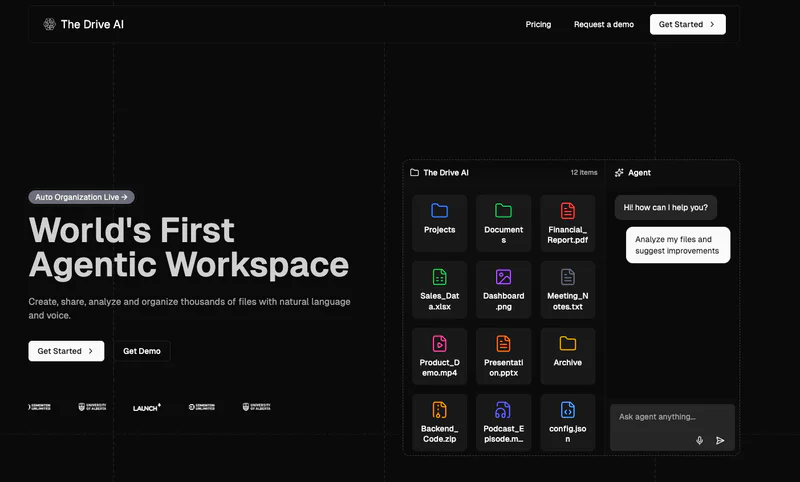
Drive AI is the world's first agentic workspace that combines intelligent file management with AI-powered automation, allowing users to create, organize, analyze, and share files using natural language. Unlike traditional cloud storage platforms, Drive AI creates intelligent agents from your document that understand content and execute actions across your entire workspace.
The platform uses advanced AI to automate file organization, analyze document content, and manage team collaboration through chat channels. Users can rename hundreds of files, organize folders, set permissions, and query multiple documents simultaneously using simple voice or text commands, making file management faster than manual methods.
Key Points:
- Primary function: Agentic workspace for AI-powered file management and collaboration
- Target users: Teams, knowledge workers, businesses needing intelligent storage solutions
- Main differentiator: Agents that take action to create, rename, archive, share, and organize files with words
- Basic how it works: AI agents automate file operations and analyze content through natural language
- Platform availability: Web, mobile app, integrates with Google Drive, Dropbox, OneDrive
Drawbacks of Drive AI:
- Learning curve with new collaboration features and AI agent interfaces requiring time to master
- Pricing barriers at $19.99/month for pro features compared to free plan with only 1GB storage
- Limited offline access to files requiring internet connectivity for full functionality
- No audio podcast generation like some alternative tools focused on study features
- Newer platform with smaller user base compared to established workspace solutions like Google Drive
Drive AI Customer Reviews
"I've been using The Drive AI for a while now, and it's finally getting the recognition it deserves. The AI-powered smart storage has made finding and organizing files a breeze." - User, Product Hunt
"There was a bit of a learning curve at first, but it's been absolutely worth it." - User, Product Hunt
Quick Overview Table
Feature | Details |
|---|---|
Best For | Teams needing intelligent file management and collaboration |
Pricing Starts At | Free plan (1GB), Pro $19.99/month |
Free Plan | Yes (1GB storage, 5 AI queries per day) |
Platform | Web, Mobile, Google Drive/Dropbox/OneDrive integration |
Company | The Drive AI |
Our Rating | 4.2/5.0 |
Top 5 Best Alternatives to Drive AI in 2026
1. Elephas

Elephas is an AI-powered personal knowledge assistant exclusively designed for Mac, iPhone, and iPad users who need intelligent document analysis, secure file management, and AI writing assistance. The platform changes documents, PDFs, and notes into a searchable AI brain that works completely offline, ensuring your files and sensitive information never leave your device.
Unlike cloud-based workspace tools like Drive AI, Elephas processes everything locally on your Mac using its built-in local LLM models. The AI assistant integrates seamlessly across all macOS applications while supporting multiple AI models including GPT-4, Claude, and Gemini for comprehensive document analysis and content creation tasks.
Key Features:
- Super Brain: Creates your personal knowledge base by learning from PDFs, Word documents, and over 20 file formats. Generate unlimited searchable brains for different projects, providing instant answers with source citations from your documents without sending data to cloud servers for maximum secure handling.
- Offline AI Capabilities: Run Elephas completely offline with local data storage using on-device AI models. This ensures complete privacy and control over sensitive files while getting AI-powered assistance across all macOS applications for your workflow, making it ideal for confidential document handling.
- Super Command Feature: Works across any Mac app to perform text operations like summarize lengthy content, grammar fixes, rewrites, and translation. Create custom commands based on keywords for frequently used task automation, making document work faster when you need to organize and analyze multiple files.
- Multi-Device Sync: Seamlessly sync data across Mac, iPhone, and iPad using the same Apple account. Access your knowledge bases and AI writing assistance on whichever device you're using without manual file transfers, ensuring productivity on mobile and desktop platforms.
- Multiple AI Models: Choose between OpenAI, Claude, Gemini, and other advanced AI providers, or use your own API keys for maximum flexibility. Switch between different model options based on your specific use case needs and preferences for document analysis.
Pricing: $9.99/month
Why is it better than Drive AI
- Works across all Mac applications instead of requiring dedicated workspace platform access, providing AI assistance everywhere
- Offline AI capabilities protect confidential files without sending anything to cloud storage unlike Drive AI's online-only approach
- Super Brain learns from your specific documents rather than providing generic file management and chat features
- Native macOS integration offers better productivity for Mac users with seamless app workflow
- Lower subscription cost at $9.99/month versus Drive AI's $19.99/month pro tier
Customer Reviews
"Elephas fits beautifully into my writing routine! I haven't come across any other app that offers such a great level of Mac integration along with a wide variety of AI tools and features" - User, Capterra
"The ability to manage documents, retrieve data accurately, and flexibility to handle various file types to its offline mode for privacy makes this tool invaluable for my workflow." - Executive Director, Capterra
2. Notion AI

Notion AI is an intelligent workspace assistant built into the Notion platform that helps teams create, edit, and organize content using artificial intelligence. The tool combines note-taking, project management, and database functionality with AI-powered writing assistance, document chat, and automation capabilities for comprehensive workspace management.
With seamless integration into existing Notion pages, the AI can write content, summarize documents, chat with your knowledge base, translate text, and automate database properties. It excels at helping teams manage projects while providing AI assistance for content creation and information retrieval across collaborative workspaces.
Key Features:
- Smart Writing Assistant: Generate blog posts, emails, outlines, and creative content while fixing grammar and improving writing style. The AI understands context within your workspace to provide relevant suggestions and help overcome writer's block during document creation.
- Document Chat: Ask questions about your Notion content and get instant answers based on actual information stored in your workspace. Query multiple pages simultaneously to find insights across your entire knowledge base without manual searching through folders and files.
- Content Summarization: Automatically create concise summaries of long documents, meeting notes, and research materials. The AI analyzes content to extract key points, helping user teams understand information faster and make decisions efficiently.
- Database Automation: Auto-fill database properties, analyze data patterns, and generate action items from project discussions. This feature streamlines workflow management and reduces manual data entry for teams managing complex projects with multiple documents.
- Multi-Language Support: Translate text between different languages and adjust writing tone from formal to casual. This makes Notion AI valuable for global teams who collaborate across language barriers and need flexibility in content presentation.
Pricing: $10/month
Why is it better than Drive AI
- Seamlessly integrated into existing Notion workspace versus Drive AI's separate platform approach
- Lower pricing at $10/month compared to Drive AI's $19.99/month for premium features
- Superior database automation capabilities for project management beyond basic file organization
- Stronger community and extensive template library for various use cases
- Better for teams already using Notion who want to add AI without switching platforms
Customer Reviews
"Initially I was intimidated and overwhelmed, however once I learned the basics and started working daily with Notion I found myself liking it very much and enjoying the process of creating notes and database systems to organize both my business and person life." - User, Capterra
"Notion's AI is significantly less capable than ChatGPT, with unconvincing functionalities. The AI is slow, and when used on pages with extensive data, it experiences severe latency, often freezing for several minutes." - User, Capterra
3. Google Drive with Gemini

Google Drive with Gemini brings advanced AI intelligence to the world's most popular cloud storage platform. The integration adds AI-powered document creation, intelligent file management, automated email drafting, and natural language search capabilities across Google Workspace applications for enhanced productivity.
The platform combines Google Drive's reliable storage infrastructure with Gemini AI assistant capabilities across Docs, Sheets, Slides, and Gmail. Users can organize files intelligently, chat with documents, generate content, and collaborate in real-time while benefiting from robust security and compliance features.
Key Features:
- AI-Powered Document Creation: Generate and edit content across Docs, Sheets, and Slides using natural language prompts. Gemini understands context to help draft professional documents, analyze spreadsheet data, and create presentation materials efficiently.
- Intelligent File Organization: Use natural language queries to find and organize files across your entire Drive. Ask questions like "Find PDFs shared last month" and Gemini retrieves relevant documents instantly, making file management more intuitive than manual folder navigation.
- Automated Email Drafting: Compose professional emails in Gmail with AI assistance that understands tone and context. Gemini can summarize email threads, draft responses, and help manage inbox workflow to save time on communication tasks.
- Real-Time Collaboration: Work simultaneously with team members on documents with AI assistance available to all collaborators. The platform supports chat channels within documents and provides intelligent suggestions to improve collaborative workspace productivity.
- Enterprise Security: Benefit from Google's robust security infrastructure with encryption, compliance certifications, and granular permission controls. Files remain secure in the cloud while the AI analyzes content with enterprise-grade data protection and terms of service compliance.
Pricing: $19.99/month (Google One AI Premium)
Why is it better than Drive AI
- More established platform with billions of users versus Drive AI's newer, smaller user base
- Seamless integration across entire Google Workspace ecosystem beyond basic file storage
- More generous free plan with 15GB storage versus Drive AI's 1GB on the free tier
- Superior real-time collaboration features refined over years of development
- Better third-party app integrations and extensive ecosystem support
Customer Reviews
"Gemini in Google Drive is able to summarise lengthy documents, connect the dots between multiple files on complex topics, and answer questions instantly, like having a study buddy who's always ready to help" - User Review, IT Pro
"When testing file summarization, every single detail apart from airport names was wrong. The time involved in creating the right prompts possibly exceeded the time it would have taken to look up information manually" - User Review, IT Pro
4. Dropbox Dash

Dropbox Dash is an AI-powered universal search and organization tool that connects all your apps, content, and tools in one searchable workspace. The platform goes beyond traditional cloud storage by providing intelligent search across connected applications, automated content creation, and AI-powered insights to help teams find and organize files faster.
The app searches across platforms like OneDrive, Notion, and Gmail to find files, images, or videos instantly. With advanced AI understanding of audio, video, and images, Dash enables comprehensive content discovery and analysis that traditional file management systems cannot match.
Key Features:
- AI-Powered Universal Search: Search across all connected apps and cloud storage platforms simultaneously. The AI understands natural language queries to find documents based on content rather than just filenames, making file discovery significantly faster than manual folder browsing.
- Content Creation Tools: Use purpose-built AI for writing, analyzing, and summarizing documents from across your favorite platforms. Dash can create project plans by pulling together information from strategy docs, timelines, and budget spreadsheets to automate document preparation.
- Video and Image Search: Search across audio, video, and images with AI that understands visual content. Find specific scenes in recordings or images based on content description, enabling more comprehensive media management than text-only search.
- People Search: Quickly identify subject matter experts within your organization. Discover who wrote specific content or find teammates with relevant expertise, streamlining team collaboration and knowledge sharing across your workspace.
- Advanced Security Controls: Admins can exclude sensitive content and manage access permissions across connected apps. Custom exclusions keep confidential HR documents, financial data, and sensitive projects out of search results while maintaining secure file handling compliance.
Pricing: $9.99/month
Why is it better than Drive AI
- Broader integration ecosystem connecting multiple cloud storage platforms versus Drive AI's limited integrations
- More affordable at $9.99/month compared to Drive AI's $19.99/month premium tier
- Advanced video and image search capabilities beyond basic document analysis
- Established Dropbox infrastructure with proven reliability and extensive user base
- Better suited for teams using multiple storage platforms who need unified search
Customer Reviews
"The AI-powered search makes finding files across all my apps incredibly fast. I can search for content inside videos and images, which saves hours compared to manually browsing folders across different platforms." - User Review, Spring 2025 Release
"While the search is powerful, I wish there were more advanced filtering options for very large result sets. The AI sometimes returns tangentially related content when I'm looking for something specific." - User feedback from review platforms
5. Box AI

Box AI is an enterprise-grade intelligent content management platform that brings AI capabilities to secure file storage, collaboration, and workflow automation. The platform specializes in serving regulated industries with advanced security features, granular permission controls, and AI-powered document analysis for organizations requiring strict compliance.
With AI-powered document summarization, intelligent metadata extraction, and automated workflow processes, Box AI helps enterprise teams manage large document repositories efficiently. The platform excels at secure content collaboration while providing AI assistance for document intelligence and query answering.
Key Features:
- AI-Powered Document Summarization: Get instant summaries of lengthy documents and Q&A capabilities for files stored in Box. The AI analyzes content to extract key information, helping customer teams understand complex documents without reading entire files manually.
- Intelligent Metadata Extraction: Automatically classify and tag documents using AI that understands content context. This automates file organization and makes documents discoverable through intelligent search, reducing manual classification work for large storage repositories.
- Secure Content Collaboration: Share files with granular permission controls and compliance features for regulated industries. Box provides enterprise-grade security meeting HIPAA, GDPR, and FedRAMP standards, ensuring sensitive files remain secure throughout collaboration workflows.
- Automated Workflow Processes: Create approval workflows and automate routine document tasks. The platform helps teams streamline processes from contract review to document approvals, reducing manual work in file management and improving team efficiency.
- Multi-Document Querying: Query up to 10 files simultaneously to extract insights without extensive manual searching. This feature enables comprehensive analysis across multiple documents, making Box AI particularly valuable for research and compliance use cases.
Pricing: $17.30/month (Business tier)
Why is it better than Drive AI
- Enterprise-focused security with advanced compliance certifications for regulated industries
- Better suited for large organizations with complex permission requirements versus Drive AI's simpler model
- More robust workflow automation capabilities beyond basic file agent actions
- Proven track record with major enterprise deployments and established customer base
- Superior audit trails and governance features for organizations with strict compliance needs
Customer Reviews
"Box tools were easy to learn, use and master, with an entire ecosystem of content creation and management support ready on smartphone and laptop, taking only a few minutes to learn." - User, Gartner Peer Insights
"Box is not the cheapest option on the market, with pricing squarely aimed at businesses and enterprises. Feedback from our users was mixed, and customer service isn't always responsive." - User Review
Quick Comparison Table
Tool | Starting Price | Best For | Key Strength | Main Weakness |
|---|---|---|---|---|
Drive AI | $19.99/month | Teams needing agentic workspace | World's first AI agents for file automation | Learning curve and limited offline access |
Elephas | $9.99/month | Mac users needing offline AI assistant | Complete privacy with offline processing | Only available for Apple ecosystem |
Notion AI | $10/month | Teams using Notion workspace | Database automation and workspace integration | AI slower than ChatGPT on large pages |
Google Drive + Gemini | $19.99/month | Google Workspace users | Established platform with 15GB free storage | Inaccurate summarization in some tests |
Dropbox Dash | $9.99/month | Universal search across apps | Video/image AI search across platforms | Limited filtering for large result sets |
Box AI | $17.30/month | Enterprise compliance needs | Enterprise security and workflow automation | Higher cost and mixed customer service |
Final Verdict
Drive AI is an innovative platform that changes traditional file management through intelligent agents capable of automating workspace tasks. Its ability to create, organize, and analyze documents using natural language commands provides comprehensive capabilities beyond conventional cloud storage.
However, Drive AI offers pricing at $19.99/month and requires internet connectivity, meaning it's not ideal for everyone. Users who need offline functionality and robust privacy will find Elephas more suitable at $9.99/month, while teams already using Google Workspace or Notion might prefer those integrated alternatives.
For specific use cases like universal search across storage platforms, Dropbox Dash provides excellent value, and enterprises requiring compliance should consider Box AI.