
According to Deloitte’s 2024 Connected Consumer Survey, nearly 48% of consumers experienced at least one security or privacy failure in the past year, up from 34% in 2023, highlighting growing distrust in cloud-based digital services and accelerating adoption of privacy-first, local tools for sensitive workflows.
In this LM Studio review, we'll explore everything you need to know about this desktop application designed to help users download and manage AI models locally, execute multiple language models, and build AI solutions without cloud dependency through an intuitive GUI.
Here is what we are going to cover:
- What is LM Studio and its capabilities for running large language models locally
- Key features that make this local AI platform different from cloud-based services
- Pricing structure and cost advantages of local inference
- Drawbacks and limitations
- Customer reviews from real users
- Five alternatives including Elephas for Mac users seeking privacy-first solutions
- Detailed comparison across pricing and features
- Which local LLM tool is the best choice for different use cases
By the end of this LM Studio review, you'll understand whether this platform fits your workflow needs and how it compares to other local AI solutions like Ollama, helping you make an informed decision about running AI on your computer.
Let's get into it.
What is LM Studio?
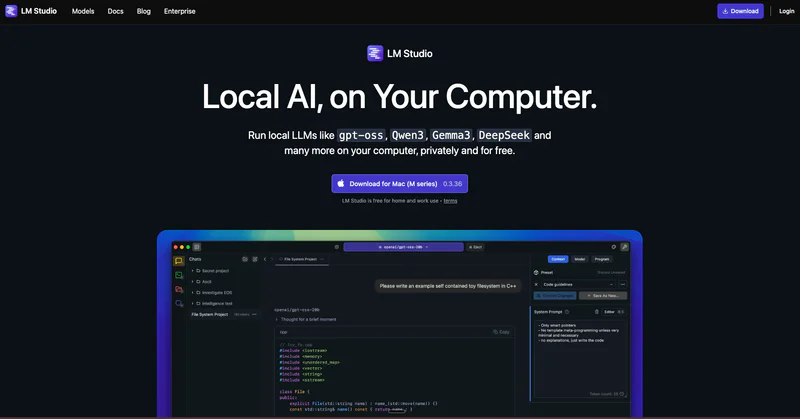
LM Studio is a free desktop application that enables users to run large language models locally on their own computers without requiring cloud connectivity or subscription costs. The platform provides an intuitive GUI for discovering, downloading, and executing open-source models from Hugging Face, making on-device processing accessible to both developers and non-technical users who want complete data privacy.
The application uses llama.cpp as its inference engine to deliver efficient model loading and GPU acceleration. Users can execute LLMs entirely offline once downloaded, chat through a familiar interface, and leverage the platform's local server capabilities with OpenAI-compatible endpoints for integration with external applications.
Key Points:
- Primary function: Desktop app for running large language models directly on your local machine
- Target users: Developers, privacy-conscious professionals, enthusiasts, businesses with concerns about data security
- Main differentiator: User-friendly graphical user interface for local LLMs powered by llama.cpp with zero subscription costs
- Basic how it works: Download models from Hugging Face, use LM Studio to execute inference locally via GPU or CPU, interact through chat interface or local server
- Platform availability: macOS (including Apple Silicon with Metal acceleration), Windows, Linux
Drawbacks of LM Studio:
- Hardware requirements demand significant system memory (16GB minimum, 32GB recommended for larger AI models), making it challenging for budget systems to execute language models on-device
- Performance depends on local hardware capabilities, with slower inference on machines lacking powerful GPU or Apple Silicon chips compared to cloud-based generative AI services
- Limited to open-source models available on Hugging Face, excluding proprietary options like GPT-4 or Claude that offer more advanced reasoning
- Learning curve for optimizing inference settings like GPU offload, context windows, and quantization levels to maximize performance when you use LM
- Large model downloads (2GB to 100GB+) require substantial storage and bandwidth, making it less convenient than cloud solutions
LM Studio Customer Reviews
"Absolutely beautiful User Interface and super easy to setup and start using" - User, Product Hunt
"The interface makes working with on-device models so much easier than command-line tools. Great for experimenting with different language models without burning through subscription credits" - User, Reddit
Quick Overview Table
Feature | Details |
|---|---|
Best For | Privacy-conscious users running AI locally with GPU acceleration |
Pricing Starts At | Free (no cost, requires own hardware) |
Free Plan | Yes (completely free, open to everyone) |
Platform | Windows, macOS (Apple Silicon/Intel), Linux |
Company | The LM Studio Team |
Our Rating | 4.3/5.0 |
Top 5 Best Alternatives to LM Studio in 2026
1. Elephas

Elephas is a personal knowledge assistant exclusively designed for Mac, iPhone, and iPad users who need intelligent document analysis, secure workflow automation, and writing assistance that works across all applications. Unlike general language model runners, this Mac-native solution transforms your documents, PDFs, and notes into a searchable brain with complete privacy through on-device processing.
While the reviewed platform focuses on executing open-source models through chat, Elephas provides a complete productivity ecosystem. The platform integrates seamlessly across all macOS and iOS applications with Super Brain feature that learns from your files, supporting multiple AI models including local LLMs through Ollama integration, GPT-4, Claude, and Gemini for comprehensive support.
Key Features:
- Super Brain: Creates your personal knowledge base by learning from PDFs, Word documents, and over 20 file formats. Generate unlimited searchable brains for different projects, providing instant answers with source citations from your documents.
- System-Wide Integration: Works across any Mac app with simple keyboard shortcuts, providing context-aware assistance in Mail, Slack, Obsidian, and every desktop application.
- Multi-Model Flexibility: Choose between cloud providers (OpenAI, Claude, Gemini) or execute models locally using Ollama, compatible backends, or other local inference engines. This hybrid approach lets you leverage multiple backends while accessing productivity features, giving you the best of both worlds.
- Offline Capabilities: Run Elephas completely offline with local data storage using on-device models and local LLMs. This ensures complete privacy and control over sensitive files while getting powered assistance across all macOS applications, ideal for professionals with strict requirements.
- Knowledge Management: Unlike basic chat interfaces, Elephas processes thousands of pages with intelligent indexing, semantic search, and citation tracking. The Super Brain feature makes it superior for research, document analysis, and building solutions based on your proprietary information.
Pricing: $9.99/month
Why is it better than LM Studio
- Works across all Mac applications instead of requiring a separate desktop window, providing assistance everywhere you work
- Super Brain learns from your specific documents with citations, not just generic chatbot responses
- Compatible with multiple backends while adding productivity features, letting you leverage local models with enhanced capabilities
- Native macOS and iOS integration offers better user experience for Apple Silicon users compared to cross-platform interfaces
- Includes knowledge management, workflow automation, and document analysis beyond basic chat functionality
Customer Reviews
"Elephas fits beautifully into my writing routine! I haven't come across any other app that offers such a great level of Mac integration along with a wide variety of tools and features" - User, Capterra
"The ability to manage documents, retrieve data accurately, and flexibility to handle various file types to its offline mode for privacy makes this tool invaluable for my workflow." - Executive Director, Capterra
2. Ollama

Ollama is an open-source command-line platform that enables users to execute language models on their computers without cloud connectivity or subscription costs. Often described as "Docker for LLMs," it dramatically simplifies downloading, managing, and executing models like Llama, Mistral, and DeepSeek directly on personal hardware through a CLI optimized for developers and automation workflows.
Unlike graphical approaches, Ollama provides a command-line interface for executing models as a backend service. Users download pre-trained models via CLI and execute inference locally on their hardware with complete sovereignty, making it ideal for developers who want scriptable access without graphical overhead.
Key Features:
- 100+ Open-Source Models: Access extensive library including Llama 4, Mistral Small 3, DeepSeek R1, Gemma 2, Qwen, Phi-3, and specialized models for coding and multimodal tasks.
- Complete Offline Operation: Executes entirely without internet connectivity once models are downloaded, ensuring full privacy for sensitive work. Like other on-device solutions, this enables assistance without concerns about sending information to external providers.
- Command-Line Interface: Simple CLI commands for downloading and executing models with minimal configuration, making it more automation-friendly than graphical interfaces. Developers can easily integrate into scripts, backend systems, and custom applications.
- Local API Server: Spin up OpenAI-compatible endpoints for integration with external applications while maintaining complete privacy. This local server functionality matches similar capabilities but with lighter resource footprint and better performance for headless deployments.
- Cross-Platform Support: Native support for macOS 11+, Windows 10 22H2+, and Linux distributions. GPU acceleration works seamlessly on NVIDIA GPUs and Apple Silicon, similar to other tools' hardware acceleration but with more efficient resource usage.
Pricing: Free
Why is it better than LM Studio
- More scriptable and automation-friendly with CLI-first design, ideal for developers who want to run AI in backend systems
- Lighter resource footprint compared to GUI-based solutions, executing as a pure backend service without interface overhead
- Greater flexibility for server deployments and Docker containers, making it better for production use cases and running locally in cloud environments
- Stronger open-source community with more integrations and extensions available for building solutions
- Better for executing models as a service that multiple applications can access simultaneously
Customer Reviews
"I use it to create Ollama LLM Throughput Benchmark Tool" - Jason TC Chuang, Product Hunt
"A cursory search of r/localllama gives plenty of occasions where people have been frustrated by limitations" - User, Hacker News
3. GPT4All

GPT4All is a free, open-source desktop chatbot developed by Nomic that executes language models completely offline on consumer hardware without requiring GPU acceleration or subscriptions. The platform provides a user-friendly desktop application for executing models entirely on your local machine with complete privacy and offline functionality, making on-device processing accessible to users with basic hardware.
Unlike GPU-focused approaches, GPT4All is explicitly optimized for CPU-only operation. The platform offers a simple graphical user interface with built-in LocalDocs RAG integration, allowing private document chat without data leaving your device, making it ideal for users who want to use LM more casually without technical setup.
Key Features:
- LocalDocs RAG Integration: Built-in document chat feature allowing private querying of PDFs, text files, and other documents without data leaving your device. This makes GPT4All more feature-complete for document analysis compared to basic chat interfaces.
- 1,000+ Model Library: Extensive collection of downloadable open-source models from popular model families including Llama, Mistral, and others. The model selection is comparable to competitors but with simpler one-click installation and loading processes.
- No GPU Required: Optimized to execute on CPU-only systems, making it accessible on any desktop or Macbook without dedicated graphics requirements.
- Complete Offline Operation: Functions entirely without internet connectivity once models are downloaded, perfect for air-gapped systems and users with strict requirements. Like other solutions, all processing happens locally on your machine.
- Adjustable Parameters: Granular control over chatbot settings including temperature, batch size, context length, and other inference parameters. While some tools offer more advanced options, GPT4All provides enough flexibility for most use cases through its simpler interface.
Pricing: Free
Why is it better than LM Studio
- Lower hardware requirements with explicit CPU-only optimization, works better on budget hardware without powerful GPU or Apple Silicon
- More privacy-focused design specifically for non-technical users with zero telemetry and simpler setup
- Native RAG built-in through LocalDocs feature, no additional configuration required compared to external integration approaches
- More accessible user interface designed for non-technical users who want to use LM without learning inference optimization
- Better for older Macbook and desktop systems with limited resources that struggle with demanding requirements
Customer Reviews
"GPT4ALL has simplicity, stability (on Linux) and a certain je ne sais quoi that make it difficult to replace" - User, GitHub Discussions
"Very buggy. LocalDocs doesn't work on Mac" - Gary Pettigrew, Product Hunt
4. Jan

Jan is an open-source ChatGPT alternative that executes completely offline, allowing users to execute open-source models on their machine or connect to cloud options like GPT and Claude through a unified interface. The platform enables executing language models directly on your local machine with complete privacy through a ChatGPT-like cross-platform desktop interface with hybrid capabilities.
Unlike local-only approaches, Jan emphasizes flexibility through hybrid local/cloud support. For Mac users, Metal acceleration is enabled by default on Apple Silicon M1, M2, and M3 chips, providing faster inference than CPU-only operation while maintaining the option to run AI entirely offline when needed.
Key Features:
- Hybrid Local/Cloud Support: Flexibility to execute open-source models locally or connect to cloud providers (OpenAI, Claude) through one unified interface.
- Metal GPU Acceleration: Default GPU offload on Apple Silicon (M1/M2/M3) providing faster inference than CPU-only operation..
- OpenAI-Compatible API: Local server with OpenAI-compatible endpoints for seamless integration into existing applications. This matches similar capabilities while adding cloud model access through the same interface.
- Real-time Web Search: Built-in web search capabilities during conversations for accessing current information, something many basic chat interfaces lack. This makes Jan more useful for research and tasks requiring current data analysis.
- Cross-Platform Native Apps: Native desktop applications for Windows, macOS, and Linux with consistent user experience across platforms. Like other solutions, Jan provides interfaces for users who prefer graphical approaches over command-line tools.
Pricing: Free
Why is it better than LM Studio
- Hybrid architecture seamlessly switches between local and cloud models, giving flexibility to leverage local inference alongside GPT-4 or Claude when needed
- All-in-one solution includes UI, backend, and model hub in one application versus more focused approaches to running locally
- Built-in web search integration for current information during conversations, enhancing capabilities beyond basic chat
- Better for Apple Silicon with Metal acceleration by default, providing superior performance on M1/M2/M3 Macbook systems
- More flexible workflow allows using local models for privacy and cloud models for complex generative AI tasks in the same chat interface
Customer Reviews
"Just install it, point it to a model, and go. You can easily get a free local OpenAI compatible API by clicking the 'start server' button" - User, Hacker News
"One deal breaker for some users was the inability to talk to multiple models at once, with the app blocking until the first query is done, and Tauri apps feeling pretty clunky on Linux" - User, Hacker News
5. AnythingLLM

AnythingLLM is an all-in-one desktop and Docker application with built-in RAG (Retrieval-Augmented Generation), agents, no-code agent builder, and extensive document processing capabilities for executing local LLMs with enterprise-grade features. The platform provides a comprehensive application for Mac, Windows, and Linux with local models, RAG, and agents requiring minimal configuration while ensuring complete privacy.
Unlike basic chat focus, AnythingLLM offers enterprise RAG features and agents. Everything from models to documents and chats is stored locally on your desktop by default, with support for both text-only and multi-modal models in a single interface, making it suitable for businesses needing advanced solutions.
Key Features:
- Built-in RAG System: Native retrieval-augmented generation with support for PDFs, Word docs, CSV, codebases, and online document imports with local vector database. This enterprise-grade feature set exceeds basic capabilities for document analysis and building applications.
- AI Agents with No-Code Builder: Agent skills including file generation, chart creation, web search (DuckDuckGo/Google/Bing), and SQL connectors (MySQL/Postgres/SQL Server). These automation capabilities make AnythingLLM suitable for business use cases beyond basic chat interfaces.
- Multi-Modal Support: Handles text, images, and audio in single interface with support for both text-only and multi-modal models. This comprehensive approach makes AnythingLLM better for diverse generative AI use cases compared to text-focused solutions.
- Model Context Protocol (MCP): 2025 compatibility with MCP for interoperability with external toolchains and development ecosystems. This makes AnythingLLM more future-proof and extensible for developers building solutions.
- Flexible Backend Support: Works with Ollama, OpenAI, compatible backends, and other services with multi-user permissions and team collaboration features. You can leverage multiple backends while using superior RAG and agent capabilities, combining the strengths of different platforms.
Pricing: Free (Desktop), $25/month (Cloud Starter)
Why is it better than LM Studio
- Enterprise RAG features with sophisticated document processing, indexing, and retrieval versus basic chat capabilities
- Built-in agents with no-code builder for automation, eliminating need for external frameworks required with simpler tools
- Multi-user collaboration features for businesses and teams, making it suitable for organizational deployment unlike single-user solutions
- More complete platform with UI, RAG, agents, and backends versus focused approaches to executing models
- Business-ready options with cloud hosting and enterprise support available, providing path to scale beyond desktop deployment
Customer Reviews
"Switched to save monthly subscription costs that were eating into project profits. The writing assistance is solid for drafts and editing... Saved over $300 this year while maintaining decent output quality." - Freelance writer, Alphr
"while a template is working on a prompt, selecting another chat made with another template only to read that chat, processing stops" - robang74, GitHub Discussions
Quick Comparison Table
Tool | Starting Price | Best For | Key Strength | Main Weakness |
|---|---|---|---|---|
LM Studio | Free | GUI users needing local AI with GPU acceleration | Intuitive interface powered by llama.cpp | Requires 16GB+ RAM and storage |
Elephas | $9.99/month | Mac users needing productivity tools | System-wide integration with knowledge management | Apple ecosystem only, closed source |
Ollama | Free | Developers and automation | CLI-first, lightweight backend for running LLMs | No interface, steeper learning curve |
GPT4All | Free | Budget hardware users | CPU-optimized, works without GPU offload | LocalDocs buggy on Mac |
Jan | Free | Hybrid workflow users | Local + cloud flexibility with web search | Can't query multiple models simultaneously |
AnythingLLM | Free/$25+ | Business and teams | Enterprise RAG + agents | More complex setup than alternatives |
Conclusion
LM Studio is a powerful free desktop app for running open-source language models locally with full privacy, offline access, and GPU acceleration through a clean graphical interface. It is best suited for users who want cloud-free AI, accept higher hardware requirements, and are comfortable managing large model files and performance settings.
Compared to other tools, Ollama excels for developers and automation, GPT4All works better on low-end hardware, Jan offers hybrid local-and-cloud flexibility, and AnythingLLM targets advanced RAG and business workflows.
Each alternative serves a different need, depending on skill level, hardware, and use case. For Mac users who want system-wide AI, document intelligence, and flexible model support beyond chat, Elephas delivers a more complete productivity experience while still respecting privacy.