
According to the U.S. Chamber of Commerce's 2025 report, 58% of small businesses are now using AI tools—more than double compared to 2023. This rapid adoption shows that AI is no longer just for big companies. Small business owners are using these tools to save time, cut costs, and compete more effectively in today's market.
In this article on the best AI tools for small business owners, we'll explore everything you need to know about the top solutions that can change how you run your business in 2025.
Here is what we are going to cover:
- What is the best AI tool for small business owners
- Quick comparison table of all tools with pricing
- Detailed reviews of the top 12 AI tools for small businesses
- How we chose the best AI tools for small business owners
- Common mistakes small business owners make when using AI tools
- Final recommendations based on your budget and needs
By the end of this article, you'll discover which tools can save you hours every week, automate repetitive tasks, and help you focus on growing your business instead of getting stuck in daily operations. Whether you need help with writing, customer management, accounting, or automation, this guide covers everything.
Let's get into it.
What is the Best AI tool for Small Business Owners?
Elephas stands out as the best AI tool for small business owners who value privacy and control. Unlike cloud-based tools that send your data to external servers, Elephas works completely offline on your Mac, keeping sensitive business information secure. The Super Brain feature turns your documents, notes, and files into a searchable knowledge base, giving you instant answers from your own data without uploading anything online.
What makes Elephas special is its flexibility. You can switch between multiple AI providers like OpenAI, Claude, and Gemini, or use local models that work without the internet. The AI Workflows automate routine tasks like summarizing files, creating presentations, and filling PDF forms. For small businesses handling contracts, client data, or proprietary information, Elephas delivers powerful AI capabilities while keeping everything private and under your control.
Best AI Tools for Small Business Owners at a Glance
- Elephas - Mac-native AI assistant with offline knowledge management
- ChatGPT - General AI assistant for writing, brainstorming, and research
- Jasper - AI content and copywriting for marketing
- HubSpot CRM - Free CRM for customer and sales automation
- QuickBooks - Automated accounting, invoicing, and financial management
- Otter.ai - Voice recording and meeting transcription
- Zapier - Workflow automation across apps
- Descript - AI-powered audio/video editing and transcription
- Tidio - AI chatbots and live chat support
- Reclaim.ai - AI calendar scheduling and time blocking
- Fireflies.ai - AI meeting recorder and note taker
- ElevenLabs - Ultra-realistic AI text-to-speech voice generation
Tool Name | Best Feature | Pricing |
Elephas | Mac-native AI assistant with offline knowledge management | $9.99/month |
ChatGPT | General AI assistant for writing, brainstorming, and research | $20/month |
Jasper | AI content and copywriting for marketing | $69/month |
HubSpot CRM | Free CRM for customer and sales automation | Free Forever |
QuickBooks | Automated accounting, invoicing, and financial management | $38/month |
Otter.ai | Voice recording and meeting transcription | $16.99/month |
Zapier | Workflow automation across apps | $29.99/month |
Descript | AI-powered audio/video editing and transcription | $24/month |
Tidio | AI chatbots and live chat support | $39/month |
Reclaim.ai | AI calendar scheduling and time blocking | $12/month |
Fireflies.ai | AI meeting recorder and note taker | $18/month |
ElevenLabs | Ultra-realistic AI text-to-speech voice generation | $5/month |
1. Elephas
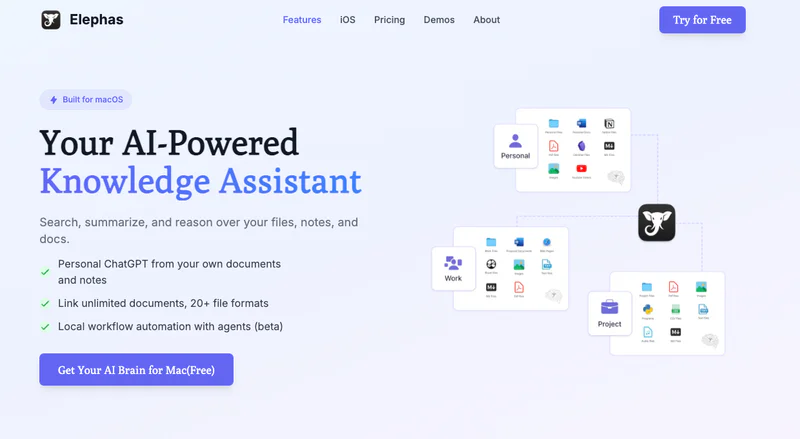
Best for — Mac-native AI assistant with offline knowledge management
Elephas is a Mac knowledge assistant built specifically for users who want complete privacy and control over their data. It works across every Mac app, letting small business owners write emails, create content, and manage knowledge without sending data to the cloud. Everything runs locally on your Mac, which means your business information stays private and secure.
Also, Elephas has a Super Brain feature that turns your documents, notes, and files into a searchable knowledge base. You can ask questions about your own business documents and get instant answers. It supports multiple AI providers like OpenAI, Claude, and Gemini, plus local models that work completely offline. For small businesses handling sensitive information, Elephas provides AI assistance without privacy concerns or internet dependency.
Key Features
- Works offline with local AI models for complete privacy
- Super Brain turns your documents into a searchable knowledge base
- AI Workflows with agents for multistep automation tasks
- Integrate with Apple Notes, Obsidian, Notion, Devonthink, etc.
- Supports multiple AI providers (OpenAI, Claude, Gemini, local models)
- Works across all Mac apps with Super Command feature
- Built-in web search for research without leaving your work
- Notes feature to capture and organize information quickly
- Supports CSV, JSON, PDF, and 10+ other file formats
- Export chats to PDF, Markdown, Keynote, or text files
- Personalized writing tones that match your style
Pricing: $9.99/month
Why We Picked Elephas:
Elephas solves a major problem for small business owners who need AI features and productivity but worry about data privacy. Unlike cloud-based tools, Elephas keeps everything on your Mac and works completely offline if needed. The Super Brain feature is perfect for businesses that want to search through their own documents, contracts, and notes instantly without uploading anything online.
The automation workflows help owners complete routine tasks faster, from summarizing files to creating presentations. With support for multiple AI models, you can switch providers based on your needs without changing tools. Overall, Elephas gives small businesses powerful AI capabilities while maintaining full control over sensitive information.
User Feedback
I purchased a lifetime subscription around 2 years ago. Elephas has significantly enhanced my customer relationships by refining my tone and professionalism in written communication. The ability to swiftly outline key points and tap the Elephas button has greatly improved my writing. Elephas transforms my rants and rambles into well-crafted, friendly or professional responses, saving me a lot of time and making me seem like a nice person. (Seriously) [sensitive content hidden] always offers prompt, kind, and supportive assistance whenever I encounter issues that I've created. He might be using Elephas too ;-) The program updates have kept pace with advancements in AI. Capterra
Elephas is a great AI product; It provides a new way to interact with your notes, ideas and documents. Personally, my favorite feature of elephas was the quick summon for the LLM of my choice. Capterra
2. ChatGPT (OpenAI)

Best for — General AI assistant for writing, brainstorming, and research
ChatGPT is a conversational AI chatbot from OpenAI that can generate text, answer questions, and assist with tasks in plain English. Small business owners use it to draft emails, write social posts, create ads or blog content, and even debug code or analyze data. It works like a virtual assistant: instead of spending time on manual writing, a few prompts produce finished copy.
ChatGPT is powered by the advanced GPT-5.1 model and is updated with the latest knowledge. It integrates via plugins and an API with other apps, so it can automate responses in Slack or chat on a website. Overall, ChatGPT saves hours on writing and creative work.
Key Features
- AI chatbot for drafting emails, reports, ads, blogs, and more
- Supports text summarization, translation, and code generation
- GPT-4 model option (higher accuracy and reasoning)
- Plugins and API for integrating with Slack, Gmail, CRM, etc.
- Conversational interface that understands context and tone
- Voice-to-text input via mobile (with Whisper backend)
Pricing: $20/month
Why We Picked ChatGPT:
ChatGPT is incredibly versatile for small businesses. It automates content writing and brainstorming, letting owners offload repetitive writing chores and ideas generation. ChatGPT handles customer emails or social media posts in seconds. The instant answers and creative help dramatically reduce workload, making it easier to stay on-brand and communicate quickly without delays.
User Feedback
“ChatGPT has become an invaluable tool for me… I particularly love how ChatGPT assists in finding the correct tone for different types of writing… I’m very satisfied with ChatGPT's performance and would highly recommend it…”G2.com
“The tech though powerful becomes very irritating with constant hanging up of the website and slow response rate on paid plans. The image generation capabilities are very limited in comparison to others like midjourney and they lack realism.
The chats hang up after every other response and the website stops responding completly many times. Doesnt feel good to pay for a product this broken.
A very slow and cumbersome support is provided by the company..” G2
3. Jasper

Best for — AI content and copywriting for marketing
Jasper is a specialized AI writing assistant built for marketers. It helps small businesses produce high-quality copy quickly, whether it’s a social media ad, email campaign, blog post, or product description. You give Jasper a few prompts or a brief outline, and it generates polished content in seconds.
Jasper supports a brand voice by letting you save your style preferences. It also comes with built-in marketing templates (e.g. Facebook ad, landing page hero text, SEO meta descriptions) that streamline content creation. This tool saves marketing teams hours by writing first drafts or headline variations automatically. Jasper’s clean interface and collaboration features let users edit AI output together before publishing.
Key Features
- Dozens of templates for blogs, ads, emails, landing pages, etc.
- Long-form document editor for blog posts and articles
- Brand voice and style guide customization
- Multilingual support for global marketing copy
- Integration with tools like SurferSEO, WordPress, and Chrome
- Content optimization (writing suggestions and grammar)
Pricing: $69/moth
Why We Picked Jasper:
Jasper works like a marketing partner that’s always on. It automates writing tasks so founders and teams can pump out more ads, blogs, and social posts faster. In practice, Jasper greatly reduces the time and stress of content marketing. It’s easy for small teams to maintain consistency and brand voice without hiring extra writers. Overall, Jasper boosts creativity and lets businesses scale content production without a big marketing department.
User Feedback
“Jasper is a simple, game-changing tool... It consistently delivers first drafts that align perfectly with our tone of voice, saving us both time and effort. It feels like having an extra teammate who started working on content immediately.”G2
“The output quality was very very bad. We ended up using ChatGPT... because it could follow our brand voice perfectly. I tried tweaking the settings in Jasper, but it pretty much gave the same wrong output.”G2
4. HubSpot CRM

Best for — Free CRM for customer and sales automation
HubSpot CRM is a free customer relationship management platform popular with small businesses. It organizes contacts, tracks sales leads, and automates outreach tasks so owners don’t have to use spreadsheets. Users can log emails to leads, schedule follow-up tasks, and use email templates, all linked to each contact record.
HubSpot can also trigger automated email sequences and reminders, ensuring no customer falls through the cracks. The interface is user-friendly and works right out of the box. Because it’s cloud-based, teams can access the same data from anywhere. HubSpot even offers free live chat and ticketing tools for customer support.
Key Features
- 100% free core CRM (unlimited users and contacts)
- Sales pipeline and deal tracking with drag-and-drop pipeline view
- Contact and company database with detailed info and notes
- Email templates, meeting scheduler, and call tracking
- Built-in live chat widget and chatbots for websites
- Integrations with Gmail, Outlook, Slack, Shopify, WordPress, etc.
Pricing: HubSpot CRM is free Forever
Why We Picked HubSpot CRM:
We chose HubSpot CRM because it automates sales and customer tasks at zero cost. It organizes leads and automates outreach, which saves founders hours on admin work. For example, logging emails automatically and scheduling follow-ups helps small teams nurture prospects without manual effort. Users praise its ease of use (the “end user in mind,” “breath of fresh air”). Overall, HubSpot scales with your business: you can start free and upgrade plans as you grow, keeping workflows smooth without disruption.
User Feedback
“HubSpot CRM is a breath of fresh air... It has been built with the end user in mind, making management of the platform extremely easy... This is a CRM you can start with, grow with, and utilize to help grow and manage your business.” Softwaresuggest
“The HubSpot email servers are believed to have bad deliverability rates, so emails get flagged as spam often. Therefore, we had to switch to our own email servers.” Softwaresuggest
5. QuickBooks (Intuit)

Best for — Automated accounting, invoicing, and financial management
QuickBooks Online is cloud accounting software customized to small businesses. It automates many bookkeeping tasks so owners aren’t buried in receipts and spreadsheets. With QuickBooks, you can create and send professional invoices in seconds, scan receipts by phone, and have income/expenses logged automatically by bank synchronization. It also automatically categorizes transactions and calculates taxes owed.
Owners get real-time financial reports and dashboards (profit/loss, cash flow) so they always see the business’s health. QuickBooks is accessible from desktop or mobile, so books are updated on the go. By streamlining financial workflows, QuickBooks Online frees up time usually spent on manual data entry and reconciliation.
Key Features
- Invoicing, billing, and payments processing
- Automated expense tracking via bank and credit integrations
- Monthly subscription and payroll management (optional add-on)
- Pre-built financial reports and cash flow charts
- Receipt capture and smart categorization (AI-assisted)
- Inventory and project tracking (in higher plans)
Pricing: $38/month
Why We Picked QuickBooks Online:
This tool saves small businesses time on finances. It automates tedious tasks like data entry and bank reconciliation, so errors are reduced. With cloud access, even solo owners or remote bookkeepers can collaborate seamlessly. The AI-driven Intuit Assist auto-categorizes expenses and highlights patterns, speeding up accounting close. In sum, QuickBooks Online provides a “virtual finance assistant” that keeps books organized 24/7, allowing owners to focus on sales rather than spreadsheets.
User Feedback
“I like QuickBooks Online because of how easy it makes managing finances... It automatically tracks income and expenses by pulling data from my bank... The overall effect is it saves us time, reduces errors, and keeps our financial management organized.”G2.com
“Some features can be slow or complicated to use, and the subscription cost is higher compared to simpler tools. Updates or syncing with bank accounts sometimes cause errors that we have to fix manually.”G2.com
6. Otter.ai

Best for — Voice recording and meeting transcription
Otter.ai is an AI-powered meeting assistant that transcribes speech to text in real time. It works with Zoom, Google Meet, and other conferencing platforms, automatically joining calls to take notes. For small teams, Otter records meetings, interviews, and brainstorming sessions, converting them into searchable transcripts instantly. Users can highlight key points and create summary keywords.
After a meeting, Otter provides a summary and lets everyone review the full text, eliminating the need to re-watch videos. With live speaker ID and keyword search, Otter saves countless hours of note-taking and follow-up. Its mobile app also records on-the-go conversations and syncs across devices.
Key Features
- Automatic live transcription and note-taking in meetings
- Speaker identification and timestamped transcripts
- Summary keywords and highlights generation
- AI meeting assistant to import recordings from Zoom/MS Teams
- Integration with Zoom, Microsoft Teams, and Google Meet
- Mobile apps and Chrome extension for on-demand recording
Pricing: $16.99/month
Why We Picked Otter.ai:
Otter.ai dramatically cuts down manual note-taking. In practice, it turns every meeting recording into an instant transcript, so team members can focus on the discussion instead of scribbling notes. It’s especially useful for capturing action items and ideas that would otherwise be forgotten. This tool offers fast time-to-value: once set up (few minutes), it starts saving hours every week. Whether it’s sales calls or team standups, Otter keeps everyone aligned without extra effort.
User Feedback
“Otter consistently joins meetings on time, regardless of platform, making it a dependable tool for our remote team. Its ability to capture clear and accurate summaries allows us to revisit important points without needing to watch the whole recording again. I also find the screenshot feature particularly helpful for quickly sharing highlights. Overall, Otter improves our team’s organization and saves us time on each call.” G2
“If you deny the bot access to a meeting, it still keeps trying to join for a while, which can be distracting. Also, it shows generic labels like Speaker 1 and Speaker 2 instead of using actual names, which makes the transcripts less readable. It would be great if Otter recognized individual names and had support for more languages like Hindi.” G2
7. Zapier

Best for — Workflow automation across apps
Zapier is a no-code automation platform that connects apps and automates repetitive tasks. It supports thousands of integrations (Gmail, Slack, Shopify, QuickBooks, etc.) so that actions in one app trigger workflows in another. For example, a new Shopify order can automatically create an invoice in QuickBooks and send a Slack notification.
Small businesses use Zapier to eliminate manual data entry and stitch together cloud tools. The interface lets users build “Zaps” (automation recipes) with triggers and actions. Multi-step Zaps and conditional logic allow complex automation without coding. This hands-free integration means business owners spend less time copy-pasting between tools and more time on strategy.
Key Features
- Connects 5,000+ web apps with customizable workflows
- Multi-step “Zaps” with if/then conditions and filters
- Instant triggers and scheduled workflows
- Integration with CRM, marketing, finance, and project apps
- Visual editor (no coding required) for setup
- Team collaboration (shared Zaps and folders)
Pricing: $29.99/month
Why We Picked Zapier:
Zapier is a great tool for small business automation. It lets owners automate their existing tools without hiring developers. We picked it because it “glues” everything together – from email to ecommerce to CRM. In practice, Zapier saves hours each week by automating routine workflows (for example, auto-creating customers in accounting when sales happen). According to users, Zapier “has been the backbone” of their operations and “drives consistency, efficiency, and success in [their] business” G2
User Feedback
“Zapier has been the backbone that keeps everything running smoothly. It seamlessly connects every platform in our tech stack. It has allowed me to scale by automating all the little things – like adding new customers to our CRM or notifying the team of new orders. Zapier isn’t just a tool — it’s the engine that drives consistency, efficiency, and success in my business.”G2
“The only drawback I’ve found is that Zapier can be a bit expensive compared to some other automation tools. While its functionality is excellent and reliable, the pricing structure can hit your pocket hard if you need a lot of zaps. In short, it works great, but the cost is the main issue.”G2
8. Descript

Best for — AI-powered audio/video editing and transcription
Descript is an all-in-one audio and video editing app powered by AI. It transcribes your recordings and lets you edit media by editing text. For small businesses creating podcasts, product demos, or marketing videos, Descript simplifies editing. You upload a recording or screen capture, and Descript generates a text transcript.
To remove a pause or a mistake, you just delete the word in the text – the audio/video trims accordingly. It also has an AI “Overdub” that can clone voices for re-recording. Team collaboration is easy too: multiple people can edit transcripts together. Descript effectively turns complex video editing into simple text editing, saving time and making content production accessible to non-specialists.
Key Features
- Automatic transcription of audio/video in minutes
- Text-based editing (cut or rearrange by editing words)
- “Overdub” AI voice cloning for seamless audio fixes
- Screen recording and video editing (multitrack timeline)
- Export to podcast, video, or separate clips for social media
- Collaboration tools (share projects and comments)
Pricing: $24/month
Why We Picked Descript:
Descript reduces the workload of media editing. It lets small teams quickly refine audio and video without learning complex software. In practice, this tool can cut editing time by 80% – you no longer scrub through video to find a typo, you just delete the word in the text transcript. We chose it for its ability to democratize content production. The AI-powered editing and overdubbing are real time-savers, turning hours of editing into minutes.
User Feedback
“Descript completely changed the way I edit videos and podcasts. The text-based editing is brilliant – editing the words in the transcript literally edits the video timeline. Overdub and Studio Sound features save a lot of time, and the interface is clean and easy to use. It’s great for collaboration, and cuts down editing from hours to minutes.”G2
“Sometimes Descript can be heavy on system resources when working with long videos. The export settings could offer more advanced options, and rendering can be slightly slow on older machines. Overall it’s good, but there is a learning curve and occasional performance lag.”G2
9. Tidio

Best for — AI chatbots and live chat support
Tidio is an AI-driven live chat and chatbot platform for websites. It helps small e-commerce and service businesses automate customer support. Once installed, Tidio shows a chat widget where visitors can ask questions. Behind the scenes, AI chatbots can answer FAQs, collect lead information, or route inquiries to human agents.
Tidio also supports live chat so team members can jump in when needed. All chats are synced with integrations like Shopify, Facebook, and email. This means orders or user data can be fetched directly in chat. By providing instant answers 24/7, Tidio reduces response time and keeps customers engaged, which can boost sales and satisfaction.
Key Features
- Website live chat widget with AI bot fallback
- AI chatbots for automated Q&A (multi-language support)
- Integration with Shopify, Messenger, Instagram, email, etc.
- Chatbots builder (no coding required) and prebuilt templates
- Mobile and desktop apps to chat on the go
- Visitor tracking and canned responses
Pricing: $39/month
Why We Picked Tidio:
Tidio is effective at reducing support workload. It lets businesses offer instant chat help without adding staff. By automating answers to common questions, it ensures customers get quick responses any time of day. We chose it for its real integrations (e.g. Shopify) and ease of use. In practice, businesses report that Tidio makes customer interactions “effortless” and integrates neatly with their ecommerce platforms G2. The AI chatbots handle routine queries, freeing up business owners to focus on more complex tasks.
User Feedback
“Tidio makes interacting with customers feel effortless. The combination of live chat and AI chatbots creates a very natural, always-on support system. Setting it up on our website and integrating with Shopify and Messenger took minutes, and it operates smoothly. The built-in automated chat flow saved us so much time on FAQs.”G2
“The only thing I dislike about Tidio is that the tiered pricing can become expensive for high-traffic websites, especially the upgraded bot features. The customization options for the chat widget could also be more advanced (more design templates and triggers).”G2
10. Reclaim.ai

Best for — AI calendar scheduling and time blocking
Reclaim.ai is an AI calendar assistant that automatically schedules tasks and blocks focus time. It integrates with Google Calendar or Outlook and adjusts your schedule in real time. For small business owners juggling many tasks, Reclaim ensures nothing gets lost in the shuffle. Users can set goals (e.g. “2 hours marketing work every week”) and Reclaim will find time to schedule it around meetings.
It can also auto-reschedule if priorities change. Reclaim supports multiple calendars at once, so it never double-books. Other features include Slack status sync (sets status during focus time) and detailed analytics on time usage. Overall, Reclaim turns a calendar into a self-managing virtual assistant.
Key Features
- Automatic time blocking for tasks, habits, and breaks
- Custom scheduling links (let others pick meeting times based on your priority rules)
- Auto-rescheduling if events conflict or priorities change
- Integration with Google Calendar and Outlook
- Slack status updates (shows if you are in “Focus Time”)
- Team analytics dashboard (track how teams spend time)
Pricing: $12/month
Why We Picked Reclaim.ai:
We included Reclaim for its ability to reduce scheduling headaches. Instead of manually finding time for tasks, Reclaim automatically defends your focus time, saving hours per week of planning. The AI adjusts your calendar on the fly, which means owners don’t waste time moving meetings around. Real integrations (Google, Outlook, Todoist, etc.) make setup quick. In practice, small teams say Reclaim creates 40% more time in their schedules for priorities. It’s essentially an AI scheduler that helps entrepreneurs stick to their plans with minimal effort.
User Feedback
“I love Reclaim for its smart scheduling. It automatically finds the best time for meetings and important tasks so I don’t have to manually adjust my calendar. The integration with Google Calendar is seamless. Overall, it saves me a ton of time on planning and ensures I actually get my most important work done.”G2
“One issue is that scheduling links have limited customization. For example, I can’t set a custom domain for booking, and scheduling links don’t allow hiding my personal email. Also, I’ve noticed duplicate events when syncing between Google and personal calendars. The instructions could be clearer for new users.”G2
11. Fireflies.ai

Best for — AI meeting recorder and note taker
Fireflies.ai is an AI assistant that records, transcribes, and summarizes voice meetings. It works with Zoom, Microsoft Teams, Google Meet, and more. Small businesses use Fireflies to capture every meeting’s content automatically, without someone having to take notes. After each call, Fireflies provides a searchable transcript, key takeaways, and action items.
It even generates AI summaries so that team members can quickly review what was discussed. Fireflies also integrates with Slack, HubSpot, and CRMs to log notes or follow up on leads. By ensuring no detail is missed, Fireflies saves time and makes meetings more actionable.
Key Features
- Automated meeting recording across platforms (Zoom, GMeet, Teams, Webex, etc.)
- Instant transcription and real-time note-taking
- AI-generated meeting summaries and highlights
- Searchable transcripts (find keywords across all meetings)
- Integrations with Slack, Salesforce, HubSpot, Notion, etc.
- Mobile app for recording calls on mobile
Pricing: $18/month
Why We Picked Fireflies.ai:
This tool replaces the tedious task of note-taking. We chose it for its ability to turn meetings into instant documentation. Real-world use shows that teams quickly catch up on discussions and decisions by reading summaries instead of slogging through recordings. Fireflies integrates with existing apps, so meeting insights flow into workflows automatically. As one user put it, Fireflies has “become a must-have tool in our meetings,” offering clear, accurate notes that make remote collaboration far easier G2.
User Feedback
“I love using Fireflies.ai to record my meetings because it eliminates the need for me to take notes, significantly saving me time. I receive the meeting summary instantly, which is high-quality, enabling me to ensure I have all the key points without delay. Integration with Slack means I get my meeting notes directly in our channels, making it very convenient. Overall, Fireflies makes our meetings more efficient and reduces their duration.”G2
“My main problem is when I have meetings in various languages – Fireflies doesn’t auto-detect the language. After meetings in another language, I have to manually convert the notes. It would be much easier if the app recognized the meeting language automatically.”G2
12. ElevenLabs

Best for — Ultra-realistic AI text-to-speech voice generation
ElevenLabs provides state-of-the-art AI voice synthesis. It can generate very natural-sounding voiceovers from text or even clone a human voice from a short sample. Small businesses use it to create narrated videos, ads, podcasts, or customer greetings without hiring voice actors. The voices capture emotion and intonation better than older tools.
ElevenLabs offers an intuitive web app and API for integration. Users can adjust pacing, emphasis, and style in the audio. They also support multiple languages and accents. This means companies can quickly produce professional-quality voice content for marketing or training.
Key Features
- Realistic text-to-speech with human-like intonation
- Voice cloning: create a custom voice from minutes of audio
- Support for 29+ languages and accents
- Fine-tuning control over style and emotion in generated speech
- API/SDK integration for apps and games
- Dashboard with conversation history and analytics
Pricing: $5/month
Why We Picked ElevenLabs:
We picked ElevenLabs for its voice quality and flexibility. Its AI voices sound impressively human, which is great for creating podcasts or video voiceovers without a studio. The quick voice cloning lets a business use the same voice consistently across content. According to a reviewer, ElevenLabs “works just as promised and delivers very high-quality output,” making it easy to generate new voices from text G2. This means time and cost savings on audio production, scaling from a solo founder’s needs to small teams.
User Feedback
“I appreciate ElevenLabs because it works just as promised and delivers very high-quality output. The setup was easy, especially for text-to-speech which I use the most. I love that the platform allows me to create new voices from text prompts — now I can have distinct voices for different uses, and it makes perfect sense for my work.”G2
“ElevenLabs is fantastic, but I think the price could be lowered. Right now, customers expect an out-of-the-box solution, and at this price, it can be tough to scale usage. I would love if ElevenLabs reduced the price to make it more accessible.”G2
How did we choose the Best AI tools for Small Business Owners?

We tested dozens of AI tools to find the best options for small business owners. Our selection focused on tools that actually save time and make daily work easier without requiring technical skills.
We looked at several important factors when choosing these AI tools:
Key selection criteria:
- Saves time on repetitive tasks
- Easy setup without technical knowledge
- Clear pricing with no hidden costs
- Works well for teams of 1-20 people
- Real user reviews from trusted platforms
Each AI tool on this list solves specific business problems. We checked user feedback from platforms like G2, Capterra, and Reddit to understand what works in real business situations. The best AI tools for small business owners need to be reliable and affordable.
We also tested how these tools handle common tasks like writing emails, managing customers, tracking finances, and automating workflows. Only tools that delivered clear value and positive results made it to our final list of recommendations.
Mistakes Small Business Owners Make When Using AI Tools

Many small business owners get excited about AI tools and jump in too fast. This causes problems that waste time instead of saving it.
Common mistakes to avoid:
- Starting with ten different tools at once
- Automating everything before understanding your workflow
- Picking tools that don't work together
- Never checking if the tools actually help
The biggest mistake is thinking more tools equal better results. You end up spending hours switching between apps and managing subscriptions. Start with one or two AI tools that solve your main problems first.
Another issue is over-automating too soon. You need to understand your process before letting AI handle it. Otherwise, you create automated chaos instead of automated efficiency.
Why not start simple? Elephas works differently because it keeps everything in one place on your Mac. You don't need to juggle multiple subscriptions or learn different interfaces. It integrates with apps you already use, so tracking what works becomes natural. Start slow, see results, then add more features as you grow.
Conclusion
If you want complete privacy and offline AI assistance, Elephas is your best choice at just $9.99/month. It handles writing, knowledge management, automation, and works across all Mac apps without sending data to the cloud.
For general writing and brainstorming, ChatGPT works well at $20/month. Need marketing content? Jasper helps with ads and blogs. Managing customers? HubSpot CRM is free forever. For accounting, QuickBooks automates invoicing and expenses.
Meeting transcription is covered by Otter.ai or Fireflies.ai. Zapier connects all your tools together. Descript handles video editing through text.
But honestly, if budget matters and you want one tool that does most tasks, start with Elephas. It costs less than half of ChatGPT, works offline, protects your data, and handles writing, automation, and knowledge management all in one place.