Win the engagement. Keep the NDA intact.
A private workspace (Super Brain) for your strategy decks, client financials, interview notes, meeting transcripts, and data room PDFs. Indexing stays local on your Mac. Cloud AI runs with zero data retention, and 28 types of sensitive data are redacted on-device before anything leaves.
No credit card required · GPT-5, Claude & Gemini · Offline via Ollama

When your engagements involve
This isn't the kind of data you casually paste into ChatGPT.
Yet someone in your industry pasted exactly this into a chatbot this week.
How Elephas works with your engagements
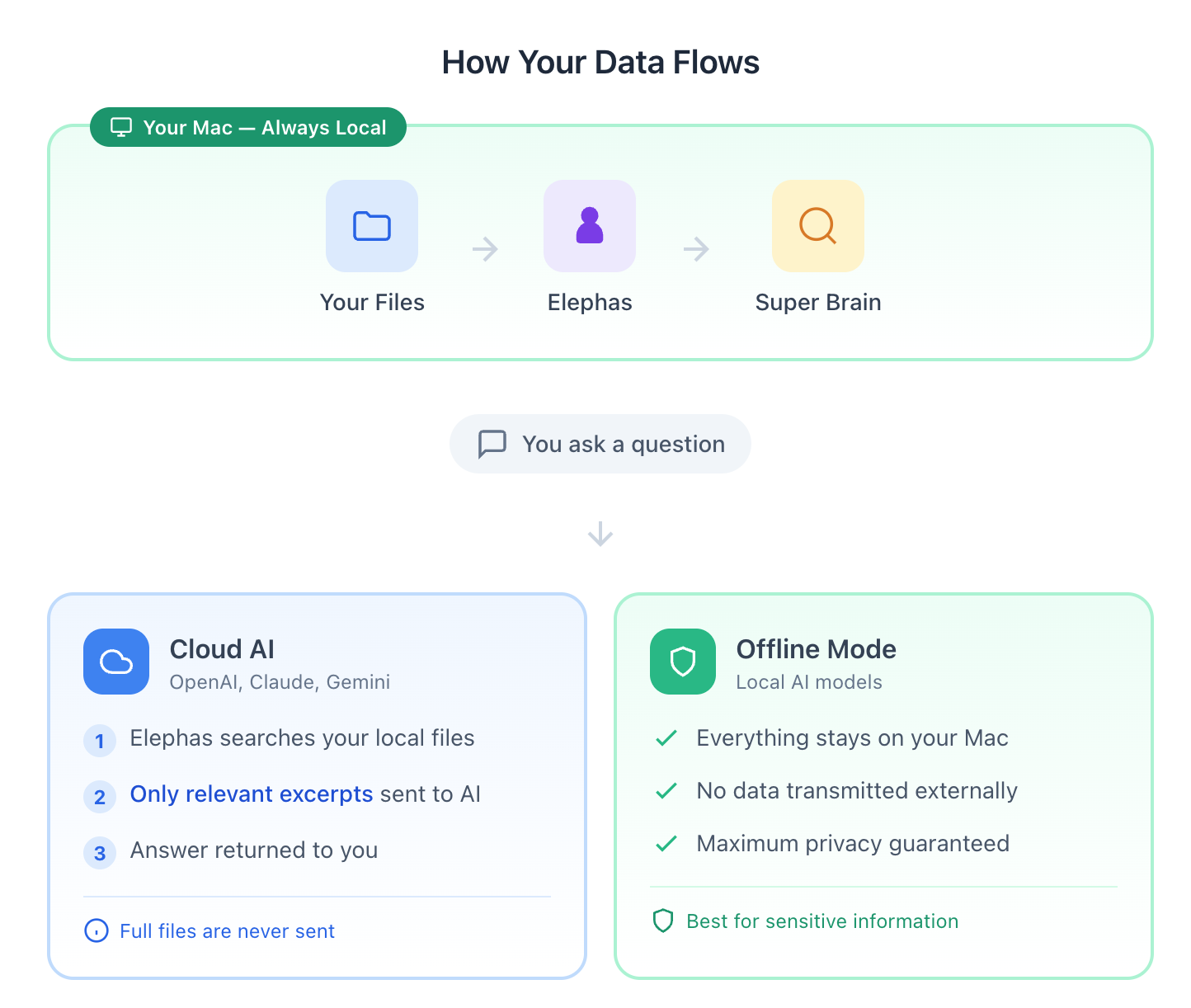
Indexing stays on your Mac. Redaction runs on-device. You choose whether inference happens locally, through cloud APIs with zero data retention, or on your own API keys.
Drop your engagement files into a workspace
Create a dedicated workspace (Super Brain) per client or engagement. Add your PDFs, Excel models, Word docs, Notion pages, and meeting transcripts. Indexed entirely on your Mac.
Elephas indexes locally and redacts on-device
Smart Redaction replaces 28 types of sensitive data, names, organizations, currency amounts, account numbers, and more, with placeholder tokens before anything reaches a cloud model. Your full documents are never sent.
Pick the mode that fits the engagement
Run offline for the most sensitive engagements, use zero-data-retention cloud AI for drafting and synthesis, or bring your own API key to take the proxy out of the data path entirely.
Local indexing
Engagement files stay on your Mac. Nothing is uploaded to set up the workspace.
Zero data retention
Cloud requests go only to providers with zero data retention enabled. Nothing is logged, stored, or trained on.
Your choice
Offline, cloud via proxy, or bring your own API key.
The private ChatGPT alternative for consultants
ChatGPT may train on your prompts unless you pay enterprise. Elephas runs Smart Redaction on your Mac first, then routes through providers with zero data retention enabled, so nothing is logged, stored, or trained on. You still get GPT-5 or Claude quality on your decks and models, without sending raw client data.
Proposal drafting grounded in your past engagements
Drop your past SOWs, case studies, and winning proposals into a per-client workspace. Draft the next proposal with citations back to your own files, and reuse the framing that already won the work.
Due diligence review at data room scale
Load hundreds of data room PDFs without uploading them anywhere. Ask for a risk summary, a timeline, or every mention of a clause. Elephas searches the local index and cites the page.
Elephas vs ChatGPT, Claude, and NotebookLM
Honest comparison of the tools consultants actually weigh against each other.
| Elephas | ChatGPT (consumer) | Claude (consumer) | NotebookLM | |
|---|---|---|---|---|
| Your files indexed on your Mac, not uploaded | Yes, always | No, uploaded | No, uploaded | No, uploaded to Google |
| Redacts client data before sending to a cloud model | Yes, on-device | No | No | No |
| Works fully offline with a local model | Yes | No | No | No |
| Works inside Mail, Slack, and Keynote | Yes, Super Command | No | No | No |
| Answers cite your own files | Yes | Limited | Limited | Yes |
| Bring your own OpenAI or Anthropic key | Yes | N/A | N/A | N/A |
Comparison reflects published feature sets as of 2026. NotebookLM is strong for research on sources you are free to upload. ChatGPT and Claude are general chatbots. Elephas is the option when your files are covered by an NDA.
Client diligence, answered
When a client asks how you use AI, you have a real answer
More clients now ask their advisors how AI touches their data. These are the three questions they ask, and the answers you can give in writing.
Does a third-party model provider retain or train on my data?
No. Cloud AI requests routed through the Elephas reverse proxy only go to providers with zero data retention enabled. Providers do not log, store, or train on your question or the passages sent with it. The request is processed in memory and the response is returned.
Using Bring Your Own Key? Requests go directly to the provider on your own account, so retention follows the policy on that account.
How long are uploaded engagement files, chats, and outputs retained?
Your engagement files and indexed content stay on your Mac. Elephas does not store your document content, search index, or chat history on its own servers.
When you use cloud AI, only the question text and the short excerpts needed to answer it are sent. Your full documents and most metadata stay on your device.
On sync: iCloud sync is on by default and keeps your data inside your own Apple iCloud account, never on Elephas servers. Turn it off in Preferences → General to keep everything on the device. See the iCloud FAQ below.
Can I request deletion of engagement files and related data at any time?
Yes. Your engagement files live on your Mac, so you remove them by deleting them locally. For account data and any related records, you can request deletion at any time by emailing support@elephas.app.
Filling out a client's vendor security questionnaire? Write to the same address. We will respond directly rather than hand you a generic policy link.
Three ways to run AI. You pick the mode for the engagement.
Indexing is always local. Inference is your choice, per workspace.
Local model on your Mac
Use a local model via Ollama. Both indexing and inference stay on your device. Nothing leaves your Mac. Turn off your Wi-Fi. In Offline mode, Elephas still answers from your documents.
When to use it
Engagements under strict NDAs, unannounced deals, anything your client would not want leaving the building.
Default cloud mode
Requests route through an Elephas reverse proxy to providers configured with zero data retention. Providers do not log, store, or train on the content. Smart Redaction anonymizes 28 types of sensitive data on-device before the request is sent.
When to use it
Drafting, synthesis, research, and analysis where redaction-first processing fits the engagement.
Your own AI account
Connect your own OpenAI, Anthropic, or Google API key. Requests go straight from your Mac to the provider with no intermediary. Retention follows the policy on your own account.
When to use it
Firms with existing enterprise API terms, or consultants who want to remove the Elephas proxy from the data path entirely.
Smart Redaction
Protection before processing, for client work
When you use cloud AI, Smart Redaction scans outgoing queries and retrieved passages on your Mac and replaces 28 types of sensitive data with placeholder tokens before anything reaches the provider.
Coverage is strongest when sensitive details are structured identifiers with clear patterns or labels. It is designed to reduce exposure, not to promise complete detection. On Pro+, the Redaction Inspector shows exactly what was redacted in every message. For maximum control, pair it with Offline mode.
Read the full coverage and caveatsWhat's covered for consulting work
- Names of people, organizations, and places
- Client contact details: emails, phone numbers, addresses
- Currency amounts, account numbers, IBANs, routing numbers, tax IDs
- Links to client portals and data rooms
- Dates and IP addresses in logs and exports
Honest note: pattern matching catches common, structured identifiers. It will not catch every sensitive sentence in free-form narrative. For the most sensitive engagements, run offline.
What it looks like in practice
Four workflows consultants run in Elephas every week.
Turn 30 client interviews into a findings outline
Drop your interview notes and meeting transcripts into a workspace. Ask for the recurring themes, the outliers, and who said what. Names and organizations are redacted before any cloud call.
Draft the proposal from your past engagement docs
Elephas retrieves the relevant sections from your past SOWs, case studies, and deliverables, and drafts with citations back to your own files. Reuse what already won.
Ask "what did we learn in discovery?" across hundreds of files
Ask in plain English and get an answer grounded in your workshop notes, research PDFs, and transcripts, with the page cited. No re-reading the whole folder before the steering committee.
Build the deliverable without leaving Keynote or Mail
Super Command brings Elephas into any Mac app via a keyboard shortcut. Tighten an executive summary in Keynote, answer a client email in Mail, or rewrite a Slack update, grounded in your research library.
Not another chatbot
Generic AI tools were built for open prompts on the open web. Your work is neither.
Generic AI chat
- × Consumer prompts are often used to train future models.
- × No ground truth. The model confidently invents a market figure and you have to catch it before the client does.
- × Cannot see your actual engagement files. You paste in excerpts and hope for the best.
Elephas
- Default cloud requests route to providers with zero data retention. No training on your content.
- Answers cite the page from your own files, so you can verify in one click.
- Indexed locally. Elephas works against your engagement files without uploading them.
Pro+ is best for sensitive work
Full control over your client data
Pro+ adds the Redaction Inspector, privacy controls, offline workflows, and priority performance. At $39.99 a month, it pays for itself in less than 15 minutes of one billable hour.
- Redaction Inspector: see exactly what was redacted in every message
- Choose local vs cloud per workspace
- Offline workflows for NDA-bound engagements
Plans: Free · Standard $9.99 · Professional $19.99 · Pro+ $39.99. Every new download starts with 7 days of Pro, no credit card.
Questions consultants ask before they install
Straight answers, with links to the underlying docs.
-
Consumer ChatGPT may use your inputs to improve future models, and ChatGPT Enterprise solves that only at enterprise pricing. Elephas routes cloud requests only to providers with zero data retention enabled, and runs Smart Redaction on your Mac first, so names, organizations, currency amounts, and 25 other types of sensitive data are replaced with placeholder tokens before anything reaches OpenAI, Anthropic, or Google. For the most sensitive engagements, run a local model and nothing leaves the device.
-
It depends on the tool. With Elephas, your client files are indexed locally on your Mac, 28 types of sensitive data are redacted on-device before any cloud call, and cloud requests go to providers with zero data retention enabled. Your full documents stay on your device. For engagements where nothing can risk being logged externally, run a local model in Offline mode.
-
NotebookLM is a strong research tool, but your sources are uploaded to Google's cloud. Elephas is a Mac-native private knowledge workspace: indexing stays on your device, redaction runs locally before any cloud call, and you can run fully offline with a local model. Super Command also lets you use Elephas inside Mail, Slack, Safari, and Keynote via a keyboard shortcut.
-
No tool can certify compliance with your specific NDA. Those obligations stay with you. What Elephas provides are three controls that make them easier to meet: local indexing keeps client files on your Mac, on-device redaction reduces what is sent to any cloud model, and Offline mode lets you work without any external request at all.
-
No. Elephas does not train any models on your data. Cloud AI requests routed through our reverse proxy only go to providers with zero data retention enabled, so providers do not log, store, or train on your question or the passages sent with it.
-
Yes. Your engagement files and the search index live on your Mac, so you can delete them locally at any time. For account data, email support@elephas.app and we will remove it.
-
Elephas is not SOC 2 or ISO 27001 certified today. The architecture is local-first: your engagement files stay on your Mac, and Elephas servers do not store your content. If you need to answer a client's vendor security questionnaire, email support@elephas.app and we will walk through the data flow with you.
-
No. Elephas does not store your document content, search index, or chat history on its own servers. Your indexed data stays on your Mac. When you use cloud AI, only the question text and the short excerpts needed to answer it are sent, never your full documents. See the next question for how Apple's iCloud and CloudKit fit in.
-
Yes. Elephas uses Apple's iCloud for multi-device sync, and all of it stays inside your own Apple iCloud account, never on Elephas servers.
Two Apple services are used when sync is on: CloudKit mirrors app data (your workspaces and chat records) across your Mac, iPhone, and iPad, and iCloud Drive syncs the indexed file content. A single switch controls both.
Sync is on by default. Turn it off in
Elephas › Preferences › Generaland nothing syncs anywhere. Data stays on the device. If your Apple ID has Advanced Data Protection enabled, Apple stores CloudKit and iCloud Drive data with end-to-end encryption that only your devices can decrypt. -
Yes. Bring Your Own Key sends requests directly from your Mac to the provider using your own API account, so retention follows the policy on that account. This removes the Elephas proxy from the data path entirely. Configure it in Settings under AI Provider.
-
Every new free download gets 7 days of Pro activated automatically, no credit card. After that: Free, Standard at $9.99, Professional at $19.99, and Pro+ at $39.99, which is best for sensitive work and includes the Redaction Inspector. Pro+ pays for itself in less than 15 minutes of one billable hour.
Client work deserves a better default
Use AI on your engagements with more control and less exposure
Local-first indexing, on-device redaction, and no training on your data by default. Pick the mode that fits the engagement.
No credit card. Pays for itself in less than 15 minutes of one billable hour. Answering a client's vendor questionnaire? Contact us.