
Your own API key works with an Elephas trial or a Personal or Professional plan, in your Personal workspace. It is not available in Team workspaces. See Plans and pricing.
Before you start
- Sign in to Elephas, with an active trial or plan.
- Get an API key from your provider’s website. Elephas links to the right page with Get a Key.
- The key must allow API use of a chat model, with credit on the account.
Supported providers
OpenAI, Anthropic (Claude), Google Gemini, Groq, Mistral, xAI (Grok), DeepSeek, OpenRouter and Together AI. For any other service that offers an OpenAI-compatible API, use a custom endpoint.Steps
1
Open Settings › AI
Press ⌘, on Mac or Ctrl+, on Windows, then click AI. Under How Elephas answers, click My own AI account.
2
Choose your provider
OpenAI and Anthropic (Claude) are listed already. Click the one you use. For another provider, click Connect another provider… and pick it from the list.Choosing an account switches Elephas to your own key straight away. The account in use is marked In use. The others show Switch.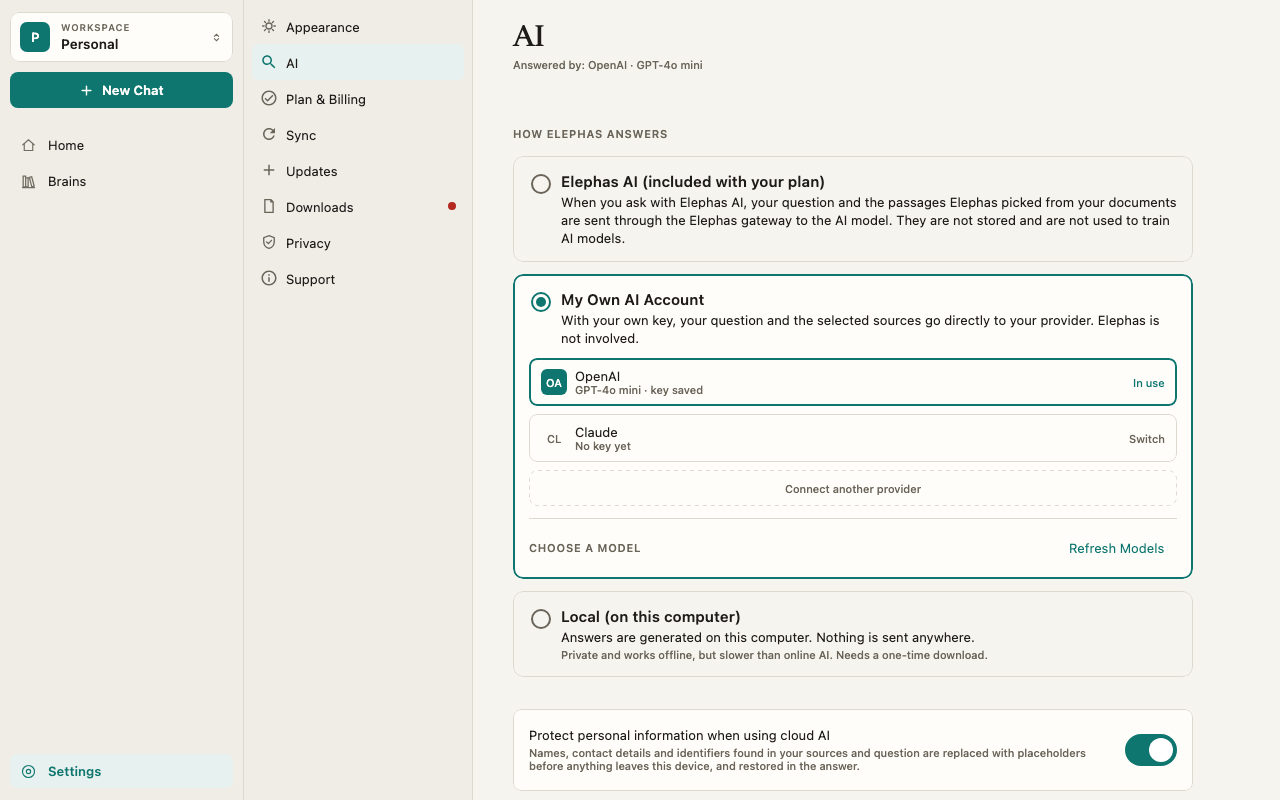
3
Paste your key
Paste the key into API key and click Save Key. Elephas checks it with your provider, which shows Checking your key… and then Your key works.
4
Pick a model
Under Choose a model, Elephas lists the chat models your key can use. Type in Find a model to filter a long list. Click a model to use it.Elephas runs a short check with that model: Checking followed by the model name, then Ready and the model name. The check sends a small test message on your key. It never includes your documents.
5
Ask a question
Elephas answers with the provider and model you picked. Settings › AI shows Answered by: My Own AI Account.
How it works
Where your key is stored
Your key is saved in your system’s secure store: Keychain on Mac and Credential Manager on Windows. Settings shows An API key is saved in your system keychain. but never shows the key itself. Keys are never synced to your other devices and never written to Elephas’s logs. Each provider keeps its own key. Switching from OpenAI to Anthropic and back keeps both keys, so you can switch when one account runs low.- Replace Key lets you paste a new key for that provider.
- Remove Key deletes the key from your keychain.
- Remove Account takes a provider you added off the list. Its key stays in your keychain until you remove it.
What is sent, and to whom
When you ask, your question, up to the last 4 chat messages and the passages Elephas needs go directly from your computer to your provider. Model lists and key checks also go directly to your provider. Elephas’s servers never receive them. See What data is sent to AI. With Protect personal information when using cloud AI on, which is the default, Elephas hides many common personal details before anything is sent. See Personal information protection. Your provider’s API terms decide whether it keeps your requests or uses them for training. Check them for the provider you use.Models must support Agent tools
Elephas lets the model search and read your documents step by step, which needs tool calling. A model that can’t do this is marked Can’t use Agent tools and the status says the model can’t use Agent tools here. Pick another model. Pick another model from the list.Your plan still matters
Your own key needs an Elephas trial or plan, checked online. A passed check lasts up to 60 minutes and is cleared when you restart Elephas. The check sends only a device ID, never your key, questions or documents. Your own key does not use your Elephas AI allowance.Team workspaces
Your own key is never used in a Team workspace. Team questions use Elephas AI under the Team’s AI policy. See Team AI policy.Troubleshooting
Your provider rejected that key
Your provider rejected that key
The full message names your provider, for example OpenAI rejected that key. Check it and paste it again. Nothing was saved. Copy the key again from your provider’s website, without spaces. See API key errors.
Your AI provider account is out of credit
Your AI provider account is out of credit
Add credit on your provider’s website, then ask again. Some free plans, such as Groq’s, allow only a little text each minute, which is less than one Elephas question can need. See API key errors.
You're offline when you save a key
You're offline when you save a key
Elephas saves it anyway and says You’re offline. Your key is saved and will be checked when you’re back online. Click Try Again once you are connected.
Elephas could not access the system keychain
Elephas could not access the system keychain
Restart Elephas and try again. On Mac, allow Elephas when Keychain asks for permission.
FAQ
Can Elephas see my API key or my questions?
Can Elephas see my API key or my questions?
No. The key stays in your system keychain, and your questions go straight to your provider. Elephas only checks your plan, with a device ID.
Can I use a ChatGPT Plus or Claude Pro subscription?
Can I use a ChatGPT Plus or Claude Pro subscription?
No. Those are consumer subscriptions. Elephas needs an API key from the provider’s developer platform, which is billed separately by usage.
Can I use my own key for Team Brains?
Can I use my own key for Team Brains?
No. Team workspaces use Elephas AI or, if the Team allows it, Local AI.