
Protection applies to Elephas AI and your own API key. Local AI sends nothing to the cloud, so there is nothing to hide from it.
Before you start
- The private-information models must be downloaded. They download during first-run setup and appear in Settings › Downloads as Private-information models. See First-run downloads.
- In a Team workspace, the Team’s AI policy decides whether redaction runs, not your personal setting. See Team AI policy.
Steps
Turn protection on or off
1
Open Settings › AI
Open Settings and choose AI.
2
Find the switch
Find Protect personal information when using cloud AI. It is on by default.
3
Leave it on, or turn it off
If you turn it off, your question and sources are sent to cloud AI exactly as they appear in your documents.
Always hide specific names
Automatic detection can miss things. To make sure a client name, project code name or other term is always hidden, add it to the Brain’s Protected Names: “Names and terms listed here are always replaced with placeholders before this Brain’s content is sent to cloud AI.” See Protected Names.Check what was hidden
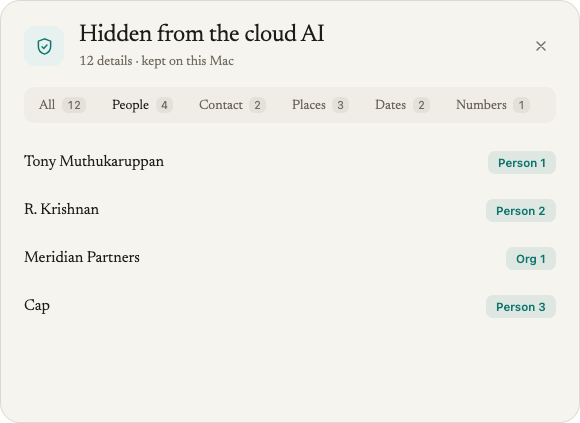
Under each answer protected this way, a row shows how many details were hidden, for example 3 details kept on this Mac · Review (this PC on Windows). Click it to see the list. See Review hidden details.How it works
What Elephas hides
Elephas looks for these kinds of personal details. The names below are the kinds of details you may see in the hidden details list.
Plus anything you add to a Brain’s Protected Names.
What Elephas does not hide
These are left as they are, so the AI can still answer questions about amounts and timelines:- Ordinary dates, such as a contract date or a due date. Only dates of birth are hidden.
- Years and periods, such as “2025”, “Q1 2024”, “FY2025”, “monthly” or “today”.
- Money amounts, such as $1,250.00 or 3.400,50. Long ID-like numbers, such as account numbers, are still hidden.
- Gender.
- Job titles and honorifics, such as “Dr.” or “CEO”, so the AI can still understand who is who.
How it runs on your computer
Detection happens on your computer, before anything is sent. Elephas uses three methods together:- Protected Names you add to a Brain. Matched as whole words, ignoring case and accents.
- Patterns for structured details such as email addresses, card numbers, IBANs and phone numbers.
- An on-device model that recognises names, organisations, places and similar details in running text, in all seven supported languages. It runs locally and is downloaded once during setup.
[PERSON-3fa2c1]. The same name always gets the same placeholder within a Brain, so the AI can still tell that two passages are about the same person. It does not see who that person is.
The link between placeholders and real words is kept in memory only. It is never saved, synced or written to a log.
Languages
Elephas decides the language of each document on its own. A document that is mostly German with a few English quotes counts as German.
Tamil documents can be searched, but not protected yet. See Search your documents in other languages.
With protection on, if a cloud question would use a document in a language Elephas can’t protect, or a document with too little text to tell its language, Elephas sends nothing and shows: “Some of the selected sources are in a language Elephas can’t protect yet, so nothing was sent.” Use Local AI for those documents, or turn protection off if you accept sending them as they are.
After you update to 1.0.2
Elephas re-checks your existing documents in the background. As a rough guide, that takes about an hour per 1,000 five-page documents. Until a document is re-checked, documents in the newly supported languages are still refused for protected cloud questions. Nothing is sent unprotected while this runs.Protected questions take longer
Detection takes about a second per page of text in English and German, and up to about two seconds for Chinese. Long chats take longer, because the chat history is checked too.If the models are not ready, nothing is sent
If protection is on but the private-information models have not finished downloading, Elephas does not fall back to weaker protection. It stops and shows: “Elephas can’t protect personal information until it finishes downloading. Nothing was sent. Open Settings to finish setting up, or turn the protection off.” If protection fails for any other reason, Elephas shows: “Personal information couldn’t be protected for this answer, so nothing was sent.”Limits you should know
- It detects the large majority of personal information. No automated detection is perfect. Some details will be missed. Unusual names, nicknames, and details that only identify someone in context (a job title plus a small town, for example) can slip through. Company names are the most likely to be missed when Elephas searches in several steps for one answer.
- It sometimes hides things that are not personal. That is the cautious side of the tradeoff. The real words are restored in your answer.
- The topic of your question is still sent. Placeholders hide who and which, not what. The AI still reads the rest of the passage.
Troubleshooting
Elephas can't protect personal information until it finishes downloading
Elephas can't protect personal information until it finishes downloading
The private-information models are missing or still downloading. Open Settings › Downloads, check Private-information models, and finish the download. Then ask again. See First-run download failed.
Some of the selected sources are in a language Elephas can't protect yet
Some of the selected sources are in a language Elephas can't protect yet
One of the documents in scope is in a language protection doesn’t cover yet, such as Tamil, or has too little text to tell its language, so Elephas sent nothing. If you just updated to 1.0.2, the document may not be re-checked yet. Wait, then ask again. Otherwise narrow the scope to other documents, switch to Local AI, or turn protection off if you accept sending that text as it is.
FAQ
Does Elephas remove all personal information?
Does Elephas remove all personal information?
No. It hides many common personal details, listed above, and it will miss some. You can see exactly what was hidden for each answer with the hidden details row, and add anything that matters to Protected Names.
Which languages does protection cover?
Which languages does protection cover?
English, German, Spanish, French, Hindi, Japanese and Chinese. Tamil and other languages are not protected yet, so with protection on, a cloud question that uses them sends nothing.
Why did the AI see a date or an amount?
Why did the AI see a date or an amount?
Ordinary dates, years and money amounts are not hidden, so the AI can answer questions about them. Only dates of birth are hidden. Add anything sensitive to the Brain’s Protected Names.
Does detection send my documents anywhere?
Does detection send my documents anywhere?
No. Detection runs on your computer with a model stored on your computer. Only the text with placeholders is sent to the AI you chose.
Does it work with my own API key?
Does it work with my own API key?
Yes. Protection applies to both Elephas AI and your own API key, with every supported provider and custom endpoints.
Why does the answer show real names if the AI never saw them?
Why does the answer show real names if the AI never saw them?
Elephas puts the real words back on your computer as the answer arrives. The AI only ever wrote the placeholders.
Can my Team admin turn it off?
Can my Team admin turn it off?
In a Team workspace, the Team Owner sets the AI policy. It can disable cloud AI, allow it, or allow it only with required redaction. Only the Team Owner can change it. See Team AI policy.