Personal Knowledge AI · Mac & iOS · 3,000+ professionals

Think with your own knowledge. Without exposing your data.

Elephas automatically redacts sensitive information before AI processing. Work with your documents, notes, and files. Choose whether AI runs locally, through the cloud, or with your own provider.

Local-first processing
Sensitive data redaction
Optional offline mode
Cloud AI intelligence

No credit card required · GPT-5, Claude & Gemini · Rated 4.6/5 · App Store

🧠
Strategy Brain
847 documents
PII redaction on

What did we decide about the Asia expansion timeline?

Elephas Elephas

Based on the Q3 board meeting notes, the Asia expansion was pushed to H2 2025 due to regulatory concerns in Singapore. The team agreed to prioritize Japan market entry first.

Board-Meeting-Q3.pdf, page 12

Trusted by 3000+ professionals worldwide

Rated 4.6 out of 5 by real users on Capterra, GetApp, and Software Advice

Best Value
Frontier Runners
Best in Support
Scott's profile picture

The brains that you can create from information you have already created and then interact with, is one of the most brilliant features of any AI I have come across.

Edward - United States

I work across several fields (business, tech, non-profit development, start-ups, education, health, fiction writing, and a few more) and wanted a system that allowed me to quickly cross-connect without hiding things in folders and sub-folders festooned with tags.

Gil C - Executive Director

I like how easy it is to create specialized brains based on personal or professional files, documents, notes, and web pages in the application. I have personally created hundreds of reports over my career, and I can upload those and those of my colleagues to create a specialized brain.

Kevin- Professional Engineer, US

AI is useful. Until the work becomes sensitive.

When your work involves

Contracts Internal docs Client files Research notes Meeting transcripts

This isn't the kind of data you casually send to AI.

But without AI, you're stuck searching through everything manually.

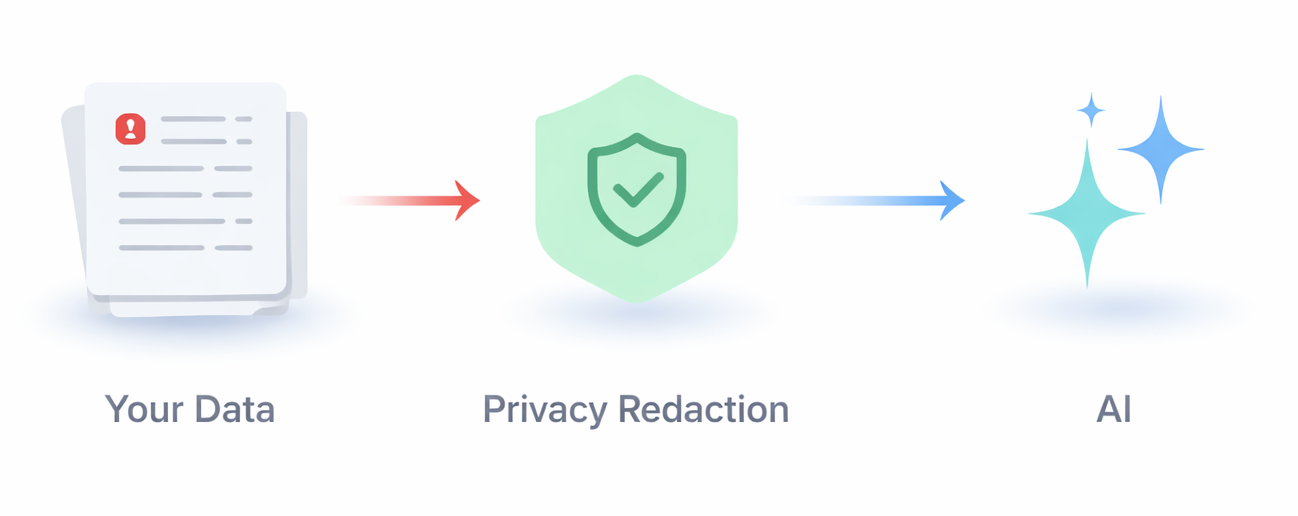
Elephas PII redaction flow: your data is redacted before being sent to AI

How Elephas works with your documents

Elephas keeps as much as possible local, redacts sensitive information before cloud requests, and gives you flexible ways to work depending on the task.

1

Add your documents into a Super Brain

Create focused workspaces for each project or client. Add PDFs, notes, contracts, research. Indexed locally on your Mac.

2

Elephas indexes locally and redacts sensitive information

Sensitive data is automatically detected and redacted before anything reaches a cloud AI model.

3

Use offline or redacted cloud AI depending on the task

Summarize, search, and generate insights. Every answer is grounded in your own files with citations.

PDF PDFs
Notes Notes
Notion Notion
Zoom Zoom

Elephas

Super Brain

847 documents

You asked:

"What did we decide about Asia expansion?"

Board approved phased approach starting Japan Q2...

Document Board Minutes, Mar 2024

Works with: PDFs, Word, Excel, Apple Notes, Notion, Obsidian, Zoom transcripts, Markdown, and more

Where this actually matters

Elephas is built for documents and workflows that are too important to treat casually.

Legal research and contracts

Sensitive clauses, obligations, and client material.

Work without exposing confidential terms.

Private notes and journals

Personal ideas, reflections, and sensitive thoughts.

Use AI without giving up privacy.

Client and business documents

Internal reports, proposals, and strategy docs.

Keep control over what gets processed.

Research libraries

Large collections of papers, notes, and source material.

Search and synthesize with grounded answers.

Internal company knowledge

Proprietary processes, decisions, and IP.

Protect internal information while making it usable.

AI writing across your Mac

Emails, drafts, documents, and everyday writing.

Write with your own knowledge, not generic AI output.

Elephas vs ChatGPT, Claude, and NotebookLM

How Elephas compares when working with your own documents and sensitive data.

Most AI tools like ChatGPT or Claude are designed for general-purpose tasks. Elephas is built for working with your own documents, especially when dealing with sensitive or confidential information.

What matters for sensitive work General AI tools
(ChatGPT, Claude)
Notebook-style tools
(NotebookLM)
Elephas
Works with your own documents Limited / per chat Yes Yes, persistent workspace
Handles sensitive data safely Not designed for it Limited controls PII redaction before processing
Control where AI runs Provider-controlled Cloud-only Local, cloud, or your own API
Answers grounded in your files Sometimes Yes Yes, with clear sources
Works across your system Limited Browser-based Mac-native, works anywhere

If you're looking for a ChatGPT alternative for working with your own documents, Elephas offers a more controlled approach. With PII redaction, local processing options, and grounded answers from your files, it is better suited for sensitive workflows than general-purpose AI tools.

Super Command

AI writing assistant. In every app on your Mac.

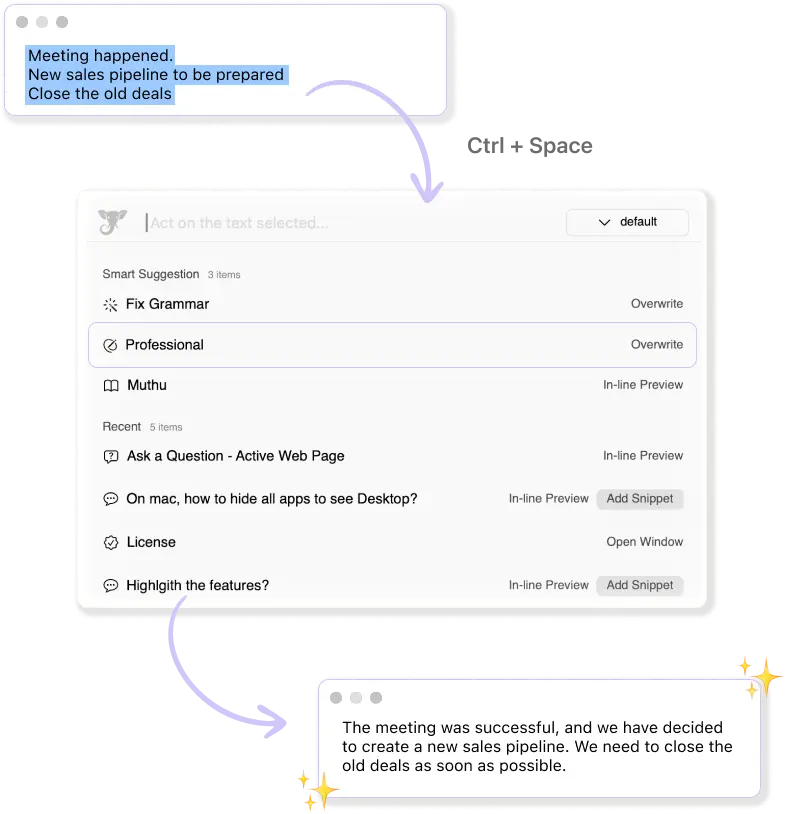
Press one keyboard shortcut and Elephas appears in any app. Summarize, rewrite, translate, fix grammar, or draft from your own knowledge. Sensitive data stays protected.

Works in Mail, Safari, Slack, Notes, and any app
Summarize, rewrite, translate, fix grammar
Create custom commands (Snippets) for your workflow
Draft using your own documents as context
Elephas Super Command AI writing assistant - select text, rewrite professionally, fix grammar across any Mac app

Works across all your favorite apps

Elephas works across Outlook, Gmail, Notion, Mail, Slack, Teams, Reddit, Instagram, LinkedIn, Twitter, Discord and more
Testimonials

Trusted by Knowledge Workers

"If they take away Elephas from me I will lose my job. I use it for absolutely everything. From rewriting text to reminding me of facts I didn't even remember with Brain."

Gabriel Business Professional, Brazil
Gabriel

"The Super Brain function is brilliant. It's my daily driver. It can export results directly into Keynote—if you have a template ready, you can be set in 5 minutes."

Kamil Consultant, Poland
Kamil

"The capability to handle more contact, deal with more emails and refine my content has been a real help as I set up my new company. It is intuitive and learns as it goes."

Sean Ireland
Sean

"The brains that you can create from information you have already created is one of the most brilliant features of any AI I have come across."

Edward United States
Edward

"King of AI clients. I've tried pretty much every local AI client on my Mac, but Elephas may be the best. Really centres on building knowledge bases."

Ben United Kingdom
Ben

"Game changer for your productivity. You can create brains, bringing your own data, and chat with it like some sort of Yoda character. By far the best app of its kind."

David Antonio Spain
David Antonio

Frequently Asked Questions

Got questions? We've got answers.

Use AI on sensitive work without exposing your data.

Local-first indexing. Automatic redaction. Optional cloud AI when you need more power.

Join 3,000+ professionals already using Elephas

Also available on Mac App Store (Super Brain only)