
Before you start
Chats belong to a workspace. You see the chats of the workspace you are in: your Personal workspace, or a Team workspace. Switch workspaces with the workspace switcher at the top of the sidebar.Steps
Start a new chat
Click New Chat at the top of the sidebar, press ⌘N on Mac or Ctrl+N on Windows, or choose Chat › New Chat. New Chat is at the top of the sidebar on every page. On a Brain’s page, it starts a chat for that Brain. Elsewhere, it keeps your current Brains. A chat is saved when you send its first question. Its title is the first 60 characters of that question, with ”…” if it is longer.Find an old chat
Your recent chats are in the sidebar on every page, newest first, under Today, Yesterday, Previous 7 days and Earlier. The list shows 10 chats. Click Show more to see 10 more at a time. A chat that is still being answered shows a live dot. Click a chat to open it. There is no chat search. Home also lists your recent questions under Last Asked. A chat you open keeps the Brains and documents it was asked about, so a follow-up searches the same place.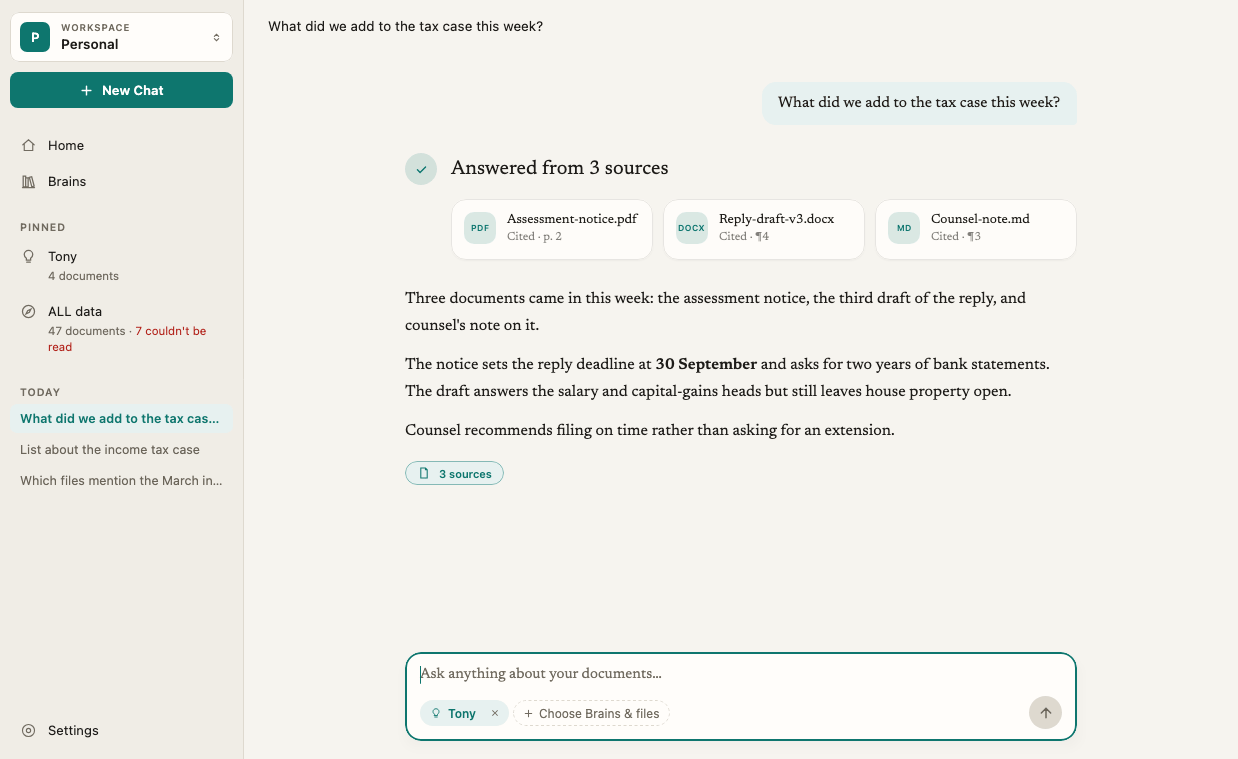
Pin a chat
On a Brain’s page, you can pin up to 4 chats so they stay at hand. If four are already pinned, Elephas says Four chats are already pinned. Unpin one first. Pins are kept on this computer only.Rename a chat
1
Open the chat's menu
Do one of these:
- Click ⋯ on the chat’s row in the sidebar, or right-click the row.
- With the chat open, choose Chat › Rename Chat….
2
Type the new title
Choose Rename, type a title and click Rename.
Delete a chat
1
Open the chat's menu
Use any of the menus above, or choose Chat › Delete Chat….
2
Confirm
Choose Delete. Elephas asks, for example, Delete “Lease renewal dates”? Its messages and citations are removed. This cannot be undone. Click Delete.
How it works
Where your chats are stored
Your chats, their answers and their citations are stored on your computer, in the same encrypted database as your Brains and index. They are not kept on an Elephas server. See Where your data is stored. When you ask a question with Elephas AI or your own API key, the question and a few recent messages from that chat are sent to get the answer. Your other chats are never sent. See What data is sent to AI.Whether chats sync
- Personal workspace, Sync off: chats stay on this computer only.
- Personal workspace, Sync on: finished chats sync to your other devices, end-to-end encrypted. Deleting a chat on one device deletes it on the others. Answers still being written are never synced. See What syncs.
- Team workspace: your chats are private to you. Other members, Admins and the Team Owner can’t read them, even when you ask about a shared Team Brain. See Team Brains.
Chats are separate per workspace
A chat can only use Brains from its own workspace. You can’t mix a Team Brain and a Personal Brain in one chat. That keeps one client’s or one company’s material from mixing with another’s.Troubleshooting
A chat I had is missing
A chat I had is missing
Check the workspace switcher. Chats from your Personal workspace don’t appear in a Team workspace, and the other way round. If you use Personal Sync, a chat deleted on another device is deleted here too. See Sync troubleshooting.
Rename Chat… and Delete Chat… are greyed out
Rename Chat… and Delete Chat… are greyed out
They act on the chat that is open. Open a saved chat first. A new chat has nothing to rename until you send its first question.
A chat says A Brain in this question's scope is no longer available
A chat says A Brain in this question's scope is no longer available
A Brain the chat used was deleted, or you lost access to it. Choose other Brains in Choose Brains & files to keep asking in this chat.