
What Elephas does
Keeps your documents in one place
Group your files into Brains: one for a client, a case, a research project or a course. Add files, whole folders or web pages.
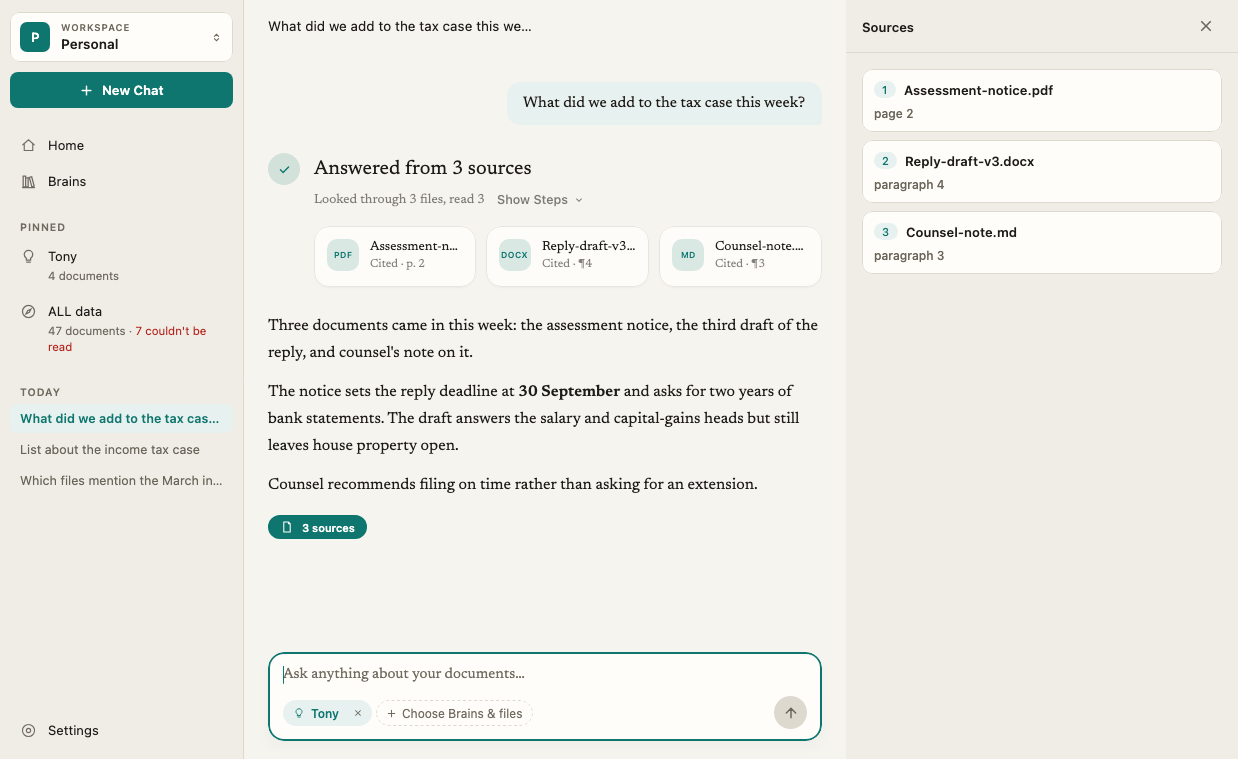
Answers from your sources
Ask a question and Elephas finds the passages that matter in your documents, then writes an answer grounded in them.
Cites every claim
Numbered citations show the exact passage from your file, so you can check the answer yourself in seconds.
Lets you choose where AI runs
Use Elephas AI, your own API key, or Local AI that runs on your computer.
Who it is for
Elephas is built for people whose work lives in documents, often confidential ones: lawyers, accountants, consultants, researchers, financial advisors and small business owners. If you spend your day searching contracts, reports, filings, meeting notes or research papers, Elephas is the tool that reads alongside you and shows its work.How it works
1
Add your documents
Drop in your PDFs, Word and PowerPoint files, Excel sheets, Markdown notes, e-books, images and scanned pages. Elephas reads them on your computer, including text in scanned pages.
2
Elephas indexes them locally
Indexing happens on your computer. Always. Your documents stay stored on your computer. The search index and your chats are kept in an encrypted database.
3
Ask a question
Choose which Brains to ask, type your question, and get an answer with numbered citations. Click a number to see where it came from.
Three ways to get answers
You control where the AI that writes your answers runs. Change it any time in Settings › AI.
With a cloud option, your question and the few passages needed to answer it are sent to the AI. By default, Elephas detects and hides many common personal details, such as names, contact details and ID numbers, before anything leaves your computer, then puts the real values back in the answer. See what data is sent to AI for the full picture.
Privacy at a glance
- Your files stay stored on your computer. Your library is only copied off your computer if you turn on Personal Sync, which is end-to-end encrypted.
- Indexing and search are local. Reading your documents, scanned-page recognition and search all run on your computer.
- You choose where AI runs. Pick Local AI and the answer is written on your computer.
- Sync is off until you turn it on. Personal Sync is available on the Professional plan.
- Reports never include your content. Anonymous usage and error reports help us fix problems. They never include your documents, questions, answers or file names, and you can turn them off. See usage reports.
Plans
Elephas starts with a 7-day free trial. No card is needed. After that, choose Personal, Professional or Team, or talk to us about Enterprise. See plans and pricing.Elephas runs on Apple Silicon Macs and Windows PCs. There is no iPhone or iPad app. Check the system requirements before you install.
Related articles
Quick start
Add your documents and ask your first question.
Key concepts
Brains, documents, Ask, chats and citations explained.
Choose how Elephas answers
Compare Elephas AI, own API key and Local AI.
Moving from classic Elephas
How this app differs from the original Elephas for Mac.