
For Team Owners, and anyone the Owner makes a Recovery Authority. Members never need the kit.
What the kit is
The file alone is useless without the code, and the code alone is useless without the file. That is why Elephas asks you to keep them in two separate safe places.
Before you start
- You are the Team Owner, or you hold Recovery Authority on this computer.
- The Team workspace is open, and you are in Team Settings › Recovery.
Steps
Save the kit during setup
You save the kit once, as part of setting up the Team. Setup cannot finish without it: Complete Setup stays locked until the file is saved and you confirm you wrote down the code.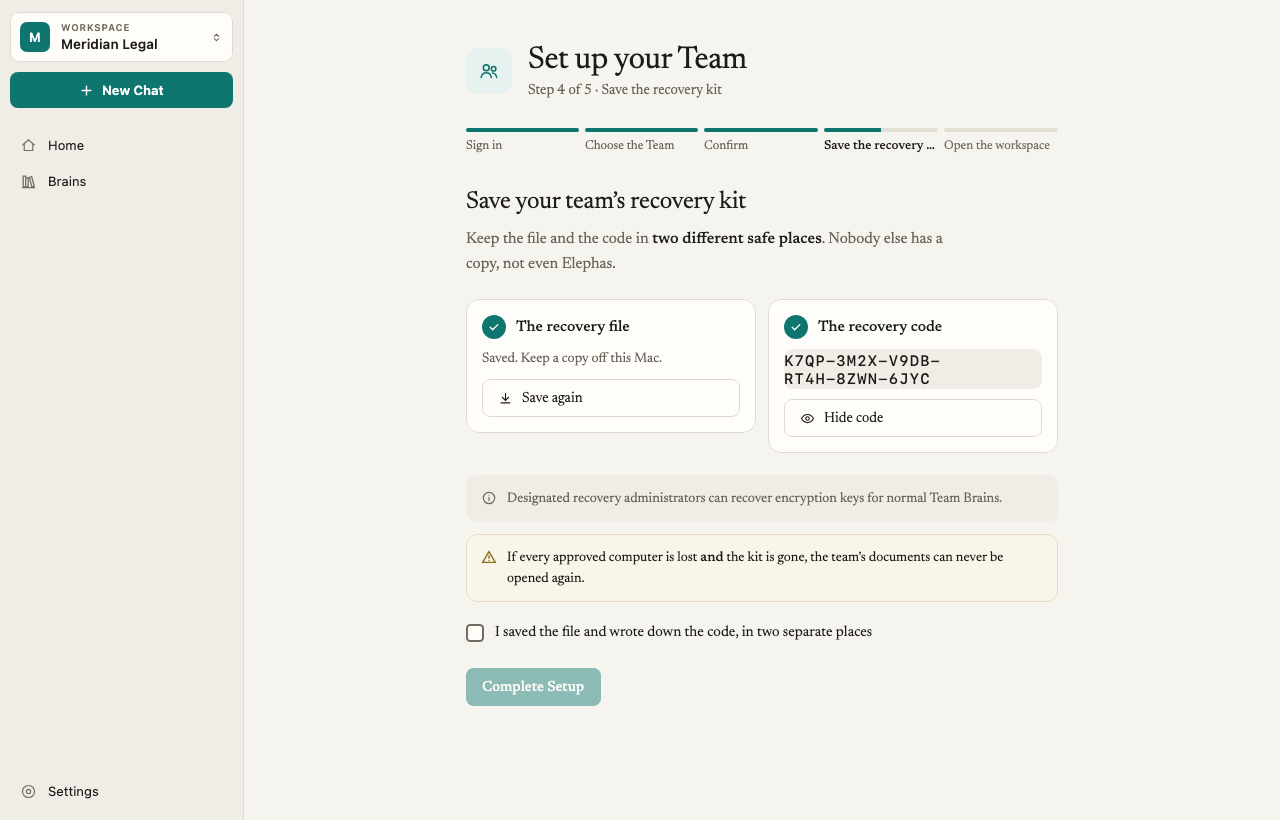
The code shown here is an example.
Make a new kit if you lost the file or the code
If you lost your kit but still have a computer that holds the Team’s recovery key, make a new one.1
Open Recovery
Go to Team Settings › Recovery.
2
Export a new package
Under Import or export a recovery package, choose Export existing recovery key and save the new file.
3
Record the new code
Elephas shows a New Recovery Code. Write it down and keep it apart from the new file.
Check a kit still works
In Team Settings › Recovery, follow the four steps under Import or export a recovery package: Choose the encrypted package, Enter the recovery code, Acknowledge what recovery means, then Verify or import it. Choose Verify package to check the file and code match without installing anything. Elephas confirms: “Recovery package verified. Nothing was installed.”How it works
A new kit does not cancel the old one
Exporting makes a new file and a new code for the same recovery key. In the app’s words: “It does not cancel earlier packages: any older package with its code still works.” Use export when a kit was lost. If you think a kit was stolen or copied, exporting a new one does not help. That needs a key rotation, which is a separate, Team-wide operation. Contact support.What happens without the kit
Elephas cannot rebuild a lost kit. It cannot email you a new code, and support cannot relink your account to the keys. This is the price of encryption that Elephas itself cannot open.
Recovery Authority
A Recovery Authority is someone whose approved computers hold the Team’s recovery key. The Owner’s first computer is one. Once your team has more than one administrator, give Recovery Authority to a second trusted person, so the Team does not depend on one computer. In Team Settings › Recovery, under Recovery Authority operations, enter that person’s Team Principal ID, choose Grant Recovery Authority, then Distribute approved device wraps so their approved computers receive the key.Troubleshooting
Recovery package refused
Recovery package refused
The file and code do not match, or the file belongs to another Team. Check you picked the right file and typed the code exactly.
Setup was interrupted and my saved kit is no longer valid
Setup was interrupted and my saved kit is no longer valid
If setup restarted, the earlier kit was replaced before it took effect. Save the new kit Elephas shows you and delete the old file. See Set up a Team workspace.
I lost the kit and every approved computer
I lost the kit and every approved computer
Elephas cannot restore Team recovery in this case. Contact support to discuss your billing and next steps. See Contact support.