
Available in Team workspaces. See Elephas for Teams.
Team roles
Brain roles
Each Team Brain has its own list of people, each with one Brain role. Only people with a Brain role can open that Brain and ask its documents.
Whoever creates a Team Brain becomes its first Manager. A Manager’s computer also hands the Brain’s key to new people and new computers, so keep at least one Manager per Brain who opens Elephas regularly.
Permission table
Every role can open every Team Settings section. When your role cannot do something, the screen says so, for example “Only the Team Owner can change the AI policy.” The Elephas server checks your role on every change, whatever the app shows.
Steps
Change someone’s Team role
1
Open Members
Go to Team Settings › Members.
2
Use the button on their row
Click Make Admin on a Member’s row, or Make Member on an Admin’s row. Elephas confirms the new role.
Give someone a Brain role
Go to Team Settings › Team Brains, open Who has access under the Brain, pick the person in Choose a member…, and click Manager, Contributor or Reader. See Team Brains.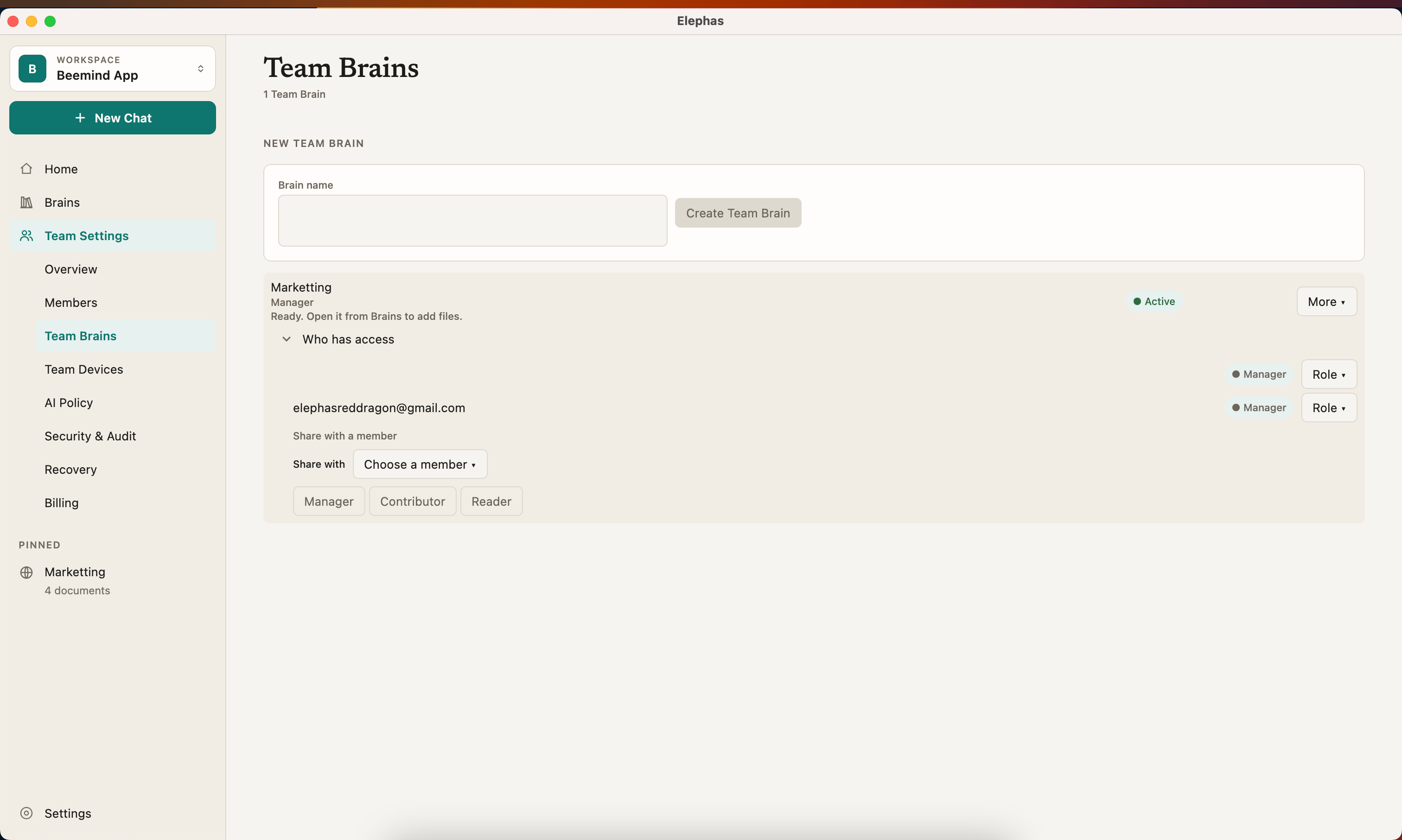
Troubleshooting
More fixes in Team errors.