Local AI vs Cloud AI: Which Is Safer for Your Data?
In January 2026, a US federal judge ordered OpenAI to produce 20 million de-identified ChatGPT logs in the New York Times copyright suit, rejecting OpenAI's user-privacy defense outright. That single ruling reframed the local AI vs cloud AI debate from a performance question into a data-safety one: your “private” cloud chats are now court-confirmed discoverable evidence.
This is the honest local AI vs cloud AI comparison for privacy-conscious knowledge workers and Mac users handling sensitive data: seven criteria, four reader profiles, and a verdict that doesn't pretend the answer is simple. We compare AI models from popular AI providers (Claude and ChatGPT, Gemini, Llama, Mistral) across cloud-based services and local AI solutions, so you can choose between cloud-based AI and running models locally with full control.
Local AI wins decisively on three vectors. Cloud AI still owns one. Hybrid is what experienced practitioners converge on after twelve months, and this article shows you exactly how to build it on a Mac without the trade-offs.
20M
ChatGPT logs ordered produced in NYT case
67%
Of enterprise security teams concerned about AI data exposure
<500ms
First-token latency on M-series Mac
3 of 7
Data-safety vectors local AI wins decisively
Executive Summary
- The January 2026 Stein order made cloud AI conversation logs court-confirmed discoverable evidence; local AI conversations cannot be subpoenaed from a vendor that never had them.
- Local AI wins decisively on three data-safety vectors: subpoena exposure, ToS-driven training drift, and third-party breach blast radius.
- Cloud AI still owns the capability frontier (frontier reasoning, native multimodal, agentic browsing, Microsoft 365 Copilot tenant graph) and that is a real win, not a courtesy concession.
- Hybrid (local for sensitive 80%, cloud for capability-frontier 20%) is what experienced practitioners converge on after twelve months.
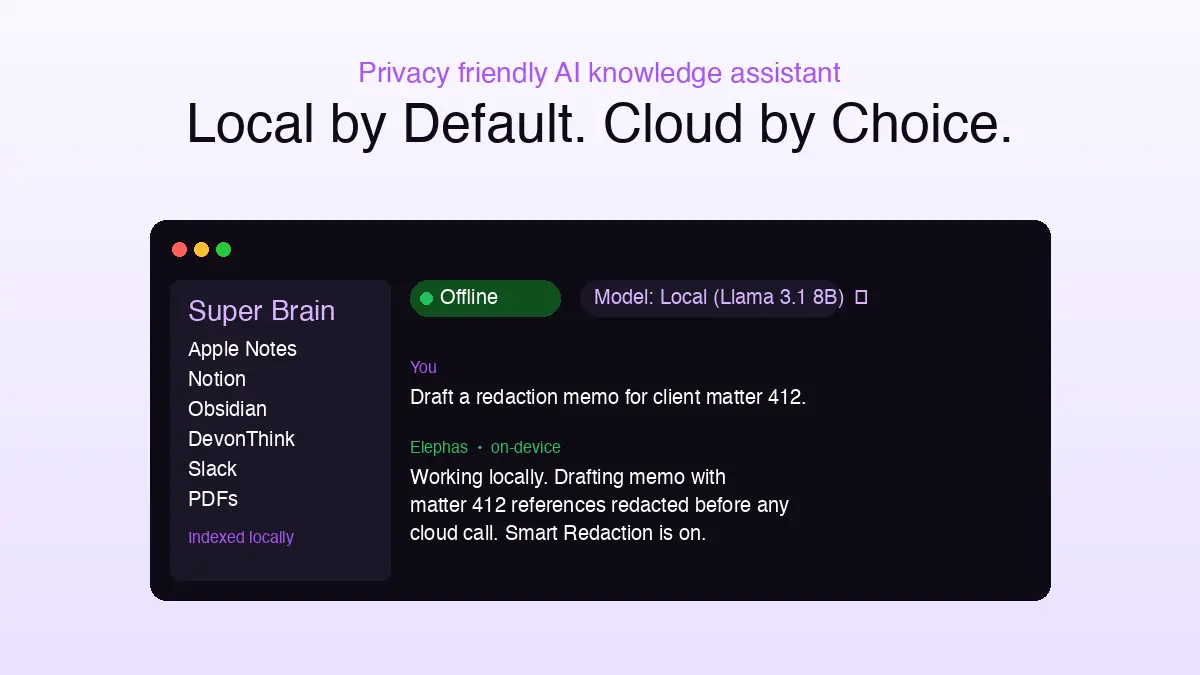
- Elephas is the privacy-friendly AI knowledge assistant we recommend for Mac users handling sensitive data: it provides built-in local LLM models, Smart Redaction for cloud fall-overs, and explicit per-prompt model routing so nothing leaves your machine unless you choose.
The Court Order That Reset the Local AI vs Cloud AI Question
In January 2026, US District Judge Sidney Stein affirmed a magistrate's order forcing OpenAI to produce all 20 million de-identified ChatGPT logs to plaintiffs in the New York Times copyright suit (Bloomberg Law; Jones Walker AI Law Blog, 2026-01-05).
The court rejected OpenAI's user-privacy defense outright. Translation: your “private” cloud chats are now court-confirmed discoverable evidence (see also our deeper take on whether ChatGPT is safe for confidential documents).
That single ruling reframes the local AI vs cloud AI debate. Local AI conversations cannot be subpoenaed from a vendor that never had them. Cloud AI conversations, sent to ChatGPT, Microsoft Copilot, Google Gemini, Notion AI, or Claude.ai, sit in a vendor's data center where a court order can reach them.
This article walks the criteria first, then the verdict. We will get to who should pick what, but the criteria come first.
Seven Criteria That Decide Local AI vs Cloud AI for Data Safety
You cannot compare local AI and cloud AI honestly without first naming what matters. AI adoption decisions vary by use cases, from AI coding to research to AI-assisted summarization.
The right AI strategy depends on which axes matter for your AI work. These seven criteria are the best practices any cloud provider or local inference setup should be measured against.
- Data handling and training-on-user-data posture. Where the prompt goes after Send; whether it trains the vendor's model; retention windows; consumer-versus-enterprise plan delta. A vendor that trains on free-tier chats by default is structurally different from a model that never leaves the device.
- Subpoena exposure and legal-discovery risk. Whether a court, plaintiff, or regulator can compel the vendor to produce your logs. The Stein order made cloud AI conversation logs discoverable; that fact is not in any vendor's terms of service yet.
- Third-party breach blast radius. How much data is exposed when a vendor (or one of its integrations) is breached. The US House banned Microsoft Copilot for staffers citing oversharing risk, with 67% of enterprise security teams concerned about AI tools exposing sensitive data and 15%+ of business-critical files at oversharing risk through Copilot's broad permissions reach (Time, Dark Reading, Concentric AI, Securiti, Metomic, 2026-03; partial reversal noted September 2025).
- Capability frontier. Multimodal, web search, agentic tool use, frontier-model reasoning. A privacy upgrade that costs 50% of useful capability will not stick.
- Performance and latency. First-token time, offline reliability, degradation under flaky network. Cloud AI breaks when the Wi-Fi does.
- Hardware floor and total cost of ownership. Subscription tiers versus amortized hardware and electricity. Cloud looks cheap at the line item but charges per seat per month forever; local AI infrastructure has a real hardware floor with marginal cost per prompt of zero.
- Compliance posture (GDPR, HIPAA, SOC 2, BAA). Which regulatory frameworks each approach can serve, at which plan tier. Lawyers, clinicians, and financial professionals need a defensible answer to “where did the patient note go?”
These seven, not feature checklists, decide the question for anyone whose work touches data sovereignty, regulated information, or client trust. Together they form the foundation of a defensible AI strategy, whether you deploy on local devices, run AI applications through cloud APIs, or sit in between with a hybrid workflow.
- Three of the seven (data handling, subpoena exposure, breach blast radius) are structural; vendor terms cannot fix them, only architecture can
- Two (capability frontier, performance) are scaling questions that change quarterly with each new model release
- Two (hardware floor and TCO, compliance) are budget and legal questions that depend on which industry you serve and how many seats you cover
- The right ordering depends on funnel stage: a regulated solo practitioner ranks compliance and subpoena risk first; a startup founder ranks capability frontier and zero-hardware entry first
Local AI: What It Actually Does for Your Data
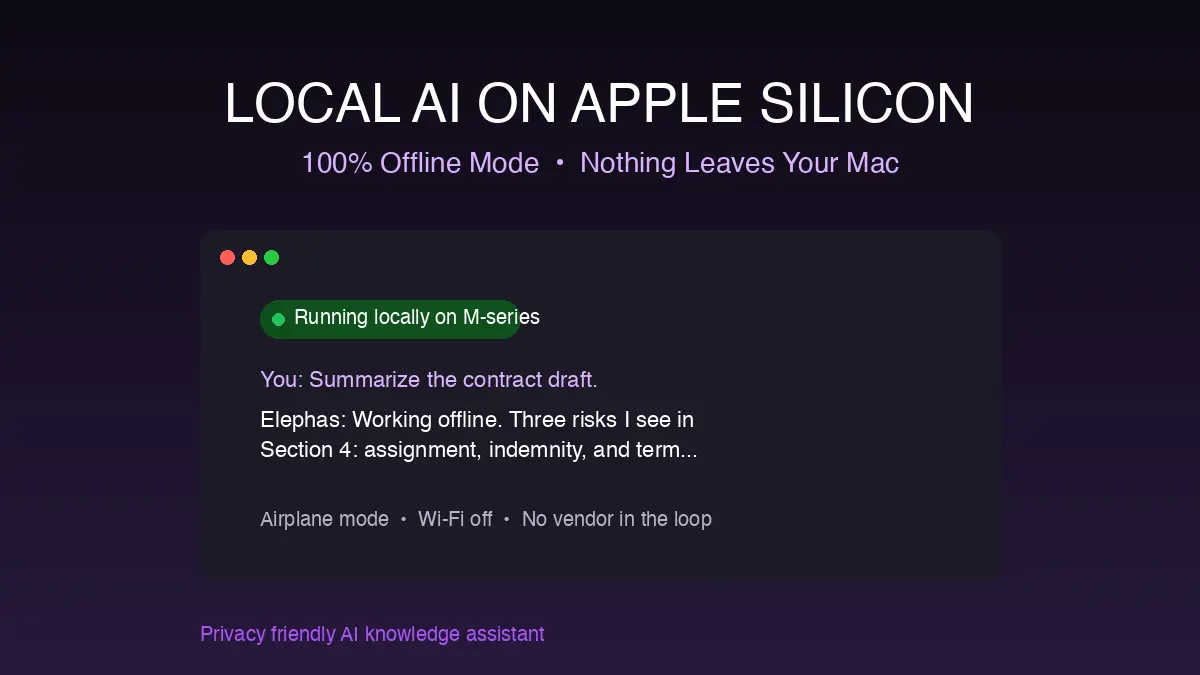
Local AI runs the model locally on your own Mac, on-premises in the original sense of the word. Open-weights large language models like Llama, Mistral 7B, Qwen, and Phi load via Ollama, LM Studio, or llama.cpp.
Apple Silicon uses the MLX software development kit for native acceleration. Consumer AI tools like Elephas wrap on-device inference in a Mac-native UI; Windows users can run the same models on NVIDIA-powered desktop computer or personal computer setups.
Running locally, prompt content and computer data storage stay inside your machine. No api call leaves your network, so a static foundation model cannot retroactively train on you and a subpoena to OpenAI cannot retrieve what the vendor never received.
Cost picture is straightforward. Pure open-source runners (Ollama, LM Studio, llama.cpp) carry $0 software cost on top of a one-time hardware floor. A wrapped Mac-native assistant adds a subscription for local model management plus cloud routing in one place; visit elephas.app for current plans.
- Subpoena exposure: effectively zero on the vendor side. Breach blast radius for prompt content: zero, since there is no third-party tool surface
- Performance: sub-500ms first-token response time on M-series Macs (16GB+ unified random-access memory) for 7B and 13B models; local inference eliminates the cloud round-trip entirely
- Hardware floor by model size: 8GB unified memory caps at 7B Q4; 16GB recommended for everyday use; 32 to 64GB for 30B and 70B parameter models, per APXML and SitePoint 2026 hardware analyses
- Capability strengths: automatic summarization, sentiment analysis, retrieval-augmented generation, rewrites. Capability gaps: multi-step agentic reasoning, frontier multimodal, native web search
- Compliance bright lines: GDPR-friendly by default, and the cleanest HIPAA path because no business associate exists when protected health information never leaves the device
- Trust posture must be “verify each tool's telemetry policy,” not “assume.” Local AI is privacy-strong by architecture but still benefits from a regular check of each app's preferences (aitooldiscovery, 2026)
Cloud AI: What It Actually Does for Your Data
Cloud AI runs frontier cloud models in vendor data centers, handled by the cloud provider end-to-end. The category includes ChatGPT (built on the GPT-4, GPT-4o, and older GPT-3 lineage), Microsoft Copilot, Google Gemini, Anthropic Claude, Notion AI, and AWS Bedrock from Amazon Web Services.
Generative AI at this scale ships as platform as a service over the internet through cloud APIs. Each api call is handled by the cloud provider's computing resources behind a cloud API, with cloud computing infrastructure handling scalability for third-party cloud providers like Azure AI, Vertex AI on Google Cloud, and AWS.
Data handling on consumer tiers is the structural problem. Per LumiChats's 2026 privacy guide, paying $20/month for ChatGPT Plus or Claude Pro does not protect your data privacy by default. Google updated Gemini's ToS to use a “sample” of consumer chats to train the LLM; opt-out is buried (Analytics Insight).
Capability frontier is where cloud AI offers a real win. Frontier-model leadership across ChatGPT 5.5, Claude Opus 4.7, and Gemini 3.1 Pro with 1M-token context; native multimodal, agentic browsing, built-in web search; structural risks sit at the consumer tier and enterprise plans materially reduce them.
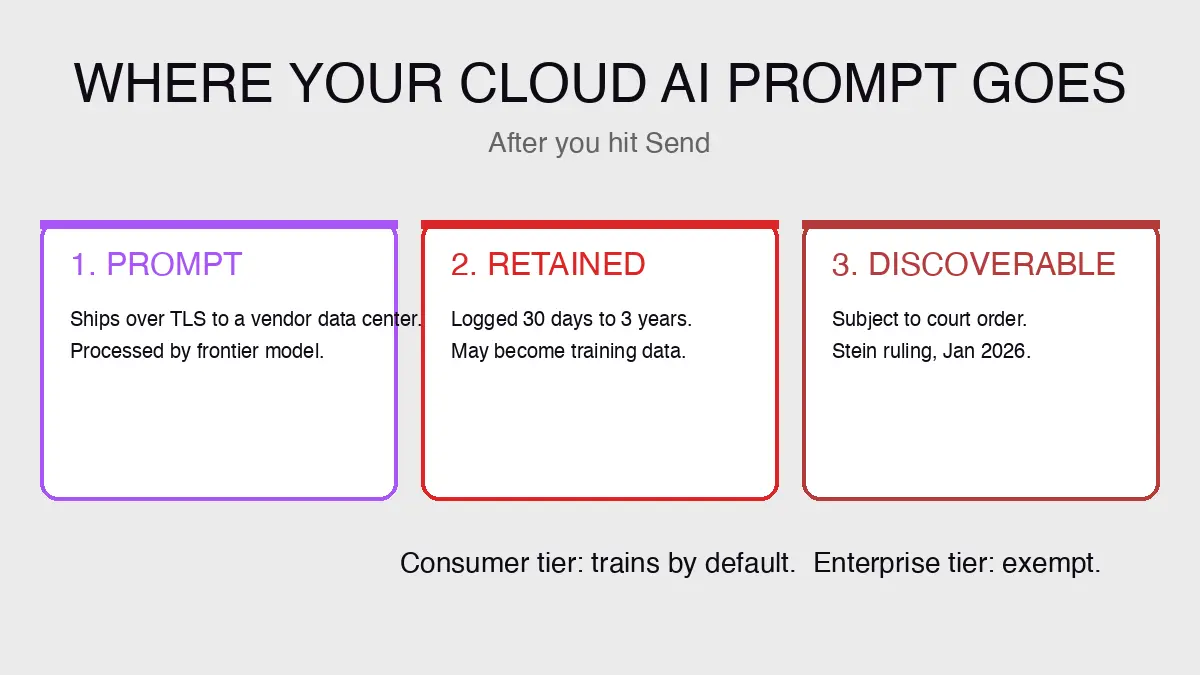
- Subpoena exposure: high and case-law-confirmed. The Stein order plus the May 2025 Wang preservation order require OpenAI to preserve all ChatGPT conversation logs indefinitely for legal discovery, even after Delete
- Breach blast radius: real. OpenAI's November 9 third-party breach exposed names, emails, and locations of API users using cloud services (Proton breach summary); a DNS side-channel vulnerability was disclosed and patched on 2026-02-20. For broader context, see our running log of AI security incidents
- Performance: 1.5 to 4 second first-token typical depending on geography. Hardware floor: any internet-connected device, but a flaky network breaks the workflow
- Compliance: OpenAI SOC 2 Type 2 covers API, Enterprise, Team, Edu; BAA available for ChatGPT for Healthcare; Microsoft 365 Copilot Enterprise tenant-isolated; Anthropic Enterprise BAA
- Cloud subscription pricing (condensed): ChatGPT Plus $20 / Pro $200 / Business $20-25/seat. Microsoft 365 Copilot Business $18-21/seat. Google AI Plus $7.99 / Pro $19.99. Claude Pro $20 / Team $25-30/seat. Notion Plus $10/seat
- Hybrid claim audit: some cloud AI providers and cloud AI solutions now claim their platforms supports both local and cloud deployment (AWS Bedrock on-prem, Azure edge runtime), but the “local” mode often still phones home; audit before trusting it
Local AI vs Cloud AI: Side-by-Side Comparison
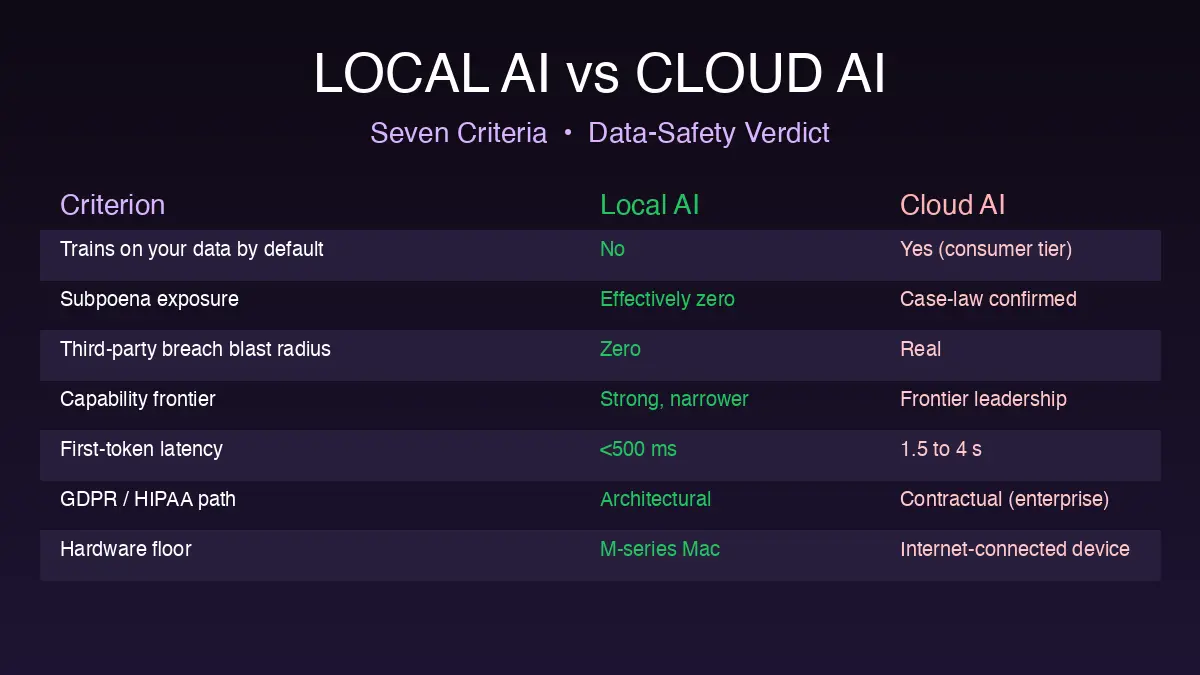
Side by side on the seven criteria, the data-safety vectors break sharply for local AI; the capability-frontier vectors break for cloud. The cloud and local AI debate compresses into a single tradeoff axis where AI platforms across both camps converge.
| Criterion | Local AI | Cloud AI |
|---|---|---|
| Trains on user data by default | No (structurally cannot) | Yes on consumer tier; enterprise tiers exempt |
| Subpoena exposure (vendor side) | Effectively zero | High and case-law-confirmed |
| Third-party breach blast radius | Zero | Real (Nov-9 third-party breach, Feb-2026 DNS side-channel) |
| Capability frontier | Strong on RAG, summarization, rewrites; weaker on agentic and multimodal | Frontier leadership (ChatGPT 5.5, Claude Opus 4.7, Gemini 3.1 Pro) with multimodal, web search, agentic |
| First-token latency | <500ms typical on M-series | 1.5 to 4 seconds typical |
| Hardware floor (GPU / RAM) | M-series Mac with 8GB+ unified memory | Any internet-connected device |
| HIPAA path | PHI never leaves device, no BAA structurally needed | BAA available at enterprise tier |
| GDPR posture | Friendly by default | Workspace and Enterprise plans cover it contractually; consumer tier complicates data minimization |
| 5-year TCO (single user) | One-time M-series hardware + a single Mac-native local-AI subscription | $1,200 per vendor over 60 months; multi-vendor easily $3,000 to $5,000+ |
| Structural-incentive risk | None | Cloud economics push vendors toward more aggressive ToS over time |
Where local wins clearly: data handling, subpoena exposure, and breach blast radius. The Stein order ruling and the structural-incentive pattern anchor the case without restatement.
Where cloud wins clearly: capability frontier, native multimodal, always-current model upgrades, and zero-hardware-floor entry. Cloud AI's frontier capability gap over local is real and worth respecting.
Where they sit roughly equal: latency favors local, but only on a 16GB+ M-series. Compliance can serve HIPAA and GDPR either way.
- Hybrid AI (local for sensitive, cloud for capability-frontier) is the workflow most experienced practitioners converge on after twelve months
- Local AI sweeps the data-safety vectors. Cloud AI sweeps the capability-frontier vectors. Total cost of ownership math runs in local AI's favor for multi-year workloads
- Response time and capability run in cloud's favor for one-off frontier tasks. Smaller models in the 7B to 13B range close the gap for everyday AI services, though larger cloud-hosted models may still pull ahead on novel reasoning
- Latency, GDPR posture, and HIPAA path can go either way depending on hardware floor and plan tier
- Elephas wraps the local stack in a Mac-native UI and adds model routing for that hybrid pattern; the full bridge belongs in the verdict below
Picking Your Side: Four Reader Profiles
Different readers want different recommendations when choosing cloud AI versus local AI, and a single answer would be dishonest. Choosing between cloud-based AI and local depends on your funnel stage with AI tools and how you integrate AI today. Here is the direct call by archetype.
A1: Picking Your First AI Setup (Never Used Either Seriously)
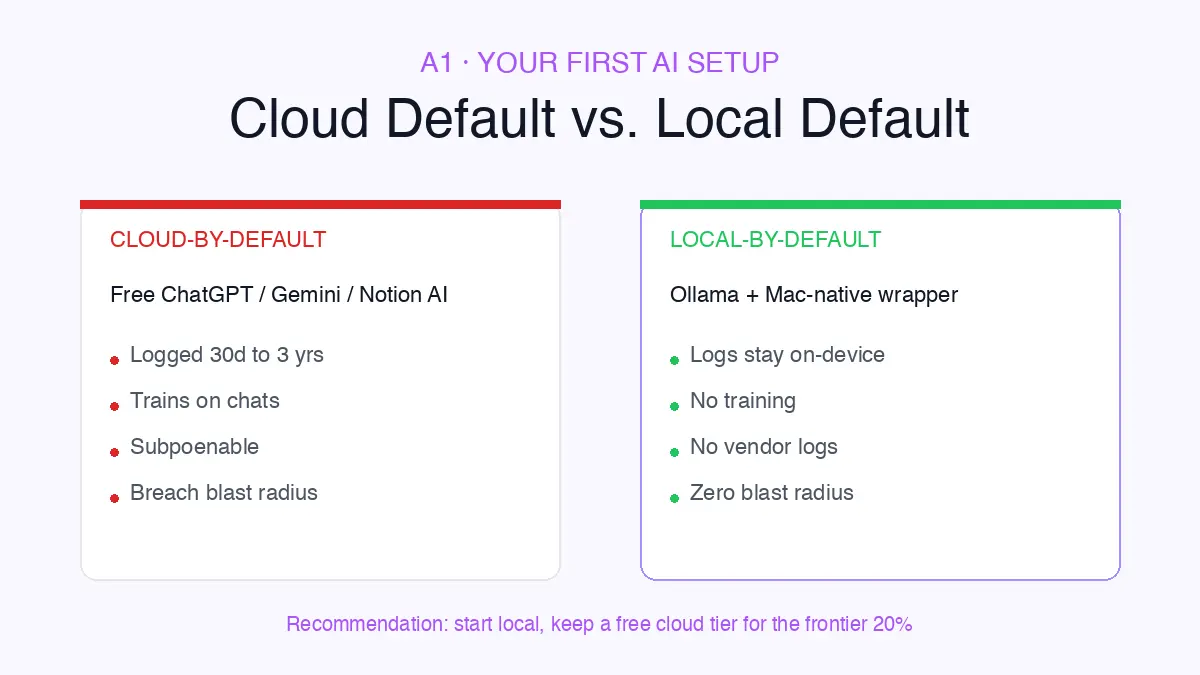
If you have never used either seriously and you are choosing your first setup, here is what cloud AI actually does with your prompt after Send. The prompt ships over TLS to a vendor data center, runs inference, returns a response.
On consumer tiers, the exchange is logged anywhere from 30 days (OpenAI API default) up to three years (Gemini retention per current Google docs). That log can become training data unless you opt out manually.
- Recommendation: start local on Mac as the safer zero-start pick (lower lifetime risk, lower marginal cost), and keep a free cloud tier handy for the capability-frontier 20%
- That is the best for your business default for almost anyone in this profile, especially if your work touches client data, PHI, or financial memos
- Open the Mac App Store, install Ollama plus a Mac-native local-AI wrapper, and you have a privacy-strong starting point in 20 minutes
A2: Already on ChatGPT, Notion AI, or Gemini for 6+ Months (Switching Cost)
If you have been on ChatGPT, Notion AI, or Gemini for six months and are weighing migration, the privacy risk in what you have already pasted is real (we cover this further in our guide on uploading contracts to AI safely). Past content sits in vendor logs.
Those logs are subject to the Wang preservation order (ChatGPT logs preserved indefinitely for legal discovery, even after Delete) and discoverable via the Stein-order pattern. Switching does not undo that; it stops the bleeding from this prompt forward.
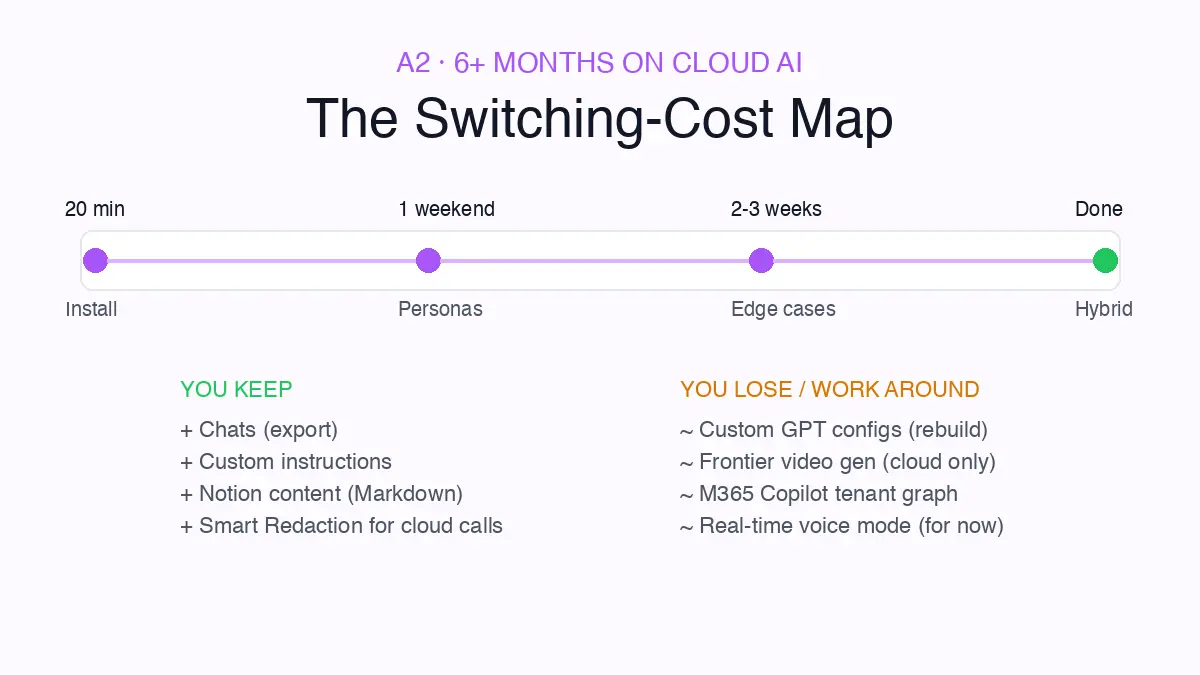
- Chats and custom instructions export cleanly via Settings then Data Controls
- Custom GPT configurations do not export (only the conversation transcript), so plan to rebuild personas as Ollama Modelfiles or Elephas Personas, around 30 to 60 minutes each
- Notion content exports as Markdown and CSV, then re-indexes in Elephas Super Brain
- Web search, frontier video generation, and Microsoft 365 Copilot's tenant-graph context have no clean local equivalent; accept hybrid for those
- Even on a paid Google AI Pro plan you may still be in the training pipeline, since users on Google Support thread #395548332 and gemini-cli issue #20569 report Google's own docs and the AI Pro terms of service contradict each other
Recommendation for this AI work and AI adoption profile: run a hybrid workflow. Elephas routes between its built-in local LLM models and your cloud accounts inside one Mac-native UI. Switching pain timeline: 20 minutes to install, one weekend for personas, two to three weeks of edge cases.
A3: Already on Local or Elephas (Reassurance + Capability Gap)
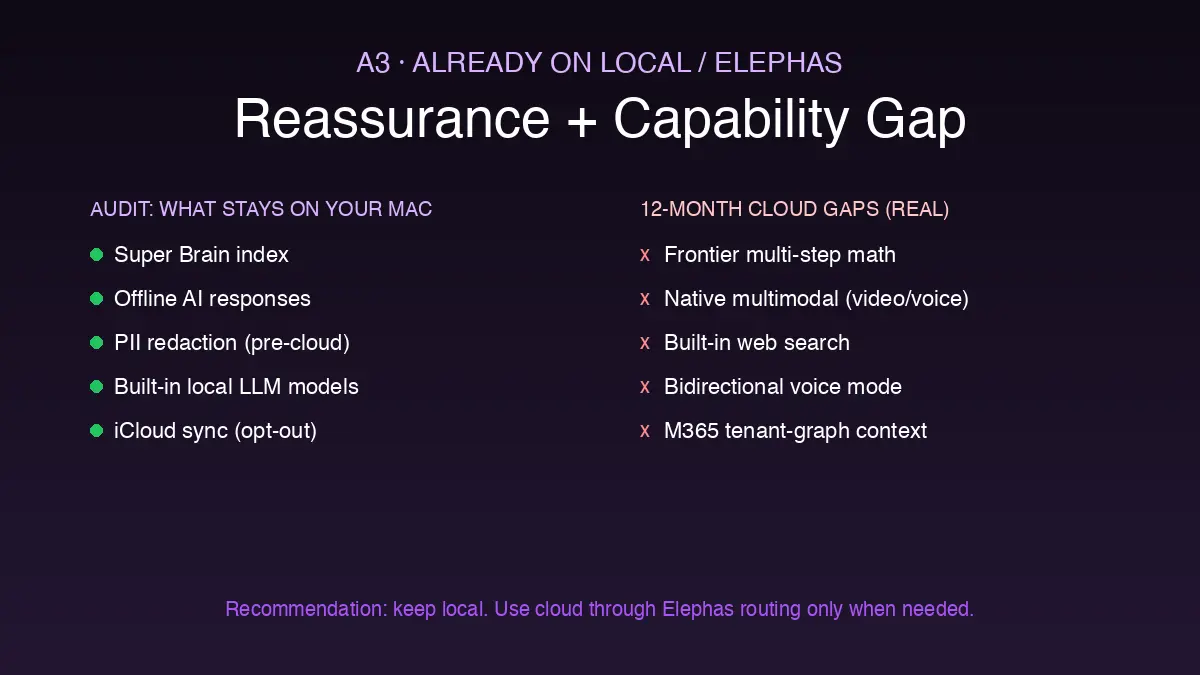
If you are already on Elephas and want to verify the privacy story is still clean, here is the honest audit. Elephas gives you two ways to run a prompt, and the privacy posture is different for each.
Mode 1: Built-in local LLM models. Elephas ships with local LLM models inside the app, so nothing has to leave your Mac. Super Brain indexing, Offline AI responses, and PII redaction all run on-device. Capability is more limited than frontier cloud, but the privacy floor is absolute: zero data leaves your machine.
Mode 2: Your own API keys (third-party models). If you connect your OpenAI, Anthropic, Google, or Perplexity API key, Elephas routes prompts through those models for the extra capability. Before anything reaches the cloud model, Smart Redaction strips sensitive data: client names, emails, credit cards, medical or health records, and other PII. The cloud AI sees the redacted version; answers come back and Elephas restores the redacted bits locally. Elephas itself operates on a zero data retention policy, so your prompts and responses are not stored on Elephas servers.
Recommendation: default to Mode 1 for sensitive work, switch to Mode 2 with Smart Redaction only when the task genuinely requires frontier capability.
A4: Skeptic of Both Sides, Auditing Whether Local Has Phoned Home
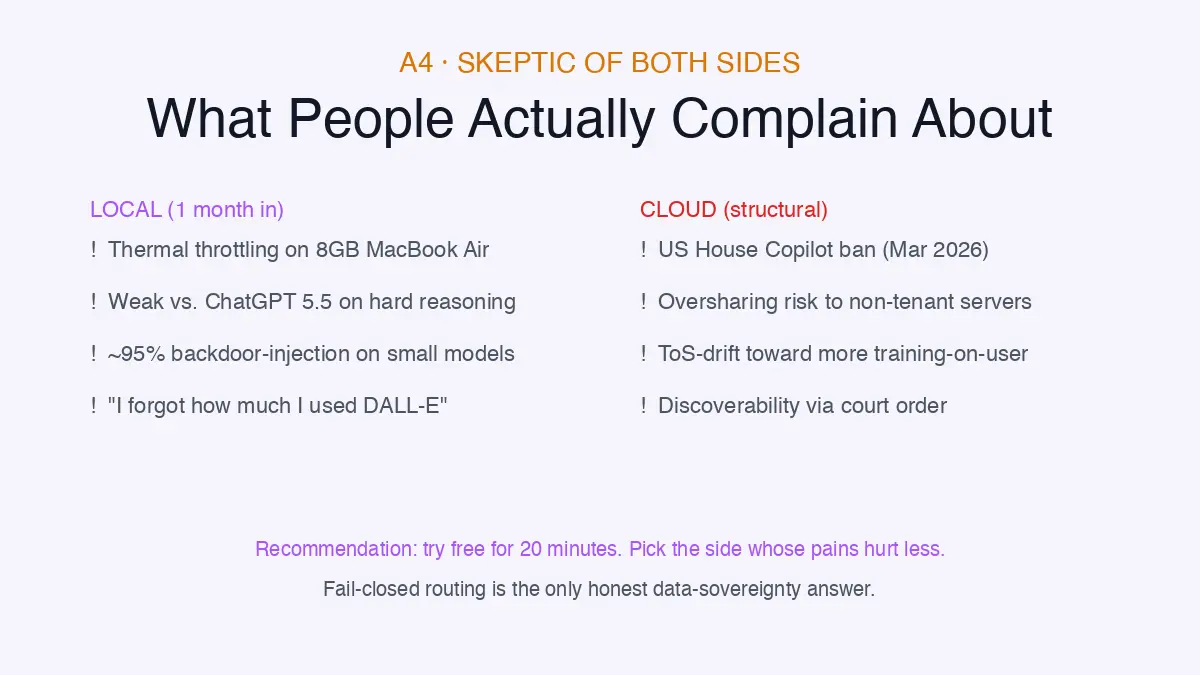
If you are skeptical of both sides and want to know whether local AI's “private by default” claim survives scrutiny, the honest answer is not zero. The aitooldiscovery 2026 review explicitly cautions: verify each tool's telemetry policy in its own documentation.
No major Mac-side local-AI tool has been caught exfiltrating prompt content recently. The Microsoft Recall pattern (opt-out by default until publicly called out) means the trust posture should be “verify in each app's preferences,” not “assume.”
For the record on Elephas: it operates on a zero data retention policy, so prompts and responses are not stored on Elephas servers in either mode (built-in local LLMs or your own API keys with Smart Redaction). That is the part of the audit you can actually verify in writing.
What people who actually tried local AI complain about a month in (drawn from r/LocalLLaMA pattern reports), plus one cloud-side counterpoint to keep the audit honest:
- Thermal throttling on 8GB MacBook Air during sustained 13B inference
- Weak outputs versus ChatGPT 5.5 or Claude Opus 4.7 on multi-step reasoning the user did not realize they relied on
- The “I forgot how much I used DALL-E” surprise, since multimodal generation is a real capability gap for a subset of users
- Cloud-side counterpoint: US House banned Microsoft Copilot for staffers in March 2026 citing oversharing risk to non-tenant cloud services (Time); partially reversed September 2025 to a 6,000-staffer pilot per Computerworld, but the underlying oversharing-risk concern is structurally unresolved
Recommendation: lowest-friction try-before-buy is Ollama or Elephas free on your existing Mac. Fail-closed routing (return an error rather than silently sending sensitive prompts to cloud) is the only honest data-sovereignty answer.
The Verdict: Local Wins on Three Vectors, Cloud Wins on One, and Hybrid Is the Mature Answer
Local AI is genuinely safer on the three vectors that decide data safety in 2026: subpoena exposure, terms-of-service training drift, and third-party breach blast radius. Cloud AI still owns the capability frontier across multimodal, web search, agentic browsing, and the Microsoft 365 Copilot tenant-graph context.
Hybrid is the mature answer for almost everyone whose work spans both sensitive content and frontier capability. Local for the sensitive 80%, cloud for the frontier 20%, with sensitive requests configured to fail closed instead of silently routing to a vendor you do not control.
On Mac, the practical implementation of that hybrid is Elephas. Zero data retention policy. Two modes: the built-in local LLM models for prompts that should stay on-device, or your own API key (OpenAI, Claude, Gemini, Perplexity) with Smart Redaction stripping names, dates, client details, and medical info before any cloud call leaves your machine.
Pick local AI if you handle legal client work, healthcare PHI, financial memos, or journalist source notes. Pick cloud AI if you primarily need frontier reasoning, agentic browsing, or native multimodal with enterprise contracts (more in our broader guide to AI tools that keep client data private).

Try Elephas free on Mac
The privacy-friendly AI knowledge assistant with built-in local LLM models, Smart Redaction, and explicit per-prompt model routing.
See current plans on elephas.app