Westlaw AI Review 2026: Features, Pricing & Is It Worth It?
Thomson Reuters has gone all-in on AI for Westlaw. But with opaque pricing, cloud-only processing, and features that feel bolted on rather than native—is it actually worth the investment? We break it all down.
Quick Verdict
Bottom line: Westlaw AI is powerful for legal research but expensive and locked into the Thomson Reuters ecosystem. It's best for firms that already have a Westlaw subscription and need AI-assisted research on top of an established workflow. Solo practitioners and budget-conscious lawyers should look elsewhere.
What Is Westlaw AI?
Westlaw AI is Thomson Reuters' suite of artificial intelligence features built into the Westlaw legal research platform. Rather than building a standalone AI product, Thomson Reuters has layered AI capabilities on top of its existing Westlaw infrastructure—the same database that millions of attorneys have used for decades.
The AI features launched in stages throughout 2024 and 2025, built largely on the foundation of CoCounsel, Thomson Reuters' earlier AI assistant powered by GPT-4. In 2026, many of those CoCounsel capabilities have been folded directly into the Westlaw platform, though some remain as separate add-ons.
The key AI features include AI-Assisted Research (conversational search with citations), Quick Check (citation verification), Document Analysis (upload briefs and contracts for AI review), and a Drafting Assistant for generating legal text. All of these operate within the Westlaw web interface and require an active internet connection.
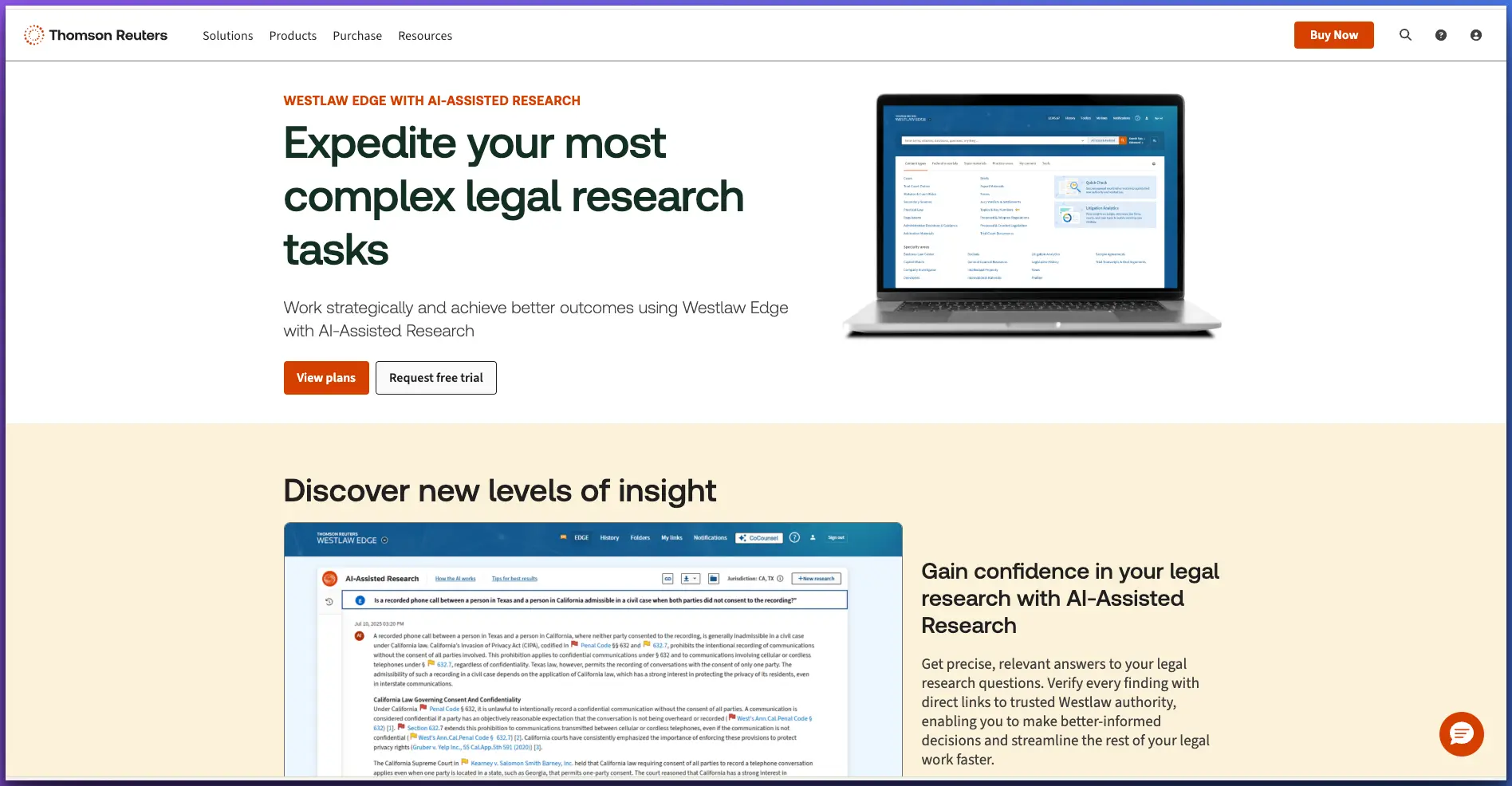
Westlaw AI Features: A Deep Dive
1. AI-Assisted Research
This is the flagship AI feature. You can ask natural-language legal questions—"What is the standard for piercing the corporate veil in Delaware?"—and Westlaw AI returns a synthesized answer with linked citations to cases, statutes, and secondary sources in the Westlaw database.
The key advantage: every citation is verifiable because it comes from Westlaw's actual database, not generated from a language model's training data. This is a meaningful differentiator from general-purpose AI tools like ChatGPT, which are known to hallucinate case citations.
2. Quick Check
Upload a brief or legal memo and Quick Check scans it for citation accuracy, identifies potentially overruled or distinguishable authorities, and surfaces additional cases you may have missed. Think of it as an automated cite-checking assistant. It integrates with KeyCite to flag any authorities with negative treatment. This is genuinely useful for litigation teams preparing filings.
3. Document Analysis
Upload contracts, briefs, or other legal documents and ask the AI questions about their contents. You can extract key provisions, identify potential issues, or get summaries. The limitation: documents are uploaded to Thomson Reuters' cloud servers for processing, which raises privilege concerns for some practitioners. There are also file size and upload quantity limits that can be frustrating for large matters.
4. Drafting Assistant
Generate legal text from prompts—draft contract clauses, motion sections, or correspondence. The drafting quality is competent but not exceptional. It tends toward generic legal language rather than the firm-specific voice and style that clients expect. For routine drafting, it saves time. For complex or nuanced work, it requires significant editing.
5. Westlaw Edge Integration
The AI features are built on top of Westlaw Edge, which means you get access to KeyCite (citation verification), ResultsPlus (secondary source recommendations), Statutes Compare (legislative history tracking), and Litigation Analytics. The AI layer adds conversational access to these existing tools. If you're already comfortable with Westlaw Edge, the AI feels like a natural extension. If you're new to the platform, there's a learning curve.
What Works Well
Verified legal database — no hallucinated citations. Every case and statute cited actually exists in the Westlaw database.
Deep integration with case law, statutes, regulations, and secondary sources. The breadth of the database is unmatched.
KeyCite integration gives you instant citation verification and negative treatment alerts within AI responses.
Familiar interface for existing Westlaw users. If your firm already uses Westlaw, the AI features slot in without a major workflow change.
Strong for litigation research. AI-Assisted Research and Quick Check are genuinely useful for preparing briefs and motions.
What Doesn't Work
Pricing is opaque and expensive. Thomson Reuters doesn't publish clear pricing — you have to call sales. Expect $200+/month for base Westlaw, plus additional fees for AI features.
AI features feel bolted on rather than native. The conversational interface sits awkwardly alongside the traditional Westlaw search paradigm.
No offline capability whatsoever. Every query requires an internet connection and processes on Thomson Reuters' cloud servers.
Cloud-only processing raises privilege concerns. Uploading client documents to third-party servers for AI analysis creates potential privilege waiver issues under ABA guidance.
Locked into the Thomson Reuters ecosystem. Westlaw AI only works with Westlaw data. You can't bring your own documents into the research flow easily.
Document upload limits are restrictive. Large matters with hundreds of documents can quickly hit ceilings.
Slower than AI-native tools. Because the AI layer sits on top of legacy infrastructure, response times can lag behind purpose-built AI assistants.
Westlaw AI Pricing: The Full Picture
Thomson Reuters is notoriously opaque about pricing. They don't publish rate cards—you have to contact sales for a quote, and pricing varies based on firm size, package tier, and negotiation. Here's what we've gathered from public sources and practitioner reports:
Varies wildly by package (Westlaw Edge, Westlaw Precision, etc.)
Availability depends on your subscription level
For the full AI assistant experience beyond basic AI search
May be bundled or sold as separate modules
Total cost for a small firm: $400–1,200+/month
For a solo practitioner or small firm that wants Westlaw with full AI capabilities, you're looking at a minimum of $400/month and potentially over $1,200/month depending on the package. That's $4,800–14,400+ per year for a single user.
The alternative: Elephas + free research tools = ~$20/month
Elephas ($19/month) gives you AI document analysis, drafting, and client communication—all processed locally on your Mac. Pair it with Fastcase (free through most bar associations), Google Scholar, and CourtListener for legal research. Total: under $20/month with better privacy.
Westlaw AI vs. Alternatives: Side-by-Side
| Feature | Westlaw AI | CoCounsel | Lexis+ AI | Elephas |
|---|---|---|---|---|
| Monthly Price | $200+/mo | $225+/mo | $200+/mo | $19/mo |
| Offline Mode | No | No | No | Yes |
| Data Privacy | Cloud | Cloud | Cloud | Local |
| Legal Database | Yes | Yes | Yes | Your docs |
| AI Quality | Good | Good | Good | GPT-4 / Claude |
| Citation Verification | Yes (KeyCite) | Yes | Yes (Shepard's) | N/A |
| Document Drafting | Basic | Yes | Basic | Advanced |
| Works With Any App | No | No | No | Yes |
Note: Westlaw AI, CoCounsel, and Lexis+ AI are legal research platforms with AI bolted on. Elephas is a general-purpose AI assistant that processes documents locally. They serve different primary functions—the comparison is about overall AI value for lawyers, not a direct feature-for-feature matchup.
Who Should Use Westlaw AI?
Large firms already on Westlaw
If your firm already pays for Westlaw, adding AI features is a no-brainer. The incremental cost is manageable at scale, and the integration with your existing research workflow is seamless. The AI features genuinely save time on research and cite-checking.
Mid-size firms considering switching
Evaluate carefully. The total cost of Westlaw + AI can be substantial. Consider whether alternative AI tools combined with your current research platform might give you better value. Run a pilot with a few attorneys before committing firm-wide.
Solo practitioners
Probably too expensive unless you have a high-volume litigation practice that demands constant legal research. At $400–1,200+/month, the cost is hard to justify for a solo. Consider AI tools designed for solo practitioners or affordable legal research platforms that offer better value.
Budget-conscious lawyers
No. Use Elephas for AI-powered document analysis, drafting, and communication ($19/month), and pair it with free research tools like Fastcase and Google Scholar. You'll get 80% of the AI benefit at 2% of the cost. See our guide to private AI tools for lawyers for more options.
Elephas as a Complement to Westlaw
Here's the thing most reviews won't tell you: you don't have to choose one tool or the other. The smartest approach is to use each tool where it excels.
Westlaw is unmatched for legal research—case law, statutory analysis, citation verification. That's its core strength and no general-purpose AI tool can replicate that verified legal database.
Elephas handles everything else a lawyer does with AI: analyzing client documents locally (preserving attorney-client privilege), drafting correspondence, summarizing depositions, preparing for client meetings, composing demand letters, and working offline during court appearances or travel.
The Recommended Stack
Westlaw for legal research, case law analysis, and citation verification
Elephas for document analysis, drafting, client communication, and offline work
Result: Comprehensive AI coverage with local privacy for sensitive work—at a fraction of going all-in on Thomson Reuters add-ons
This approach also addresses the ABA Formal Opinion 512 concerns about AI and confidentiality. Westlaw's verified database handles research where hallucination risk matters most, while Elephas's local processing ensures privileged client information never leaves your device. It's the best of both worlds.
Privacy & Privilege Considerations
Westlaw AI processes all queries and uploaded documents on Thomson Reuters' cloud servers. Thomson Reuters states that client data is not used to train AI models and is handled under their legal industry data protection policies. That's better than using a consumer AI tool like ChatGPT.
However, the fundamental issue remains: uploading privileged client documents to any third-party server creates a third-party disclosure that could be argued to waive attorney-client privilege. While Thomson Reuters' terms are favorable, not every court has weighed in on whether cloud-based AI processing constitutes a waiver.
For research queries (asking about case law, statutes, legal questions), the privilege concern is minimal—you're querying a database, not sharing client facts. For document analysis and upload features, the risk is higher. This is where local-processing tools like Elephas offer a structural advantage: no data ever leaves your machine.
The Verdict: Should You Subscribe to Westlaw AI?
Westlaw AI is a solid product built on an excellent legal database. The research quality is high, the citations are real, and the integration with KeyCite and other Westlaw features is genuine. If you already pay for Westlaw, adding AI capabilities is a worthwhile upgrade.
But the pricing is the dealbreaker for most small firms and solo practitioners. Thomson Reuters has priced Westlaw AI for large firms and institutional buyers. If you're not already in the Westlaw ecosystem, the cost of entry is steep and the AI features alone don't justify it.
For most lawyers, the practical path forward is combining affordable, privacy-first AI tools like Elephas with whichever legal research platform you already use. You get powerful AI for daily work without the $1,000+/month price tag. And you keep privileged information where it belongs: on your own device.
Frequently Asked Questions
Is Westlaw AI worth the cost?
It depends on your firm size and existing subscriptions. If you already pay for Westlaw, the AI add-ons provide genuine value for legal research. But for solo practitioners and small firms, the total cost ($400-1,200+/month) is difficult to justify when tools like Elephas ($19/month) combined with free research databases can handle most daily AI tasks.
Can Westlaw AI replace a legal research assistant?
Westlaw AI can accelerate research tasks but cannot replace human judgment. It excels at finding relevant case law, verifying citations, and identifying missing authorities. However, it still requires attorney oversight to evaluate relevance, craft legal arguments, and apply strategic thinking to case-specific facts.
Does Westlaw AI hallucinate citations?
Westlaw AI has a significant advantage over general-purpose AI tools: it draws from Thomson Reuters' verified legal database. This means citations are real and verifiable. However, the AI's analysis of how cases apply to your specific situation still requires careful attorney review. The citations are real, but the reasoning may not always be sound.
How does Westlaw AI compare to CoCounsel?
CoCounsel (now part of Thomson Reuters) and Westlaw AI are converging. CoCounsel was originally a standalone AI legal assistant built on GPT-4, while Westlaw AI is integrated directly into the Westlaw research platform. Thomson Reuters has been folding CoCounsel capabilities into Westlaw, so the distinction is increasingly blurred. Expect them to merge fully over time.
Can I use Westlaw AI offline?
No. Westlaw AI requires an active internet connection and runs entirely in the cloud. All queries and documents are processed on Thomson Reuters servers. If you need offline AI capability for confidential document analysis, Elephas is one of the few tools that processes data locally on your Mac without any internet requirement.
What's the cheapest way to get AI legal research?
The most cost-effective approach is combining Elephas ($19/month) for AI document analysis, drafting, and client communication with free legal research tools like Fastcase (free through many bar associations), Google Scholar for case law, and CourtListener. This gives you AI capability for under $20/month compared to $400-1,200+ for Westlaw AI.
Should I use Elephas alongside Westlaw?
Yes, this is actually the recommended approach for firms that already subscribe to Westlaw. Use Westlaw for what it does best — legal research, citation verification, and case law analysis. Use Elephas for everything else — document drafting, client email composition, contract review, meeting preparation, and offline work with confidential materials. The combination gives you comprehensive AI coverage at a fraction of going all-in on Thomson Reuters add-ons.

Related Resources
Explore all AI for Lawyers resourcesSiri vs ChatGPT for Confidential Work
15 min readarticleCan You Upload Contracts to AI? Privacy Risks, Vendor Workflow, and Safer Alternatives for AI Contract Management
11 min readarticleAI for Sensitive Data: A Complete Guide to Using AI Tools Without Exposing Sensitive Company Information (2026 Edition)
10 min readarticleIs ChatGPT Attorney-Client Privilege Protected? The Heppner Ruling and Generative AI in Litigation
11 min readAI for Lawyers Without the Enterprise Price Tag
Elephas gives you AI-powered document analysis, drafting, and communication—all processed locally on your Mac. Works alongside Westlaw or any research platform. Starting at $19/month.
Try Elephas Free
No credit card required. True offline AI included.