Amazon Quick Desktop App: What It Reads on Your Mac and Where Your Files Go
The Amazon Quick desktop app can read whole folders on your Mac or PC, far more than one pasted question. A 2026 report by Cyberhaven found that 39.7 percent of all AI interactions involve sensitive data (Cyberhaven).
What you need is a plain answer. The Amazon Quick desktop app is Amazon's AI assistant for work on Mac and Windows. It reads folders you grant, keeps your chats and searchable copies of files you choose in your Amazon Quick account, and sends your prompt and any attachments to cloud models.
The sections below cover what it reads, where each file goes, the risks, the plans, and how it compares with Claude Cowork and ChatGPT.
Quick answer
- The Amazon Quick desktop app is Amazon's work assistant for Mac and Windows.
- Granting a folder doesn't upload it. Indexing (building a searchable copy) does. Chats and memory live in Amazon's cloud.
- Each request sends your prompt and any attachments to cloud models. Amazon says it doesn't use them to train AI models.
- The $0 Free plan needs no AWS account. Amazon's pages disagree on whether it includes the app.
- Elephas is a private AI knowledge assistant for Mac and Windows that answers from your own documents and hides personal details first. Plans start at $19 a month after a 7-day free trial (pricing).
What Is Amazon Quick, and What Does the Desktop App Do?
Amazon Quick is Amazon's AI assistant for work, and the desktop app brings it to macOS and Windows. The app runs on your computer, but AI models in Amazon's cloud handle each request, says the AWS security page for enterprise accounts (AWS is Amazon Web Services).
AWS built it as the next step after Amazon Q Business, which closed to new customers from 31 July 2026 (AWS notice). It first launched as Amazon Quick Suite in October 2025 (Quick Suite launch).
The preview began on 28 April 2026. An AWS What's New post of 9 September 2026 made it generally available in 7 AWS Regions, and Amazon's launch story was last updated that day.
What Does the Amazon Quick Desktop App Read on Your Computer?
The Amazon Quick desktop app reads folders you grant, work apps you connect and pages its browser opens, and AWS lists no screen-watching tool.
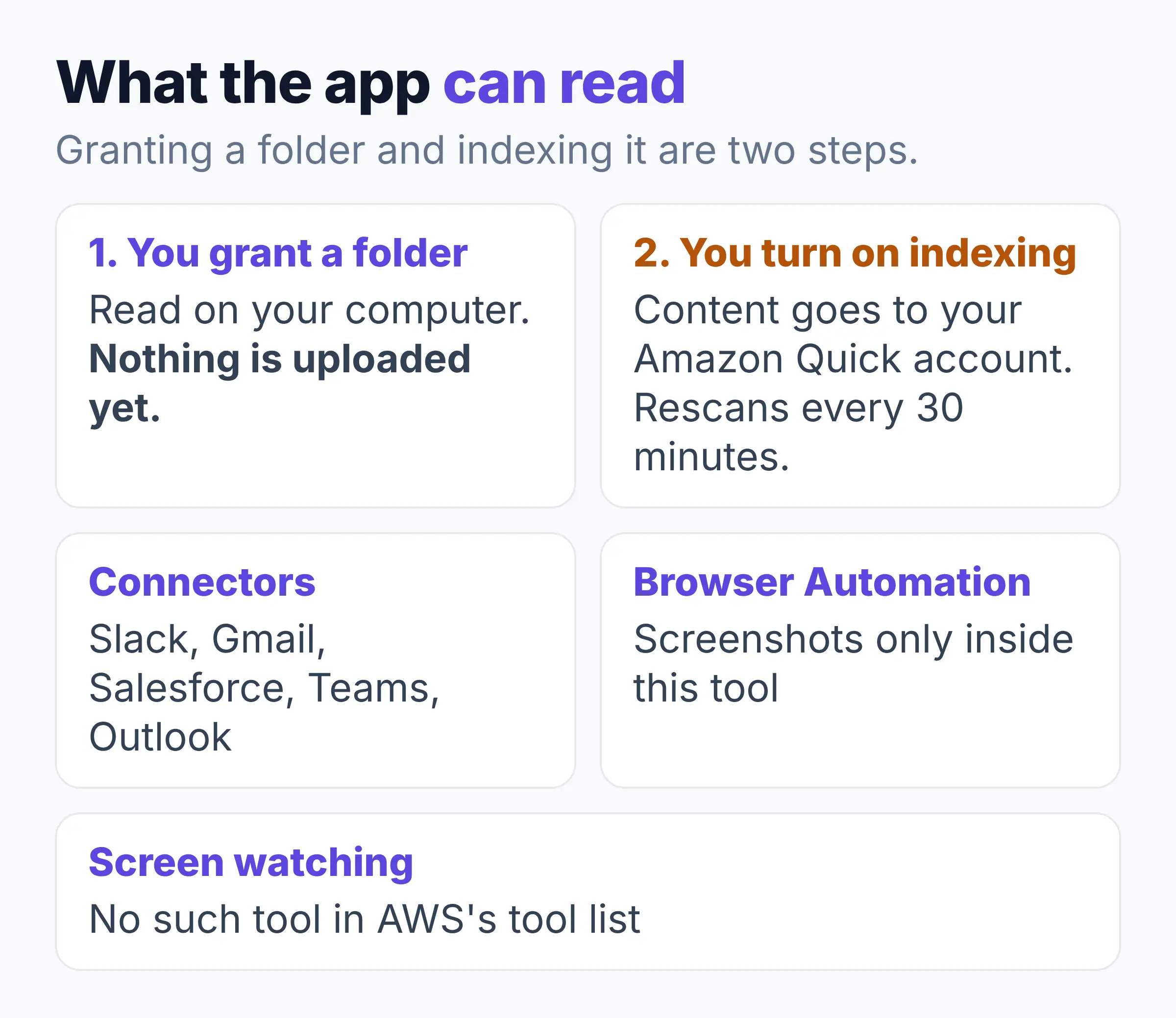
If you give the app your Documents folder, nothing is uploaded at first. AWS says Quick "can read its files on your computer, but it doesn't upload them until you turn on indexing" (building a searchable copy). Indexing sends their content to your Amazon Quick account and rescans every 30 minutes.
Quick can't read folders you didn't pick, and it can't see your whole Mac. A sandbox (a walled-off space where its code runs) keeps it to granted folders, though AWS says the sandbox "always has access to the system temporary directories regardless of the configured folder permissions."
- Connectors (links to other apps) such as Slack, Gmail, Salesforce, Microsoft Teams and Outlook let it read those apps too.
- Screenshots happen only inside its Browser Automation tool. AWS's tool list shows no screen-watching tool.
- All system tools start switched on, with write actions set to "Ask Each Time".
Where Do Your Files Go? The Knowledge Graph, Your Account and Each Request
Amazon Quick keeps your chats, memory, knowledge graph and indexed files in your cloud-based Amazon Quick account, says the AWS desktop security documentation.
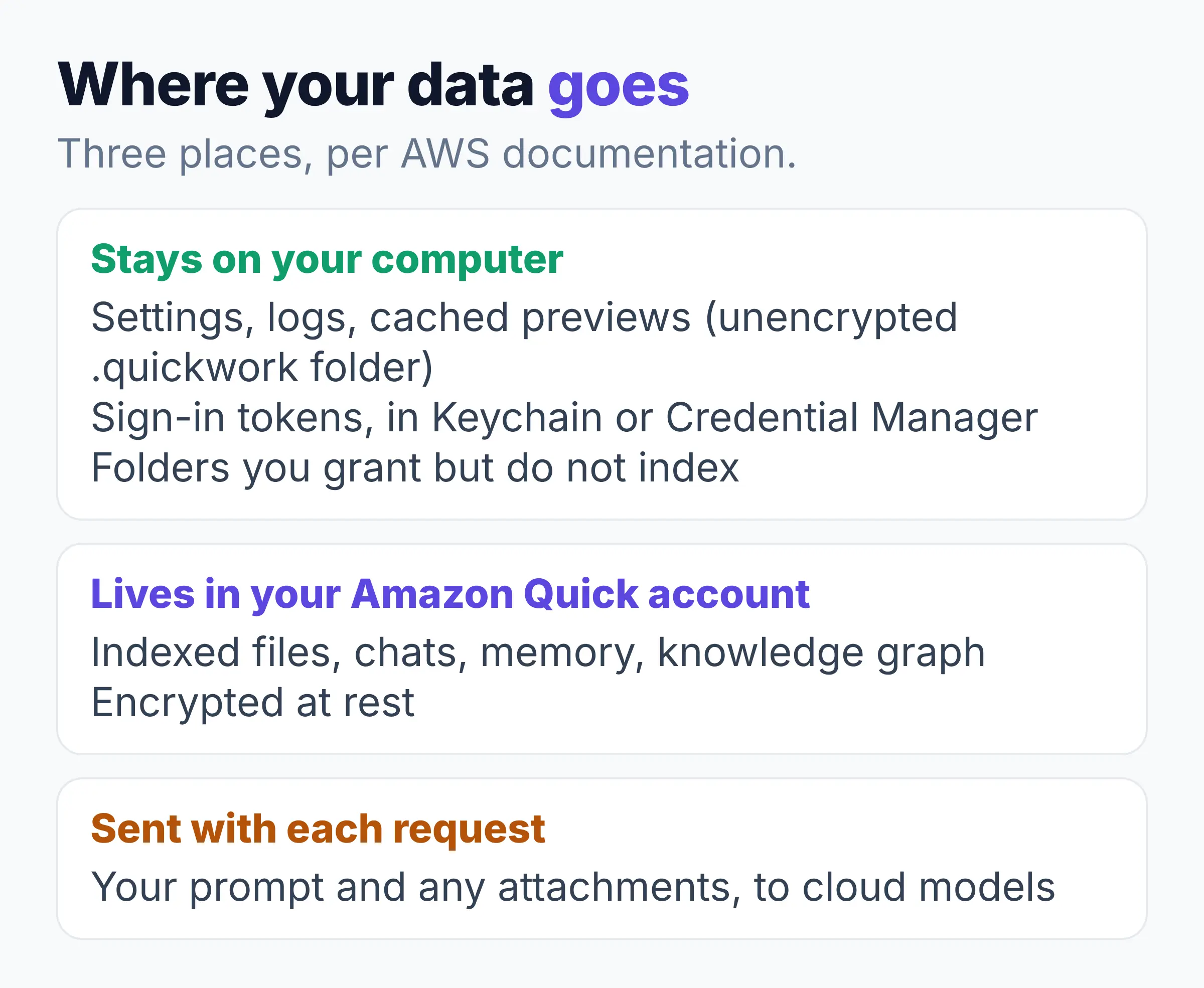
In AWS's words, Amazon Quick "keeps each user's conversations, memory, knowledge graph, library, skills, and indexed folder content in your AWS Quick account" (desktop security page). A knowledge graph is a map of the people, projects and dates in your work.
What stays on your computer, what lives in your Amazon Quick account, what is sent with each request
| Item | Where it goes | Source |
|---|---|---|
| Settings, folder permissions, logs, cached previews | Your computer, in the unencrypted .quickwork folder | AWS desktop security page |
| Sign-in tokens | Your computer, in Keychain or Credential Manager | AWS desktop security page |
| Folders you grant but do not index | Read on your computer by Quick's tools, not uploaded to your account. The model that answers runs in Amazon's cloud | AWS knowledge page |
| Indexed files, chats, memory, knowledge graph | Your Amazon Quick account, encrypted at rest | AWS desktop security page |
| Your prompt and any attachments | Sent with each request to cloud models | AWS desktop security page |
AWS also says "You cannot disable cross-Region inference". That means your request may be handled in another AWS region in the same part of the world.
- AWS's download page says "No uploading". That is true for granting a folder, but not for indexing it.
- Cloudelligent says the "core AI agent backend" runs on your hardware. AWS says the app "doesn't host or run models."
- The same blog says Quick's chat history stays on your computer, which AWS's security page does not support.
What Are the Risks of Using Amazon Quick on Your Computer?
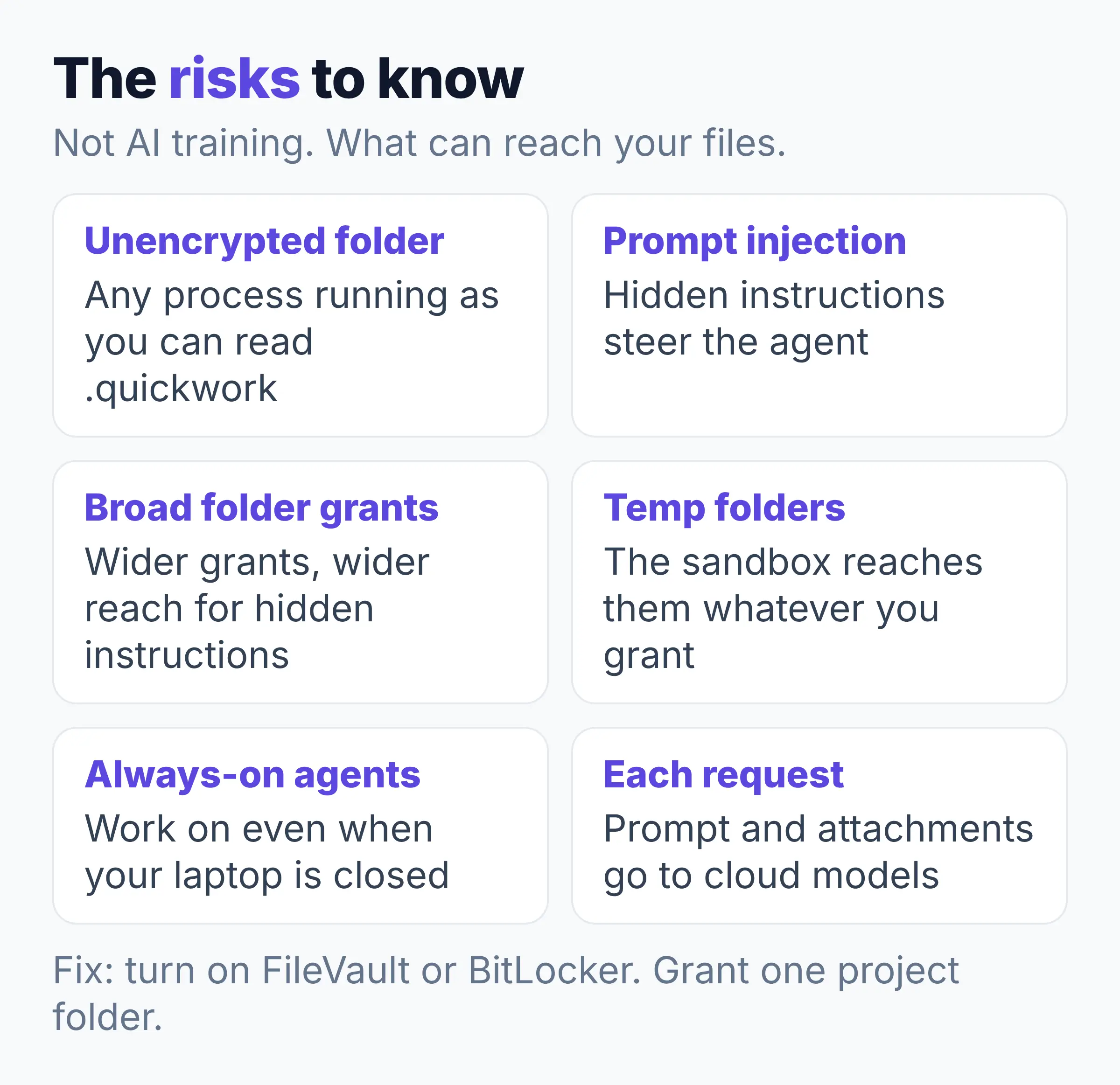
The main Amazon Quick risks come from what hidden instructions or other apps can reach and what leaves your computer with each request, not from AI training.
Your prompt and any attachments go to Amazon's cloud models with each request. AWS's documents do not describe a way to hide names first. Microsoft Purview labels (company file tags) can block a labelled file, but that is not hiding names in the text.
Prompt injection (hidden instructions in a file, web page or invite that steer an AI agent) is what AWS calls adversarial content. A study by Nasr, Carlini, Tramer and 11 co-authors found that attacks that adjust to each protection got past 12 recent protections, with success "above 90% for most" (arXiv).
In January 2026, researchers at PromptArmor made Claude Cowork upload files from a connected folder through a hidden instruction. In June 2025, EchoLeak showed Microsoft Copilot in Microsoft 365 could leak data. Microsoft fixed it, with no evidence customers were targeted. No public attack on Amazon Quick was found as of 10 November 2026.
- The .quickwork folder is not encrypted, and AWS says any process running as you can read it, so turn on FileVault on Mac or BitLocker on Windows (built-in disk locks).
- Grant one project folder, not your whole Documents folder.
- Broad folder grants widen what a hidden instruction can touch, and the code sandbox reaches temp folders whatever you grant.
- AWS's always-on agents keep working in the cloud "even when your laptop is closed". AWS's security page adds that automated runs have no one watching: "No interactive session is present to observe what happens during execution." Check each tool's permission before you schedule an agent.
- In May 2026, Fog Security reported a permissions bug in Quick's web chat agents. AWS had fixed it in March and said no customer data was at risk.
Amazon Quick Pricing: Which Plan Includes the Desktop App?
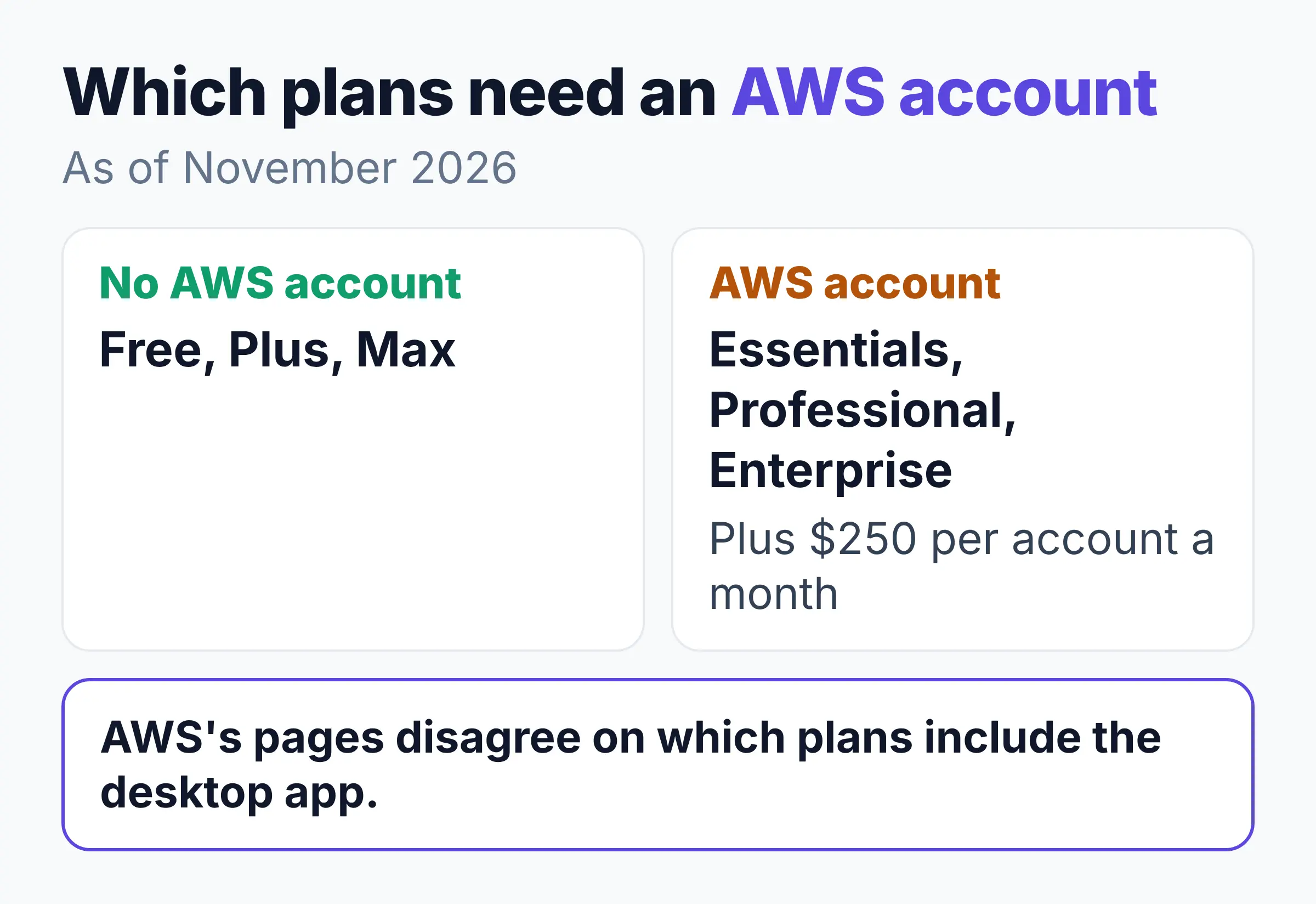
Amazon Quick pricing starts with a $0 Free plan you can open with a Google (Gmail), Apple or Amazon login, no work AWS account needed. AWS's pages disagree on which plans include the desktop app.
| Plan | Price as of November 2026 |
|---|---|
| Free | $0, one user, 1 GB index |
| Plus | $20 a user a month yearly, or $25 monthly |
| Max | $100 a user a month yearly, or $125 monthly |
| Essentials | $3 a user, plus $250 per account a month |
| Professional | $20 a user, plus $250 per account a month |
| Enterprise | $40 a user, plus $250 per account a month |
AWS's pricing page lists the desktop app on every plan, Free included, while its FAQ says the app "is available on Plus, Professional, and Enterprise plans". The pages disagree, so check the pricing page on the day you sign up.
Amazon Quick suits teams that want AI agents and connectors across work apps. If you mainly ask questions of your own files, see the next section.
- You need an AWS account for Essentials, Professional and Enterprise, per the pricing page.
- Every sign-up gets a 30-day Plus trial, then you pick Plus or Free, says the AWS FAQ.
- AWS caps agent hours (time AI agents spend working for you): up to 8 hours a month per Professional user, 18 on Enterprise and 3 on Essentials until 31 January 2027 (pricing page).
Amazon Quick vs Claude Cowork and ChatGPT: Where Your Data Goes
- Amazon Quick: reads folders you grant and connected work apps. Chats, memory and indexed files sit in your Amazon Quick account, says the AWS security page.
- Claude Cowork: reads folders you connect and can take screenshots. Tasks run on Anthropic's servers, so files it opens are processed there, says Anthropic's safety page.
- ChatGPT: on Mac, Work with Apps reads content from a supported coding or text app you open. OpenAI says it joins your chat history and may improve models, per its help page.
Elephas: The Solution for Private Answers From Your Own Files
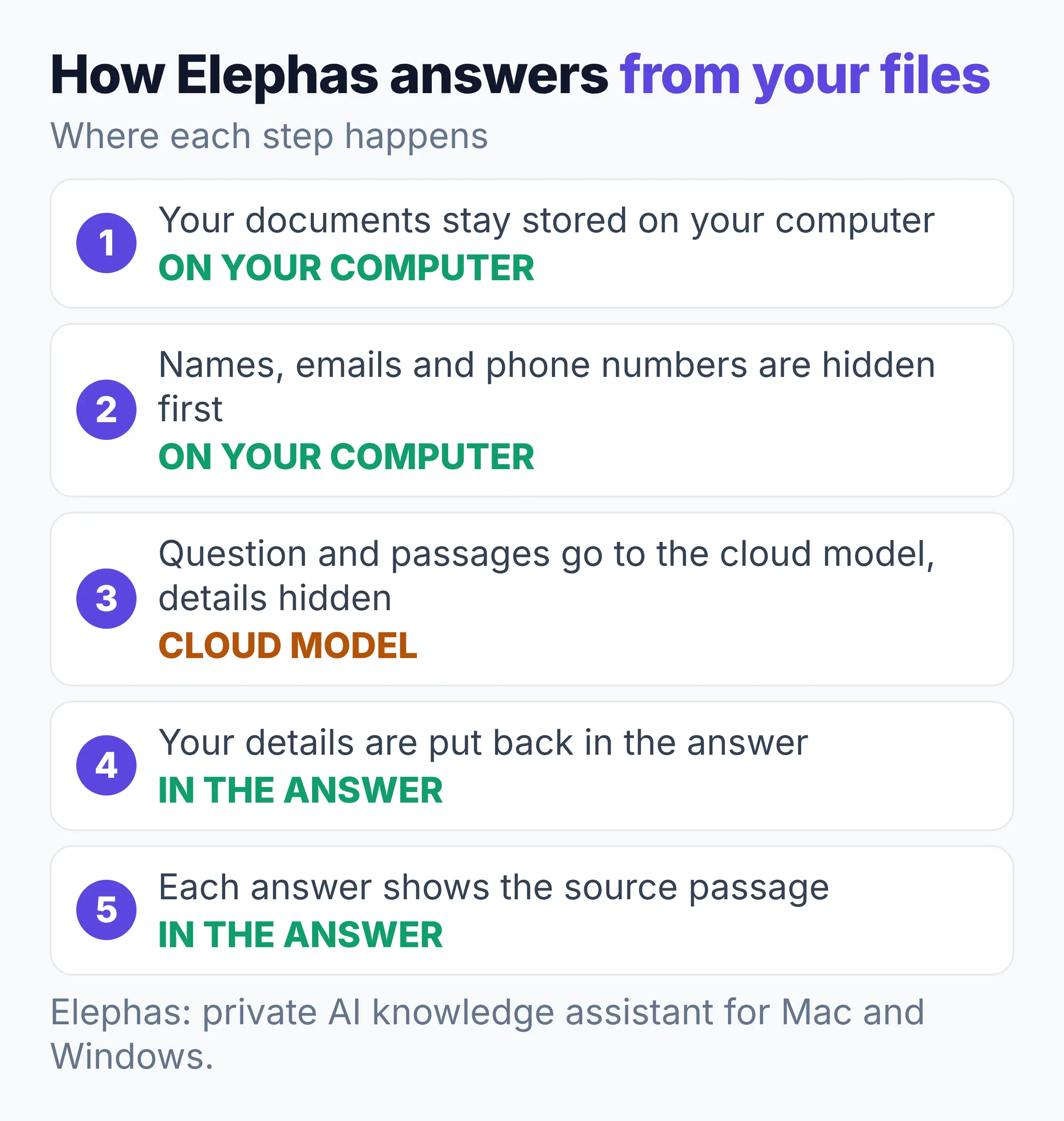
For private answers from your own files, keep your documents on your computer and hide personal details before a question leaves it.
A LayerX report, covered by The Register in October 2025, found that 22 percent of copy-and-paste actions into AI tools include personal or card data (The Register).
Elephas is a private AI knowledge assistant for Mac and Windows that answers from your own files and shows the source passage. Your documents stay stored on your computer.
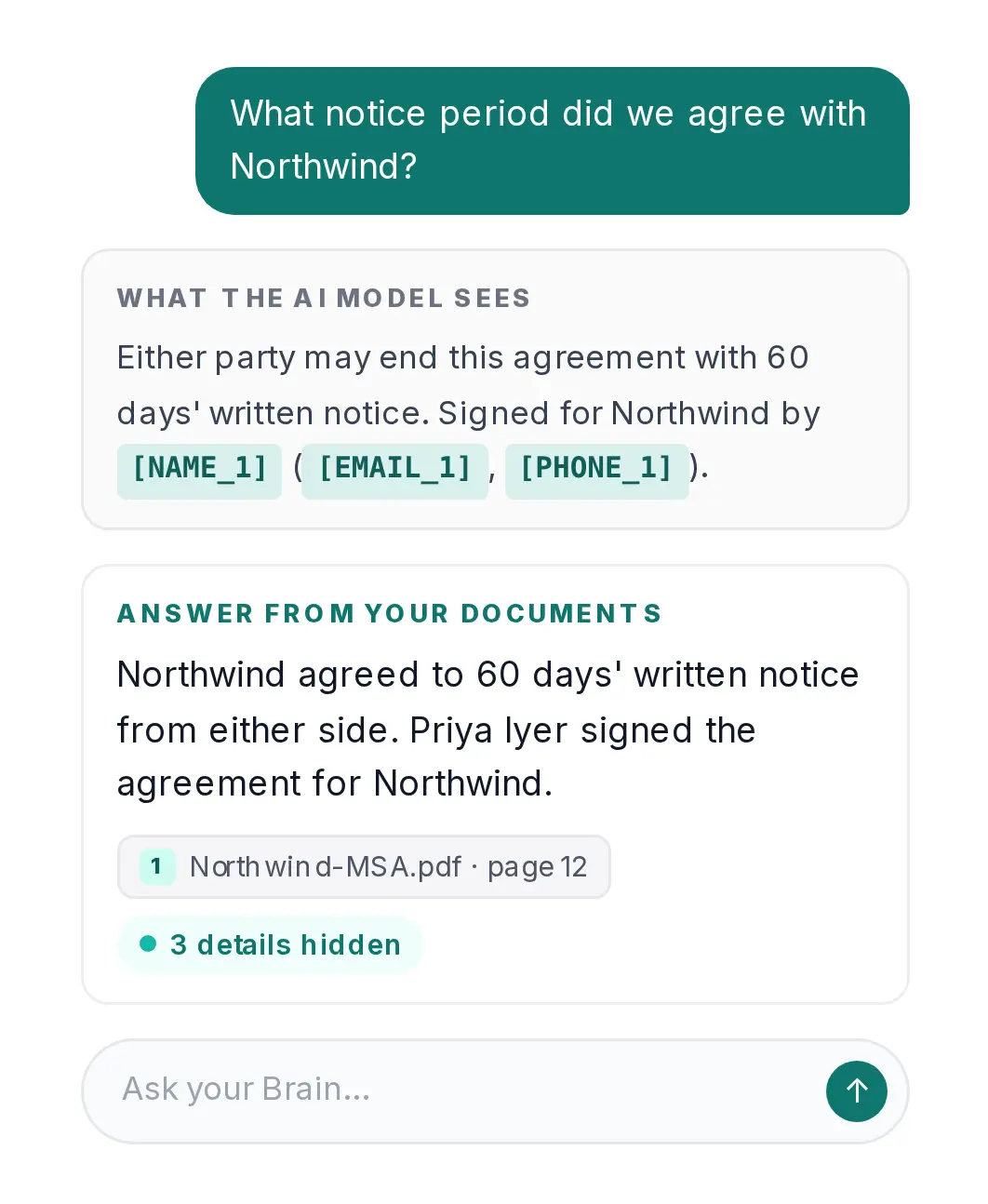
Illustration from the Elephas website. Names and details are examples.
Before a question leaves your computer, Elephas hides personal details such as names, email addresses and phone numbers, then puts them back in the answer. The question and selected passages still go to the cloud model, with those details hidden. The optional on-computer model sends nothing anywhere.
- Amazon Quick is the better pick for teams that want agents, automations and connectors across work apps.
- Keep using a cloud model for each question while names, emails and phone numbers stay hidden. Compare ChatGPT anonymizer tools.
- Free for 7 days, no card needed. Plans start at $19 a month (pricing).
FAQ: Amazon Quick Desktop App Questions
Does AWS use my files to train AI models?
No. AWS's FAQ says it does not use your data "to train models in any AWS Quick plan", free or paid. The desktop security page adds that AWS doesn't use "your conversations, files, or personal context to train or improve AI models."
Does the desktop app run on Intel Macs?
No. AWS's getting started page lists macOS 12 or later on Apple Silicon (M1 or later), or Windows 10 64-bit or later. Both need 8 GB of RAM and 2 GB free to install, with 10 GB or more recommended for search indexing.
How long does Amazon Quick keep my chats?
Amazon Quick keeps unpinned chats for 365 days and chats you pin or put in folders for 750 days, per AWS's usage limits page. The rolling 30-day window on its data handling page applies only after a user is deleted. Memory and the knowledge graph together can use up to 2 GB.
Can Quick's built-in filters stop prompt injection?
Not fully. AWS's security page says Quick's blocked-word filters use exact matching and apply only to the web experience. A study by Zhan, Fang, Panchal and Kang found attacks that adjust to each protection got past all eight protections tested on AI agents, with success over 50% (ACL Anthology).
What do early users report about the desktop app?
Independent reviews barely exist as of November 2026. One user on the AWS community forum reports company sign-in failing when another app already uses port 18080 (July 2026). An AWS Partner replied in the same thread that the app uses that fixed port. On 14 August 2026, AWS let admins set per-user limits.