Apple Intelligence Not Working? 11 Fixes for Mac and iPhone
Last updated: 22 July 2026
On iOS 26 and macOS 26, Apple Intelligence looks switched on, yet nothing happens when you tap it, or the toggle sits greyed out with no error at all. Apple Intelligence is rarely broken outright; it is usually gated behind one silent condition, and the gate fails quietly.
Below are 11 fixes, ordered from cheapest and least destructive to most drastic, each with a way to confirm it actually worked. They cover both Mac and iPhone, so whichever device is stuck, the right gate is only a few steps away.
Quick answer
- Not an outage? Check Apple's System Status page first (Step 1)
- Toggle greyed out? Match Siri's language to your device language (Step 3), or check for an MDM restriction on a work device (Step 9)
- Stuck downloading? Confirm 7GB free storage, then charging plus Wi-Fi plus no VPN (Steps 4-5)
- Only one feature broken, not all of them? Isolate it before resetting anything (Step 7)
- Elephas starts at $19/month (free plan available) if you want a Mac-native AI assistant that works the same no matter which Apple Intelligence gate is closed
“Apple Intelligence iOS/iPhone NOT Working SOLVED” by Saunders Tech. Watch it, then work through the steps below.
Apple Intelligence Not Working: The Fast Diagnosis
Apple Intelligence not working almost always traces to one of 4 silent gates: mismatched Siri language, insufficient storage, unmet network or power conditions, or an IT-managed restriction. Fixing the right gate restores it, without erasing the device.
Some of the frustration isn't a bug: lawyers proposed a $250 million settlement over delayed Siri AI marketing, covering an estimated 37 million devices, awaiting a judge's approval, per AP News. On r/ios, one reader described paying for features that hadn't shipped.
Before You Start: What Apple Intelligence Needs From Your Device
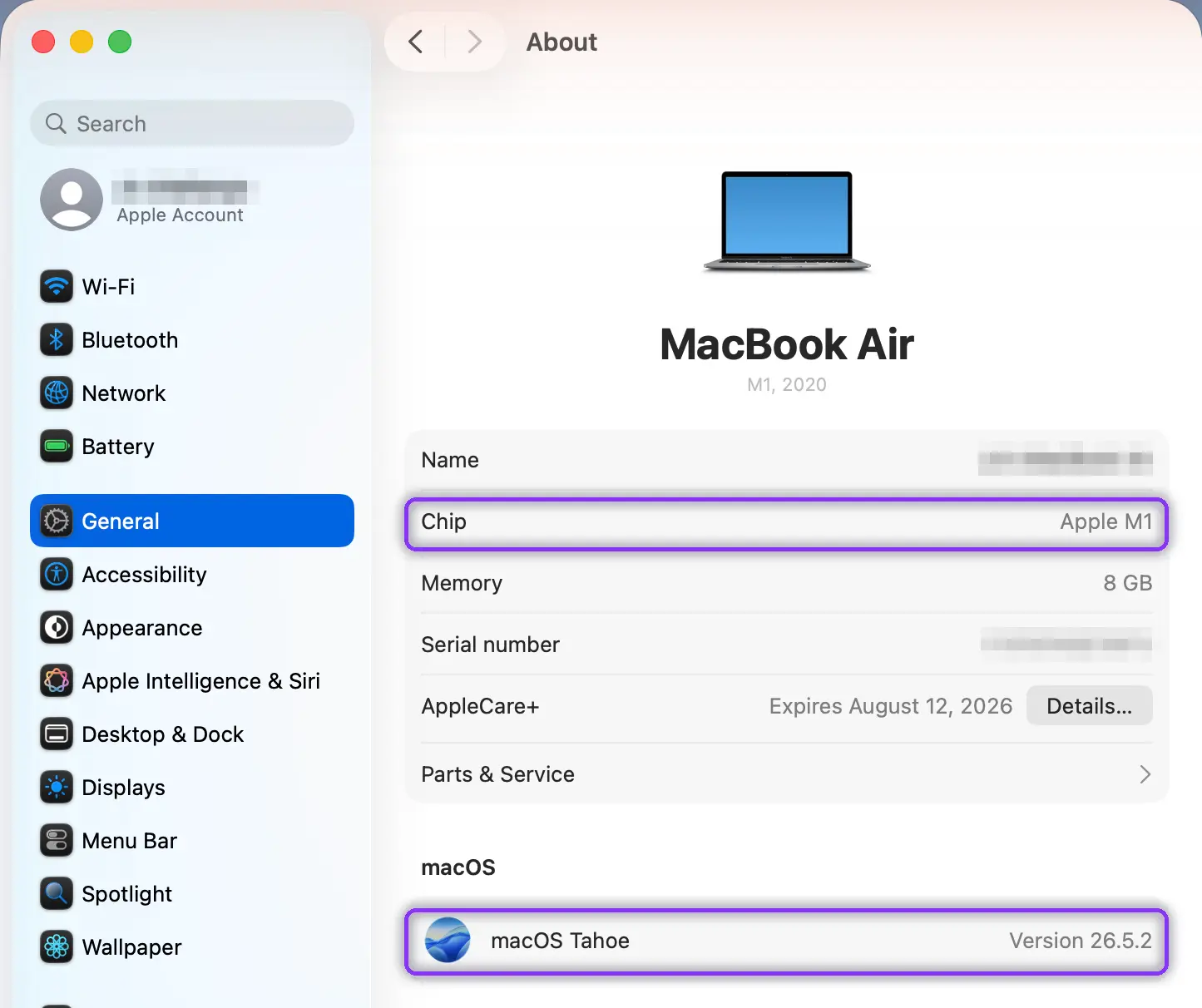
Apple Intelligence needs five things before Step 1: eligible hardware, iOS 26 or macOS 26, 7GB storage, matching Siri language, and an Apple Account.
- Eligible hardware: iPhone 15 Pro/Pro Max, iPhone 16+, iPad Air/Pro with M1+ (or A17 Pro iPad mini), any Mac with M1+, Apple Vision Pro, per Apple's device requirements page
- Operating system: iOS 26, iPadOS 26, or macOS 26 (Tahoe)
- Free storage: at least 7GB on each device
- Language: device and Siri set to the same supported language
- Signed in to Apple Account
On r/ios, one user quoted Apple: both location and account region in the EU block it.
A few checks before Step 1
A status of “Apple Intelligence Requested” is normal for the first few hours. On r/technology, one commenter pointed to how far Siri's feature rollouts have slipped before, so a little patience is fair. Past three days, stop waiting and start at Step 1.
The fixes people carry over from ChatGPT rarely help here. Signing out, clearing a cache, or reinstalling do little, because this is built into iOS and macOS, not installed as an app. The one real equivalent is signing out and back in (Step 6), and the ChatGPT extension has its own switch (Step 8).
On r/mac, one user confirmed it runs on every M-series Mac back to the M1.
One last trap: a toggle reading on does not mean the model files finished downloading, which Steps 4 and 5 check. And a greyed-out toggle on a work Mac is not always a fault, Step 9 tells an MDM restriction apart from a Screen Time limit or an Apple Account gate.
How to Fix Apple Intelligence Not Working: 11 Steps for Mac and iPhone
The 11 fixes run in gate order, after an outage and eligibility check: Siri language, storage, network and power, then IT policy.
- Siri language: the device and Siri language setting must match (Step 3)
- Storage: at least 7GB free must be available (Step 4)
- Network and power: charging, Wi-Fi, and no VPN, all at once (Step 5)
- IT policy: an MDM restriction only IT can lift (Step 9)
On a work or school device, run Step 9 first: an MDM restriction makes every other step pointless.
Step 1: Rule Out an Apple-Side Outage First
Check the Apple System Status page for Siri or Apple Intelligence entries, then check whether it's one device or every device on your account. MacRumors confirmed an iOS 26 beta outage unrelated to device settings that resolved on its own.
Some features roll out to devices one at a time. On r/iphone, one user was told newer features “rely on server-side updates” and can lag an updated phone by a couple of days.
✓ Verify it worked: No red or yellow indicator next to Siri services on the status page, and the same feature fails identically on a second linked device if you have one.
Step 2: Confirm Your Device and Chip Are Actually Eligible
On iPhone/iPad, check Model Name under Settings > General > About. On Mac, check Chip under Apple menu > About This Mac.
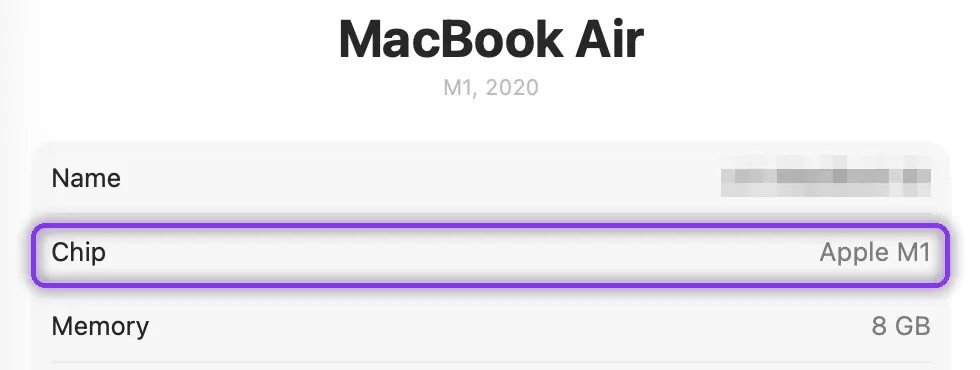
Apple confirms compatibility with iPhone 15 Pro and Pro Max, and every iPhone 16 or later, plus any Mac with an M1 chip or later; Intel Macs cannot run it at all.
✓ Verify it worked: About This Mac shows Chip: Apple M1 or later, or your iPhone/iPad Model Name matches the eligible-device list.
Step 3: Match Your Siri Language to Fix the Silent Block
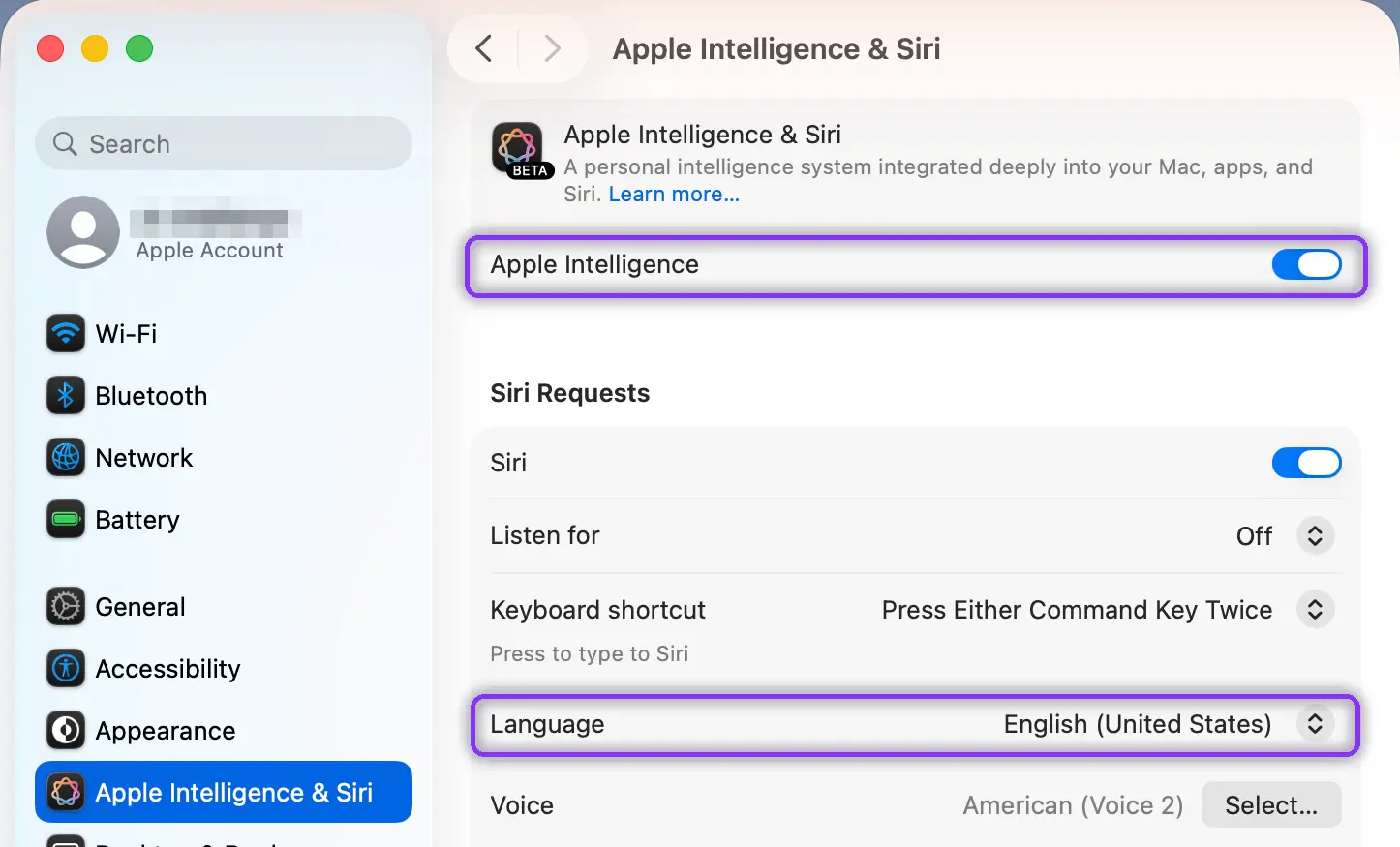
Note your device language at Settings > General > Language & Region (labeled language and region on some builds), then make sure Siri is set to a supported language that matches it.
iPhone/iPad at Settings > Apple Intelligence & Siri > Siri Requests > Language, Mac at System Settings > Apple Intelligence & Siri > Language. Apple confirms these are independent settings.
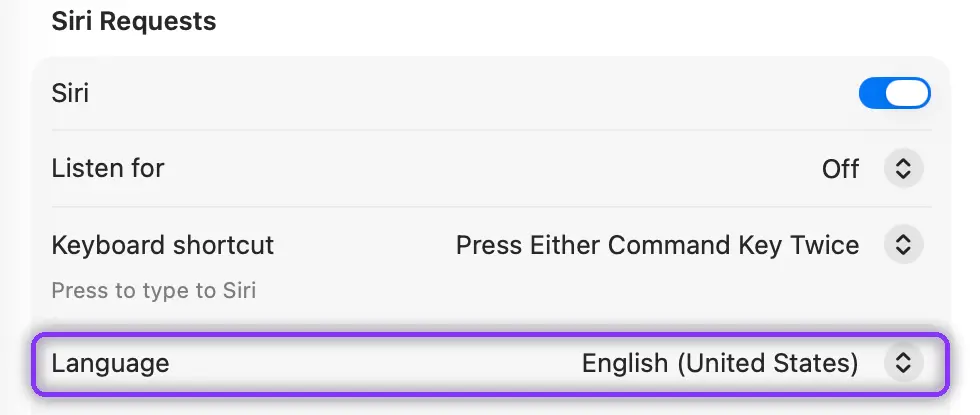
On r/iphone, one user found Apple Intelligence gets disabled when Siri's language and the device language don't match exactly, including locale.
✓ Verify it worked: Settings > Apple Intelligence & Siri switch is turned on and no longer greyed out.
Step 4: Free Up Storage to Meet the 7GB Requirement

Check free space at Settings > General > iPhone Storage (or iPad Storage), or System Settings > General > Storage on Mac. MacRumors quotes Apple: Apple Intelligence needs 7GB free, and falling short is why it stays stuck on downloading. Clear that space, and the download bar usually starts moving within 15-30 minutes.
On r/ios, one user pointed to the path for the model footprint: Settings > General > iPhone Storage > iOS.
✓ Verify it worked: Storage screen shows 7GB or more available, and the download indicator begins moving within 15 to 30 minutes.
Step 5: Meet the Download Conditions: Power, Wi-Fi, No VPN

- Plug in
- Connect to normal Wi-Fi (not a cellular hotspot or metered network)
- Turn off Low Power Mode
- Disable any VPN and iCloud Private Relay
Low Power Mode can block the download on iPhone; on a MacBook it only matters on battery, under System Settings > Battery. MacObserver confirms all are needed at once; a VPN or Private Relay can also block Private Cloud Compute requests.
A VPN can block Apple Intelligence outright, not just harder requests. On r/ios, one user found on-device Writing Tools stopped working with a VPN on, and started again the moment they turned it off.
✓ Verify it worked: Apple Intelligence & Siri shows a completed download, with no progress bar or “Preparing” label.
Step 6: Sign Out and Back Into Your Apple Account
Go to Settings > [Your Name] > Sign Out (or System Settings on Mac) to sign out of your Apple ID, restart, then sign back in. Apple Support Community reports this clears a stuck “Preparing” status in 10-15 minutes.
This fix carries little risk: it deletes no data.
Region can sabotage this step too. On r/MacOS, one user found the feature stuck downloading after travelling into a region where it hadn't launched yet.
✓ Verify it worked: Apple Intelligence & Siri no longer shows “Preparing” and instead shows active download progress or is switched on.
Step 7: Work Out Why Only Some AI Features Fail, Not All
Test Writing Tools in Notes, then in Chrome, Slack, or Obsidian. Apple documents it working in most places you write. Working in Notes but not elsewhere usually means a competing extension or VPN. Genmoji can also break entirely on its own, unrelated to Writing Tools.
On r/MacOS, one user found the real Image Playground switch buried in Photos.
✓ Verify it worked: Writing Tools appears in Notes's Edit menu, and after disabling VPNs or extensions, it also appears in the third-party app.
Step 8: Test the ChatGPT Extension Separately

Go to Settings > Apple Intelligence & Siri > ChatGPT and check “Use ChatGPT” and “Confirm ChatGPT Requests” (labeled “Confirm Requests” on Mac). Test a Writing Tools request that skips the extension. Apple documents this connection as one that can fail independently.
ChatGPT is an extra, not a dependency. On r/mac, one user confirmed Writing Tools runs fine on the built-in models with the extension disabled.
✓ Verify it worked: A Writing Tools request that does not route to the extension succeeds or fails independently of extension-routed requests.
Step 9: Tell an MDM Restriction Apart From Screen Time
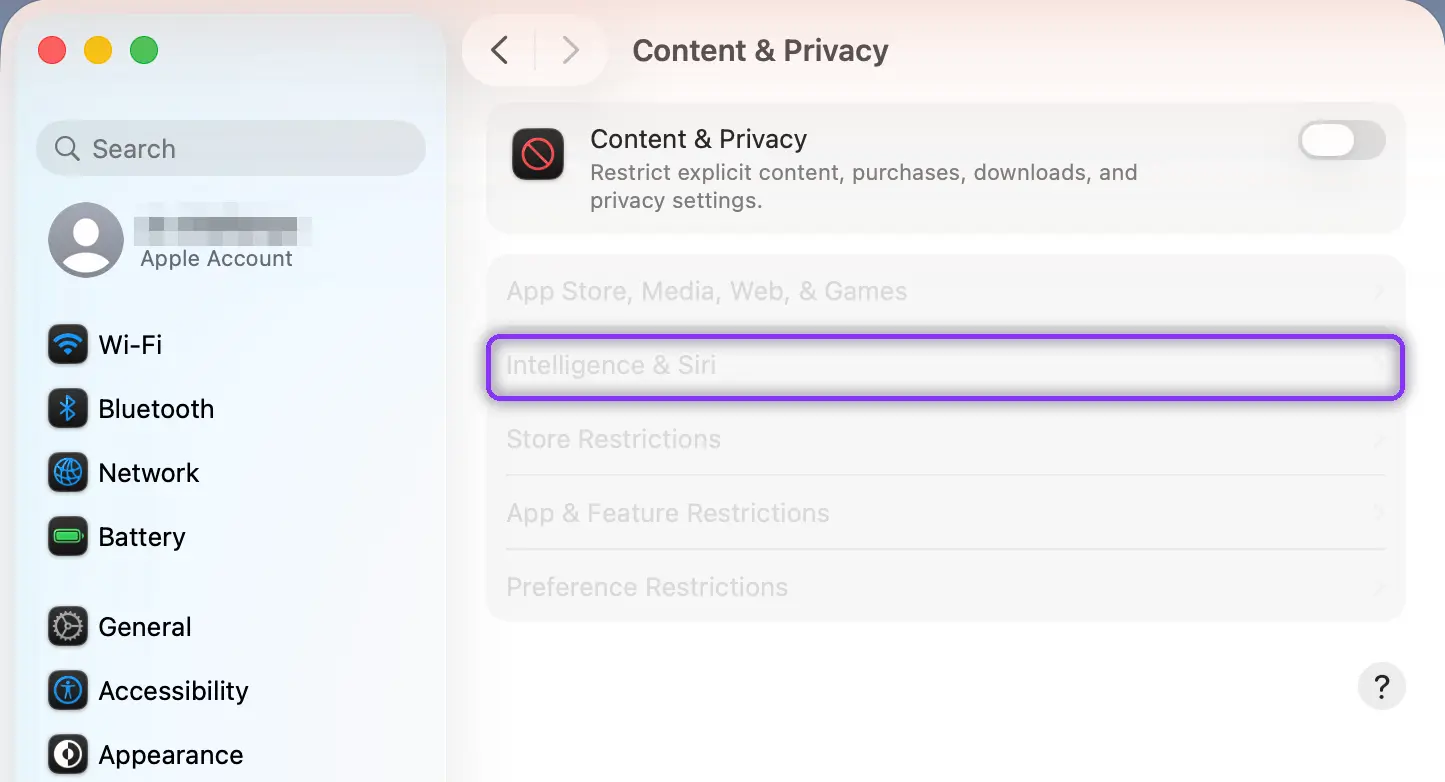
Check Settings > Screen Time > Content & Privacy Restrictions > Intelligence & Siri (or System Settings > Screen Time on Mac). A changeable switch means Screen Time, fixable yourself.
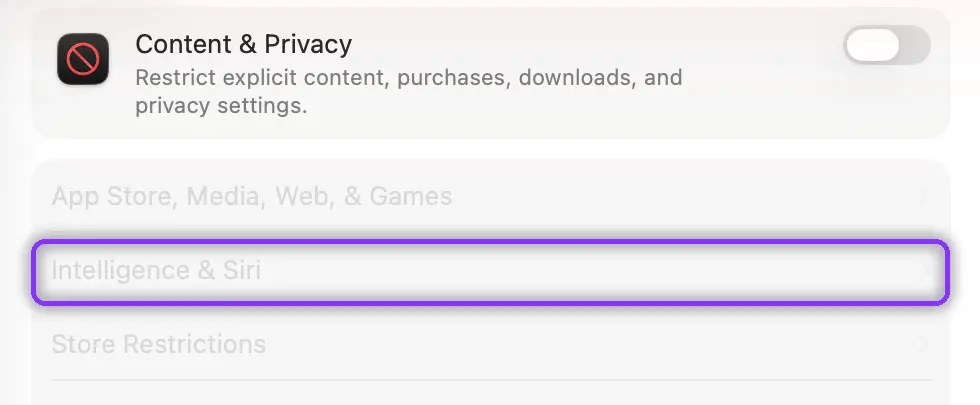
A “Managed by [Organization]” banner with no switch means MDM, per the deployment guide; only IT can change it, since it sits above the feature switch itself.
On r/CarPlay, one commenter put it plainly: a greyed-out setting usually means one above it needs to be turned on first.
✓ Verify it worked: A user-editable switch means Screen Time; a “Managed by [Organization]” banner with no switch means MDM, contact IT.
Step 10: Force a Clean Recheck When Downloads Restart at 100%
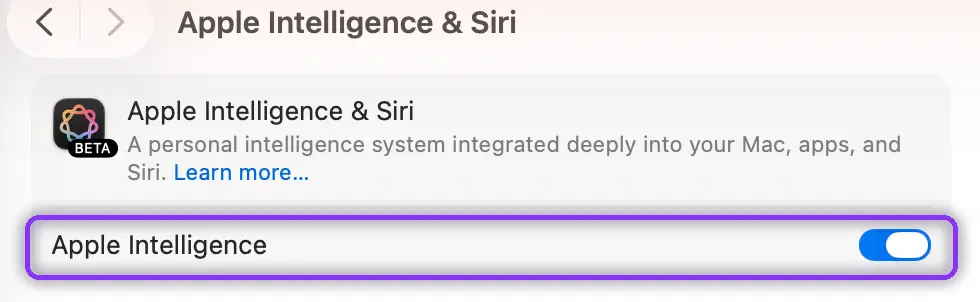
Turn Apple Intelligence off, wait 30 seconds, reboot, then turn it back on. If the loop repeats twice, apply Step 6 first. Apple Support Community documents this, and on r/MacOSBeta, one user resolved a stalled download this way.
✓ Verify it worked: Apple Intelligence & Siri stays switched on and the download indicator does not reappear after restarting your device and 10 or more minutes of normal use.
Step 11: Work the Reset Ladder, Safest Fix First
Test Apple Intelligence after each level before moving to the next:
- Reset Network Settings, iPhone/iPad only:
Settings > General > Transfer or Reset > Reset > Reset Network Settings. Mac has no equivalent; forget the network underSystem Settings > Wi-Fi > Details > Forget This Networkand remove any VPN underSystem Settings > VPN. - Reset All Settings, iPhone/iPad only: a sibling item in the same submenu. macOS has no equivalent.
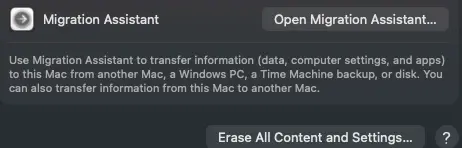
- The destructive tier, back up first: iPhone/iPad use Erase All Content and Settings; Apple silicon Mac uses
System Settings > General > Transfer or Reset > Erase All Content and Settings(Erase Assistant), per Apple's Transfer or Reset guide. Recovery Mode reinstall is the fallback if Erase Assistant fails.
| Reset level | What it removes | What it keeps | Backup needed |
|---|---|---|---|
| Reset Network Settings (iPhone/iPad); manual Wi-Fi/VPN forget (Mac) | Saved Wi-Fi, VPN configs, device name, trusted certs | All apps, photos, files | No |
| Reset All Settings (iPhone/iPad only, no Mac equivalent) | All settings back to default (keyboard dictionary, location, Apple Pay cards) | All apps, photos, files | No |
| Erase All Content and Settings (iPhone/iPad) or Erase Assistant (Mac) | Everything: apps, photos, files | Nothing, until restored from backup | Yes, mandatory |
Storage doesn't always clear until the final rung. On r/iphone, one user backed up first, then found model files still taking space until a full erase and restore.
✓ Verify it worked: After the applicable reset and restart, Apple Intelligence & Siri shows the switch turned on and the download completes without stalling.
Common Mistakes When Troubleshooting Apple Intelligence
- Ignoring Siri's language setting: it blocks activation even in a supported region. Source: Apple. Fix: Step 3.
- Skipping the 7GB storage check: it's the top cause of a “stuck switch” complaint. Source: MacRumors (2025-02-06). Fix: Step 4.
- Trusting a Screen Time fix on a managed Mac: MDM and Screen Time toggles look identical. Source: Apple Deployment Guide. Fix: Step 9.
- Assuming power and Wi-Fi don't matter: the download needs both plus no VPN, or it stalls. Source: MacObserver. Fix: Step 5.
Supported doesn't mean live. On r/technology, one commenter noted it still wasn't available in mainland China.
“Working” doesn't mean accurate. A Southern Illinois University study found Apple Writing Tools rewrites made emotional-tone detection harder, misclassifying over 40% of modified text in one dataset and 45% to 50% in another. Double-check important output, not just the setting.
What to Do If You Still Can't Restore Apple Intelligence
Collect these details before contacting Apple, per the general practice Apple staff describe on the Apple Developer Forums. Apple Intelligence is gated by region, language, hardware, and IT policy, unliftable on a managed Mac.
- Exact device model, OS build number, region, and language settings
- Free storage amount and network type at time of failure, including VPN status
- Whether the device is personal or managed, and steps already tried
- Contact Apple Support through Apple's official site if nothing above worked
- Elephas is a privacy-friendly AI knowledge assistant for Mac with a free plan and starts at $19/month, with a free trial, if the gate you hit is one you can't lift yourself
It pairs with any cloud model while keeping sensitive text off its servers.
A 2026 WiSec study of Apple's Private Cloud Compute by Hasso Plattner Institute and TU Darmstadt researchers found one-time tokens could be reused and that a per-token salt let separate requests be linked (paper). Worth keeping identifiers out of the cloud path anyway.
On r/iPhone15Pro, one user found Apple Intelligence unreliable and went back to Siri.
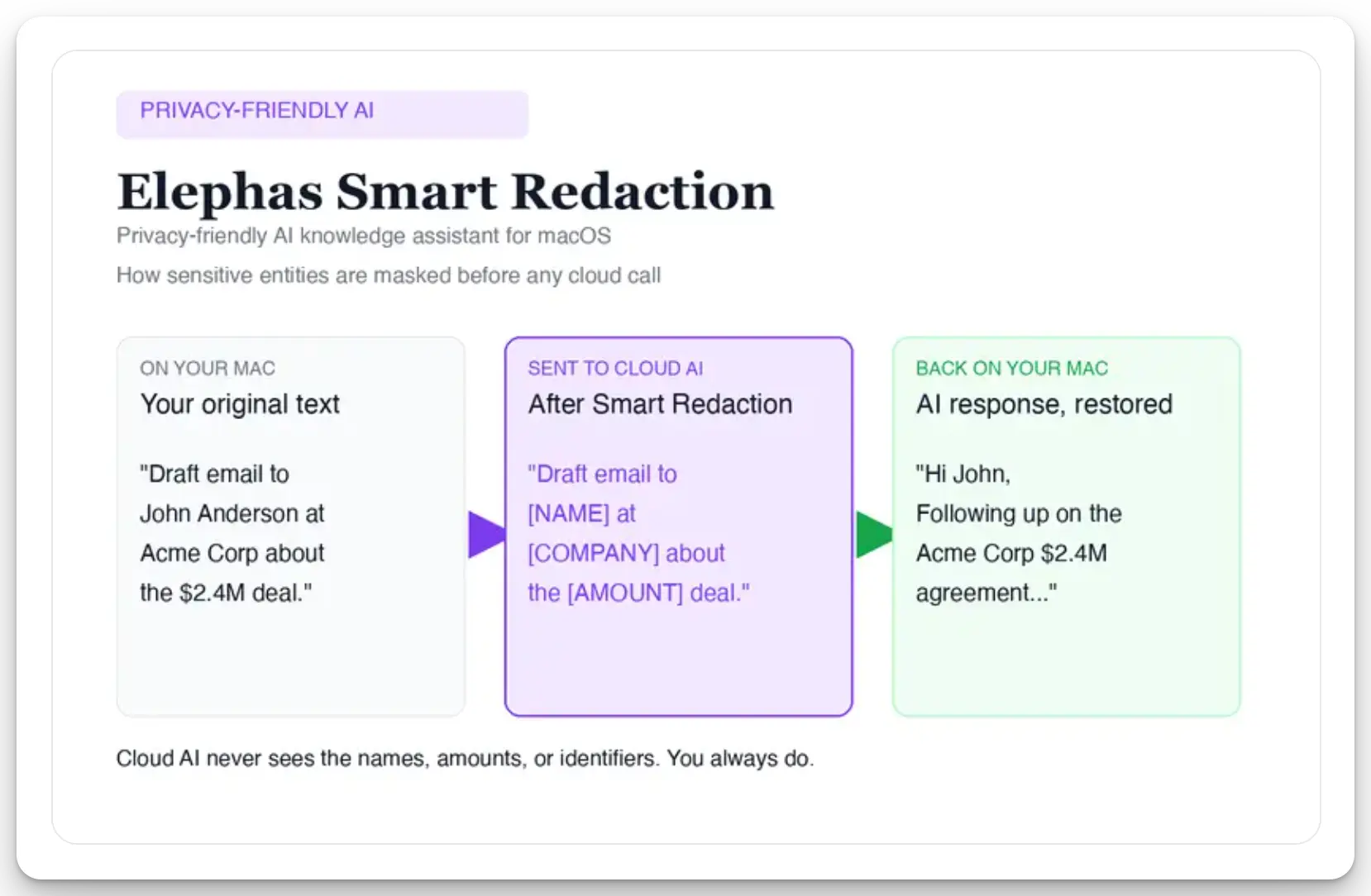
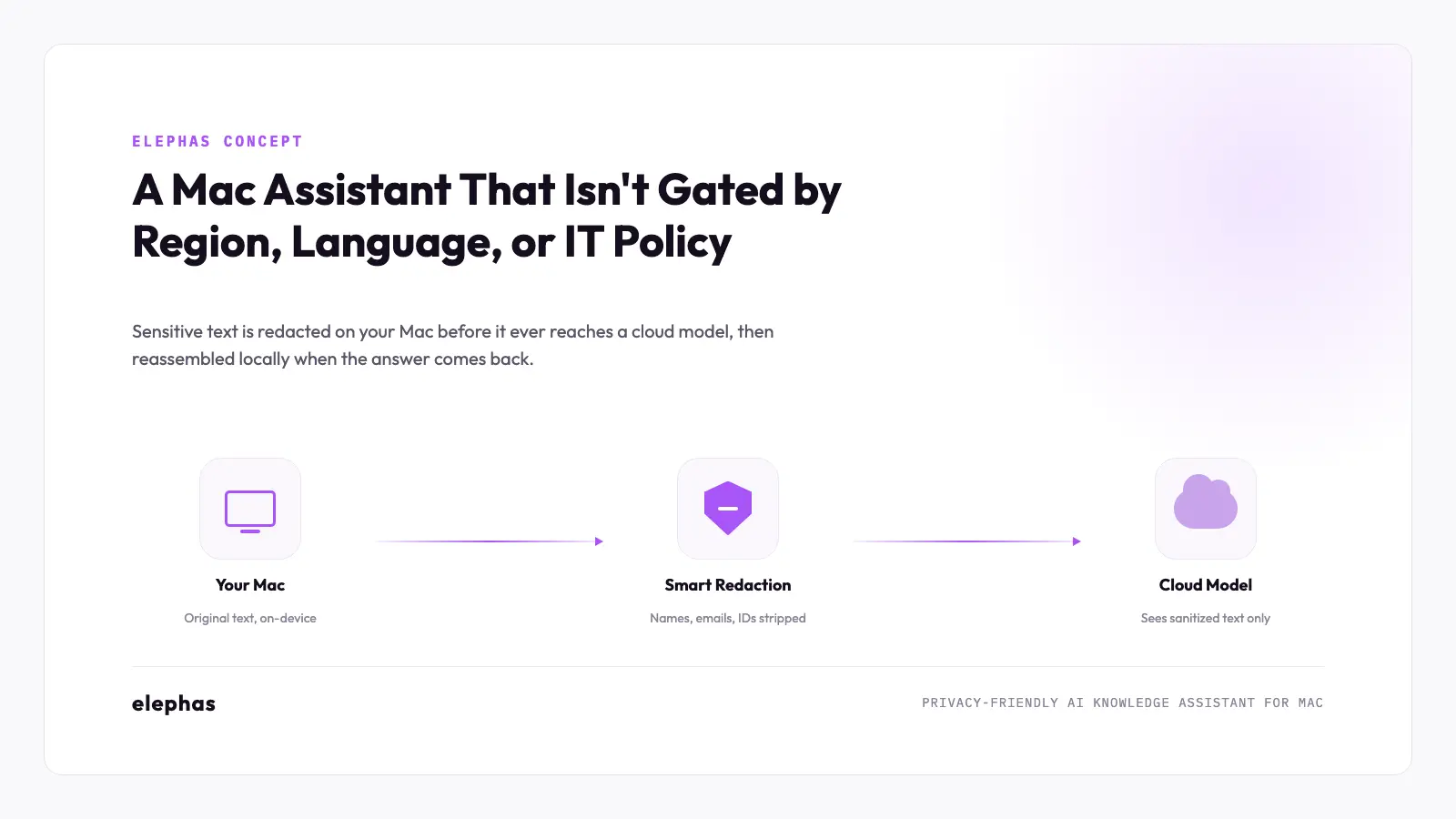
For researchers who still want a leading cloud model, Elephas adds a layer through automatic PII redaction. Before a prompt reaches ChatGPT 5.5, Claude Opus 4.8, Gemini, Grok, Perplexity, or any other cloud model, Elephas strips sensitive names, emails, phone numbers, and identifiers on your Mac. The cloud model only sees sanitized text.
When the answer comes back, the redacted fields are reassembled locally on your machine, so identifiable information never leaves the device. Elephas pairs this with zero data retention: content never trains AI models, never sits on a vendor's server, and never passes through a third-party reviewer's screen.
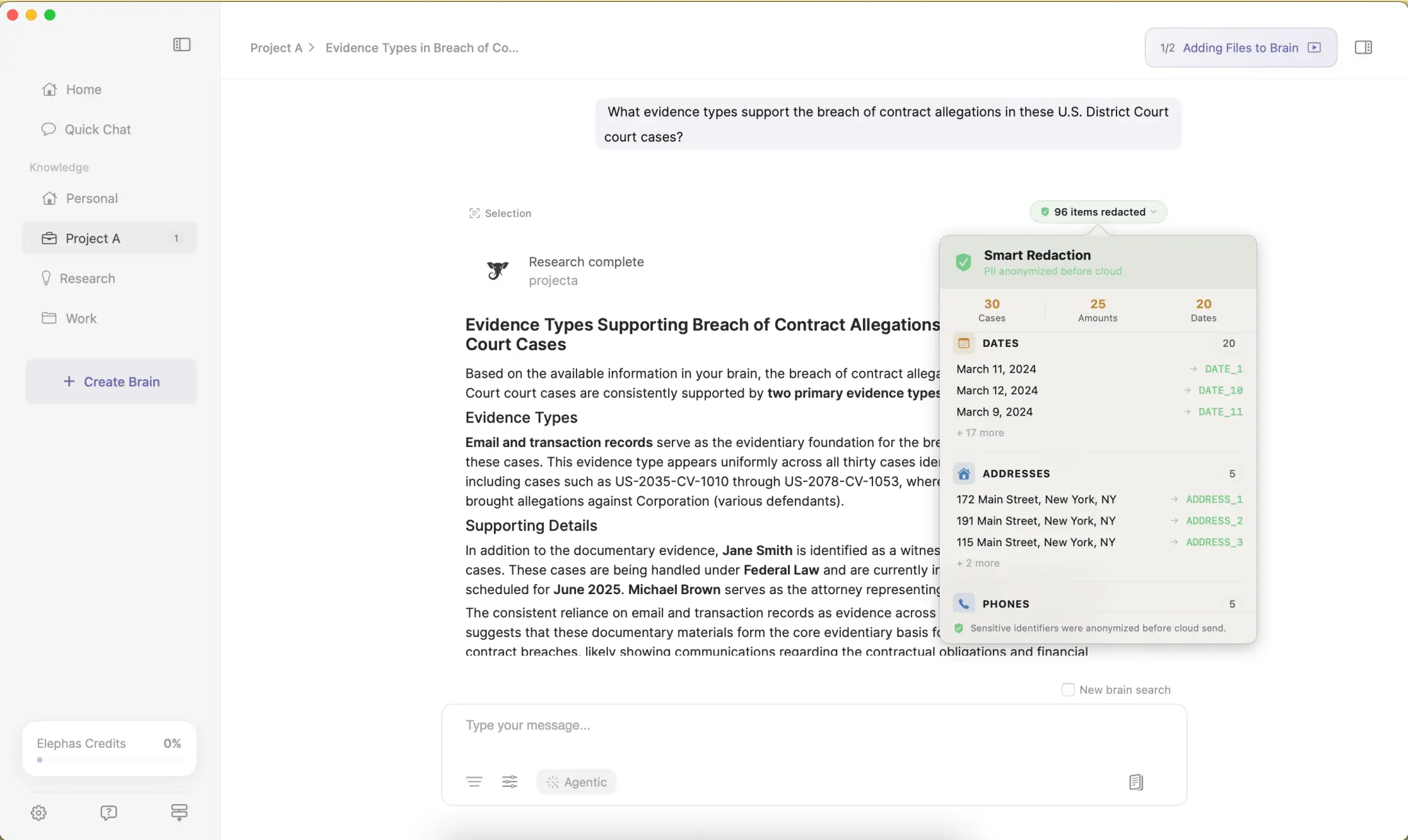
Smart Redaction is on every Elephas plan, including Free, never gated to a paid tier. Elephas also provides built-in local LLM models for tasks needing no cloud model. Whether Siri sends data to Apple is answered at Siri and AI privacy and sensitive data verdict.
Where to go from here
If the status still has not changed after 24 to 48 hours, move to Step 1 and work down the list. For what Apple Intelligence does once it is unblocked, read the complete guide; for feature-level help, using Apple Intelligence.
What none of these steps can give you is a Mac assistant that is not gated by Apple's rollout logic in the first place.
If Step 9 confirmed an MDM block, that gate belongs to IT, and the same policy often controls what you can install, so an assistant you control fits a personal Mac more cleanly than a managed one.
If you would rather stop troubleshooting the feature altogether, turn it off and reclaim the storage.
Common questions
Is Apple Intelligence not working the same as it being unavailable in my country?
Not always. Some regions have no launch date yet, that's availability, not a bug. Others are supported but blocked by a mismatched Siri language (Step 3) or a storage shortfall (Step 4).
Why does Apple Intelligence say “Preparing” for days?
“Preparing” usually means the download hasn't completed, often from low storage (Step 4) or unmet network and power conditions (Step 5). Past 24-48 hours with both confirmed, sign out and back in (Step 6) first.
Can I still use ChatGPT if Apple Intelligence itself is broken?
Sometimes. The ChatGPT extension is separate from the on-device and Private Cloud Compute models Apple ships (Step 8). If one fails and the other still works, that isolates which one is broken.
Does turning off Apple Intelligence free up storage space?
Yes. Disabling the feature reclaims the space used by the on-device model files. If storage matters more than functionality, that's a reasonable trade.
Will resetting my Mac delete my files?
On iPhone or iPad, Reset Network Settings and Reset All Settings (Step 11) remove settings, not data. A Mac has neither, so the only reset available in that pane is the destructive one, and it requires a verified backup first.
Is a greyed-out toggle always an MDM problem on a work Mac?
No. Check Screen Time's Content & Privacy Restrictions first (Step 9). A changeable Allow or Don't Allow switch means a personal setting you control. Only a “Managed by [Organization]” banner with no switch confirms MDM, which requires IT.
