Siri Not Available? Every Fix That Actually Works (iPhone, iPad & Mac, 2026)
Siri Not Available, or Siri not working on iPhone, almost never means a broken phone. In 2026 it usually means one invisible prerequisite: too little storage, a mismatched Siri language, a Screen Time restriction, a stalled download, or a blocking work profile. Siri may look dead when one setting is the real fix.
Quick answer
- The banner "Siri not available" means Siri cannot reach Apple's servers or is missing a prerequisite, not that it is offline. (Apple Support)
- The top non-obvious fix is storage: Apple Intelligence needs about 7 GB, and a near-full device silently breaks Siri. (Apple's requirements)
- Check Screen Time's Siri and Dictation switch first; a restriction greys Siri out with no error.
- Want a Mac AI that does not depend on Apple's servers? Elephas provides built-in local LLM models, has a free plan, and starts at $19/month. Try Elephas for free.
If you are wondering is Siri an AI, the new Siri runs on an on-device model plus Apple's cloud, so storage and the network break it, not a reboot. On a throttled connection the model can take 30 minutes or more, and Siri may stay unavailable (macReports). How that whole system fits together is in our Apple Intelligence guide.
| Error text you see | Where it appears | Most likely cause | Step to try |
|---|---|---|---|
| "Siri not available, try again later" | Siri screen | Servers unreachable, or a paused download | Step 6 |
| "Apple Intelligence is not available right now" | Siri settings | Model stalled mid-download | Step 6 |
| Siri toggle greyed out or missing | Settings | Screen Time restriction or a managed profile | Step 4 or 8 |
| Siri went silent after an update | Anywhere you say "Hey Siri" | Siri language flipped to a wrong locale | Step 2 |
| "Not available in your country or region" | First Siri setup | Region or Digital Markets Act limit | Step 1 |
On r/technology one user wrote, "it enrages me how shit Siri still is," while r/ios asked, "Can we please get Siri fixed?"
Check These Before You Touch a Single Setting
Two failures look like broken Siri but no switch fixes them: an Apple server outage and an eligibility gap. Rule both out first.
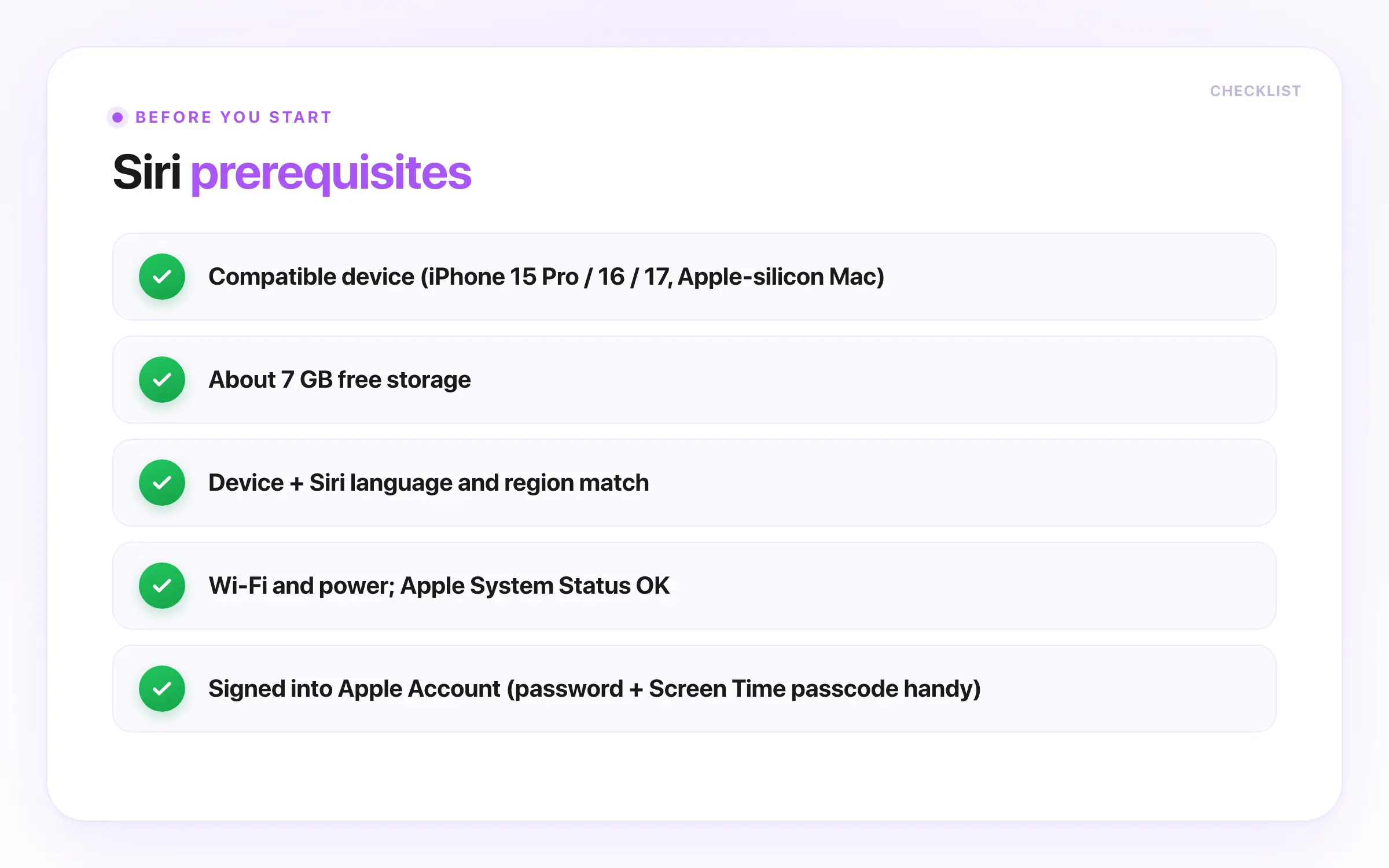
- Compatible iPhone models and Macs, per Apple Inc.: iPhone 15 Pro, any iPhone 16 or 17, an M-series or A17 Pro iPad, or an Apple-silicon Mac. Older devices get classic Siri only. (Apple's requirements)
- About 7 GB of free storage for the on-device model, on current iOS, iPadOS, or macOS 26.x.
- Device language and Siri language set to the same supported language and region. (feature availability)
- Wi-Fi plus power, and Apple's System Status page checked before blaming your device.
- Signed into your Apple Account (Apple ID), with its password and any Screen Time passcode handy: the Screen Time and sign-out steps need them.
A user on r/apple noted Siri "MUST be [turned on] in order to use CarPlay," so switching it off can take other features down.
If you restored from a backup or set up a new iPhone from an old one, check two carry-over traps first. A Screen Time "Siri & Dictation" restriction can ride along inside the backup, and an update can quietly mis-set your Siri language, while the on-device model never transfers and re-downloads on the new device.
A returning switcher on r/iphone said they "just want the phone that works well with the ecosystem," exactly what Siri breaks when it does not carry over.
How to Fix Siri Not Working on iPhone, iPad, or Mac
Work these troubleshooting steps top to bottom and stop the moment Siri answers. The order to fix Siri not working leads with the most common iOS 26 and macOS 26 causes and puts destructive wipes last.
How to work these steps:
- Stop as soon as Siri responds; the earliest steps resolve Siri issues in most cases.
- Steps 1 to 6 are non-destructive.
- Step 7 clears saved network passwords only; a factory erase stays off it.
One r/iphone user wrote, "I'm glad they gave us more pride wallpapers before the promised Siri features," a good reminder to rule out an unshipped feature before you troubleshoot.
Step 1: Rule out Siri issues you cannot fix
Decide whether this is a real failure or an unshipped feature. The personalized new Siri comes with iOS 27 later in 2026, as a beta (MacRumors), and on iPhone and iPad in the EU it is delayed with no set timeline under the Digital Markets Act (Apple Newsroom), not a bug.
First-timers: "Not available in your country or region" is an availability limit, not a broken phone.
EU users welcomed it: one r/apple commenter joked, "If letting me switching from Siri is what over regulation of capitalism, please sign me up."
Verify it worked: Siri answers a test phrase, or the Siri settings confirm the missing ability is unreleased.
Step 2: Match your Siri language and region
Set your device and Siri language to the same supported language and region. Siri reads as unavailable until a new language pack finishes downloading, which can take 30 minutes or more (macReports). Open General > Language & Region, then Siri settings > Language (Mac: System Settings).
Migrators: the iOS 26 update silently flipped some Siri languages, for example to India English. Check this first if Siri died right after updating.
Region matters more than most guides admit. On r/apple, one user "asked Siri what time it was" in Ireland and got a wrong, context-free reply.
Verify it worked: You should now see a matching supported locale in the Language row, and the greyed-out switch clears.
Step 3: Free up storage so the model can install
Clear space above the 7 GB Apple Intelligence needs; it runs on a 3 billion parameter on-device model, so a full device cannot install it (Apple's report). A near-full phone shows "Sorry, something went wrong," and freeing storage fixes it (Apple Community). Go to Settings > General > iPhone Storage (Mac: General > Storage).
Verify it worked: Storage shows more than 7 GB free, and the model resumes in the Siri settings.
Step 4: Turn Siri and Dictation back on in Screen Time
Check for a hidden restriction. If Siri & Dictation is off under Content & Privacy Restrictions, the Siri switch greys out with no error, often after a restored backup (Apple Support).
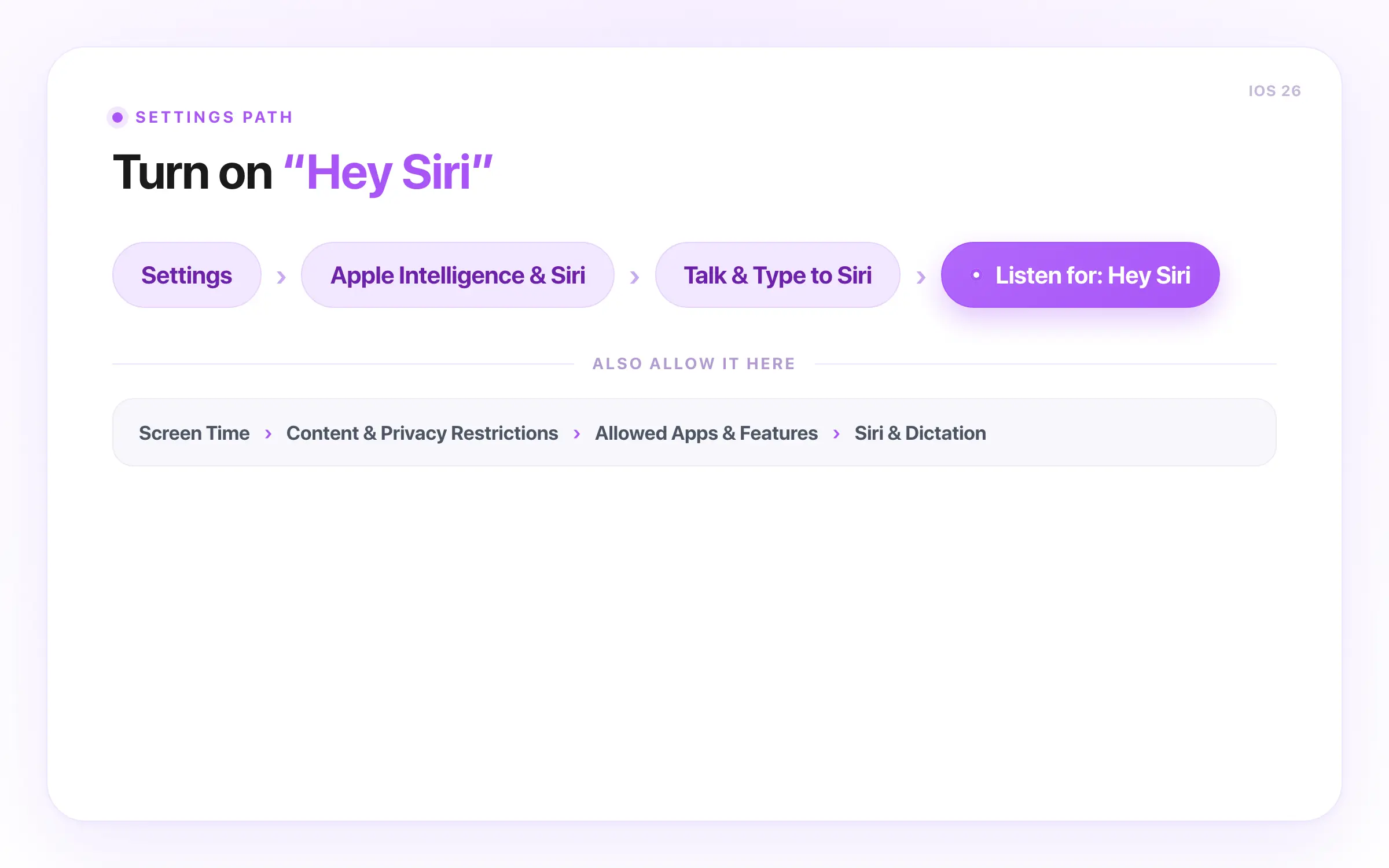
Go to Settings > Screen Time > Content & Privacy Restrictions > Allowed Apps & Features and turn Siri & Dictation on (Mac: System Settings). On iOS 26, also check Content & Privacy Restrictions > Intelligence & Siri, which can separately block the AI features.
Verify it worked: The Siri & Dictation switch is on, and the greyed-out Siri switch is tappable again.
Step 5: Retrain Siri to fix Hey Siri not working
Turn Siri off and on and re-record your voice so you retrain Siri to recognize your voice. Open the Siri settings > Talk & Type to Siri, set Listen for to "Siri" or "Hey Siri", switch it off then on, and turn on Allow Siri When Locked (Mac: System Settings).
Then press and hold the side button to summon Siri and check you can hear Siri answer.
One r/HomePod owner found "I reset them from scratch and suddenly everything is working fine."
Verify it worked: Siri glows when you say "Hey Siri" and answers "what time is it?"
Step 6: Clear the network path, then force a clean re-download
Give the download a clean route: Wi-Fi on, cellular-only and VPN off, Low Power Mode off, on power, and Date & Time automatic, since a wrong clock breaks the handshake. If the banner sits at the same percent for 30 minutes or more, a VPN or custom DNS is usually the block (macReports).
If still stuck, delete Siri and Dictation history, or turn Apple Intelligence off and restart your device; turning it off also restores classic, server-based Siri right away (MacRumors forum).
Power users: when Hey Siri not working comes and goes, a bug list on r/ios noted "'Hey Siri' stops responding randomly" and "Shortcuts will sometimes fail to run." To fix Hey Siri not working, clear the download blocks above first.
Verify it worked: The banner climbs to 100% and Siri responds, or classic Siri answers with the AI features off.
Step 7: Reset network settings, then sign out and back in
Refresh the network, then your account; this clears saved network passwords only, not your data.
iPhone or iPad: Settings > General > Transfer or Reset iPhone > Reset Network Settings, then Settings > your name > Sign Out, restart, and sign in.
Mac: sign out of your Apple Account in System Settings, restart, and sign in, then switch the connection off and on.
Verify it worked: The Siri switch turns on and a test request returns a real answer after you sign in.
Step 8: Install iOS updates, then check profiles or Apple Support
Install the newest point release; some "works once, then dies" cases on iOS 26.1 were Apple-side regressions fixed later (MacRumors forum). Then check General > Software Update, and General > VPN & Device Management (Mac: Device Management) for a mobile device management (MDM) profile, plus System Status.
Power users: on a managed device, an MDM "Siri & Dictation" restriction needs your admin to lift it (Apple's deployment guide).
On r/apple, one reader quipped "after dealing with Siri, Sound Therapy is the only way out."
Verify it worked: Software Update reads "up to date" on 26.x, Siri survives a reboot, and System Status flags any managed profile or outage.
Common Mistakes That Keep Siri Broken
Most Siri troubleshooting stalls on wrong assumptions about why Siri stops working. These four traps pair common Siri issues with their real cause.
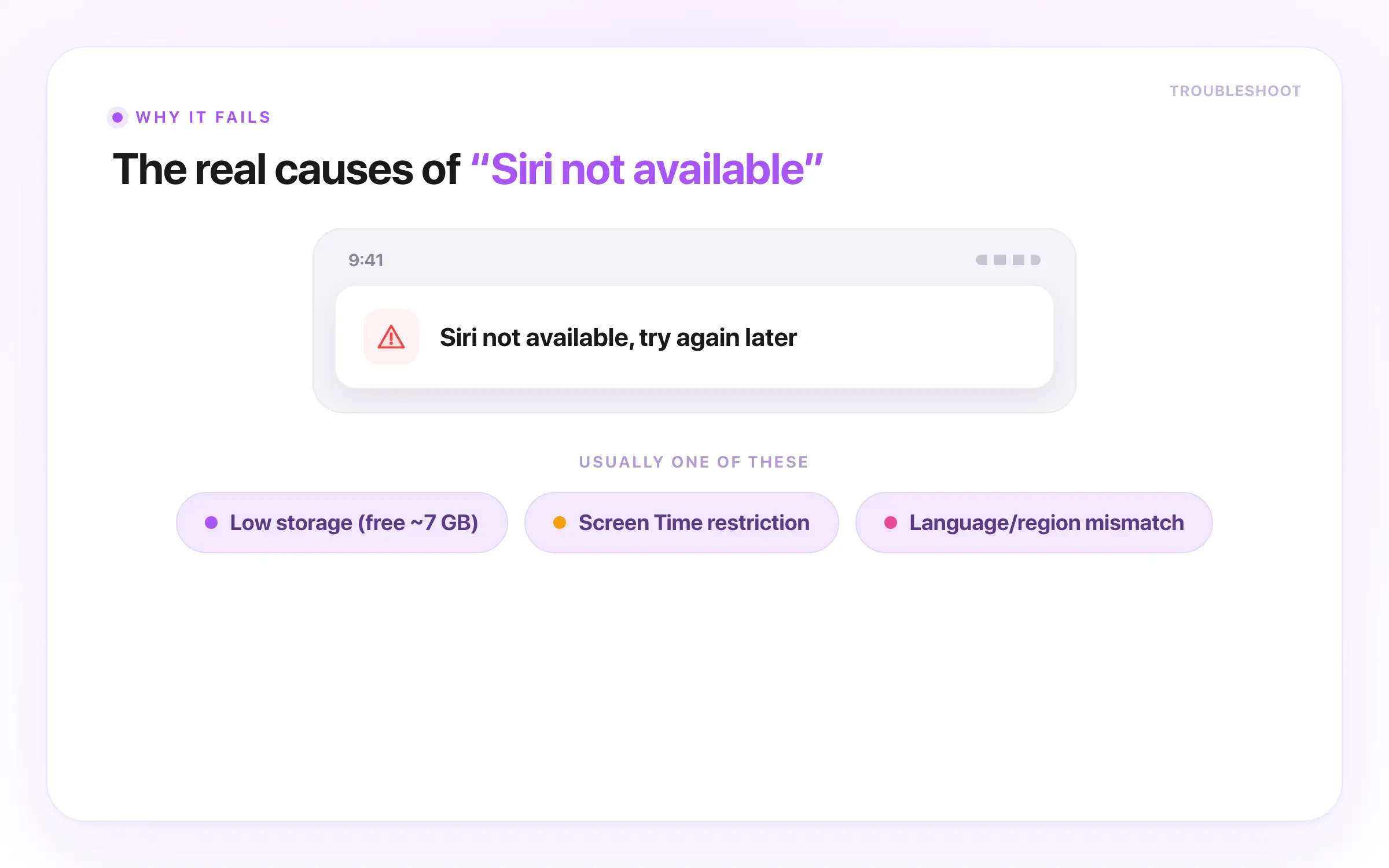
- iOS 26 Siri glows then says "Sorry, something went wrong": low storage means Apple Intelligence cannot install its model on a full device. Source: Apple Community, thread 256154200 (2025-09-16). Fix: free up about 7 GB. (Most common for first-timers and migrators.)
- Screen Time silently hid Siri: Siri & Dictation is off under Content & Privacy Restrictions, so Siri greys out with no error. Source: Apple Support, doc 105037 (maintained 2026). Fix: turn it back on under Allowed Apps & Features. (Most common for migrators and hand-me-downs.)
- After the update, Siri's language auto-switched: the upgrade flipped Siri to a non-matching locale, for example India English, until it matches your speech. Source: MacRumors forum 2466111 (iOS 26 / 26.1 era, 2025 to 2026). Fix: set the Siri language to your locale. (First-timers and migrators see this most.)
- Apple Intelligence Siri stuck on "Preparing" or "Downloading" forever: the model will not finish while a VPN, cellular-only connection, Low Power Mode, or low storage blocks it. Source: macReports and Apple Community 255822364 (2025 to 2026). Fix: a network connection and power, VPN off, then delete Siri & Dictation History. (Most common for power users.)
Factory-wiping first rarely fixes a download problem, so work Steps 1 to 8 before erasing. Assuming the missing "AI Siri" is a fault chases a feature that never shipped.
Plenty of readers doubt Apple here. A comment on r/applesucks claimed "there are two teams... disabling the other team's features," while r/ios users keep asking "where is Siri 2.0."
After Siri Is Working Again
Once Siri answers again, a few quick follow-ups keep it stable and catch a bigger problem early.
- Turn on Type to Siri as a mic-free fallback, and check Apple's System Status page if Siri wobbles again.
- Re-check that Shortcuts, HomeKit, and CarPlay voice triggers all fire; an update can quietly drop a Shortcut action.
- If the download keeps stalling, leave Apple Intelligence off and run classic Siri for reliable automations.
- Keep confidential prompts off any always-listening cloud assistant until you know where the audio goes.
When Siri Isn't Safe for Confidential Work
Siri is a voice assistant, not a private workspace. Apple says Siri can send audio, transcripts, and context to its servers and may keep transcripts up to two years, with a subset reviewed (Apple's Siri privacy).
Researchers in 2020 found smart speakers, Siri included, woke to background audio in more than 1,000 logged cases (study).
A separate 2026 research audit found Apple's differential privacy code was misconfigured, affecting about 87% of the data it measured in one macOS release and 68% in the next (study).
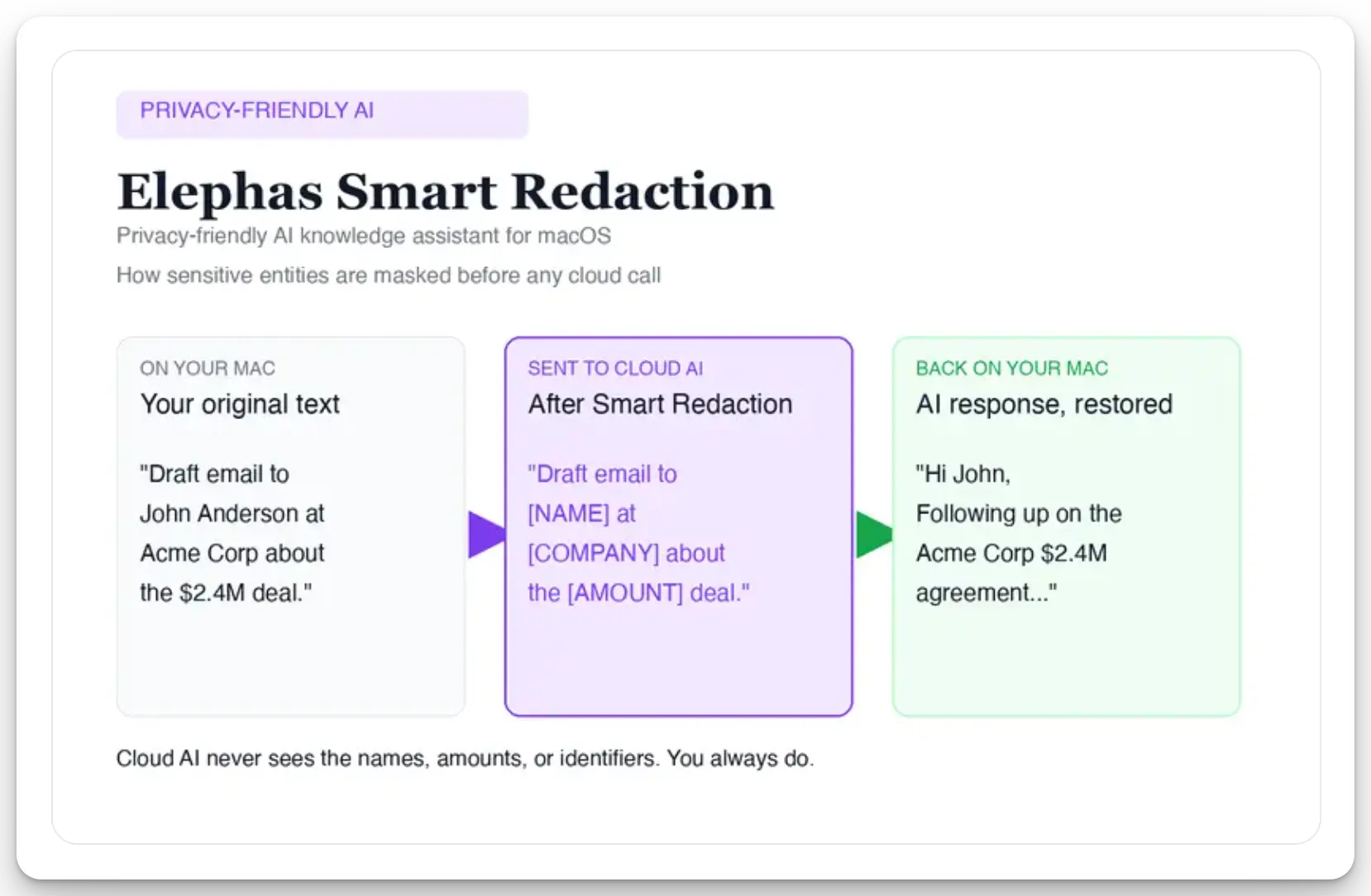
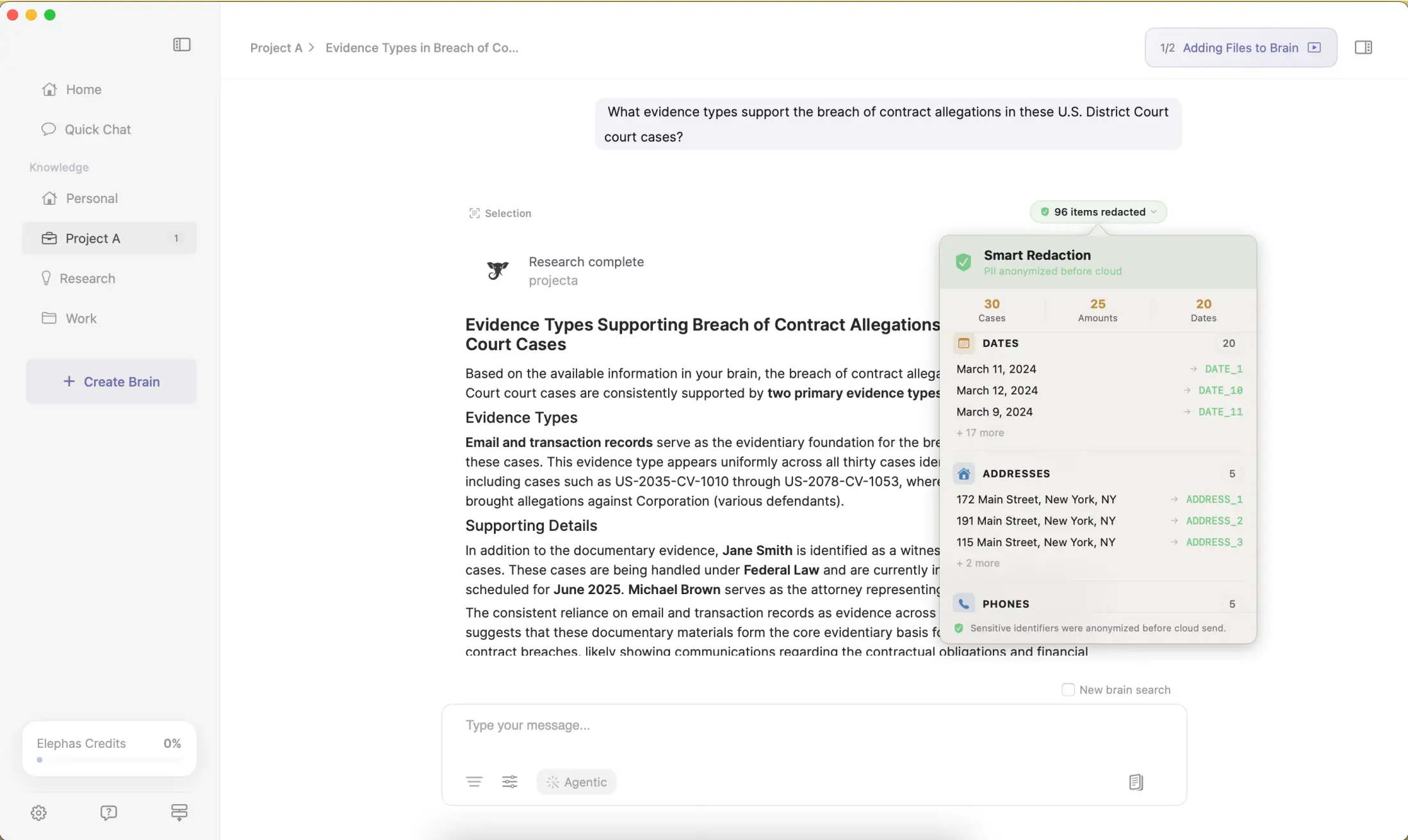
Elephas is a privacy-friendly AI knowledge assistant for Mac that provides built-in local LLM models so your data can stay on your machine. For lawyers and clinicians who still want a capable cloud model, it redacts personally identifiable information (PII) before it leaves the Mac. Smart Redaction (beta) runs on every Elephas plan, including Free, and pairs with Apple Intelligence on Mac. Elephas has a free plan and starts at $19/month; try Elephas for free.
For researchers who still want a capable cloud model, Elephas adds a second layer through automatic PII redaction (beta). Before a prompt is sent to ChatGPT 5.5, Claude Opus 4.8, Gemini, Grok, Perplexity, or any other cloud model, Elephas strips sensitive names, emails, phone numbers, and identifiers on your Mac. The cloud model only ever sees the sanitized text. When the answer comes back, the redacted fields are reassembled locally on your machine, so identifiable information never leaves the device. Elephas pairs this with zero data retention: content never trains AI models, never sits on a vendor's server, and never passes through a third-party reviewer's screen.
- Rule out the non-fixables first: a delayed feature, a regional limit, or an outage is never yours to solve.
- Storage, language, and Screen Time resolve most Siri issues; try them before anything drastic.
- Network refresh and factory wipes are the last move, not the first.
- For confidential work, read more on Siri and privacy or compare Siri vs ChatGPT.
- If Siri's server dependence and retained transcripts are a problem for confidential work, Elephas is a privacy-friendly AI knowledge assistant for Mac with built-in local LLM models, so your data never has to leave your machine.
Frequently Asked Questions
Why does my iPhone say Siri Not Available?
The banner means Siri cannot reach Apple's servers or is missing a prerequisite: too little storage, a mismatched Siri language, a Screen Time restriction, or a paused download. It is rarely a hardware fault, so check those settings to get Siri working on your iPhone again before a full wipe.
Does Siri work without an internet connection?
Only partly. Some on-device requests, like timers, alarms, and app launches, run offline, but most questions, dictation, and AI answers need Apple's servers. If the network and cellular are both down, Siri often shows Not Available.
Why is the new Siri not available in the EU?
Apple delayed the personalized new Siri in the European Union under the Digital Markets Act (Apple Newsroom). On an EU device the missing abilities are a policy and timing limit, not a bug.
How do I reset Siri without erasing my iPhone?
Turn Siri off and on in the Siri settings, then reset network settings as in Step 7. Both refresh Siri without touching photos, messages, or apps. A full factory erase is a last resort, not a first step.
Why is Siri stuck on Preparing?
The on-device model will not finish while a VPN, cellular-only connection, Low Power Mode, or low storage blocks it. Put it on a network connection and power, free space above 7 GB, and remove the VPN. For Siri right away, turn Apple Intelligence off.
Can I use Siri on a work or school iPhone?
Sometimes. A mobile device management profile can disable Siri and Dictation, greying the toggle out with no error. Check General > VPN & Device Management for a managed profile; only your IT administrator can lift one.
Try Elephas free on your Mac
The Mac-native privacy-friendly AI knowledge assistant: built-in local LLM models and on-device Smart Redaction, so your confidential prompts never have to leave the hardware you own. Free plan, and it starts at $19/month.
Get Elephas →