Perplexity Computer vs Claude Cowork: Which AI Agent Should Run on Your Mac?
Last updated: October 14, 2026
On October 6, 2026, Anthropic moved new Cowork tasks on its Pro and Max plans onto its own servers. Five weeks earlier, Perplexity added Hybrid Compute for Macs with 24 GB of memory or more. So the usual answer, that Perplexity is cloud and Cowork is local, is now partly wrong.
If you do knowledge work with confidential files, what matters is which step of a task leaves your Mac, and that now depends on your plan and your Mac.
This Perplexity Computer vs Claude Cowork comparison covers where each AI assistant runs, what each costs as of October 9, and which one fits your situation.
Quick answer
- Perplexity Computer on a Mac is hybrid: tasks start in the cloud, and only flagged private-file steps can run on a local model (Apple silicon, 24 GB+ memory, macOS 15+).
- Claude Cowork on Pro and Max has run new tasks in the cloud since October 6, and files it opens on your Mac are processed there.
- Prices checked October 9: both start at $20/month. Perplexity's Max plan is $200/month with 10,000 credits; Claude Max is $100 or $200/month.
- Pick Perplexity for cited web research on a 24 GB+ Mac, and Cowork for folder chores on non-confidential files.
- For confidential files, Elephas is a private AI knowledge assistant for Mac that offers optional local models and automatic PII redaction before any cloud call. Free plan, from $19/month.
What Changed for These Two AI Agents Between September and October 2026?
Three changes in five weeks broke most launch-era comparisons. The PII-TRACE paper behind Perplexity's on-device check for personally identifiable information (PII) was submitted on August 31. Hybrid Compute for Macs followed on September 1. On October 6, Cowork moved new Pro and Max tasks to the cloud and removed the "Only on your computer" option.
Perplexity launched Computer on February 25, 2026 (launch-week review), as a cloud agent running 19 AI models, so reviews from that time describe a different product.
For Perplexity and Claude, which step leaves the Mac now depends on plan and memory.
What Should Decide the Choice When an Agent Can Open Your Files? (7 Criteria)
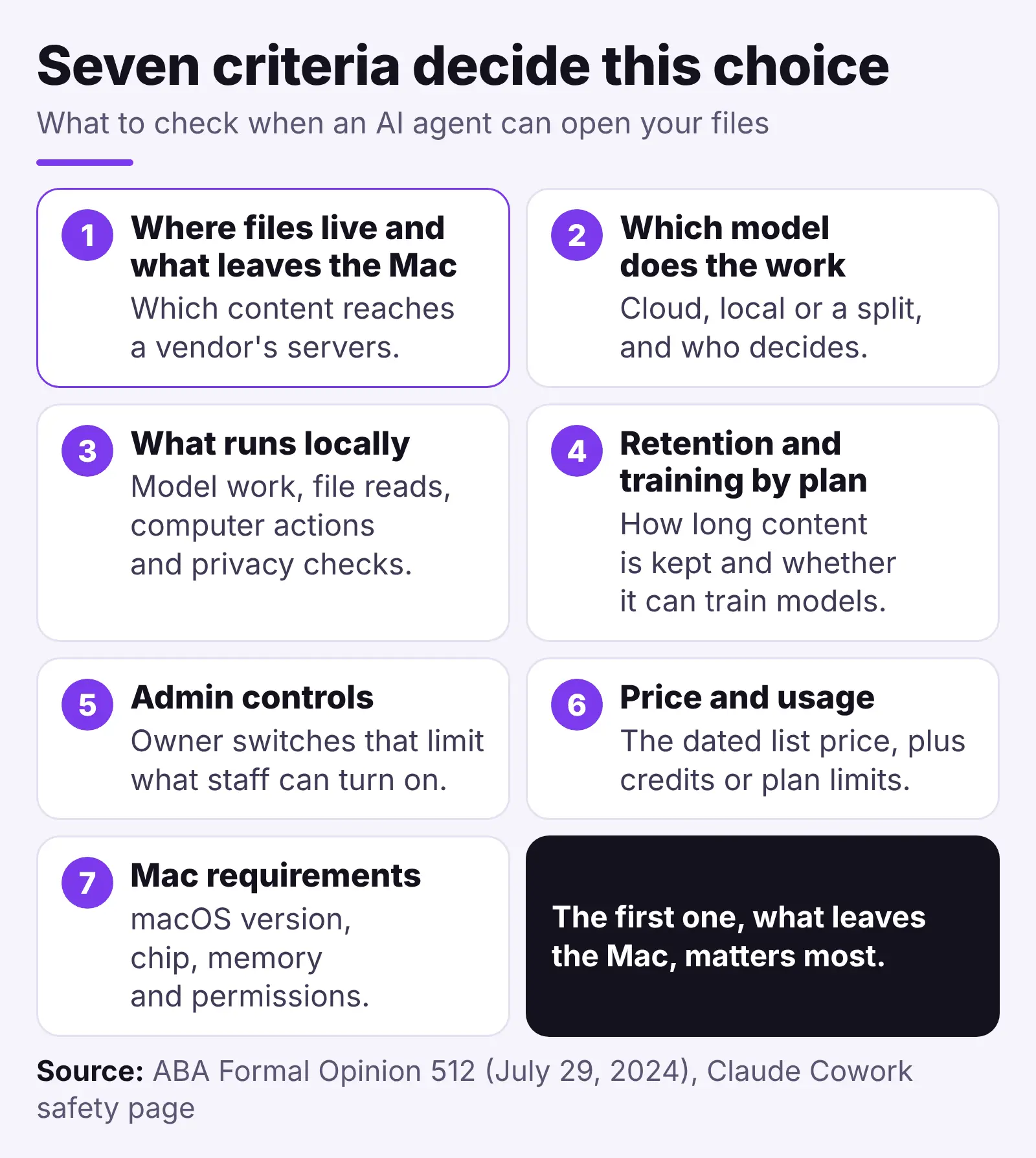
Seven criteria decide this choice, and the first, what leaves the Mac, matters most. The American Bar Association's guidance, ABA Formal Opinion 512 (PDF, July 29, 2024; summary) applies the confidentiality rules to generative AI. It says lawyers should first understand how an AI tool handles confidential information.
- Where files live and what leaves the Mac: which content reaches a vendor's servers.
- Which model does the work: cloud, local or a split, and who decides.
- What runs locally: model work, file reads, computer actions and privacy checks.
- Retention and training by plan: how long content is kept and whether it can train models.
- Admin controls: owner switches that limit what staff can turn on.
- Price and usage: the dated list price, plus credits or plan limits.
- Mac requirements: macOS version, chip, memory and permissions.
Cost made the list because agent tasks are hard to price. In a July user report, one Max subscriber said Computer burned about 15,000 credits and gave no usable email draft. A credit-saving guide describes another run that took 40 minutes and climbed from 15,000 to 21,000 credits. Neither could be checked first-hand.
Folder access matters too. A September user report says new Cowork projects only take one folder (a user claim, not a vendor statement), so you either expose a parent folder or copy files in. The safety page confirms that Claude reaches only the folders you connect.
Perplexity Computer: What Runs in the Cloud and What Can Stay on Your Mac?
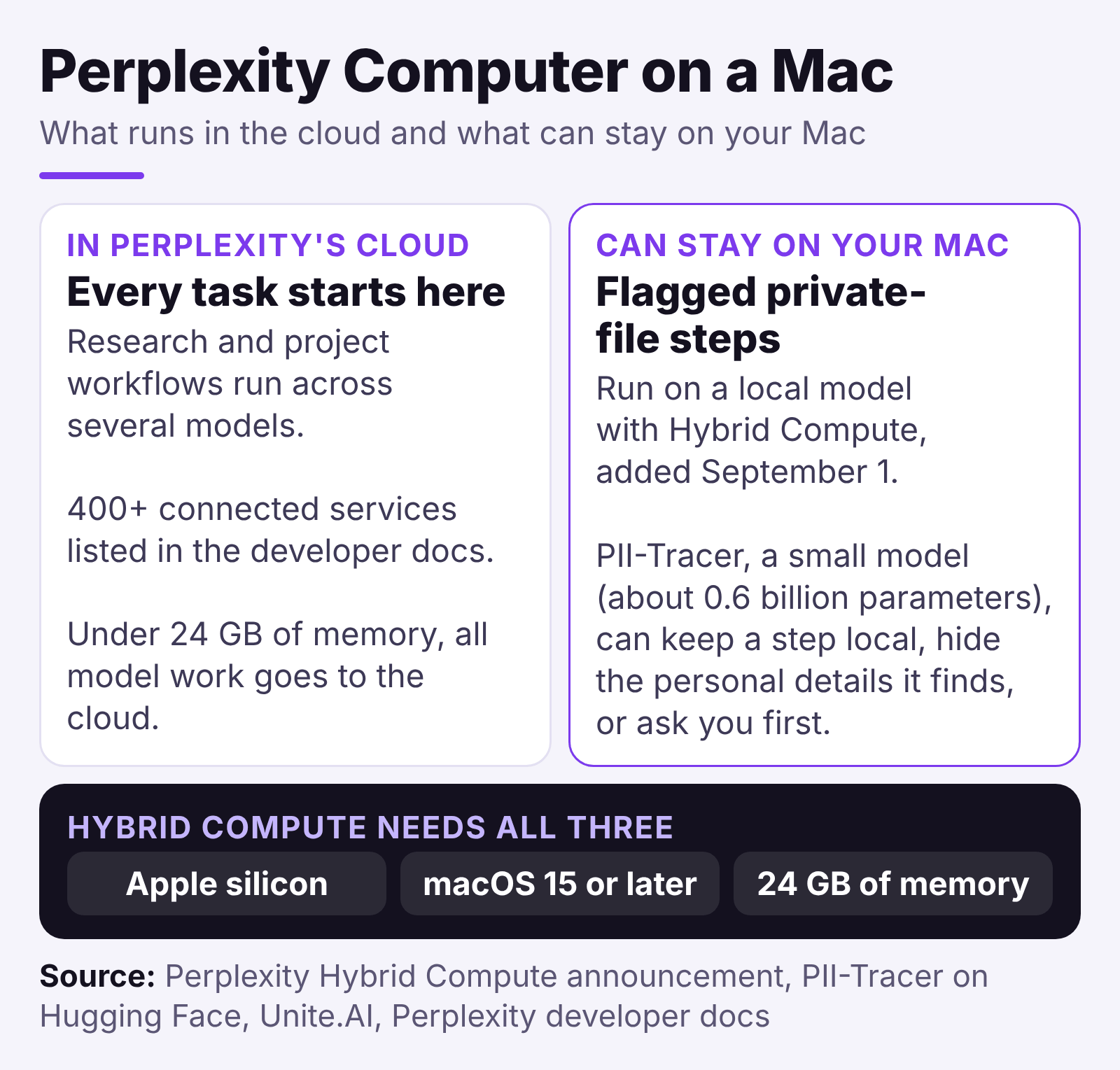
Computer is a multi-model agent from Perplexity AI. On a Mac, it starts every task in the cloud and can hand only flagged private-file steps to a local model, on Apple silicon Macs with 24 GB+ of memory. Our full Computer review covers the cloud side.
The agent runs research and project workflows across several models in Perplexity's cloud. Its developer docs list 400+ connected services. It searches the web like an AI search engine and then finishes the job, for example a deep research report.
- Retention and training: the Enterprise terms block training on customer content (Cape). For Free, Pro and Max, Perplexity's help center says an AI data retention setting is on by default and can be turned off in Account Settings.
- Admin controls: Enterprise admins get a usage-only analytics key and, per Unite.AI, organization-wide rules for what stays on the Mac, what is masked and what needs approval. We found no public per-team off switch.
- Price and usage: Pro includes Computer but has no fixed monthly credit allowance; Max includes 10,000 credits a month.
- Mac requirements: Accessibility, Screen & System Audio Recording and Full Disk Access (setup guide; Times of AI); Hybrid Compute needs macOS 15 or later.
Research is where it shines. "I keep coming back to the research engine," wrote Karo Zieminski in February. On cost, she warned in June: "The number that should actually scare you is per-task burn, not the per-credit price," in her credits guide.
Perplexity Personal Computer and Hybrid Compute on a Mac
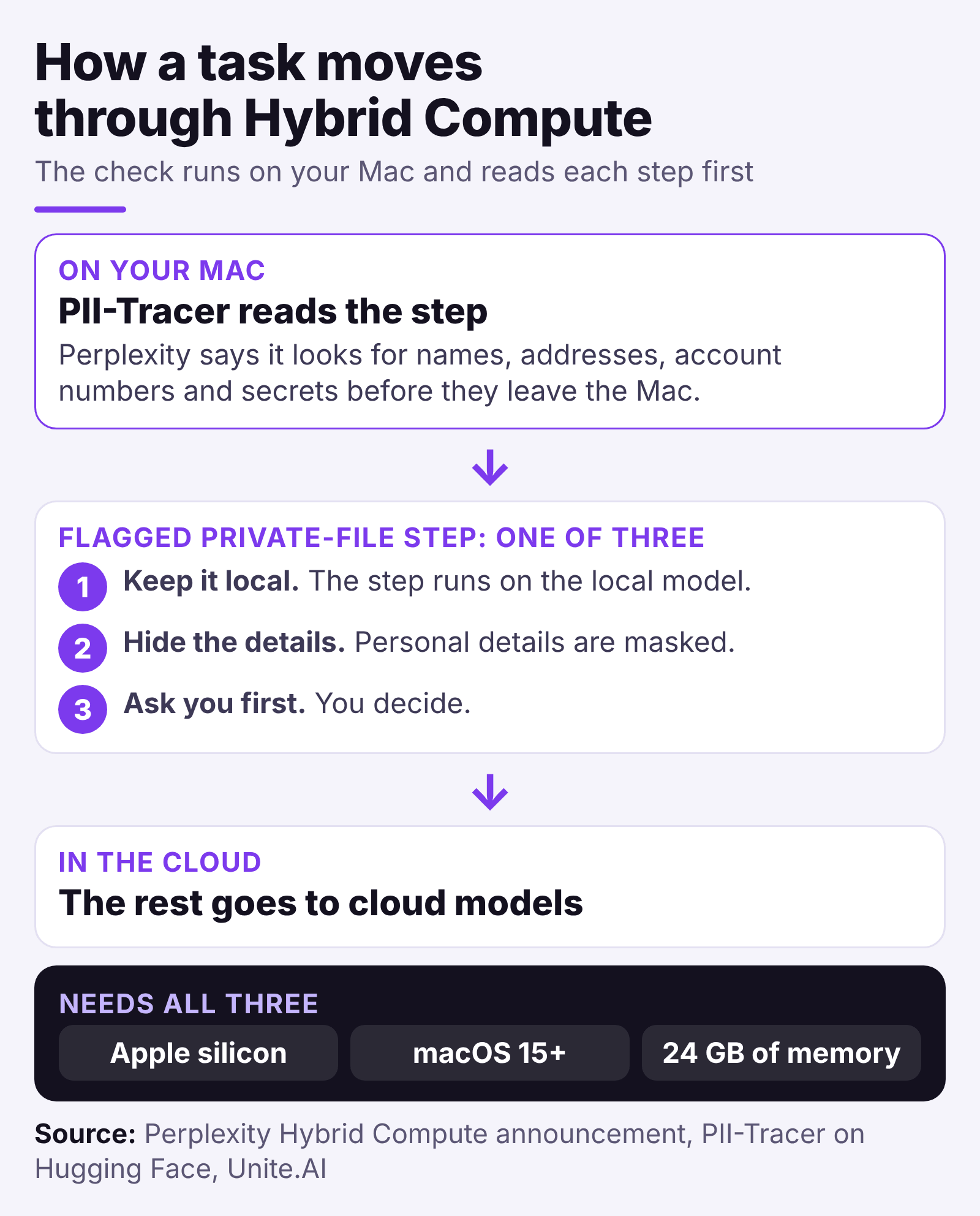
Perplexity's Mac app mode works in folders you connect and can operate Mac apps. With Hybrid Compute, added September 1 (Unite.AI), flagged private-file steps can run on a local model.
An on-device check called PII-Tracer, a very small model, can keep a step local, hide the personal details it finds, or ask you first. Perplexity says it looks for names, addresses, account numbers and secrets before they leave the Mac (Unite.AI).
The check isn't perfect. None of the eleven baseline detectors in the PII-TRACE paper caught every personal detail without also flagging harmless text, and PII-Tracer had the best character-level score of the 12 systems tested (Unite.AI). The test used 13,148 made-up conversations, so it is a benchmark, not a test of the shipped check.
- Hybrid Compute needs Apple silicon, macOS 15+ and 24 GB of memory, so a 16 GB Mac skips the local model.
- Portable Computer is a separate app for supported Windows and Linux PCs with 24 GB of video memory.
Computer is strongest at cited research, but its privacy depends on your Mac's memory. Our Hybrid Compute safety guide goes deeper on what it keeps local.
Claude Cowork: Where Does Your Work Run After October 6, 2026?
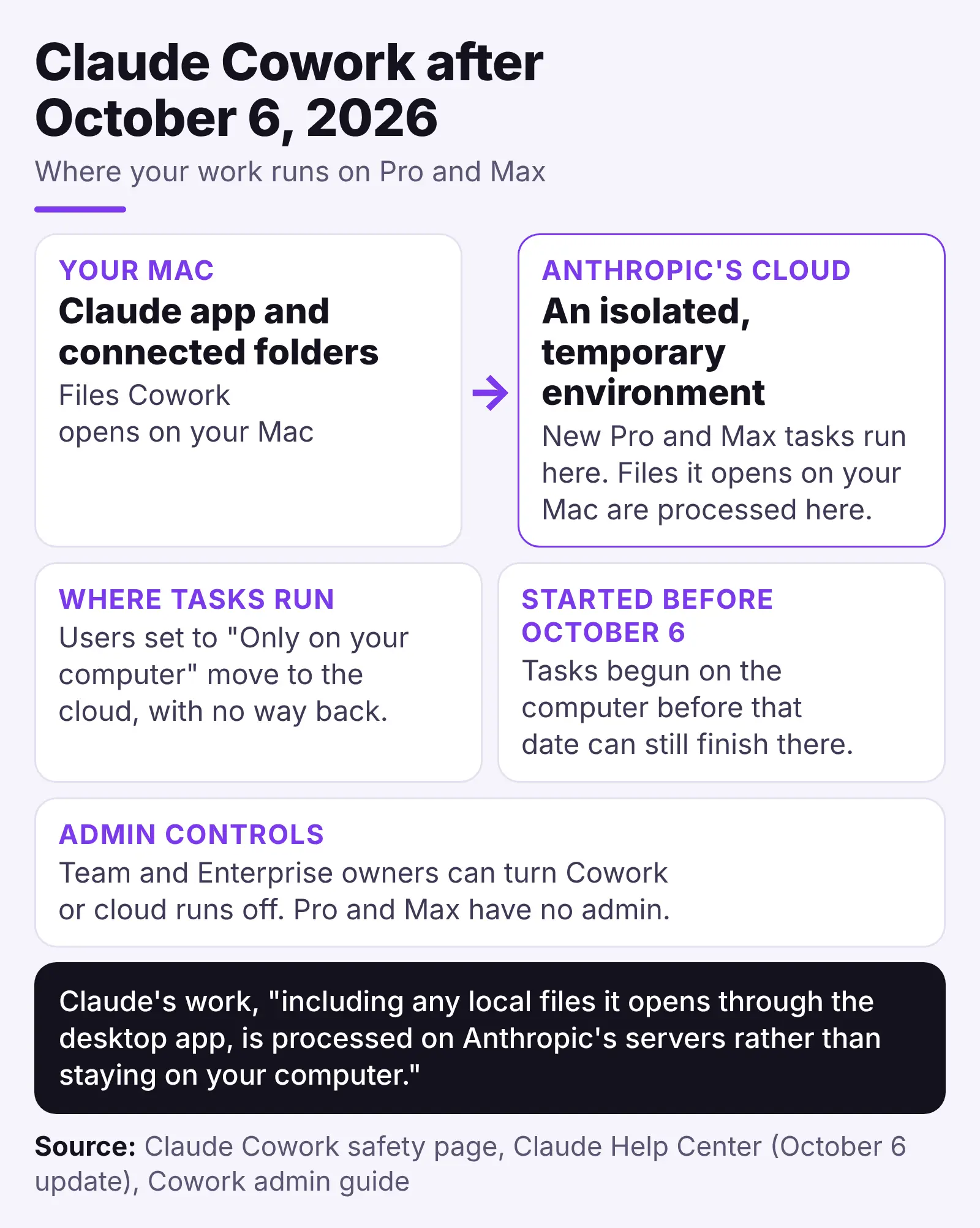
Cowork is an agentic AI (one that acts on its own) working across your files, apps and connectors (links to other services), and Anthropic lists it as part of Claude. Since October 6, new Pro and Max tasks run in a temporary cloud environment, and files it opens on your Mac are processed there.
The Cowork safety page is direct: Claude's work, "including any local files it opens through the desktop app, is processed on Anthropic's servers rather than staying on your computer." Our Cowork guide covers setup.
- Where tasks run: the "Only on your computer" option is gone, and its users move to the cloud for good (October 6 update).
- Retention and training: on consumer plans, the model-training setting means five-year retention when on and 30 days when off (consumer terms). Commercial plans are not used for training by default (Anthropic privacy center).
- Admin controls: Team and Enterprise owners can turn Cowork or cloud runs off (admin guide). Pro and Max have no admin.
- Price and usage: available on Pro and Max, and it counts against your normal Claude usage limits.
- Mac requirements: the Claude app open and online; macOS 15+ for background computer use.
Early reviewers praised the hand-off. Simon Willison wrote, "I think that's a really smart product." Dan Shipper wrote in Every that "once you experience handing off a task and coming back an hour later to find it done, something clicks." Both wrote before the cloud change.
Willison called it unfair to ask users to watch for "suspicious actions that may indicate prompt injection" (hidden instructions steering the agent). The company's research on browser agents found that even a 1% attack success rate "still represents meaningful risk". The company advises against computer use for sensitive legal, financial or health information.
Cowork and Claude Code: the route for work that must stay local
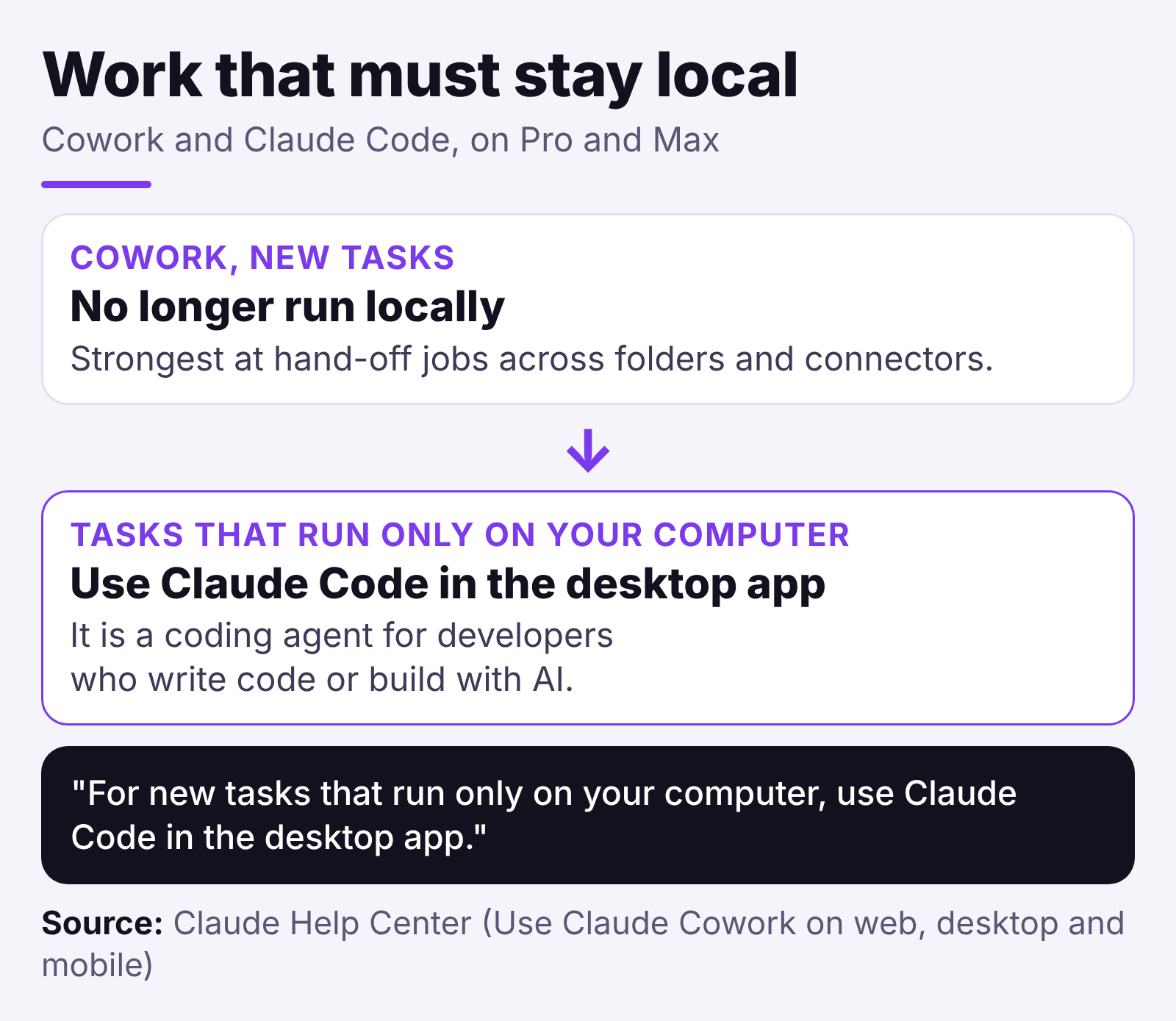
Cowork is strongest at hand-off jobs across folders and connectors, and Claude connects to legal tools such as Box, iManage and NetDocuments (legal guide). On Pro and Max, new tasks no longer run locally, though tasks started on the computer before October 6 can still finish there.
For tasks that must stay on the computer, the support page says: "For new tasks that run only on your computer, use Claude Code in the desktop app." That coding agent is for developers who write code or build with AI, so this page skips it.
Head-to-Head: How Do They Compare on Data Path, Price and Mac Needs?
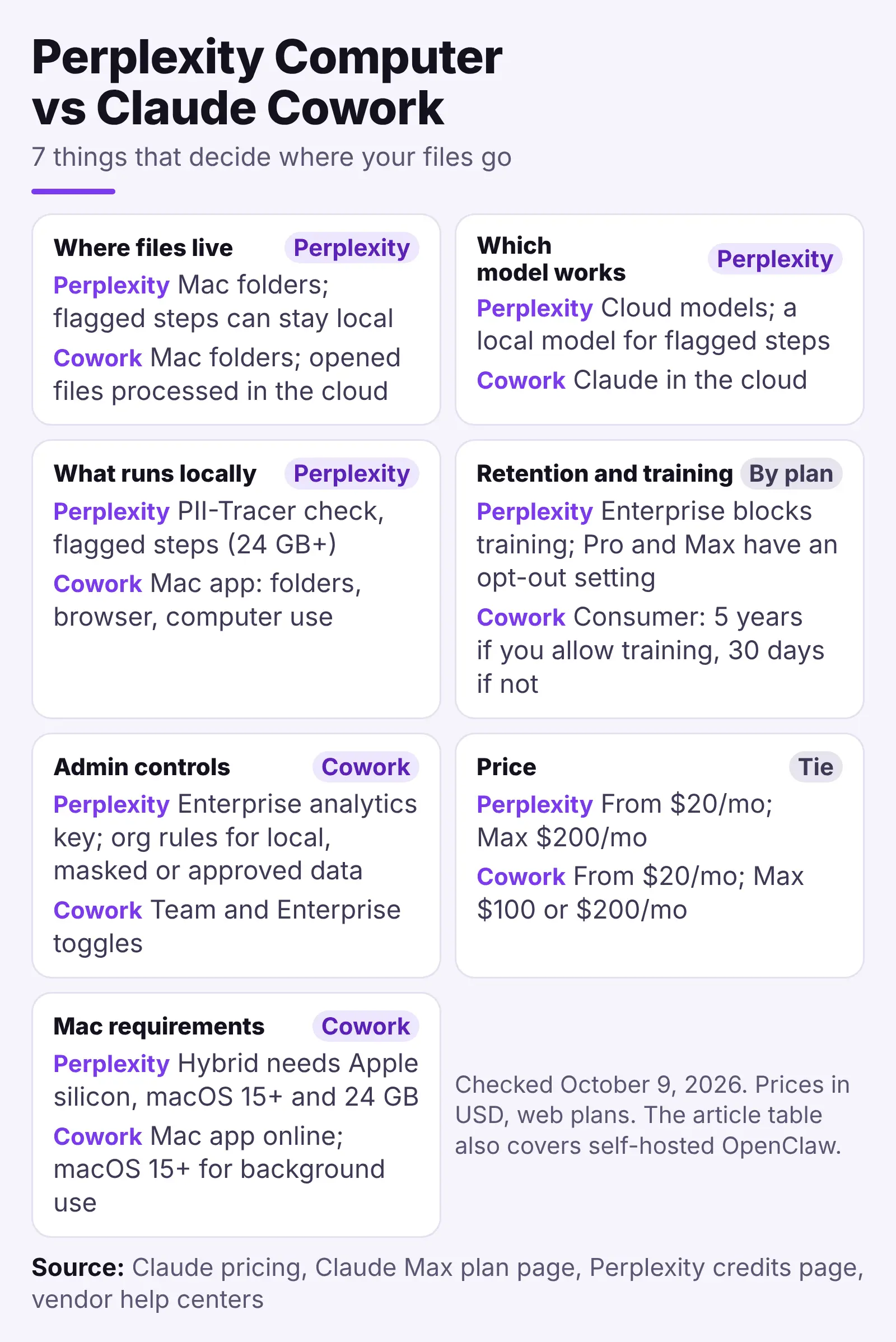
Perplexity can keep flagged file steps on a qualifying Mac (Apple silicon, 24 GB+ memory, macOS 15+), while consumer Cowork processes opened files on Anthropic's servers. Both start at $20/month. Perplexity charges by credits (Max: $200/month with 10,000 credits) and Claude by shared plan limits (Max: 5x or 20x Pro usage for $100 or $200/month).
What leaves the Mac, step by step
Perplexity with Hybrid Compute on a 24 GB+ Mac:
- The task starts in Perplexity's cloud. PII-Tracer checks each step on your Mac, then keeps it local, hides what it detects, or asks you.
- A flagged private-file step runs on the local model, and masked or approved context goes to cloud models.
Cowork on Pro or Max:
- The task runs in a temporary environment on Anthropic's servers.
- It reaches connected folders through the Mac app, and opened file content is processed on those servers.
- The environment is removed when the session ends; sessions and outputs stay in your Claude account.
Whatever part of a document an agent puts in its prompt goes to whoever runs the AI system. So "the folder stays on my Mac" doesn't mean "the content stays on my Mac".
The seven criteria side by side
We checked this Cowork vs Perplexity Computer table on October 9, 2026.
| Criterion | Perplexity (Mac app) | Cowork (Pro, Max) | OpenClaw (self-hosted) |
|---|---|---|---|
| Where files live | Mac folders; flagged steps can stay local | Mac folders; opened files processed in the cloud | Your hardware |
| Which model works | Cloud models; a local model for flagged steps | Claude in the cloud | Your choice |
| What runs locally | PII-Tracer check, flagged steps (24 GB+) | Mac app: folders, browser, computer use | Gateway, memory, tools |
| Retention and training | Enterprise blocks training; Pro and Max have an opt-out setting | Consumer: 5 years if you allow training, 30 days if not | Set by your model provider |
| Admin controls | Enterprise analytics key; org rules for local, masked or approved data | Team and Enterprise toggles | Roles and policy you set up yourself |
| Price | From $20/mo; Max $200/mo | From $20/mo; Max $100 or $200/mo | Free (MIT) plus hardware and model |
| Mac requirements | Hybrid needs Apple silicon, macOS 15+ and 24 GB | Mac app online; macOS 15+ for background use | macOS 26.2+ app; macOS 13.5+ for command line and gateway |
Perplexity leads on its on-device check and cited research; Cowork leads on legal connectors and Team and Enterprise owner switches. Both can run automation on a schedule in the cloud with the laptop closed, and both need broad Mac permissions.
What each plan costs (checked October 9, 2026)
| Plan | Price |
|---|---|
| Perplexity Pro | $20/month; weekly Computer usage instead of monthly credits |
| Perplexity Max | $200/month; 10,000 credits a month, no rollover |
| Extra Perplexity credits | 100 credits = $1 |
| Claude Pro | $20/month, or $17/month billed annually |
| Claude Max 5x / 20x | $100/month / $200/month |
| Self-hosted agent | No paid tier |
App Store prices differ (US store: Claude Max 5x shows $124.99), so check where you pay. Sources: Claude pricing, the Max plan page and Perplexity's credits page.
Credits can run out fast. Perplexity's own examples put a multi-step research report at about 350 to 950 credits (credits page), and in this guide a single run of 40 minutes climbed from 15,000 to 21,000 credits.
Perplexity Computer vs OpenClaw: where the self-hosted option fits
The self-hosted option is open source and free to use. It runs on your hardware with hosted or local models. You handle setup and sandboxing, which limits what its tools can touch. Its GitHub page warns: "Tools run on the host for the main session unless you configure sandboxing."
Our self-hosted agent comparison goes deeper.
What neither agent protects
Neither agent covers these five risks.
- Over-broad folder access, from Cowork's delete rights to Perplexity's control of Mac apps.
- Harmful instructions hidden in web pages or documents.
- Mistaken actions on live files, such as an unwanted overwrite.
- Imperfect detection of personal details, as the PII-TRACE results show.
- Plan-based retention: five years or 30 days on Claude consumer plans, set by one switch.
NIST, the US standards body, published an agent hijacking report in January 2025. It warns that "many AI agents are vulnerable to agent hijacking."
The NYC Bar Association Formal Opinion 2024-5 (opinion, August 7, 2024) says lawyers may wish to get advance consent before sharing confidential information with generative AI. Since October 6, that question applies to Claude and Perplexity alike.
Where Elephas Fits for Confidential Files
Both agents are built to work in folders you connect. They read your files and write new ones, which suits everyday folders. Contracts, money records, HR files and health notes are harder, because an agent must read the content to act on it, and on most plans that happens in the cloud.
Elephas is a private AI knowledge assistant for Mac, iPhone and iPad (Elephas for Windows is coming soon: join the waitlist). It lets you chat with your own documents. On the Mac (macOS 13 or later), optional local models run fully offline, so a confidential folder never has to leave your machine.
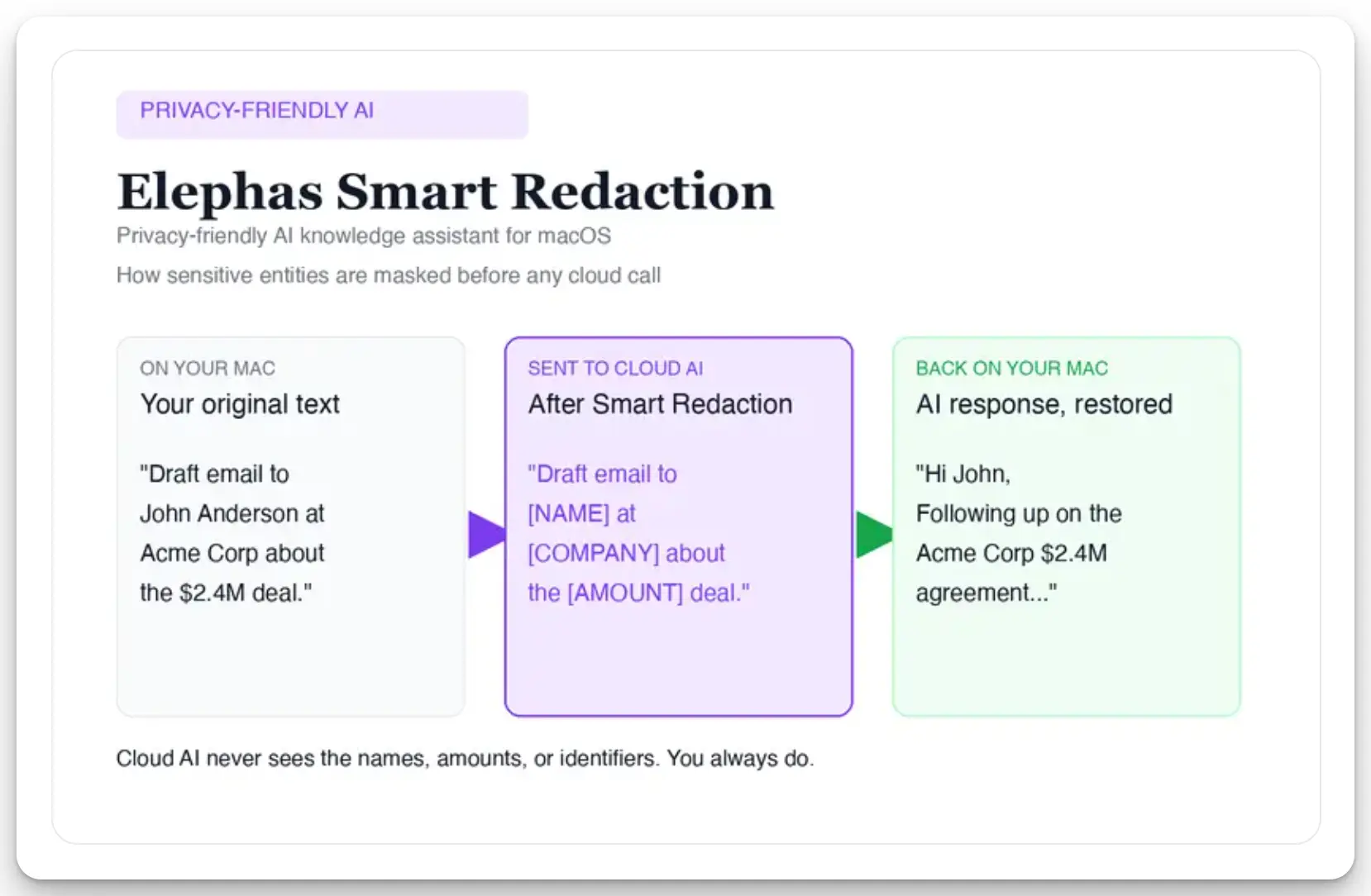
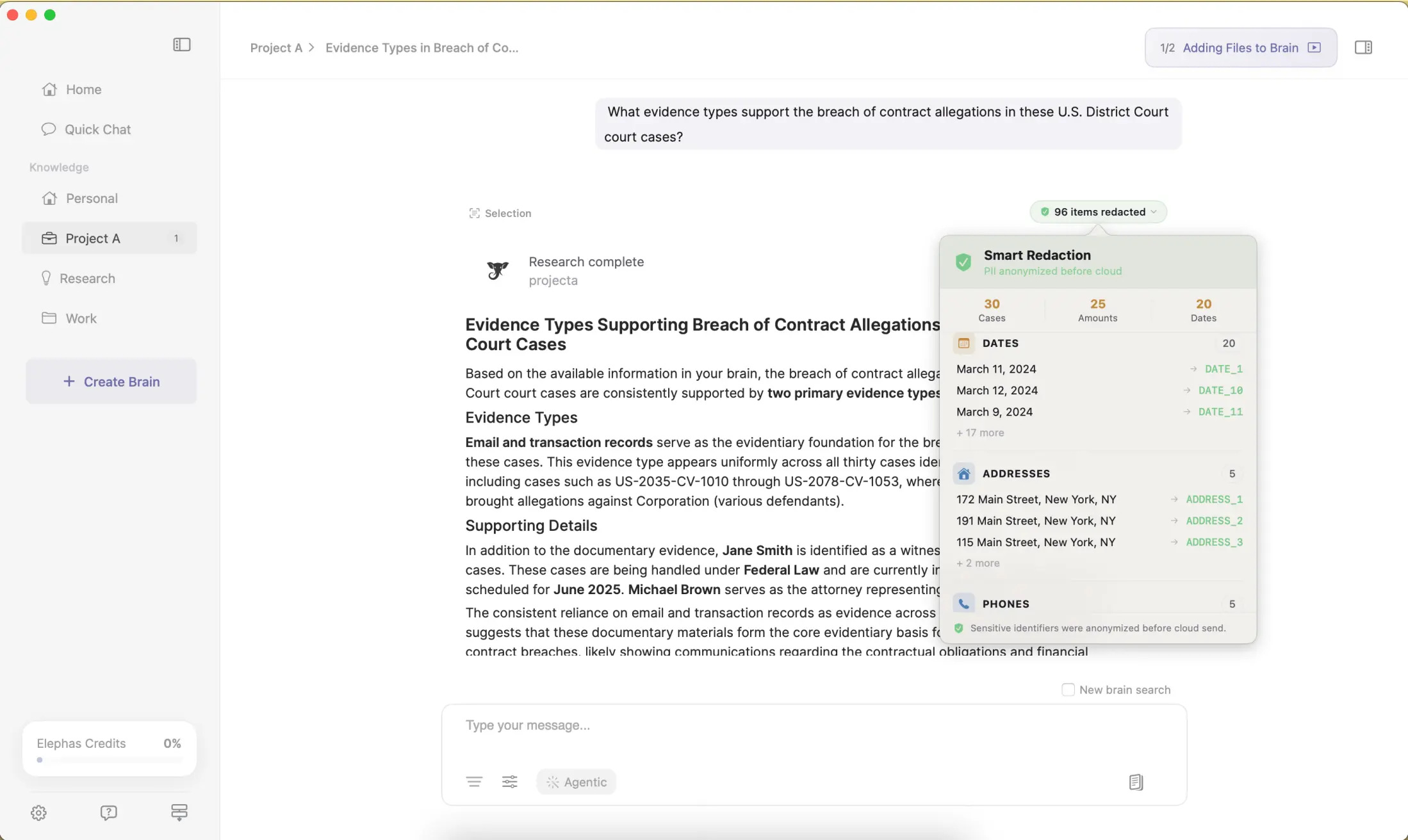
When a big job still needs a cloud model, Elephas adds a second layer through automatic PII redaction. It redacts 28 types of sensitive data, from names and emails to account numbers and case numbers, on your Mac before any cloud call. Sensitive data is automatically detected and redacted before anything reaches a cloud AI model. Elephas's built-in cloud AI, powered by OpenAI and Anthropic models, runs with zero data retention: providers do not log, store, or train on what is sent. You can also bring your own API key from 15+ providers, including OpenAI, Claude and Gemini.
| Point | Perplexity Computer | Claude Cowork | Elephas |
|---|---|---|---|
| Main job | Research and multi-step tasks | Hand-off jobs across folders and connectors | Private chat with your own documents |
| Where file content is processed | Cloud; flagged steps can stay local on a 24 GB+ Mac | Anthropic's servers on Pro and Max | Indexed on your Mac; local models stay on the Mac, cloud AI gets redacted text |
| Fully offline option | No, tasks start in the cloud | No, new tasks run in the cloud | Yes, with local models on the Mac |
| Private details before a cloud call | PII-Tracer can keep a step local, hide details or ask you | Opened files are processed on Anthropic's servers | 28 types of sensitive data redacted on your Mac first |
| Retention | On by default; training opt-out on Free, Pro and Max | Consumer: 5 years if training is on, 30 days if off | Built-in cloud AI: zero data retention |
| Mac needs | Apple silicon, macOS 15+, 24 GB for the local step | Claude app open and online | macOS 13 or later |
| Starting price | $20/month (Pro) | $20/month (Pro) | Free plan; paid plans from $19/month |
The agents fit chores on everyday folders, and Elephas fits the files you would think twice about handing over. Elephas has a free plan and starts at $19/month; see all plans at elephas.app/pricing.
Verdict: Which AI Agent Should Run on Your Mac?
Perplexity wins for cited web research and is the only one of the two that can keep flagged file steps on a 24 GB+ Mac. Cowork wins for folder and connector chores on files you can send to Anthropic's servers.
For a small firm, Cowork brings legal connectors and Team owner switches.
For files you would think twice about handing to either agent, Elephas is the better fit. It keeps them on your Mac with optional local models, and when you use a cloud model, it redacts private details first.
- Perplexity: best for cited research; its local step needs 24 GB or more.
- Cowork: best for folder and connector jobs on files you can send to Anthropic.
- Neither is a privacy guarantee, so limit access to one folder and keep approvals on.
- Elephas: best for confidential files; work offline with local models, or use ChatGPT, Claude or Gemini with names and account numbers redacted on your Mac first.
Frequently asked questions
Can I run a Perplexity Computer locally?
Partly. On Apple silicon Macs with 24 GB+ of memory and macOS 15+, Hybrid Compute runs flagged private-file steps on a local model, but tasks start in the cloud. Portable Computer, for supported Windows and Linux PCs with 24 GB of video memory, runs tasks on the PC and asks before using a cloud model.
Why is Perplexity Computer so expensive?
It runs on credits, at 100 credits for $1, and a multi-step research report can take about 350 to 950, while a data dashboard can take 2,400 to 9,800 (Perplexity). Max costs $200/month with 10,000 credits; Pro includes weekly Computer usage instead of monthly credits.
Why use Perplexity over Claude?
Use Perplexity when you need sources you can check. It searches the live web and cites what it finds, so pick Perplexity for research. When the Claude vs Perplexity question is about folder jobs, Cowork fits better.
Which AI agent is better: Perplexity, Cowork or OpenClaw?
Perplexity is better for cited web research, and its local step needs a 24 GB+ Mac. Cowork is better for folder and connector chores on non-confidential files. The self-hosted option is open source, free to use and runs on your hardware, but you own setup and sandboxing (limiting what its tools can touch).
Is Claude Cowork safe on your computer?
Cowork is as safe as the folders you connect. It can read, write and permanently delete files there, and on Pro and Max opened files are processed in the cloud. Connect one folder and keep approvals on.
Can Claude Cowork watch your screen?
Yes, through Claude computer use, a beta feature on Pro and Max. Claude takes screenshots and asks permission before accessing new applications. On macOS 15 or later it can work in background windows, but your Mac must stay awake.
What is the best computer to run Claude Cowork on?
Any Mac that runs the Claude desktop app and stays online. Cowork uses Anthropic's Claude models in the cloud. Unlike Perplexity's local step, it doesn't need 24 GB of memory. On macOS 15 or later, computer use runs in the background by default.
