Private AI vs Public AI at Work: The 2026 Guide for Employees Who Don't Want to Get Fired
In January 2023, per Gizmodo, an Amazon corporate lawyer warned staff in an internal Slack channel not to share “any Amazon confidential information (including Amazon code you are working on)” with ChatGPT. She added the line that turned the memo into a workplace AI artefact: she had “already seen instances” where ChatGPT outputs “closely matched” existing internal Amazon material. The incident is logged in the OECD AI Incidents Database. The employees were already pasting. You cannot un-paste a contract.
The clock on this is no longer abstract. Per the European Commission's summary of the EU AI Act, GPAI obligations entered application on August 2, 2025, the Commission's enforcement powers (fines up to EUR 35 million or 7 percent of global turnover) take effect August 2, 2026, and pre-existing models must comply by August 2, 2027. The discovery trail does not run through the company. It runs through the keyboard you are holding.
Is the contract you pasted last week already sitting inside someone else's model weights? The answer depends entirely on which kind of AI you used.
11%
of every paste-in to ChatGPT is sensitive or confidential (Cyberhaven Labs, 1.6M workers)
$670K
added breach cost from shadow AI (IBM Cost of a Data Breach 2025)
233
AI-related incidents in 2024, +56.4% YoY (Stanford HAI AI Index 2025)
Aug 2 2026
EU AI Act enforcement powers go live, fines up to EUR 35M
What “Public AI” Actually Means (and Why Almost Every Tool You Already Use Is One)
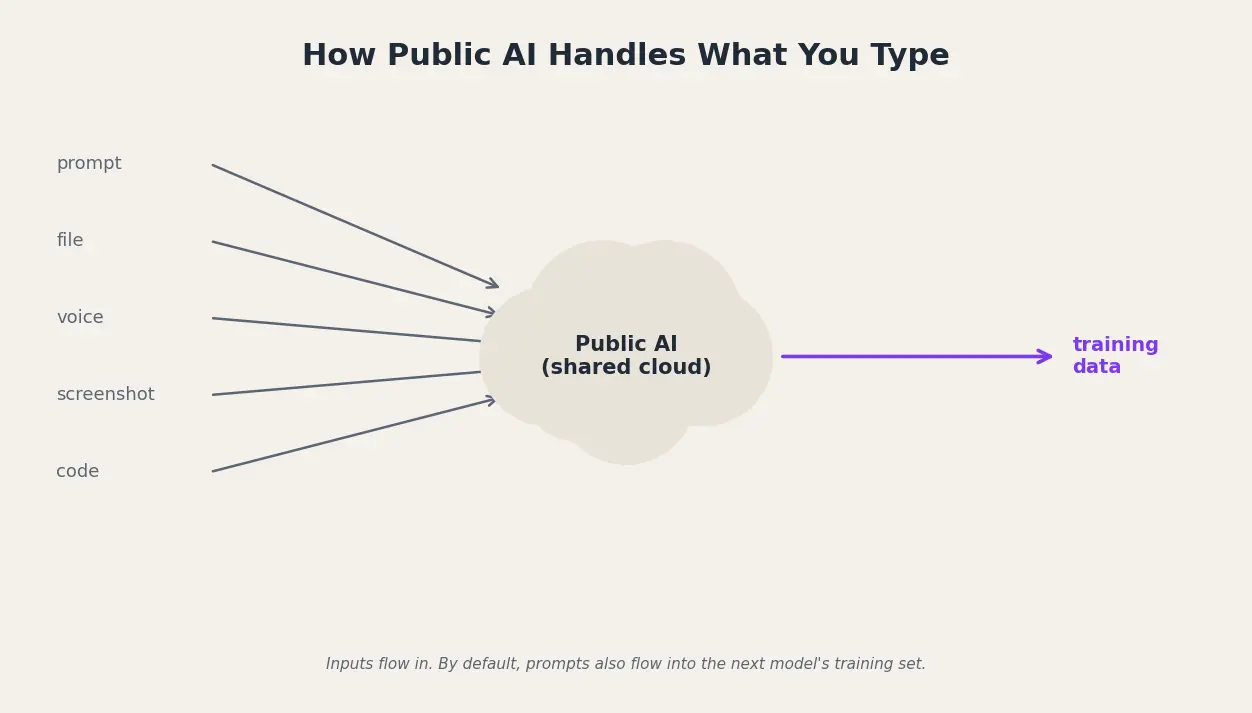
Public AI is a hosted large language model accessed over the open internet, on shared infrastructure, governed by a click-through Terms of Service. Defaults on most consumer tiers treat your prompts as fuel for the next model. “Plus” does not mean “private.”
Private AI vs public AI
Public AI tools like ChatGPT, Gemini, and Claude run on shared cloud infrastructure and may use your prompts to train future models by default. Private AI runs on infrastructure you control (on-device, self-hosted, or a dedicated enterprise tenant with a contract that blocks training and limits retention), so confidential work data never leaves your boundary.
Here is what the defaults actually look like across six tools most knowledge workers reach for:
- ChatGPT (Free, Plus, Pro on a personal workspace): training on by default, opt-out is a settings toggle most users never find (per OpenAI's Data Controls FAQ).
- Claude (Free, Pro, Max): since August 28, 2025 trains on chats with 5-year retention unless you opted out by October 8, 2025 (per Anthropic).
- Microsoft Copilot for Individuals: Microsoft's own consumer terms label it “for entertainment purposes only,” not for important advice.
- Google Gemini (free): human reviewers can read sampled conversations, default retention 18 months.
- DeepSeek: per The Hacker News, the privacy policy itself states personal data are stored in China.
- Meta AI (Llama-powered consumer): trains on public posts and prompts in most regions, with opt-out blocked in some EU markets.
What “Private AI” Actually Means (Three Patterns, Not Just One)
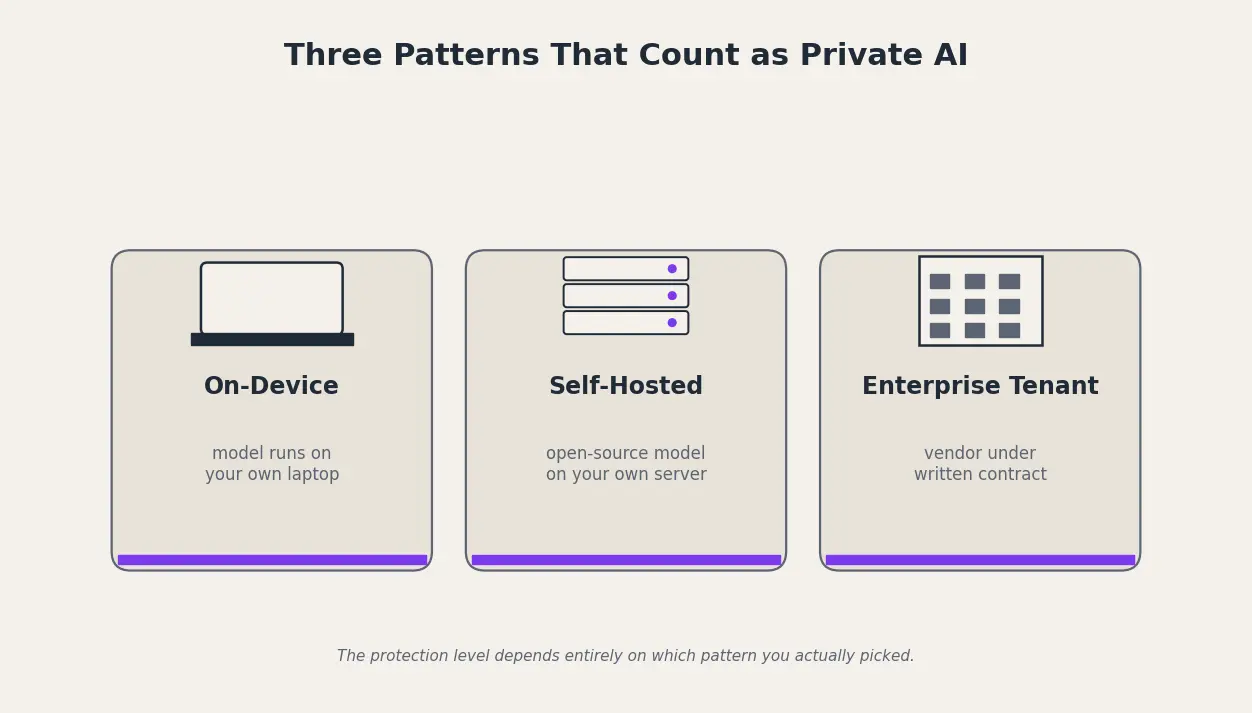
Private AI is a model whose data-handling boundary you control, by hardware, by tenancy, or by a binding contract. Vendors brand themselves “private AI” when they really mean “we have an enterprise tier,” so the substance lives in the deployment pattern, not the marketing. The honest test: does the data leave the device, does it touch a third-party API, does it train the model, can the vendor read plain text, and can you audit what came back.
There are five practical deployment patterns, and the protection level depends on which one you picked:
- Local on-device inference: weights run on your own laptop, no internet round-trip; examples include Apple Intelligence on-device tier and llama.cpp.
- Self-hosted open-source LLM: Llama, Mistral, or DeepSeek weights deployed inside your VPC or on-prem GPU cluster, with logs and keys you own.
- Enterprise tenant with a Data Processing Addendum: ChatGPT Enterprise, Claude for Work, Gemini for Workspace, or Microsoft 365 Copilot, walled off from training under commercial terms.
- Private cloud compute (vendor-attested): Apple's Private Cloud Compute pattern, where prompts land in a hardware-attested enclave with no persistent storage.
- Hybrid with on-device redaction: sensitive entities stripped on-device before the prompt is sent to a cloud LLM, then re-inserted in the response on-device.
Per Microsoft's “Enterprise data protection in Microsoft 365 Copilot” page, prompts inside a properly licensed enterprise tenant “aren't used to train foundation models.” That commitment exists only inside the tenant. A personal Copilot account does not get it.
Difference Between Public AI and Private AI: 8 Dimensions That Decide Everything
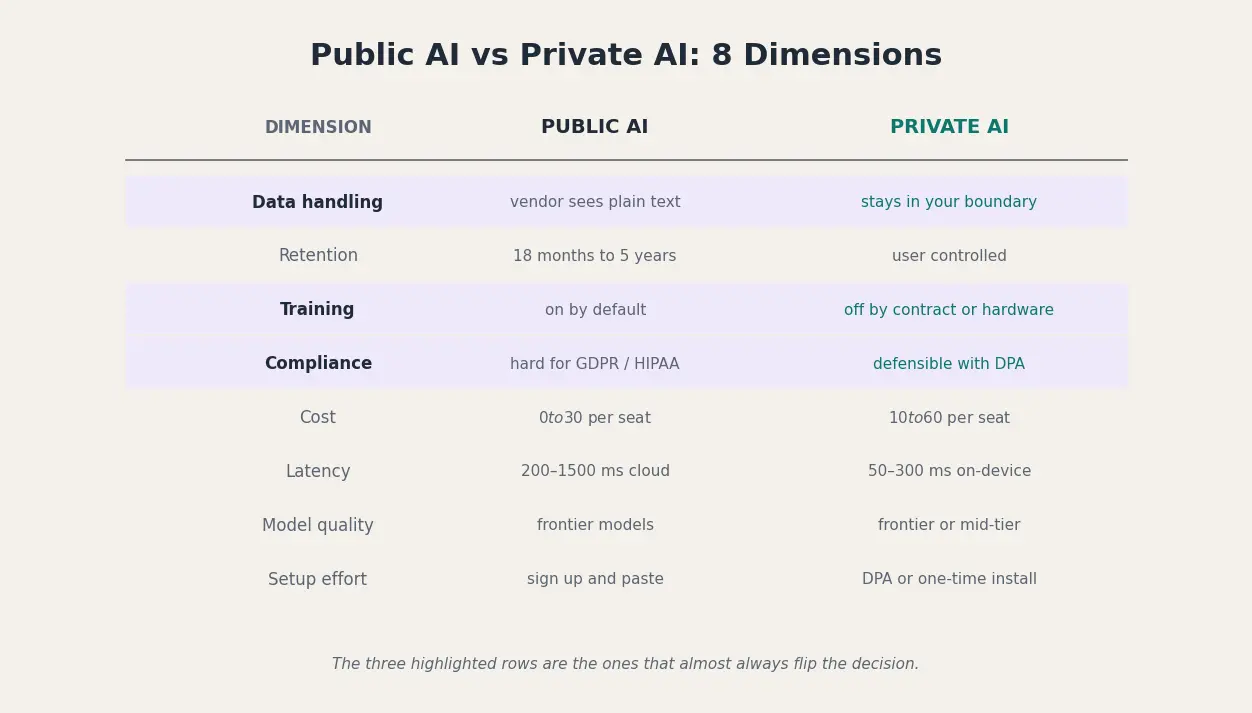
Put the two side by side on the eight dimensions a risk team actually scores, and three rows almost always flip the decision: data-handling default, training-usage default, and compliance posture. Cost looks decisive on its own, but a cheap-per-seat public tool becomes expensive the moment one breach lands inside it.
Even “private” enterprise tools have edges. Per the same Microsoft Copilot page, “the EU Data Boundary doesn't apply to web search queries” and “Anthropic models are currently excluded from the EU Data Boundary.” The moment Copilot grounds an answer in Bing, or routes to an Anthropic model, you are in a different legal universe.
The verdicts that matter are role-specific:
- Regulated client work (legal, healthcare, finance): private only, no public tool clears Article 32 plus sectoral rules.
- Brainstorming generic copy: public is fine, the data is throwaway anyway.
- Code containing company source: private (on-device or enterprise tenant), per the Amazon January 2023 template.
- Customer support drafts with PII: hybrid with on-device redaction, the entity to protect is the customer's name.
The Risks of Public AI at Work: 5 Real Incidents and the Numbers Behind Them
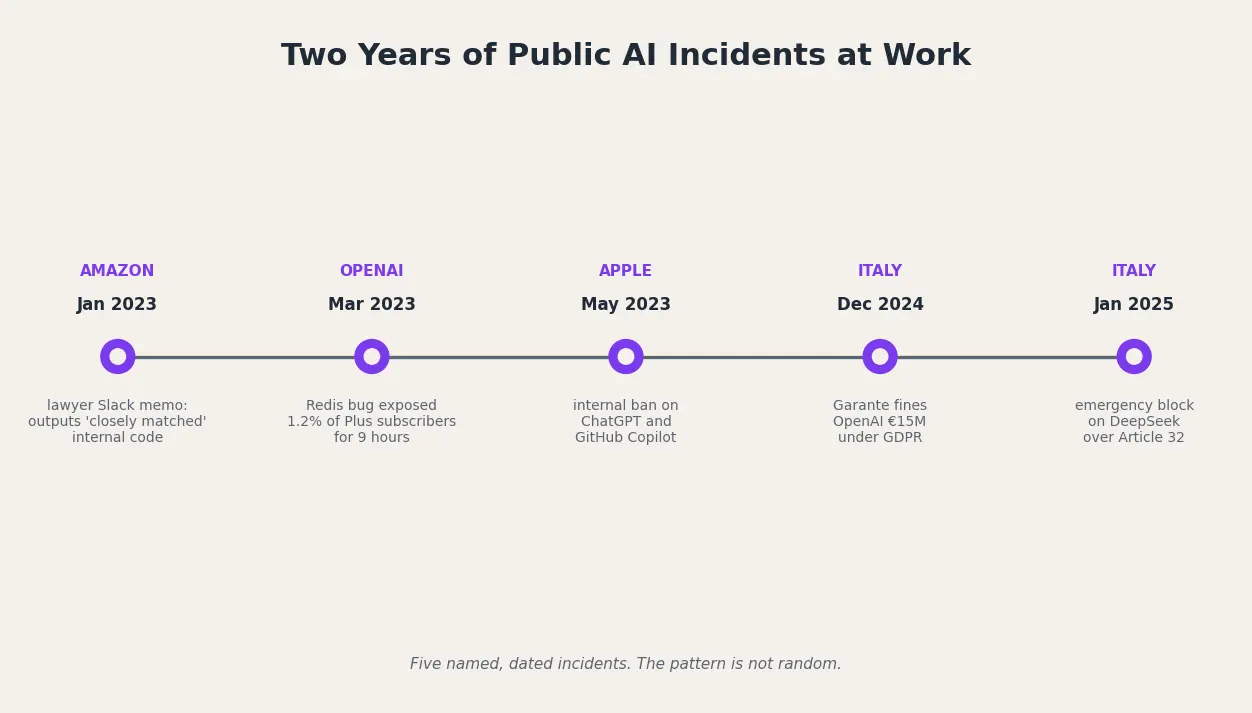
The risk is not theoretical. It is a documented incident roster spanning two years, two continents, and three of the largest companies in the world. Per Cyberhaven Labs' endpoint study of 1.6 million workers, 11 percent of everything employees paste into ChatGPT is sensitive or confidential, and a typical company sees 319 leak incidents per 100,000 employees per week. Per IBM's Cost of a Data Breach Report 2025, shadow AI adds $670,000 to the average breach cost, 20 percent of all breaches involve shadow AI, and 97 percent of AI-breached organisations lacked AI access controls. Per Stanford HAI's AI Index 2025, 233 AI-related incidents were logged in 2024, a 56.4 percent jump over 2023.
Read in chronological order, the pattern is not random:
- January 2023, Amazon Slack memo: per Gizmodo, an Amazon lawyer warned staff she had “already seen instances” where ChatGPT outputs “closely matched” internal Amazon material.
- March 2023, OpenAI Redis bug: per OpenAI's post-mortem and Help Net Security, a nine-hour race condition exposed payment data and chat titles for 1.2 percent of ChatGPT Plus subscribers active in the window.
- May 2023, Apple internal ban: per The Wall Street Journal via MacRumors, Apple barred ChatGPT and GitHub Copilot company-wide over leak fears.
- December 2024, Italian Garante fine: per The Hacker News and Euronews, Italy fined OpenAI EUR 15 million under GDPR for training-data and breach-notification failures, the first major EU GenAI enforcement action.
- January 2025, Italian Garante DeepSeek block: per The Hacker News, the Garante issued an emergency ban two days after the R1 launch, citing GDPR Article 32 because DeepSeek's own policy states personal data are stored in China.
Bans are no longer the exception. JPMorgan, Bank of America, Citigroup, Goldman Sachs, and Apple all restricted public AI use in the first half of 2023, and the EU is now adding regulatory teeth on top.
When to Use Public AI, When to Use Private AI: A Role-by-Role Rule of Thumb
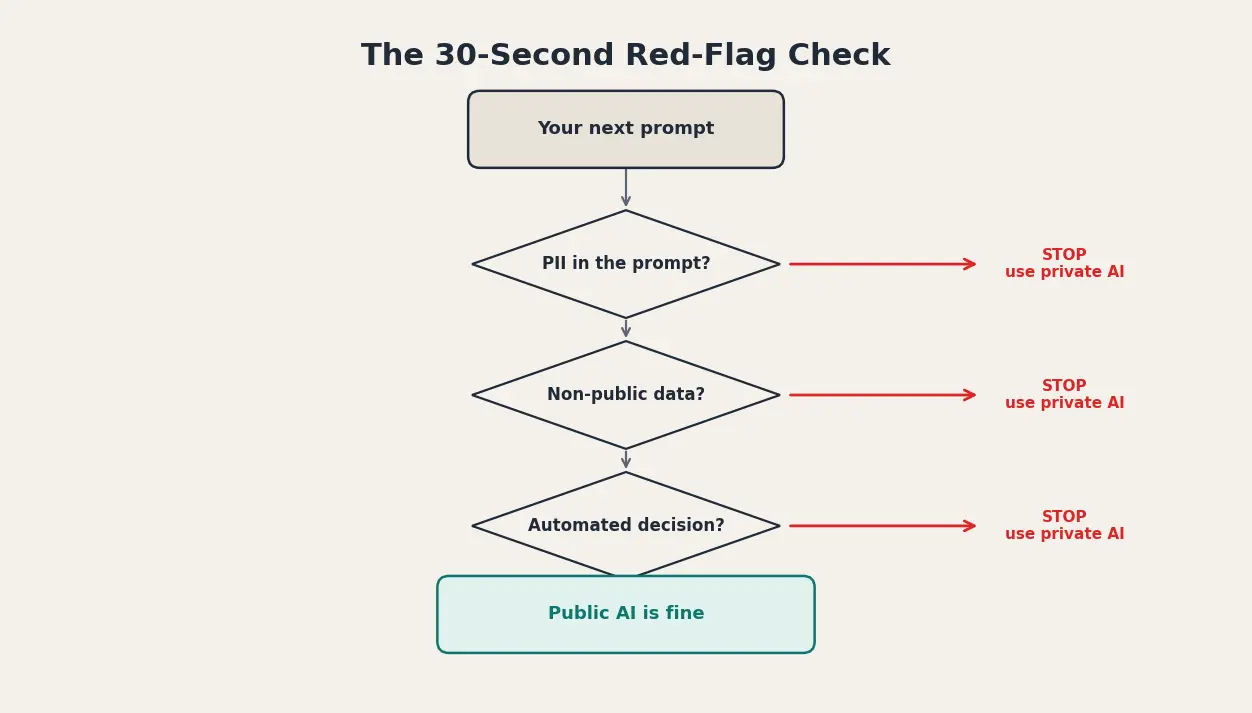
The right choice between public and private AI is a function of the role you are in and the data the next prompt will contain. Most knowledge workers will use both, in different moments of the same day. The job is to know which moment is which before you hit Enter.
A one-line rule for six roles: legal, never paste contract clauses or client identities; HR, never paste resumes or performance notes; finance, never paste ledger detail or M&A drafts; marketing, public AI is fine for ideation, not customer lists or brand-confidential roadmaps; engineering, never paste proprietary source; executives, never paste board materials. Per Cisco's 2024 Data Privacy Benchmark Study, 48 percent of professionals admitted entering non-public company information into a public GenAI tool. The roster above is the line 48 percent already crossed.
Before you hit Enter on any prompt, run a 30-second red-flag check. Stop if any of the following is true:
- The prompt contains a name, email, or ID for someone who has not consented to AI processing.
- The prompt contains non-public financial data, source code, customer lists, or strategy documents.
- A compliance officer would be uncomfortable seeing this prompt verbatim in a discovery filing two years from now.
- You are on a personal free or consumer tier (assume training is on).
- The answer will drive a decision affecting a person's job, credit, or treatment (GDPR Article 22 territory, human-in-the-loop required).
- You are outside your company's sanctioned tool list (shadow AI), on the wrong side of the IBM $670,000 uplift.
Private AI on Your Mac: How Elephas Closes the Loop
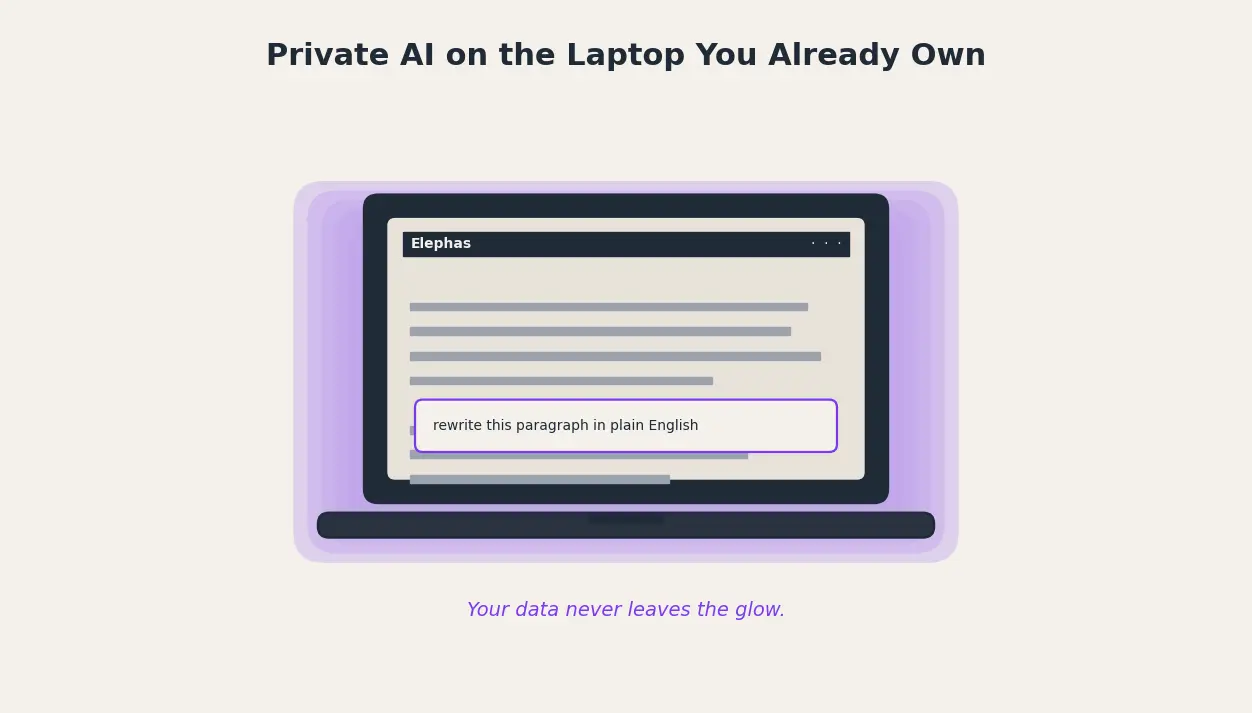
Two paths actually work for an individual employee in 2026. The first is a dedicated private AI tier from a frontier vendor, and those are expensive once you price in seats, contracts, and IT review. The second is running a local AI model on your own laptop, which avoids the cost question but runs into hardware limits and slow inference on anything but the newest Macs.
Elephas closes the gap. It is a Mac-native private AI assistant that starts at $19 per month, and it gives you two practical ways to work safely:
- Run local AI models natively on your Mac if your hardware supports it. Local models are inbuilt in Elephas, so there is no second app to install, no Docker, no model file management, no command line. Open the shortcut, type the prompt, and the inference happens on your machine.
- If you want the quality of a cloud model for a specific task, Elephas provides Smart Redaction. When you chat about a document before sending your query to the cloud model you selected, Elephas automatically detects sensitive information (client contracts, names, internal identifiers) and redacts it before the prompt is sent. This ensures confidential data never leaves your Mac.
There is also Super Brain, the private knowledge base that lives on your hard drive. You point Super Brain at your own files (PDFs, notes, emails, exports) and then chat with it in plain English. It is the same conversational experience as ChatGPT, except the answers come from your own documents and nothing is uploaded to a third party.
Six things matter most for workplace use:
- Local inference on Apple Silicon: contracts, Slack exports, and meeting notes never leave the laptop.
- Universal text shortcut: works inside Mail, Notes, Pages, Word, Slack, Notion, anywhere you type.
- Super Brain: index your own files locally, query in plain English, no vendor upload.
- Smart Redaction: strips sensitive entities before any prompt reaches a cloud model.
- Choose your model: bring your own OpenAI, Anthropic, or local key, no forced vendor lock-in.
- Offline mode plus one-time install: works on a plane or hotel network, no MDM dependency for solo pros.
