Is Siri an AI? What Apple's New Siri Actually Is
Yes. Siri is AI. But that answer hides the important part: the Siri most people complained about was mostly a narrow intent system, while the new Apple Intelligence Siri is a large-language-model assistant.
The useful question is not whether Siri counts as AI. It is which kind of AI is answering, where the request is processed, and when your words leave the device.
Quick answer
- Old Siri was AI in the older sense: speech recognition, natural language processing, machine learning, and hand-written intent rules.
- New Siri is modern AI: an Apple Intelligence assistant backed by Apple Foundation Models, on-device reasoning, Private Cloud Compute, and an optional third-party model you choose.
- The third-party model is no longer only ChatGPT. With the iOS 27 Extensions framework you can pick ChatGPT, Claude, or Google Gemini, set in Settings through an App Store marketplace.
- Not every Siri request stays on your iPhone or Mac. Simple requests may run locally. Harder requests can use Apple's private cloud. A request sent to your chosen model leaves Apple for that provider.
- For private work, the safest answer is layered: use Siri for everyday commands, but keep sensitive documents in a local-first AI workspace.
- On a Mac, Elephas keeps your documents on your device and strips sensitive names and identifiers before any cloud model sees them. It has a free plan and starts at $19/month.
The honest answer: old Siri and new Siri are not the same thing
Siri has always used AI pieces. It needed automatic speech recognition to turn voice into text, natural language processing to guess what you meant, and machine learning models to improve dictation and ranking.
But the old Siri did not behave like ChatGPT because it was not built like ChatGPT. It mostly mapped your request to known intents: set a timer, call someone, turn on a light, search the web. If your wording fell outside those tracks, Siri often gave up or sent you to Safari.
Apple Intelligence changes that architecture. The new Siri can understand context, route harder work to larger models, and answer more conversationally. That is the shift from a voice-command assistant to an AI assistant. If you have not enabled the new assistant yet, here is how to set up Siri on Mac and iPhone, and if it refuses to appear at all, the fix Siri not available guide walks through every cause.
| Version | What it really was | What it could do | Private-work risk |
|---|---|---|---|
| Old Siri | Speech recognition plus narrow ML and intent rules | Commands, dictation, reminders, calls, web searches | Low capability, limited usefulness |
| Apple Intelligence Siri | LLM-based assistant with local and cloud model routing | Contextual answers, app actions, richer language understanding | Depends where it routes |
| Siri + a chosen model (ChatGPT, Claude, Gemini) | Apple assistant handing a request to your selected provider | Open-ended generation when Apple asks or you confirm | Leaves Apple |
What actually powers the new Siri?
Apple's new Siri is not one model. It is a routing system. The assistant decides whether a request can be handled locally, whether it needs larger Apple Intelligence models through Private Cloud Compute, or whether you should be asked to use ChatGPT.
1. On-device Apple Intelligence
Some Siri requests are processed entirely on your device. This is the cleanest privacy path because the request does not need to leave your iPhone, iPad, or Mac.
2. Private Cloud Compute
More sophisticated questions can be sent to Apple's Private Cloud Compute. Apple says this system is designed so data is used only for the request, not retained, and not readable by Apple.
3. Optional third-party model you choose
If Siri decides an outside model could help, or if you ask it to, the request can leave Apple and go to a third-party provider. This is the important privacy boundary, and it is no longer only ChatGPT.
With the iOS 27 Extensions framework, Apple lets you pick which model handles these requests: ChatGPT, Claude, or Google Gemini, chosen in Settings through an App Store marketplace for Apple Intelligence extensions. Whichever you select, that request follows that provider's rules, not Apple's.
For some requests, models are capable of processing your Siri requests entirely locally on the device. But sometimes the System Orchestrator realizes that it's a more sophisticated question.
Craig Federighi, Apple SVP of Software Engineering
That quote is the plain-English version of the architecture: Siri is now an AI orchestrator. It chooses the smallest model that can do the job, then escalates when needed.
One point of confusion worth clearing up
There are two different Google connections in the new Siri, and people mix them up. The first is the extension above, where you can pick Gemini as the chatbot that answers a handed-off request.
The second is Apple's own backend. Apple says its new Apple Foundation Models are co-developed with Google and built on technology behind the Gemini family, running on-device and through Private Cloud Compute. Apple stresses that on this path Google is not involved in handling your data. So Siri's own brain is partly Gemini-derived, separate from the Gemini extension you might switch on yourself. The background on that Apple and Google deal is in Siri and Gemini.
Does Siri use ChatGPT, Claude, or Gemini?
It can use any of them, but Siri is not any of them. Apple's assistant can hand a request to an outside chatbot as an extension. At launch that meant only ChatGPT. With the iOS 27 Extensions framework, Apple opened it up so you can choose ChatGPT, Claude, or Google Gemini as the model Siri hands off to.
You set this in the Apple Intelligence and Siri section of Settings, through an App Store marketplace for extensions, and Apple plans to let different providers cover different jobs. The extension is gated either way. You can turn it off, and Apple says Siri asks before sending requests in the relevant flows.
This matters because the privacy rules change with the destination. On-device Siri is one thing. Private Cloud Compute is another. A third-party model is a separate company under its own policies, whether that is OpenAI, Anthropic, or Google.
| Data path | Who processes it? | Does it stay on device? | Best use |
|---|---|---|---|
| On-device Siri | Apple model on your device | Yes | Personal commands and lightweight requests |
| Private Cloud Compute | Apple cloud models under PCC guarantees | No, but stays inside Apple's privacy boundary | Harder Siri or Apple Intelligence tasks |
| Third-party extension | Your chosen provider: OpenAI, Anthropic, or Google | No | General chatbot answers when you explicitly allow the handoff |
So the accurate sentence is: Siri is Apple's AI assistant, and it can optionally ask ChatGPT, Claude, or Gemini for help. Treat that handoff like a separate destination, not as a normal Siri request, no matter which model you picked. For client work specifically, our Siri vs ChatGPT comparison weighs both routes.
Why Siri felt dumb for so long
People were not wrong to say Siri felt behind. The old assistant could recognize phrases, but it did not deeply understand messy questions. It handled a small set of known actions well and failed quickly outside them.
Modern AI assistants work differently. They can interpret loose language, maintain more context, and synthesize answers instead of matching your words to a fixed command. That is why ChatGPT felt like a different species of software even though Siri had used AI components for years.
The new Siri is Apple's attempt to close that gap without abandoning Apple's privacy promise. The gap stayed open for years, and why Siri was delayed tells that story. The tradeoff is that privacy now depends on the route: local, Private Cloud Compute, or ChatGPT.
Is Siri AI private enough for sensitive work?
For normal personal use, the new Siri is one of the more privacy-conscious AI assistants because Apple tries to handle simple work locally and sends harder Apple Intelligence work through Private Cloud Compute.
For confidential work, the standard should be higher. If you are asking about a client file, patient note, tax record, board deck, or internal strategy memo, the question is not just whether the vendor promises privacy. The question is whether the data ever needs to leave your Mac in the first place. What Siri actually does with your voice is covered in what Siri really hears.
The practical rule
Use Siri for device actions, everyday questions, and low-risk summaries. Do not casually paste sensitive documents into any assistant path that can leave your device.
If the work is sensitive, keep the source documents local and redact before any cloud model sees the prompt.
That is where a local-first Mac AI tool still has a job, even in a world where Siri becomes genuinely intelligent.
Where Elephas fits when Siri becomes smarter
The point of Elephas is not to replace Siri for timers, messages, or quick commands. Siri is excellent for that. Elephas is for the work you would not want floating through a general assistant: PDFs, client notes, research files, private drafts, and personal knowledge.
Elephas is a privacy-first AI knowledge assistant for Mac. It lets you query your own documents and notes, keeps your files on your machine, and supports workflows where sensitive names and identifiers are stripped before any cloud model sees a request.
| Task | Use Siri | Use Elephas |
|---|---|---|
| Set reminders, send messages, open apps | Yes | Not the main job |
| Ask a general public question | Yes | Optional |
| Summarize private PDFs and notes | Only if routing is acceptable | Better fit |
| Query a personal knowledge base | Limited | Built for this |
| Use cloud AI with redaction first | No redaction workflow | Better fit |
The clean split is simple: Siri for the operating system, Elephas for your knowledge work. One controls your device. The other protects and searches the material that matters. To get more out of the Siri half, start with these best Siri shortcuts.
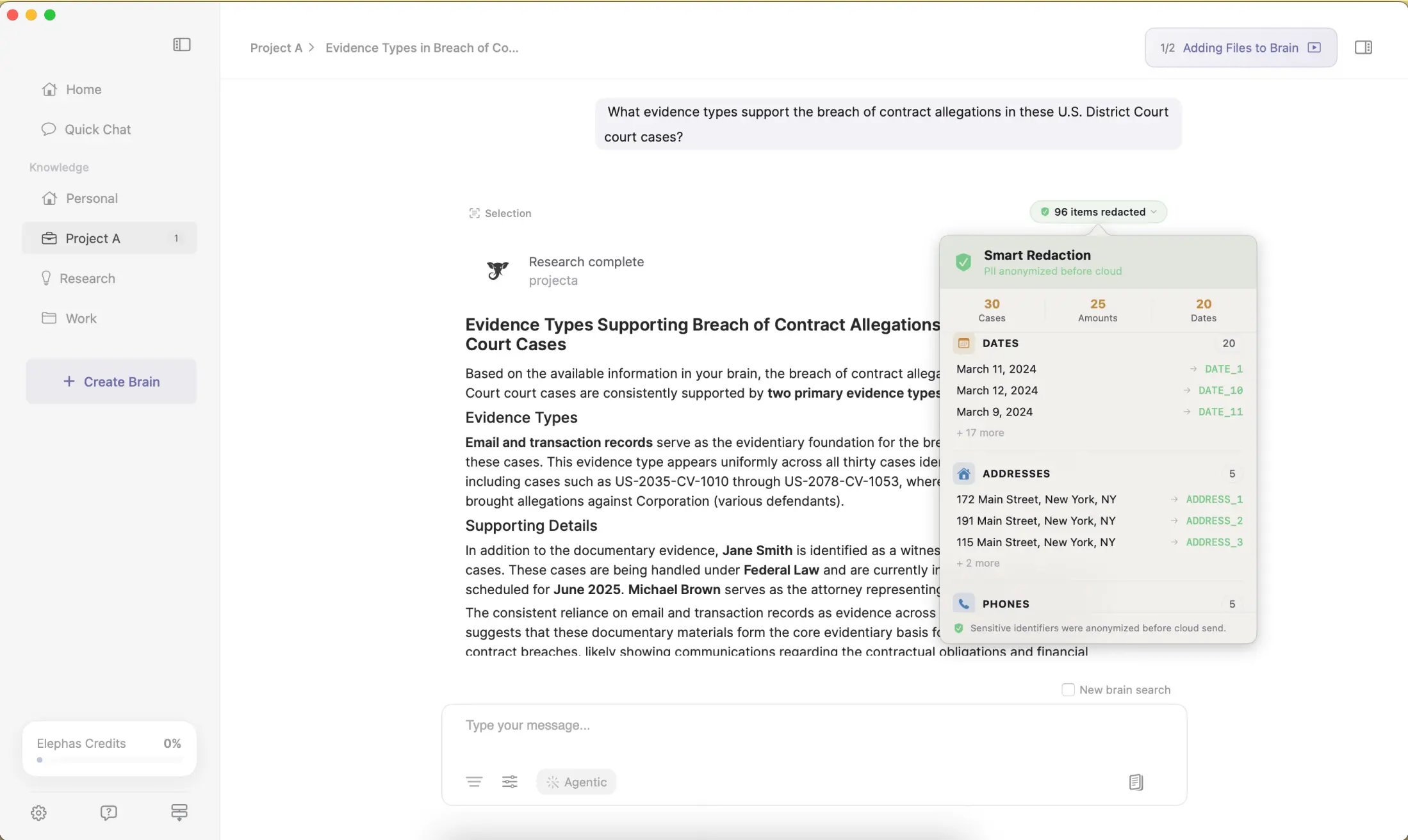
How Elephas protects a prompt before it reaches the cloud
For people who still want a leading cloud model, Elephas adds a second layer through automatic PII redaction. Before a prompt is sent to ChatGPT 5.5, Claude Opus 4.8, Gemini, Grok, Perplexity, or any other cloud model, Elephas strips sensitive names, emails, phone numbers, and identifiers on your Mac.
The cloud model only ever sees the sanitized text. When the answer comes back, the redacted fields are reassembled locally on your machine, so identifiable information never leaves the device.
Elephas pairs this with zero data retention: content never trains AI models, never sits on a vendor's server, and never passes through a third-party reviewer's screen.
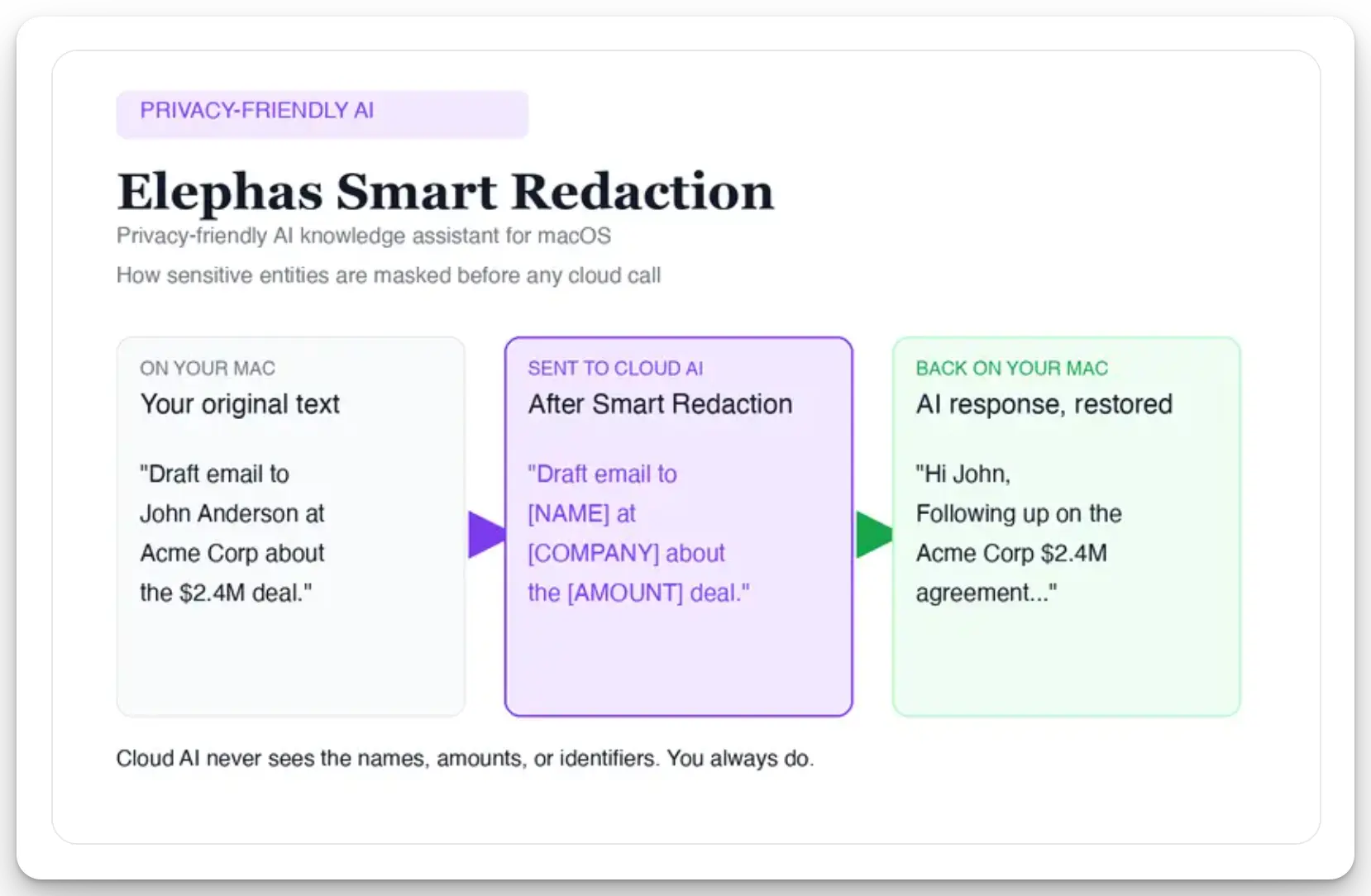
Sensitive data is automatically detected and redacted before anything reaches a cloud AI model, your content is never used to train AI models, and nothing passes through a third-party reviewer's screen.
Smart Redaction is on every plan, including the free tier. Elephas has a free plan and starts at $19/month, so you can try Elephas for free before you trust an AI assistant with anything confidential.
Related questions
Is Siri generative AI now?
The Apple Intelligence version of Siri is generative-AI powered for supported tasks. It can use Apple's foundation models and optionally ChatGPT, depending on the request and settings.
Is Siri the same as ChatGPT?
No. Siri is Apple's assistant. ChatGPT is one optional extension Siri can hand work to when you allow it. With iOS 27 Extensions you can choose Claude or Google Gemini for that role instead.
Was old Siri just rules?
Not only rules. It used AI techniques for speech and language, but the assistant behavior was heavily intent-based and much narrower than modern LLM assistants.
Can Siri read what is on my screen?
Apple Intelligence gives Siri richer context across apps and on-screen information, but availability depends on device, OS version, app support, and privacy settings.
Should I turn off the third-party model inside Siri?
If you handle confidential work, yes, or at least leave confirmation on and avoid sending sensitive documents. Whichever model you picked, ChatGPT, Claude, or Gemini, the extension route is the one that leaves Apple's privacy boundary.

Related Resources
Explore all AI Privacy & Security resourcesApple Intelligence Privacy: What Leaves Your Mac (and What Never Should)
9 min readcomparisonSiri vs Alexa in 2026: Which Assistant Wins After the AI Overhaul?
20 min readarticleWhat Is Apple Intelligence? Features, Devices & Privacy Explained (2026)
15 min readguideApple Intelligence on Mac: The Complete 2026 Guide (Features, Setup, Privacy, and the New Siri)
25 min readSources
- Apple Newsroom: Apple Intelligence and Siri announcements
- Apple Security Research: Private Cloud Compute
- Apple Legal: ChatGPT extension and privacy
- MacRumors: iOS 27 lets you pick Claude or Gemini instead of ChatGPT
- MacRumors: Apple reveals new AI architecture built with Google Gemini models
- 9to5Mac: Craig Federighi on Siri AI routing
- Tom's Guide: Federighi on Siri as an integrated conversational tool