Apple Intelligence on Mac: The Complete 2026 Guide (Features, Setup, Privacy, and the New Siri)
Apple Intelligence for Mac runs on any M1 or later Mac on macOS 26 Tahoe or the 2026 release, needs roughly 7 GB free, and gives you Writing Tools, Mail summaries, Photos search, Image Playground and a rebuilt assistant. Most requests stay on the machine. Harder ones go to Apple's private servers. ChatGPT is a separate opt-in switch.
You switched it on the week it shipped, and you still cannot name one thing it changed. That is not a settings problem. Apple has rebuilt this product twice since launch, and it has agreed to pay $250 million to settle a false-advertising claim over the assistant it demoed and never shipped, in a settlement still awaiting court approval (MacRumors).
Quick answer
- Which Macs: M1 or later Apple silicon only. Intel Macs are excluded, permanently.
- What you get today: rewriting, proofreading, summaries, Photos search, custom images, Live Translation, and model actions inside Shortcuts.
- What leaves your Mac: most requests stay local; complex ones go to Private Cloud Compute; anything you hand to ChatGPT goes to OpenAI under a separate policy.
- What the rebuilt assistant changes: it moves into Spotlight, gains onscreen awareness, and still refuses to read a web link.
- The gap Apple leaves: its tools rewrite the text in front of you but have no memory of your own documents. Elephas closes that gap. Free plan available; paid plans start at $19/month, with a free trial.
Last updated: July 13, 2026
Start with what is actually installed, because two products now answer to the same name.
What Is Apple Intelligence on Mac, and What Is the New Siri?
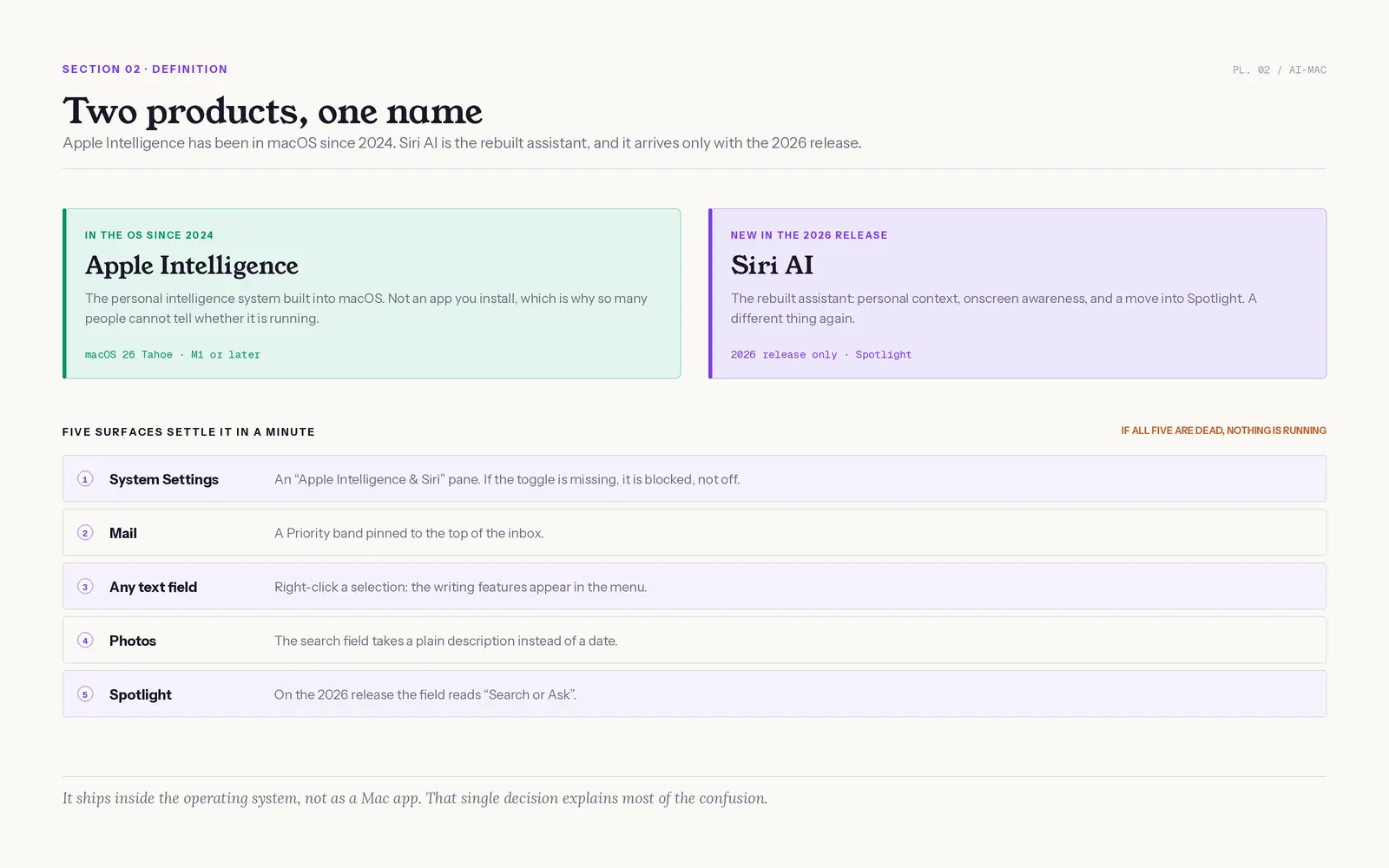
Apple Intelligence is the personal intelligence system Apple Inc. built into macOS, not an app you install. It is artificial intelligence in the ordinary sense: generative models that write, summarize and search. Siri AI, the rebuilt virtual assistant with onscreen awareness, is a separate thing, arriving only with this year's release.
According to Apple Newsroom, it ships inside the operating system rather than as a separate Mac app. That single decision explains why so many people cannot tell whether it is running. Five surfaces settle it in a minute:
- System Settings, then the Apple Intelligence & Siri pane. If the toggle is missing, it is blocked, not off.
- The Priority band at the top of your Mail inbox.
- The right-click menu on any selected text, where the writing features live.
- The search field in Photos, which now takes a plain description instead of a date.
- The Spotlight field on the 2026 release, which reads "Search or Ask".
- If all five are dead, nothing is running on that Mac.
Apple's own foundation-model paper reported in 2025 that its roughly 3-billion-parameter on-device model matched or beat comparable open baselines, while noting meaningful disagreement among the human graders on hard or subjective examples (arXiv 2507.13575). Apple's own paper concedes how much of this is judgement rather than measurement.
"That makes sense too. I never use Apple intelligence or heard much about it by mac users" (r/macbookair)
"Apple Intelligence. Uh huh. You're not getting me with that one again" (995 upvotes, r/iphone)
Confusion is the normal reaction; scepticism is the next. What it actually does on a Mac, as opposed to an iPhone, is where every guide goes vague. We cover whether Siri is an AI separately.
Apple Intelligence Features on Mac: What Actually Works in 2026
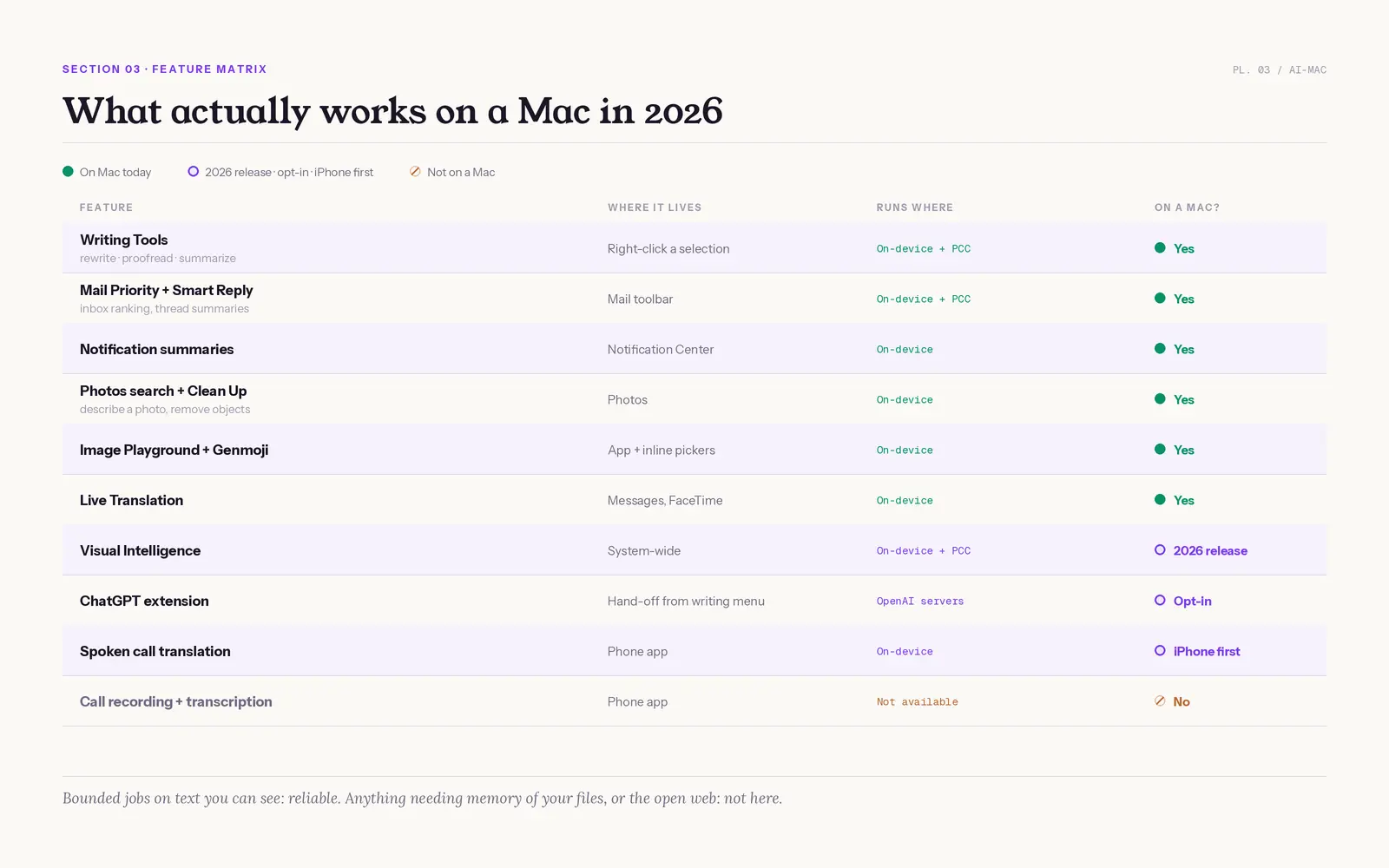
On a Mac in 2026 you get Writing Tools, Mail Priority Messages and Smart Reply, notification summaries, Photos search and Clean Up, Image Playground, Genmoji, Live Translation, Safari and Notes summaries, and model actions inside Shortcuts. Call recording is iPhone-only.
Visual Intelligence reached the Mac only with this year's release.
| Feature | Where it lives on a Mac | Apps | Runs where | On Mac? |
|---|---|---|---|---|
| Writing Tools (rewrite, proofread, summarize text) | Right-click a selection. In the 2026 release, "Write with Siri" | Apple apps, third-party apps (Zoom, Slack), websites, PDFs | On-device, private servers for long text | Yes |
| Mail Priority Messages, Smart Reply, inbox summaries | Mail toolbar and message list | On-device plus private servers | Yes | |
| Notification summaries | Notification Center | System-wide | On-device | Yes |
| Photos search, Clean Up tool (remove distracting objects), create memory movies | Photos search field and Edit toolbar | Photos | On-device | Yes |
| Image Playground, Genmoji (a custom emoji) | Standalone app plus inline pickers | Messages, Notes | On-device | Yes |
| Live Translation | Messages and FaceTime | Messages, FaceTime | On-device | Yes |
| Get spoken translations for calls in the Phone app | Phone app | Phone | On-device | iPhone first |
| Call recording and transcription | Not available | Phone | Not available | No, iPhone only |
| Visual Intelligence | Screen capture | System-wide | On-device plus private servers | 2026 release only |
| ChatGPT extension | Hand-off from the assistant or the writing menu | System-wide | OpenAI servers | Yes, opt-in |
Search for Specific Photos, and Other Things That Work
Apple Intelligence handles short, bounded jobs on text you can see, and falls over on anything that needs memory of your files or access to the web. Ten real work tasks make the pattern obvious.
- Works reliably: proofreading, tone changes, summarizing a selected passage, ranking your inbox, drafting a two-line Smart Reply, and photo search when you search for specific photos by describing them.
- Works, with caveats: long-thread email and PDF summaries. Apple itself warns that outputs vary and that you should check names, dates and figures before acting (Apple Support).
- Fails by design: summarizing a web link. Apple's own instructions tell the assistant to refuse. It is the most-hit wall on a Mac, and it is not a bug.
- Not on a Mac at all: call recording, and anything leaning on the Phone app or CarPlay.
Mac owners quote the summaries back to each other, which is the clearest sign the feature gets used. Developers are less kind.
"Summary Through Apple Intelligence: MacOS Sequoia 15.5 is now available, introducing new features like a fifth category in Mail" (r/MacOS)
"they realized their PR-dept was writing checks their tech-dept couldn't cash... Apple has yet to deliver anything anywhere that even matches Chat-GPT of 18 months ago" (r/iOSProgramming)
Both are true at once. Our walkthrough on how to use Apple Intelligence covers the tasks it handles well, and Photos without oversharing covers the image side.
Which Macs Actually Run Apple Intelligence?
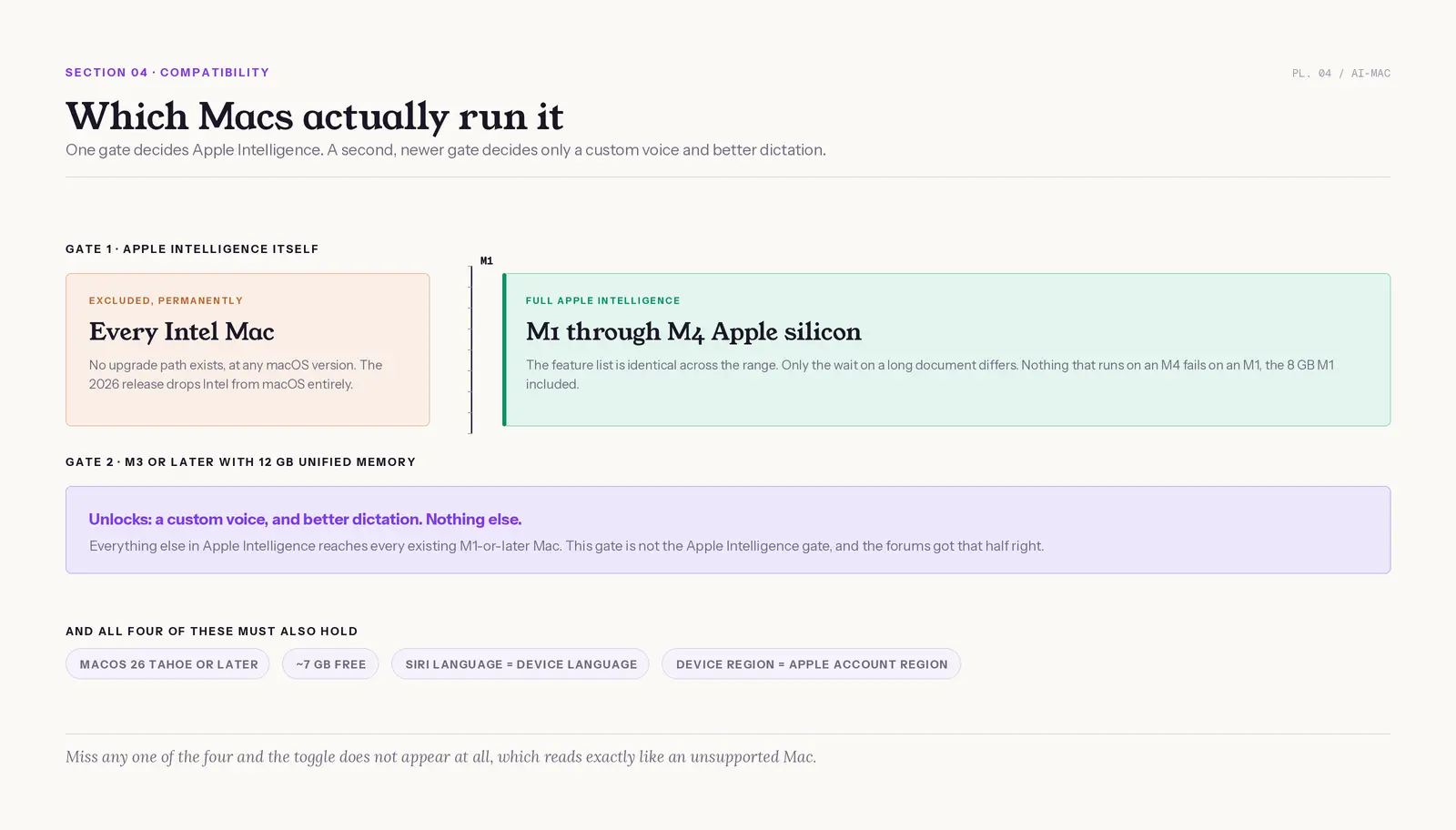
Any Mac with Apple silicon runs it: M1 or later, on macOS Tahoe or the 2026 release, with roughly 7 GB free. Intel Macs are excluded and stay excluded. The M1 is not being dropped.
| Requirement | What qualifies | What does not |
|---|---|---|
| Chip | M1 through M4 Apple silicon. The MacBook Neo uses an A18 Pro | Every Intel Mac, forever |
| Operating system | macOS 26 Tahoe, or the latest version of macOS | Anything older than Tahoe |
| Storage | Around 7 GB free for the model download | A nearly full disk stalls the download |
| Language | Your Siri language must match your device language | Mismatched pairs hide the toggle |
| Region | Supported device region and matching Apple Account region | Mainland China and managed accounts are restricted |
The forums got the memory story half right. AppleInsider reported on June 11, 2026 that the new gate is an M3 Mac or later with at least 12 GB of unified memory. It gates only a custom voice and better dictation. Everything else reaches existing Apple Intelligence Macs, the 8 GB M1 included.
- M1 versus M4: the feature list is identical. Only the wait on a long document differs. Nothing that runs on an M4 fails on an M1.
- The 8 GB question: 8 GB is not the cutoff for Apple Intelligence, only for running large third-party local models alongside it.
- The Intel question: no upgrade path exists, at any macOS version.
Mac owners reached that conclusion before Apple confirmed it, and they are blunt about the Intel trade-off.
"im not sure for how long apple will support m1 chips, but i feel we have some more years left as there still are new features being rolled out that runs perfectly fine on m1, like iPhone mirroring, apple intelligence etc." (r/macbookpro)
"If you really just want a Mac and you're willing to forgo Apple intelligence there are some intel machines out there that people will sell you for dirt cheap" (an Apple employee giving buying advice, r/mac)
The Mac qualifies. Now the toggle has to appear, a different problem.
How to Get Apple Intelligence on Your Mac
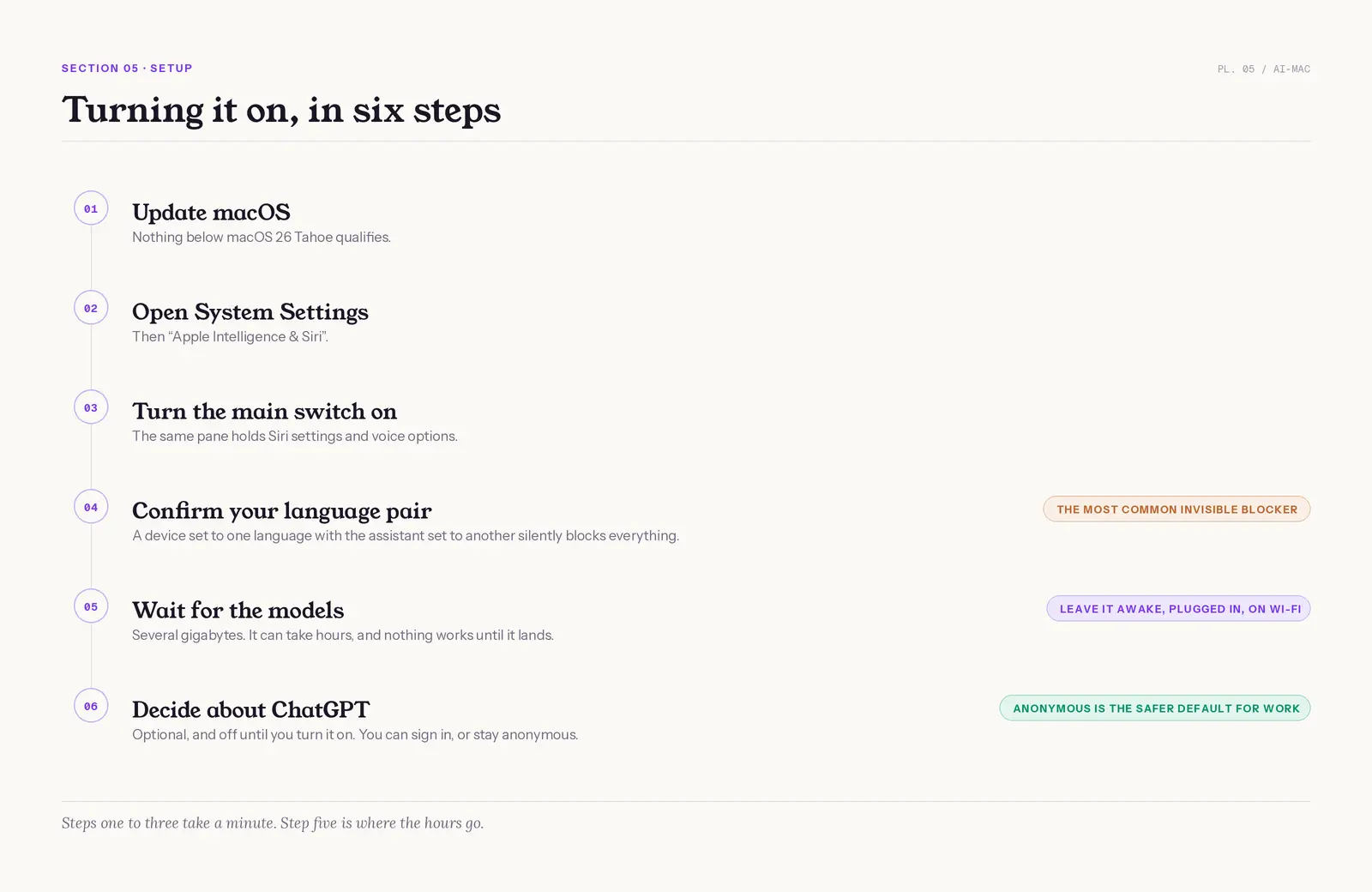
Open System Settings, choose Apple Intelligence & Siri, turn it on, and wait for the model download to finish. Your device language and your Siri language must match a supported pair. You need roughly 7 GB free. ChatGPT sits lower in the same pane, off until you turn it on.
Getting Started With Apple Intelligence, in Six Steps
- Update to the latest version of macOS. Nothing below Tahoe qualifies.
- Open System Settings, then Apple Intelligence & Siri.
- Turn the main switch on. The same pane holds Siri settings and voice options.
- Confirm your language pair. A device set to one language with the assistant set to another silently blocks everything.
- Wait for the models. The download runs to several gigabytes and can take hours. Nothing works until it lands.
- Decide about the extension. ChatGPT access is optional, and you can sign in to an OpenAI account or stay anonymous.
Without an OpenAI account, Apple says requests and attachments are not tied to your Apple Account, are not retained except where law requires, and are not used for training. Sign in, and OpenAI's own policies apply instead (Apple Support). Anonymous is the safer default for work documents.
There is an honest cost to switching it on, and some people have spent two years reading rollout timelines instead of using anything. The top reply on one 2024 rollout thread is still a copied schedule, "iOS 18.1 will introduce Siri enhancements, text editing tools, notification summaries" (r/apple).
"Apple Intelligence - OFF" listed as step four of a widely shared battery-life setup, because "As per users Apple intelligence has been the main culprit of fast battery drain" (r/macbookair)
If the trade is not worth it, here is how to turn off Apple Intelligence cleanly. The assistant half has its own walkthrough: how to set up Siri on Mac and iPhone. For a lot of Mac owners the switch never lights up at all.
Why Apple Intelligence Will Not Turn On (and How to Fix It)
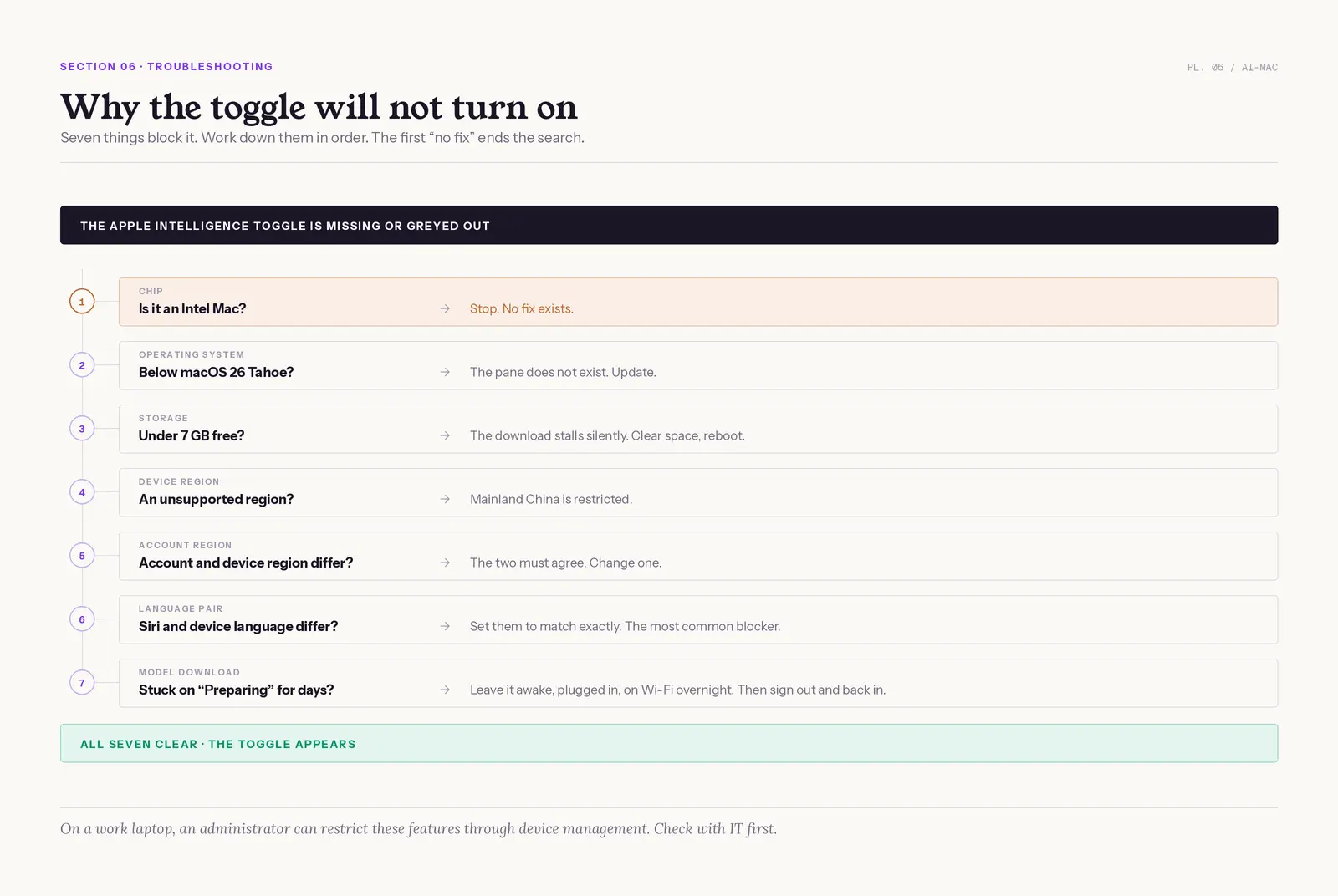
Seven things block the toggle: an Intel chip, an old operating system, less than 7 GB free, an unsupported device region, an Apple Account region that does not match the device, a Siri language that does not match your device language, or a model download that never finished. Work down them in order.
- Chip. Intel means stop. No fix exists.
- Operating system. Below macOS 26 Tahoe, the pane does not exist. Update.
- Storage. Under 7 GB free, the download stalls silently. Clear space, then reboot.
- Device region. Some regions and languages are not covered yet. Mainland China is restricted.
- Apple Account region. A US device with an account registered elsewhere hides the toggle. The two must agree.
- Language pair. Set your Siri language to match your device language exactly. This is the most common invisible blocker.
- Model download. If the pane says "Preparing" for days, leave the Mac awake, plugged in and on Wi-Fi overnight. If it never finishes, sign out and back in.
Managed Macs are a special case. Administrators can restrict Writing Tools, Mail summaries, Smart Reply, transcription and the reports feature through device management, so on a work laptop the toggle may be missing because someone decided it should be (Apple Support). Check with IT first.
The other half of the question is what turning it off removes. The features stop. The downloaded models stay on disk until macOS reclaims them. Spotlight, voice commands, dictation and photo search by date all survive. Two Reddit findings beat Apple's documentation here.
"updates that show apple intelligence as part of the setup assistant seem to reenable it. On my system I have a profile installed that makes the setup assistant skip that part" (r/MacOS)
Manual model deletion on an M1 MacBook Air through Recovery Mode and Disk Utility does delete the data, and afterwards "the Storage section works just fine" (r/MacOS)
If you would rather not touch Terminal, disabling it and waiting is enough. If the toggle is on but features misbehave, work through the fix Apple Intelligence checklist, and if the assistant itself has gone quiet, the Siri not available fixes cover that side.
Writing Tools on Mac, and Where They Stop
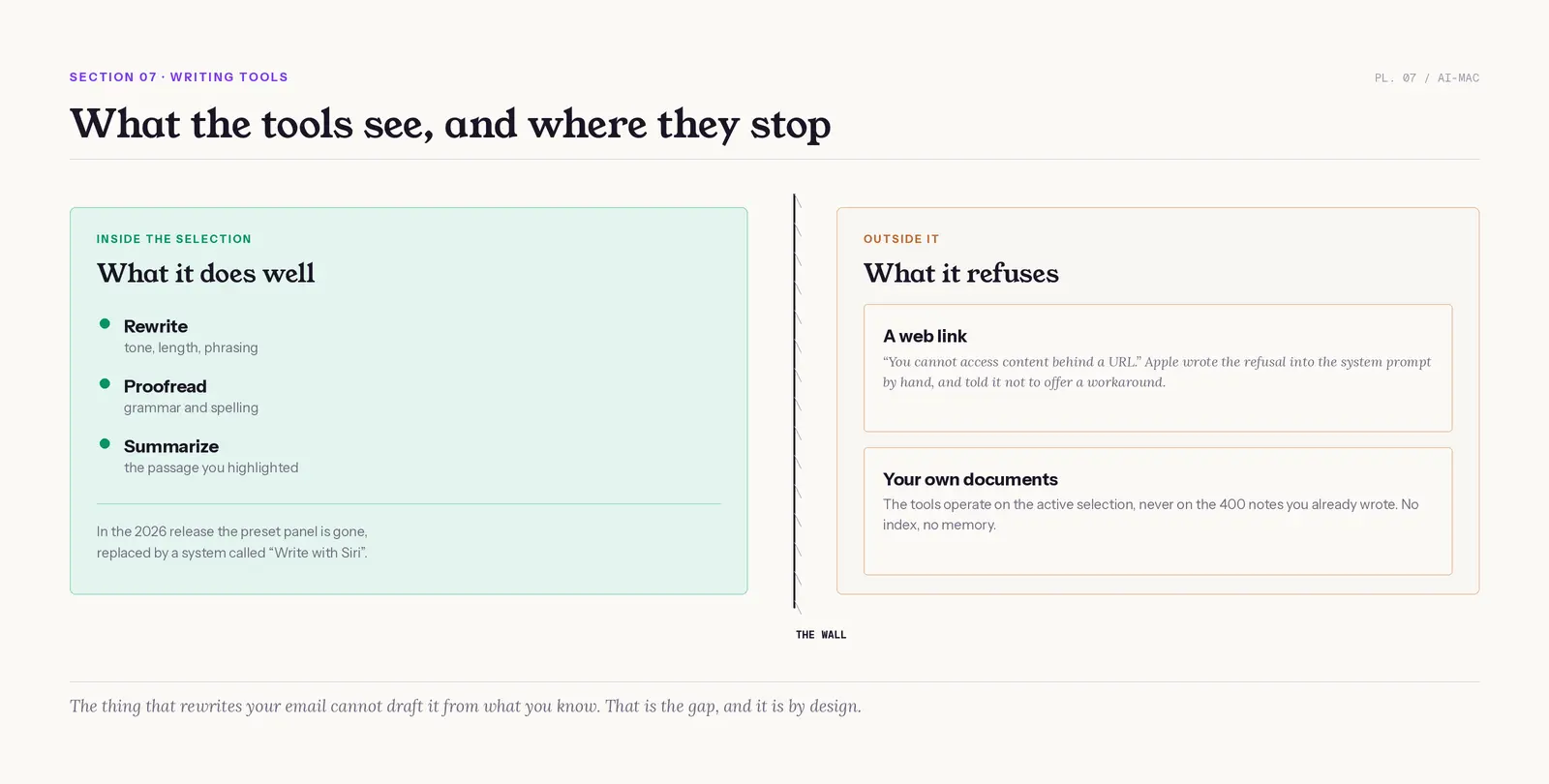
Writing Tools rewrite, proofread and summarize text selected in the active field. In the 2026 release the old preset panel is gone, replaced by a system called "Write with Siri". What did not change is the limit: the tools only see the text in front of them.
9to5Mac reported on June 22, 2026 that the old panel "has been removed in favor of this new Write with Siri system." Apple wrote the next ceiling by hand. Its system prompt, documented in the iOS 27 beta and quoted by 9to5Mac on June 24, 2026, instructs the assistant to refuse:
"You cannot access content behind a URL: When a user provides a URL and asks you to summarize, read, or extract information from it, inform them that you cannot access web pages."
The same prompt tells it not to offer a workaround. The deeper limit is memory: the tools operate on the active selection, never on the 400 notes you already wrote. The thing that rewrites your email cannot draft it from what you know. The full tour of what they handle well is in Writing Tools limits.
| Apple Intelligence | ChatGPT | Claude | Elephas | |
|---|---|---|---|---|
| Reads your own documents | No | Uploads, projects and connectors. No index of your Mac | Uploads, projects and connectors. No index of your Mac | Yes, indexes files on your Mac |
| Summarizes a web link | No, refuses by design | Yes | Yes | Yes |
| Answers from general world knowledge | Limited | Yes, a frontier model | Yes, a frontier model | No. It answers from your files, not from what a model already knows |
| Cites its sources | No | Yes, when it searches the web | Yes, when it searches the web | Yes, from your own files |
| Works offline | Partly | No | No | Yes, provides built-in local LLM models |
| Included with macOS, nothing to install | Yes | No | No | No. A separate Mac app. Free plan, paid from $19/month |
| Where your text goes | On-device, or Private Cloud Compute | OpenAI servers | Anthropic servers | On-device, or redacted before any cloud model |
An open-source clone for other platforms, described as "instant super intelligent grammar correction, instant website/document/YT video summaries, customisable prompts, and all through your own local & cloud modles" (r/software)
"Apple intelligence does not work with password app" (r/1Password)
Read that feature list closely: website summaries and document summaries, the two things Apple's version will not do. Our Siri vs ChatGPT breakdown goes deeper. For the wider matchups, see Apple Intelligence vs ChatGPT, vs Gemini, and vs private AI tools.
Where Elephas Fits, and Where It Does Not
Elephas is a privacy-friendly AI knowledge assistant for Mac that indexes your own files and answers from them, citing the source document. It closes the two gaps above and nothing wider: it reads your documents, and it reads a web link, which the rebuilt assistant is instructed to refuse.
It is a Mac app, and it provides built-in local LLM models, so a full offline mode is there when the work is sensitive.
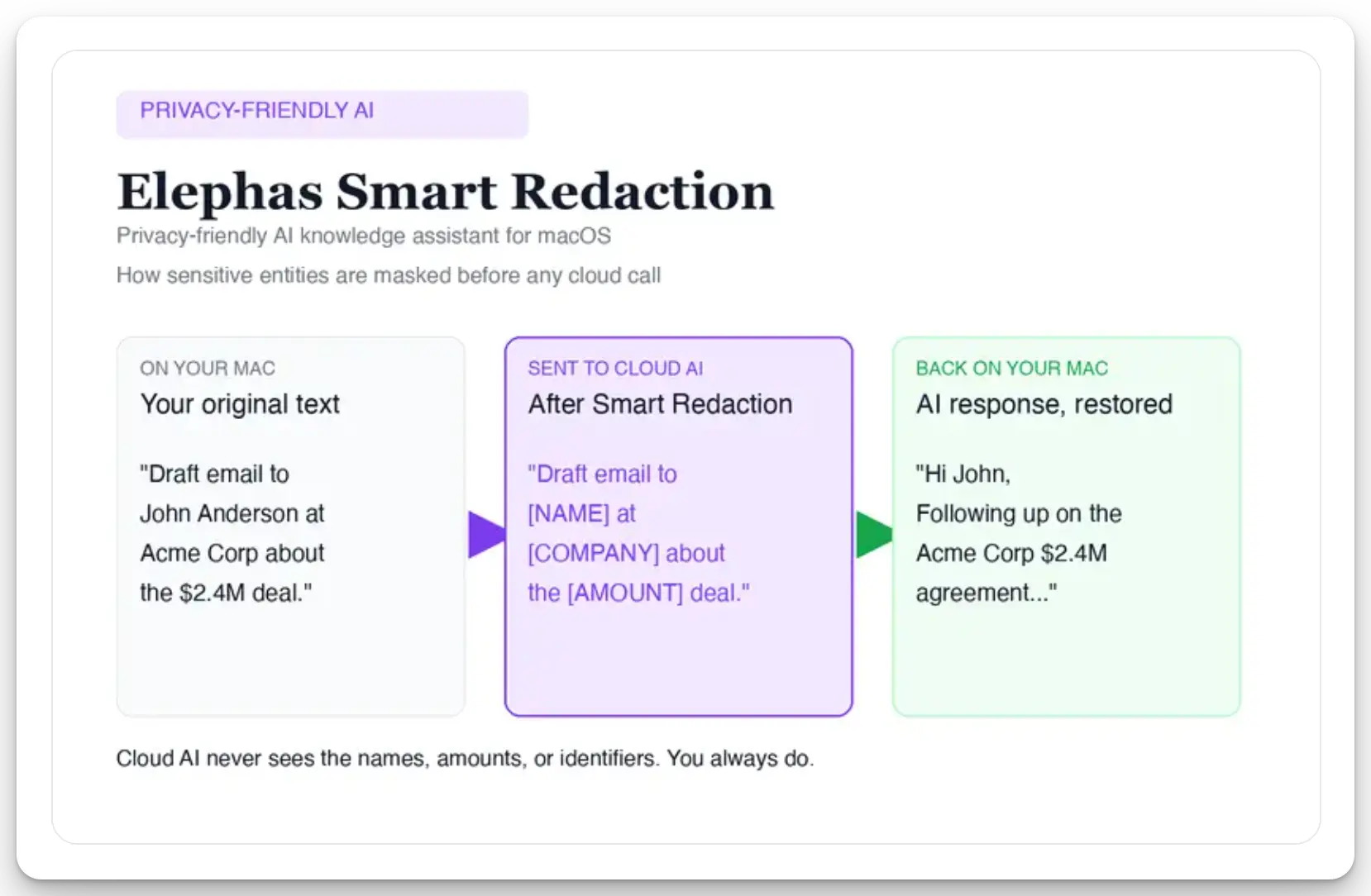
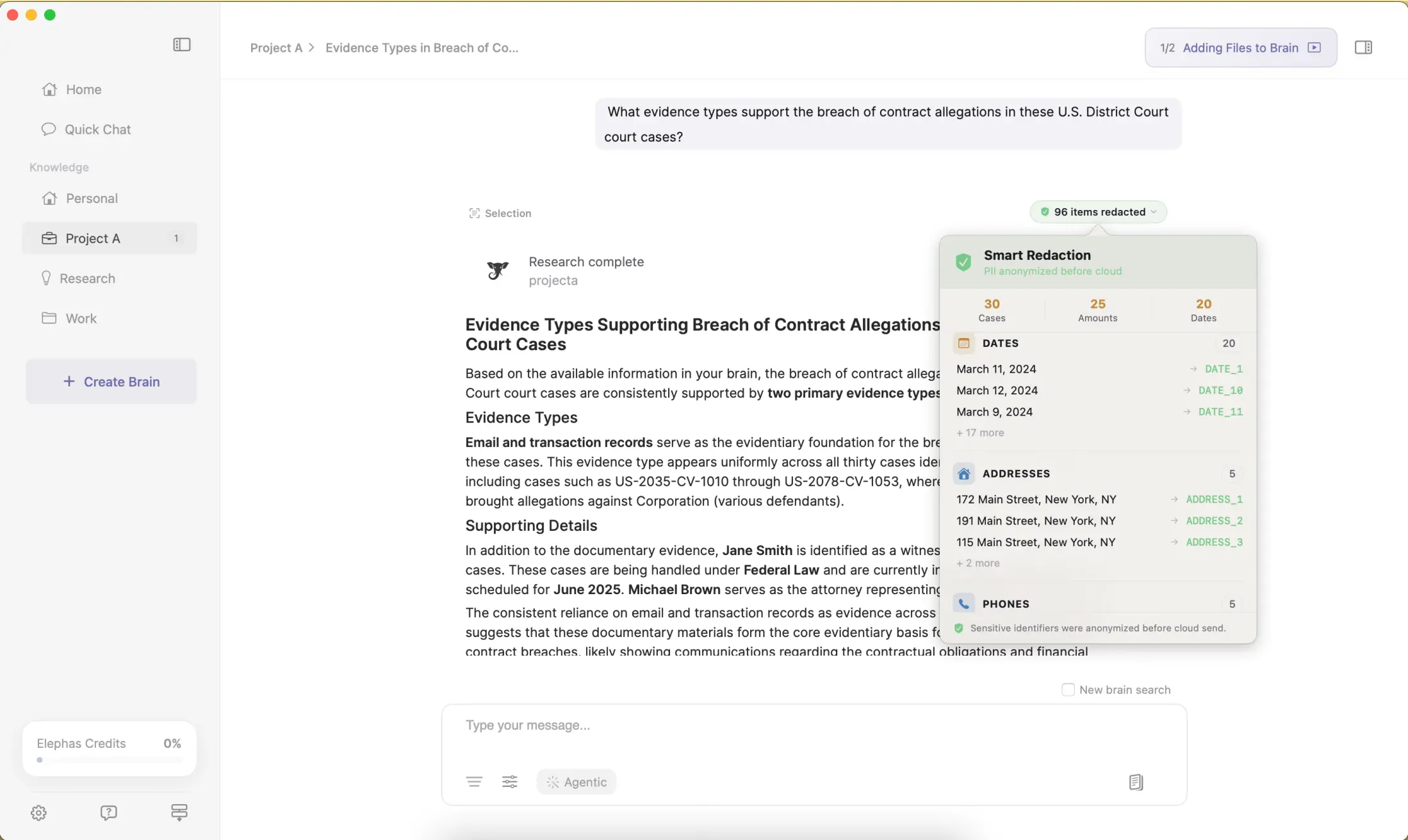
If you still hand the heavy work to a cloud model, Elephas adds a second layer through automatic PII redaction. Before a prompt is sent to ChatGPT 5.5, Claude Opus 4.8, Gemini, Grok, Perplexity, or any other cloud model, Elephas strips sensitive names, emails, phone numbers, and identifiers on your Mac. The cloud model only ever sees the sanitized text. When the answer comes back, the redacted fields are reassembled locally on your machine, so identifiable information never leaves the device. Elephas pairs this with zero data retention: content never trains AI models, never sits on a vendor's server, and never passes through a third-party reviewer's screen.
Smart Redaction is available on every plan, including the Free tier. Free plan available; paid plans start at $19/month, and the current list is on the Elephas pricing page. Try Elephas for free if the document-memory gap is the one blocking you.
- Write with Siri replaces the old preset panel. The presets are gone, not relocated.
- The URL refusal is a product decision, not a gap. The same system prompt tells the assistant not to offer a workaround.
- In the table above, Elephas is the only column that reads your own documents.
Which Mac Apps Actually Use Apple Intelligence?
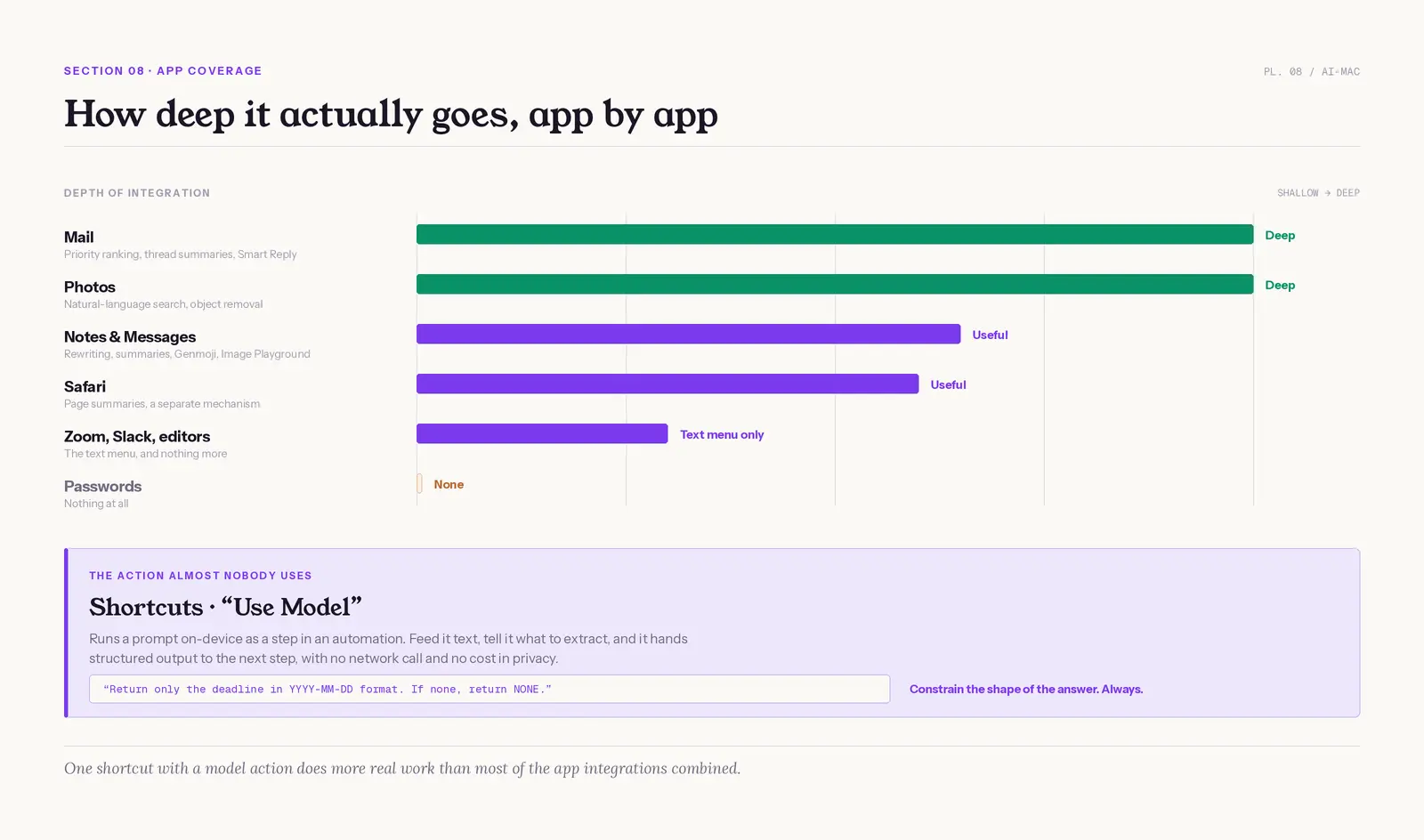
Coverage reaches Mail, Messages, Notes, Photos, Safari, Reminders, FaceTime and Shortcuts, plus any third-party app that uses standard macOS text fields, which is where the writing menu appears. It does not reach Passwords.
- Mail: the deepest integration. Priority ranking, thread summaries, Smart Reply. Genuinely saves time on a busy inbox.
- Notes and Messages: rewriting, summaries, Genmoji, Image Playground. Pleasant, not load-bearing.
- Photos: natural language search and object removal. Quietly the most reliable feature on the Mac.
- Safari: page summaries in the browser, a different mechanism from asking the assistant to read a link, and the reason people think the refusal is a bug.
- Third-party apps (Zoom, Slack, most editors): the text menu, nothing more.
- Passwords: nothing at all (r/1Password).
Third-party depth is shallow. Most apps get the text tools and nothing else, so a system that works across every app feels thinner than the keynote slide implied.
The Shortcuts Action Almost Nobody Uses
The genuinely powerful thing on a Mac is buried in Shortcuts: a model action that runs a prompt on-device as a step in an automation. Feed it text, tell it what to extract, and it hands structured output to the next step, with no network call.
- Good at: classifying messages, pulling a date or an amount out of an email, short rewrites, turning a mail thread into a calendar entry, and tagging items so a workflow can categorize them.
- Bad at: multi-step reasoning, long documents, arithmetic. Keep every prompt to one instruction and one output shape.
- Costs you nothing in privacy: the on-device option never leaves the Mac, the safest AI automation Apple ships.
- One pattern that works: "Return only the deadline in YYYY-MM-DD format. If none, return NONE." Constrain the shape of the answer, always.
One shortcut with a model action does more real work than most of the app integrations combined, and Apple has never marketed it. Ready-made starting points are in our best Siri shortcuts list. Every feature also makes one decision the moment you use it: stay on the Mac, or leave it.
What Does Apple Intelligence Do With Your Data?
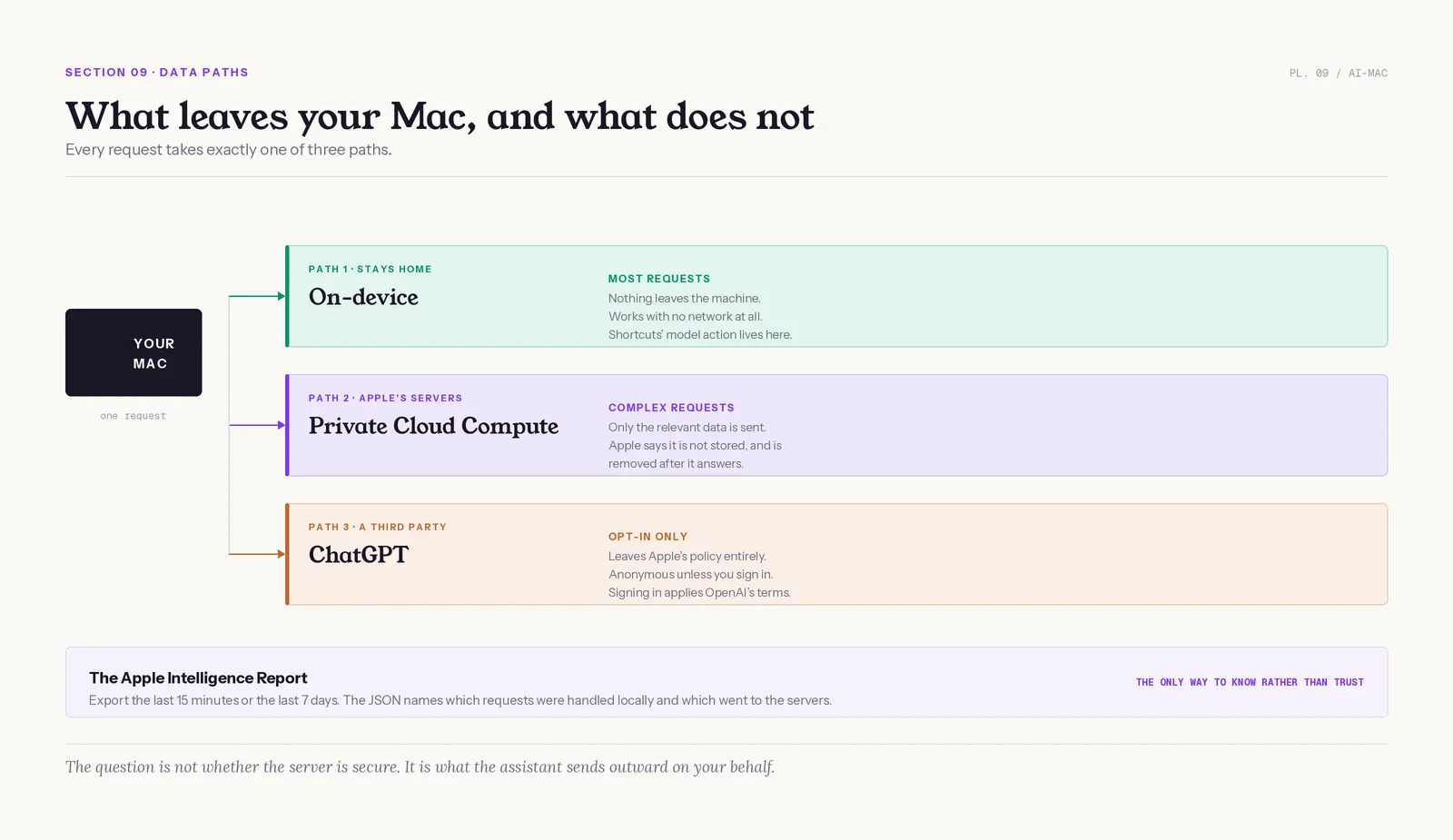
Every request takes one of three paths. Most are handled on-device. Complex ones send only the relevant data to Private Cloud Compute, where Apple says it answers the request, is not stored, and is removed afterwards. ChatGPT requests go to OpenAI under a separate policy.
Mac users can export an Apple Intelligence Report covering the last 15 minutes or the last seven days, and the JSON identifies which requests were handled locally and which went to the server-based models (security.apple.com). It is the only way to know rather than trust.
Apple's protections are real and specific. Private Cloud Compute uses the Secure Enclave, Secure Boot, signed code, cluster attestation and publicly inspectable server software (Apple Security). On the architecture, most reviewers agree. The sharpest criticism comes from Matthew Green, the Johns Hopkins cryptographer, in June 2026 (Cryptography Engineering):
"private inference can work perfectly, and yet valuable (monetizable) data can still flow outward to a public search engine or LLM, simply because the agent was programmed to do its job... There is no cryptographic primitive that protects you from 'upload your search facts to Google'"
"they slap dashed Apple Intelligence together quickly... I know when to call a spade a spade" (a self-described Apple fan, r/ChatGPT)
The question is not whether the server is secure. It is what the assistant sends outward on your behalf. For the deeper treatment, see Siri AI privacy, what Siri does with your voice, and whether it is worth it for sensitive data.
What Independent Researchers Found About Apple's Privacy Stack
An IEEE S&P 2026 audit found that Apple's macOS DifferentialPrivacy framework broke its stated privacy guarantee in five of nine tested mechanisms, and those five carried 87 percent of the usage data the researchers watched Sonoma send home (arXiv 2605.21378). Apple's privacy promises are engineering claims, and they can fail an audit.
The same audit put macOS Sequoia at 68 percent of collected data sitting inside the broken mechanisms, so the newer release was barely better (arXiv 2605.21378). That framework is not Private Cloud Compute, which is the point: the word "private" covers several different systems, and they do not all hold up equally.
Researchers at The Ohio State University reported in 2026 that their "Serpent" attack could steal and replay Apple Intelligence access tokens across devices on macOS 26 Tahoe (arXiv 2604.15637). Apple confirmed the finding, assigned CVE-2025-43509, and paid a bounty. The mitigation made theft harder without fully binding a token to one device.
A paper at ACM WiSec 2026 reverse-engineered the Private Cloud Compute interfaces and warned that non-reproducible binaries still stop outsiders from verifying the shipped code (arXiv 2605.24239). A Trail of Bits audit concluded the design beats most cloud AI systems, while noting that cloud inference still decrypts your request inside the enclave (Trail of Bits).
- The Apple Intelligence Report exports as JSON, so "did this leave my Mac" is answerable rather than a matter of trust.
- ChatGPT requests leave Apple's policy entirely and land under OpenAI's.
- Private Cloud Compute ships publicly inspectable server software, which is more than any rival offers.
macOS 27, the New Siri, and What Is Still Missing
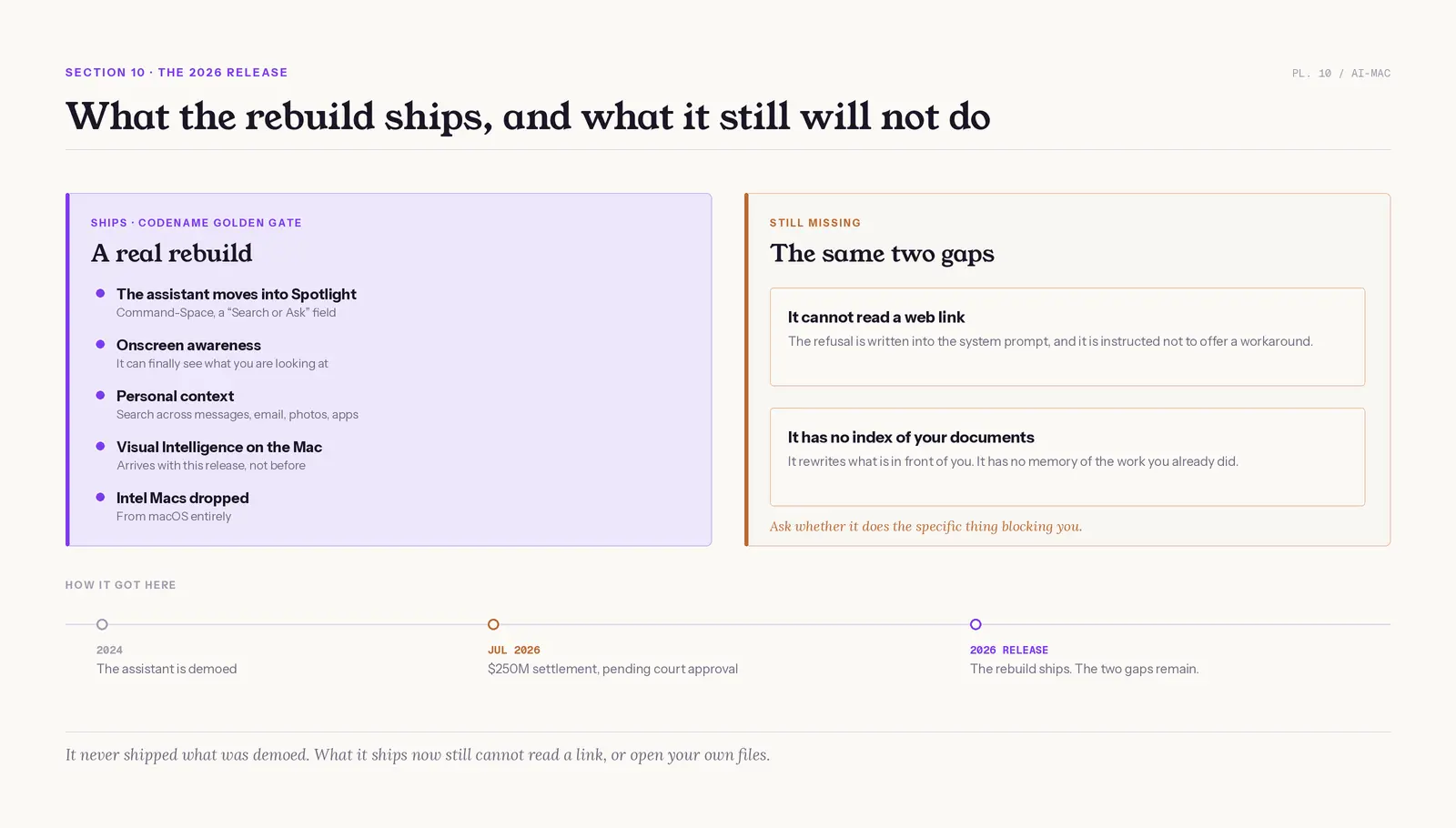
Apple's 2026 release, codenamed Golden Gate, is due to reach public beta this week (MacRumors). The assistant moves into Spotlight behind Command-Space as a "Search or Ask" field, there is a standalone app, and Visual Intelligence finally runs on the Mac. Intel Macs are dropped entirely. Our checklist on how to prepare for macOS 27 covers what to sort out before the update lands.
The new Siri is a real rebuild, not a coat of paint. According to Apple Newsroom, Apple describes personal-context search across messages, email, photos, screen content and apps. Onscreen awareness is the genuinely new capability: the assistant can finally see what you are looking at. Which apps actually plug into the new assistant is tracked in our macOS 27 Siri apps directory, and the automation side is explained in App Intents vs Shortcuts. The road here was long: why Siri was delayed covers the two-year slip, and Siri and Gemini covers the Google deal behind the rebuild.
One detail in that rebuild is worth being precise about. The new Siri does not run on Apple's models alone: Apple licensed a custom Gemini model from Google, reportedly for around $1 billion a year, to power the heaviest requests (CNBC). It is not the Gemini chatbot you can install from the App Store. The model is a version tuned for Apple, it runs inside Apple's own privacy boundary rather than Google's, and Apple says Google cannot read or keep anything that passes through it. So "Siri runs on Gemini" is true, and "Siri sends your requests to Google's Gemini" is not.
On July 9, 2026, MacRumors reported a preliminary-approval hearing on Apple's proposed $250 million settlement over the assistant it demoed and never shipped. If approved, eligible US iPhone 15 Pro and 16 buyers get $25 per claim, up to $95. Mac buyers are not in the class.
"At this point, can they really keep getting away with falsely advertising Apple Intelligence?" (848 upvotes, r/iphone)
"To be fair they don't do this THAT often, which is why it was (is) so strange they did it with multiple Apple Intelligence features" (r/apple)
So state the decision as a rule instead of a vibe. Do not ask whether the rebuilt assistant is good. Ask whether it does the specific thing blocking you, because it still cannot read a link or index your documents. A local Mac assistant like Elephas closes exactly those two.
- Intel Macs are dropped from the 2026 release entirely.
- Mac buyers are not in the settlement class. Only eligible US iPhone 15 Pro and 16 buyers can claim.
- Onscreen awareness is the genuinely new capability. Reading a web link and indexing your own documents still are not.
What You Actually Get on a Mac Today
Apple Intelligence on a Mac today is a strong editing layer with no memory: it rewrites what is in front of you but cannot read a link or open your own documents. For the backstory, see the Siri AI overhaul, the lawsuit explained, WWDC 2026, and Apple's March event. The longer arc of Apple's AI strategy and Apple's big AI changes is on the blog. For what actually wires an app into that assistant, see what App Intents does.
- Worth having now: the writing menu, Mail triage, photo search, and a model action in Shortcuts. Small wins that compound, at no extra cost.
- Thinner than advertised: third-party depth, reasoning, and anything needing memory of your own work. The tool sees the selection, not your history.
- What leaves your Mac: export the Apple Intelligence Report. Most requests stay local, complex ones go to Apple's private servers, and ChatGPT is a separate decision.
- What the 2026 release changes: the assistant moves into Spotlight and gains onscreen awareness. It still refuses to read a link and still has no index of your documents.
- For the gap Apple leaves: Elephas is a privacy-friendly AI knowledge assistant that provides built-in local LLM models and answers from your own files, so the documents you already wrote finally become something the AI can use.
FAQ
Does Apple Intelligence work on an Intel Mac?
No, and it never will. Apple restricted the system to M1 and later Apple silicon at launch, and the 2026 release drops Intel Macs from macOS entirely. No software update changes this, and there is no upgrade path short of buying an Apple silicon Mac.
How much storage does it use, and can I get that space back?
Around 7 GB. Disabling it in System Settings stops the features immediately, and macOS reclaims the downloaded models on its own over time. Mac owners have also removed them manually through Recovery Mode and Disk Utility, which Apple does not document.
Can the assistant summarize a web page on my Mac?
No. Apple's system prompt instructs the assistant to say it cannot access web pages, and not to offer a workaround. The refusal is policy, not a missing feature. Safari's page summary is separate and still works. For links, you need a third-party tool.
Is Apple Intelligence free?
Yes. Apple Intelligence is included with macOS on every supported Mac, with no subscription and no add-on purchase. The ChatGPT extension is also free and works without an OpenAI account, though signing in moves those requests under OpenAI's policies rather than Apple's.
Does it work outside the United States?
Mostly, but availability depends on three things at once: your device region, your Apple Account region, and a supported language pair. Mainland China is restricted, managed work accounts can be blocked by an administrator, and a mismatch between any two of the three hides the toggle entirely.
Will it drain my MacBook battery?
Mac owners consistently report a hit, and battery-saving guides routinely list turning it off as an early step. Apple publishes no figure. If you are chasing every hour of runtime on a MacBook Air, switching it off is a fair trade.
