What Is Apple Intelligence? Features, Devices & Privacy Explained (2026)
Last updated: July 2026. Last verified: 13 July 2026.
Apple Intelligence is Apple's free, built-in generative AI layer across iPhone, iPad, Mac, Apple Watch and Apple Vision Pro. Not an app, not a chatbot: about a dozen features stitched into the operating system. On a Mac it needs an M-series chip and 7 GB of storage.
You turned it on the week it arrived and still cannot name one thing it changed. That is the design, not a settings problem. So the question worth asking is not what Apple Intelligence is. It is when your work leaves your Mac, and whether you would ever know.
Quick answer
- Some tasks stay on your Mac, some do not. In 2026 testing Proofread and Rewrite ran on-device; Summarize and Smart Reply went to Private Cloud Compute (WiSec '26).
- There is no local-only switch. WiSec '26, verbatim: "There is also no configuration option only to use local models." The only guaranteed-local state is off.
- The index cannot be fenced to a folder. "Learn from this App" is on by default for every app.
- You can check what left. The Apple Intelligence Report (System Settings > Privacy & Security) lists what your Mac sent to Private Cloud Compute, but by default remembers only 15 minutes.
- For work that cannot leave the Mac: Elephas provides built-in local LLM models and Smart Redaction (beta) on every plan, including Free. It has a free plan and starts at $19/month. Try Elephas for free.
You Turned On Apple Intelligence. Can You Tell What Changed?
Two windows over, a Mail thread holds a client's unsigned term sheet. Nothing on screen tells you whether Apple Intelligence touched it, or where that request ran. The invisibility is the design.
The mood in r/iphone has curdled into: "At this point, can they really keep getting away with falsely advertising Apple Intelligence?"
What Is Apple Intelligence, and Which Apple Devices Support It?
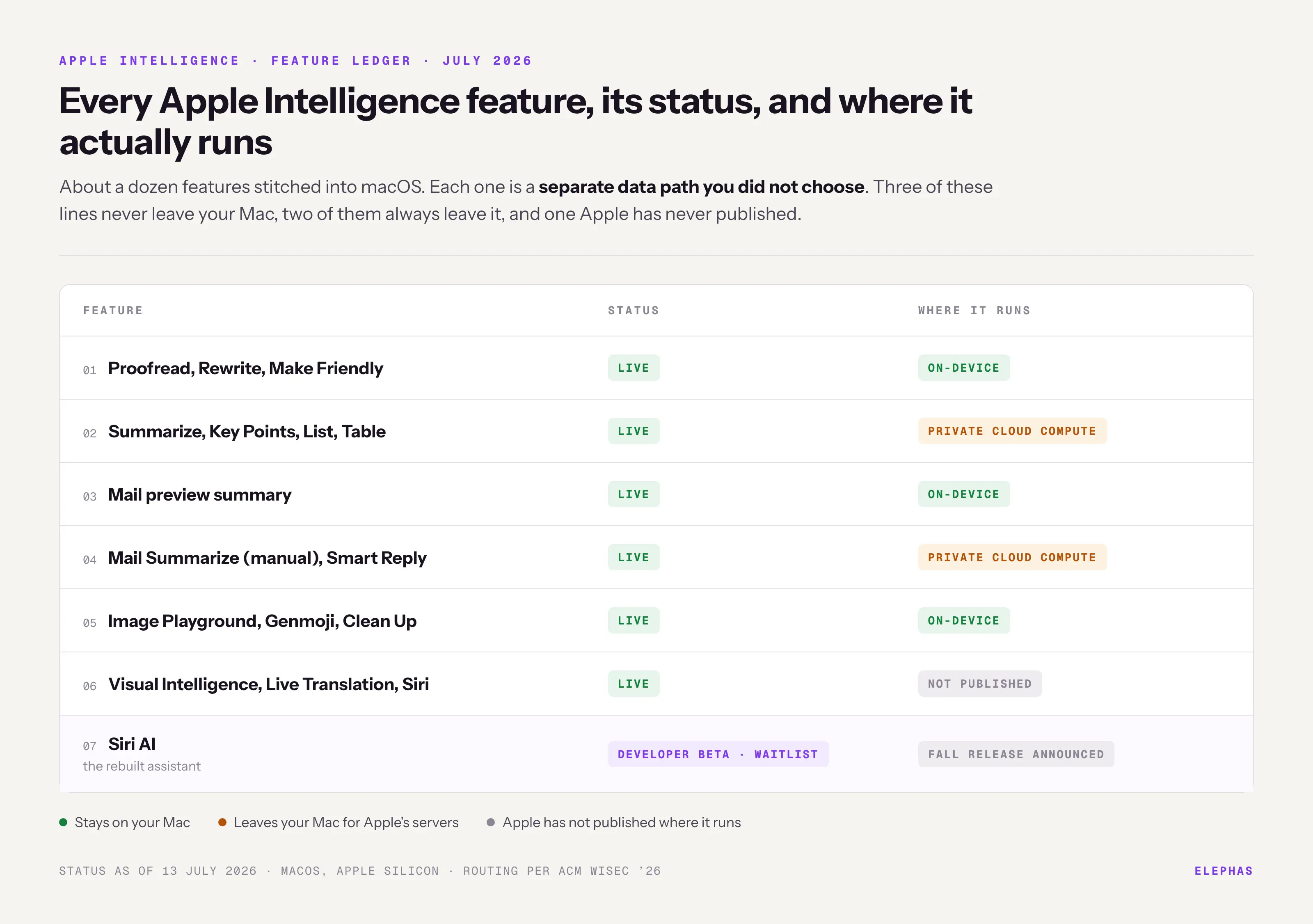
Supported devices all run Apple silicon: an M-series Mac, an A17 Pro or M-series iPad, an iPhone 15 Pro or later. Behind that bar sit about a dozen features, each a separate data path you did not choose.
| Feature (July 2026) | Status |
|---|---|
| Writing Tools: Proofread, Rewrite, Make Friendly | Live |
| Summarize, Key Points, List, Table | Live |
| Mail preview summary, Mail Summarize, Smart Reply | Live |
| Image Playground, Genmoji, Clean Up tool | Live |
| Visual Intelligence, Live Translation, Siri | Live |
| Siri AI (the rebuilt assistant) | Developer beta, waitlist |
Three names, three things. Apple Intelligence is the feature layer, Siri the old assistant, Siri AI its rebuilt replacement, announced June 2026 and still waitlist-gated; Macworld called it "not nearly ready for everyday users."
The naming does the work. An r/australia thread names it: "processes that have existed for a long time that were just described as general features (grammar suggestions in Word, photo touch ups in Lightroom) but now are called AI..."
Not everyone rates it worth the money: r/Smartphones says "living without Apple Intelligence is completely alright." Setup: Apple Intelligence on Mac.
- Apple Support puts the cost at 7 GB of storage; device and Siri languages must match.
- It is free. There is no subscription, and no paid Apple tier unlocks more of it.
- Switching it off deletes the download: the Apple Intelligence models "will be removed from your device."
When Does Your Work Leave Your Mac? On-Device, Private Cloud Compute, and ChatGPT
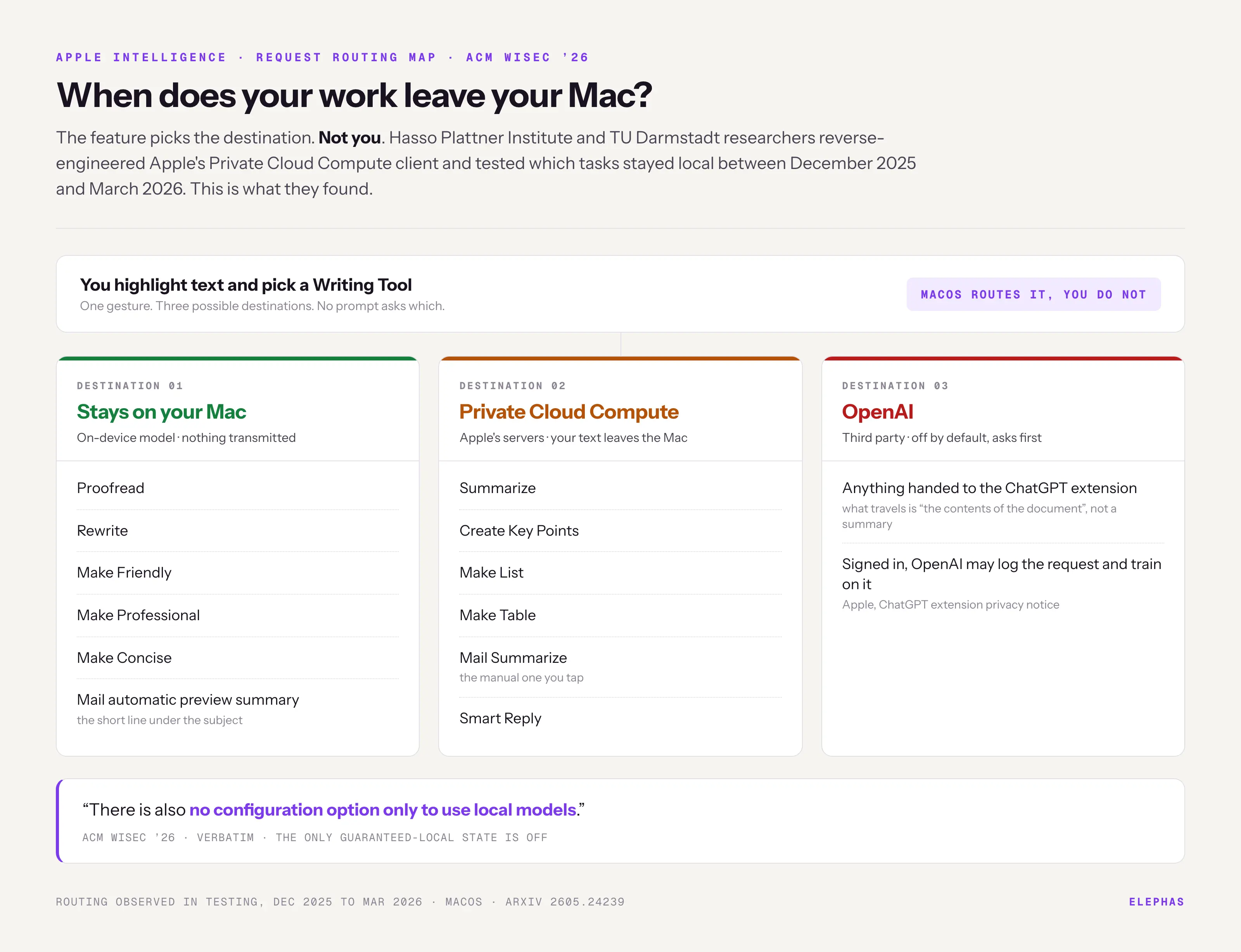
Your work leaves your Mac whenever the feature routes it to Private Cloud Compute, and the feature picks, not you. Rewrite a paragraph and it stays local; summarize it and it leaves.
Researchers from the Hasso Plattner Institute and TU Darmstadt reverse-engineered Apple's Private Cloud Compute client for ACM WiSec '26, testing which tasks stayed local between December 2025 and March 2026. Their finding, verbatim: "There is also no configuration option only to use local models."
| Request | Where it ran (WiSec '26 testing) |
|---|---|
| Proofread, Rewrite, Make Friendly, Professional, Concise | On-device |
| Mail automatic preview summary | On-device |
| Summarize, Create Key Points, Make List, Make Table | PCC |
| Mail Summarize (manual), Smart Reply | PCC |
| Anything handed to the ChatGPT extension | OpenAI |
Apple's promise is narrower than it sounds. Apple Newsroom: "personal data is not stored nor made accessible to Apple or anyone else" when PCC handles a request. That covers retention and access, not whether your text stayed on the Mac.
- Google and Apple's joint statement says "the next generation of Apple Foundation Models will be based on Google's Gemini models", and Apple Security Research confirms some workloads now run on Google Cloud with NVIDIA hardware, inside enclaves that accept only Apple-signed software.
- No source says Google, OpenAI or NVIDIA has accessed user content: the security model is attestation, not geography. See what Siri can access.
- The ChatGPT extension is off by default and asks before sending, but that confirmation prompt is itself a setting you can switch off. Signed out: "OpenAI also must not use your information to improve or train its models."
- Signed in: "OpenAI may log your request, attachments, and session history, and use this data to train or improve their models." What travels is "the contents of the document", not a summary.
The same team scored Apple's cloud model at 56.5% on MMLU-Pro, and Apple pulled news notification summaries in January 2025 after they fabricated headlines. An r/mac thread is blunt: "Everything is 100% marketing."
Does Apple Intelligence Index Your Whole Mac? Personal Context, Siri AI, and "Learn from This App"
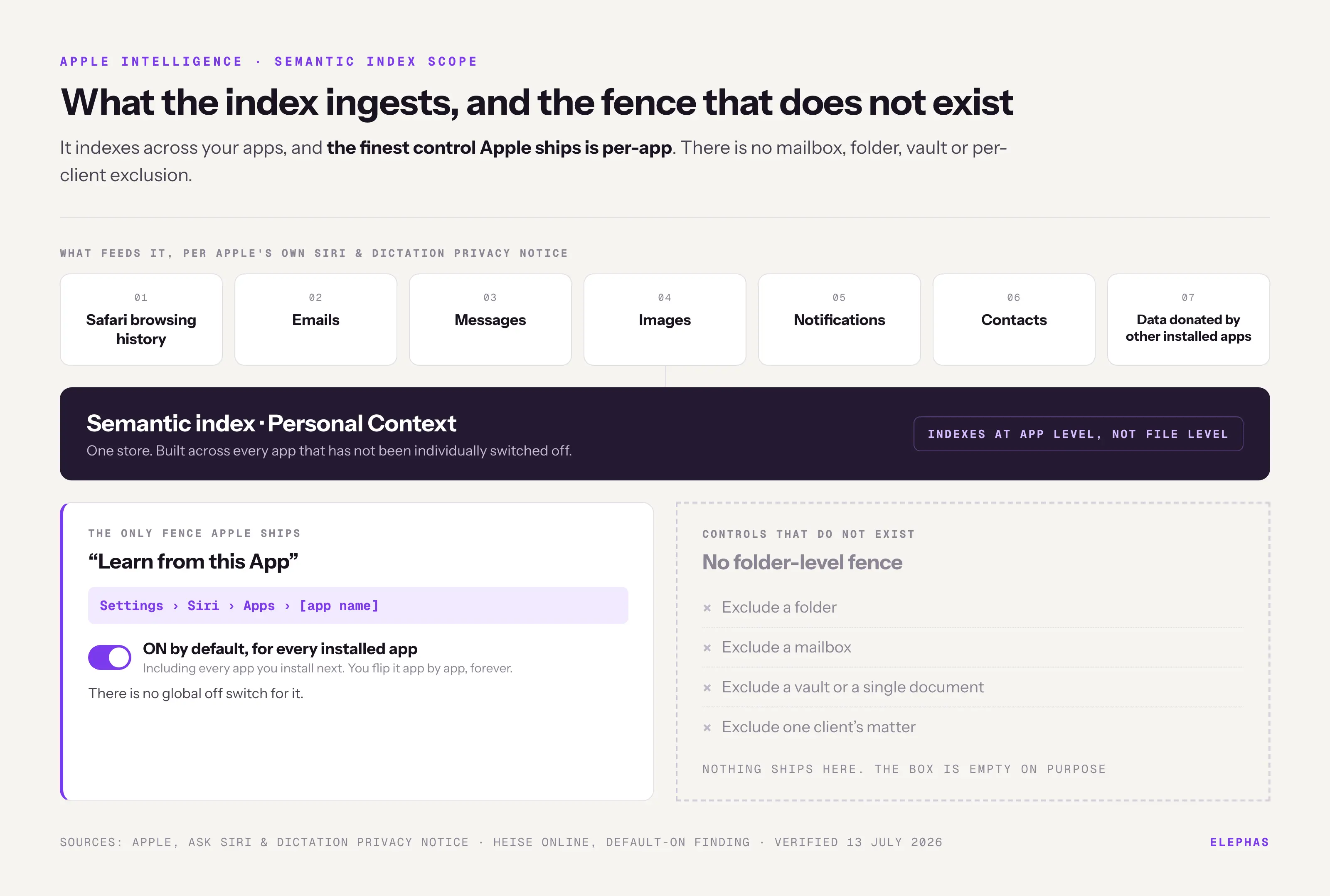
Yes. It indexes across your apps, and the finest control Apple ships is per-app: no mailbox, folder or per-client exclusion exists. Apple's Ask Siri privacy document lists what feeds it: "Safari browsing history, emails, messages, images, notifications, and contacts, as well as information donated or contributed by other installed apps."
The only fence sits at Settings > Siri > Apps > [app name], where you switch off "Learn from this App". Per heise online, it "is switched on for every installed app as soon as Siri and/or Apple Intelligence have been activated."
- No global off means doing it by hand, app by app. From r/Millennials: "I turned apple intelligence off on every app on my phone."
- Type to Siri hits the same index. See is Siri an AI.
The index is groundwork for Siri AI, which has not shipped. Apple says the Digital Markets Act blocks it in the EU, and the split runs per device: macOS 27 and visionOS 27 get it there, iPhone and iPad do not. Thomas Regnier of the European Commission disputes that, calling the delay Apple's own.
- ABA Formal Opinion 512 is explicit that a client's "informed consent is required" before a lawyer puts case information into a self-learning generative AI tool. Signed in to the ChatGPT extension, Apple Intelligence is one.
- GDPR Article 5(2) requires a controller to "be able to demonstrate compliance". "Apple says it's private" is not a compliance artefact.
- FINRA Notice 24-09 reaches third-party AI. Separately, HIPAA needs a written contract (45 CFR 164.502(e)), and Apple offers no business associate agreement, so that box stays unticked.
- Samsung banned generative AI on company devices in 2023 after staff pasted confidential material into ChatGPT.
IBM's Cost of a Data Breach 2025 report found "one in five organizations reported a breach due to shadow AI", and 13% reported a breach of their AI models or applications; heavy shadow-AI use added about $670,000 to the average breach. Mail's Summarize sends text off the Mac without anyone pasting anything.
Can You Verify Any of This? The Apple Intelligence Report, the $250M Lawsuit, and the Vanishing Off Switch
There is exactly one real verification tool, the Apple Intelligence Report, and by default it remembers only 15 minutes. Apple's privacy documentation gives the Mac path: "On Mac, go to System Settings > Privacy & Security > Apple Intelligence Report, then select a report duration."
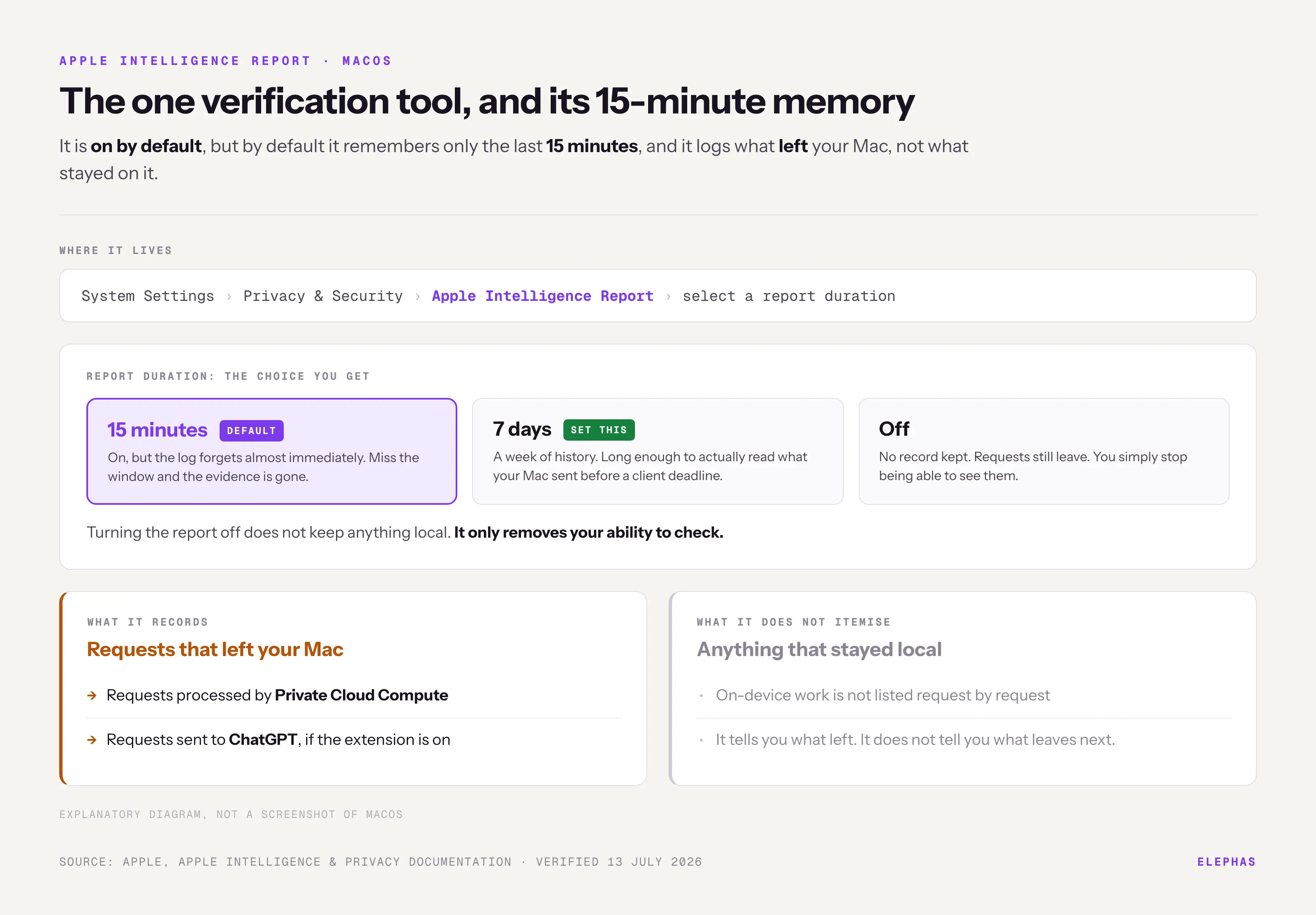
- The Report logs what left: PCC requests, plus ChatGPT ones if the extension is on. It does not itemise what stayed local. Set it to 7 days.
- Device Analytics is opt-in; if you opted in, Apple "may use privacy-preserving techniques to collect data about aggregated trends, including about the content processed by Apple Intelligence." Check it's off.
- 2019: Apple apologised for human grading of Siri audio, sampled at "less than 0.2 percent" of requests.
- June 2026: Manual do Usuário reported the off toggle missing in iOS 27 beta 1: "On iOS 26 (left), Apple Intelligence can be turned off. On iOS 27 beta 1, it can't." Single source, screenshot-based, beta software.
- Buyers got there before the courts did. From r/gadgets: "iPhone 16 was marketed as the apple intelligence device and now we are out here stuck in a beta stage & lacking features."
In July 2026 Apple agreed to pay $250 million, from $25 per device, over the personal-context Siri it advertised and never shipped. As of 9 July, "the judge has not yet issued a ruling." More: the Apple Intelligence lawsuit.
Apple deserves its due: Private Cloud Compute is independently verifiable on three criteria, published server images, a Virtual Research Environment, and device attestation. Even so, WiSec '26 replayed supposedly one-time PCC tokens 2 to 5x and got answers back.
- An Ohio State team demonstrated a working cross-device token-theft attack, CVE assigned and bounty paid.
If you turn off Apple Intelligence, Apple confirms the models are deleted. Workarounds survive: disable Siri, use Screen Time, push an MDM profile. An r/MacOS thread flags the catch: "updates that show apple intelligence as part of the setup assistant seem to reenable it."
- r/technology draws the harsher conclusion: "macos will be pushing apple intelligence too. So I guess Linux is the only option for those people who really care about privacy..." Not an option for a Mac practice.
What's the Solution for Work That Can Never Leave Your Mac?
The safer path makes "did this leave my Mac" provably no: the model runs locally, and anything cloud-bound leaves with identifiers stripped.
Third-party access to PCC requires "fewer than 2 million first-time app downloads"; cross that line and you "must migrate to an alternative solution within 6 months." PCC protects Apple's features, not the apps you do sensitive work in.
Elephas is a private AI knowledge assistant for Mac that redacts sensitive data before it reaches cloud models. It provides built-in local LLM models and a fully offline mode, so a request never leaves the machine. That is the local-only switch Apple does not offer.
For work you still want a leading cloud model on, Elephas adds a second layer through automatic PII redaction. Before a prompt is sent to ChatGPT 5.5, Claude Opus 4.8, Gemini, Grok, Perplexity, or any other cloud model, Elephas strips sensitive names, emails, phone numbers, and identifiers on your Mac. The cloud model only ever sees the sanitized text. When the answer comes back, the redacted fields are reassembled locally on your machine, so identifiable information never leaves the device. Elephas pairs this with zero data retention: content never trains AI models, never sits on a vendor's server, and never passes through a third-party reviewer's screen.
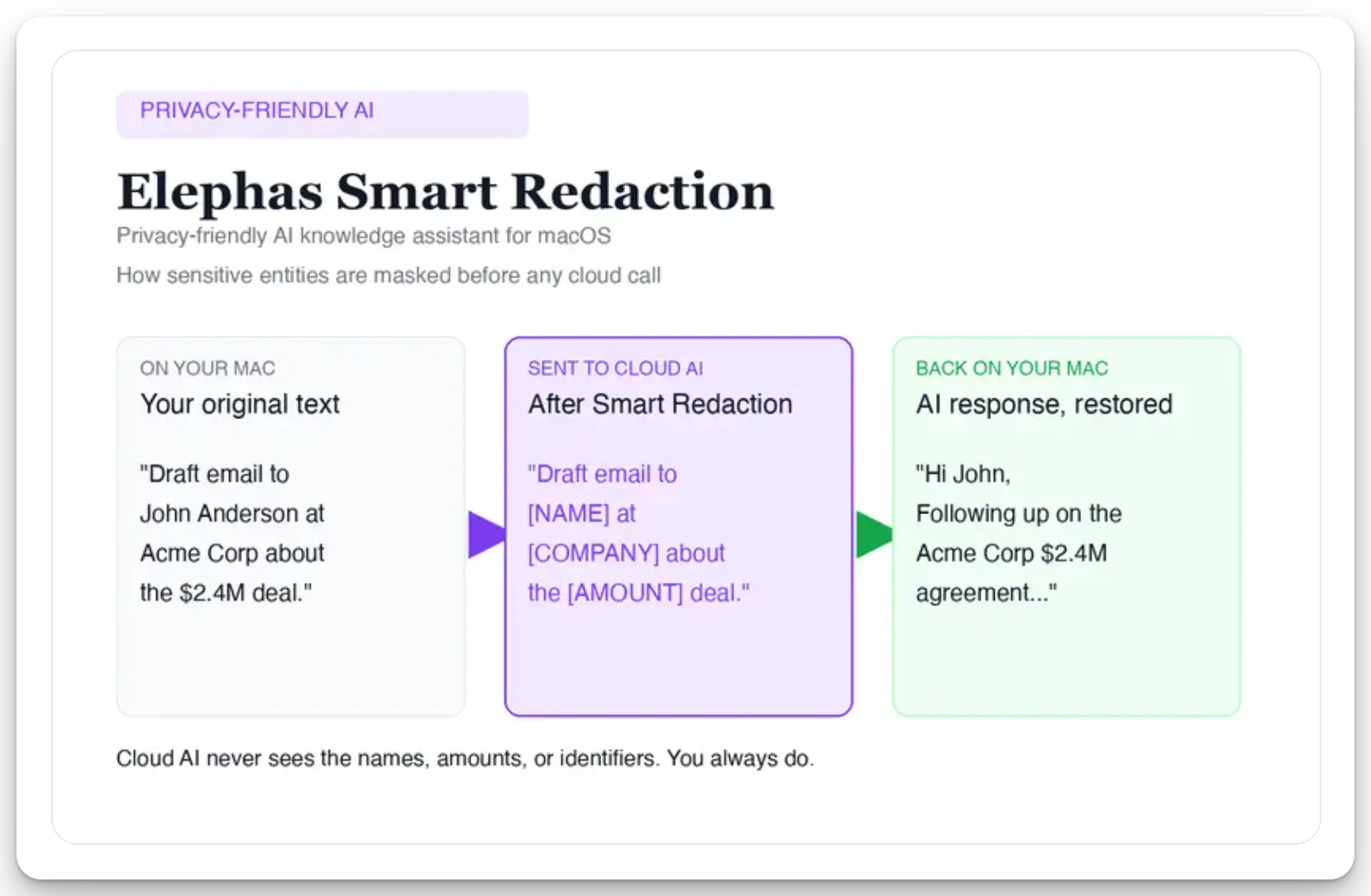
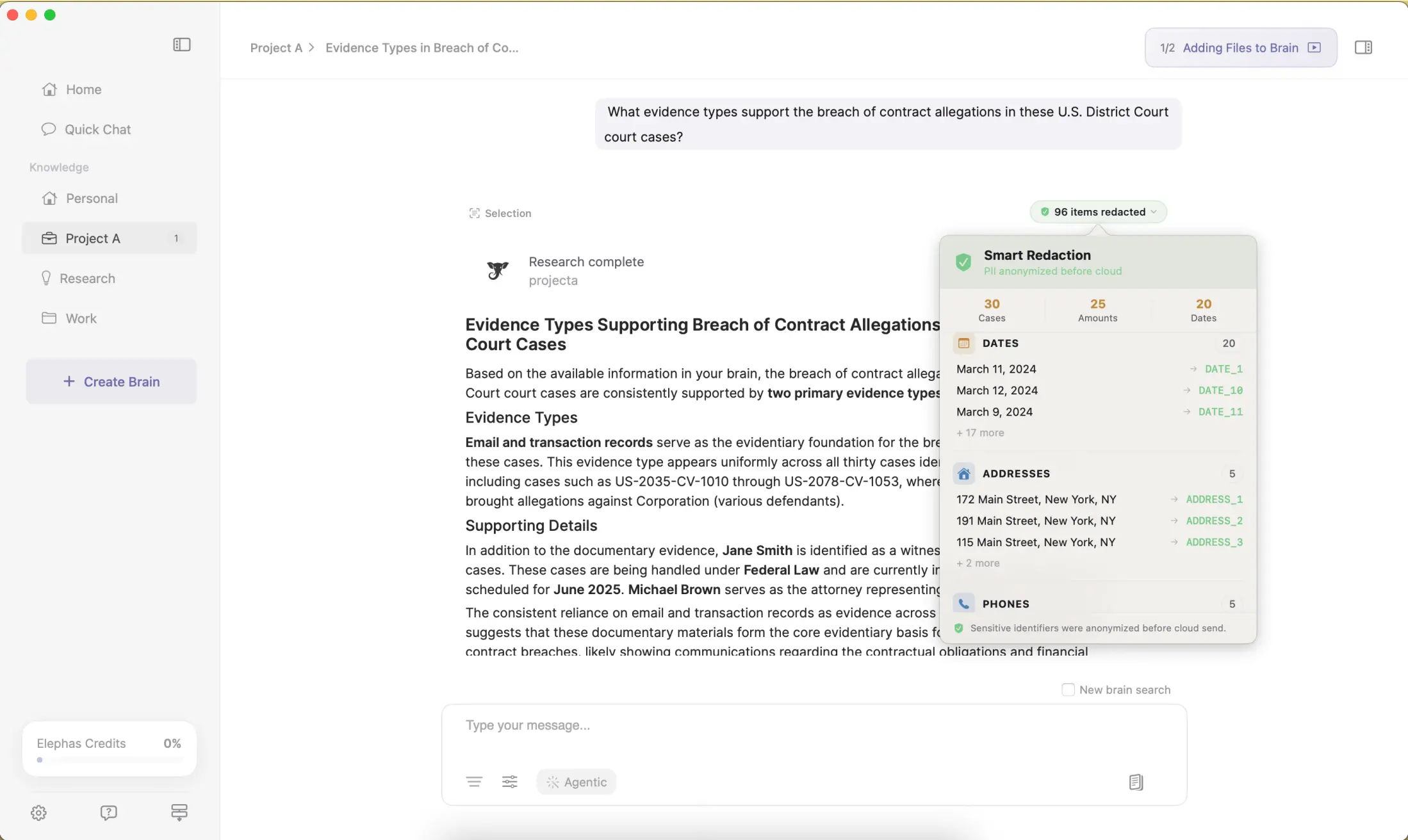
- Smart Redaction is available on every plan, including Free. The sequence is fixed: local Mac, redact, cloud AI, answer back, reassemble locally.
- Elephas has a free plan, and paid plans start at $19/month. See pricing for the full list.
- Apple Intelligence rewrites and summarises at OS level; it is not document-grounded AI over your own files. Whether that trade is worth it is a separate question.
So, What Is Apple Intelligence in 2026? The Honest Answer
Some of it stays on your Mac, some does not, and you cannot make it all stay. That is not a scandal, it is a specification.
Take one action. Set the Apple Intelligence Report to 7 days, use Mail's Summarize, then read the log. Decide with the log open.
- It is free, it needs an M-series chip, and the feature you pick decides where your text runs. You do not get that choice.
- The Apple Intelligence Report is the only audit trail you have, and it logs only what left. Set it to 7 days, or you are trusting a 15-minute memory. Guide: how to use Apple Intelligence.
- For the folder that can never leave the Mac, Elephas is a privacy-friendly AI knowledge assistant that provides built-in local LLM models, so the work stays on your machine.
Frequently Asked Questions
Is Apple Intelligence free?
Yes. It costs nothing and needs no subscription. On a Mac it needs an M-series chip and about 7 GB of free storage; on iPhone, a 15 Pro or later.
Which Macs support Apple Intelligence?
Every Mac with an Apple silicon M-series chip. Intel Macs are not supported, and your device and Siri languages must match.
Does Apple Intelligence send my data to ChatGPT?
Only if you turn on the ChatGPT extension, which is off by default and asks first. What travels is "the contents of the document", not a summary, and signed-in requests may be used for training.
Can I make Apple Intelligence run only on my Mac?
No. WiSec '26 found "no configuration option only to use local models." The feature decides where it runs; the only guaranteed-local state is off.
How do I see what Apple Intelligence sent off my Mac?
Open System Settings > Privacy & Security > Apple Intelligence Report. It is on by default but keeps only 15 minutes, so set it to 7 days. It logs what left, not what stayed.
