Apple Intelligence Privacy: What Leaves Your Mac (and What Never Should)
Last updated: July 24, 2026
You draft a confidential client email in Writing Tools, then reach for the switch that turns Apple Intelligence off before the sensitive part. In iOS 27's beta, that switch is gone. Apple removed the single master toggle, so no one tap guarantees nothing runs.
Apple Intelligence privacy now depends on which feature you touched, not on one system switch. The question is not whether it is on, but what already left your Mac (iThinkDiff, 2026-06-24).
Quick answer
- Proofread and Rewrite stay on your Mac and never leave.
- Bigger tasks can go to Private Cloud Compute, so your content is sent to Apple servers.
- The "Ask ChatGPT" hand-off leaves Apple entirely; signed in, OpenAI's consumer terms apply.
- For client, patient, or financial data, treat that hand-off as an automatic no.
- Want AI help that never leaves the Mac? Elephas has a free plan, paid from $19/month, "Try Elephas for free."
What Are the Real User Privacy Concerns With Apple Intelligence?
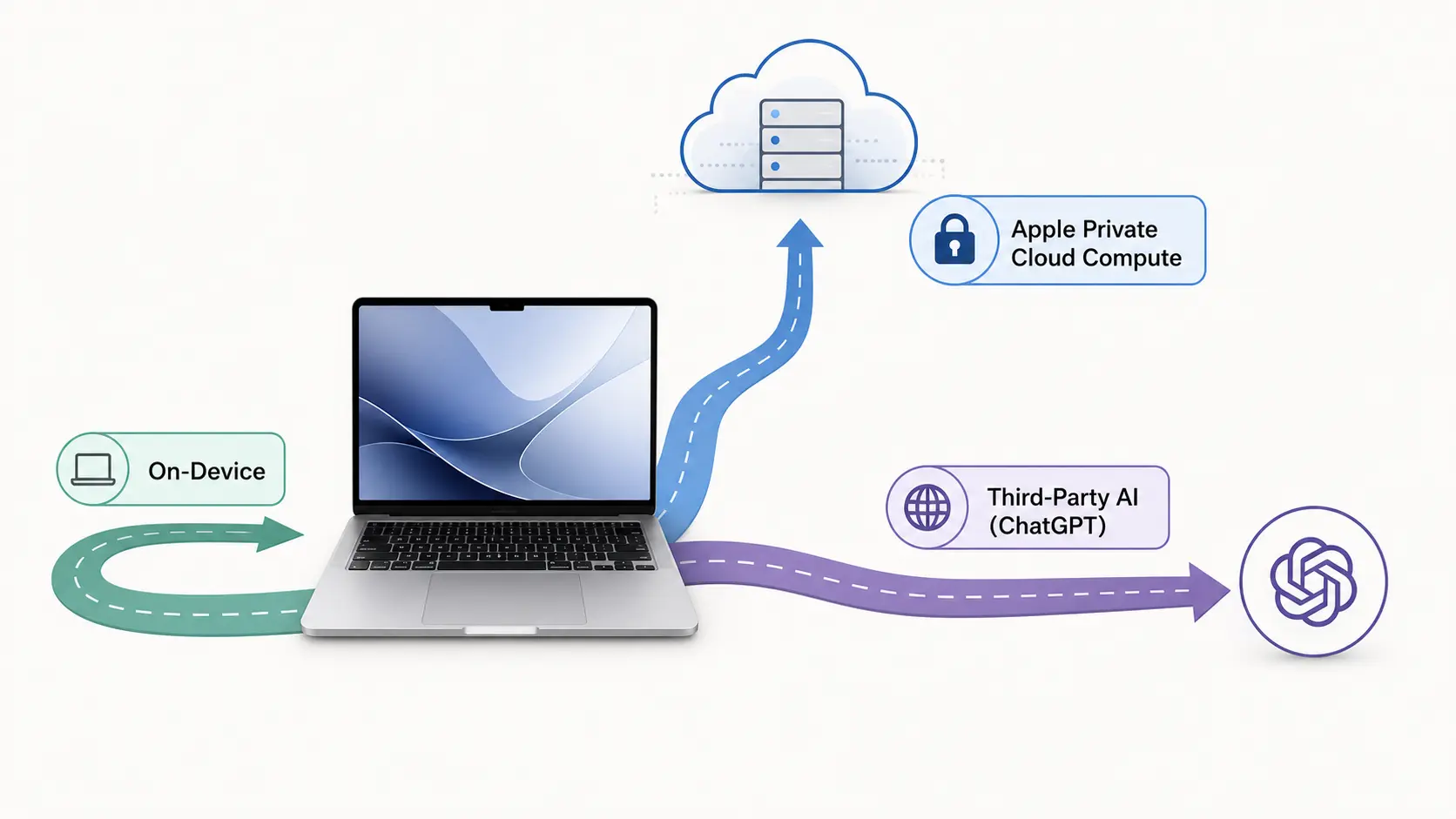
Apple Intelligence carries three privacy concerns, not one. Some tasks leave your Mac for servers Apple runs, which you cannot independently verify. The hand-off to OpenAI sends your document content off the platform. And once you sign into a personal OpenAI account, the guarantees Apple makes stop and OpenAI's consumer training terms take over.
The focus here is the Mac, where you handle client work.
Processing on your Mac beats a cloud chatbot, but the device picks a path task by task, without warning. On r/Siri, one wanted to "wait until we see how Apples 'privacy focused' AI performs," and on r/australia another warned the AI label "grants tacit permission to harvest all sorts of data."
The scale is measurable: IBM found 20% of 2025 data breaches involved "shadow AI," adding up to $670,000 to the average breach cost, and 63% of organizations have no AI governance policy.
- Invisible routing: the device chooses local or the cloud path task by task, and Apple docs don't disclose the split.
- The OpenAI fork: signed out, OpenAI can't train on it; signed in, under its privacy policy OpenAI may log your request, attachments, and session history and use them to train or improve its models.
- No off-ramp: handing regulated personal data to a vendor you never vetted is a governance problem before a technical one.
Private Cloud Compute vs On-Device vs ChatGPT: Where Does Your Data Actually Go?
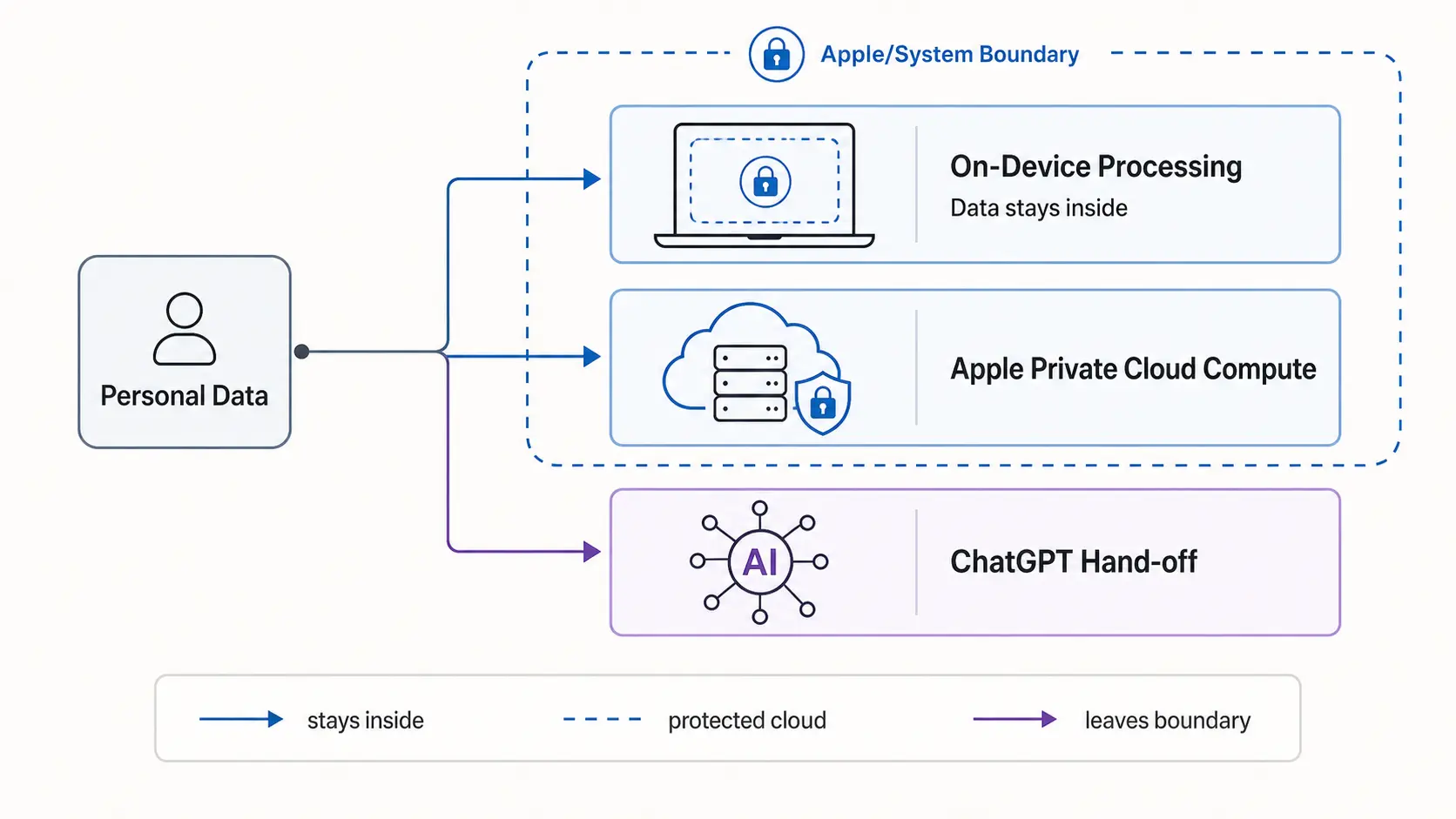
Apple Intelligence uses three data paths. On-device tasks run on your Mac and never leave. Private Cloud Compute handles heavier, server-based processing off your Mac, so your content is processed on Apple servers, then deleted. The extension sends your request and attachments off your Mac, the most exposure.
| Feature / task | Where it runs | Leaves your Mac? | Who can see content | Can you force local? |
|---|---|---|---|---|
| Proofread, Rewrite | On-device (Apple silicon, Secure Enclave) | No | Only you | Local by default |
| Summarize / Smart Reply | Private Cloud Compute | Yes, to Apple | Apple says no one | No opt-out |
| Siri and Dictation | Mixed (device or server) | Sometimes | Apple (retained up to 2 yrs if opted in) | Opt out of “Improve Siri” |
| “Ask ChatGPT,” signed out | OpenAI | Yes, leaves Apple | The vendor (not retained) | Toggle off “Use ChatGPT” |
| “Ask ChatGPT,” signed in | OpenAI | Yes, leaves Apple | The vendor (may log and train) | Account settings |
Apple says a cloud task builds "a request, consisting of the prompt, plus the desired model and inferencing parameters." Apple's terms confirm "your request and attachments like documents, photos, or contents of the document ... will be sent to ChatGPT."
- The cloud promise: Apple says user data is handled securely and is never made accessible to Apple staff, even those with administrative access, but that is a policy claim you cannot verify per request.
- What researchers found: a study of the client software warned there are "no reproducible builds" to check the servers against, and "there is also no configuration option only to use local models."
- What the hand-off costs: three Samsung engineers pasted source code into ChatGPT in 2023, and Samsung banned it within weeks.
Turning off "Ask ChatGPT" stops the hand-off, but Apple can still route larger tasks off your Mac.
On r/NoStupidQuestions a user noted ChatGPT "scans the entire internet" rather than your microphone; on r/indiasocial one praised that Apple servers can be "verified by cyber security experts."
What Does This Mean for Sensitive Data You're Legally Responsible For?
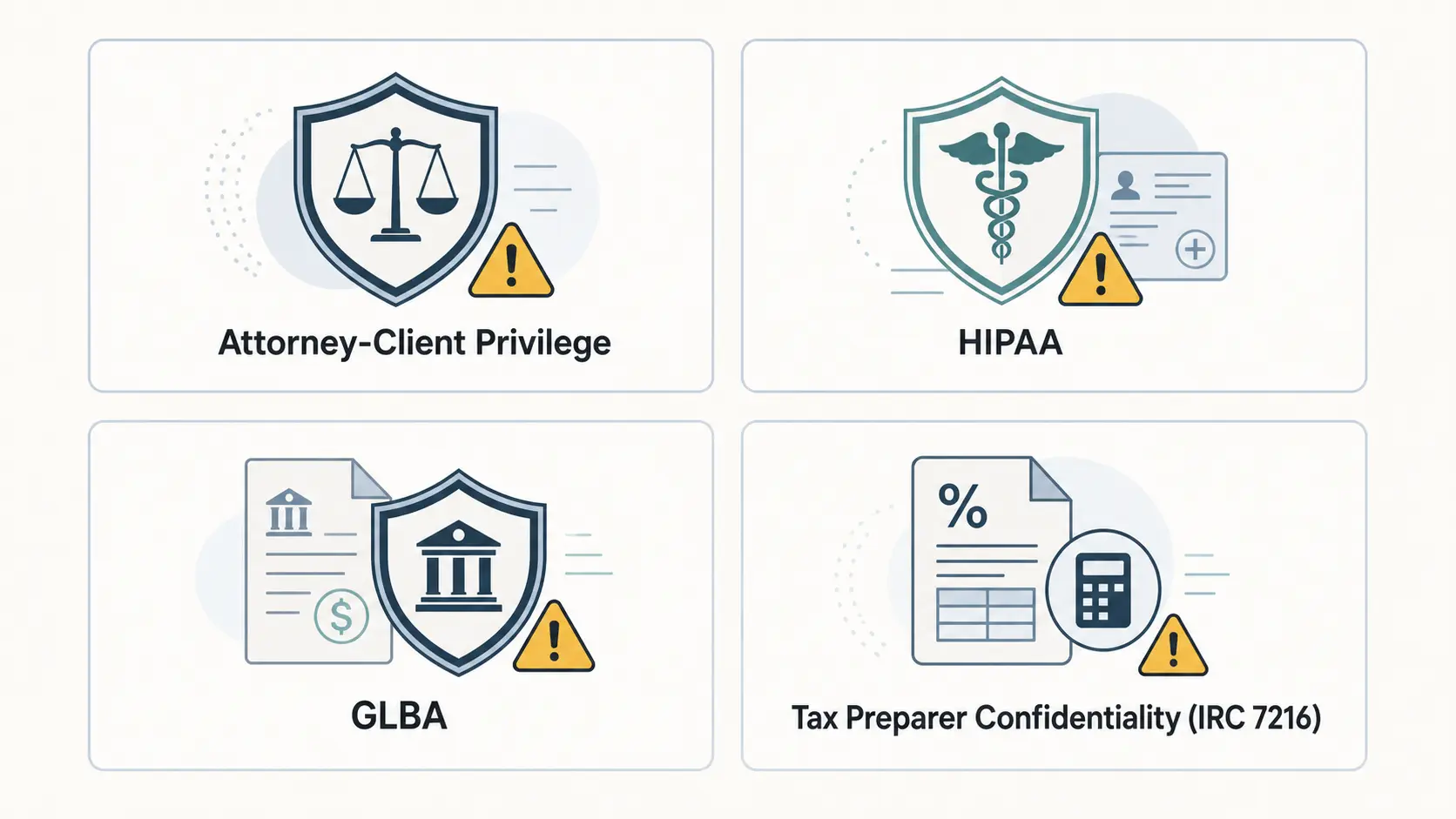
Apple Intelligence does not remove your compliance duty. Attorney-client privilege, HIPAA, GLBA, and IRC §7216 all ask whether confidential data reached a third party you never contracted or audited. Apple publishes no Business Associate Agreement and no SOC 2 report for it, so routing that content through it can breach a duty even if Apple never mishandles it.
The confidentiality problem starts when content crosses to the cloud path or the hand-off, not when a leak is proven. The duty is yours, so sensitive data decisions turn on proof, not trust.
- Lawyers: ABA Formal Opinion 512 (July 29, 2024) applies Model Rule 1.6, requiring "reasonable efforts to prevent the inadvertent or unauthorized disclosure of" client information before you enter it into any such tool.
- Healthcare: HIPAA's minimum-necessary standard and the Business Associate Agreement rule (45 CFR §164.502(e)) apply, and Apple publishes no consumer BAA for the ChatGPT extension.
- Finance and tax: the GLBA Safeguards Rule requires vetting service providers, and IRC §7216 bars unauthorized disclosure of return information (penalty up to $1,000 or one year; §6713 adds $250 per disclosure).
Apple settled Lopez v. Apple for $95 million over Siri recordings plaintiffs said were shared with contractors and tied to ads (MacRumors, 2025).
An ABA survey found 30% of lawyers now use generative AI at work, and 47% call data privacy a top concern.
On r/iphone one asked "can they really keep getting away with falsely advertising Apple Intelligence?" and on r/iPhone15Pro another weighed "tough corporate and privacy laws" against "Apple intelligence on my phone." Our Siri privacy guide goes deeper.
What Privacy Controls Can You Actually See, and What Stays Hidden?
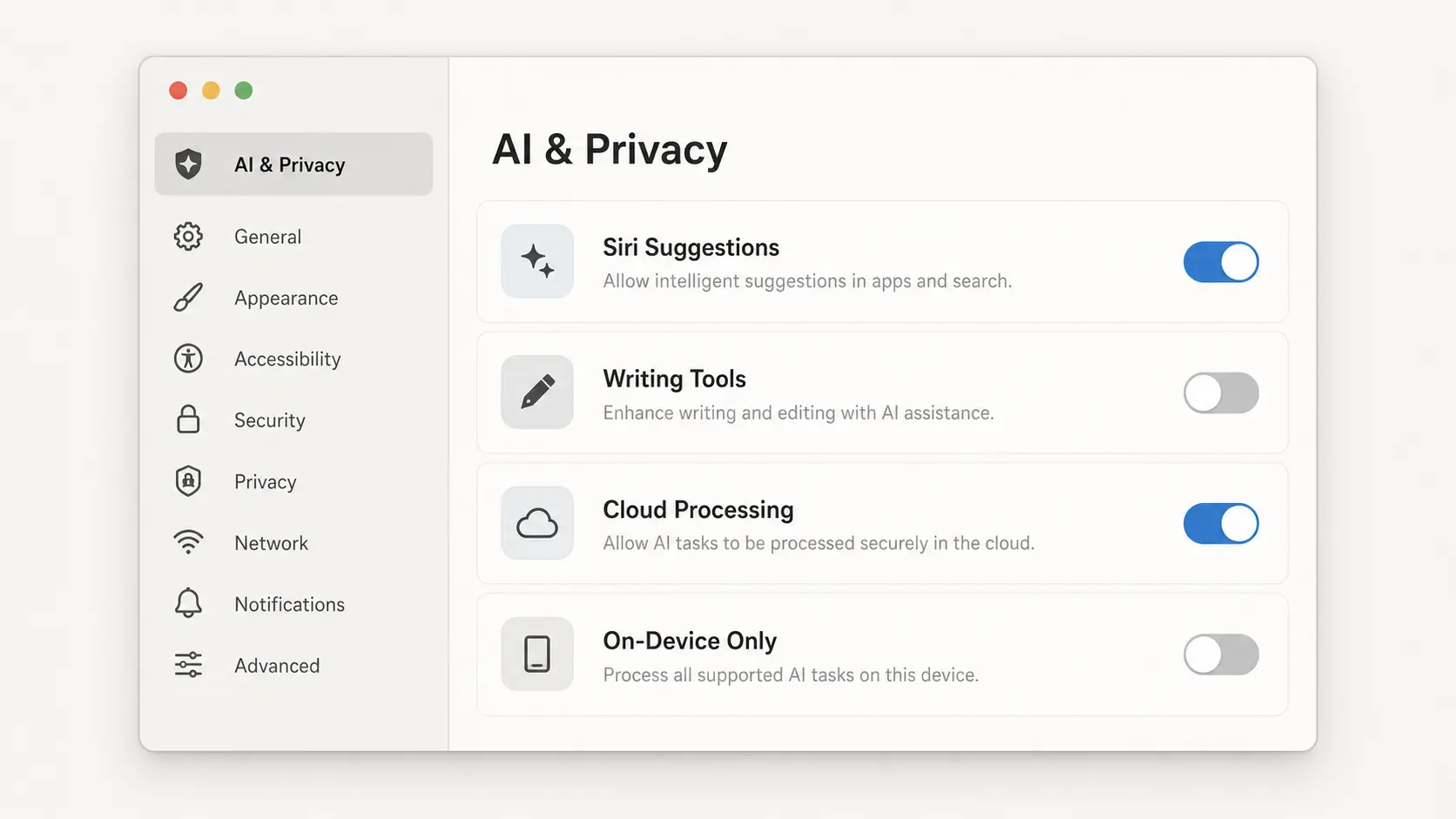
Apple gives you fewer privacy controls than most people assume. The iOS 27 beta removed the single master off switch, leaving only per-feature toggles. The built-in Apple Intelligence Report covers just the last 15 minutes or 7 days and is often empty. And Apple provides no enterprise telemetry, so your IT team cannot prove what left your Mac.
- The removed switch: you can still disable individual Apple Intelligence features, but the iOS 27 beta "removes the master Apple Intelligence toggle, meaning there is no single switch to turn off all AI features at once" (iThinkDiff, 2026-06-24), and new features ship on.
- The thin audit trail: that report spans only 15 minutes or 7 days, a spot check, not a compliance record, and many find it comes back empty.
- Advanced Data Protection encrypts far more of the iCloud data tied to your Apple Account, but administrators get no telemetry and Apple issues no SOC 2 report, so "you cannot prove what data did or did not leave a device through Apple Intelligence."
The "never stored" promise sits on limited proof. A study found Private Cloud Compute could be checked only by reverse-engineering its client, which its authors did first (WiSec '26, 2026-06-30). Other researchers found a prompt-injection and Unicode trick bypassed Apple's on-device guardrails in 76% of prompts before Apple patched it.
Pew found 59% of Americans lack confidence companies will use AI responsibly. On r/iphone one shrugged, "Apple Intelligence. Uh huh. You're not getting me with that one again," while on r/mac another welcomed a change "preventing apps from secretly accessing copied and pasted data." See how to turn it off.
How to Get AI Writing Help That Never Leaves Your Mac
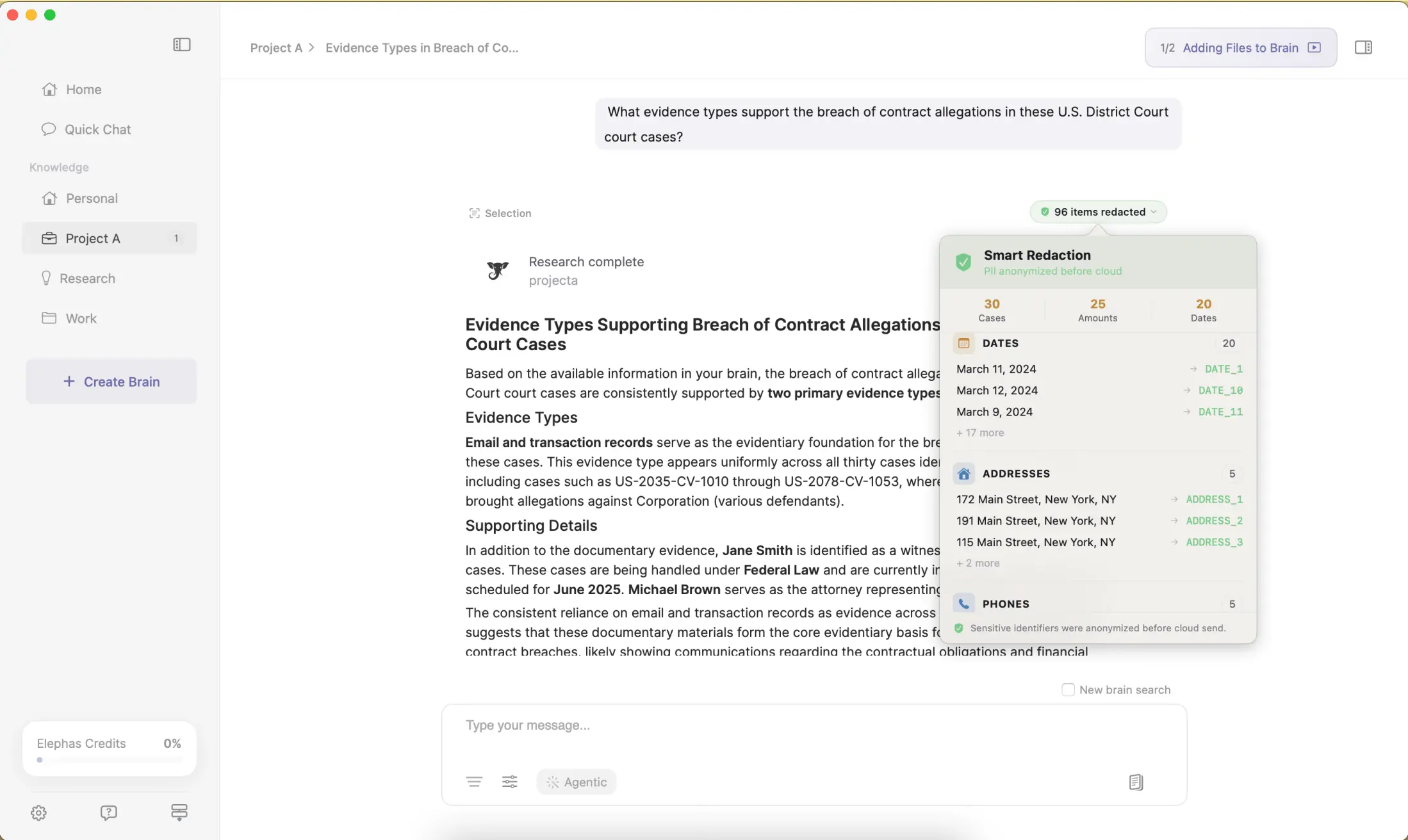
Elephas is a privacy-friendly AI knowledge assistant for Mac that keeps your work on your device instead of a server you cannot audit. It provides built-in local LLM models for offline use, and strips sensitive data on your Mac before any cloud model sees it, so you get AI help on confidential work without Apple Intelligence's guessing game.
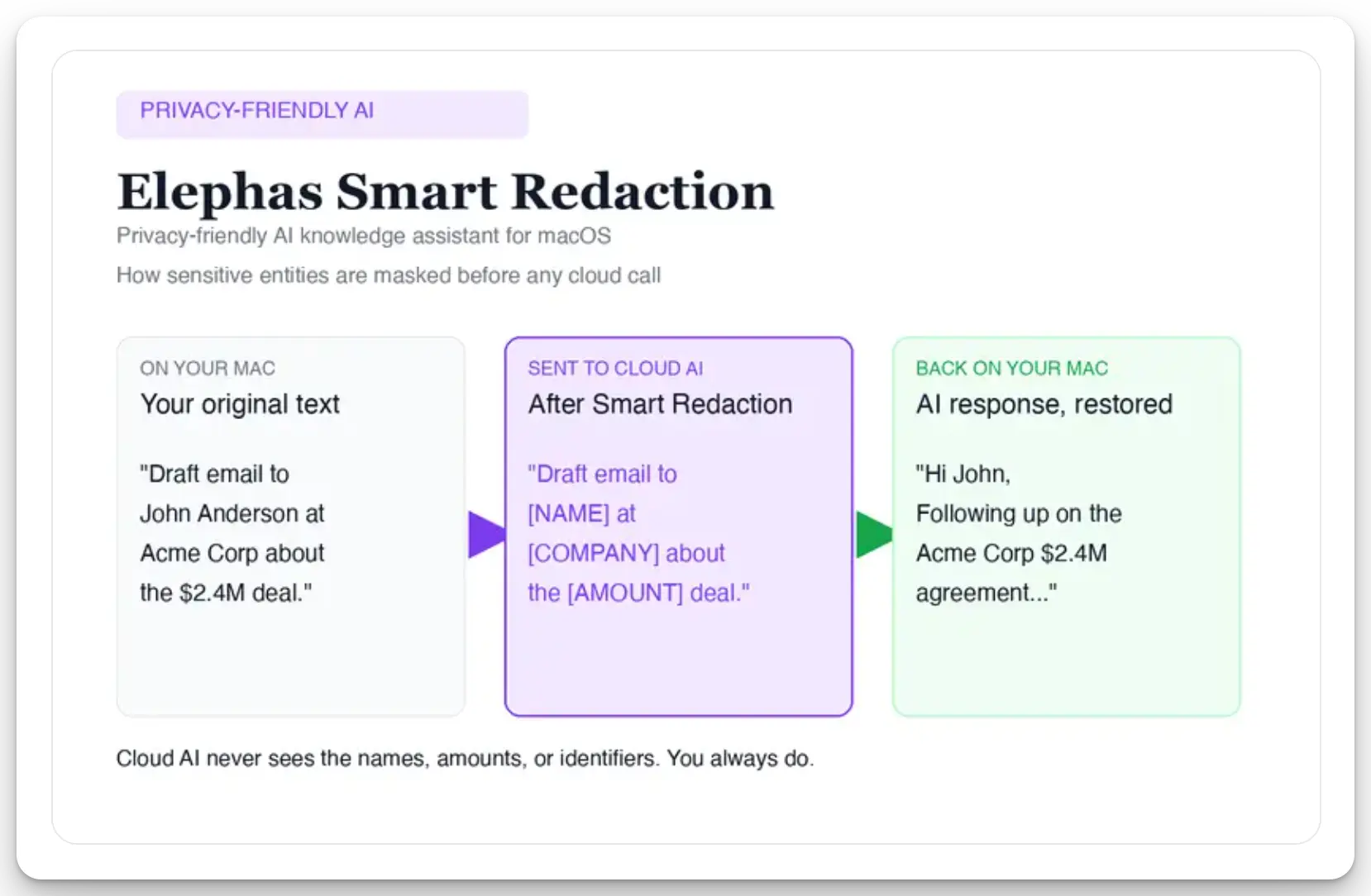
What changes is not what you can do, but where it happens. Its writing features draft and answer emails, rewrite documents, and turn rough notes into finished copy, on your device. For a cloud model, automatic PII redaction cleans the text first.
Before a prompt reaches ChatGPT 5.5, Claude Opus 4.8, Gemini, Grok, Perplexity, or any other cloud model, Elephas strips sensitive names, emails, phone numbers, and identifiers on your Mac, so the model only sees sanitized text. When the answer comes back, those redacted details are reassembled locally, so nothing identifiable leaves your machine. It backs this with zero data retention: your content never trains AI models, never sits on a vendor's server, and never passes through a third-party reviewer's screen.
- Fully offline mode: Elephas provides built-in local LLM models, so drafting sensitive content runs on your Mac with no cloud call at all.
- Choose your AI: pair it with ChatGPT 5.5, Claude Opus 4.8, Gemini, Grok, or Perplexity, or run local; Elephas pairs with them to protect privacy; it does not replace them.
- Automatic PII redaction (beta) is available on all plans, including the Free tier, never gated to a top plan.
Sensitive data is automatically detected and redacted before anything reaches a cloud AI model, your content is never used to train AI models, and nothing passes through a third-party reviewer's screen.
Elephas has a free plan, and paid plans start at $19/month (see pricing); Try Elephas free today.
So, Is Apple Intelligence Safe for Your Work?
Apple Intelligence is reasonably safe for everyday personal tasks because many run on-device and Private Cloud Compute is encrypted and non-retained. It's not safe by default for regulated confidential work: the hand-off leaves Apple, signed-in accounts can be trained on, and you cannot audit what left. Keep client, patient, and financial data on-device only.
Apple Intelligence is more private than a generic cloud chatbot, but its privacy depends on the feature and account. See our Apple Intelligence complete guide.
If the safety question is really a which-tool question, the comparisons settle it: Apple Intelligence vs ChatGPT, vs Gemini, and vs private AI tools. For the photo library specifically, here is how to use Photos without oversharing.
The most privacy-focused readers do not trust any of it: on r/technology, one concluded "macos will be pushing apple intelligence too. So I guess Linux is the only option for those people who really care about privacy."
- The one rule: if content is covered by privilege, HIPAA, GLBA, or a tax or NDA duty, never let it reach the hand-off, and prefer a tool where nothing leaves your Mac.
- The safe zone: on-device features like Proofread and Rewrite never leave your Mac.
- For AI help that never leaves the Mac, Elephas is a privacy-friendly AI knowledge assistant with built-in local LLM models, a free plan, and paid plans from $19/month.
Frequently asked questions
Could running a confidential client email through Writing Tools violate my NDA or professional confidentiality rules?
It can. If content reaches Private Cloud Compute or the ChatGPT hand-off, you may breach a confidentiality duty even without a proven leak, since you never vetted that processor. Keep privileged drafts off Writing Tools.
If I turn off “Ask ChatGPT,” does that fully stop OpenAI, or does Apple still send my data off my Mac?
Turning it off stops OpenAI, but Apple can still route larger tasks off your Mac. You cannot force every task local, and there is no per-request opt-out.
Is there one Apple Intelligence feature I should treat as an automatic no for client, patient, or financial data?
Yes, the "Ask ChatGPT" hand-off. It leaves Apple entirely, and a signed-in account can be trained on your content. Treat it as an automatic no for regulated data.
Can my firm's IT or compliance team audit what Apple Intelligence sent off my Mac?
No. Apple provides no enterprise telemetry, so IT and compliance teams cannot prove what data left a managed device. MDM can block the integration, but cannot produce a regulator audit log.
Is there a way to get AI writing help on sensitive work that never leaves my Mac, not even to Apple's servers?
Yes. A Mac-native tool with built-in local LLM models keeps drafting on your device, no cloud hand-off. Elephas runs a fully offline mode and redacts sensitive data on your Mac first.

Related Resources
Explore all AI Privacy & Security resourcesSiri vs Alexa in 2026: Which Assistant Wins After the AI Overhaul?
20 min readarticleWhat Is Apple Intelligence? Features, Devices & Privacy Explained (2026)
15 min readguideApple Intelligence on Mac: The Complete 2026 Guide (Features, Setup, Privacy, and the New Siri)
25 min readarticle12 Best Apple Intelligence Apps for Mac in 2026
24 min readSources
- iThinkDiff: How to turn off Apple Intelligence features in iOS 27
- Apple Security Research: Private Cloud Compute
- Apple Legal: ChatGPT extension and privacy
- IBM: Cost of a Data Breach Report 2025 (shadow AI)
- MacRumors: Apple settles Lopez v. Apple Siri lawsuit for $95 million
- LawNext: ABA tech survey on AI adoption in legal practice
- arXiv (WiSec '26): auditing Private Cloud Compute by client reverse-engineering
- RSA Conference: prompt-injection bypass of Apple Intelligence guardrails
- Pew Research: views of risks, opportunities, and regulation of AI