AI for Tax Memos Without Exposing Client SSNs: Workflow Guide
More tax pros use AI for memos every year. In tax firms, business use of AI nearly tripled in a year, from 8% to 21%. About 41% of pros say they use a public tool like ChatGPT, and only 17% use a tool built for tax work. The risk is what goes into the chat box along with the question.
3
Rules one SSN paste can break
8% → 21%
Tax-firm AI use in one year
41% / 17%
Use public AI vs a tax-built tool
0
Client SSNs the analysis needs
Executive Summary
- A tax memo's answer never needs the SSN. It runs on the type of business, the dollars, the dates, and the filing status, so the SSN is a name tag, not a tax fact.
- One paste of a client SSN into a public tool can break IRC §7216, the FTC Safeguards Rule, and your engagement letter all at once.
- The fix is an eight-step routine: decide the job, split the details, use placeholders, pick a local or clean-then-cloud path, prompt, check, rebuild on your computer, then verify every source.
- Recent cases make it real: a court made OpenAI keep “deleted” chats, a no-click attack pulled data from a connected Drive, and the Tax Court called out AI-made-up citations.
- Set up first: a WISP, an AI-use policy, knowing what your tool keeps, a §7216 consent plan, and a tested cleaning method.
- To clean the data for you, Elephas is a privacy-friendly AI knowledge assistant that strips SSNs and other IDs on your Mac before any cloud model sees them, with built-in local LLM models for fully offline memos.
The real risk in AI tax research
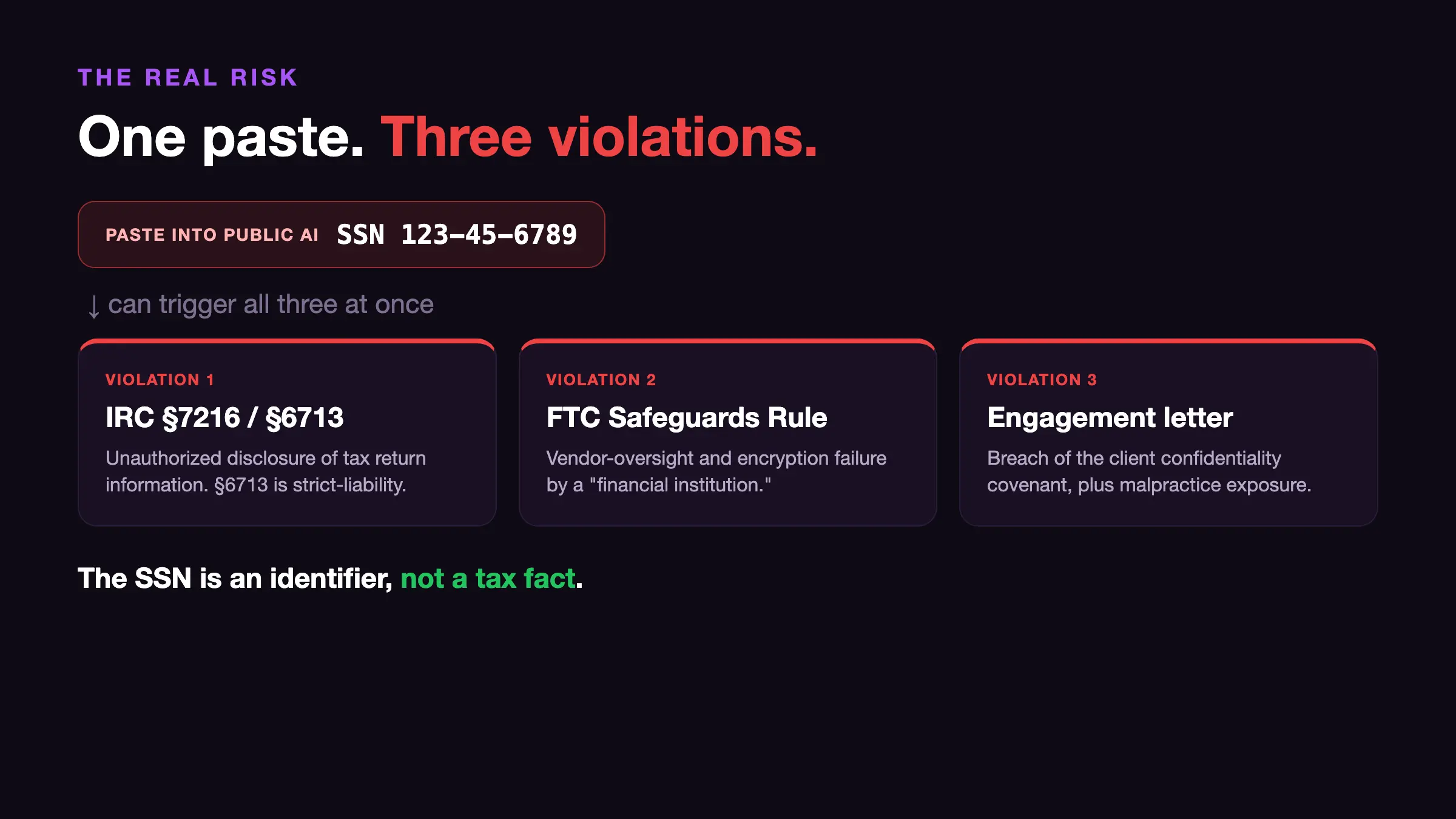
When you paste a client's details into a chat box to write a memo, the Social Security number (SSN) usually goes in too. That one paste can break three rules at the same time.
It shares tax return information, which IRC §7216 and §6713, parts of the Internal Revenue Code, forbid. It skips the vendor checks the FTC Safeguards Rule, from the Federal Trade Commission, requires. And it breaks the promise of secrecy in your engagement letter.
Here is the key point few guides say out loud: the SSN is just a name tag, not a tax fact. A tax memo works from the type of business, the dollar amounts, the dates, and the filing status. The answer is exactly the same whether the SSN is 123-45-6789 or [CLIENT_A].
So you can remove every personal detail and the AI still has all it needs to do the analysis. This guide covers what to set up first, the eight steps to follow, and the mistakes that still leak client data.
- §7216 and §6713: §6713 is strict, so even a slip can mean a fine for each time you share the data.
- FTC Safeguards Rule: if a leak hits 500 or more people's data that was not encrypted, you must report it to the FTC within 30 days, and that report is public.
- Engagement letter: breaking the secrecy promise can also open you to a malpractice claim, on top of any government fine.
Before you start: the prerequisites
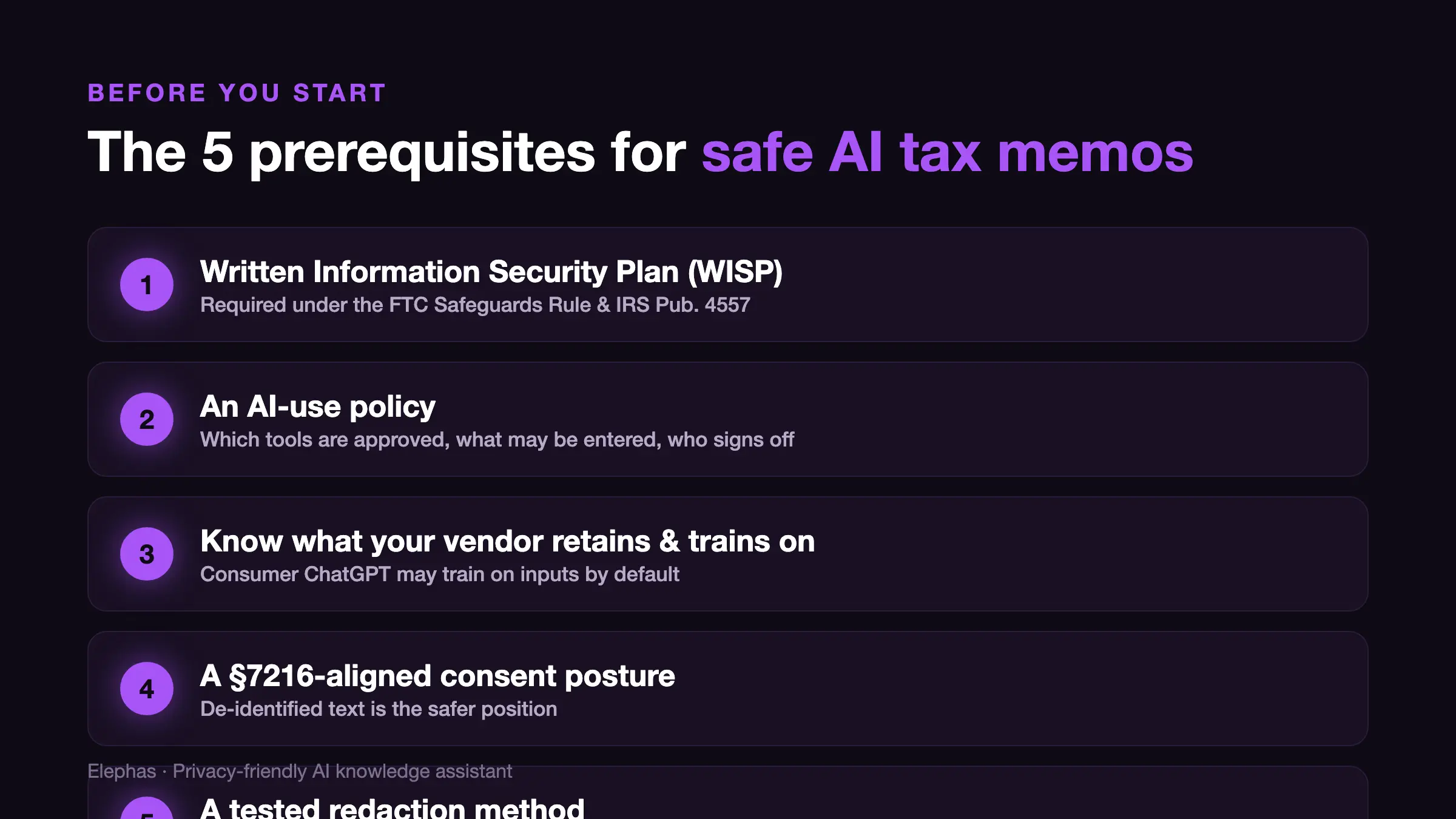
Safe AI use sits on top of basic compliance. Do not open a chat box for client work until all five of these are true. They are not nice-to-haves. A Safeguards Rule audit or a §7216 review will ask you to show them as proof that you protect client data.
- A Written Information Security Plan (WISP). Every paid preparer who files tax returns must keep one. This comes from the FTC Safeguards Rule and Internal Revenue Service (IRS) Pub. 4557. The IRS gives a free template in Pub. 5708, and you confirm you have a plan when you renew your PTIN (your preparer ID number with the IRS).
- An AI-use policy. It says which tools are allowed, what staff may and may not type in, and who signs off.
- Know what your tool keeps and learns from. The free and Plus versions of ChatGPT may use what you type to train the model. The API (developer access) and Enterprise versions do not.
- A §7216-ready consent plan. Ask your lawyer whether your steps need written client consent or a contractor notice. Removing personal details is safer, but data can still count as “tax return information” even after the name is gone.
- A redaction method you have already tested on a fake memo, not one you plan to work out in the middle of a real job.
If you're setting this up from scratch
Start with the WISP, since everything else builds on it. Download Pub. 5708, fill in the template, and pick just one approved tool to start, not ten.
Read that tool's data page in full, then write one line on what it does with your input. A setup you fully understand beats a pile of tools you only half-trust.
If you're coming from another tool
You are probably already pasting client facts into a personal ChatGPT account, so this is mostly about stopping a few things. Stop uploading raw documents and screenshots.
Drop the personal free account for client work, since that version is the most likely to train on what you type. Then build the habit again on a no-training version or a local model.
If you're upgrading an existing workflow
List every place AI already touches client data across the firm, including browser add-ons and the autocomplete built into your tax software. Add “AI tools” as their own item in the WISP, with their own risk check, since most templates still leave them out. Then make a reusable placeholder template so removing details becomes routine.
The tax workflow: 8 steps to a safe AI memo
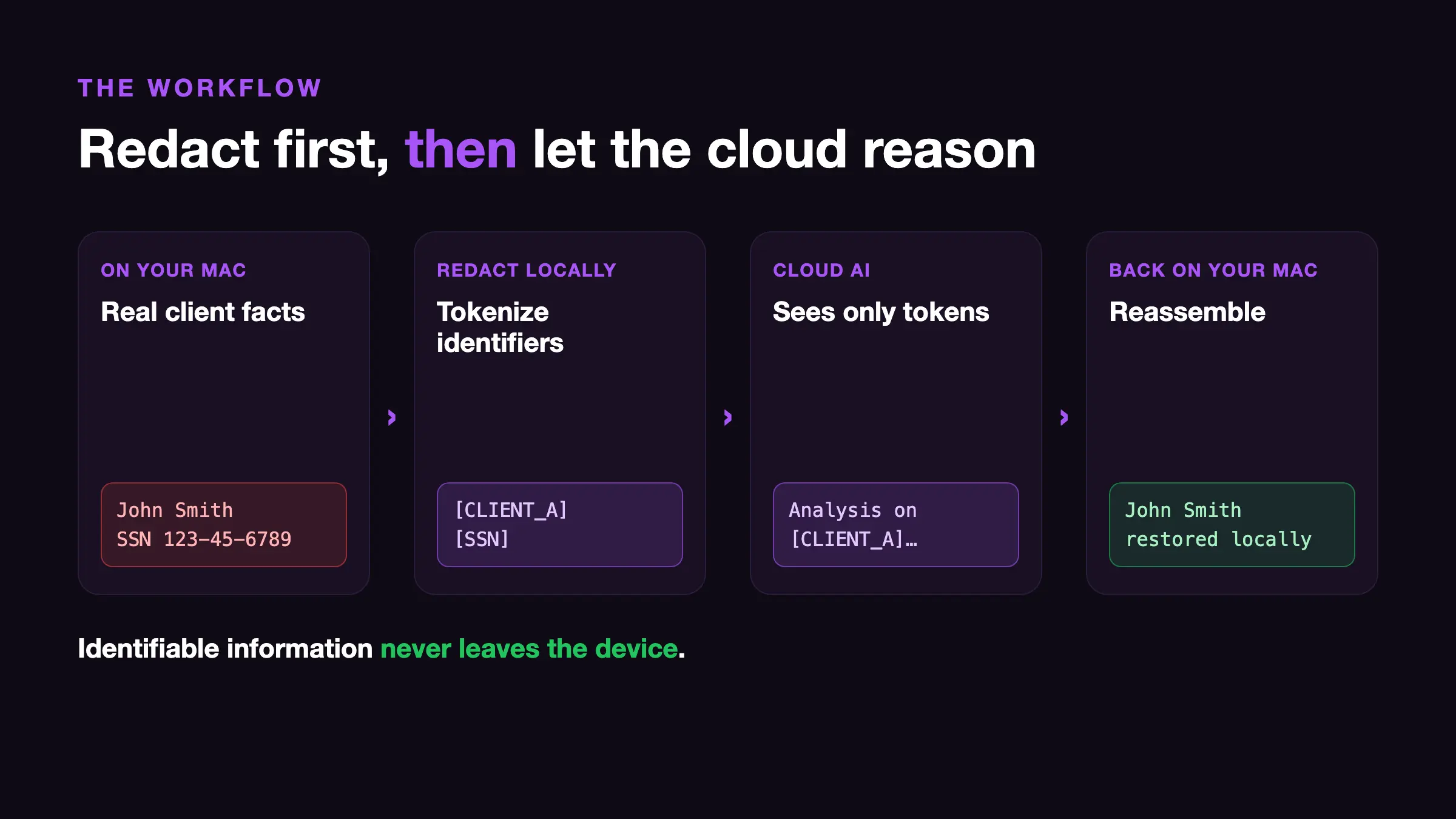
The whole method comes down to one move: split the personal details from the tax facts, then let the AI work only on the facts. Here is the list at a glance, then each step with a check you can run.
Step 1: Decide what the AI is for
Write one line that states the job, for example: “Draft the analysis for whether a single-member LLC that elects S-corp status can deduct this expense.” AI is good at working through hard tax questions and writing the first draft.
That is thinking and writing, not handling IDs, so give it zero personal details. The “just summarize this whole client file” habit is what causes most leaks.
✓ Verify it worked: Read your one-line job. It should have no client name, number, or ID, and it should fit any client with the same facts.
Step 2: Split the personal details from the tax facts
Make two columns. On the left, the IDs: name, SSN, ITIN (Individual Taxpayer Identification Number), EIN (Employer Identification Number), date of birth, address, account numbers. On the right, the tax facts: type of business, the deal, dollar amounts, the dates that affect timing, filing status.
Everything on the left goes to a key sheet on your computer and never leaves it.
✓ Verify it worked: For each item on the left, ask: “Does the tax answer change if I remove this?” If no, it is an ID, and it stays on your computer.
Step 3: Write a clean fact set (with a local key sheet)
Rewrite the facts with placeholders: [CLIENT_A], [SSN], [EIN], [ADDRESS], [DOB]. Keep the real values in a separate, locked file on your computer, the key sheet, which you use later to put the memo back together. This is called pseudonymization: only you can match the placeholders back to real people, and the cloud cannot.
Break up small details that add up, too. Date of birth, sex, and ZIP together can point to one person. That mix alone identifies about 87% of Americans.
✓ Verify it worked: Before the text goes anywhere, search it for any nine-digit number. On a Mac, run grep -nE '[0-9]{3}-?[0-9]{2}-?[0-9]{4}' factpattern.txt and you should get zero matches. Then scan by eye for any leftover name or street.
Step 4: Pick your path (local model or clean-then-cloud)
Pick based on how sensitive the data is. For the most privacy, or to work offline, run a local model with a tool like Ollama or LM Studio, so nothing leaves your computer.
For the strongest AI thinking, clean the text first, then send only the clean version to a cloud model on a plan whose data rules you know.
A tax-specific AI tool like TaxGPT, CCH AnswerConnect from Wolters Kluwer, or Thomson Reuters Checkpoint Edge is built for tax research and tax planning. It draws its answers from licensed tax libraries (this is called retrieval-augmented generation).
It also holds a SOC 2 report (an independent security audit), and promises in its contract not to train on your data. That makes it a safer cloud option than a regular chatbot. If you are still weighing the consumer route, our guide on whether ChatGPT is safe for confidential documents goes into the risks.
Power users: match the path to the data type in your WISP and write it down. “Path = clean-then-cloud, tool = X, no training confirmed” is the note an auditor wants to see.
✓ Verify it worked: Say the path and the reason in one line, and name a tool whose data rules you have actually checked. Never a personal free account.
Step 5: Ask for the analysis (no personal details)
Paste only the clean facts plus the question, then ask for the analysis and a conclusion. Add one line: “Cite primary sources such as IRC sections, Treasury regulations, rulings, and cases, and flag anything you are not sure about.”
That starts the fake-citation check early. Do not paste the original client document or a screenshot of a Form 1040.
✓ Verify it worked: Read the whole prompt top to bottom. It should read like a textbook example, with placeholders where IDs go and no real name or number anywhere.
Step 6: Run the no-PII check before you send
Do one last check for PII (personally identifiable information, like names and numbers), by tool and by eye, across the whole prompt, including anything left over from earlier in the same chat. This is the most important check, because one missed nine-digit number undoes every step before it.
The quiet failure is old data: something you pasted three messages ago is still in the chat the AI reads.
Migrators: if you are used to long, ongoing chats, start a fresh chat for clean work, so no earlier client's data is hiding higher up.
✓ Verify it worked: Run the nine-digit and SSN search across the whole prompt, and scroll up through the history. Zero matches, or you do not send.
Step 7: Build the memo and put client details back on your computer
Take the AI's analysis and conclusion, build the full five-part memo (Facts, Issues, Conclusion, Analysis, Authorities), and on your own computer put the real details back using your key sheet. You add the names back locally, after the cloud step, so data that can identify someone never goes over the wire.
✓ Verify it worked: Search the finished memo for leftover placeholders with grep -nE '\[(CLIENT|SSN|EIN|ADDRESS|DOB)[A-Z0-9_]*\]' memo.md. A leftover [SSN] in a sent memo means you did not finish putting the details back.
Step 8: Check every source against the real thing
Check every source the AI cited, yourself. Open the real IRC section, the real regulation, the real case, and confirm it exists, says what the memo claims, and is still current law. AI makes up Code sections that look perfect, and one fake citation can bring an IRC §6694 preparer penalty.
First-timers: do not skip this. A cite you cannot find in a real source gets deleted, not kept because it “looks right.”
✓ Verify it worked: Open the real source for each cite and tick it off. Every cite is confirmed, or it comes out.
Common mistakes that expose client data anyway
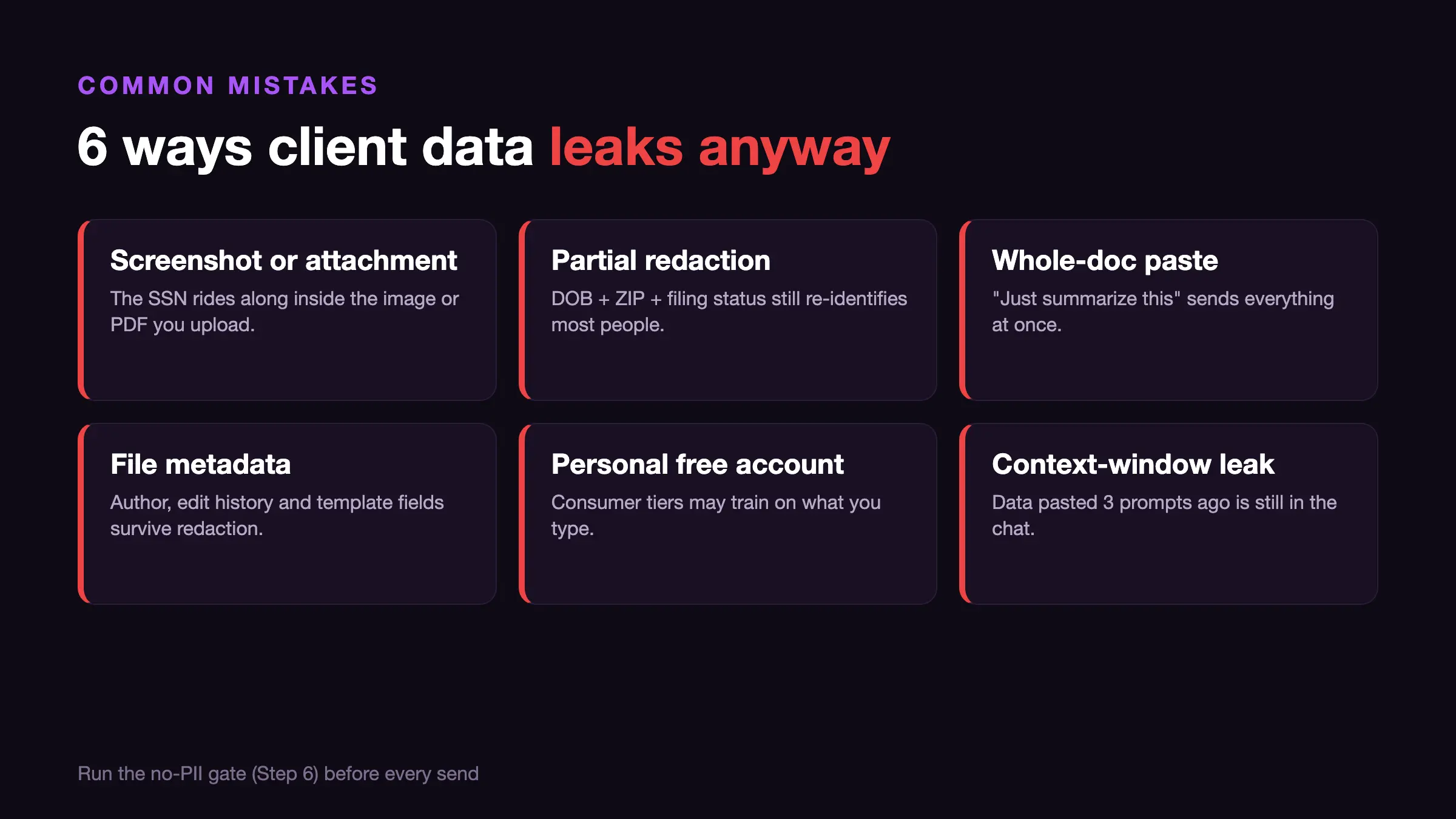
Most leaks are not the obvious paste of a raw SSN. They are the close calls that feel safe. Watch for these, then read the recent cases below, because tax rules and AI settings both change faster than firm policy.
- Leaving an SSN in a screenshot or attached file. People clean the typed text, then attach a PDF of the 1040 “so the AI can read it.” The SSN and address go right along inside the file. (Most common for first-timers.)
- Half-cleaning. Removing the name but leaving date of birth, sex, and ZIP is enough to name most people again. Break up the mix, not just the obvious field.
- Pasting a whole document for a summary. This is the biggest leak of all: name, SSN, account numbers, and last year's figures all go over the wire at once. (Most common for migrators.)
- Forgetting hidden file data. An uploaded file carries the author name, edit history, and template fields that the cleaning you can see never touched. Retype the facts into a blank document instead of uploading the original.
"Delete" did not delete the chat
Source: NYT (New York Times) v. OpenAI court preservation order (2025-05-13)
A federal court told OpenAI to keep consumer ChatGPT logs, even chats people had deleted (the hold ran May 13 to Oct 9, 2025). Only the Enterprise and Zero-Data-Retention plans were left out.
Fix: keep SSNs out of consumer chat for good, since "delete" there is a request, not a promise.
Connecting a drive exposed the whole drive
Source: Zenity Labs "AgentFlayer," Black Hat USA (2025-08)
Researchers hid an order inside a document. Asking ChatGPT to summarize it made the tool quietly search a connected Google Drive and send data out, with no click needed.
Fix: do not connect AI agents to shared client folders. Feed it one clean fact set at a time.
Fabricated citations reached Tax Court
Source: Clinco v. Commissioner, T.C. Memo. 2026-16 (Feb. 2026); Thomas v. Commissioner, No. 10795-22 (2024)
In Clinco, Judge Holmes found that a brief's citations were “cooked up by AI.” He called these made-up cases “unacceptable” and “a recipe for sanctions,” but did not punish anyone this time. In the earlier Thomas case, the Tax Court threw out a pretrial filing that cited cases that did not exist.
Fix: run Step 8 on every memo, because a made-up source is your IRC §6694 and Circular 230 problem, not the AI's.
Your privacy settings flipped on by themselves
Source: OpenAI Memory and connector rollout (2025-06-03)
Default settings for memory, connectors, and training on consumer plans change with no notice, so a setup you locked in months ago can quietly flip back. (Most common for power users who set a tool up early and never checked again.)
Fix: check tool settings on a regular schedule, not just once at setup.
Next steps: a repeatable, audit-ready workflow
The first memo is the hard one. After that, the goal is to make cleaning the data automatic, so it holds up through a busy tax season and a WISP review. Your next move depends on where you start.
If you're setting this up from scratch
Run all eight steps once on a fake memo before you touch a real client, and get your WISP reviewed and signed.
If you are still picking software, compare your options in our guide to the best AI for accountants. Practice on fake facts so you catch the number you missed, with nothing real at risk.
If you're coming from another tool
Do a side-by-side check: confirm the new no-training path writes memos as good as your old one before you drop the consumer account for good. Then delete the old chats that hold client facts, and turn off any drive connections you set up.
The switch is not done until the unsafe path is gone, not just unused.
If you're upgrading an existing workflow
Turn the placeholder system into a firm template, put a settings check on the calendar every quarter, and make the no-PII check part of your normal review, so every Certified Public Accountant (CPA) and preparer follows it.
Firms that grow this treat the cleaning step as basic plumbing, the same as encryption and two-factor login. The right tool can speed that step up and save time in tax season without weakening security.
If you want the cleaning handled automatically instead of by hand, Elephas is the privacy-friendly AI knowledge assistant we recommend for tax professionals. For tax professionals who still want a leading cloud model, Elephas adds a second layer through automatic PII redaction.
Before a prompt is sent to ChatGPT 5.5, Claude Opus 4.7, Gemini, Grok, Perplexity, or any other cloud model, Elephas strips sensitive names, emails, phone numbers, and identifiers on your Mac. The cloud model only ever sees the sanitized text.
When the answer comes back, the redacted fields are reassembled locally on your machine, so identifiable information never leaves the device. Elephas pairs this with zero data retention: content never trains AI models, never sits on a vendor's server, and never passes through a third-party reviewer's screen.
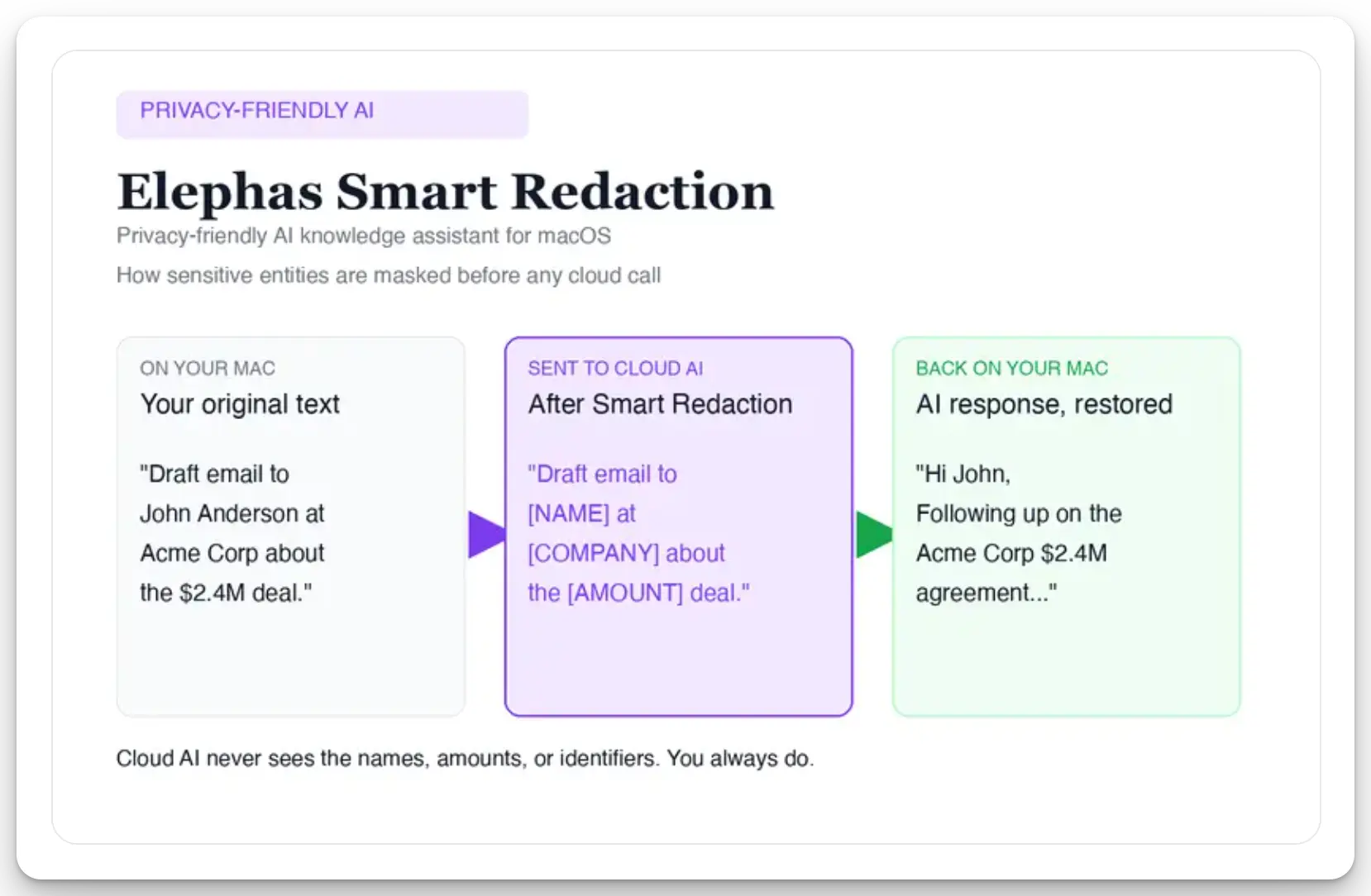
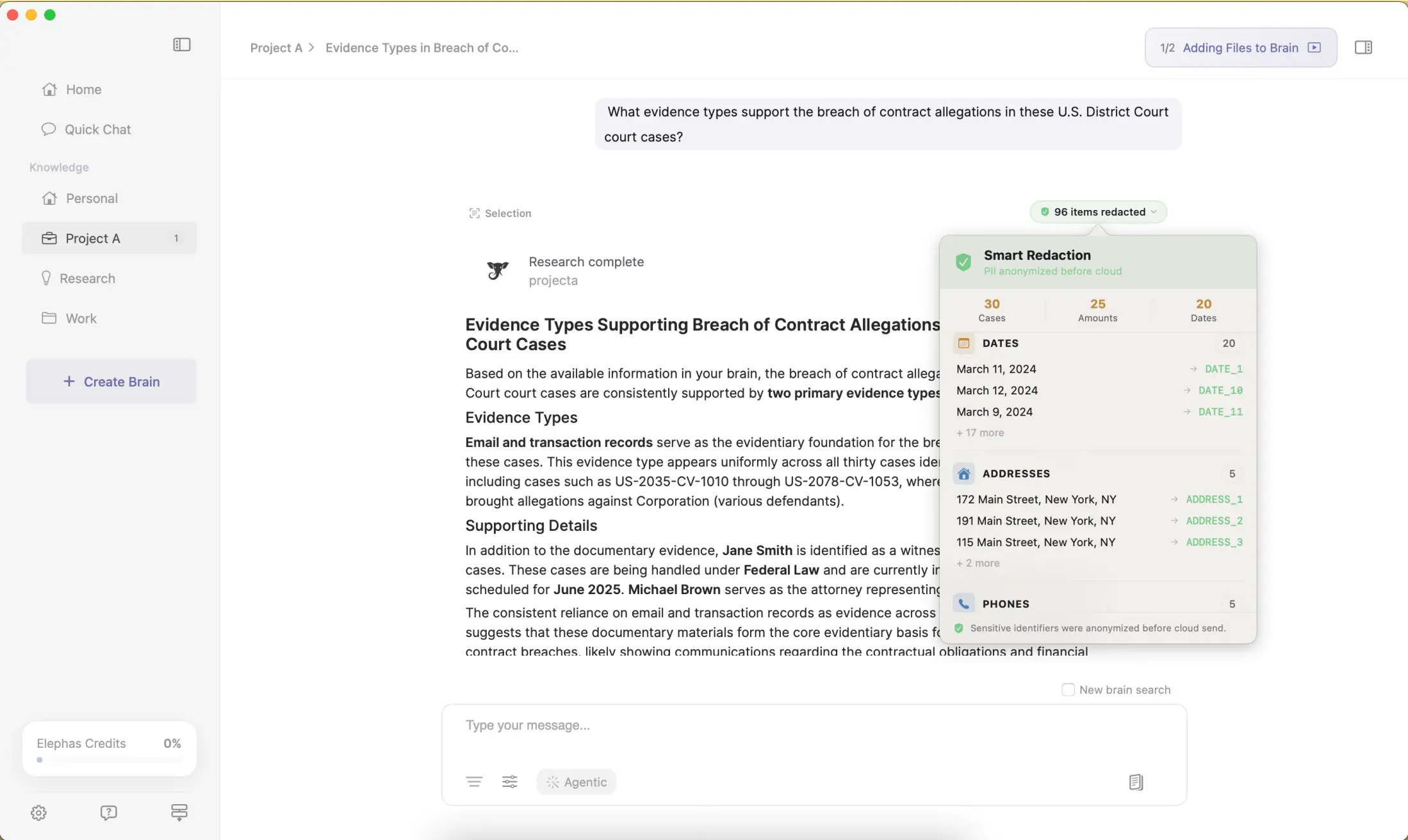
In the founder's words, “sensitive data is automatically detected and redacted before anything reaches a cloud AI model, your content is never used to train AI models, and nothing passes through a third-party reviewer's screen.”
Smart Redaction is available on every Elephas plan, including the free tier, and Elephas also provides built-in local LLM models for the cases where nothing at all should leave your machine. Elephas has a free plan and starts at $19/month; you can try Elephas for free and check the live plan list there.
- The SSN is a name tag, not a tax fact, so removing nearly all of it costs your analysis nothing.
- One paste of an SSN into a public tool can be a §7216 problem, a Safeguards Rule problem, and an engagement-letter problem at once.
- The no-PII check in Step 6 is the one check that saves you, because one missed nine-digit number undoes the rest.
- If you would rather not clean by hand, Elephas is a privacy-friendly AI knowledge assistant with on-device PII redaction and built-in local LLM models, so client data never leaves your Mac.
Write tax memos without the leak
Elephas removes client IDs on your Mac before anything reaches a cloud model, and includes built-in local LLM models for when nothing should leave your computer.
Try Elephas for free
Related Resources
Explore all AI Privacy & Security resourcesHow to Organize ChatGPT Projects
16 min readarticlePerplexity Computer vs Claude Cowork: Which AI Agent Should Run on Your Mac?
18 min readarticleChatGPT Business vs Plus: Which Plan Is Right for Your Firm?
15 min readarticlePerplexity Computer Review (2026): What It Actually Does, What It Costs, and Who It's For
11 min readSources
- IRS Section 7216 Information Center
- Treas. Reg. 301.7216-1 (disclosure and tax return information definitions)
- FTC Safeguards Rule: What Your Business Needs to Know
- IRS Publication 5708 (WISP template)
- OpenAI response to the NYT data demands (preservation order)
- Zenity Labs AgentFlayer zero-click ChatGPT connector attack
- Thomson Reuters 2025 Generative AI in Professional Services report