Siri vs ChatGPT for Confidential Work
Every time you dictate a note to Siri or open ChatGPT to draft a client email, you make a small decision about where confidential information goes. Most professionals never stop to think about it that way.
Siri feels private because it lives on your iPhone. ChatGPT feels risky because everyone has heard a story about a colleague pasting the wrong thing into a chat box. The real picture is messier: Siri now hands certain requests to ChatGPT on its own, and Apple's “private” cloud has a documented caveat worth knowing.
The Ponemon Institute found that 71% of organizations reported at least one employee uploading confidential data to a public AI tool. It took an average of 287 days to even notice. This guide compares what actually happens to your data in each tool, then covers a way to get ChatGPT's drafting speed without the exposure.
Executive Summary
- Siri is tiered, not purely on-device: simple requests stay on your phone, moderate ones go to Apple's Private Cloud Compute, and the hardest reasoning tasks route to Google Gemini running on Nvidia hardware.
- ChatGPT trains on your inputs by default on the Free, Go, and Plus plans (the tiers almost everyone in this audience is actually on) and retains data for roughly 30 days regardless of the chat-history toggle.
- A February 2026 federal ruling (United States v. Heppner) found AI-drafted documents are not protected by attorney-client privilege; ABA Formal Opinion 512 makes weighing a tool's data security a professional duty, not a preference.
- When Siri hands a request to ChatGPT anonymously, it masks your IP and excludes that exchange from training. That protection disappears the moment you open the ChatGPT app directly instead.
- Neither tool gives you a redaction step. Elephas adds automatic PII redaction on your Mac before a prompt reaches ChatGPT 5.5, Claude Opus 4.8, or any other cloud model, so you keep the drafting speed without the exposure.
What Actually Matters When the Work Is Confidential
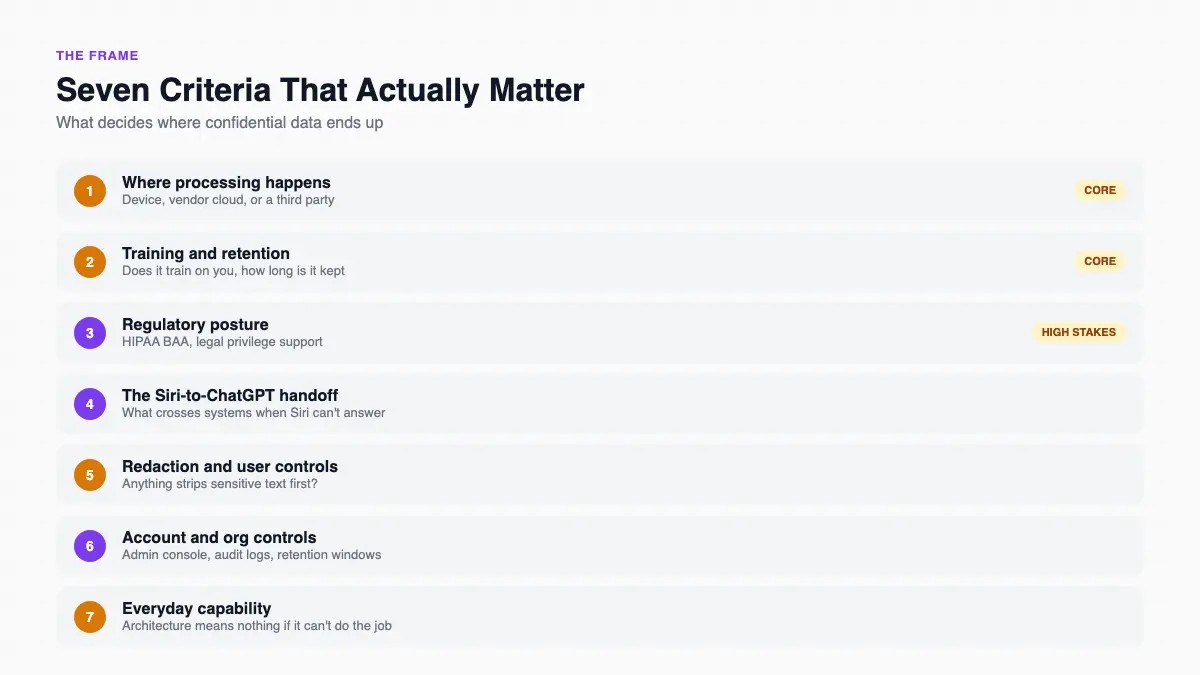
Feature lists skip a confidentiality-bound professional's real question: where a client's or patient's information ends up, and who can see it there. Whether ChatGPT is safe to use for that material depends on which of seven criteria you weigh most, and those criteria set the frame for the rest of this comparison.
- Where processing happens. Whether a request stays on your device, moves to the vendor's own servers, or crosses to a third party's cloud, and whether that path is disclosed.
- Training and retention. Whether the vendor trains future models on your inputs, and how long raw content sits on a server before it is deleted.
- Regulatory and legal-privilege posture. Whether the tool supports a HIPAA Business Associate Agreement (BAA), and how it holds up against attorney-client privilege.
- The Siri-to-ChatGPT handoff. What crosses from Apple's system into OpenAI's system when Siri cannot answer something on its own.
- Redaction and user-side controls. Whether anything strips sensitive text before it is processed, and who is responsible for that step.
- Account and organization controls. Admin consoles, audit logs, and retention windows, and which pricing tier includes them.
- Everyday capability. Privacy architecture does not matter much if the tool cannot do the job you need it for.
The third criterion carries real weight. In February 2026, a federal judge ruled in United States v. Heppner (S.D.N.Y.) that AI-drafted documents were not protected by attorney-client privilege or work-product doctrine. The court reasoned that an AI tool “is not an attorney, owes no duty of confidentiality, and cannot form an attorney-client relationship.”
ABA Formal Opinion 512, issued in July 2024, is the reason that ruling matters beyond one case: it requires attorneys to weigh a generative AI tool's “data security and confidentiality” before using it for client work. It is not the only cautionary case on record. Back in June 2023, attorney Steven Schwartz was sanctioned $5,000 in Mata v. Avianca (S.D.N.Y.) after ChatGPT invented six fake case citations he filed in a real brief.
Siri: Apple's On-Device Assistant, With a Cloud Side
Siri is Apple's built-in assistant across the iPhone, iPad, Mac, Apple Watch, and CarPlay. In June 2026, Apple rebuilt it as “Siri AI” on top of Apple Intelligence, rolling out as a phased beta across iOS 27 and macOS 27. It costs nothing beyond the device you already own. Our is Siri an AI explainer covers what that rebuild actually is.
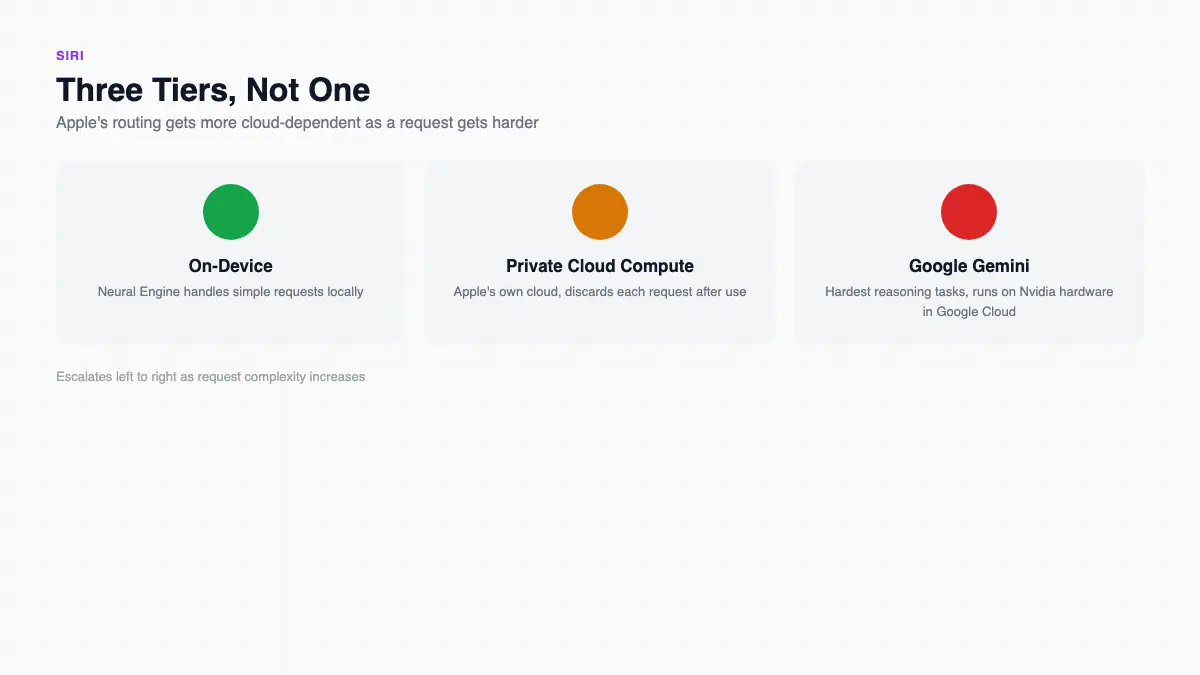
The architecture is genuinely three-tiered, not purely on-device the way Apple's marketing sometimes implies:
- Simple requests stay on Apple's Neural Engine, on your device.
- Moderate requests move to Apple's own Private Cloud Compute, which Apple says discards each request once it is fulfilled.
- The heaviest reasoning tasks route to Google Gemini models running on Nvidia hardware inside Google Cloud. Apple states this tier still runs under similar no-storage rules and bars Google from training on Apple user data.
Apple's own privacy page states that audio is not stored by default. If you opt into “Improve Siri and Dictation,” Apple says it “may retain and use this data for up to two years to develop and improve Siri.” There is a real caveat on the cloud side too: Apple's technical documentation for Private Cloud Compute discloses that it keeps limited diagnostic logs, including crash reports, for roughly 24 hours, even while Apple's public claim is that it does not retain user data beyond fulfilling the request.
Apple's own history with ChatGPT is worth knowing too. In May 2023, Apple banned employee use of ChatGPT and Google Bard internally, citing data exfiltration concerns, then launched Apple Intelligence with on-device processing and Private Cloud Compute thirteen months later. Even Apple did not initially trust ChatGPT with its own confidential data.
- Independent legal-tech analysis notes that attorneys “cannot guarantee that any specific dictation session stays on-device.” Siri has no HIPAA BAA as of March 2026, and no admin console for firms or clinics.
- AppleStorm privacy research from Lumia Security found Siri and Apple Intelligence dictation can log audio and transcripts even when the device is not tied to an Apple Account.
- Apple's $95 million class-action settlement (Lopez v. Apple) over allegations that Siri recorded private conversations through unintended activations began paying out in January 2026.
- Siri's personal-context awareness (searching your own messages, emails, and files on request) remains unmatched by any assistant not built into the operating system itself.
ChatGPT: Faster Drafting, a Different Risk Profile
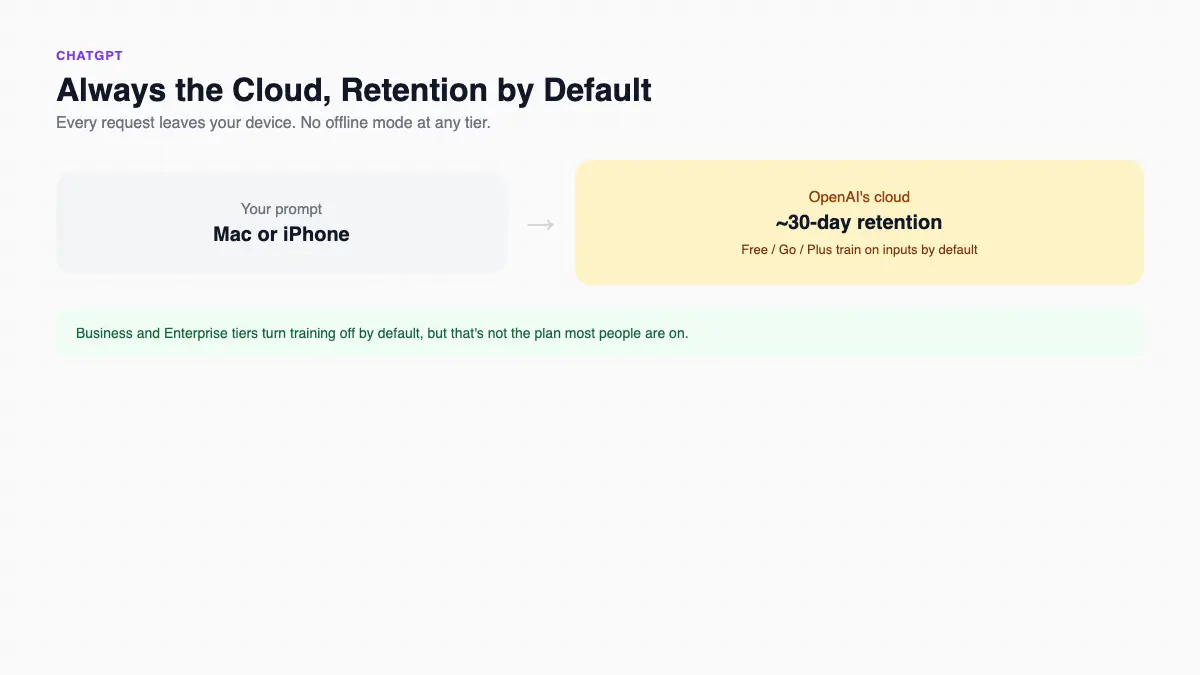
ChatGPT is OpenAI's conversational AI assistant, available on the web and as native apps for iOS, Android, Mac, and Windows. It launched publicly in November 2022, and its current flagship model, ChatGPT 5.5, shipped in April 2026. Professionals in this audience typically use it to draft client emails, summarize meeting notes, and speed up research, on a Mac at the office and an iPhone between appointments. Every request runs entirely in OpenAI's cloud; there is no offline mode at any tier.
On the Free, Go, and Plus plans (the ones almost everyone in this audience is actually on), ChatGPT uses your conversations to train future models by default. You have to find the setting and turn it off yourself. OpenAI's own terms go a step further: inputs and outputs from those tiers may be retained for roughly 30 days for abuse review, regardless of whether chat history is on or off. Above the Law, a legal trade publication, warned in April 2026 that lawyers are “lulled into thinking” the chat-history toggle protects client data. It does not stop that 30-day window.
Real users run into this gap constantly. One person on r/msp, describing a personal-injury law firm's client, wrote that “a paralegal was uploading complete, raw, unredacted medical reports to free ChatGPT in order to get AI summaries.” Another user on r/ChatGPTPro put the rule bluntly: “if you work with actual confidential information (HIPAA or FERPA), PII, or other stuff that could legitimately get your company in trouble, you definitely shouldn't be using any AI that isn't approved by your enterprise.”
- Business and Enterprise tiers do not train on your data by default, add SSO, audit logs, and SOC 2 Type 2 certification, and Enterprise offers a HIPAA BAA through “ChatGPT for Healthcare.”
- None of that reaches a solo practitioner on the $20-a-month Plus plan, which is where most of this audience actually sits.
- The 2023 Samsung Semiconductor incident is still the clearest illustration of what can go wrong: employees pasted proprietary source code and chip-yield data into ChatGPT, and the company banned the tool company-wide within a month.
- On the capability side, ChatGPT's frontier reasoning, Deep Research feature, and cross-platform reach are genuinely stronger than anything Siri offers on its own. That is exactly why professionals keep reaching for it despite the risk.
Siri vs ChatGPT: Head-to-Head
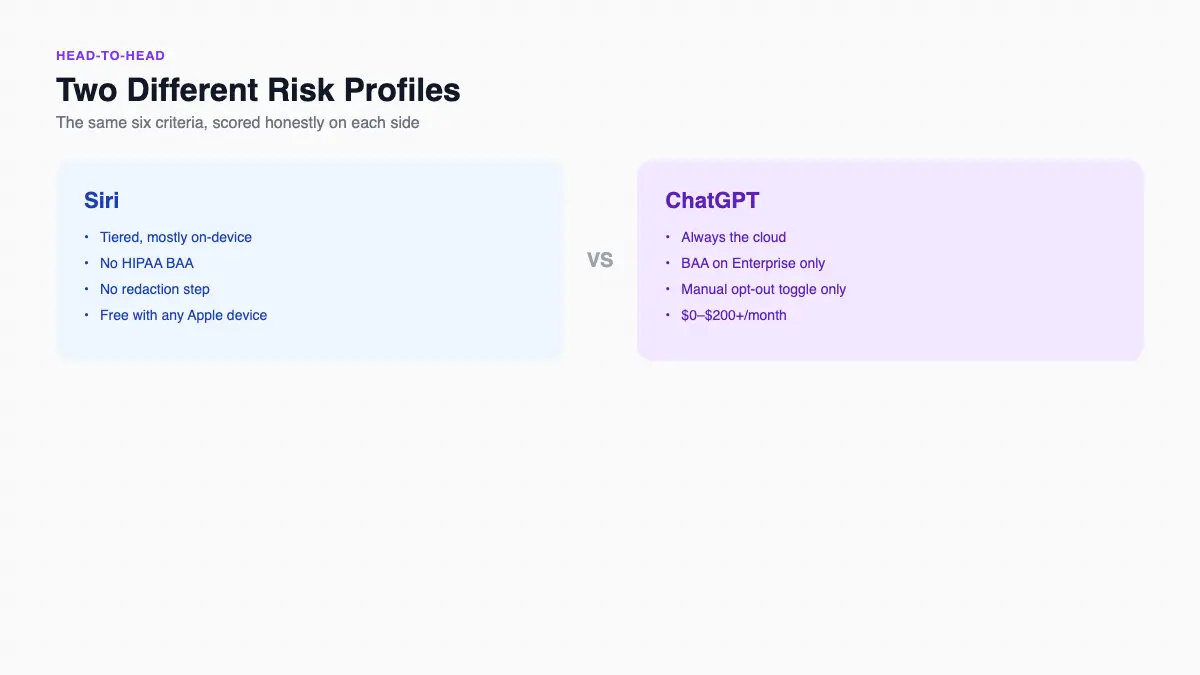
Where the two genuinely diverge is the handoff itself. Fast Company reported that when Siri routes a request to ChatGPT anonymously, it masks your IP address and excludes that exchange from OpenAI's training data. That protection disappears the moment you open the ChatGPT app directly instead of going through Siri.
| Criterion | Siri | ChatGPT |
|---|---|---|
| Where processing happens | Tiered: device → Private Cloud Compute → Google Gemini on Nvidia hardware for the hardest requests | Always OpenAI's cloud; regional residency for Enterprise/API only |
| Training & retention | Audio not stored by default; opt-in retains up to 2 years; PCC discards after each request | Free/Go/Plus train by default; ~30-day retention regardless of chat-history setting |
| Regulatory posture | No HIPAA BAA as of March 2026; no published privilege framework | BAA for Enterprise/Healthcare only; Feb 2026 ruling found no privilege on training-permissive tiers |
| The handoff | Confirmation-gated; anonymous mode hides your IP and excludes OpenAI storage/training | Receives Siri's anonymous handoff under narrower terms than a logged-in session |
| Redaction & controls | None; protection is architectural, not per-prompt | None built in; only a manual training opt-out toggle |
| Account & org controls | No tiers, no admin console, free with any device | Six pricing tiers, $0–$200+/month, full admin/SSO/audit at Business+ |
Neither product hands you a redaction step. Siri's protection is architectural: rotating device identifiers and on-device-first triage, with no per-prompt control. ChatGPT's protection is a settings toggle you have to remember to find, and even then it only stops training, not the 30-day retention.
- A lawyer on r/legaltech described the workaround professionals are already improvising by hand: “redact and tokenize or anonymize the PII before sending anything to LLMs, and detokenize the results” once the answer comes back.
- That is exactly the missing layer between these two products. One mechanical fact explains the real risk boundary better than “Siri is private, ChatGPT is not” ever could.
Which Should You Pick?
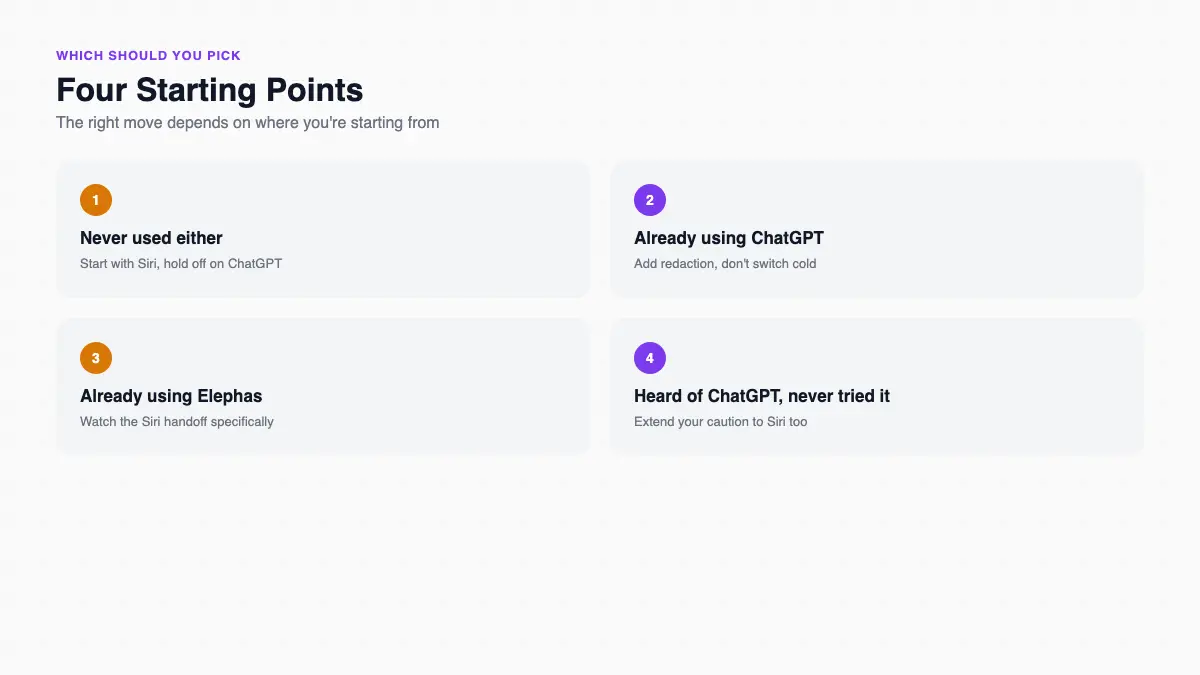
There is no single right answer here. What fits depends on how you already work, and how much confidential material has already passed through your Siri requests or ChatGPT history without you tracking it.
If you've never used either of these
If you are a solo attorney, nurse practitioner, or advisor whose day already runs through Apple's ecosystem, start by assuming both tools can leak. If your firm's compliance team checked your phone today, ChatGPT's default training setting on the Free and Plus plans would be the harder thing to explain, since it stays on unless you turn it off yourself.
- Siri's on-device-first design is the safer starting point for anything with a client or patient name attached.
- Reserve ChatGPT for generic drafting until you have a redaction step in place.
- Treat every Siri question the same way: assume anything with a real name in it might not stay local.
If you're already using ChatGPT
If you have leaned on ChatGPT for months to draft client emails and speed up research, and a colleague's comment or a firm-flagging story recently made you pause, this is the risk math to run. The Siri handoff does not change the OpenAI risk you carry when you use the ChatGPT app directly. Toggling chat history off never stopped the roughly 30-day retention window OpenAI documents for Free, Go, and Plus.
- You cannot undo what has already been sent, but you can change what happens next.
- Switching tools entirely is not required: adding a redaction step before your existing prompts leave your Mac is roughly a 5 to 15-minute one-time setup.
- Going back to typing prompts raw costs nothing to reverse if it does not work for you.
If you're already using Elephas
If you already route your confidential drafting through Elephas, and a colleague just mentioned they dictate straight to Siri or paste directly into ChatGPT “and it's fine,” here is the honest answer: Siri's “Ask ChatGPT” handoff on iPhone bypasses your Mac's redaction step entirely, since it is a separate Apple-to-OpenAI data path.
- The one legitimate case for skipping Elephas is generic, non-identifying drafting: nothing tied to a real client or patient.
- For anything with a name, date, or account number attached, going direct is the exposure, not the redaction step.
- Treat Siri dictation the same way you would treat typing directly into ChatGPT: assume it is not redacted unless you know otherwise.
If you've heard of ChatGPT but never tried it for confidential work
If you use Siri daily but have drawn a hard line at anything AI once client or patient details are involved, the handoff mechanism is worth understanding first. When Siri cannot answer a request and hands it to ChatGPT, OpenAI's privacy rules apply from that moment, not Apple's, even though the request started inside what felt like Apple's private system.
- Apple's “on-device” pitch is not a blanket promise: it holds for simple requests, but heavier requests move to Private Cloud Compute or Google Gemini's cloud.
- Your caution about ChatGPT for client work is justified: extend the same caution to any Siri request involving a real name, case number, or diagnosis.
- You cannot always tell from the interface which tier is handling a given request.
The Verdict: Pick Based on the Task, Not the Brand
Pick Siri for anything generic and hands-free: reminders, quick searches, dictating a note with no client name attached. Pick ChatGPT when you need real drafting or research power and the material is not confidential. Neither product gives you a way to use ChatGPT's speed on genuinely sensitive material without exposure. Closing that gap is the actual problem this article set out to answer.
Siri wins on architecture. Its on-device-first design and no-subscription-cost model are hard to beat for casual, non-sensitive tasks. But for lawyers, clinicians, and advisors handling privileged material, that edge stops the moment Siri hands a request to ChatGPT, where OpenAI's rules take over.
How Elephas protects a prompt before it reaches the cloud
For readers who still want a leading cloud model, Elephas adds a second layer through automatic PII redaction. Before a prompt is sent to ChatGPT 5.5, Claude Opus 4.8, Gemini, Grok, Perplexity, or any other cloud model, Elephas strips sensitive names, emails, phone numbers, and identifiers on your Mac.
The cloud model only ever sees the sanitized text. When the answer comes back, the redacted fields are reassembled locally on your machine, so identifiable information never leaves the device. Elephas pairs this with zero data retention: content never trains AI models, never sits on a vendor's server, and never passes through a third-party reviewer's screen.
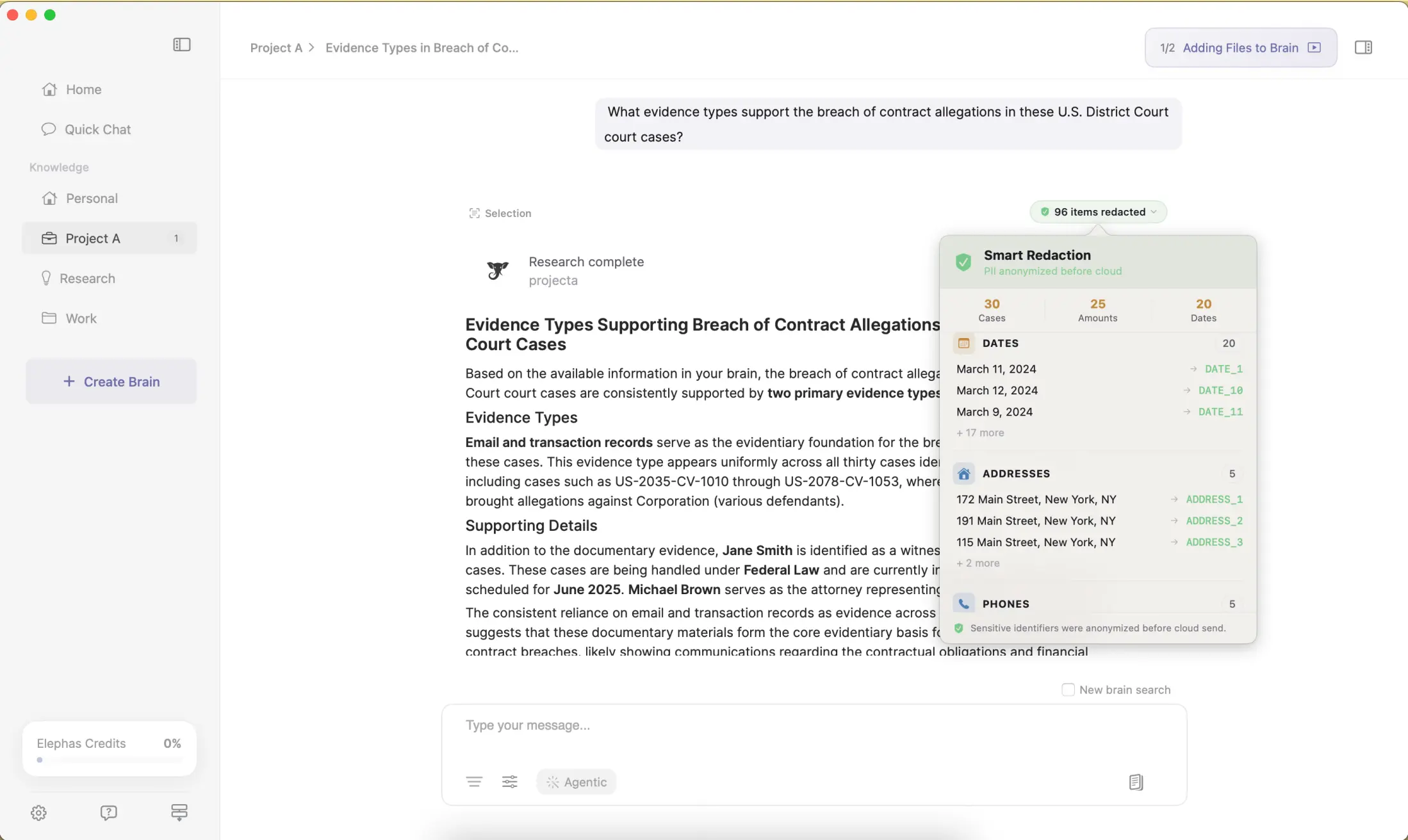
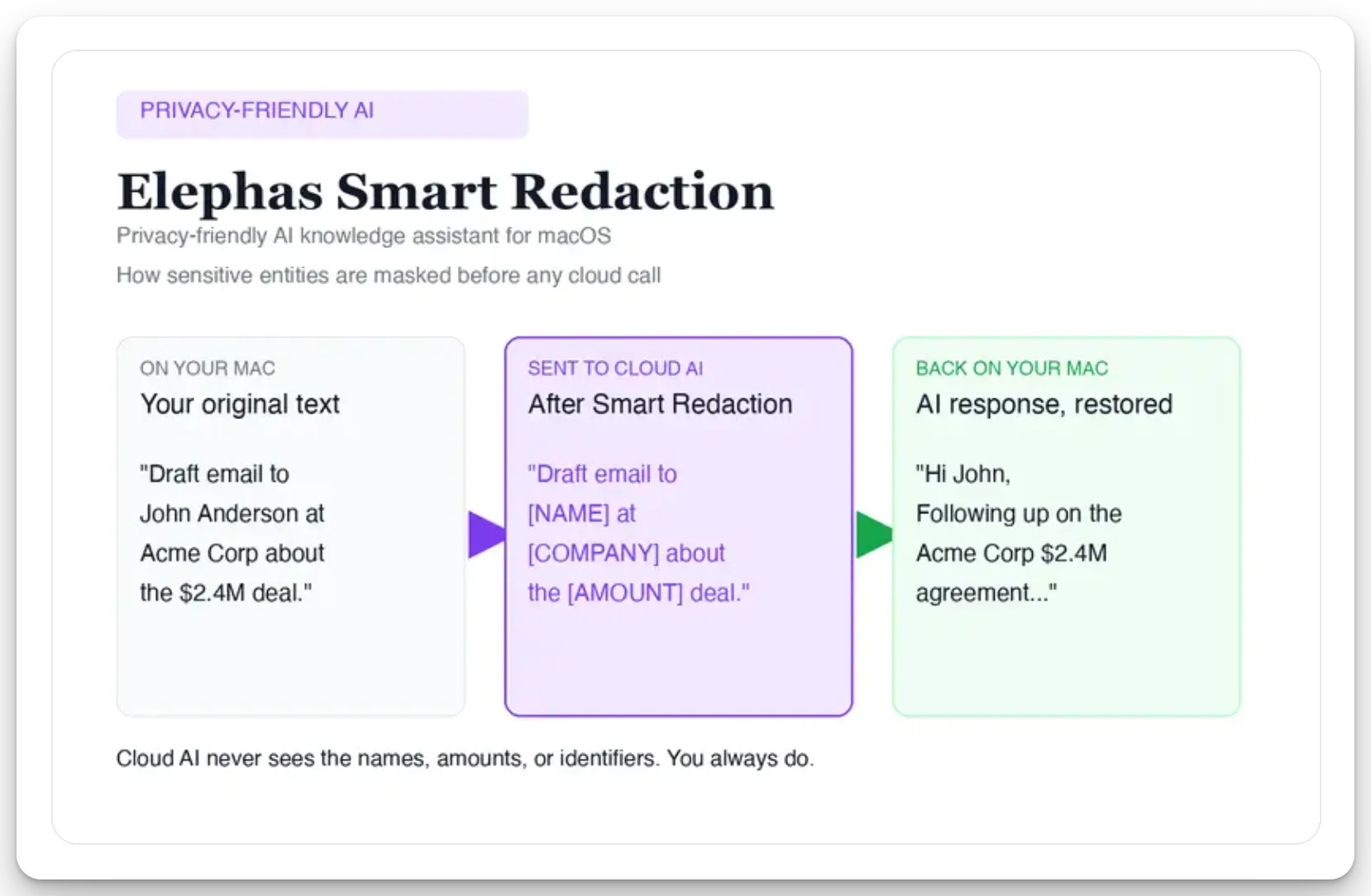
Sensitive data is automatically detected and redacted before anything reaches a cloud AI model, your content is never used to train AI models, and nothing passes through a third-party reviewer's screen.
Smart Redaction runs on every Elephas plan, including the Free tier, so it is not a feature you have to pay extra for. Elephas has a free plan and starts at $19/month, with a Try Elephas free option if you want to test the redaction step on your own prompts first.
- For readers new to both tools, start with Siri for anything generic and hold off on ChatGPT until a redaction step is in place.
- If you're already using ChatGPT, keep the workflow you built: add redaction in front of it instead of retraining yourself on a new tool.
- If you're already using Elephas, watch the Siri-to-ChatGPT handoff specifically, since it is the one path that bypasses your redaction step entirely.
- If you would rather not choose between Siri's limits and ChatGPT's exposure, Elephas is a privacy-friendly AI knowledge assistant built for exactly this gap, with built-in local LLM models and automatic redaction so your confidential material never leaves your device unprotected.
Try Elephas free on your Mac
The Mac-native privacy-friendly AI knowledge assistant: on-device Smart Redaction, built-in local LLM models, and the flexibility to wrap ChatGPT, Claude, or any cloud model with a privacy layer that runs on hardware you own.
Get Elephas →