Best AI App for MacBook Neo in 2026: 12 Tools That Actually Fit 8GB
The MacBook Neo ships with 8GB of unified memory and an A18 Pro chip, not an M-series chip. Almost every “best ai apps for mac” guide is written for M-series Macs with more memory, and never mentions that gap. Apple also just raised Neo prices to $699 because AI companies are buying up the same memory chips this machine is short on.
Every app below was checked against that 8GB ceiling, and this list says plainly when one does not fit. It covers 12 apps across document search, chat, writing, dictation and local models, with verified pricing for each.
Executive Summary
- The MacBook Neo's real constraint isn't the A18 Pro chip. It's 8GB of unified memory, and that number decides which AI apps are worth installing.
- Apps that keep a big model loaded in memory, heavy local LLM runners, some local image generators, fight the operating system for the same 8GB and lose.
- Apps that route the heavy lifting to the cloud, or that use small on-device models by design, are the ones that stay smooth on this machine.
- For document work with sensitive material, the winning move is not local only or cloud only. It is redacting on the Mac before anything reaches a cloud model.
- Twelve AI apps compared against the Neo's 8GB ceiling, with pricing verified on each tool's live pricing page.
- Elephas is the best AI app for the MacBook Neo. It indexes locally, redacts sensitive data before it reaches a cloud model, and starts free, with paid plans from $19 a month.
Why the Neo Changes the Answer
Every “best ai apps for mac” list assumes an M-series Mac with 16GB or more. That breaks on the Neo, whose price rose this year without adding memory. Its A18 Pro chip is “up to 3x faster for on-device AI workloads”, yet pairs that with just 8GB.
That memory number is the whole story: unified memory is shared between the OS, every app, and any local AI model. A Mac owner weighing machine learning work got a blunt answer from u/Weak_Armadillo6575: “The neo is not built for the on-device modelling.” That is a warning about big local models, not the Neo generally.
Ordinary AI use tells a calmer story. u/gezyy1008 ran Apple Intelligence with ChatGPT, two Safari tabs, and a spreadsheet on an 8GB Mac, reporting green memory pressure with only 230MB of swap. A student buying the Neo as an affordable second machine is the buyer this machine was built for.
Then Apple raised the price on 2026-06-25: the base Neo went from $599 to $699, the 512GB model from $699 to $799, driven by AI firms buying memory at scale. Apple's own words: “We have never seen a component price increase this much, this quickly.”
Quick Comparison Table
All pricing verified against each tool's live pricing page as of August 2026.
Elephas: A Private AI Knowledge Assistant for Your Mac
Best for chatting with your own documents on a machine that cannot comfortably host a large local model.
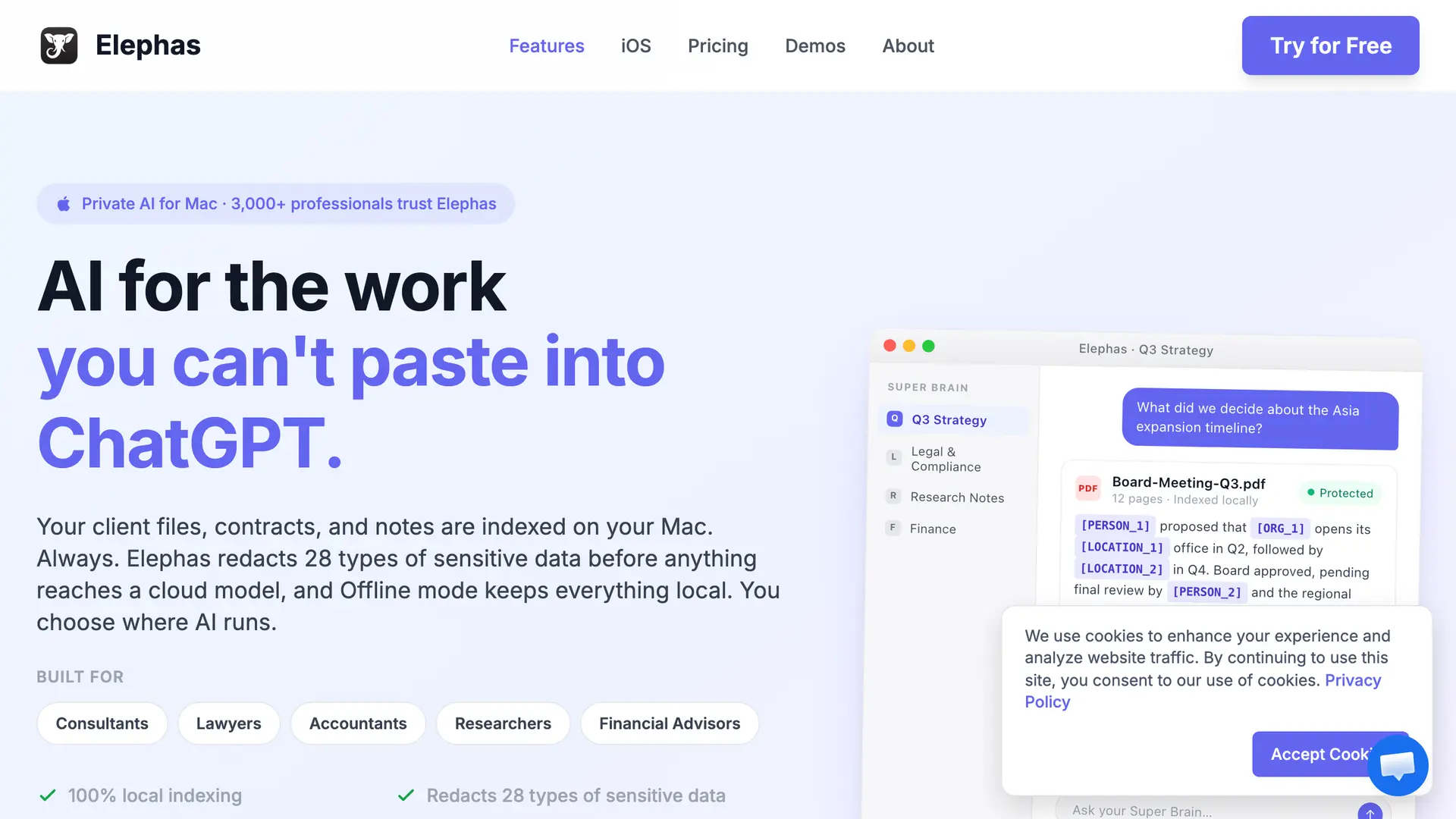
Elephas is a Mac-native AI knowledge assistant that turns your files, notes, and recordings into a searchable brain you can question, with cited answers. It works alongside the cloud model you already use, and indexes locally, so finding a passage never depends on the Neo hosting a large model.
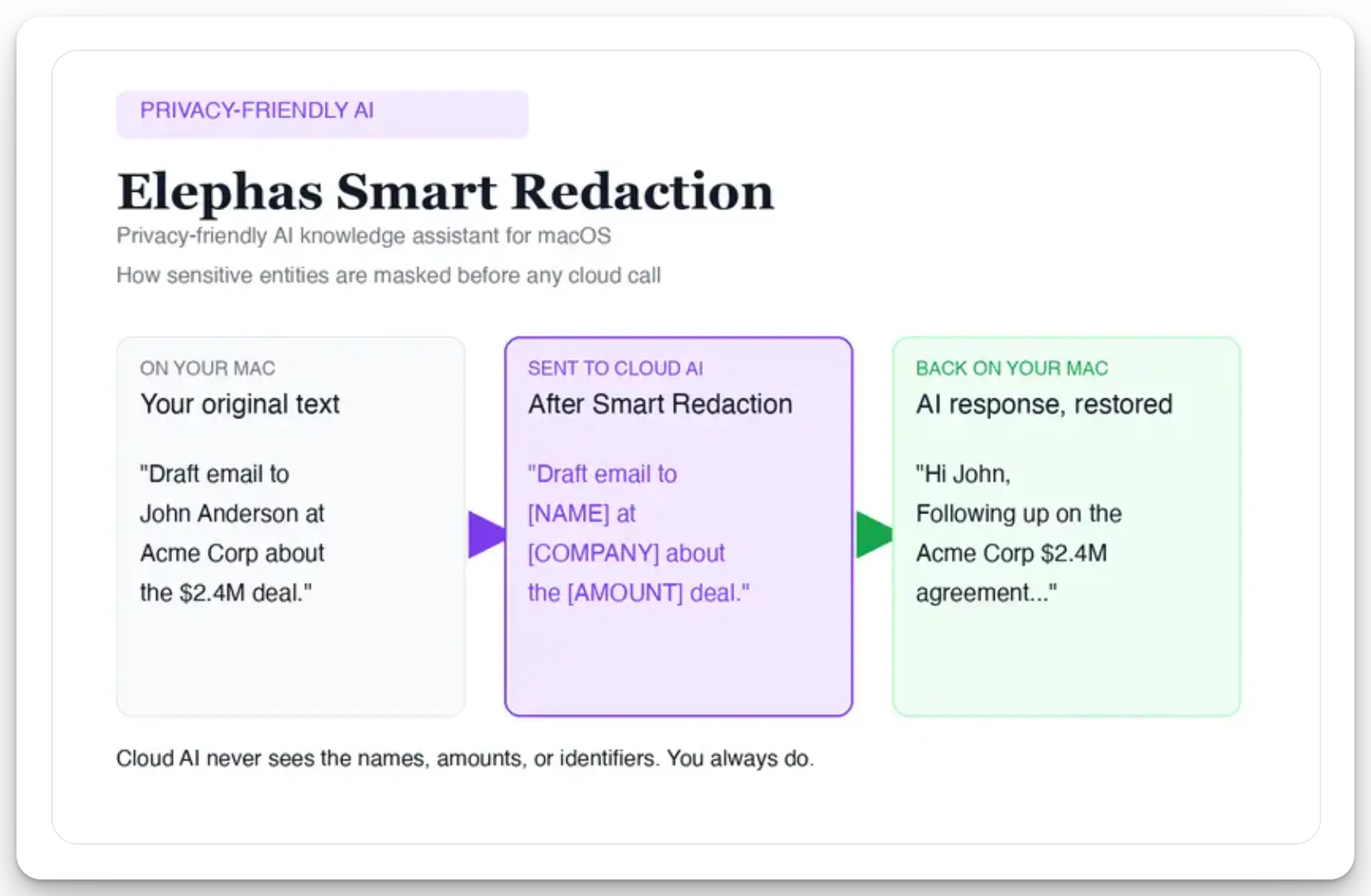
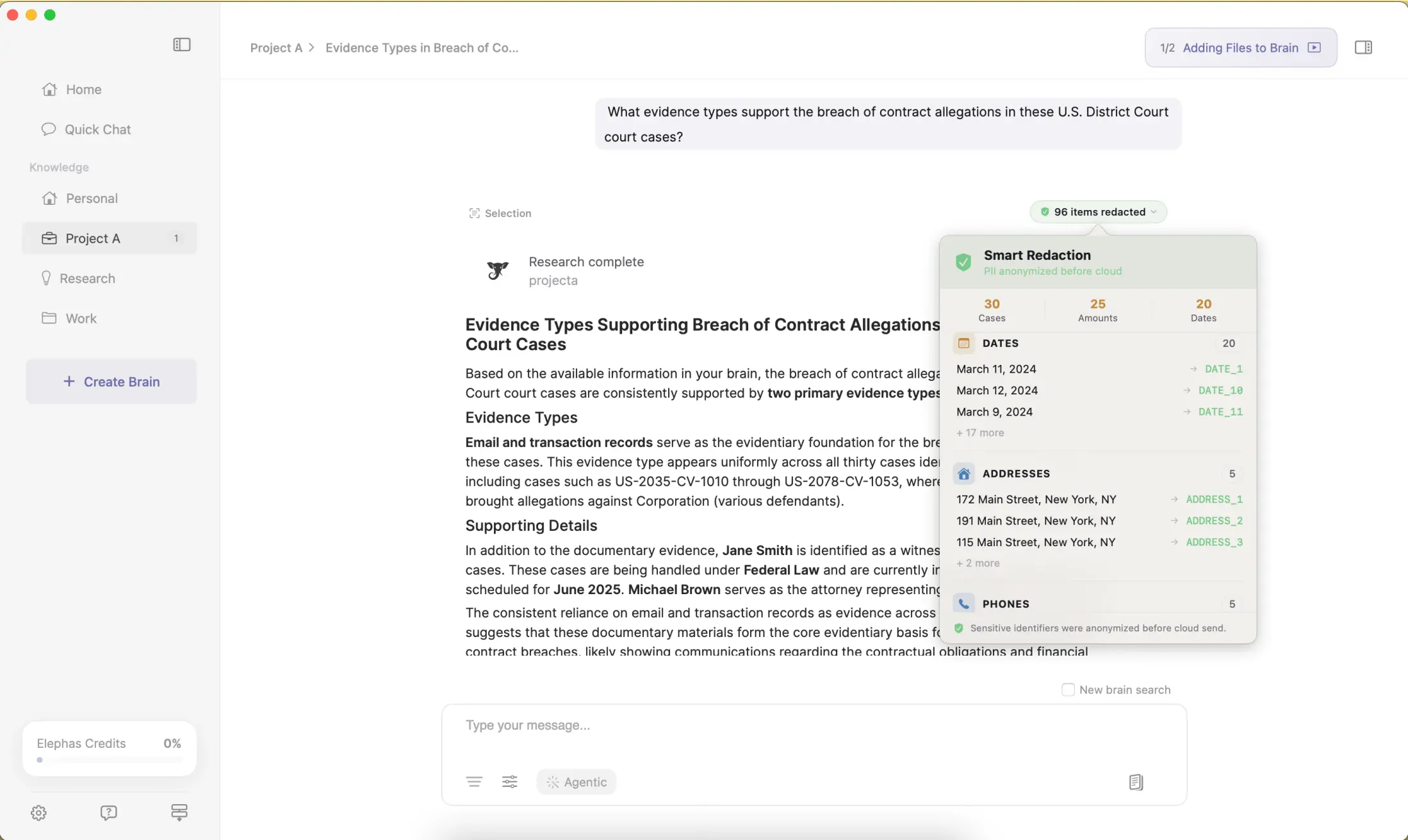
For researchers who still want a leading cloud model, Elephas adds a second layer through automatic PII redaction. Before a prompt is sent to ChatGPT, Claude, Gemini, Grok, Perplexity, or any other cloud model, Elephas strips sensitive names, emails, phone numbers, and identifiers on your Mac. The cloud model only ever sees the sanitized text. When the answer comes back, the redacted fields are reassembled locally on your machine, so identifiable information never leaves the device.
Elephas pairs this with zero data retention: content never trains AI models, never sits on a vendor's server, and never passes through a third-party reviewer's screen.
Key Capabilities
Pricing. Free plan available; paid plans start at $19/month. See elephas.app/pricing for the full plan list.
Why we picked Elephas
On an 8GB Neo, the app that wins is the one that doesn't ask the machine to hold a large model in memory just to find an answer in your files. Elephas keeps indexing local and light, then hands the reasoning to whatever cloud model you already trust, with the sensitive parts stripped out first. That is the right shape for this hardware, not a workaround for it.
Neo verdict
Local indexing and redaction are lightweight text operations, not a resident model, so they barely touch the Neo's 8GB. The heavy reasoning stays in the cloud, exactly where an 8GB machine needs it to be.
ChatGPT: The Default Cloud AI Assistant for the Neo
Best for the strongest general cloud reasoning, and the app most Neo buyers already have installed.
ChatGPT is OpenAI's cloud AI assistant, available as the ChatGPT Mac app, an iPhone and iPad app, and in the browser. It handles broad reasoning, coding help, and writing tasks, and its desktop app can see your screen and act inside other apps on request.
The model runs on OpenAI's servers, so the Neo's memory has almost nothing to do with performance here. The app itself is a thin client, so the 8GB ceiling that limits local AI tools doesn't apply to ChatGPT the way it applies to a local model runner.
Key Capabilities
Pricing. Free, Go, Plus, and Pro plans exist. The pricing page served regional pricing to us, so see the ChatGPT pricing page for the current rate in your region.
Why we picked ChatGPT
It's the AI app most Neo buyers already have, and cloud reasoning means the 8GB limit that constrains local tools simply doesn't apply. For general questions, drafting, and coding help, it is the default most people reach for first.
Neo verdict
The model lives entirely on OpenAI's servers, so the Neo's memory is a non-factor here. The desktop app's screen-reading and app-to-app features run through that same thin client, not a local model.
Claude: An AI Assistant for Long Documents and Careful Writing
Best for long documents and careful, structured writing.
Claude is Anthropic's cloud assistant, known for handling long documents well and for writing that reads more measured than punchy. It is available as a Mac app, an iPhone app, and in the browser, and like ChatGPT it keeps the model on Anthropic's servers rather than the Neo.
Claude's context window makes it well suited to reading an entire contract, research paper, or long email thread in one pass, a task that would strain a small local model but costs the Neo nothing extra since the work happens in the cloud.
Key Capabilities
Pricing. Free plan available; Pro is $20/month billed monthly. The page's advertised $17/month figure is the annual rate, which means $200 paid upfront; the true month-to-month price is $20. Max plans start from $100/month.
Why we picked Claude
For anyone on the Neo who needs to read or draft something long, a legal document, a research paper, a detailed report, Claude's context handling does the heavy lifting in the cloud, where 8GB isn't a constraint at all, making it one of the stronger AI writing tools for that job.
Neo verdict
Reading a long contract or paper taxes Anthropic's servers, not the Neo. There is no context-window tax on local memory here, which is the whole reason this app suits long documents on a small machine.
Perplexity: A Research AI With Cited Answers
Best for researched answers that come with citations.
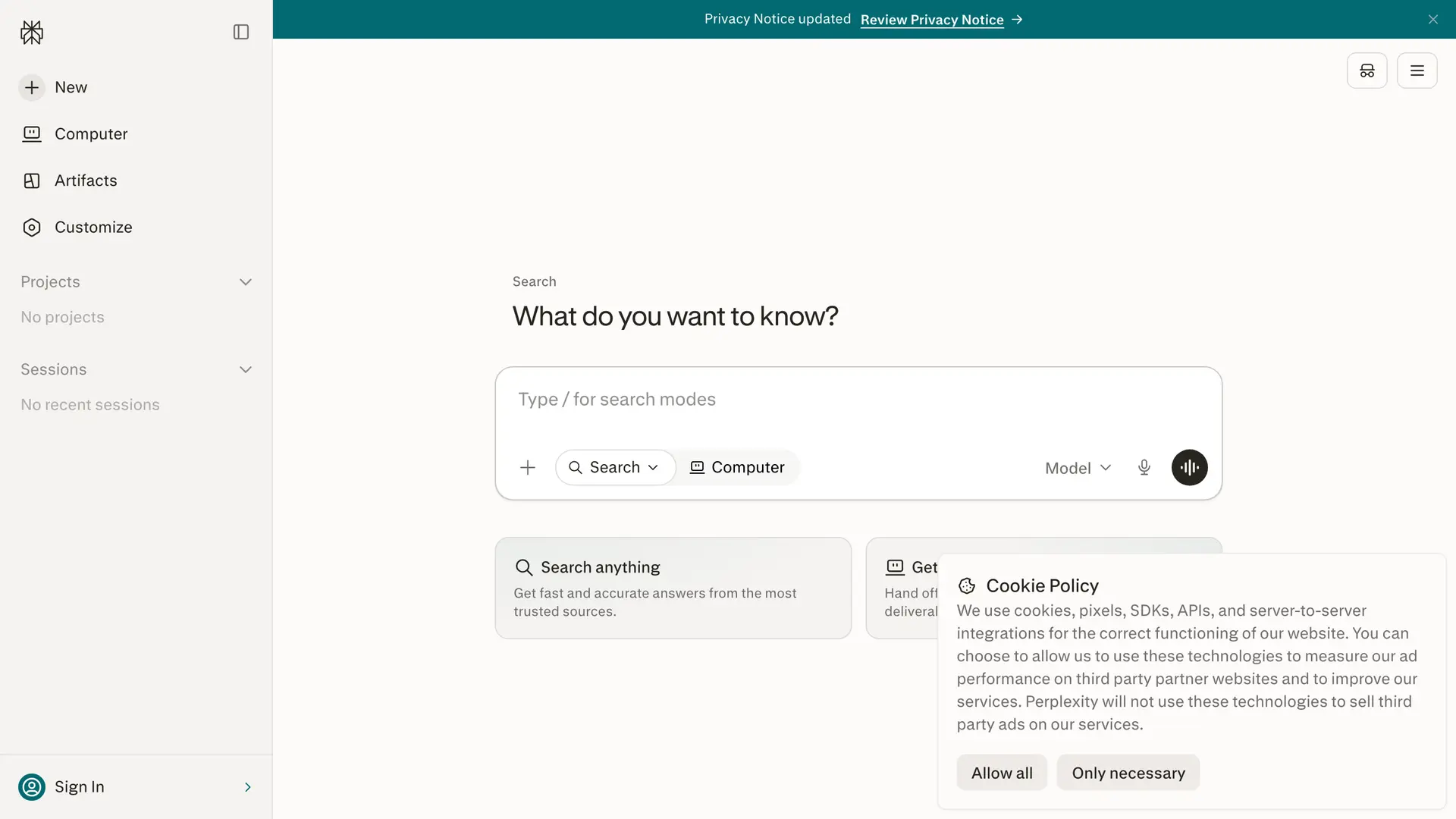
Perplexity is a cloud AI search engine that answers questions with linked sources rather than a single unsourced paragraph. It is useful for anyone who needs to check where a claim comes from, which matters more on a budget machine where you are less likely to also be running a research-verification tool.
Like the other cloud tools on this list, Perplexity's answers are generated on its own servers, so the Neo's 8GB ceiling is irrelevant to how it performs.
Key Capabilities
Pricing. Free, Pro, and Max plans exist, but the pricing page shows only annual-billed equivalents, not a true monthly rate. See perplexity.ai/pro for current plan details rather than a quoted figure here.
Why we picked Perplexity
For a student or researcher on a budget Mac who needs cited answers instead of a confident-sounding guess, Perplexity does the verification work for you, and it costs the Neo nothing in memory to do it.
Neo verdict
Every citation lookup and Pro Search step happens on Perplexity's infrastructure. The Mac just displays the result, which makes this one of the cleanest cloud-only fits on the list.
Raycast: System-Wide AI From Your Mac Launcher
Best for system-wide AI triggered from a launcher, with a small memory cost.
Raycast is a Spotlight replacement, a launcher-style productivity app that adds AI directly into its command bar, so you can summarize a page, rewrite a paragraph, or ask a question without switching apps. It runs as a lightweight background process, which matters on an 8GB machine where every resident app competes for the same memory.
Raycast's AI features route to cloud models rather than running anything large locally, so the app's own footprint, not a bundled AI model, is what determines its Neo fit, and that footprint stays small.
Key Capabilities
Pricing. Free plan available; Pro is $10/month; Pro with Advanced AI is $20/month.
Why we picked Raycast
On a memory-limited machine, a launcher-based AI tool is a better fit than a heavier standalone app, because it stays resident without competing hard for the Neo's 8GB.
Neo verdict
As a launcher extension rather than a standalone app, Raycast's own footprint is the only cost, and that footprint is small by design. The AI itself is cloud-routed, so 8GB never enters the calculation.
BoltAI: A Native Multi-Model AI Client for Mac
Best for a native multi-model client where you bring your own API key.
BoltAI is a Mac app that lets you chat with multiple AI providers, OpenAI, Anthropic, and others, from one native interface, using your own API keys instead of a bundled subscription. That structure means you pay providers directly for usage rather than paying BoltAI a monthly fee.
BoltAI is a thin client that calls out to cloud APIs, so the Neo's 8GB isn't a meaningful constraint. The app itself is small, and every model call happens on the provider's servers.
Key Capabilities
Pricing. One-time licence: Essential $79, Pro $99. No subscription exists.
Why we picked BoltAI
For a Neo owner who already pays for API access and wants one native app instead of juggling several browser tabs, BoltAI's one-time cost and thin footprint fit a budget machine well.
Neo verdict
As a thin client calling out to cloud APIs, BoltAI costs little in memory. That changes if you switch on its optional local-model mode, which inherits the same 8GB ceiling as LM Studio and Ollama.
superwhisper: Dictation That Runs Offline on Apple Silicon
Best for dictation that can run offline on Apple silicon.
superwhisper is a dictation app that transcribes speech to text system-wide, with both cloud and offline model options. Its own site states plainly that offline models “only run really well on Apple Silicon macs”, and the A18 Pro is Apple silicon, so the chip itself is not the obstacle here.
The open question is memory, not architecture. superwhisper does not publish a specific RAM figure for its offline models, so treat “works on Apple silicon” as chip-level support, not a guarantee that every offline model size will feel fast on 8GB specifically.
Key Capabilities
Pricing. Free plan available; Pro is $8.49/month, with a 15-minute free trial of Pro before you decide.
Why we picked superwhisper
For a Neo owner who dictates emails or notes daily, offline dictation on Apple silicon removes a dependency on internet access, and the app's footprint stays reasonable even without a published RAM number.
Neo verdict
Likely fine for everyday dictation, though no official RAM figure exists to confirm it at scale.
Wispr Flow: Fast Cloud Dictation for Every App
Best for fast cloud dictation with nothing heavy running locally.
Wispr Flow is a voice dictation app that sends audio to the cloud for transcription rather than running a model on your Mac. That trade means it needs a network connection to work, but it also means the Neo's 8GB never becomes a limiting factor, since no local model is loaded.
For someone who dictates constantly and does not want to think about memory pressure at all, routing to the cloud removes the variable entirely.
Key Capabilities
Pricing. Free tier includes 2,000 words per week on desktop and 1,000 words per week on iPhone. A Pro plan exists; the pricing page served regional pricing to us, so see wisprflow.ai/pricing for the current rate rather than a quoted figure here.
Why we picked Wispr Flow
It is the simplest voice input choice for an 8GB Mac precisely because it asks nothing of local memory. Everything happens off the machine.
Neo verdict
No local model means no memory pressure, but it is a trade, not a free lunch: lose the connection and dictation stops outright, since nothing here works offline.
Cotypist: On-Device Autocomplete With a Tiny Footprint
Best for on-device autocomplete with the smallest honest footprint on this list.
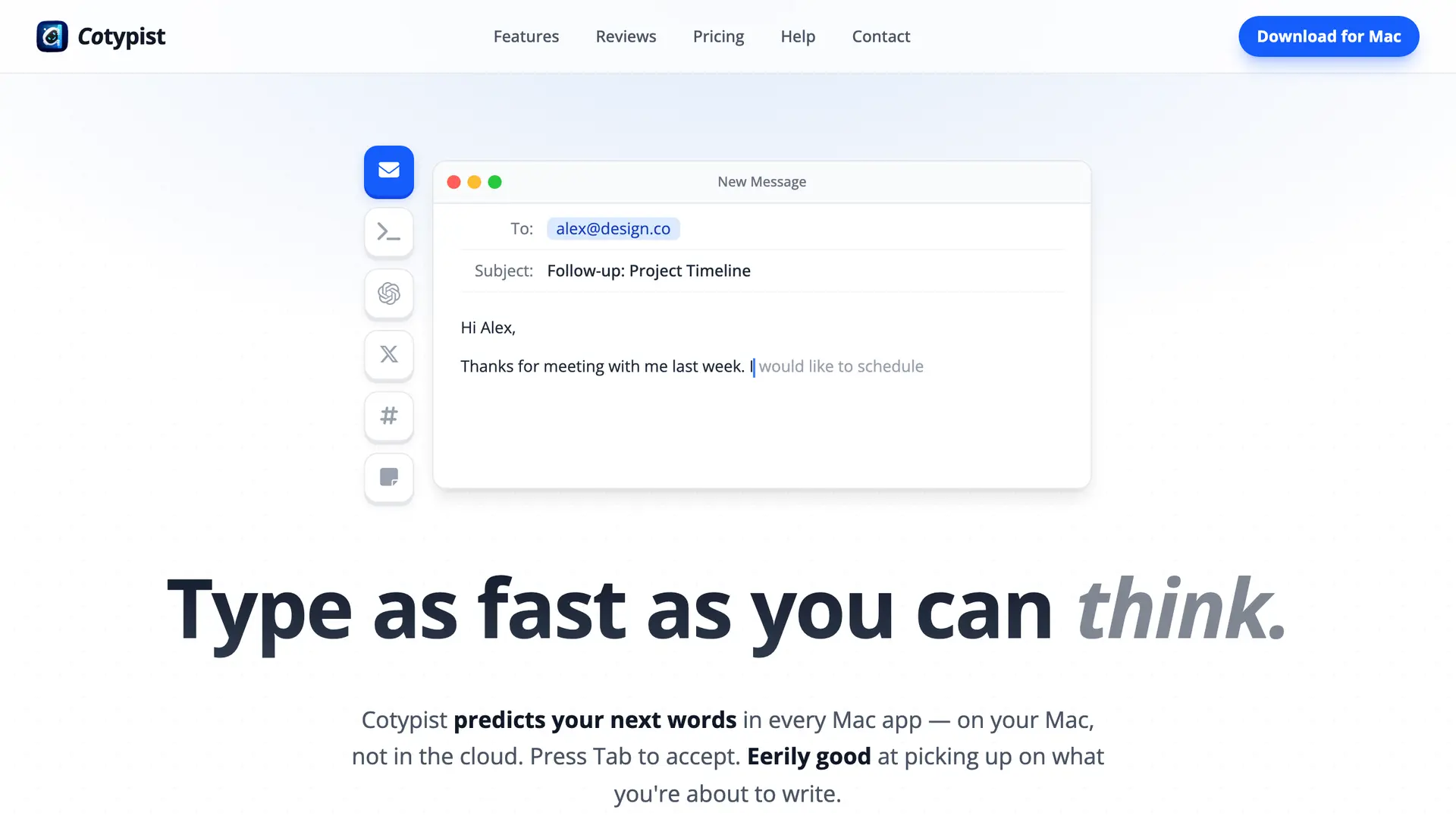
Cotypist is a Mac-native autocomplete tool that predicts text as you type, running entirely on-device with no cloud calls and no logging. It is a direct download, not an App Store app. It states it uses “about 1-2.5GB of system memory” while active, a disclosed figure most tools here never publish.
Cotypist's own recommendation is “M1 Pro or M2 (or higher) with 16 GB of system memory”, more headroom than the Neo has. A 1-2.5GB working set still leaves room on 8GB for normal multitasking, but the vendor's own bar sits higher than the Neo ships with.
Key Capabilities
Pricing. Free plan available (100 completed words per day); Plus is $8/month; Pro is $12/month, with a 30-day free trial of Pro on install and no card required.
Why we picked Cotypist
It is one of the few tools here that discloses its actual memory use, which lets a Neo owner make an informed call instead of guessing. At 1-2.5GB active, it is a manageable addition even though the vendor recommends more headroom than 8GB provides.
Neo verdict
Likely fine in day-to-day use, but the vendor's own 16GB recommendation is a real caveat worth taking seriously if you multitask heavily.
LM Studio: A GUI for Running Local AI Models
Best for running local AI models with a graphical interface, if you accept the memory tradeoff.
LM Studio is a free desktop app for downloading and running open-source AI models locally, with a GUI for browsing models and chatting with them offline. It is the most commonly recommended local-model app in the SERP, and it is also the app whose own documentation makes the Neo's core limitation explicit.
LM Studio's system requirements page states plainly: “16GB+ RAM recommended,” and adds “You may still be able to use LM Studio on 8GB Macs, but stick to smaller models and modest context sizes.” Its supported-chip list names “Apple Silicon (M1/M2/M3/M4),” not the A18 Pro, so Neo support is genuinely unconfirmed.
u/sauheb reported success anyway, running Ministral and Gemma offline on an 8GB MacBook using Locally AI, a separate app rather than a mode inside LM Studio. On a r/MacbookNeo thread testing local dictation on the Neo, u/Trusted-Stranger asked which model was used, doubting an older phone could match it.
Key Capabilities
Pricing. Free to download and use.
Why we picked LM Studio
It remains the easiest on-ramp to local AI on a Mac, but the honest answer for a Neo owner is to keep expectations small: tiny quantized models for light tasks, not a general-purpose assistant replacement. A resident local model also draws more power than a cloud-routed app, worth remembering on a machine Apple rates for up to 16 hours of normal battery life.
Neo verdict
Works, with real limits. Stick to small models and short context, per the vendor's own guidance, and expect some tasks to feel slow.
Ollama: Local AI Models From the Terminal
Best for running local models from the terminal, the lightest way to try one.
Ollama is a free, open-source tool for downloading and running AI models locally from the command line. It has less overhead than a full GUI app like LM Studio, which can matter on a memory-constrained machine, though the underlying models still need to fit in the Neo's 8GB alongside the operating system.
The same tradeoff that applies to LM Studio applies here: small models can run, but the results are limited. u/Best_Professor7266 summed up the frustration plainly: “running local models doesnt worth it because small quantized models are very dumb”, and recommended free cloud-based tools instead for an 8GB machine.
Key Capabilities
Pricing. Free and open source.
Why we picked Ollama
For a technically comfortable Neo owner who wants the lightest possible way to try a local model, Ollama is the right entry point, paired with realistic expectations about what an 8GB machine can hold.
Neo verdict
Works for small models only. Treat it as an experiment, not a daily driver, on this hardware.
Grammarly: Grammar and Tone Checking Across Every App
Best for grammar and tone checking across every Mac app.
Grammarly is a cloud-based AI writing assistant that checks grammar, tone, and clarity across Mac apps, browsers, and mobile. Because the correction engine runs in the cloud, the Neo's 8GB has no meaningful effect on how it performs.
For students and knowledge workers writing emails, essays, or reports on a budget Mac, Grammarly's system-wide reach means it works the same whether it is running on an 8GB Neo or a maxed-out MacBook Pro.
Key Capabilities
Pricing. Free plan includes 100 AI prompts per month; a Plus plan exists. The pricing page served an India-exclusive plan and regional pricing to us, so see grammarly.com/plans for the current rate in your region.
Why we picked Grammarly
It is the simplest way to get consistent writing help across every app on the Neo without asking the machine to do any local computation at all, a quiet productivity boost for anyone writing daily on a budget Mac.
Neo verdict
The correction engine runs remotely, so 8GB does not factor in here either. The tradeoff is a background process running across every app and browser tab, a small resident cost rather than an actual constraint.
What the Research Says About Sending Work to the Cloud
Redaction reduces risk, it does not remove it, and the research says so plainly. A 2026 evaluation of eight privacy techniques found that routing locally, then redacting and rephrasing, cut personal-data leakage to 0.6% across 500 samples.
The same study found the protection is uneven. Proprietary source code still leaked 31.3% of the time, so this approach suits names, emails and account numbers far better than it suits confidential code.
A separate 2026 paper on surrogate replacement reported a 98.87% detection F1 score, and warned that blunt placeholder redaction can strip enough meaning from a prompt to damage the answer that comes back.
Local models carry a second cost that specification sheets hide. Apple rates the Neo at up to 16 hours of battery life, and keeping a model resident in memory is the quickest way to spend it.
What Not to Install on 8GB
Not every AI app belongs on a Neo. Large local image generators, which keep a multi-gigabyte diffusion model resident in memory, are the clearest example. They need more headroom than 8GB leaves once the OS and a browser are open. The same caution applies to any local model runner.
Reddit owners who regret an 8GB configuration are describing this exact failure mode, not a defect in the Neo itself. u/Ok_Bullfrog_7778, an M3 Air owner with 8GB, described lag and freezing once many tabs and a second display were added to the mix, well outside a light local-AI workload.
Another Neo discussion showed the opposite experience for ordinary creative work. u/waaaazaaaaaa, an 8GB M2 owner editing 4K video in Adobe, reported only occasional slowdowns and no meaningful lag, which suggests general memory pressure and AI-specific memory pressure are two different problems with two different fixes.
The practical rule: if an app's own documentation recommends 16GB or more, believe it, and either skip it or accept a smaller, slower version. If an app routes computation to the cloud, the Neo's 8GB stops mattering, which is why most tools here lean cloud-side.
How We Selected These Tools
We started from the most-mentioned apps across top-ranking “best ai apps for mac” and “apps for MacBook” roundups, then added tools from owner discussions, including a running app list Neo owners keep on r/MacbookNeo. Each tool faced one test: does it work well on 8GB?
The factors we weighed
- Memory footprint: whether the app's own documentation states a RAM requirement, and whether that requirement fits inside 8GB.
- Where computation happens: local processing competes with the Neo's memory; cloud processing does not.
- Pricing transparency: we verified every price on each tool's live pricing page, not on review-site aggregators, and priced the monthly individual rate rather than a yearly figure divided by twelve.
- Privacy posture: what happens to a prompt containing sensitive information, and whether that is stated clearly.
- Real owner experience: Reddit threads from Neo owners and 8GB Mac users, checked against each quote's original permalink.
Where a regional pricing page did not confirm a figure in US dollars, we flagged it rather than guessed.
Conclusion
The MacBook Neo's 8GB memory isn't a flaw to route around. It is the fact that should decide which AI apps you install. Cloud-routed tools, ChatGPT, Claude, Raycast, and similar, work as well on the Neo as on a pricier Mac, while local runners like LM Studio and Ollama need real caution.
For document work with anything sensitive in it, Elephas is the strongest fit: it indexes locally, redacts before a prompt reaches any cloud model, and starts at $19/month with a free plan. That is the shape a privacy-conscious AI workflow should take on a memory-limited Mac, not a heavier local model fighting the Neo for the same 8GB.
Frequently Asked Questions
Is 8GB of RAM enough for AI apps on the MacBook Neo?
Yes, for cloud-routed AI apps like ChatGPT, Claude, and Elephas, because the heavy computation happens on remote servers. For local AI models running directly on the Neo, 8GB is limiting; vendors like LM Studio recommend 16GB or more.
Why did the MacBook Neo's price increase from $599 to $699?
Apple raised prices on 2026-06-25 because of a memory chip shortage. AI companies buying RAM and SSD at scale for their own servers pushed component costs up sharply across the industry, and Apple passed that increase on to buyers.
Can the MacBook Neo run local AI models like LM Studio or Ollama?
It can run small, quantized models, but LM Studio's own system requirements recommend 16GB or more, and its supported-chip list does not name the A18 Pro specifically. Expect modest context sizes and slower responses rather than a full local assistant experience.
What is the best AI app for private document work on a MacBook Neo?
Elephas is built for this case. It indexes your files locally on the Mac, then redacts sensitive names, emails, and identifiers before any prompt reaches a cloud model like ChatGPT or Claude, keeping the heavy reasoning off the Neo's limited memory.
Does Apple Intelligence use the MacBook Neo's memory the same way local AI apps do?
Apple Intelligence, the Neo's built-in AI, uses the 16-core Neural Engine for lighter on-device tasks and can route more complex requests to Apple's Private Cloud Compute, which is a different design from a general-purpose local model that keeps several gigabytes resident in memory the whole time it runs.
Is the MacBook Neo a good machine for AI work as a student?
Yes, for the AI work most students actually do: chatting with cloud models, dictating notes, and searching your own documents. It's not the machine for training or running large local models yourself, and its lower price makes it a reasonable second machine for that lighter workload.

The Private AI App That Fits 8GB
Elephas keeps your files and notes indexed locally on your Neo, redacts sensitive data before it reaches any cloud model, and never asks your 8GB to hold a large model in memory.
Try Elephas FreeBuilt-in local LLM models. Offline mode included.
Related Resources
Best local AI assistant for Mac
A closer look at running AI models on your own machine instead of the cloud.
Offline AI on Mac: a practical guide
What actually works without an internet connection, and what does not.
Elephas plans and pricing
Compare the free plan and paid options for a privacy-friendly AI knowledge assistant.
Research Methodology and Sources
This guide was built from web research, verification against official pricing pages and documentation, Reddit owner discussions, and independent studies. All pricing was verified as of August 2026.
- Apple Newsroom: MacBook Neo announcement
- MacRumors: MacBook Neo price increase, 2026-06-25
- LM Studio docs: system requirements
- Cotypist: memory use and requirements
- superwhisper: offline model notes
- Elephas docs: redaction limits, stated honestly
- Elephas: plan pricing
- Carlini et al., training-data extraction from GPT-2 (2021)
- Agyemang et al., “LLM-Redactor” PII leak study (2026)
- Jathanna, “SurrogateShield” redaction study (2026)