Apple Intelligence vs ChatGPT: Which Should Mac Users Trust? (2026)
Last updated: July 27, 2026
Apple Intelligence is a free, on-device AI layer built into every recent Mac and iPhone. ChatGPT is a paid-tier assistant available on any device, with far deeper capability. Neither claim settles what matters most: Apple still hands harder requests to Private Cloud Compute and, through its opt-in extension, to ChatGPT itself, while OpenAI's own CEO admits legal-privilege-style protections don't yet exist for what you type into it.
This comparison settles the question that actually matters: not which one is smarter, but which one gets your client email, your medical question, or your half-finished work document, and whether either is safe to trust with it.
What follows covers what "trust" actually means for these two products, a fair look at each one, a head-to-head table, and a pick-for-you verdict.
Quick answer:
- Apple Intelligence fits everyday, on-device tasks well: it's free, built into macOS and iOS, and defaults to local processing.
- ChatGPT wins on depth and reach: it works on any device, handles harder research and coding, and has no hardware gate.
- Neither one is built to protect genuinely confidential work, like client files, health details, or financial records.
- For anything truly sensitive, Elephas redacts sensitive details on your Mac before any cloud model sees them, on every plan including Free, from $19/month.
What "Trust" Actually Means Here
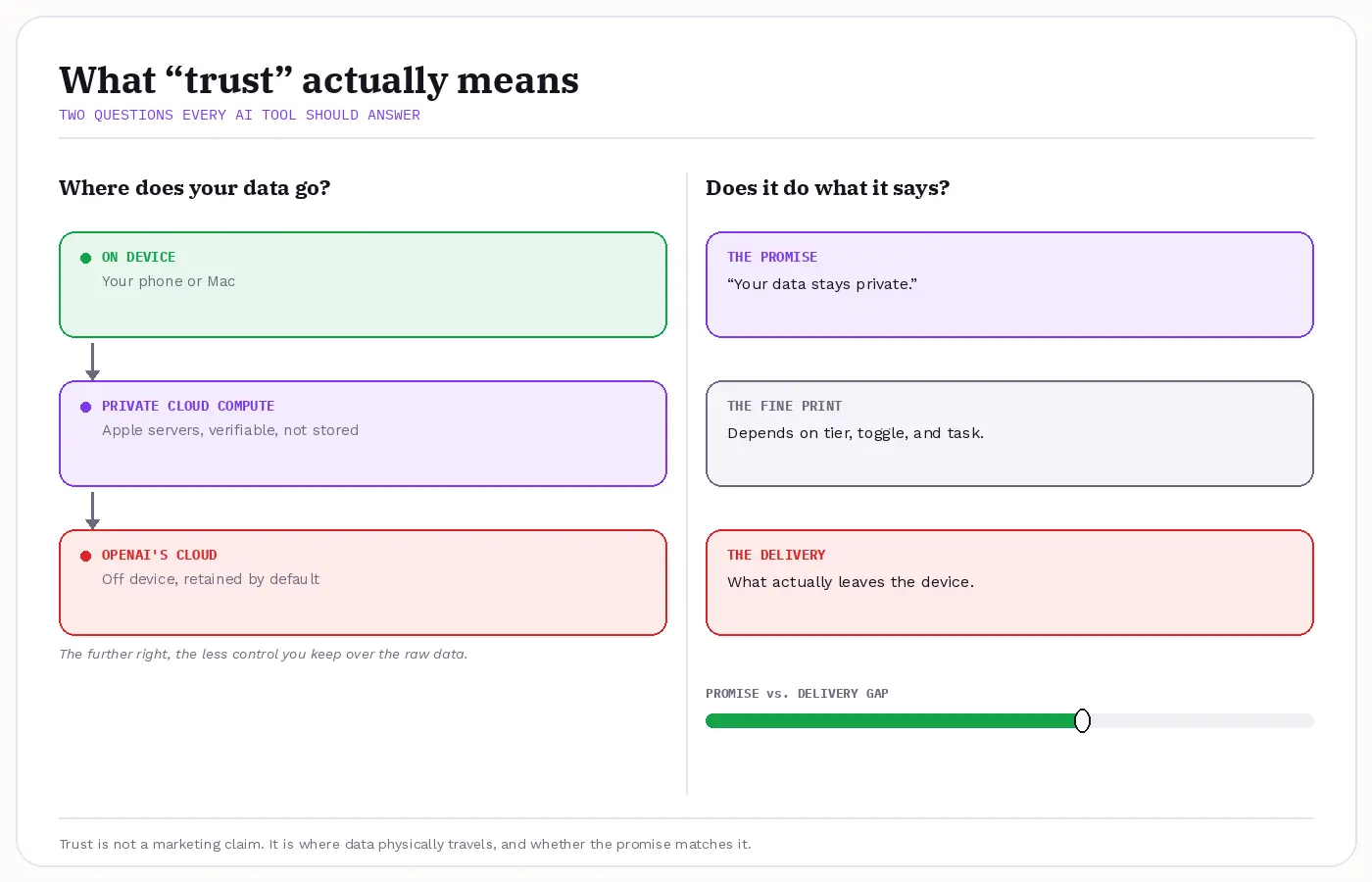
Trust breaks into two separate questions once you stop treating "AI" as one thing. The first: where does your data physically go, on-device, through Apple's Private Cloud Compute, onto OpenAI's servers, or through the opt-in handoff between the two. The second: does the product reliably do what it says it will.
That second question matters more than most comparisons admit. Sam Altman said on Theo Von's podcast in 2025 that a therapist or lawyer conversation carries legal privilege, "but we haven't figured that out yet for when you talk to ChatGPT" (Sam Altman, 2025; clip via David Bombal, 2025-08-01).
That's OpenAI's own CEO saying the confidentiality protections people assume don't yet exist for ChatGPT conversations. Apple's side has its own version of this tension: the new Siri hands off some requests to ChatGPT (Apple, 2026), which means the two products aren't fully separate systems.
That handoff is the seam where "trust Apple" and "trust OpenAI" stop being independent questions. One r/mildlyinfuriating thread described a store survey that kept asking whether the shopper knew their device was "enhanced with Apple Intelligence" before anything else. The rest of this article applies the same framework to both products:
- Data-handling model: on-device, Private Cloud Compute, or straight to the cloud
- Pricing and platform: free with hardware vs. subscription tiers on any device
- On-device capability and accuracy: what runs locally, and how often either one is simply wrong
- Retention: whether a conversation trains a model or gets stored anywhere
- Model choice: whether the tool works with data or models you already choose
- Regulatory bar: HIPAA treats a cloud AI provider as a business associate the moment it touches health data, and the American Bar Association tells lawyers to get client consent first
What Does Apple Intelligence Actually Do With Your Data?
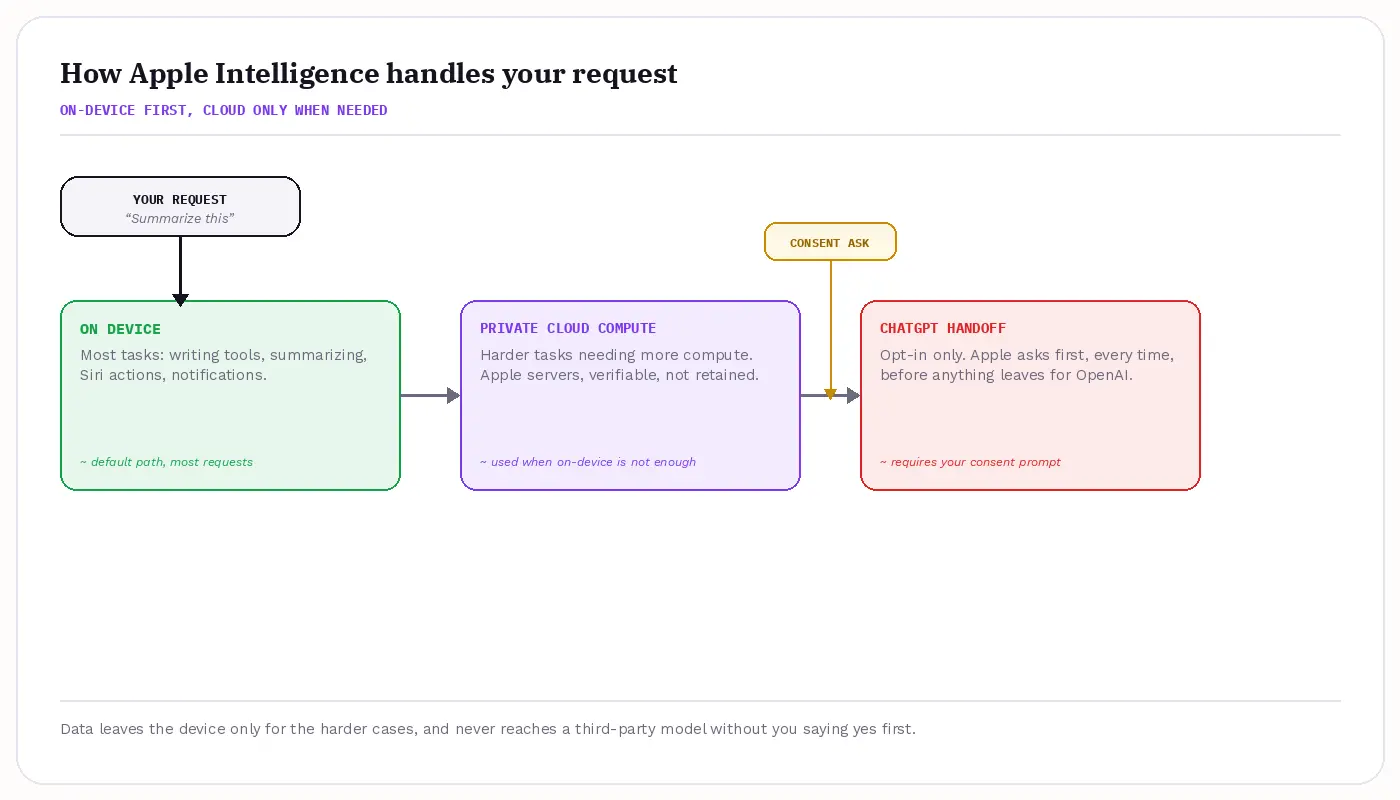
Apple Intelligence is the system-wide AI layer built into macOS, iOS 26, and iPadOS. Most everyday tasks, like proofreading, rewriting, or generating a Genmoji, run on-device. Visual Intelligence lets you point the camera or a screenshot at something and get identification, translation, or a web search on it, though the web-lookup step needs internet.
Harder requests route to Private Cloud Compute (PCC), and anything neither can answer gets an opt-in ChatGPT integration, with a prompt naming exactly what's about to be shared before anything leaves the device.
The data-handling story is strong on paper. PCC processes a request only for its duration, doesn't store it, and isn't accessible even to Apple, per Apple Inc.'s own documentation. Independent researchers can inspect the PCC software to verify that, and Apple lists a SOC 3 audit running through April 30, 2026.
- Checkable routing: the Apple Intelligence Report shows whether a request ran locally or through PCC, so it's checkable, not just a promise
- Runs offline: Writing Tools, Image Playground, Genmoji, and notification summaries; a 2026 WiSec study found proofreading and rewriting stayed local in testing, while summarization used PCC
- Pricing: free with a qualifying device, iPhone 15 Pro or later or an Apple-silicon Mac or iPad, no subscription, but 7GB of free storage is required for the on-device models
- Positive review: Tom's Guide called Writing Tools "one of Apple Intelligence's most useful features"
- Negative review: a Yahoo-reported survey found 73% of iPhone owners who tried Apple Intelligence features rated them "not very valuable" or of "little to no value"
- User sentiment: one r/iphone commenter summed up years of AI-feature marketing fatigue in one line: "Apple Intelligence. Uh huh. You're not getting me with that one again."
- User sentiment: one r/iphone thread put it bluntly: "At this point, can they really keep getting away with falsely advertising Apple Intelligence?"
- User sentiment: one r/gadgets thread put the timing complaint plainly: "To be fair, iPhone 16 was marketed as the apple intelligence device and now we are out here stuck in a beta stage & lacking features until the next model."
- User sentiment: one r/ios thread reacted to a delayed update with: "This was the one where we were supposed to get the last piece of Apple Intelligence, right? Shame."
- Handoff mechanics: connecting the ChatGPT extension in Settings takes roughly 15 to 30 minutes, and reversing it is a single toggle with zero data loss; ChatGPT Memory and chat history don't carry over, since Siri-routed requests aren't tied to that persistent session. iOS 27, expected fall 2026, previews an Extensions framework letting Claude and Gemini plug into Siri the same way.
The honest read here is mixed. The privacy architecture and price are genuinely strong, but the personalized Siri overhaul slipped past its original target. Apple also paused its AI notification summaries after they produced misleading headlines in early rollouts. ChatGPT trades that hardware gate for reach, but a very different data-handling model.
What Does ChatGPT Actually Do With Your Data?
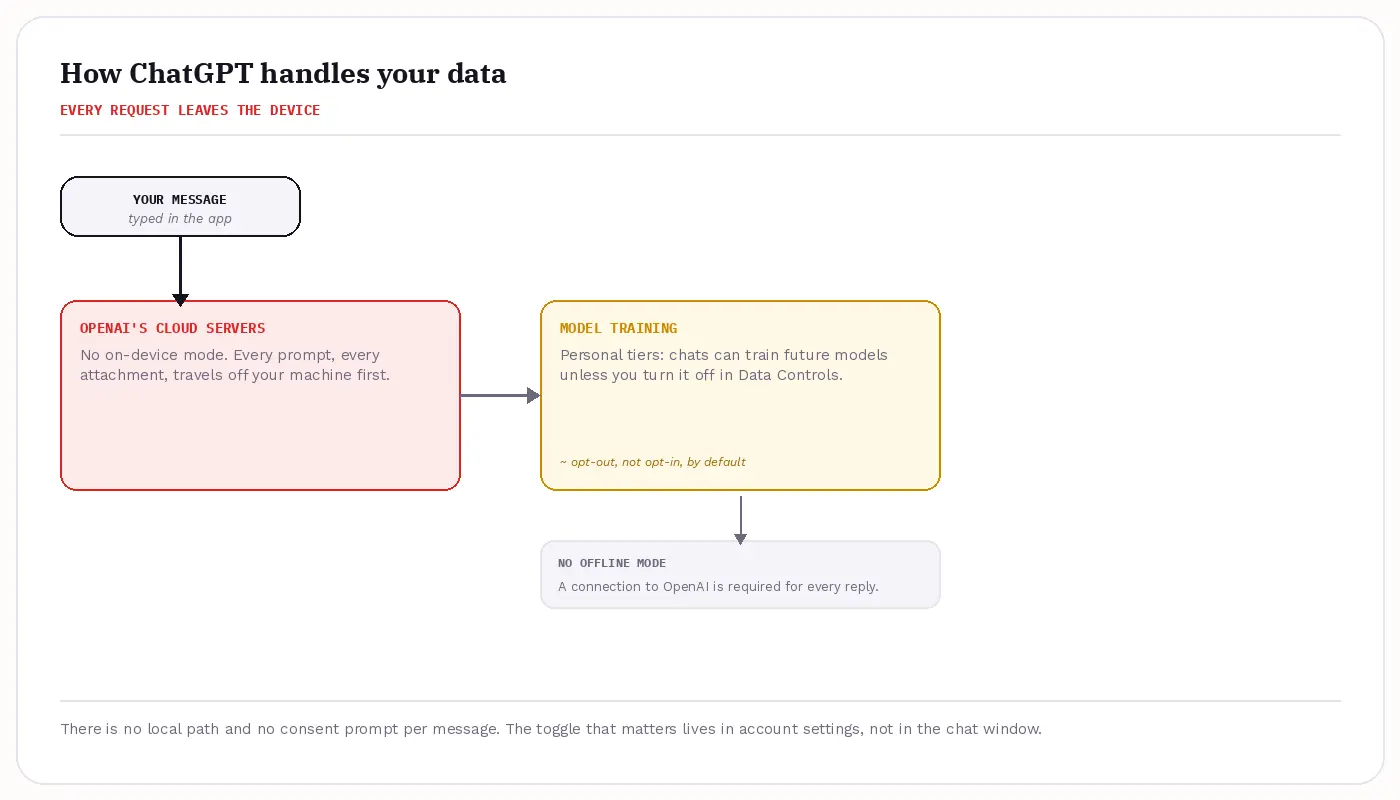
ChatGPT is OpenAI's general-purpose assistant, built on a large language model, available on the web and through native apps on macOS, Windows, iOS, and Android. Any Mac can run it through a browser or desktop app, no hardware gate at all, which is the opposite tradeoff from Apple Intelligence.
Every request processes on OpenAI's servers; there's no offline mode. Conversations can improve the model unless you turn that off in Data Controls, a setting most Plus and personal-tier users start with on. A donated ChatGPT histories study found personal information in 34.5% of messages.
Pricing runs Free, then Go at $8 a month, Plus at $20 a month, and Pro from $100 to $200 a month depending on usage tier, prices confirmed at openai.com/chatgpt/pricing. Plus also adds Deep Research, Sora, Codex, and Agent Mode. On G2, ChatGPT holds a 4.7 out of 5 rating across more than 2,000 reviews.
- No hardware gate: ChatGPT runs in any modern browser or native app, on any Mac, iPhone, iPad, Windows PC, or Android device, no minimum silicon required, unlike Apple Intelligence's iPhone 15 Pro or Apple-silicon requirement.
- Enterprise exception: Business and Enterprise workspaces exclude training by default; personal and Plus tiers start with the "Improve the model for everyone" toggle on, off is a step you take, not the state you start in.
- Disclosure pattern: the typical ChatGPT user reveals something identifying within the first 14% of their chat history, per the same 2026 study.
- Real-world capability: Plus's Codex tooling shows up in threads like one r/ChatGPT AMA, where a user pressed OpenAI's own Codex team on running it locally instead of through the ChatGPT interface.
- Positive review: G2 reviewers "consistently praise ChatGPT for its ease of use and quick responses," per the platform's aggregate.
- Negative review: on Trustpilot, the aggregate sits around 1.6 out of 5 from nearly 2,800 reviews, 73% one-star, citing billing disputes, support failures, and quality regressions.
The same G2 review base flags "Inaccuracy" as its top negative tag, cited 107 times. A documented case involved ChatGPT generating false, defamatory claims about a real person, reported by TechCrunch in March 2025. The tradeoff in one line: unmatched capability, a closed data model, and a training default that favors "on."
Head-to-Head: Where Does Each One Win?
| Criterion | Apple Intelligence | ChatGPT | Elephas |
|---|---|---|---|
| Privacy / data-handling | On-device by default; Private Cloud Compute for harder requests, not retained, not accessible even to Apple | Cloud-only, processed on OpenAI's servers | Redacts PII locally before any cloud model sees it |
| Data retention & training | PCC: erased after each request, independently auditable | Trains on your chats by default unless you opt out (OpenAI Data Controls) | Zero-data retention: no training, no vendor storage, no third-party review |
| Pricing | Free (bundled with qualifying hardware) | Free / $8 Go / $20 Plus / $100-$200 Pro / Business custom | Free / from $19/month |
| Platform reach | iPhone 15 Pro+ or Apple-silicon Mac/iPad only | Any browser plus native apps, broadest reach | macOS, iOS, iPadOS, Mac-native |
| Reliability track record | Personalized Siri overhaul slipped past its original release target (widely reported, 2025) | "Inaccuracy" is G2's top negative tag, 107 mentions | Answers drawn only from the user's own documents, always cited |
| Works with your model choice | Single ecosystem, opt-in ChatGPT handoff, expanding to Gemini and Claude in iOS 27 | Closed, single-vendor model family | Pairs with any cloud model you already use, or fully offline local LLM models |
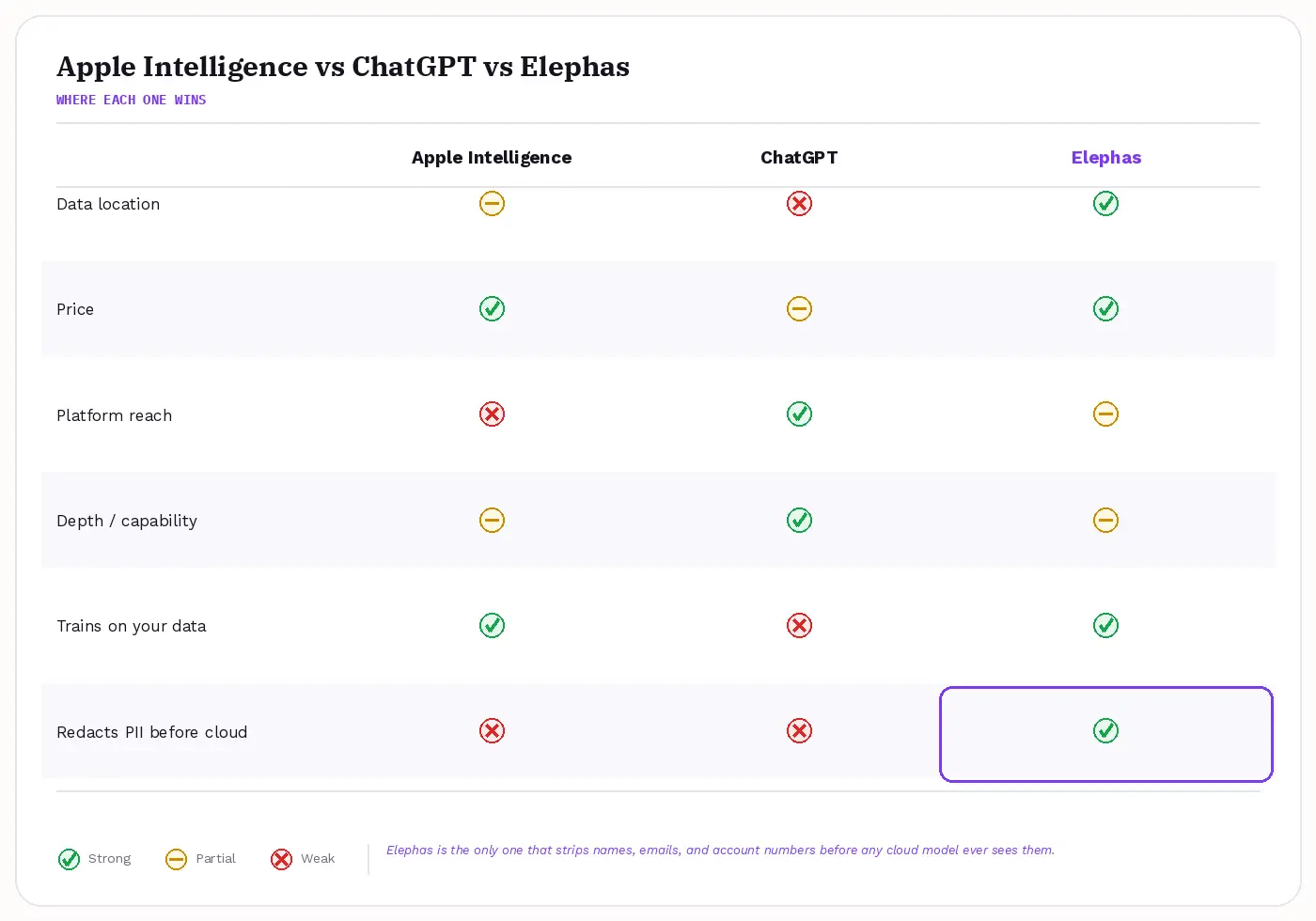
Apple Intelligence wins clearly on two rows: price, since it's free with a qualifying device against ChatGPT's tiers running up to roughly $200 a month, and data location, since on-device and PCC processing beats cloud-only by default.
ChatGPT wins clearly on platform reach, zero hardware gate, and raw capability, via tools Apple Intelligence doesn't offer. Reliability cuts both ways too: one r/apple thread called Apple's own AI walk-backs unusual, noting "it was (is) so strange they did it with multiple Apple Intelligence features."
The two are genuinely equal on one point: accuracy. Neither vendor guarantees correct output for professional work: a Stanford 2026 AI Index study found hallucination rates swinging from a few percent to well over half depending on the benchmark (source).
A separate Stanford RegLab study found even specialist legal-AI tools producing wrong answers more than 17% of the time, with one product exceeding 34% (source). That tie matters because neither vendor is racing to close it in public; both tell users to verify important output themselves.
- Need it free and private today: Apple Intelligence, if your hardware qualifies, no subscription, on-device by default
- Need depth Apple can't match: ChatGPT, with Custom GPTs, Code Interpreter, Deep Research, no hardware gate
- Worried about being wrong: neither is the safer bet; Stanford's own numbers put both families in the same wide error range
- Handling anything genuinely sensitive: neither redacts identifiers before a model sees them, which is what the verdict below resolves
Verdict: Apple Intelligence, ChatGPT, or Neither for the Sensitive Stuff
Pick Apple Intelligence for everyday, on-device tasks if your hardware qualifies: it's free and needs almost no setup. Pick ChatGPT when the task needs depth or reach Apple Intelligence can't match, like Custom GPTs, Code Interpreter, persistent Memory, or a device Apple Intelligence doesn't support.
One r/ChatGPT commenter put the tradeoff well: "just be sure to differentiate that its a LLM vs. a human. Thats super important."
Consider Elephas when the work is genuinely sensitive: client files, health details, or financial documents, the same HIPAA and attorney-consent territory raised earlier. Sensitive details slip into ordinary questions too: CybSafe's 2024 "Oh, Behave!" survey found 38% of employees already share sensitive data with unapproved AI tools (source).
Elephas is a private AI knowledge assistant for Mac that redacts sensitive details before any cloud model sees them, adding a second layer through automatic PII redaction. Before a prompt is sent to ChatGPT 5.5, Claude Opus 4.8, Gemini, Grok, Perplexity, or any other cloud model, Elephas strips sensitive names, emails, phone numbers, and identifiers on your Mac. The cloud model only ever sees the sanitized text, and when the answer comes back, the redacted fields are reassembled locally, so identifiable information never leaves the device. Elephas pairs this with zero data retention: content never trains AI models, never sits on a vendor's server, and never passes through a third-party reviewer's screen.
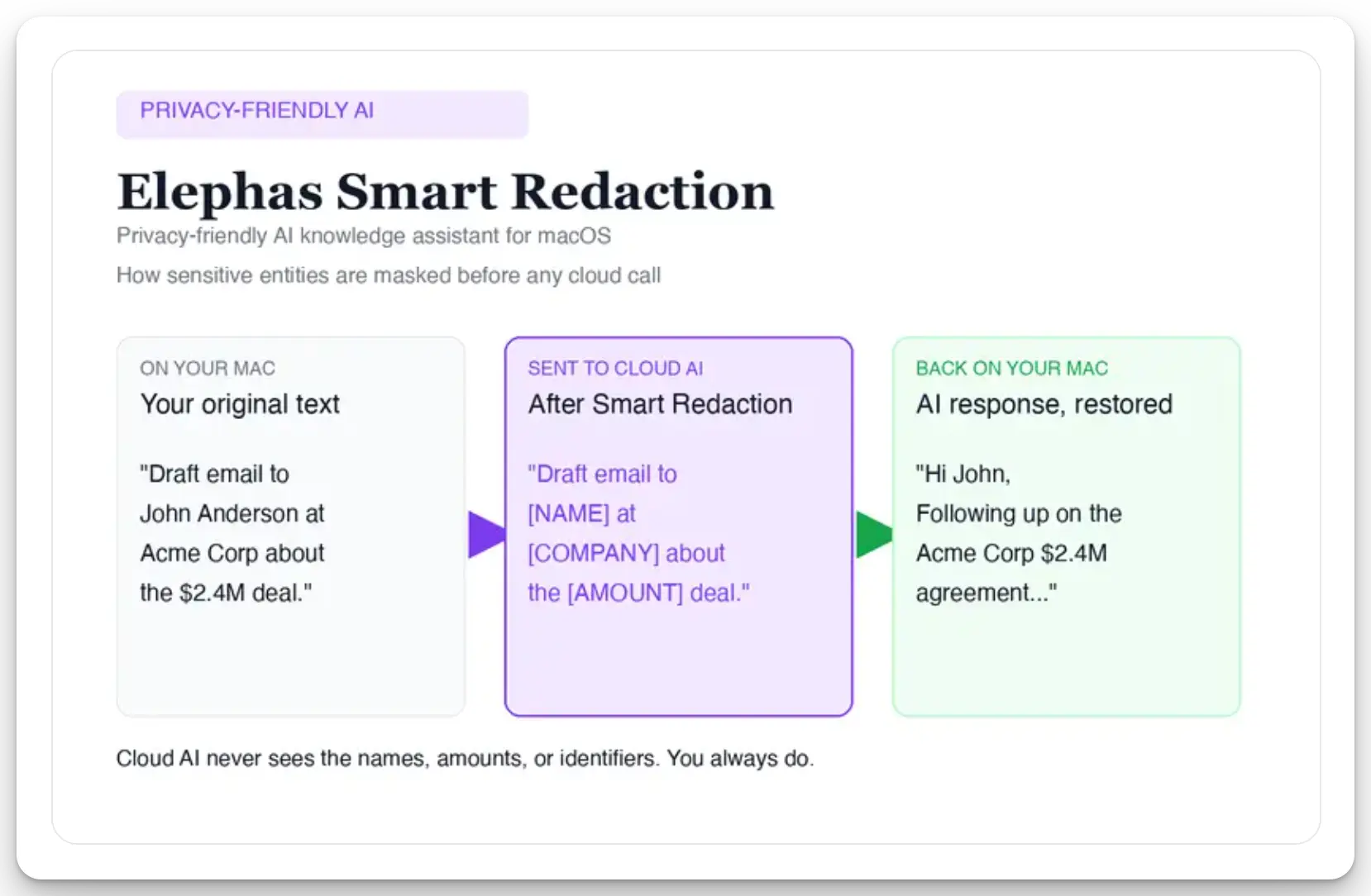
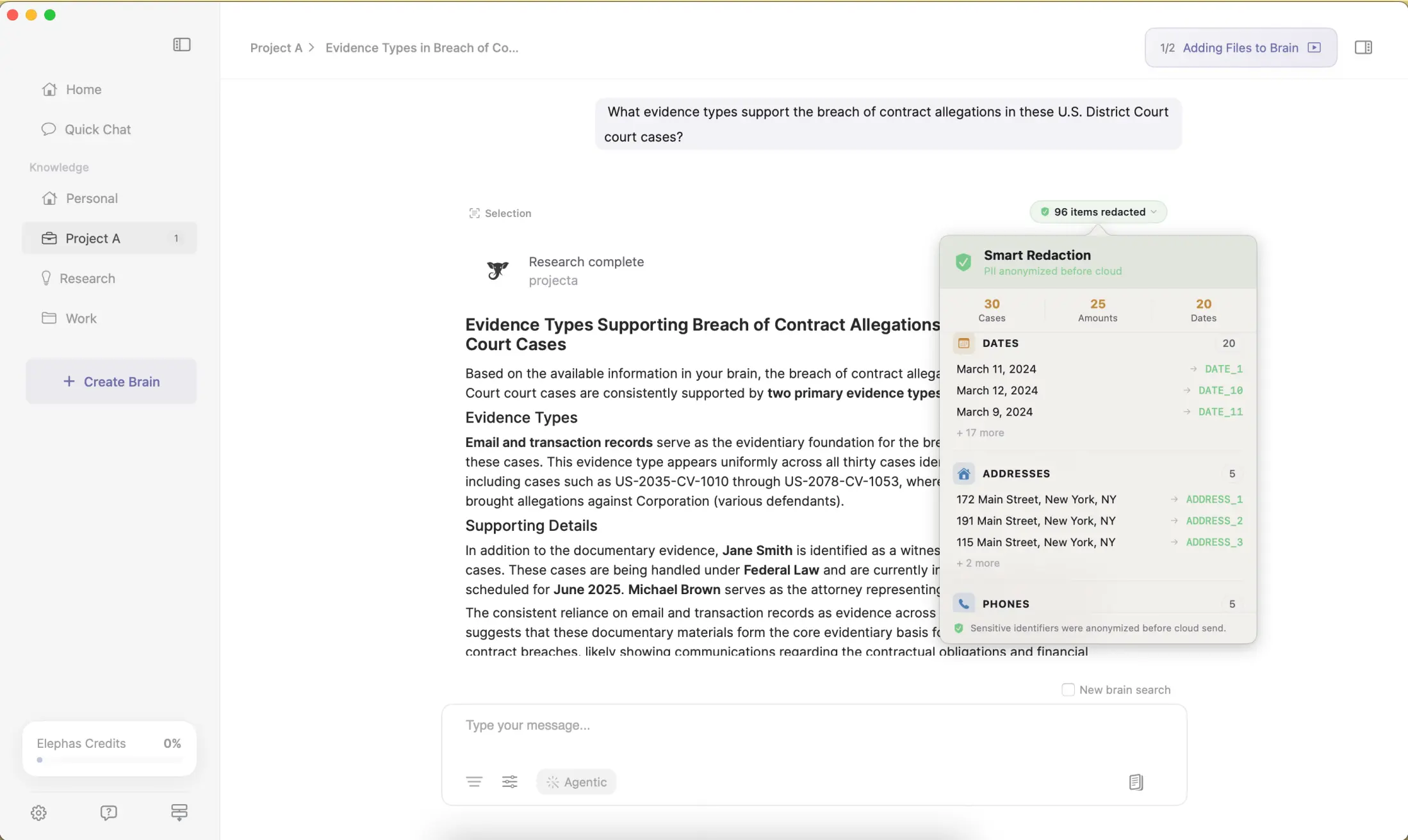
Smart Redaction ships on every Elephas plan, including Free, and Elephas also provides built-in local LLM models for fully offline work, from $19/month with a free trial.
- Apple Intelligence: everyday, on-device tasks on qualifying hardware, free
- ChatGPT: depth, reach, and capability on any device, subscription tiers apply
- Elephas: genuinely sensitive work, redacted locally before any cloud model sees it, free plan and paid tiers from $19/month
- It isn't a replacement for either product: Apple Intelligence protects where data goes, ChatGPT lets you opt out of training, but only Elephas strips personal identifiers first, for privacy questions or confidential work alike.
Frequently Asked Questions
Does Apple Intelligence send my data to ChatGPT?
Only when you approve it. The new Siri hands off certain requests to ChatGPT, but a consent prompt names exactly what's about to be shared before anything leaves the device (Apple, 2026). Everyday tasks like Writing Tools stay on-device or route through Private Cloud Compute instead.
Is ChatGPT safe for confidential work?
Not by default. Personal-account conversations can train the model unless you turn that off in Data Controls, and OpenAI's own CEO has said legal-privilege-style protections don't yet exist for ChatGPT chats (Sam Altman, 2025; via David Bombal, 2025-08-01). Business and Enterprise workspaces exclude training, but most individual users are not on those tiers.
Trust signals are mixed too: on Trustpilot, 73% of nearly 2,800 reviews are one-star, citing billing and support failures alongside quality regressions.
Can I use Apple Intelligence without ChatGPT?
Yes. Writing Tools, Image Playground, Genmoji, and notification summaries all run without ever touching ChatGPT. The ChatGPT handoff only fires when Siri can't handle a request alone, and it's opt-in every time, not automatic.
If you'd rather it never fire, you can turn off ChatGPT in Settings, an AI privacy choice Apple leaves in your hands. That distinction, information privacy by default versus by opt-out, is the heart of this comparison.
Does Apple Intelligence work offline?
Most of it does. Proofreading, rewriting, and similar everyday tasks stay on-device according to 2026 WiSec testing. Harder requests route to Private Cloud Compute, which needs a connection, and the optional ChatGPT handoff always requires internet.
Is Apple Intelligence free on every Mac?
It's free with no subscription, but only on qualifying hardware: an iPhone 15 Pro or later, or an Apple-silicon Mac or iPad, with at least 7GB of free storage for the on-device models. Older devices can't run it regardless of price.
Which is more accurate, Apple Intelligence or ChatGPT?
Neither has a clear edge. A Stanford 2026 AI Index study found hallucination rates swinging from a few percent to well over half depending on the benchmark (source), and a Stanford RegLab study found wrong legal answers more than 17% of the time (source). Both companies tell users to verify important output themselves.
