How Consultants Use AI Without Exposing Client Data
Last updated: August 10, 2026
In January 2026, reporting revealed that the interim head of CISA, the US agency responsible for federal cybersecurity, had uploaded contracting documents marked "For Official Use Only" into the public version of ChatGPT, against official restrictions.
The person whose job was protecting government data handed it to a consumer AI tool. The risk is not careless people. It is that nobody wrote the rule down before generative AI existed, and a Harmonic Security analysis published in November 2025 found sensitive data in 26.4% of file uploads to AI tools.
So how do you use AI on client work when your engagement contract says nothing either way? Here is the seven-step workflow.
Quick answer
- Check your engagement contract for AI-specific language first. Most contracts say nothing, and nothing is not the same as permission.
- Classify the document before it touches any AI tool: public, internal, confidential, or regulated.
- Verify your vendor's actual training and retention setting for your specific plan. Don't trust the marketing page.
- For redaction specifically, tools like Elephas build automatic personally identifiable information (PII) redaction into every plan, including the free one, so that step becomes a formality instead of manual work. Paid plans start at $19/month.
What Do You Need Before Touching a Client File?
None of this requires legal training or a technical background, just the right documents and settings page, gathered in about ten minutes. The AI tool tier you're on, consumer, Team/Business, or Enterprise, determines almost everything in Steps 3 and 4.
- The signed engagement letter, NDA, or MSA for this client, not a template, since its confidentiality terms are what Step 1 actually checks.
- Admin or documented access to your firm's AI tool tier (consumer, Team/Business, or Enterprise).
- A working sense of the client's data classification and information sensitivity (public, internal, confidential, regulated). Build one if your firm has none.
- No coding required. You need to read one contract clause and one settings page.
Personal AI use builds none of these habits, because it never touches a client file. If you already redact names by hand, this workflow adds two checks that habit misses: a quasi-identifier review in Step 5, and per-client isolation in Step 6.
How Do You Use AI on Client Work Safely?
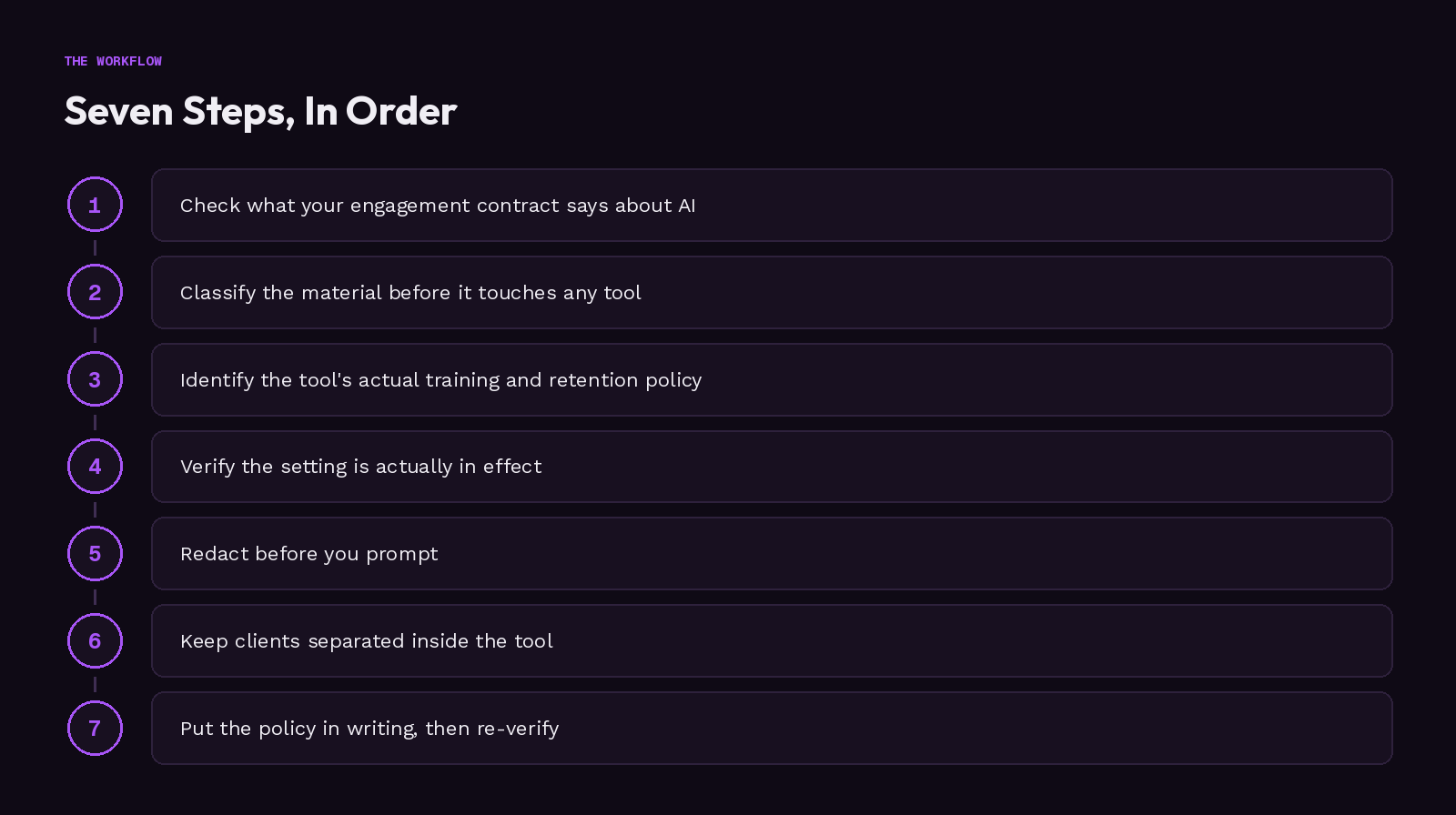
Quick view of the sequence:
- Check what your engagement contract says about AI.
- Classify the material before it touches any tool.
- Identify the tool's actual training and retention policy for your tier.
- Verify the setting is actually in effect.
- Redact before you prompt, and know what redaction can't catch.
- Keep clients separated inside the tool.
- Put the policy in writing, then re-verify on a schedule.
Step 1: Check What Your Engagement Contract Actually Says About AI
Pull the signed NDA, MSA, or engagement letter for this client, not a template. Search it for "artificial intelligence," "automated processing," "third-party tool," or "subprocessor," not a generic confidentiality clause. There are three outcomes: the contract addresses AI, prohibits third-party processing, or says nothing, and silence is the common case, not permission.
Verify it worked: you now have a written yes, no, or silent answer for this specific engagement, not a guess.
The ICMCI's Code of Responsible Use of AI in Management Consulting, launched June 4, 2026, treats entering confidential client data into AI systems without safeguards as a conduct violation, regardless of the contract. The American Bar Association reached a similar conclusion for lawyers in Formal Opinion 512 (July 29, 2024): boilerplate engagement language isn't enough.
Step 2: Classify the Material Before It Touches Any Tool
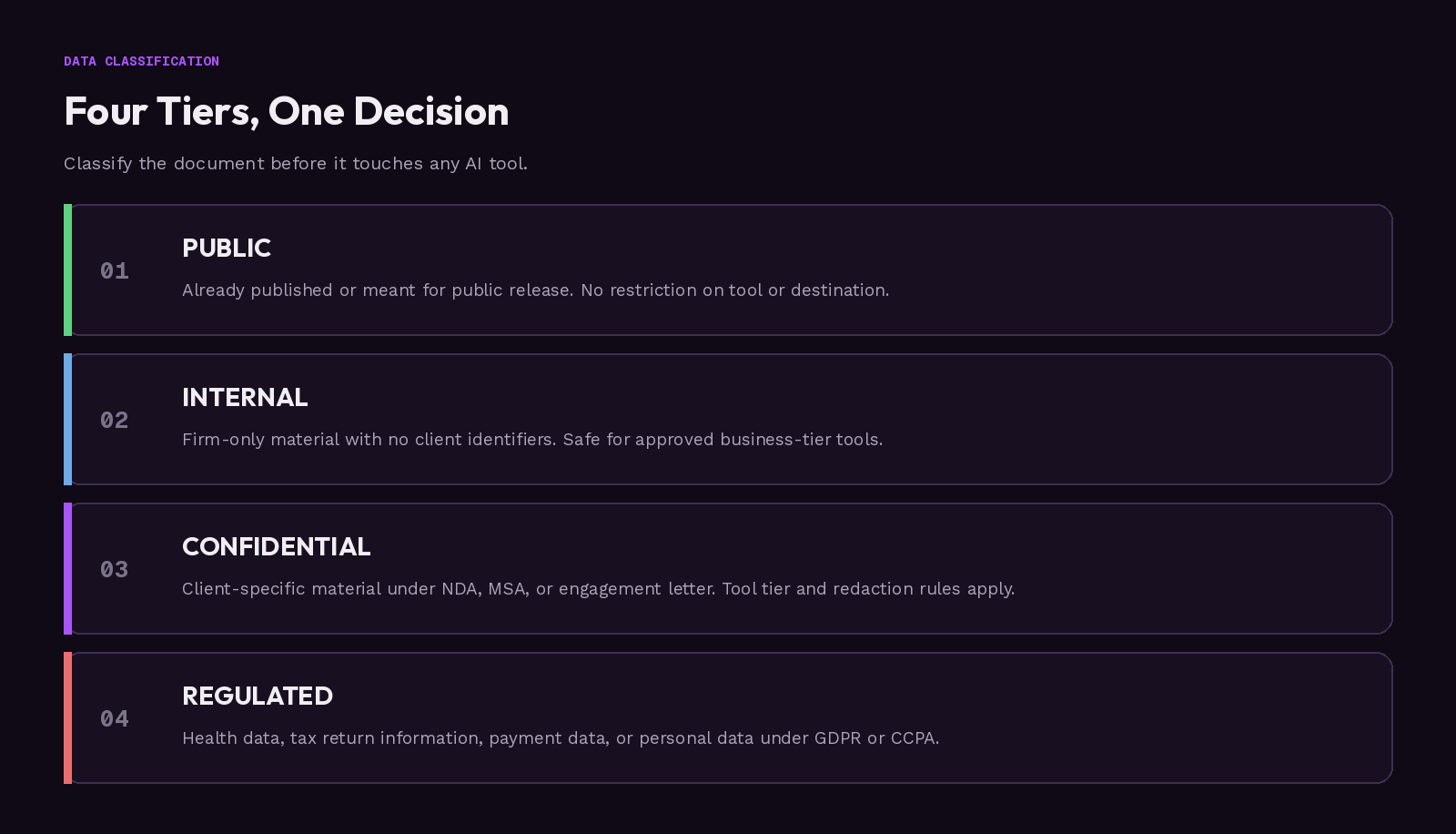
Assign the document or dataset a tier: public, internal, confidential, or regulated. Regulated covers health data, tax return information, payment data, and personal data under GDPR or CCPA. Our sensitive data guide covers the classification tiers in more depth.
Verify it worked: the task carries a one-line classification decision before you open any AI tool, for example, "client financial model, confidential, not regulated."
This decision determines which tool tier is even permissible. GDPR Article 5 requires exactly this kind of task-specific purpose limitation and data minimization, the same information privacy principle behind CCPA.
For tax-adjacent work, IRC Section 7216 prohibits preparers from disclosing return information for an unauthorized purpose, carrying a fine of up to $1,000, up to one year in prison, or both, plus a $250-per-disclosure penalty under IRC Section 6713, capped at $10,000 per year.
Step 3: Identify Your AI Tool's Actual Training and Retention Policy for Your Tier
For the specific product and plan you have, not the brand name generically, find the vendor's data-usage policy for that exact tier. "ChatGPT," "Claude," and "Gemini" each have multiple tiers with different defaults. Check the terms of service or a dedicated trust page, not the marketing site.
We compare the main options in our guide to private client-data tools.
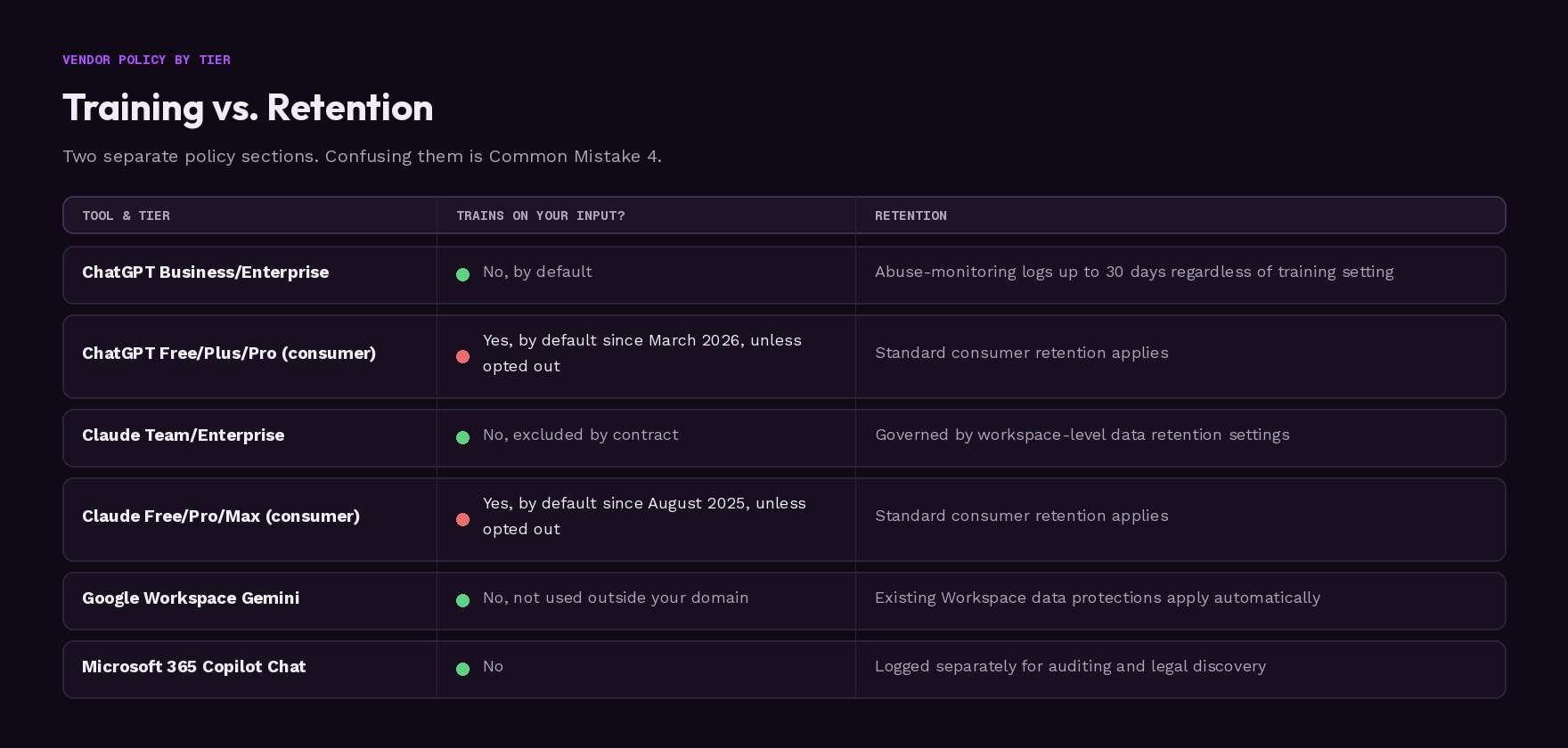
| Tool and tier | Trains on your input? | How long is content retained? |
|---|---|---|
| ChatGPT Business/Enterprise | No, by default | Abuse-monitoring logs up to 30 days regardless of the training setting |
| ChatGPT Free/Plus/Pro (consumer) | Yes, by default as of March 2026, unless you opt out | Standard consumer retention applies |
| Claude Team/Enterprise | No, excluded by contract | Governed by workspace-level data retention settings |
| Claude Free/Pro/Max (consumer) | Yes, by default since an August 2025 update, unless you opt out | Standard consumer retention applies |
| Google Workspace Gemini | No, not used for model training outside your domain | Existing Workspace data protections apply automatically |
| Microsoft 365 Copilot Chat | No | Logged separately for auditing and legal discovery |
Verify it worked: you can name, in one sentence, both the training answer and the retention answer for your actual tier, not the vendor's headline claim. Training and retention are separate policy sections.
Step 4: Verify the Company Data Protection Setting Is Actually in Effect
Log into the actual admin console, or account settings page if you're solo, and confirm the live setting instead of trusting a marketing page or a colleague's word.
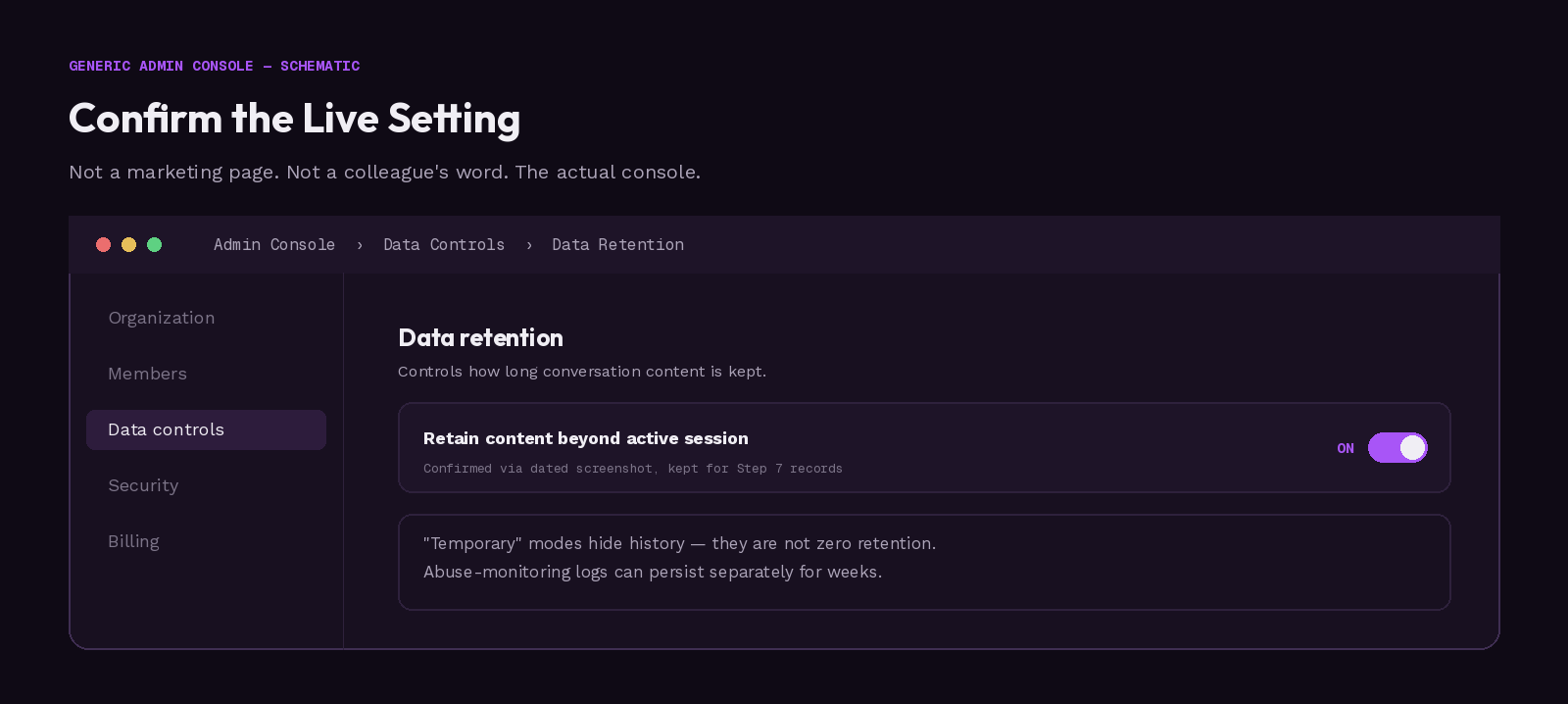
Verify it worked: you have a dated screenshot or confirmed setting state, kept as a record for Step 7.
"Temporary Chat" is not zero retention. It keeps the conversation out of your history, but the content can still sit on the vendor's servers for weeks for abuse monitoring. Not saved and not stored are two different promises.
OpenAI's path is typically Settings, Organization, Data controls, then Data retention, though menus shift, so confirm it in your own console. Anthropic's sits under Organization settings, Data and Privacy for Team/Enterprise admins, or Settings, Privacy for individual accounts. Google Workspace runs through Admin console, Generative AI, Gemini for Workspace, then Workspace Intelligence.
Step 5: Redact Before You Prompt, and Know What Manual Data Loss Prevention Can't Catch
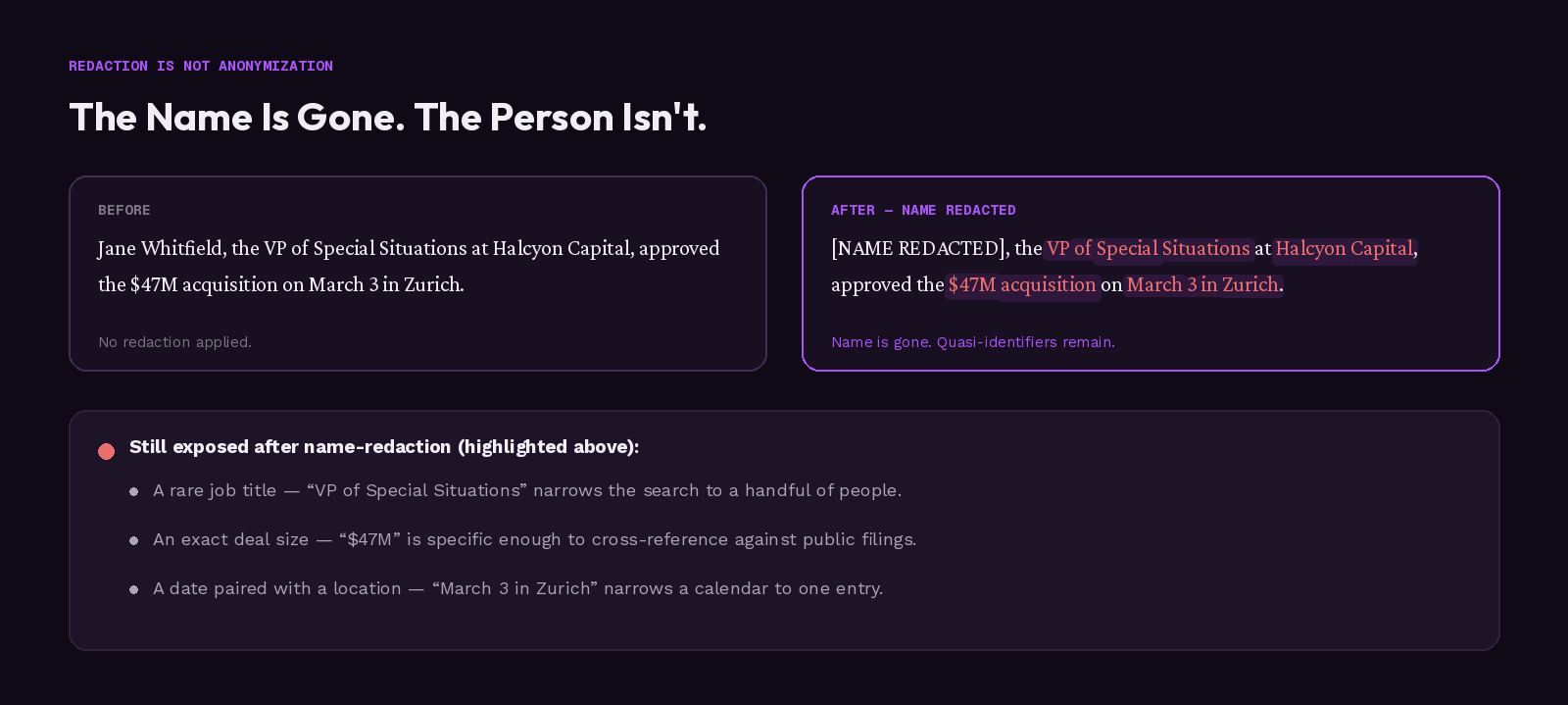
Before pasting or uploading, strip direct identifiers: names, emails, exact addresses. Then check whether what's left still allows re-identification through context: a rare job title, an exact deal size, a date paired with a location, or documents that triangulate on the same person.
Verify it worked: you can answer no to all three of the European Data Protection Board's tests for what you send. Manual name-redaction alone is measurably unreliable: Researchers at ICLR 2024 (Staab, Vero, Balunović, and Vechev) found large language models could infer location, income, and sex from anonymized text with up to 85% accuracy.
The 2025 Oslo re-identification study, from the University of Oslo and the Norwegian Computing Center, recovered up to 80% of masked spans across biographies, court rulings, and clinical notes.
According to the European Data Protection Board, in guidance published on July 8, 2026, genuinely anonymous data has to pass three tests: no isolation of a single record, no linkage between records, no inference of the underlying person. Deleting a name clears the first test, not the other two.
Step 6: Keep Clients Separated Inside the Tool
Use separate projects, workspaces, or threads per client, and never carry conversation history, files, or a "memory" feature from one client's engagement into a session touching another client's work.
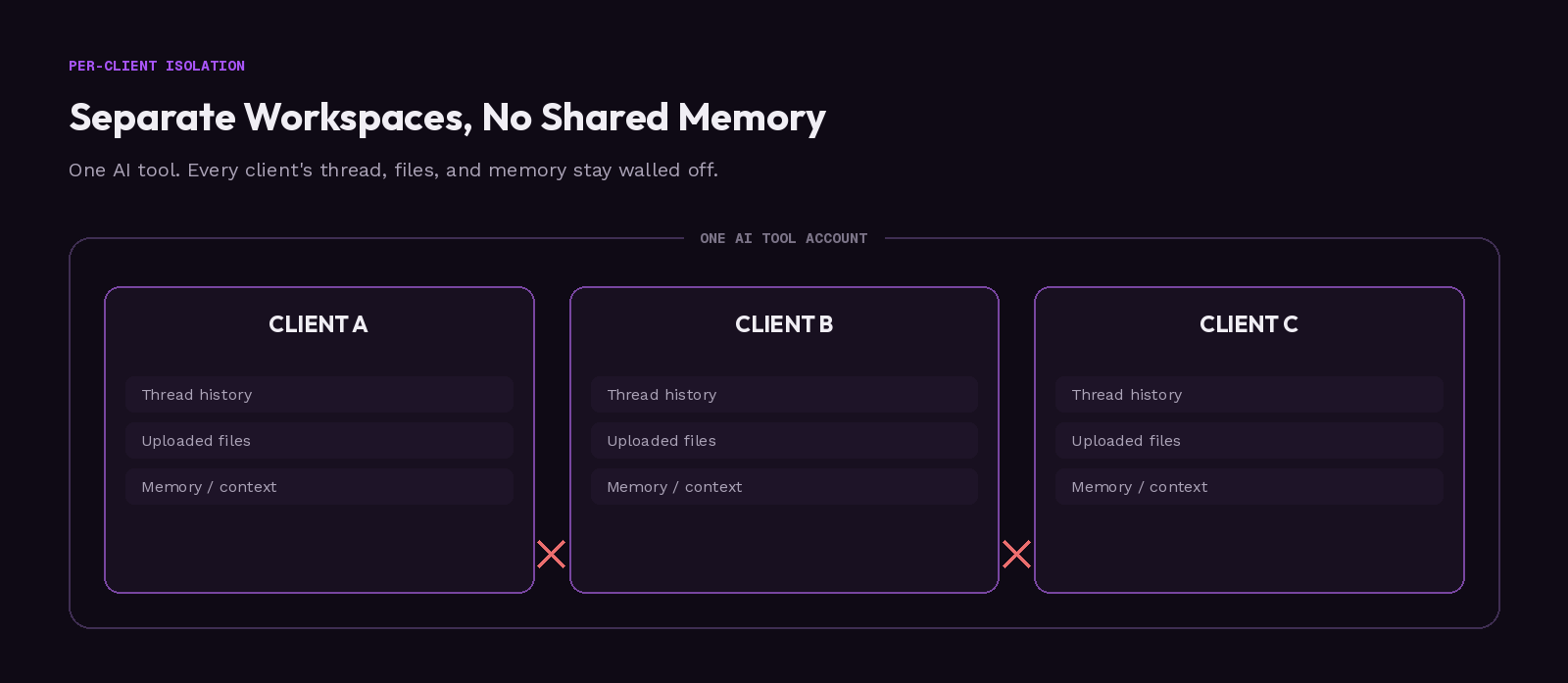
Verify it worked: each active client has its own isolated workspace or thread, and you could show an auditor the separation without explaining it away.
Juggling multiple clients in one long-running thread is the most common way cross-client contamination happens. The ICMCI Code requires protecting each client's confidentiality individually, and GDPR's purpose-limitation principle reinforces the same boundary. Dedicated data loss prevention software can enforce this at the account level.
Step 7: Put the Policy in Writing, Train Your Team, and Re-Verify on a Schedule
Write the policy down. At minimum, it should record:
- Which tools are approved for which data classes.
- Who approved that mapping, and when.
- How you verify a setting is actually in effect (Step 4).
- Your redaction standard (Step 5).
- Whether your team has been trained on it, not just handed the file.
Set a recurring quarterly reminder to re-check Steps 3 and 4, since vendor terms and admin defaults change. OpenAI's HIPAA guidance alone was posted January 8, 2026 and then expanded March 27, 2026.
Write a short incident checklist in advance: stop processing, preserve an internal record, identify what was exposed, check the vendor's deletion path, notify the accountable person at your firm, and assess whether client notice is required. Verify it worked: the policy exists as a saved file, not as something "everyone just knows."
The ICMCI Code calls for documenting significant AI-supported decisions, though it isn't binding on every consultant. Smaller SEC-regulated entities reached their amended Regulation S-P compliance date on June 3, 2026: written incident-response programs and, with limited exceptions, notice within 30 days of discovering unauthorized access.
Which Mistakes Break Client Confidentiality?
Six failure modes account for most client-data exposure.
- Reading contractual silence as permission. An NDA written before generative AI says nothing about prompts. Fix: treat silence as unresolved (Step 1). Source: ICMCI Code (June 4, 2026); ABA Formal Opinion 512.
- Uploading restricted material despite policy. Judgment alone fails under deadline, even for senior people, as the CISA case above shows. Fix: an enforced approved-tool list (Steps 3 and 4).
- Assuming an enterprise contract covers AI. A business tier is necessary, not sufficient. It still needs an AI-specific training clause. Fix: check that clause (Step 3). Source: Privacy World (January 2026) on amended SEC Regulation S-P.
- Confusing "not used to train" with "not stored." Fix: check retention separately from training (Steps 3 and 4). OpenAI's abuse-monitoring logs can hold content 30 days regardless of the training setting.
- Treating name-removal as anonymization. A rare job title or a combined document set still identifies. Fix: run the two-pass check and the EDPB three-test standard (Step 5).
- Skipping the written policy. Informal practice survives neither an audit nor a departing employee. Fix: write it once (Step 7). According to IRS Office of Professional Responsibility Alert 2026-19 (June 24, 2026) under Circular 230, tax and accounting firms must keep documented AI protocols.
Redact Client Data Before It Reaches the Cloud
Manual redaction is the step most likely to get skipped when Step 5's two-pass check meets a real deadline.
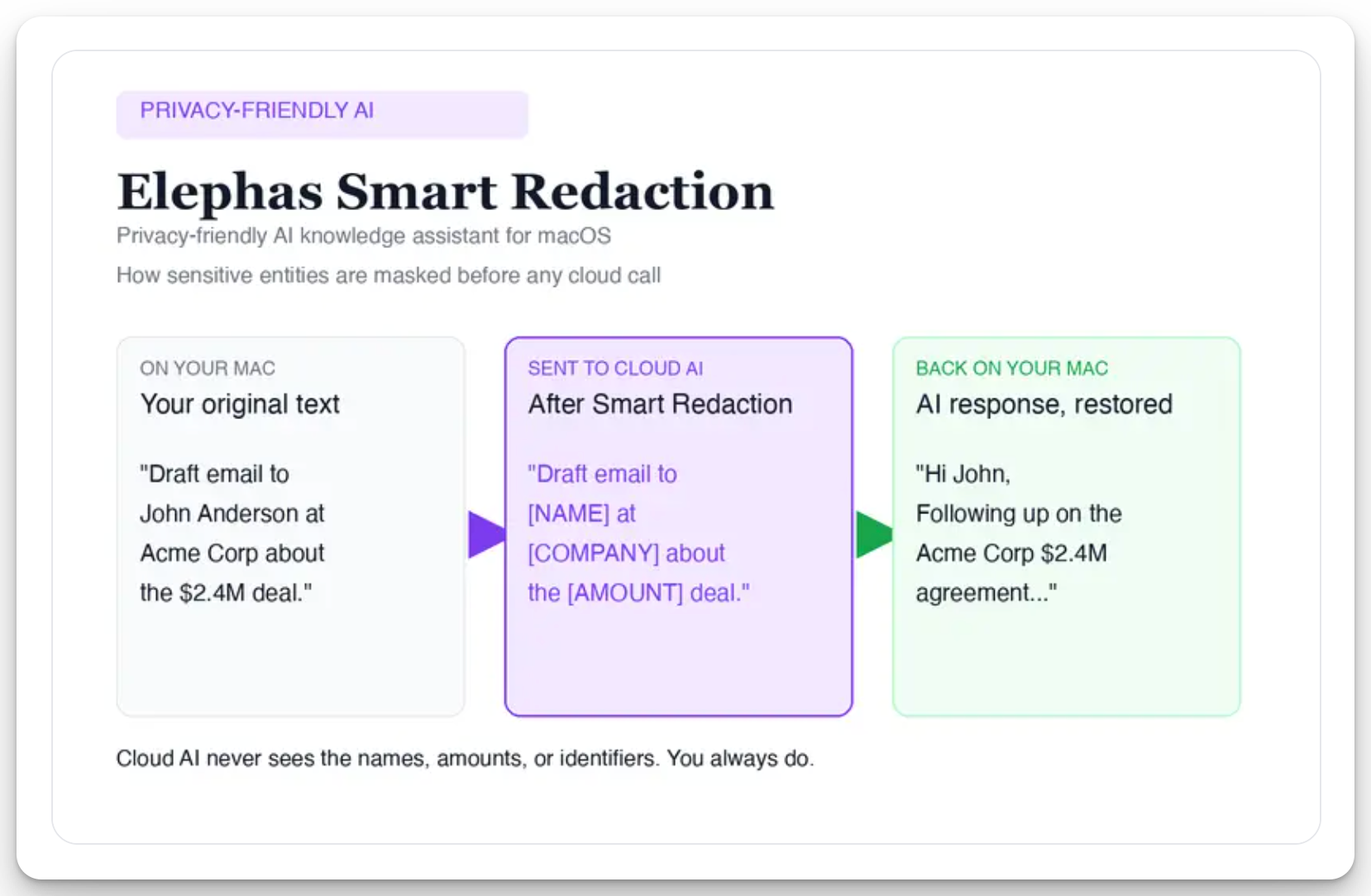
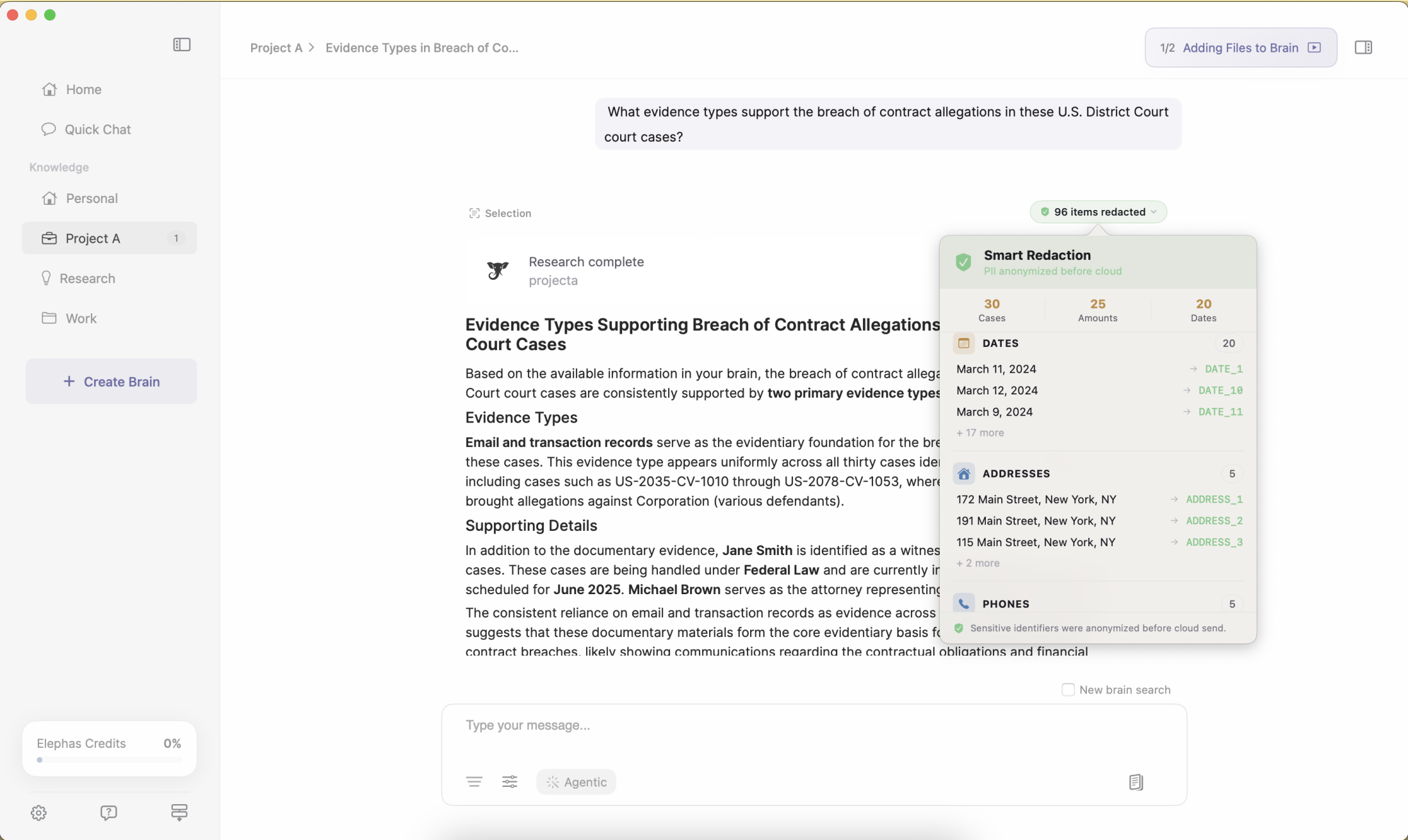
Elephas runs automatic PII redaction on your Mac. Before a prompt reaches ChatGPT, Claude, Gemini, Grok, Perplexity, or any other cloud model, it strips sensitive names, emails, phone numbers, and identifiers locally. The cloud model only ever sees the sanitized text, and when the answer comes back the redacted fields are reassembled locally, so identifiable client information never leaves the device.
That is paired with zero data retention: content never trains AI models, never sits on a vendor's server, and never passes through a third-party reviewer's screen. Smart Redaction is built into every plan, including Free.
Elephas is a privacy-friendly AI knowledge assistant that pairs with the model you already use. It has a free plan, and paid plans start at $19/month; see elephas.app/pricing for the full list.
How to Safeguard Client Data From Here
Pick one AI tool tier as your firm's default rather than leaving it to individual choice, and put the quarterly re-check from Step 7 on an actual calendar. Run the whole workflow once on a low-stakes internal document before your first real client file, so the contract check and classification step become fast.
Then see whether your engagement-letter template can name AI explicitly, which closes the silent-contract gap for every client after this one. More workflows for independent practices sit in our AI tools for consultants hub. The habit that matters most is treating "the contract doesn't mention AI" as unresolved, never as clearance.
Frequently Asked Questions
The questions consultants ask most once they start running this workflow on live client work.
Q: How long does this workflow take to run for the first time?
A: The first full pass through the seven steps takes roughly 45 to 75 minutes, mostly spent locating documents and checking settings. Repeating it for later documents takes about 5 to 10 minutes each, since the contract check and tool-tier verification rarely change once they're done.
Q: Does turning off chat history stop a vendor from training on my prompts?
A: No, not automatically. Chat-visibility settings and the training and retention settings covered in Step 3 and Step 4 are controlled separately, and vendors don't always make that distinction obvious in the interface. Check both directly for your own tier rather than assuming one setting covers the other.
Q: Is deleting a client's name enough to anonymize a document?
A: No. Removing a name addresses only the obvious identifier. Researchers at ICLR 2024 found large language models could infer location, income, and sex from anonymized text with up to 85% accuracy.
A 2025 Oslo study found up to 80% of masked spans recoverable in similar documents. Run Step 5's check first.
Q: Can I keep using ChatGPT Business or Claude Team for client work?
A: Yes, both are reasonable choices for client work, but the business tier itself isn't the safeguard. Confirm the retention window for your exact plan in Step 3, and verify the setting is actually live in Step 4, before treating either tool as automatically client-safe.
Q: What should I do if client data ends up in the wrong AI tool by mistake?
A: Stop processing immediately, preserve an internal record of what happened, identify exactly what was exposed, check the vendor's deletion path, and notify the accountable person at your firm. Decide separately whether the client needs to be told. Write this checklist down before an incident happens, not during one (Step 7).
