MacOS 27 Siri Apps: Every App That Works With the New Siri (2026)
Last updated: August 4, 2026
Search for the apps that work with Siri AI and page one is all announcements. The Apple Newsroom post, a stack of MacRumors previews, and a Macworld feature roundup. Every one describes what Siri AI can do. None of them tells you which apps on your Mac actually respond to it.
Part of that is the hype cycle: the rebuilt Siri runs on a custom Google Gemini model, reportedly licensed for about $1 billion a year, and headlines like that crowd out the practical question of which apps actually respond to it.
That gap exists for a real reason. On macOS 27, codenamed Golden Gate, there is no fixed master list. An app works with Siri AI only when its developer exposes that app's content and actions through Apple's App Intents framework. So the honest answer depends on the app, its version, and what the developer chose to wire up.
This directory sorts it out. Apple's own apps that work today, the third-party apps that do or soon will, and the trap that catches professionals: an app can sit in Shortcuts and still be invisible to the new natural-language Siri. For the confidential side of the story, where none of this is safe by default, we finish on Elephas.
Quick answer:
- The new Siri only works inside an app once that app's developer ships Apple's App Intents framework; Apple's own apps (Messages, Mail, Calendar, Reminders, Notes, Photos, Music, Maps, Safari, Shortcuts) already do.
- Third-party support ships app by app: 9to5Mac found the Tessie app answered a car-battery question in beta while the official Tesla app did not.
- Eight categories, including spreadsheets, word processors, and browsers, stay Shortcuts-only — a Shortcuts action there doesn't mean Siri AI can run it by voice.
- For anything confidential, Elephas is a privacy-friendly AI knowledge assistant with built-in local LLM models that redacts sensitive data on your Mac before any cloud model sees it: free plan, from $19/month, free trial.
Which Apps Work With the New Siri Right Now?
The table below is built from Apple's own examples, its developer documentation, and public beta reports as of August 4, 2026 — not an independent lab test of every build. Siri AI is still in beta, so treat each row as a snapshot, not a guarantee that survives the next release.
| App | Type | What Siri AI Can Do | Status | Cost |
|---|---|---|---|---|
| Messages | Apple built-in | Send, read, and summarize messages; pull context | Works on macOS 27 | Free, built into macOS |
| Apple built-in | Find details in mail, draft, summarize threads | Works on macOS 27 | Free, built into macOS | |
| Calendar | Apple built-in | Create events from text on screen, check schedule | Works on macOS 27 | Free, built into macOS |
| Reminders | Apple built-in | Add, complete, and find reminders by meaning | Works on macOS 27 | Free, built into macOS |
| Notes | Apple built-in | Add content, transcribe audio, summarize notes | Works on macOS 27 | Free, built into macOS |
| Photos | Apple built-in | Edit, clean up, search by description, share | Works on macOS 27 | Free, built into macOS |
| Music | Apple built-in | Play a recommended track, podcast, or playlist | Works on macOS 27 | Free, built into macOS |
| Maps | Apple built-in | Search places, start directions, share arrival | Works on macOS 27 | Free, built into macOS |
| Safari | Apple built-in | Summarize a page, act on what is on screen | Works on macOS 27 | Free, built into macOS |
| Shortcuts | Apple built-in | Run and chain actions, including third-party ones | Works on macOS 27 | Free, built into macOS |
| Tessie | Third-party | Read vehicle data through its App Intents | Reported working in beta | Free trial; paid tiers vary |
| Things | Third-party | Add and query tasks once App Intents ship | Developer support requested | $49.99 one-time (Mac) |
| DEVONthink | Third-party | Surface documents once App Intents ship | Developer support requested | From $99 one-time |
| Most text apps | Any standard app | Writing Tools: proofread, rewrite, summarize text | Works, text editing only | Varies by app |
| Elephas | Outside the framework | Private AI that redacts data before the cloud | Works on macOS 27 | Free / from $19/mo |
What "Works With the New Siri" Actually Means
Four different things hide under one phrase, and mixing them up is why the answer feels slippery. Apple sells Siri AI as one assistant, but underneath it there are separate layers, and an app can sit on one without touching the others.
The deepest layer is App Intents, and Apple's WWDC 2026 session covers the building blocks: app entities expose content, intents expose actions, and view annotations describe what's on screen. When a developer ships these, Siri can run a real action inside that app — that is what most people mean by works.
Above that sit Spotlight indexing and onscreen awareness, letting Siri read content without changing it, then Shortcuts and Writing Tools, which trigger or edit but don't act with control. Only App Intents gives Siri true control. Our App Intents guide and App Intents vs Shortcuts pieces explain further; Apple's developer overview is the primary source.
| Layer | What it does | Siri's level of control |
|---|---|---|
| App Intents | Exposes real actions inside the app | Full — Siri can act |
| Spotlight + onscreen awareness | Lets Siri read content | Read-only |
| Shortcuts | Runs older, pre-built automations | Trigger only |
| Writing Tools | Edits text in almost any field | Text editing only |
The beta threads show the confusion. One user on r/apple described the goal: "you can do a lot of stuff using Siri without having to open the app to do it... lets Siri be your interface into the app." Ship the hooks and the app responds; skip them and it stays silent.
The Professional Trap: 13 Siri Domains vs. 8 Shortcuts-Only Ones
Here's the detail most roundups skip. Apple's App Intents schema documentation names exactly 13 primary domains Siri AI can act on directly: Audio, Calendar, Camera, Clock, Files, Mail, Maps, Messages, Notes, Phone, Photos, Reminders, and system search.
Eight more domains exist, but Apple limits them to Shortcuts only: Books, Browser, Journaling, Presentation, Reader, Spreadsheet, Whiteboard, and Word Processor. Live in Excel, Word, PowerPoint, or a PDF reader? That's the trap — exactly the professional tools stuck in Shortcuts, out of reach of a spoken Siri command.
| Domain group | Domains | Siri can act by voice? |
|---|---|---|
| 13 primary domains | Audio, Calendar, Camera, Clock, Files, Mail, Maps, Messages, Notes, Phone, Photos, Reminders, System search | Yes |
| 8 Shortcuts-only domains | Books, Browser, Journaling, Presentation, Reader, Spreadsheet, Whiteboard, Word Processor | No — Shortcuts only |
Having a Shortcuts action isn't the same as having Siri's attention. One developer on r/apple described the underlying framework as "already used by things like siri shortcuts" — App Intents predates and underlies both. Siri AI only drives the 13 domains Apple opened; check the domain before assuming a command will work.
Which Apple Apps Already Work With the New Siri?
Apple's own apps are the safest bet because Apple wired the intents itself. Its Siri AI announcement shows Siri finding email details, drafting mail, editing photos, and adding a recipe to Notes from an on-screen chat. Calendar and Audio also sit among the documented domains, even where the keynote didn't demo it.
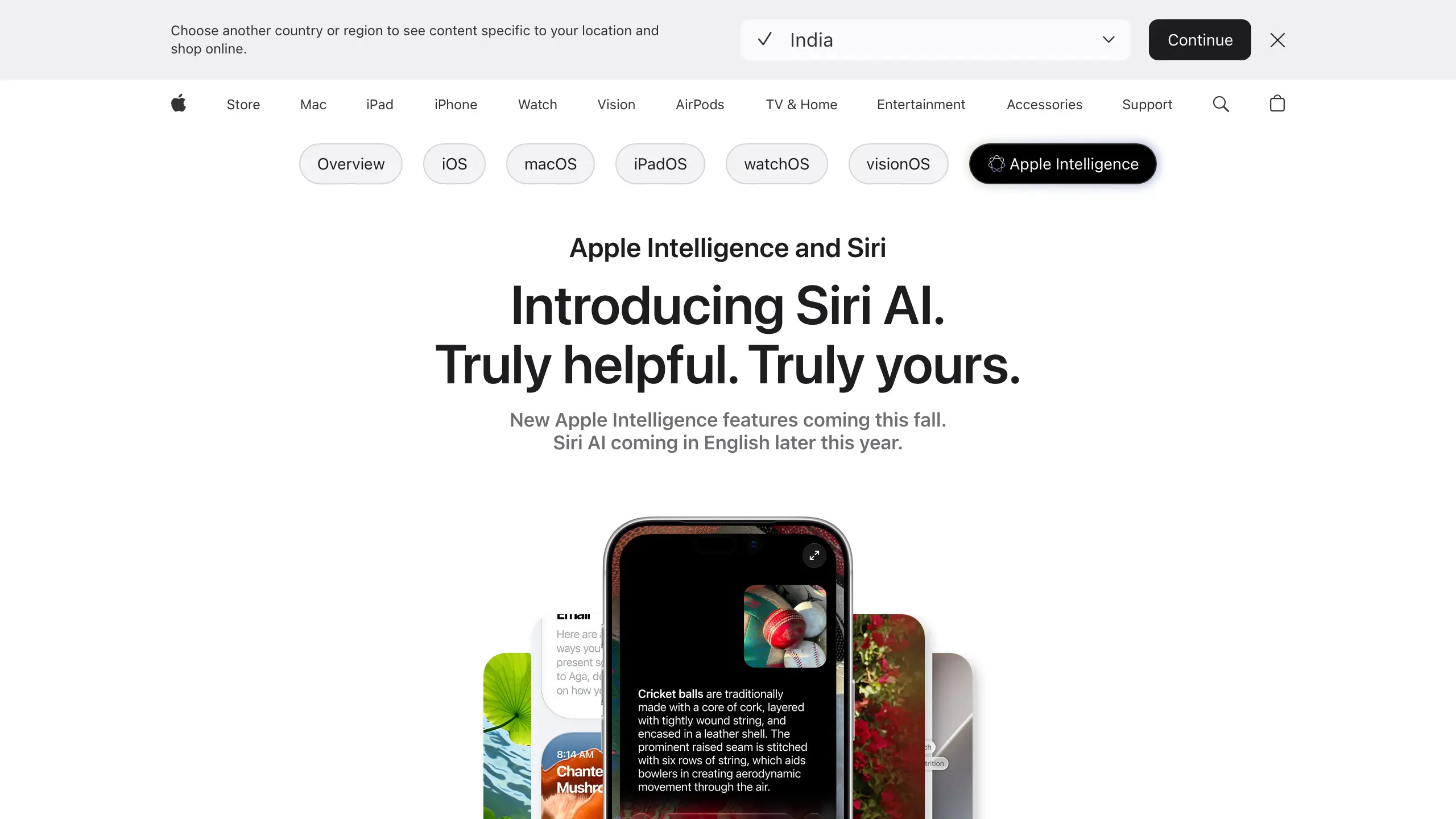
- Messages, Mail, and Notes handle the daily triage. Ask Siri to summarize a long thread, draft a reply, or drop a line into a note, and it acts inside the app rather than handing you a web result.
- Calendar and Reminders are both primary App Intents domains, so Siri can create events and reminders directly rather than just search for them; Reminders can also be searched by meaning through the system semantic index, not just exact words.
- Photos, Music, and Maps cover the everyday actions: clean up an image, queue up something to listen to, or start directions by asking in plain language. Visual Intelligence, also shown in Apple's own announcement, adds a camera- or screenshot-based layer on top for tasks like splitting a bill or looking up nutrition info.
- Safari and Shortcuts are the connective tissue. Safari lets Siri act on the page you are reading, and Shortcuts lets you chain steps, including actions from apps that expose them.
One limitation worth stating plainly: this directory covers the Mac specifically. The same App Intents framework also ships on iOS 27 and watchOS 27, but app support there isn't guaranteed to match macOS. For the setup path, our Apple Intelligence Mac guide walks through it, and what Siri AI actually is covers the bigger picture.
Third-Party Apps: Real Support, Real Requests, Still Arriving
Third-party coverage is the part that keeps moving. Because support ships app by app, the question that actually matters isn't whether an app works with the new Siri in general — it's whether this specific developer has shipped App Intents for macOS 27 yet.
The clearest evidence so far came out of the beta. 9to5Mac reported that Siri pulled live battery data from the third-party Tessie app, while Tesla's own official app returned nothing on the identical request. Same car, same question, different result — because one developer had done the integration work and the other hadn't.

Demand for that same treatment shows up in the developer forums. Things users are asking whether the app will pick up the newer intents; DEVONthink users have filed an identical request. One iOS developer put it plainly: "I'm a fan, currently in the process of bringing it to my app... I wish more adopted them."
Two rules hold in the meantime. Any app with a standard Mac text field already gets Writing Tools, so proofreading and summarizing work today in apps like Bear or Craft. But an app offering only Shortcuts actions, the kind developers are still debating, may not answer a spoken command until it adopts the newer schema.
What Independent Research Says About AI Assistants and Apps
Research measures the gap between an app being listed and a task completing, and the numbers argue for caution. The 2026 iOSWorld study reported that the best agent completed 52% of 133 tasks across 26 apps, but only 37% of the 60 multi-app tasks. Cross-app work is what Siri AI promises.
Desktop results are no better. The macOSWorld research found that proprietary agents cleared 30% of 202 tasks while lightweight open-source models stayed under 5%, and Arabic performance fell by an average of 28.8% against English.
Task sets also skew the scores. The MacArena study ran 421 human-verified tasks across 50 applications and reported a 26.5 percentage-point reversal in rankings once new macOS-native tasks were added, a reminder that lab numbers do not always transfer to real desktop work.
Privacy claims deserve the same scrutiny. An IEEE S&P 2026 audit found violations in five of nine Apple mechanisms, affecting 87% of covered data collection in macOS Sonoma and 68% in Sequoia. None of this tests Siri App Intents directly, but an advertised integration is not proof a task will finish.
The Privacy Gap, and Where Elephas Fits
Everything above assumes the work is not sensitive. For a lawyer, clinician, accountant, or anyone handling regulated data, Siri AI raises a harder question, because helpful and private are not the same thing.
Apple does real work here. The Spotlight index runs on device, and harder requests use Private Cloud Compute. But conversation history can sync through iCloud, and Apple confirmed some workloads now run in Google Cloud. Professional duties still apply: HIPAA, ABA Opinion 512, and IRC section 7216 all bind sensitive work.
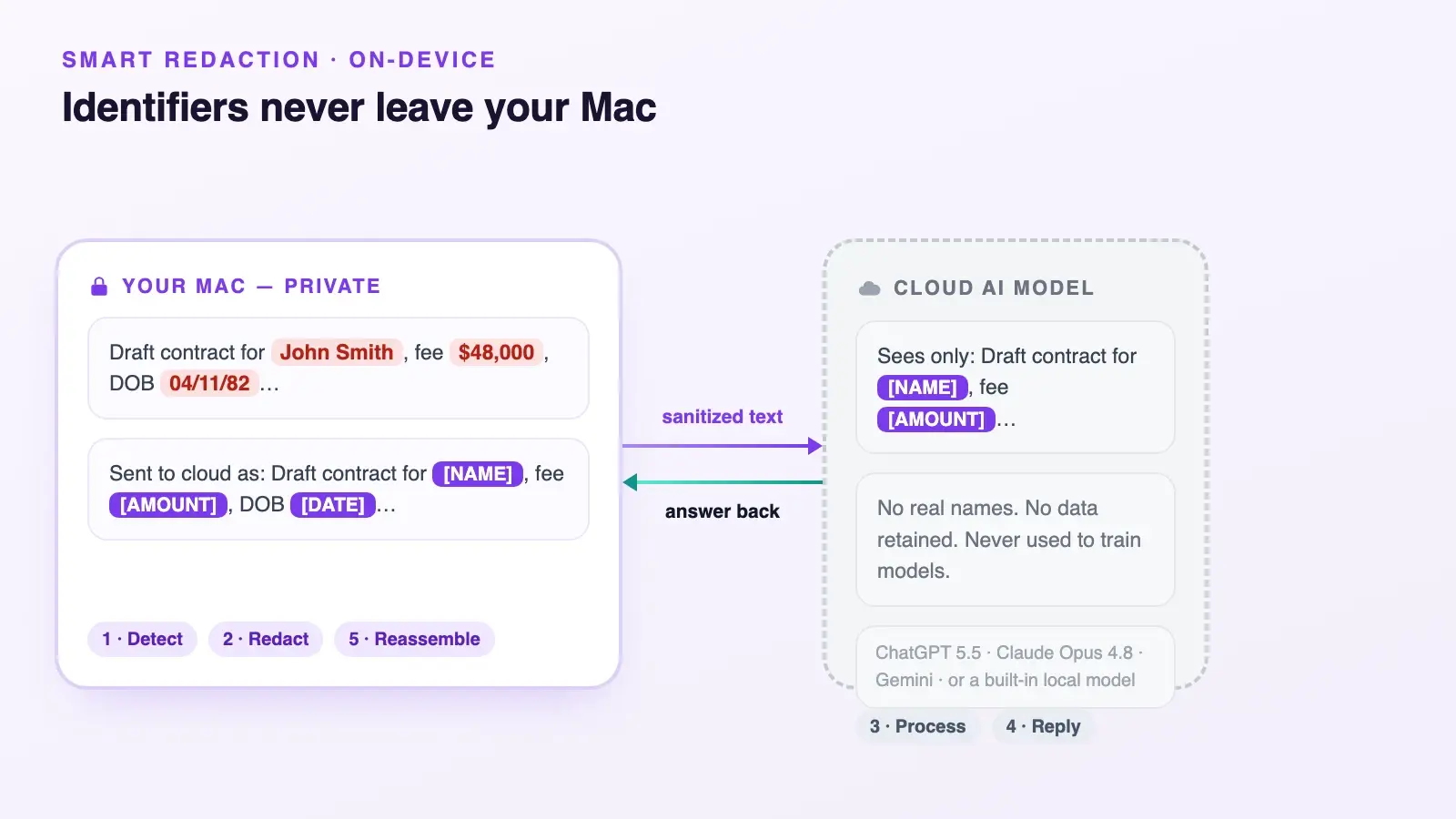
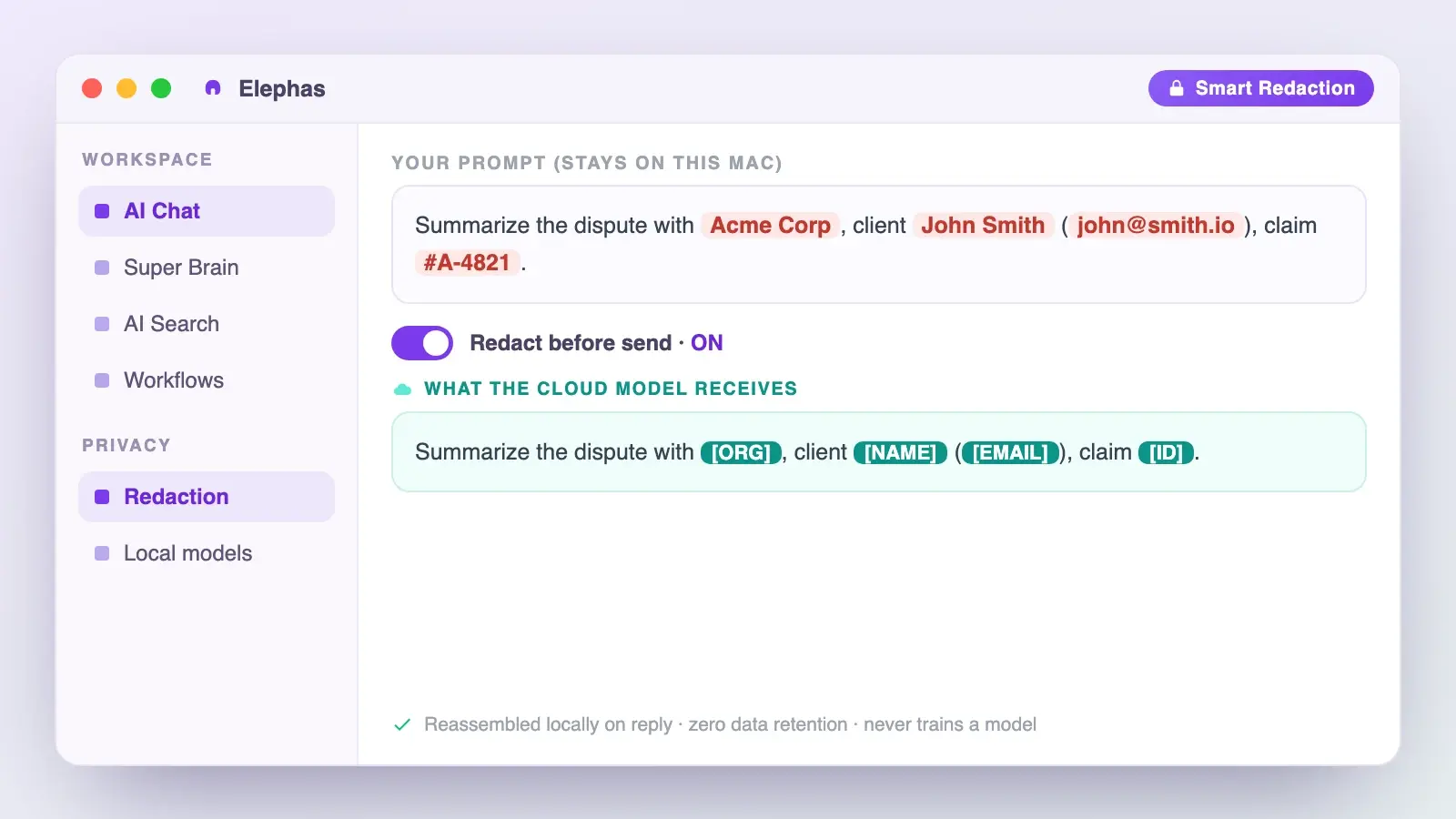
This is exactly the gap Siri AI leaves open, and it's where Elephas comes in through automatic PII redaction. Names, emails, phone numbers, and other identifiers get stripped out locally on your Mac before a prompt ever reaches ChatGPT, Claude, Gemini, Grok, Perplexity, or any other cloud model. Whatever comes back is stitched back together with the real details right there on your machine, so nothing identifying ever actually left it. That sits alongside zero data retention: content never trains AI models, never sits on a vendor's server, and never passes through a third-party reviewer's screen.
Smart Redaction runs on every Elephas plan, including Free, so the protection is not locked behind an upgrade. Elephas provides built-in local LLM models, starts at $19/month with a free plan, and you can try Elephas for free. For more, see Siri and privacy and handling sensitive data.
The Honest Limits, and How to Check an App Yourself
The new Siri is powerful and unfinished at the same time. macOS 27 reached public beta on July 13, 2026, and Apple has said a consumer release follows later in the year, so the roster of working Shortcuts and app actions will keep changing.
Hardware sets the floor. Apple's June announcement says Siri AI needs an M1 Mac or later, while its most powerful on-device model and advanced dictation need an M3 with 12GB of memory. Availability is also uneven by region and language during the beta, so check your own market before assuming a feature is live.
Capability is also uneven across task types. One person on r/shortcuts, testing the on-device models, reported that Siri could "dynamically choose and execute Shortcuts... though full cross-app actions remains challenging." Onscreen awareness is another edge case: it reads what is visible, and beta testers have debated what it can and cannot reach inside a document.
To check any app yourself:
- Confirm the app has updated for macOS 27.
- Ask Siri for one specific action inside it.
- Watch whether Siri actually acts, or just hands back a web answer.
- If it only edits text, that's Writing Tools, not App Intents — treat it accordingly.
- For anything confidential, route the work through a redaction layer first.
How We Compiled This Directory
We built this directory from primary sources, not a claim of testing every app. We read Apple's Newsroom announcements, its App Intents documentation, and its Support guides, then cross-checked examples against beta reporting from 9to5Mac and MacRumors and against developer discussion in Reddit threads.
Where a source confirms an action, we marked it working. Where support is only announced or requested, we said so plainly. Apple's keynote App Store list names dozens of apps, but it is a showcase, not a compatibility list, so a keynote appearance is not proof Siri AI can drive an app.
Conclusion
The real answer to "every app that works with Siri AI" is a rule, not a roster. Check the action you actually need, on the app version you actually run.
- Apple's own apps work now, on any Mac with Apple Intelligence turned on.
- Third-party apps work once their developer ships App Intents — check the specific app, not the category.
- Eight productivity categories, including spreadsheets, word processors, and browsers, stay stuck in Shortcuts only.
- The privacy math doesn't change: Siri AI is built to be helpful across your data, which is fine for errands but not for anything you can't afford to leak.
- For that confidential slice of your work, Elephas is a privacy-friendly AI knowledge assistant with built-in local LLM models: free plan, from $19/month, free trial.
Frequently Asked Questions
Which Macs support Siri AI on macOS 27?
Siri AI on macOS 27 needs a Mac with an M1 chip or later. The most powerful on-device model and advanced dictation require an M3 Mac or newer with at least 12GB of unified memory. Older Intel Macs do not support any Siri AI features at all.
Do all my apps automatically get Siri AI support?
No. An app works only after its developer adopts Apple's App Intents and ships an update for macOS 27. Apple's built-in apps work first, and third-party apps arrive individually. Installing an app does not by itself make it respond to Siri.
Does Siri AI work with Excel, Word, or PowerPoint?
Not through natural-language Siri yet. Apple limits the spreadsheet, word processor, and presentation domains to Shortcuts only. Those apps may expose Shortcuts actions, but that is not the same as asking Siri AI to run them by voice.
Is Siri AI available right now?
It is in beta. Apple opened Siri AI to developers on June 8, 2026, and macOS 27 reached public beta on July 13, 2026. A wider consumer release is expected later in the year, so app support and behavior are still changing between builds.
Does the new Siri send my data to the cloud?
Much of it runs on device, and harder requests use Apple's Private Cloud Compute. However, conversation history can sync through iCloud, and Apple has confirmed some Private Cloud Compute workloads run in Google Cloud data centers. For regulated data, that matters.
Can I use the new Siri for confidential client or patient work?
Not without extra protection. Apple's safeguards are real but broad, and professional rules still apply to you. A private tool like Elephas redacts sensitive data on your Mac before any cloud model sees it, on every plan including Free, which keeps identifiable details on the device.
Can I stop a specific app from working with the new Siri?
Yes. Go to System Settings, then Siri & Spotlight, and turn off Siri access or Spotlight indexing for that app. macOS 27 reorganizes this screen, and beta testers have found some toggles moved into submenus, so check both levels if an app isn't where you expect.
Sources
- Apple Newsroom, Apple introduces Siri AI: https://www.apple.com/newsroom/2026/06/apple-introduces-siri-ai-a-profoundly-more-capable-and-personal-assistant/
- Apple Developer, App Intents schema domains: https://developer.apple.com/documentation/appintents/app-schema-domains
- Apple Developer, Human Interface Guidelines for Siri: https://developer.apple.com/design/human-interface-guidelines/siri/
- Apple Security, Expanding Private Cloud Compute: https://security.apple.com/blog/expanding-pcc/
- 9to5Mac, Siri AI can pull info from third-party apps in the beta: https://9to5mac.com/2026/07/07/siri-ai-can-pull-info-from-third-party-apps-in-the-latest-developer-beta/
- MacRumors, macOS Golden Gate public beta: https://www.macrumors.com/2026/07/13/macos-golden-gate-public-beta/
- iOSWorld benchmark (2026): https://arxiv.org/abs/2606.09764
- macOSWorld benchmark: https://arxiv.org/abs/2506.04135
- MacArena benchmark: https://arxiv.org/abs/2606.06560
- IEEE S&P 2026 differential privacy audit: https://arxiv.org/abs/2605.21378
- ABA Formal Opinion 512: https://www.americanbar.org/content/dam/aba/administrative/professional_responsibility/ethics-opinions/aba-formal-opinion-512.pdf
