What Is App Intents? How the New macOS 27 Siri Works With Your Apps (2026)
Last updated: August 2026
App Intents is all over Apple's developer documentation, but almost no one has explained what it means for the apps you actually use. It is the framework that lets the rebuilt macOS 27 Siri act inside your apps, not just answer questions about them.
SiriKit is gone, so App Intents is now the only door Siri has into a third-party app. This guide breaks it down for Mac users: what it is, how it differs from Shortcuts, which apps will actually work with the new Siri, and where your data goes.
Quick answer:
- App Intents is an Apple framework that lets the new macOS 27 Siri, Spotlight, and Shortcuts trigger specific actions inside your apps.
- It isn't Android's "Intent" system, and it isn't Shortcuts renamed: App Intents is the engine, Shortcuts is the interface.
- Support rolls out gradually over two to three years, so unsupported apps stay invisible to it.
- For confidential work you'd rather keep off a cloud AI, Elephas is a privacy-friendly AI knowledge assistant with built-in local LLM models: free plan, from $19/month, free trial.
What App Intents Is (And Why It Suddenly Matters on Mac)
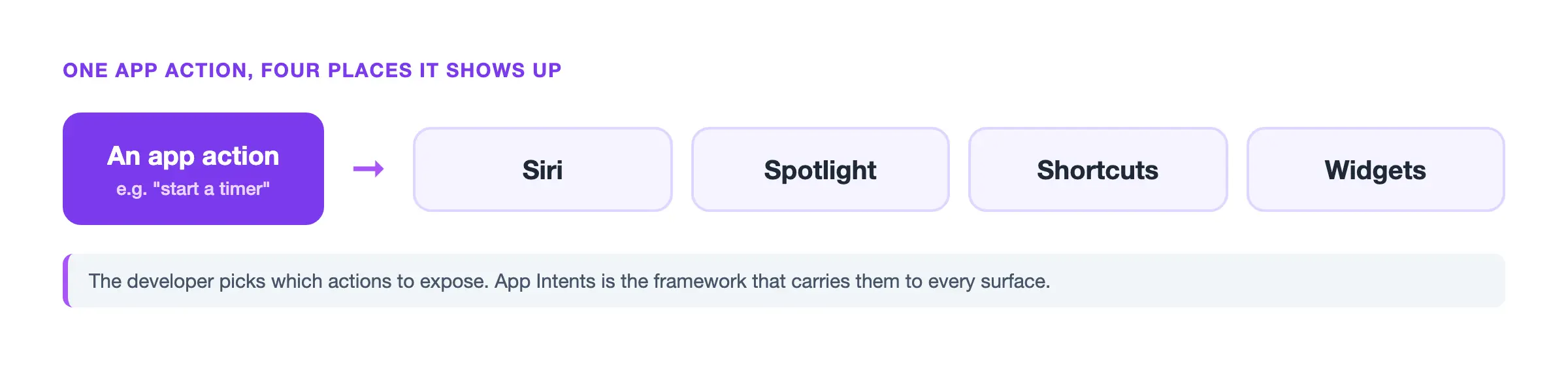
App Intents is the Apple framework letting a developer expose specific actions, like creating a task or drafting a reply, to Siri, Spotlight, Shortcuts, widgets, and Apple Intelligence. They decide which actions exist and what data each can touch, not full access. It's effectively the API into your app's capabilities.
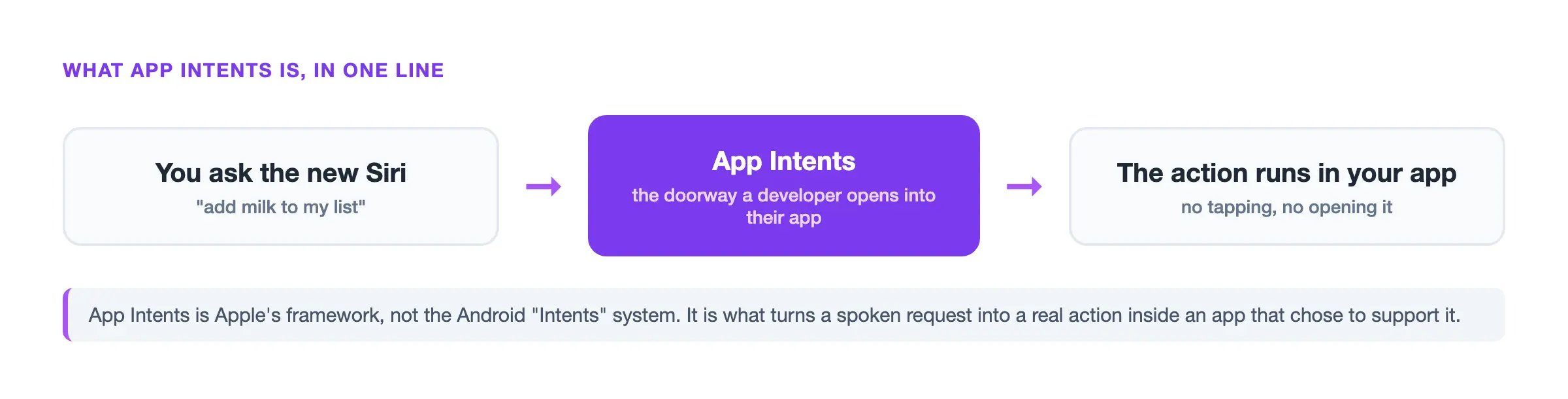
If you landed here searching Android's Intent system, that's different and older: this covers the same-named Apple framework, not the Android messaging system used between app components. The two share a name, nothing else.
This suddenly matters because macOS 27 ships a rebuilt Siri running a custom Google Gemini model, reportedly 1.2 trillion parameters and licensed for about $1 billion a year, and Apple formally deprecated SiriKit. See our Apple Intelligence guide for the wider picture.
As one Reddit user put it in r/iphone: "The delayed features are the preview they showed at wwdc last year (app intents, personal context and onscreen awareness)." Before which apps work with it, here's what happens under the hood.
How App Intents Works Under the Hood
You configure nothing yourself. Each action has to be implemented, like create a task. A recipe app could expose a "start this recipe" action. Those actions surface the same way, plus Live Activities, and trigger from the iPhone Action button or a voice command. There's no toggle; support just ships or it doesn't.
App Entities are the real boundary: a developer chooses which records, files, or contacts an action can touch, and Spotlight indexing makes that content discoverable Apple-wide. App Schemas feed those entities into Spotlight's semantic index, giving Siri context with attribution to your app. Our is Siri AI piece explains more.
One coder put it plainly in r/iOSProgramming: "once you read through the documentation on how intents work, implementation is fairly easy... It took me just a few hours to set up my data types as queryable entities, and design several App Intents for common actions in my app."
Another r/iOSProgramming user flagged a rougher edge: "The two-step flow is so frustrating when you just want to dump something quick into your app." Because it's out of your hands, the obvious question is how this differs from Shortcuts.
App Intents vs Shortcuts: The Engine and the Interface
App Intents is the engine, Shortcuts is the interface: one action and its data are defined in code, and Shortcuts, Siri, and Spotlight are where you trigger it. Shortcuts came first; this is the newer foundation that makes one action transferable across apps, for a smoother user experience wherever you trigger it from.
SiriKit was the older, narrower predecessor Apple has now retired. One gotcha: legacy support doesn't automatically make the new Siri work; it must be declared explicitly. App Intents itself has grown from iOS 16 through iOS 18. For a deeper side-by-side, see our App Intents vs Shortcuts comparison.
| Term | What it is | Who builds it | Where you see it | Status |
|---|---|---|---|---|
| App Intents | Action framework | Developer | Behind the scenes | Only path to Siri |
| App Shortcuts | Bundled shortcuts (up to 10) | Developer | Shortcuts app, Siri | Current |
| SiriKit | Older Siri framework | Developer | N/A | Deprecated, WWDC 2026 |
| Shortcuts (app) | Build or run automations | You | Shortcuts app | Sits on App Intents |
| Android Intent | Unrelated Android system | Android dev | N/A on Mac | Different platform |
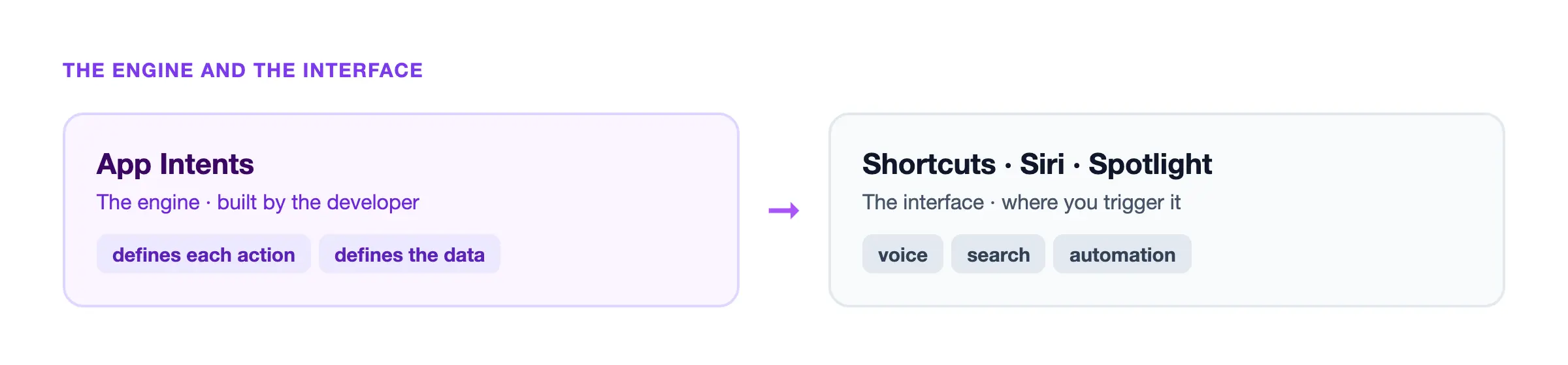
A r/thingsapp user made the link plainly: "Things does have them, App Intents are basically what shows in the Shortcuts app."
The same user flagged how uneven discovery still is: "I've noticed with my own app the new Siri is actually not very good at discovering them. Sometimes it's able to perform the action, sometimes it'll say there's no actions available for my app." That matters most for which of them respond to the new Siri.
Which Apps Work With the New macOS 27 Siri (and How to Tell)
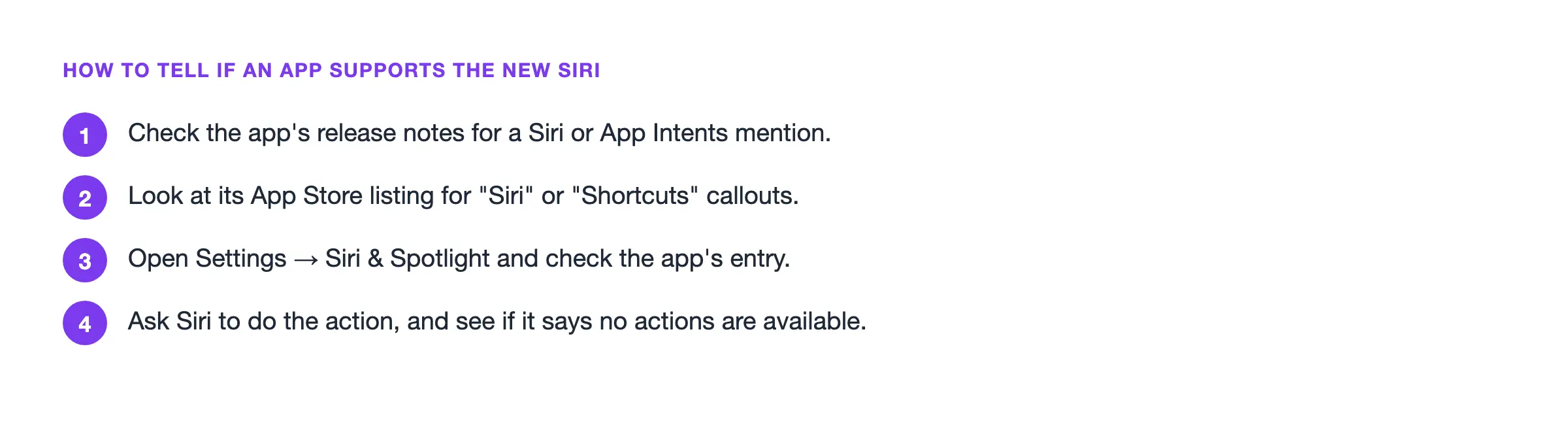
Support arrives gradually, not all at once. Apps with support respond immediately; the rest catch up within that same window. Without it, nothing breaks, just silence. Here's how to tell:
- Check the app's release notes for a Siri or App Intents mention.
- Look at its App Store listing for "Siri" or "Shortcuts" callouts.
- Open Settings, then Siri & Spotlight, and check the app's entry.
- Ask Siri to do the action, and see if it says no actions are available.
Raycast and the new Siri do different jobs: Raycast is a keyboard-driven launcher you open yourself; the framework lets a voice assistant reach in without opening the main app at all. Discovery is still imperfect. For the specific apps that already respond, our compatibility directory tracks Apple's own apps plus every third-party adopter we've confirmed.
One coder wrote in r/iOSProgramming: "On my partner's phone running iOS 26, the intents work just fine and Siri responds normally. However on my phone running the iOS 27 beta, Siri acts like she doesn't have any power to interact with my app at all."
Others in r/apple are still waiting: "A Siri that can perform complex cross-app interactions for you from a single request... will be very popular... They just haven't shipped it yet." See our the new Siri overview for more. Once an app responds, the bigger question is where that data goes.
Where Your Data Goes When Siri Acts Inside Your Apps
Most of these actions run locally; heavier tasks fall back to Private Cloud Compute, which Apple says deletes the data once the request is answered. Apple runs its Gemini-based model under its own privacy controls, not as training data for Google: what changes is surface area, not who trains what.
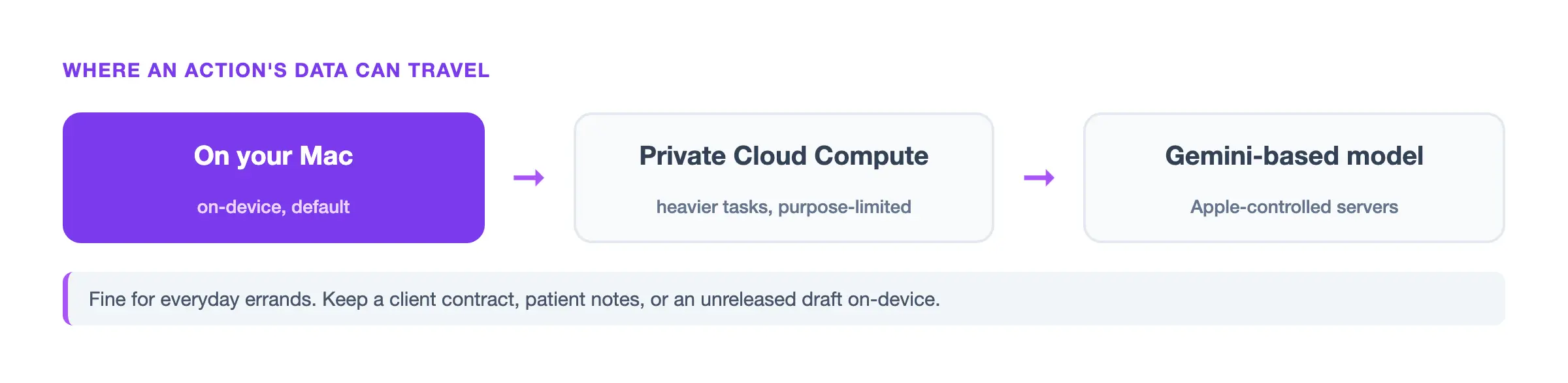
hideInSpotlight defaults to false, so confidential records can land in Spotlight's index unless opted out. The official documentation says these models "run entirely on device so that a task can be completed without data leaving your device," and Private Cloud Compute exists "for the sole, exclusive purpose of fulfilling the user's inference request."
The honest concern isn't training, it's surface area. Apple itself paid $95 million to settle a Siri eavesdropping lawsuit, and a 2026 governance paper warns on-device assistants can still combine app data into more paths than a user would expect (source).
One r/degoogle user summed up the worry about control: "I don't use Siri... as long as the phone controls my apps, I'm not sure switching mail app makes a difference." Our Siri privacy note goes deeper.
Keeping Confidential Work Off the Cloud: Where Elephas Fits
App Intents is great for errands you'd say out loud. For work you wouldn't, a client contract, patient notes, or an unreleased draft, you want a tool that processes it on your own Mac. Elephas is a privacy-friendly AI knowledge assistant with built-in local LLM models, so sensitive text never leaves your device.
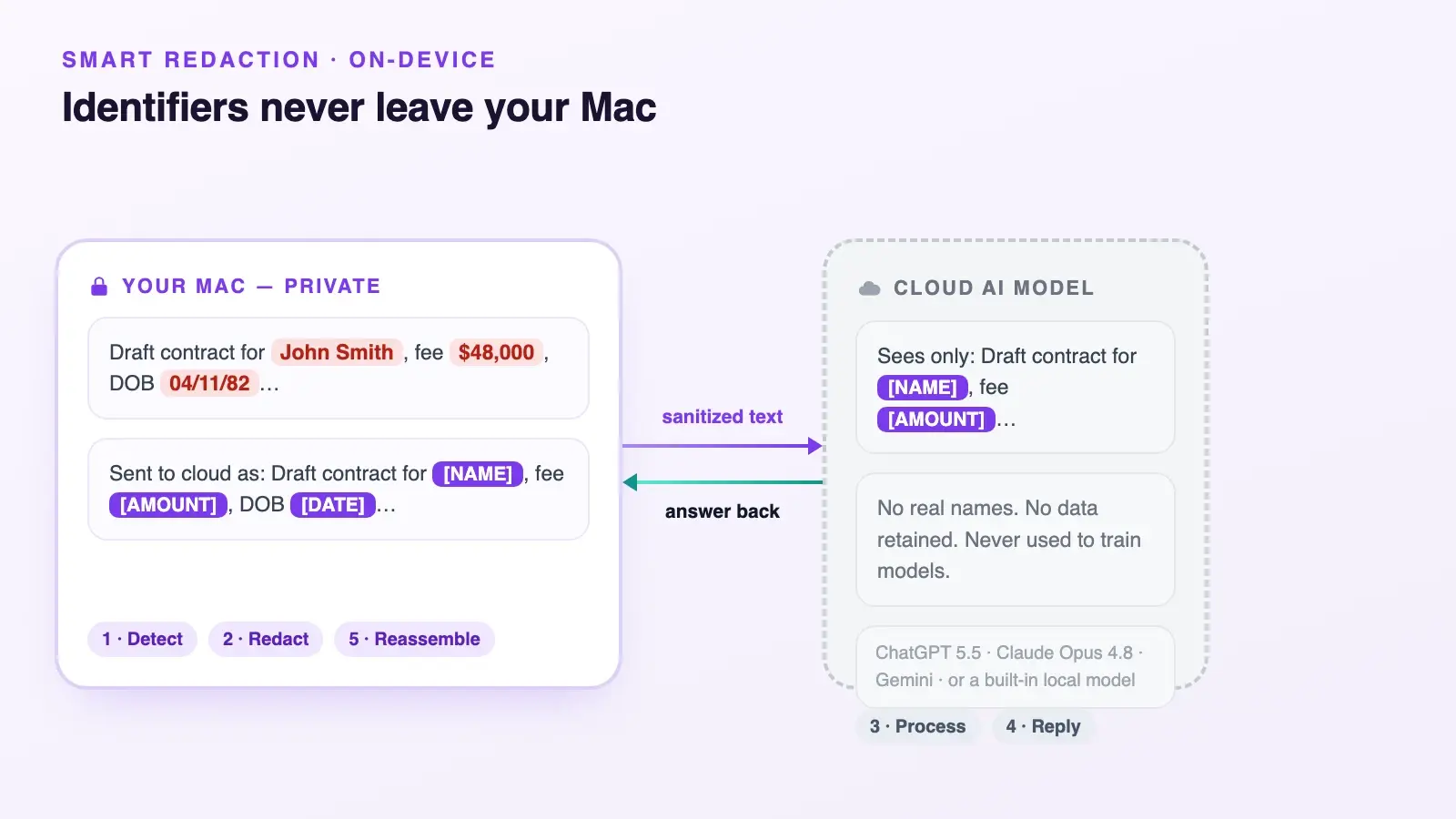
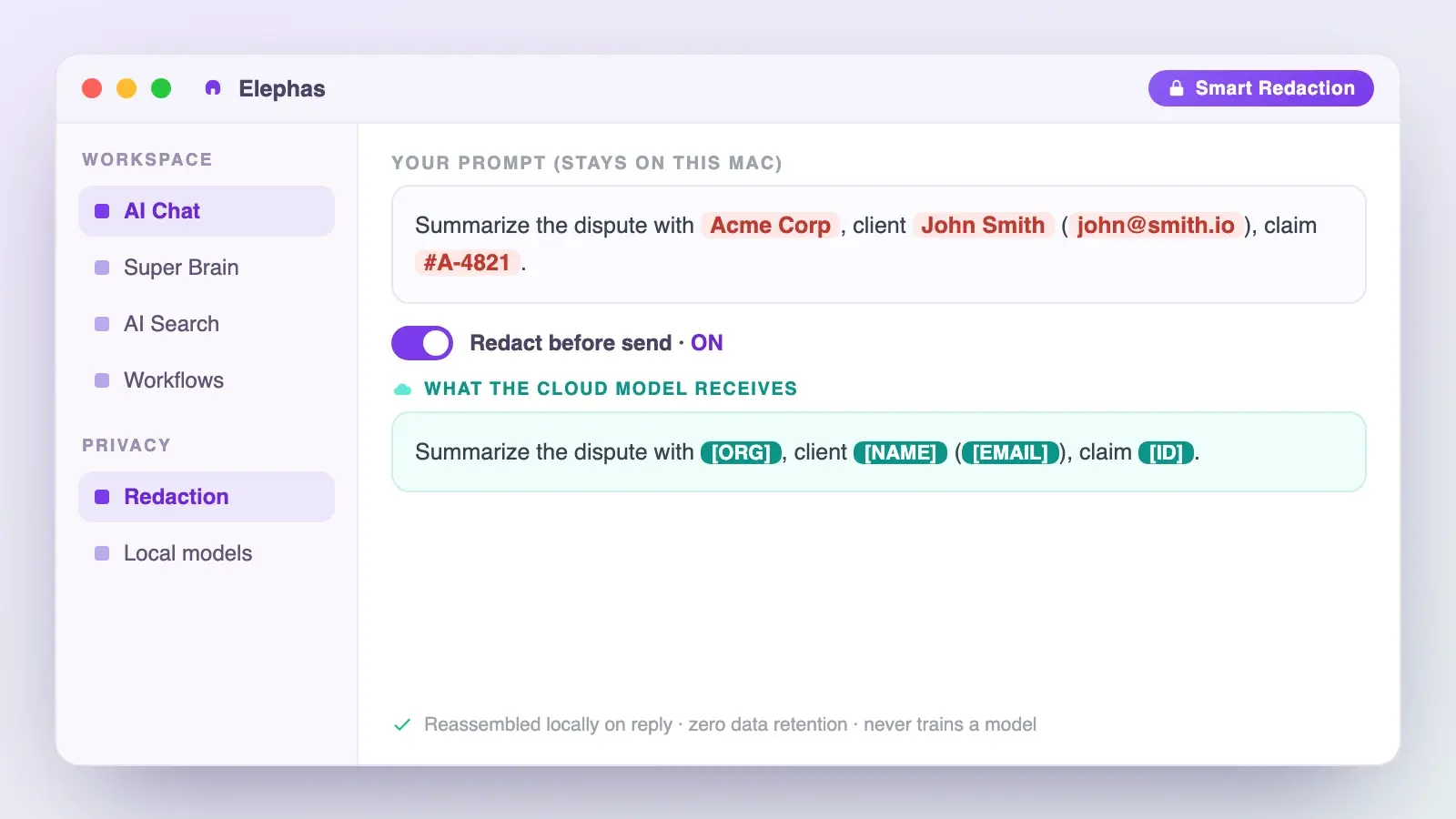
Some of you will still reach for a frontier cloud model on harder problems, which is exactly where researchers and consultants tend to land. Elephas covers that case through automatic PII redaction, its Smart Redaction feature: it scans your prompt on-device and swaps out names, emails, phone numbers, and other identifiers before anything leaves your Mac, whether you're calling ChatGPT 5.5, Claude Opus 4.8, Gemini, Grok, or Perplexity. The provider only ever sees the scrubbed version. Once the reply comes back, Elephas puts the real details back together locally, so the identifying information never actually traveled anywhere. That comes with zero data retention built in: content never trains AI models, never sits on a vendor's server, and never passes through a third-party reviewer's screen.
Smart Redaction is available on every Elephas plan, including Free. A USENIX Security 2025 study found 7.8% of public iOS Shortcut recipes could be used for surveillance (source).
CybSafe's 2024 "Oh, Behave!" survey found 38% of employees already share sensitive data with unapproved AI tools, often the kind a stray action could reach (source).
IBM's 2025 breach report put shadow-AI breaches at $4.63 million on average. Elephas has a free plan and starts at $19/month, with a "Try Elephas for free" offer on the pricing page. None of this means avoiding the new Siri, just knowing which half of your work belongs to it.
The Bottom Line: What to Do Before macOS 27 Ships
App Intents is the doorway between the new Siri and every app on your Mac, rolling out gradually, with nothing for you to do but wait for updates.
The one decision worth making before macOS 27 ships: let Siri handle the errands, and keep a client draft, a contract, or patient notes on a tool that processes them on your own Mac. Try Elephas free if you want it ready in time.
Frequently Asked Questions
Is App Intents the same as Android intents?
No. Android's Intent system is a decade-old concept for messaging between app components. It's a completely different, unrelated framework.
Is App Intents just Shortcuts renamed?
No. It's the engine developers write; Shortcuts, along with Siri and Spotlight, is the interface you use to trigger what they built.
Do I have to turn App Intents on myself?
No. It's entirely out of your hands. Once an app updates, its new Siri and Spotlight behavior appears automatically, with nothing to configure.
Will Notion, Obsidian, or Raycast work with the new Siri right away?
Support rolls out over two to three years. Check an app's release notes or App Store listing rather than assuming day-one coverage.
If an app doesn't support App Intents, does something break?
No. The app simply stays invisible to Siri requests. There's no error message, just silence where a response would normally appear.
Does App Intents send my data to Apple's servers?
Most requests process locally. Heavier ones fall back to Private Cloud Compute, which keeps data only long enough to answer the request.
What happened to SiriKit?
Apple deprecated SiriKit at WWDC 2026. App Intents is now the only framework third-party apps use to reach Siri.
Is App Intents safe for confidential work?
It's fine for low-stakes automation. For contracts, patient notes, or client drafts, use a private, on-device AI tool that keeps them on your Mac instead of routing them through Siri.
Sources:
- CNBC, "Apple to pay Google for a custom Gemini model powering Siri" (2026): https://www.cnbc.com/2026/01/12/apple-google-ai-siri-gemini.html
- Tech Times, "App Intents Replaces SiriKit" (2026): https://www.techtimes.com/articles/318005/20260608/wwdc-2026-app-intents-replaces-sirikit-gemini-siri-migration-clock-starts.htm
- Apple Developer, "App Entities": https://developer.apple.com/documentation/appintents/app-entities
- Apple Developer, WWDC26 session 240: https://developer.apple.com/videos/play/wwdc2026/240/
- Apple Developer, "hideInSpotlight": https://developer.apple.com/documentation/appintents/indexedentity/hideinspotlight
- Apple Security Research, "Private Cloud Compute": https://security.apple.com/blog/private-cloud-compute/
- Apple Legal, "Apple Intelligence & Privacy": https://www.apple.com/legal/privacy/data/en/intelligence-engine/
- CBS News, "Apple Siri settlement" (2025): https://www.cbsnews.com/news/apple-siri-settlement-95-million-lopez-how-to-file-claim/
- Zhang et al., USENIX Security 2025: https://www.usenix.org/system/files/usenixsecurity25-zhang-shirley.pdf
- "Local Is Not a Sufficient Privacy Boundary" (2026): https://arxiv.org/abs/2606.10173
- CybSafe / National Cybersecurity Alliance, "Oh, Behave!" (2024): https://www.cybsafe.com/press-releases/study-almost-40-of-workers-share-sensitive-information-with-ai-tools-without-employers-knowledge
- IBM, "2025 Cost of a Data Breach Report": https://www.ibm.com/think/x-force/2025-cost-of-a-data-breach-navigating-ai
