ChatGPT's Computer History: What It Actually Records on Your Mac
OpenAI shipped a new opt-in feature called Computer History inside the ChatGPT desktop app for Mac on August 13, 2026. It quietly builds a searchable timeline of what you click, type, and switch between, then feeds that back to ChatGPT for more context later. The tradeoff sounds simple: give up a little privacy, get a smarter assistant. Look closer at how OpenAI built this, and it gets messier. An AI agent reads your raw activity before summarizing it, and that summary sits on your Mac unencrypted. Here's what Computer History does, and what almost nobody is saying about it yet.
Quick Answer
- OpenAI's ChatGPT desktop app for Mac now includes an opt-in feature called Computer History that builds a searchable timeline of your clicks, typing, and app switches. A short-lived AI agent then summarizes that activity into a memory file ChatGPT can reference later.
- The memory files this creates are not encrypted on your Mac, and OpenAI's own documentation says any other program running as your macOS user can read them.
- Computer History relies on the same macOS Accessibility permission that security researchers document as a standing target for keylogger and stalkerware malware. It technically reads the text you already typed rather than intercepting keystrokes as you press them.
- Access is currently limited to Pro, Business, and Enterprise ChatGPT subscribers, unavailable in the EEA, UK, and Switzerland. Beyond a handful of Hacker News comments and one adversarial report, it has drawn no sustained pushback from security researchers, IT vendors, or OpenAI itself.
- Elephas takes the opposite approach: it redacts sensitive information on your Mac before anything reaches a cloud AI model like ChatGPT, Claude, or Gemini, on every plan including Free, at Elephas.
Why ChatGPT Computer History Matters More Than the Silence Suggests
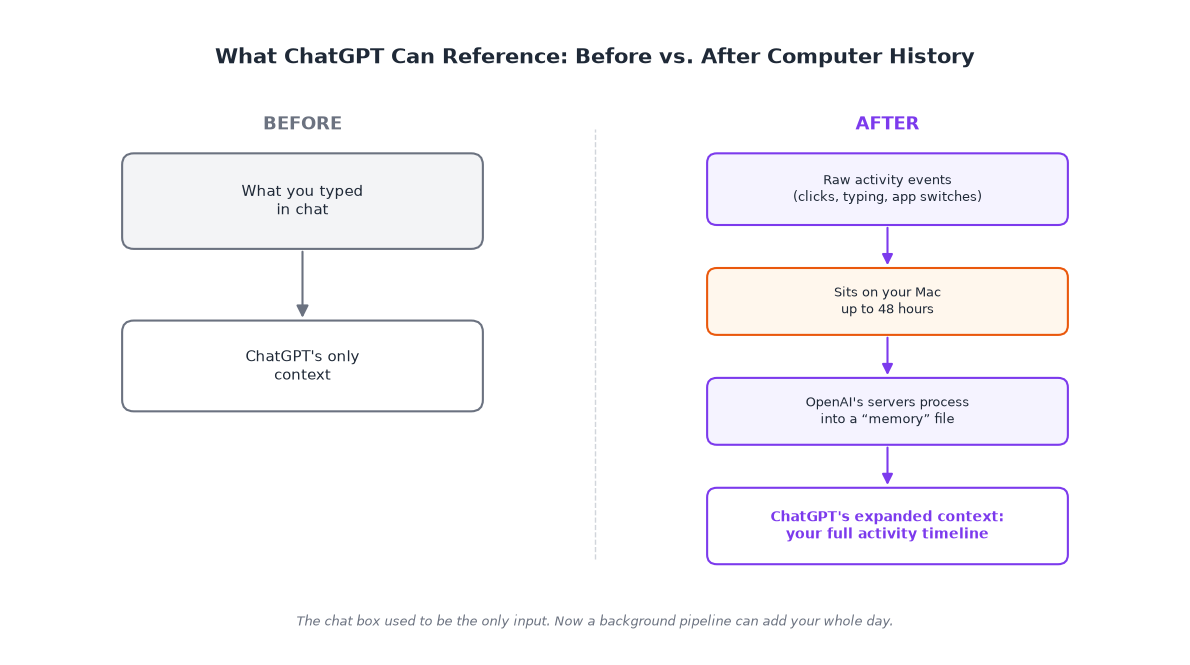
What ChatGPT Computer History collects goes well beyond a single settings toggle. Raw activity events sit on your Mac first, then a short-lived AI agent turns them into a "memory" file ChatGPT can draw on later. That pipeline means the real question isn't the feature, it's who can reconstruct your day from what it captured.
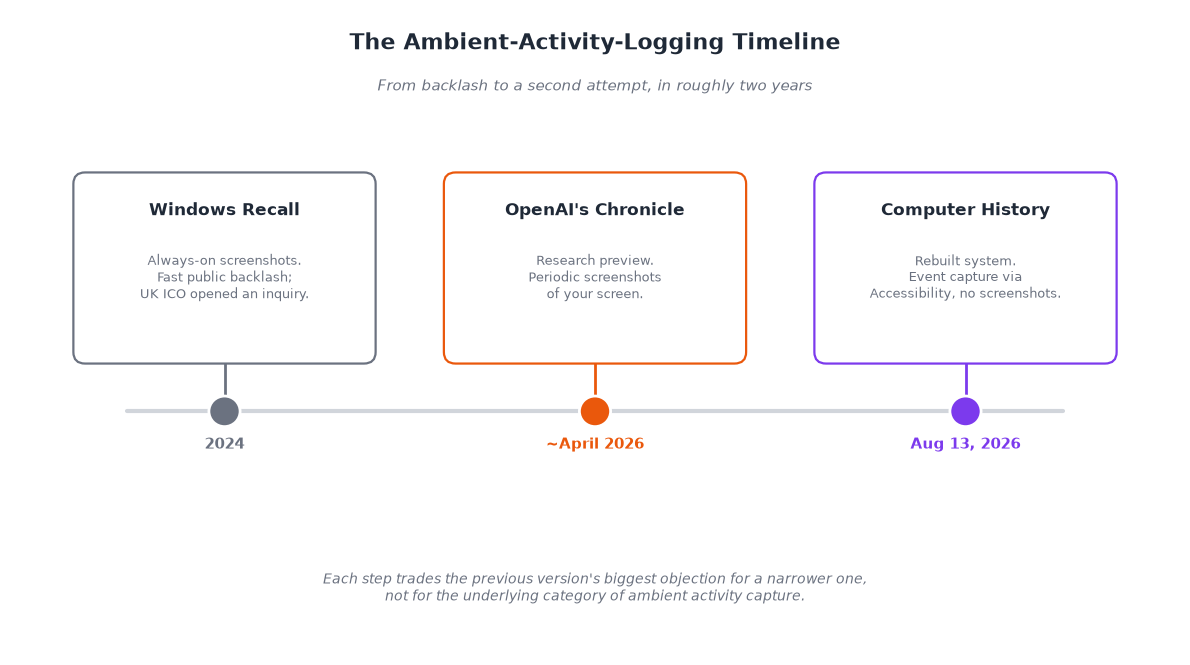
Compare it to Microsoft's Windows Recall, which pushed the same idea further with always-on screenshots and drew a fast 2024 backlash. Computer History gets graded against that memory, and it isn't OpenAI's first stumble in this exact spot.
The Register's friendly keylogging framing captures the tension. OpenAI has stumbled on Mac privacy before: a 2024 bug stored ChatGPT conversations unencrypted outside the app's sandbox, patched within days once a researcher reported it. This isn't the company's first brush with this exact failure mode.
More than a day after launch, the reaction has stayed muted. A few scattered Hacker News comments raise the same concern The Register did, but no named security researcher has published a deeper teardown, and OpenAI has not responded to the "keylogging" label at all. That quiet is still notable for a feature this invasive.
- Raw event files sit on your Mac for up to 48 hours before OpenAI's servers process them into a memory file.
- Personal ChatGPT Pro accounts can turn Computer History on themselves, even on a company-owned Mac, with zero visibility for the employer's IT team; Business and Enterprise seats need an admin to turn it on first through Workspace Settings.
- The feature skips screenshots, screen recordings, and microphone or system audio entirely, so it isn't a Recall-style visual record.
- OpenAI's own advisory tells users to pause the feature or exclude apps that hold sensitive health, financial, or personal information before opening them, on top of the everyday risk of confidential documents in ChatGPT.
- No major security vendor, MDM provider, or IT community forum has published guidance on Computer History yet, so most companies have no off-the-shelf guidance to work from.
What Computer History Actually Tracks, According to OpenAI's Own Docs
Computer History is a distinct setting inside the ChatGPT Mac app, off by default, tucked under Settings → Integrations. It isn't the chat history you already know, the log of your past conversations. That's a separate, older feature that just happens to share part of the name.
It replaced an earlier screenshot-based preview called Chronicle. Per Computer History's own documentation, it captures interaction events locally, then periodically starts a short-lived Codex session, the same coding-agent engine OpenAI uses elsewhere, to read that event stream and write a plain-language summary. OpenAI calls the result a "memory."
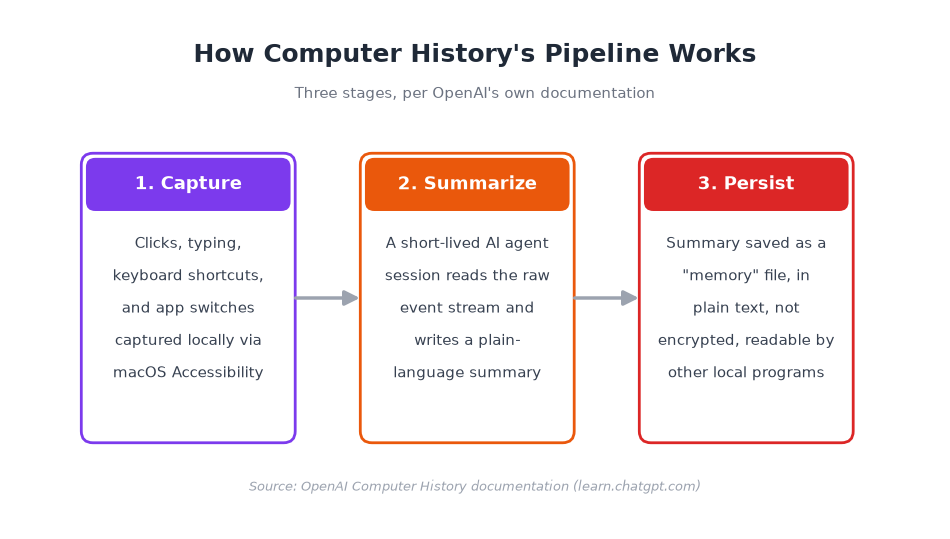
Instead of screenshots, it reads clicks, typing, keyboard shortcuts, and app switches through macOS's Accessibility system, the same framework macOS uses for screen readers and other assistive tools. Right now, that only happens in the Mac app, not on your phone or in a browser.
Access is limited to Pro, Business, and Enterprise plans, not the Free tier, and OpenAI hasn't rolled it out yet in the EEA, UK, or Switzerland either.
- The memory file lands at a fixed, named path on your Mac, inside a folder OpenAI's own docs point to directly.
- Turning Computer History on has a token cost: summarizing your background activity into memories runs as a periodic automated session, on top of your regular ChatGPT usage.
- OpenAI's own advisory goes beyond sensitive apps: it also tells users to turn Computer History off during conversations with other people unless those people have given prior express consent.
- Chronicle launched as a research preview around April 2026 and relied on periodic screenshots instead of event capture; OpenAI describes the change to Computer History as "a rebuilt system rather than a rename."
- API, key, and Amazon Bedrock customers don't get access to Computer History at all, only the consumer and Business/Enterprise ChatGPT apps.
The Permission Computer History Shares With Mac Malware, and Where That Comparison Breaks Down
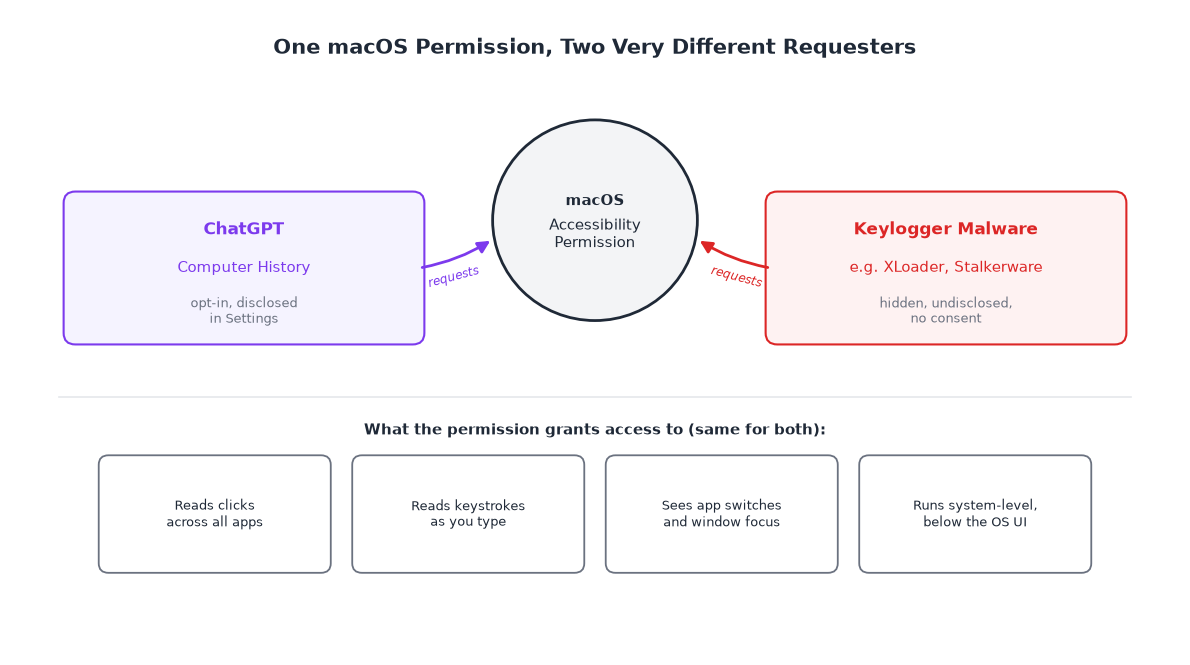
That Accessibility permission is worth pausing on. It's the same framework macOS uses for screen readers and voice control, and security researchers document it as the exact mechanism the Mac infostealer XLoader uses to identify what's on your screen.
Here's a distinction most coverage skips. macOS treats "watch what's on screen" and "watch what you type" as two different permissions: Accessibility, and a separate one called Input Monitoring, built specifically to intercept raw keystrokes. OpenAI's docs describe Computer History's capture only as "the accessibility system," never Input Monitoring.
That most plausibly means reading the value sitting in a field, not each keypress. Either way, Computer History gets what you typed. OpenAI's own documentation confirms the rest: the memory files it generates are unencrypted plain text, readable by any other program running as your macOS user, with a button opening Finder at the file.
None of this is theoretical. In November 2025, researchers showed ChatGPT's memory system could be hijacked through a crafted webpage to leak data, months before Computer History existed. OpenAI's own warning that this feature "increases the risk of prompt injection" describes that same weakness, now applied to a permission that watches your whole screen.
- Properly built password fields are exempt from Accessibility reads, but ordinary chat boxes, search bars, and web form fields inside apps like Slack or a browser are not. That's one more entry in the growing list of AI privacy risks tied to everyday AI use.
- Objective-See and Moonlock, two of the most current independent trackers of Mac malware, don't publish an exact percentage of malware abusing Accessibility specifically, but both count it among the permissions attackers most reliably go after.
- The Register's own reporting calls the mechanism "a keylogging and event capture system" in its body text, a more direct description than the "friendly keylogging" headline.
- OpenAI frames this as reducing repetitive typing and giving ChatGPT standing context about your work, though a stickier, more useful assistant is also a hedge against you switching to a rival AI tool.
- No credible, feature-specific expert defense of Computer History has surfaced in press coverage; the closest thing to a counterargument is OpenAI's own framing, repeated by several trade outlets.
What This Means for How You Use ChatGPT at Work
OpenAI's decision to hold Computer History back from the EEA, UK, and Switzerland looks less like caution and more like a hedge once you know the history. Italy's data protection authority, the Garante, hit OpenAI with a €15 million fine in 2024, over training ChatGPT on user data without adequate legal basis.
A Rome court annulled that fine in March 2026 on jurisdictional grounds, not because the underlying conduct was fine. The UK's Information Commissioner's Office also opened an inquiry into Windows Recall in 2024, so European regulators already have a documented appetite for scrutinizing this category of tool.
The closest enterprise warning comes from an AI analyst site, not a security chief. It tells Business and Enterprise teams to treat Computer History as a limited pilot until retention, consent, and audit controls line up. Admins gate it via Workspace Settings, but a Pro user can still turn it on with zero IT visibility.
That leaves the real question: whether there's a way to get useful work context from an AI assistant without it passively watching everything you do. The alternative to logging everything and promising to protect it later is choosing what enters the system, then stripping anything sensitive before it reaches a cloud model at all.
- A federal judge already ruled, in United States v. Heppner, that a user's conversations with an AI chatbot, specifically Claude, aren't protected by attorney-client privilege or work-product doctrine (protection for litigation-prep materials); Computer History adds a standing activity record on top of that exposure.
- OpenAI signs Business Associate Agreements only for Enterprise and API customers, not Free, Plus, or Team, which matters for anyone in healthcare-adjacent work considering this feature.
- Client data is already one of the most common categories of confidential information employees paste directly into ChatGPT; Computer History adds passive collection on top of a channel that's already leaking.
- No law firm blog, compliance newsletter, or DLP vendor has published guidance on Computer History specifically as of this writing. That leaves legal and healthcare-adjacent teams with no third-party guidance to check OpenAI's own documentation against.
- Expect Claude, Gemini, and other desktop AI assistants to ship something similar; this reads like an "ambient memory" pattern forming across the category, not a one-off from a single company.
A Privacy-First Alternative: Redact Before You Send, Not Log After
That's the structural choice Elephas is built around. It's a privacy-friendly AI knowledge assistant, not a competitor to ChatGPT in the sense of building its own model. You connect the cloud model you already use (ChatGPT, Claude, Gemini, Grok, or Perplexity), or use Elephas's built-in local LLM models to stay fully offline on your Mac.
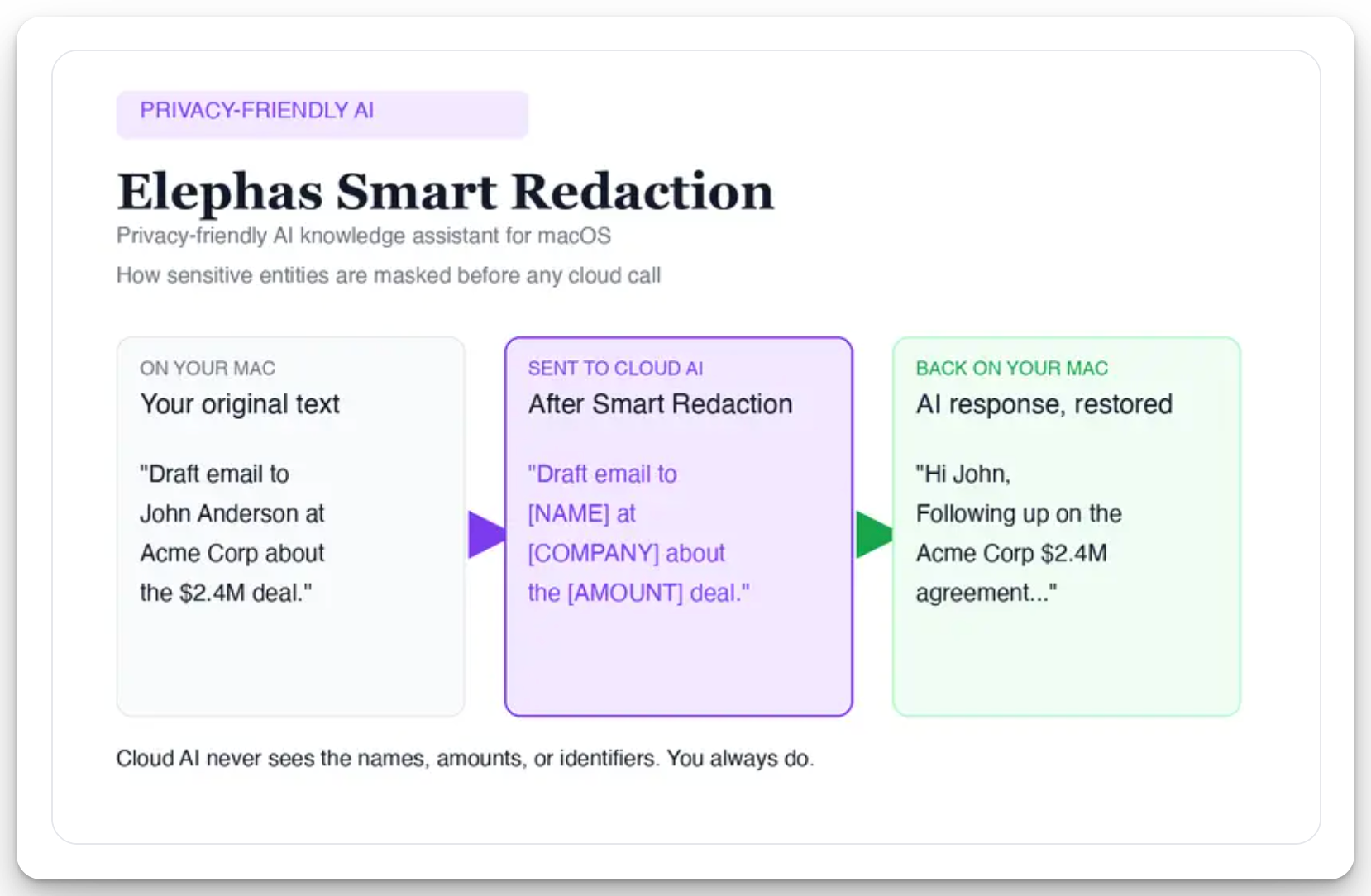
For anyone who still wants a leading cloud model, Elephas adds a second layer through Smart Redaction. Before a prompt reaches ChatGPT, Claude, Gemini, Grok, Perplexity, or any other cloud model, Elephas strips sensitive names, emails, phone numbers, and identifiers, right there on your Mac.
Only the sanitized text ever reaches the cloud model. When the answer comes back, the redacted fields are reassembled locally, so identifiable information never leaves the device unprotected. Elephas pairs this with zero data retention: content never trains AI models, never sits on a vendor's server, and never passes through a third-party reviewer's screen.
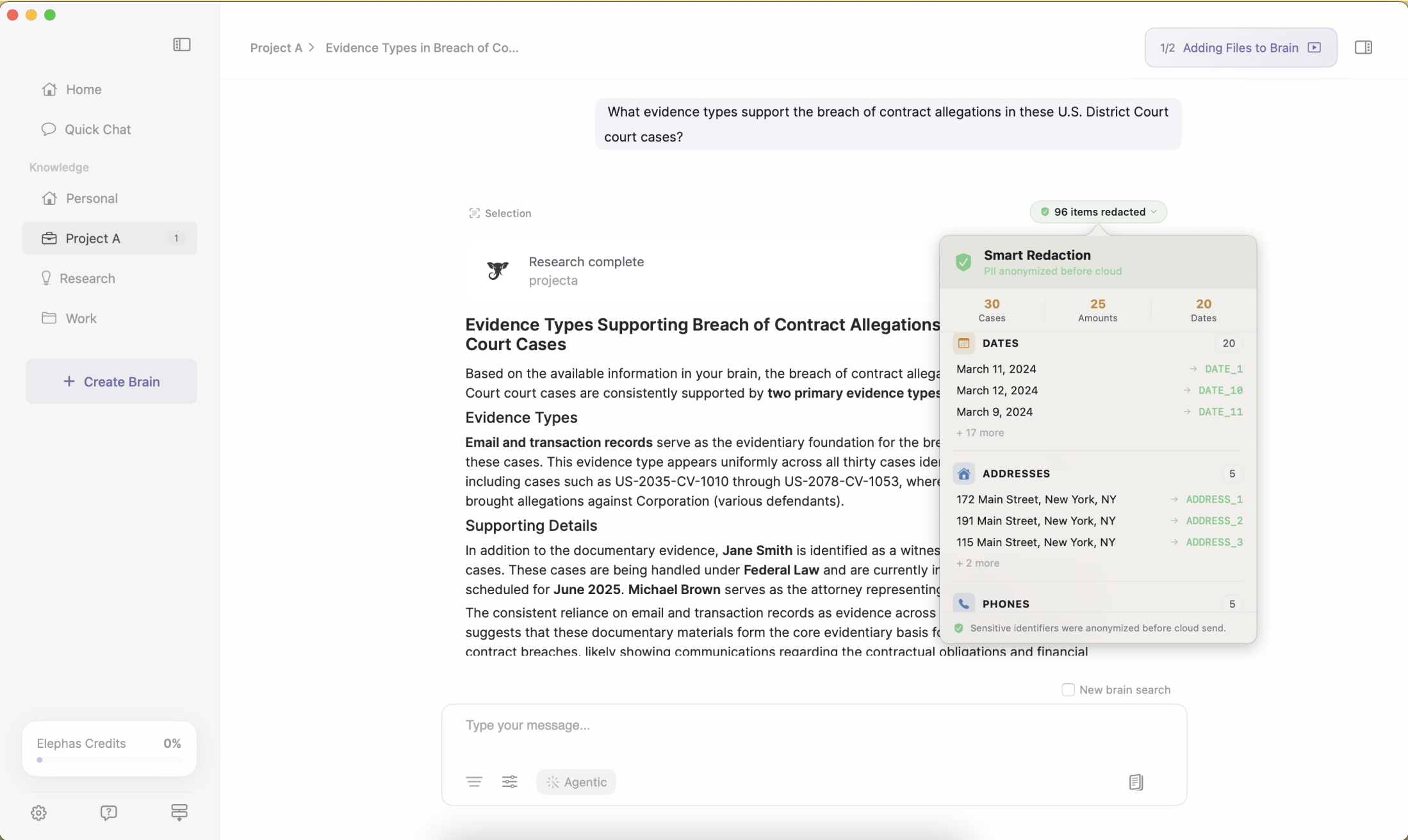
Smart Redaction ships on every Elephas plan, including Free, not gated behind a paid tier. The privacy layer can sit on a vendor's server after collection, or on your own Mac before anything is sent, and that choice is the real decision behind this story. Elephas starts at $19/month with a free trial.
- You keep the ChatGPT (or Claude, Gemini, Grok, Perplexity) subscription you already pay for; Elephas adds a redaction layer on top instead of asking you to abandon your preferred model.
- In practice, that means a prompt built from a client contract keeps the legal question but strips the client's name, email, and account numbers before any cloud model sees it.
- The redaction and reassembly sequence runs locally on your Mac, the structural opposite of a persistent, cloud-side activity log an agent summarizes on its own schedule.
- Elephas builds its knowledge base only from documents, notes, and files you actively choose to add, never from passively observed clicks, typing, or app switches running in the background.
- The full current plan list lives at elephas.app/pricing, since prices change and this article only ever quotes the $19/month starting figure.
The Real Choice Isn't ChatGPT vs. No AI
Computer History probably won't be the last time a mainstream AI vendor asks you to trade passive observation for smarter, more contextual answers. Microsoft tried it with Recall. OpenAI has now tried it twice, first with Chronicle, then with this. The more useful question going forward isn't whether to trust any single vendor's promises about how long it keeps your data. It's where you want the privacy layer to sit, before anything gets collected, not after. That choice will keep mattering long after this particular headline, and this particular silence, fades.
