Can I Use the MacBook Air With AI Apps?
Last updated: 17 August 2026
"Can a MacBook Air run AI apps" gets answered as if it were one question. It is three. Cloud tools, Apple Intelligence, and models that run on your chip make completely different demands on the machine, and only the third is capped by the Air you bought, somewhere between 8GB and 24GB of unified memory.
This page sorts out which of the three actually depends on your specs, so you stop paying for memory you will never use, or buying too little for the work you want.
Below: a compatibility table by chip and memory tier, the RAM thresholds that decide local AI, and what changed for Air buyers in August 2026.
Quick answer
- Cloud AI apps (ChatGPT, Claude, Gemini, Perplexity) run identically on any Air, 8GB to 32GB
- Apple Intelligence needs Apple silicon; its newest features need an M3-or-later Air with 12GB+ memory
- Running AI models on the Air, no cloud involved, is where RAM matters: 16GB is the comfortable floor
- MacBook Air prices and RAM wait times both moved in August 2026 due to a memory shortage
- For private work on any Air, Elephas strips identifiers before they reach a cloud model, on a free plan or from $19/month with a free trial
Yes, the MacBook Air Runs AI Apps
Yes, and on most days the Air you already own is enough. Cloud AI apps behave the same on an 8GB M1 as on a 32GB M5, because the work happens on the vendor's server, not yours.
Apple Intelligence is the exception that needs Apple silicon. The only category your hardware truly limits is a model running on the Air's own chip, where unified memory sets the ceiling.
One r/LocalLLaMA reader asked almost this and got a blunt reply:
“Ok thanks, so no local LLM for my MacBook Air got it. :(” — r/LocalLLaMA
What Counts as an AI App: Cloud, Apple Intelligence, or Local
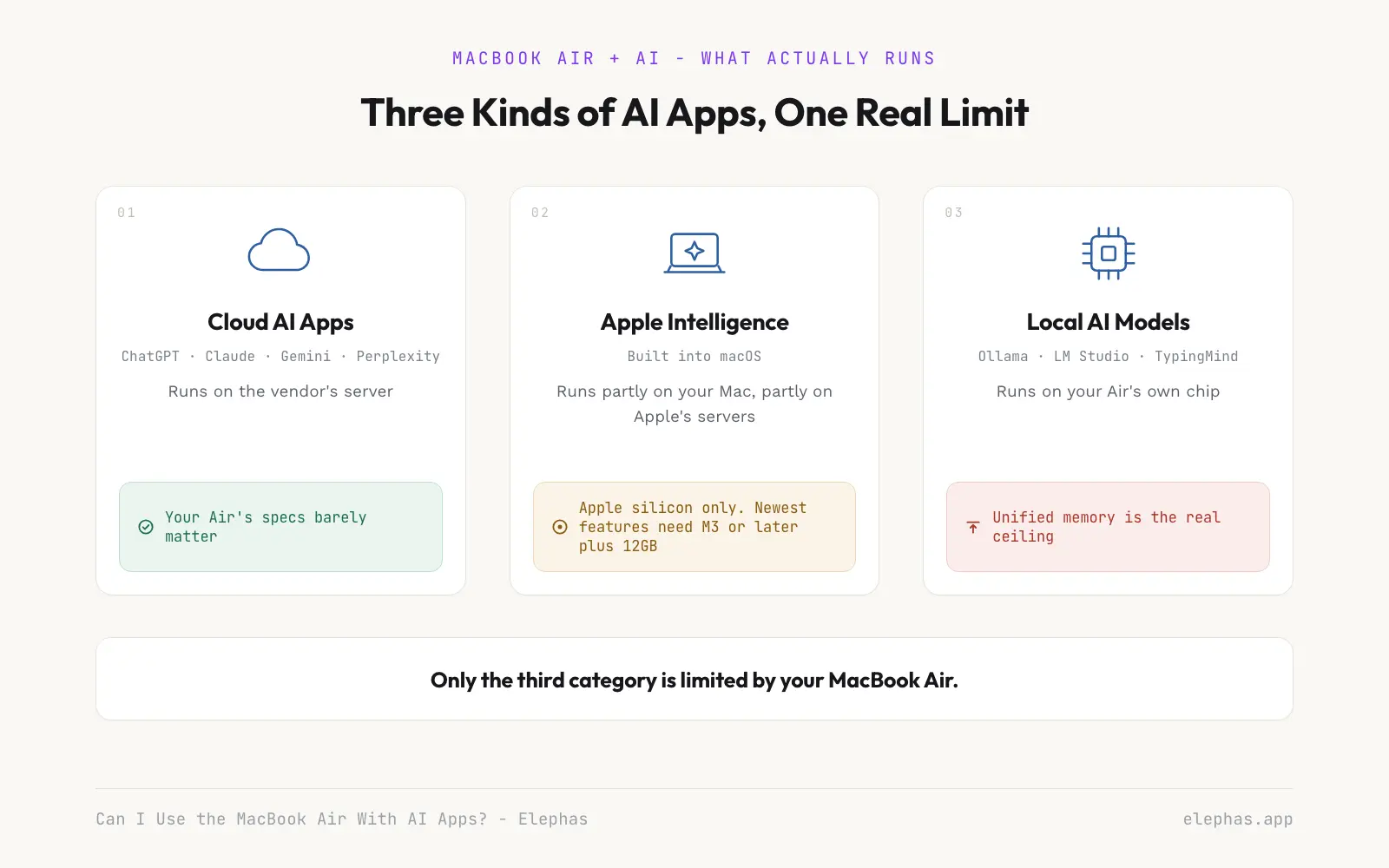
Where the model runs is the whole difference. A cloud app rents someone else's hardware by the request. Apple Intelligence ships with macOS and splits work between your chip and Apple's servers. A local app downloads a model file into your memory.
That split matches real work. One r/datascience scientist described their daily mix:
“Enterprise Data Scientist here, 10 years experience in modeling... I sometimes prototype local but frankly do 90% of my work in cloud environments.” — r/datascience
Apple Intelligence needs Apple silicon; older Intel Airs can't run it (Apple). A peer-reviewed study found it also routes harder requests to Apple's cloud servers (ACM WiSec, 2026). Not every owner is convinced it matters:
“I never use Apple intelligence or heard much about it by mac users” — r/macbookair
- Not all of Apple Intelligence runs on your chip, so a faster Air does not make every request faster.
- Local models run on the Air's own chip, the only category where hardware is the real ceiling.
- Apple Intelligence's Writing Tools (rewrite, proofread, summarize) and Shortcuts-based commands are real productivity capabilities, and neither depends on which Air you buy.
Whether this matters to you depends on which of these you are: if you're worried about the worst case, if you're trying to make this work, or if you're trying to understand the nuance.
How Much RAM Your MacBook Air Actually Needs
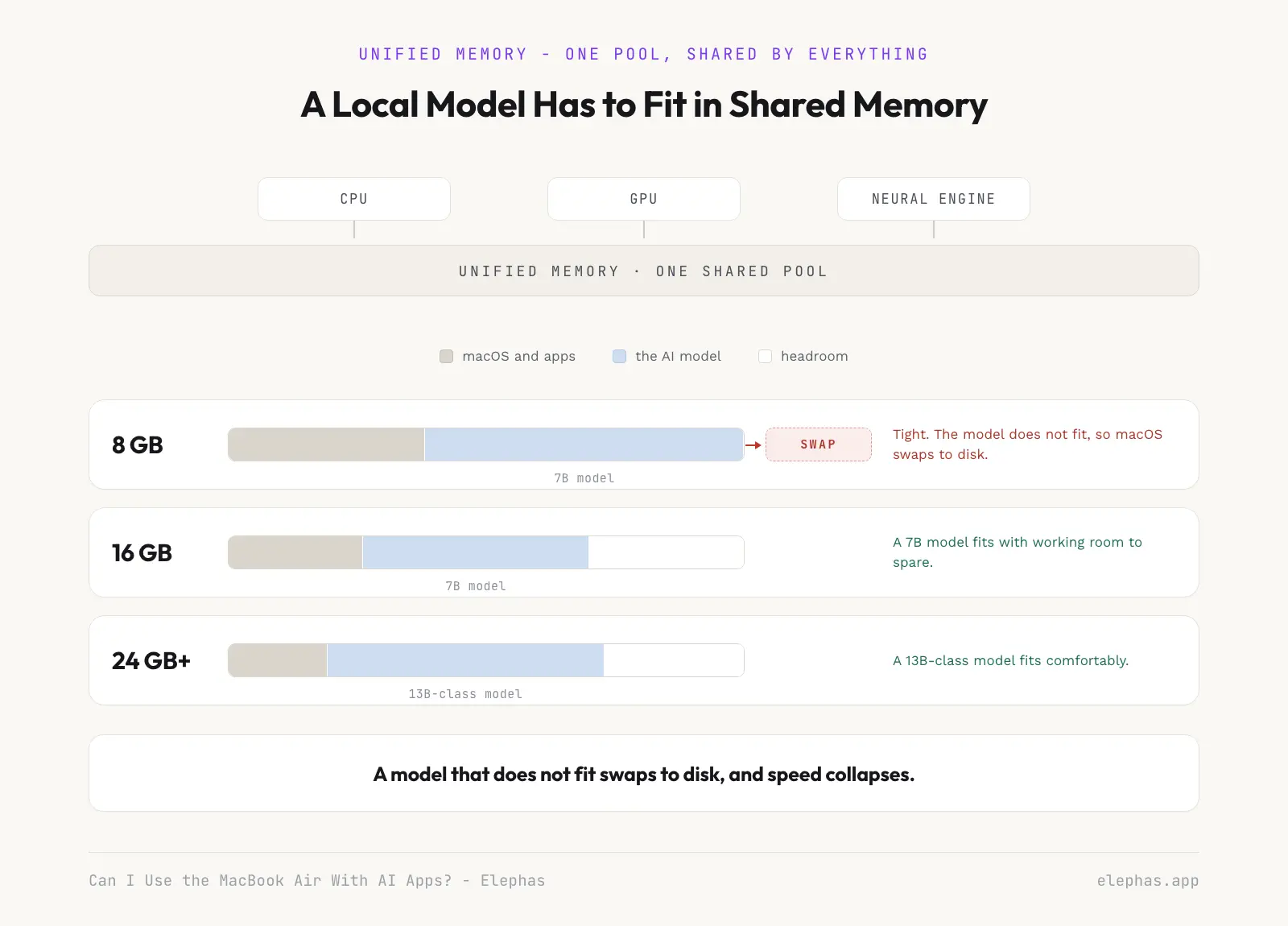
Unified memory, the RAM shared between a chip's CPU and GPU, decides whether local AI runs on your MacBook Air. A large language model (LLM) must fit its weights in that pool, so 16GB, 24GB, or 32GB matters more than the chip name.
Local AI and On-Device Models: What Your MacBook Air Can Actually Run
| MacBook Air | Cloud AI apps | Apple Intelligence | Local AI models |
|---|---|---|---|
| Intel Air (any year) | Yes | No | No |
| M1/M2 Air, 8GB | Yes | Basic tier | Small models, slow |
| M1/M2 Air, 16GB | Yes | Basic tier | 7B-class, workable |
| M3/M4 Air, 16GB | Yes | Advanced tier | 7B-class, comfortable |
| M3/M4/M5 Air, 24GB+ | Yes | Advanced tier | 13B-class, comfortable |
| M5 Air, 32GB | Yes | Advanced tier | 13B+-class, best-case Air |
One r/apple owner confirmed:
“My MacBook Air can run qwen 2.5 14B and Gemma 3 27B on it, and it's relatively okay on LMstudio, but it can't really handle much more than that.” — r/apple
- 8GB Airs: cloud-AI-first; local AI is a bonus.
- 16GB Airs: 7B-class models and document chat, workable on M1/M2 and comfortable on M3/M4.
- 24GB+ Airs: room for 13B-class models; see our best local AI assistant picks.
- Developers who want a coding assistant that stays on the machine, not just in the browser, need the same 16GB-or-more floor as any other 7B-class local model.
The Fanless Trade-Off: Air vs. MacBook Pro Under Sustained Work
Without a fan, sustained work slows as it runs. One Backyard AI user summed it up:
“The answer is an Apple Silicon Mac with the most GPU cores and RAM you can afford... definitely a MacBook Pro, not an Air because they have cooling and the machine will work hard” — r/BackyardAI
It Depends on Who You Are
If you're worried about the worst case, two failure modes matter. The fanless body throttles on long local-AI jobs no matter the RAM, and swapping to disk is separate, happening when a model does not fit in memory. 24GB fixes the second, not the first. One Air owner put it bluntly:
“You should have gotten at least 24gb/32gb of ram.” — r/macbookair
If you're trying to make this work, an 8GB M1 Air will load a 7-billion-parameter model and answer questions about a long document, slowly. A 4-bit 13-billion-parameter model leaves almost nothing for macOS, so the machine swaps and crawls. That is why the table puts 13B work at 24GB. One r/mac reader pushed back:
“Don't listen to the chorus of people saying you absolutely need 16GB. They're just wrong.” — r/mac
If you're trying to understand the nuance, a local model on a 16GB Air can claim most shared memory before macOS starts swapping, slowing the machine. A model that writes slower than you read usually hits a memory-bandwidth ceiling, not something more RAM fixes.
What to Do Before Your Next Upgrade
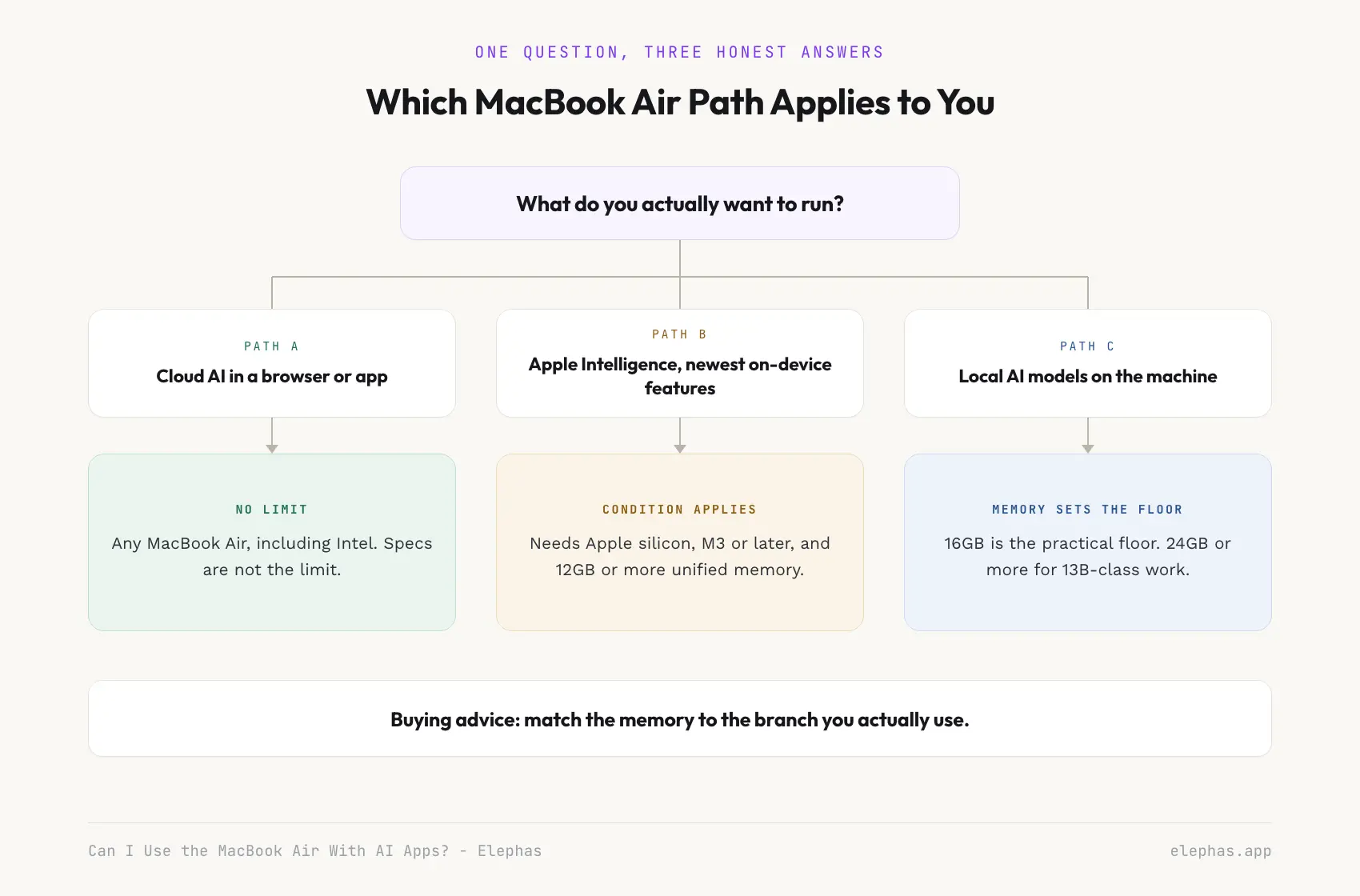
Knowing the cloud-versus-on-device split changes two decisions: which apps you trust with sensitive files, and how much memory your next Air needs, since a 13 billion parameter model needs roughly 24GB (local AI picks). Personally identifiable information (PII) deserves extra care before reaching a cloud model.
macOS 27's advanced Apple Intelligence tier needs an M3-or-later Air with 12GB+ unified memory (TidBITS, 2026-07-20; see our macOS 27 requirements guide). An experimental, single-maintainer Hacker News project claims a technique fitting a 26 billion parameter model in 2GB of RAM (Show HN, 2026-07-29). Treat it as one to watch, not a purchase driver.
A memory-chip shortage hit the Air directly (TechCrunch, 2026-08-02), pushing waits to two to six weeks alongside a $200 price rise (MacRumors, 2026-08-02). A widely cited analysis found AI data centres will use roughly 70% of 2026's memory chip supply (Northeastern Global News, 2026-08-04). One r/macbookair buyer already factors that in:
“You can always expand storage with a external ssd in the future but never ram. You also need more ram to run Apple intelligence for the M1...” — r/macbookair
That threshold recurs, per TidBITS founder Adam Engst:
“Customizable Siri expressivity: To customize the expressivity and pace of Siri's voice... Mac models with M3 and later and at least 12 GB of unified memory.” — Adam Engst, Founder and Publisher, TidBITS (2026-07-20)
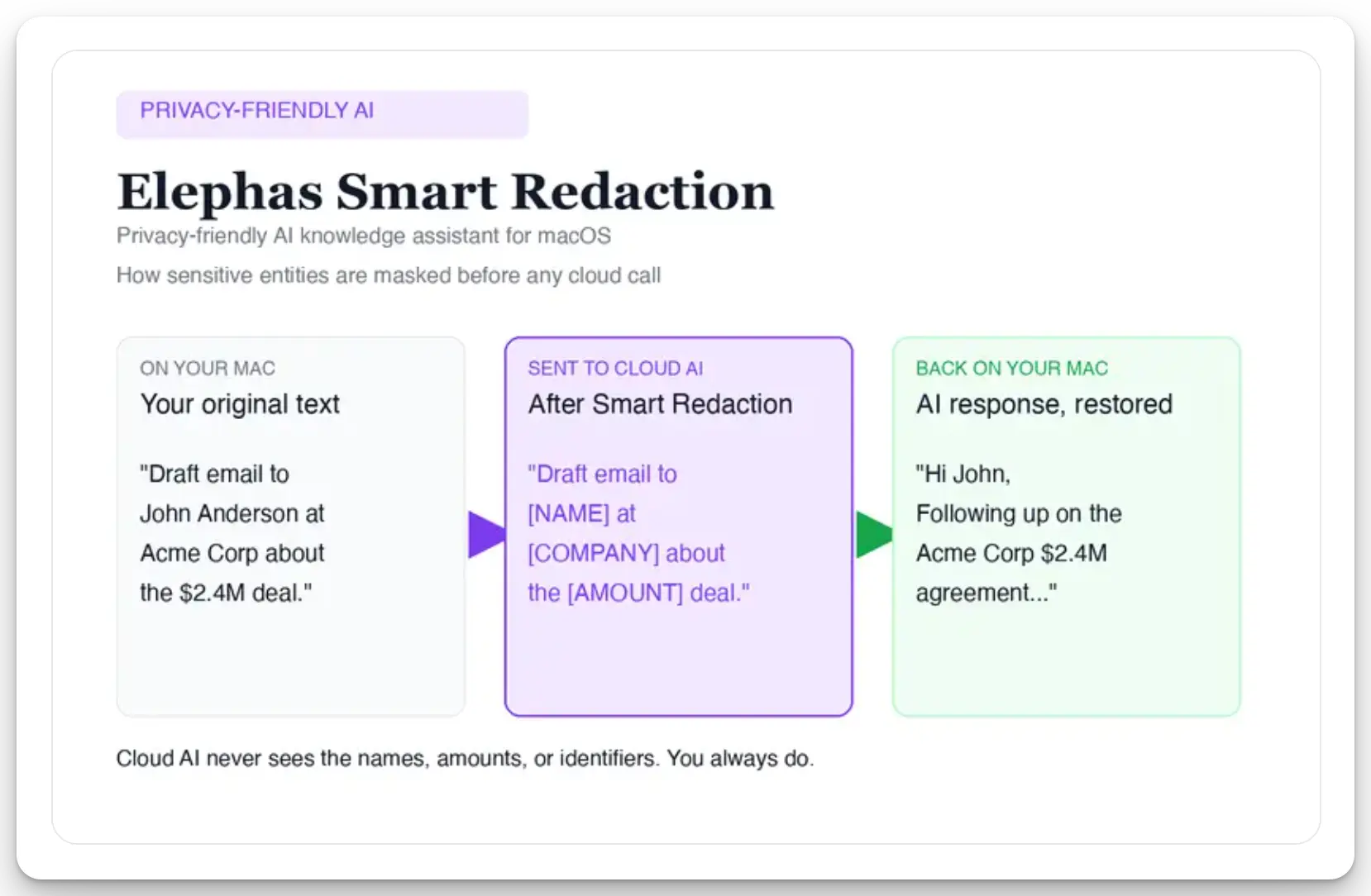
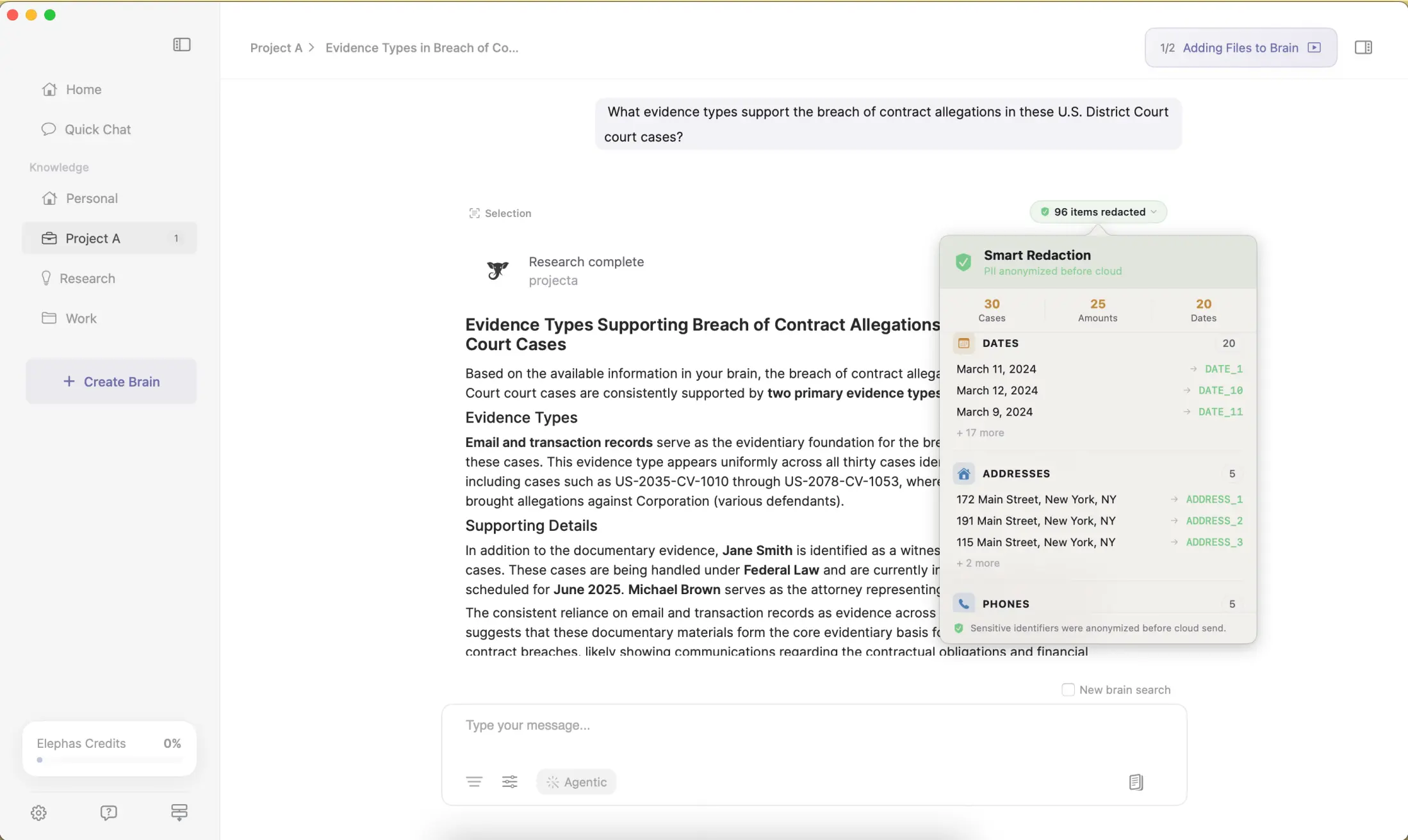
Elephas, a private AI knowledge assistant for Mac, layers automatic PII redaction (beta) on top of the routing choices above. Sensitive names, emails, phone numbers, and other identifiers get stripped on your device before a prompt reaches ChatGPT, Claude, Gemini, Grok, Perplexity, or any other cloud model, so the model only ever sees sanitized text; once the reply lands, Elephas reassembles the redacted fields locally, so nothing identifiable ever leaves the Mac. The same policy covers retention: content never trains AI models, never sits on a vendor's server, and never passes through a third-party reviewer's screen. Elephas has a free plan, and paid tiers start at $19 a month; see elephas.app/pricing for the current lineup.
- For skeptics: more RAM doesn't erase the fanless ceiling; Apple Intelligence's newest tier still needs 12GB or more.
- For advocates: size the model to the task, and treat 8GB Airs as cloud-first.
- For neutral evaluators: watch whether new loading techniques mature, and whether the memory shortage eases.
- If you want an AI app that works across cloud and on-device files without mapping out a RAM chart, Elephas is a privacy-friendly AI knowledge assistant with built-in local LLM models, staying on-device when that fits and reaching the cloud when it doesn't.
Frequently Asked Questions
Can MacBook Air run local LLM?
Yes, within limits. An 8GB Air is cloud-AI-first, since local large language models run small and slow on it. A 16GB Air handles 7-billion-parameter models comfortably, and a 24GB-or-larger Air handles 13-billion-parameter models. Match model size to memory before running anything locally.
Can MacBook Air run AI models?
Yes. “AI models” usually means a cloud chatbot, which any MacBook Air handles identically, or a local model running on the machine, which depends on memory. An 8GB Air struggles with local models; 16GB or more is the realistic floor for usable speed.
Is MacBook Air good for AI/ML?
A MacBook Air's fit for AI and machine learning depends on the work. The Air suits prototyping, cloud-based machine learning, and everyday AI apps. For heavy local training, its fanless design and shared memory become real limits, and a MacBook Pro handles sustained work better.
How much RAM do you need for a local LLM on a Mac?
For occasional use, 16GB of unified memory runs 7 billion parameter models comfortably (local models). For heavier work, including 13 billion parameter models, aim for 24GB or more. An 8GB Mac runs small local models, but treat that as an experiment, not a daily workflow.
What apps can you use on a MacBook Air?
A MacBook Air is a full desktop-class Mac. It runs cloud AI apps, Apple's built-in tools, and local apps like Ollama, LM Studio, or TypingMind. Performance varies with memory: one project runs a 26 billion parameter model in about 2GB of RAM on any M-series Mac by streaming weights from disk (Show HN, 2026-07-29).
