macOS 27 Supported Devices: Which Macs Can Run It (and What Each One Gets)
Last updated: August 13, 2026
Every Mac with an Apple silicon chip installs macOS 27 Golden Gate; no Intel Mac does.
Apple's list of macOS 27 supported devices covers seven families and 41 machines, but installing it and getting every feature are two different lists.
This page sorts your Mac into its tier: which models install it, which get Apple Intelligence, and which clear the extra M3-and-12GB gate for custom Siri voice and dictation.
Quick answer
- Any Apple silicon Mac installs macOS 27 Golden Gate; Intel Macs do not.
- Apple Intelligence runs on any Mac with M1 or later.
- Custom Siri voice and improved dictation need an M3-or-later chip with 12GB or more of memory.
- A Mac that misses that tier still runs capable private AI: Elephas is free to start, with paid plans from $19/month.
Does Your Mac Run macOS 27 Golden Gate
macOS 27 Golden Gate is Apple's 2026 release, and its hardware line is simple: Apple silicon or nothing. Two separate questions decide what your Mac gets: whether it installs the OS, and whether it clears the extra bar for the newest AI features. This page sorts your Mac into one of those tiers.
Which Macs Support macOS 27 After Apple Dropped Intel
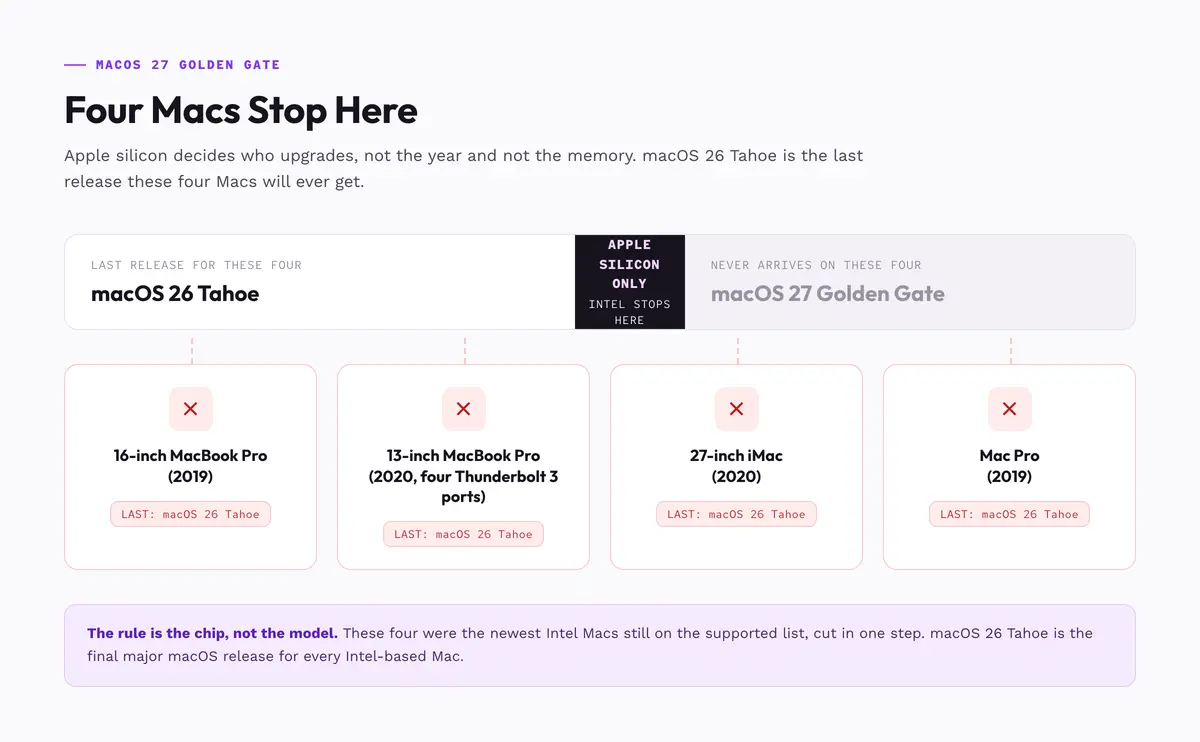
Apple silicon is the only requirement for installing macOS 27, a hard yes or no: the chip decides it, not the year or the memory. macOS 26 Tahoe is the last macOS for Intel.
MacRumors reported in April 2026 that "macOS 26 Tahoe is the final major macOS version for Intel-based Macs." Four were cut in one step:
- MacBook Pro (16-inch, 2019)
- MacBook Pro (13-inch, 2020, four Thunderbolt 3 ports)
- iMac (27-inch, 2020)
- Mac Pro (2019)
These are not rare machines: Macs reached about 11 percent of the US enterprise installed base in 2025, up 2.4 percentage points in a year, per Computerworld.
Some say theirs are fine. "some of us have machines that still have tons of life (Mac Pro 2019)" writes one on r/MacOSBeta, and "my 2020 iMac is still going strong" says another on r/apple. It was signposted on r/mac: "the writing was on the wall that eventually Intel would be deprecated on Mac's."
Intel Mac support: what to do about the four cut models
- Stay on macOS 26 Tahoe, and stay patched: No upgrade path is coming, so install every point update on release day.
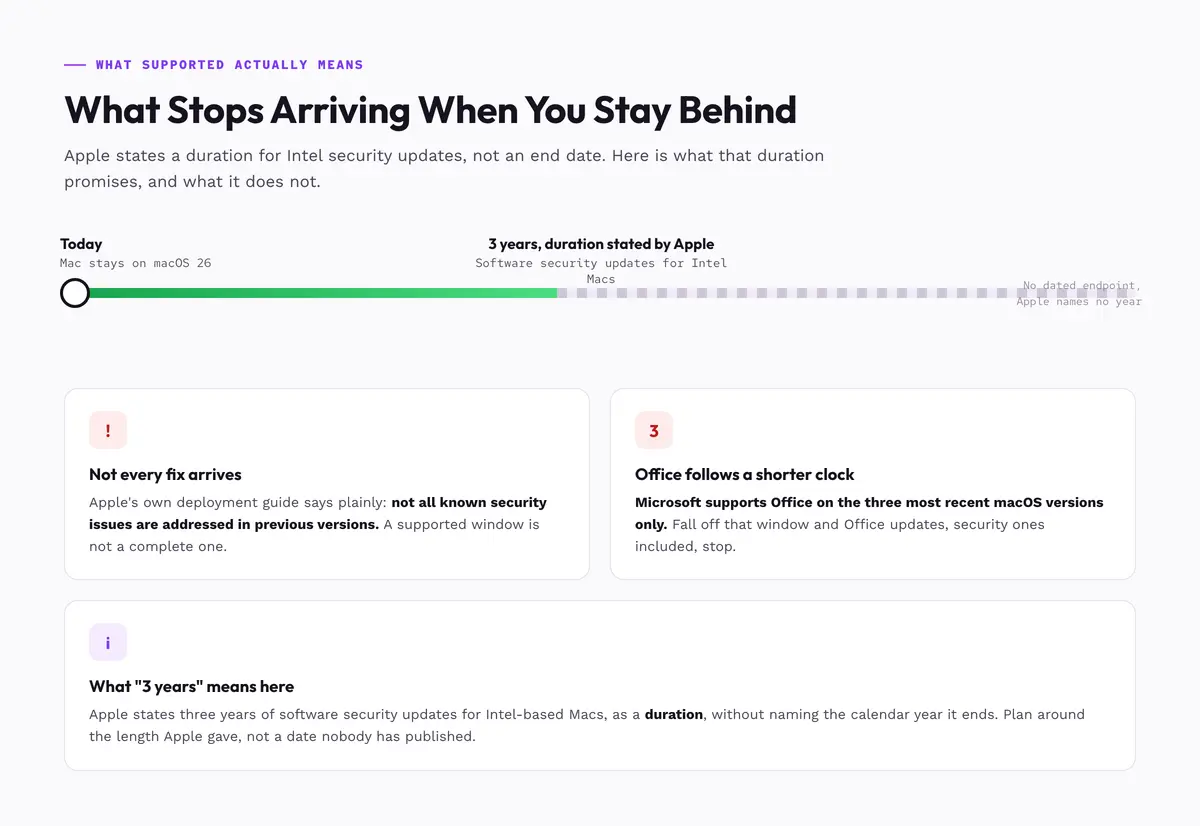
- Know the security horizon: Apple states three years of software security updates for Intel-based Macs, without naming an end date.
- Audit your apps first: Work the readiness checklist below, not at replacement time. The app bill sets the deadline.
- Back up before every update and any migration: Keep two copies, one off the machine, and verify the backup restores a real file, not just that it ran.
- Time the replacement to a real trigger: An app drops Intel support, updates stop arriving, or the machine fails at your work. Buy the configuration, not the model.
Every Mac That Runs macOS 27: The Full Supported Devices List
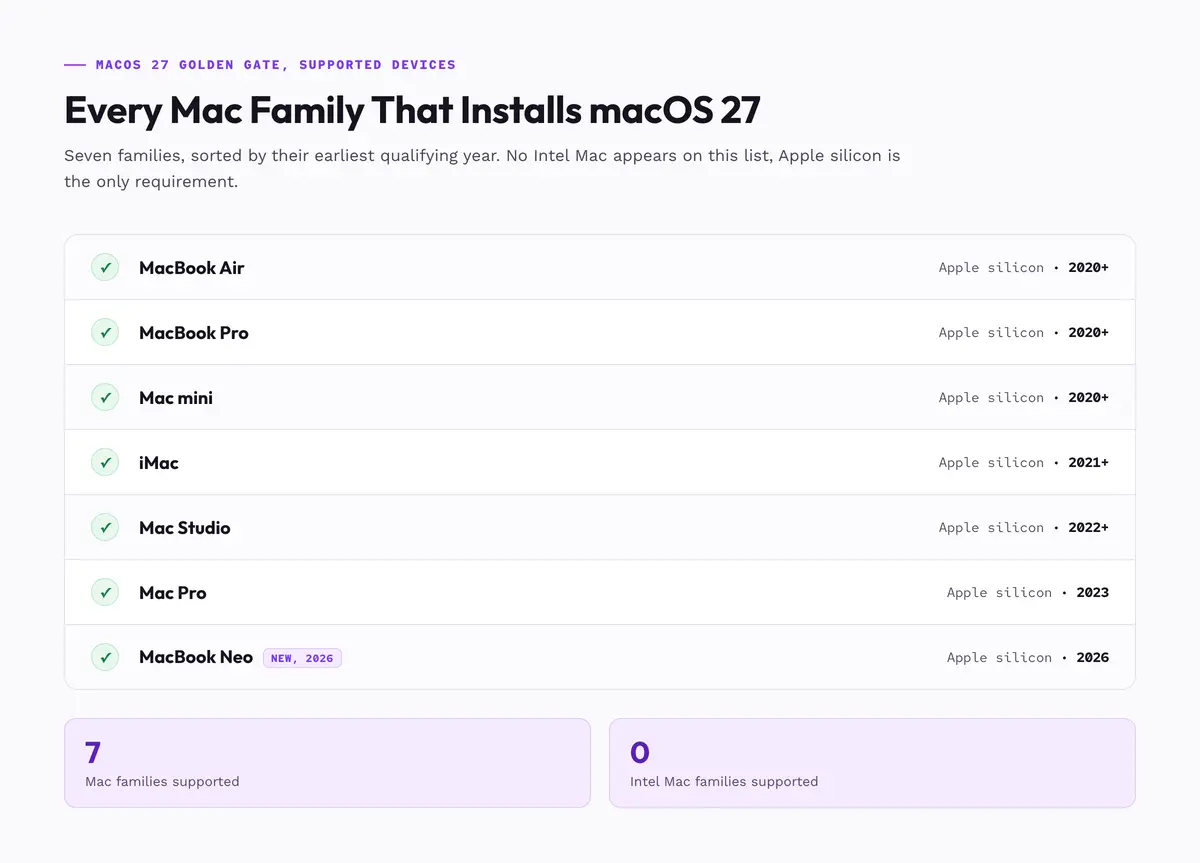
Apple lists seven Mac families for macOS Golden Gate, per Apple: six established lines plus the 2026 MacBook Neo. TechPP independently counts 40 machines across those six lines. The list holds no Intel Mac, since Tahoe was the final Intel release. Each family has its own cutoff between 2020 and 2023, plus the 2026 Neo.
| Mac family | Chip and year | Models |
|---|---|---|
| MacBook Neo | A18 Pro, 2026 | 1 |
| MacBook Air | M-series, 2020+ | 9 |
| MacBook Pro | M-series, 2020+ | 15 |
| iMac | M-series, 2021+ | 3 |
| Mac mini | M-series, 2020+ | 5 |
| Mac Studio | 2022+ | 6 |
| Mac Pro | M2 Ultra, 2023 | 2 |
Families come from Apple. The newest entry is the MacBook Neo, the only non-M-series machine.
Some already know where they stand: "Well, my main machine hasn’t been supported in a few years already…" writes one on r/mac. If you do not, run the check below.
How to check your Mac's macOS compatibility
- Open the Apple menu, then About This Mac.
- Read the line under the model name.
- A "Chip" entry naming an M-series chip or the A18 Pro is Apple silicon, so yes; "Processor" means no.
Does Every Supported Mac Get Apple Intelligence and the New Siri
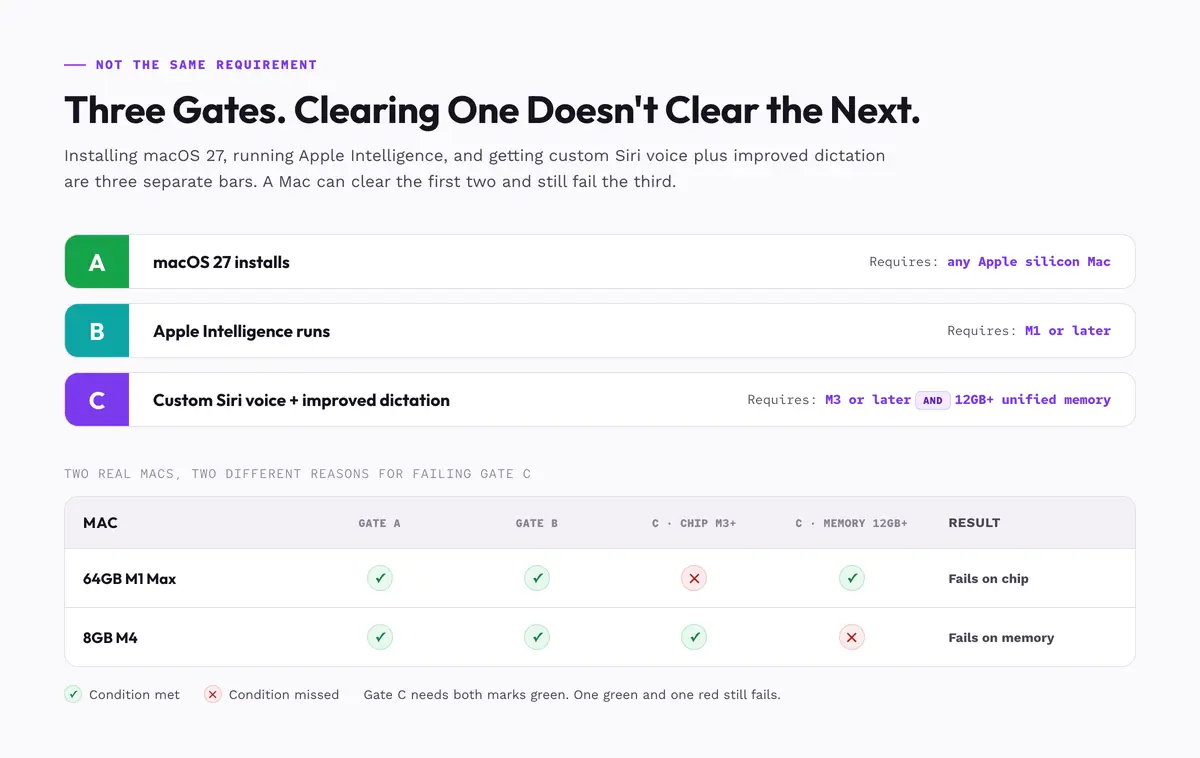
No. Any Apple silicon Mac installs macOS 27, and Apple Intelligence needs M1 or later, covering every Mac on the list. Custom Siri voice and improved dictation need an M3 or later chip and 12GB or more of memory, so M1, M2 and 8GB machines miss both.
Which Macs run Apple Intelligence and clear the M3 tier
| Your Mac | Installs macOS 27 | Apple Intelligence | Siri voice and dictation |
|---|---|---|---|
| Intel Mac | No | No | No |
| MacBook Neo, 8GB | Yes | Yes | No |
| M1 or M2 | Yes | Yes | No |
| M3 or later, 8GB | Yes | Yes | No |
| M3 or later, 12GB+ | Yes | Yes | Yes |
Apple's footnote sets that bar at "M3 and later and at least 12GB of unified memory," scoped to custom Siri voice and improved dictation, not Apple Intelligence as a whole. The Apple Intelligence guide covers the base layer; the voice option belongs to the new Siri.
Apple's own hardware shows the split: the MacBook Neo ships with 8GB, so Apple's newest Mac is on the list, runs Apple Intelligence, and misses the top tier. Apple sets that memory bar at 12GB, not 8GB or 16GB.
The AI layer is getting heavier: "Apple Intelligence on 27 takes more space" on r/MacOSBeta.
- Chip generation and memory are separate conditions, both required. An M1 Max with 64GB misses on chip.
- An 8GB M4 has the right chip and still misses, on memory.
- Missing the tier costs two named features, nothing else.
What Supported Actually Promises If You Stay on macOS 26
Staying put keeps the Mac working, not current: "Rosetta will still fully function in macOS 27," notes one on r/MacOSBeta. Apple keeps it "a general-purpose tool for Intel apps" through macOS 27, then narrows it to old games. Another on r/mac writes: "I still have several apps that wont work without Intel support".
Apple's deployment documentation says "not all known security issues are addressed in previous versions." In 2022 it left Big Sur and Catalina open to two actively exploited flaws for six and a half weeks, which Intego estimated exposed 35 to 40 percent of supported Macs.
Unpatched software is how attacks start: exploitation opened 20 percent of breaches in Verizon's 2025 report, up 34 percent year over year. Apple backports two versions deep: CVE-2026-20700 reached only Tahoe 26.3, Sequoia 15.7.4 and Sonoma 14.8.4. Microsoft supports Office on the three most recent macOS versions, after which updates stop, security ones included.
A 2026 IEEE Symposium on Security and Privacy study found differential-privacy violations in five of nine Apple mechanisms, affecting 87 percent of data collection in macOS Sonoma and 68 percent in Sequoia; it did not test macOS 27. A 2026 Ohio State preprint showed a replay attack taking Apple Intelligence tokens from Tahoe 26.
Your upgrade-readiness checklist
- Intel-only apps. In About This Mac, open System Report, then Applications, and read the Kind column. "Intel" means Rosetta-only. On TidBITS Talk, one poster was still waiting for an Apple silicon version of Garmin's Mac software as of July 20, 2026, and Doug Miller reported the Sonos Mac app still Intel a day later.
- Printers and scanners. Confirm the driver is still published for current macOS, and prefer AirPrint.
- External drives and docks. Disk utilities, RAID managers and dock firmware tools are the usual holdouts, so update firmware while the old Mac still runs.
- Plug-ins and extensions. A Universal host app can still refuse an Intel-only plug-in, so check plug-ins separately.
- Work software you do not control. VPN clients and security agents carry approved-version lists, so ask IT first. A failed item means plan, not panic; prepare for macOS 27 has the steps.
The Solution for a Mac That Misses the M3 Gate
Run the AI locally instead of waiting. An M1, an M2, an 8GB Mac and an Intel Mac on macOS 26 can all run a Mac-native assistant that redacts what it sends out.
Apple's own AI has a cloud boundary. Complex requests can route to Private Cloud Compute, which Apple said in June 2026 it was extending to Google Cloud. A 2026 WiSec study found no breach but an audit limitation; Apple Intelligence privacy covers it.
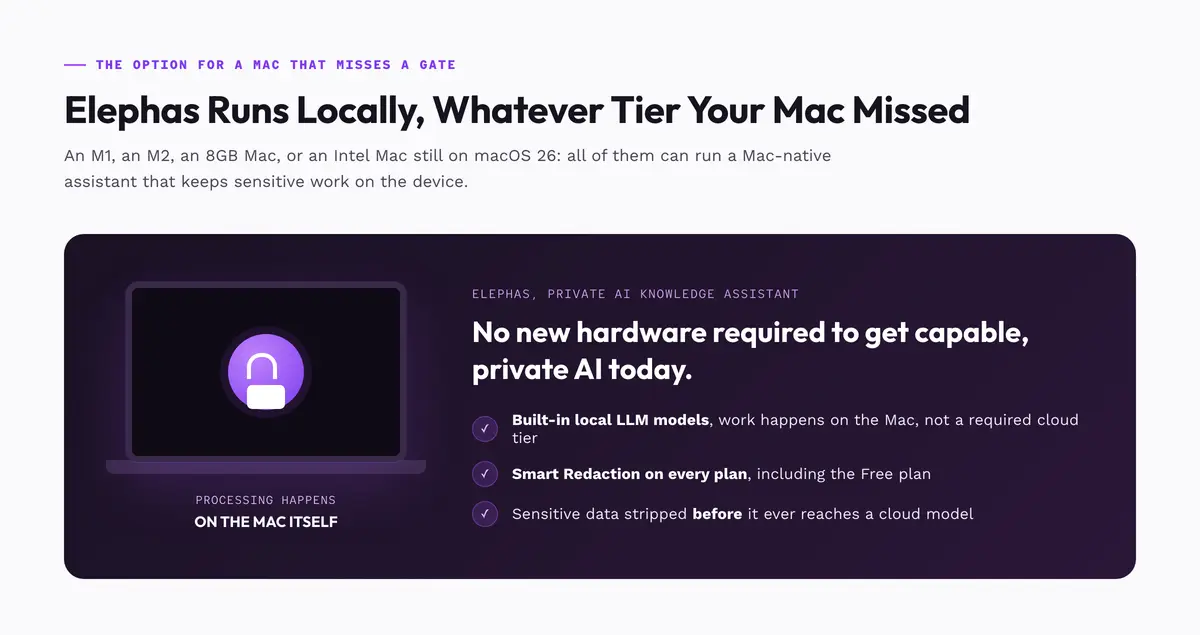
Elephas is a private AI knowledge assistant for Mac that redacts sensitive data before it reaches cloud models. It ships with built-in local LLM models, so the work happens on the Mac, whatever tier its chip missed. That fits the owner who wrote "my m1 can't run my workloads and my Intel Mac is getting really old" on r/mac.
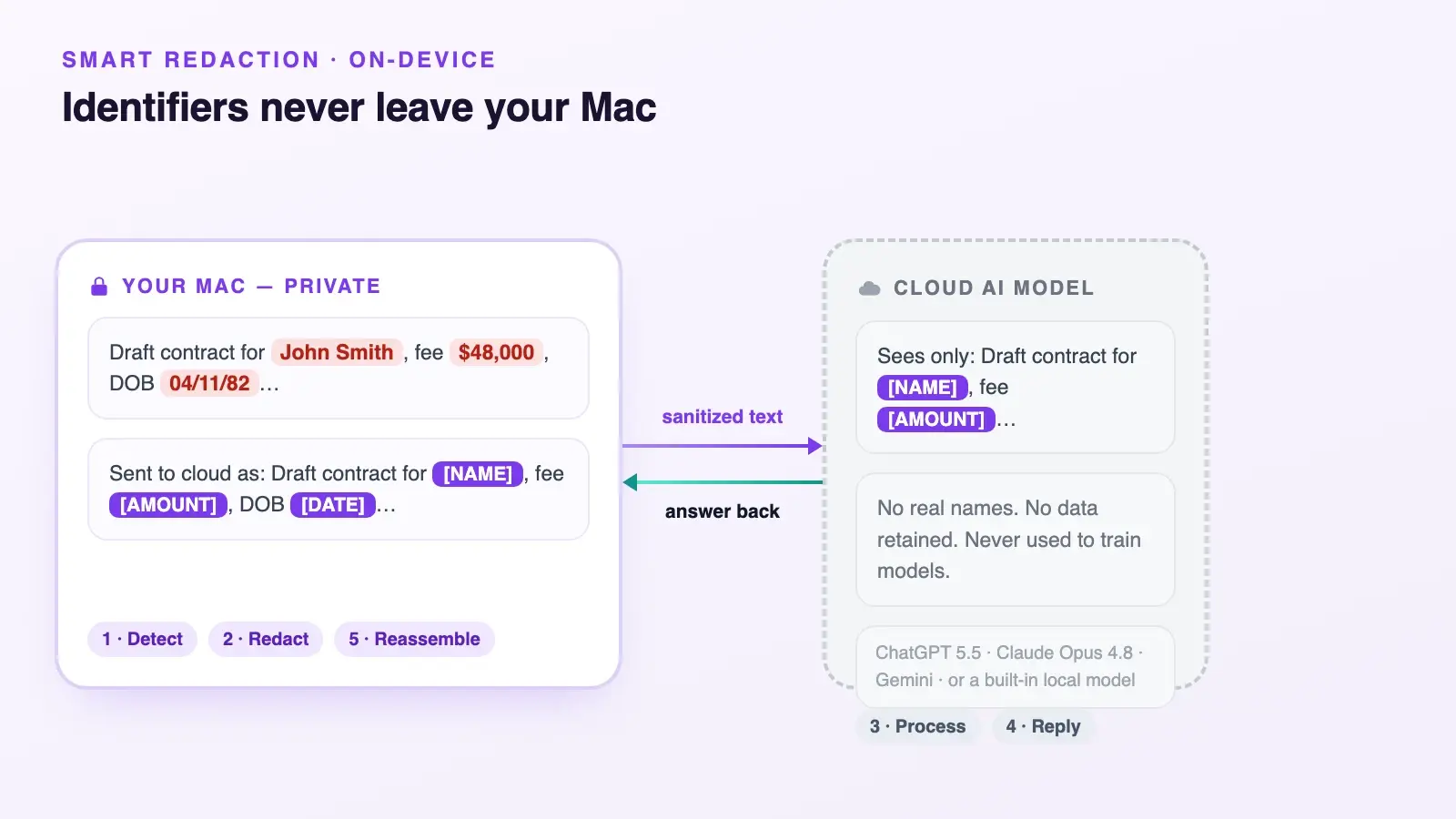
For work that still needs a leading cloud model, Elephas adds a second layer through automatic PII redaction. Before a prompt is sent to ChatGPT, Claude, Gemini, Grok, Perplexity, or any other cloud model, Elephas strips sensitive names, emails, phone numbers, and identifiers on your Mac.
The cloud model only ever sees the sanitized text, and when the answer comes back, the redacted fields are reassembled locally on your machine, so identifiable information never leaves the device. Elephas pairs this with zero data retention: content never trains AI models, never sits on a vendor's server, and never passes through a third-party reviewer's screen.
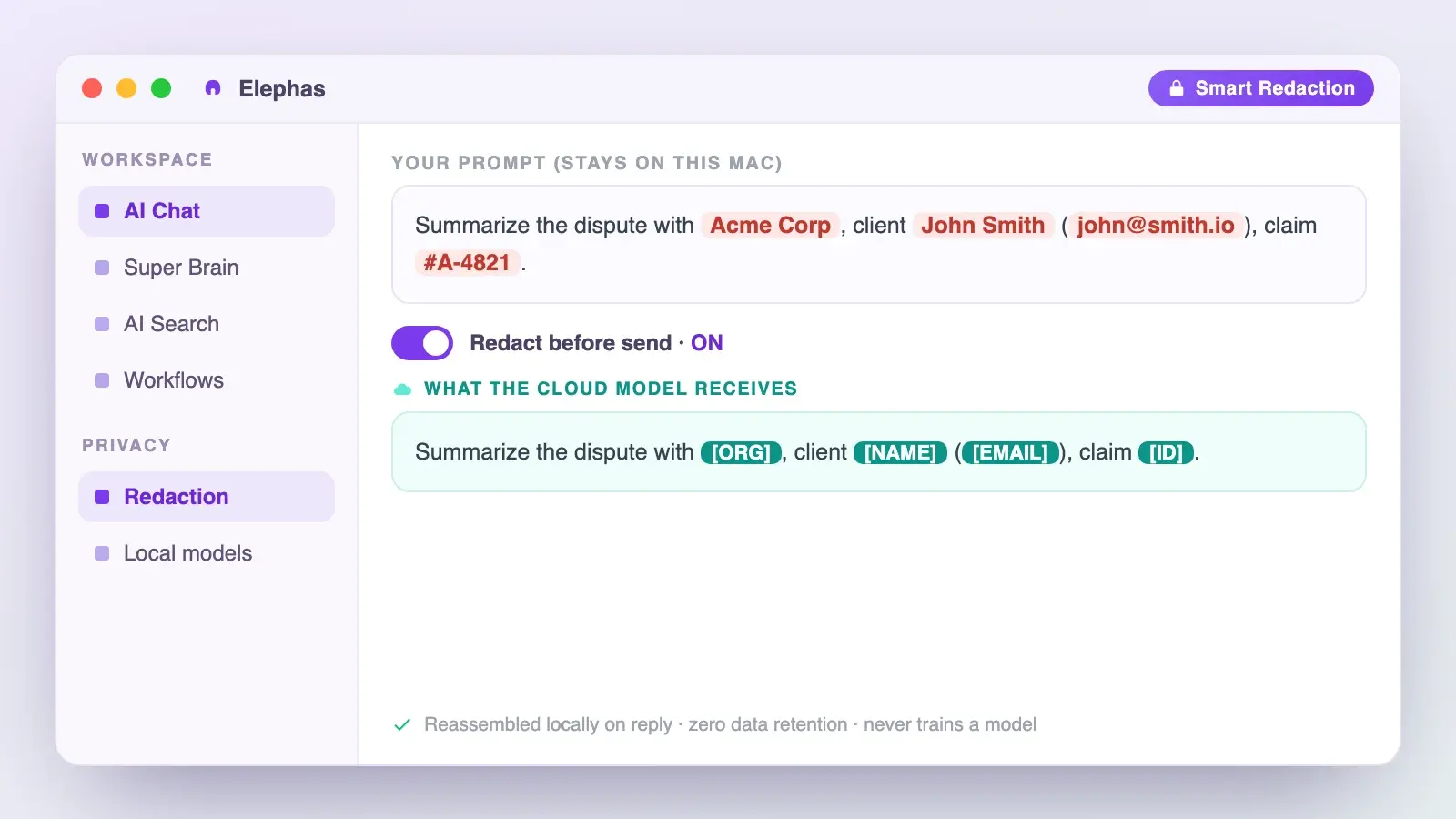
- Built-in local LLM models mean an M1, M2 or 8GB Mac waits on nothing.
- Smart Redaction is on every plan, including the Free one.
- A 1,700-page PDF is processed for $0.40, with no per-query charges beyond your plan limit.
- A free plan exists, paid plans start at $19/month, and you can try Elephas for free.
macOS 27 Supported Devices: What to Do With the Mac You Have
Four groups cover almost every owner, and a Mac off the list still has a job. One on r/DIY_Geeks reports: "The Intel Mac has been my best windows pc ironically." Replacing costs more now: memory and storage prices are up 40 to 70 percent since early 2025, Omdia's Kieren Jessop told Computerworld.
- Intel Mac. macOS Tahoe is the end of the line, with three years of security updates stated by Apple and no dated endpoint. Do the app audit and a verified backup, then see macOS 27 Siri apps for what a newer Mac adds.
- M1 or M2 Mac. You install macOS 27 and run Apple Intelligence, missing custom Siri voice and dictation.
- M3 or later with 8GB. Same as the M1 group: memory blocks it.
- M3 or later with 12GB or more. You clear all three gates.
- Whichever group you are in, a privacy-friendly AI knowledge assistant with built-in local LLM models gives an older Mac capable private AI today, without new hardware.
Frequently asked questions
When does macOS 27 Golden Gate come out?
Apple says "this fall" and has published no date. Press coverage converges on September 2026, with no Apple-confirmed day. The developer beta arrived June 8, 2026, the public beta July 13.
How much free storage does macOS 27 need?
Apple publishes no figure, and press estimates disagree: 17GB for the installer, 35GB of free space, or 50GB for comfortable performance. Clear well past the installer size, and treat no single number as an Apple requirement.
Does 64GB of memory get me past the M3 requirement?
No. Apple's footnote sets two conditions, both required: an M3 chip or later, and at least 12GB of unified memory. Memory does not substitute for chip generation, so an M1 Max with 64GB misses that tier.
How long will my Intel Mac keep getting security updates?
Apple states it will provide software security updates for Intel-based Macs for three years, without naming an end date. It also says plainly that older versions do not get every known security fix.
What is the entry-level Mac that clears every requirement?
Any Mac with an M3 chip or later and at least 12GB of unified memory, per Apple. Both count, so check the configuration, not the model. Apple's MacBook Neo, at 8GB, misses that gate.
