Perplexity Hybrid Compute: Is It Safe for Your Files?
Perplexity hybrid compute is serious, and the direction is right, but its privacy promise is narrower than the announcement implies. It arrived September 1, 2026. On September 2, the question is what processing protects.
The feature can keep sensitive work on your Mac and mask details before a cloud call. Tax returns, bloodwork, bank statements, and work documents sit inside an account with its own training settings and terms. Account settings can still allow training, and classifiers can miss context in long files.
24GB
Minimum unified memory required
4,096
Tokens the classifier can read
Sep 1
Hybrid compute launch date
Pro/Max
Eligible subscription tiers, not Free
Executive Summary
- Perplexity launched hybrid compute on September 1, 2026, letting a cloud agent hand private-file steps to a Mac model.
- An on-device classifier can keep a task local, mask sensitive parts, refuse the action, or ask for confirmation.
- It needs an Apple Silicon Mac with macOS 15, 24GB of unified memory, an eligible plan, and a manual switch to Hybrid mode.
- Processing location does not decide whether your documents are safe; account terms and settings still decide where data may go and how it may be used.
- Elephas runs Smart Redaction on every plan, including free, stripping sensitive details on your Mac before prompts reach Perplexity or another cloud model, without a plan or hardware gate.
Who Gets Perplexity Hybrid Compute
Perplexity's announcement said hybrid compute was for “all users of the Perplexity Mac app.” It is available to Pro, Max and Enterprise subscribers, not Free. The fair reading is all Mac app users rather than a waitlist, not all subscription tiers.
Hybrid compute has four gates: an Apple Silicon Mac, macOS 15 or later, at least 24GB of unified memory, and an eligible subscription. Perplexity recommends 32GB of unified memory.
- The stated memory floor is 24GB; Perplexity recommends 32GB.
- Intel Macs and Macs below macOS 15 do not qualify, regardless of their memory.
- Base MacBook Air configurations ship with 16GB of unified memory, below the stated floor.
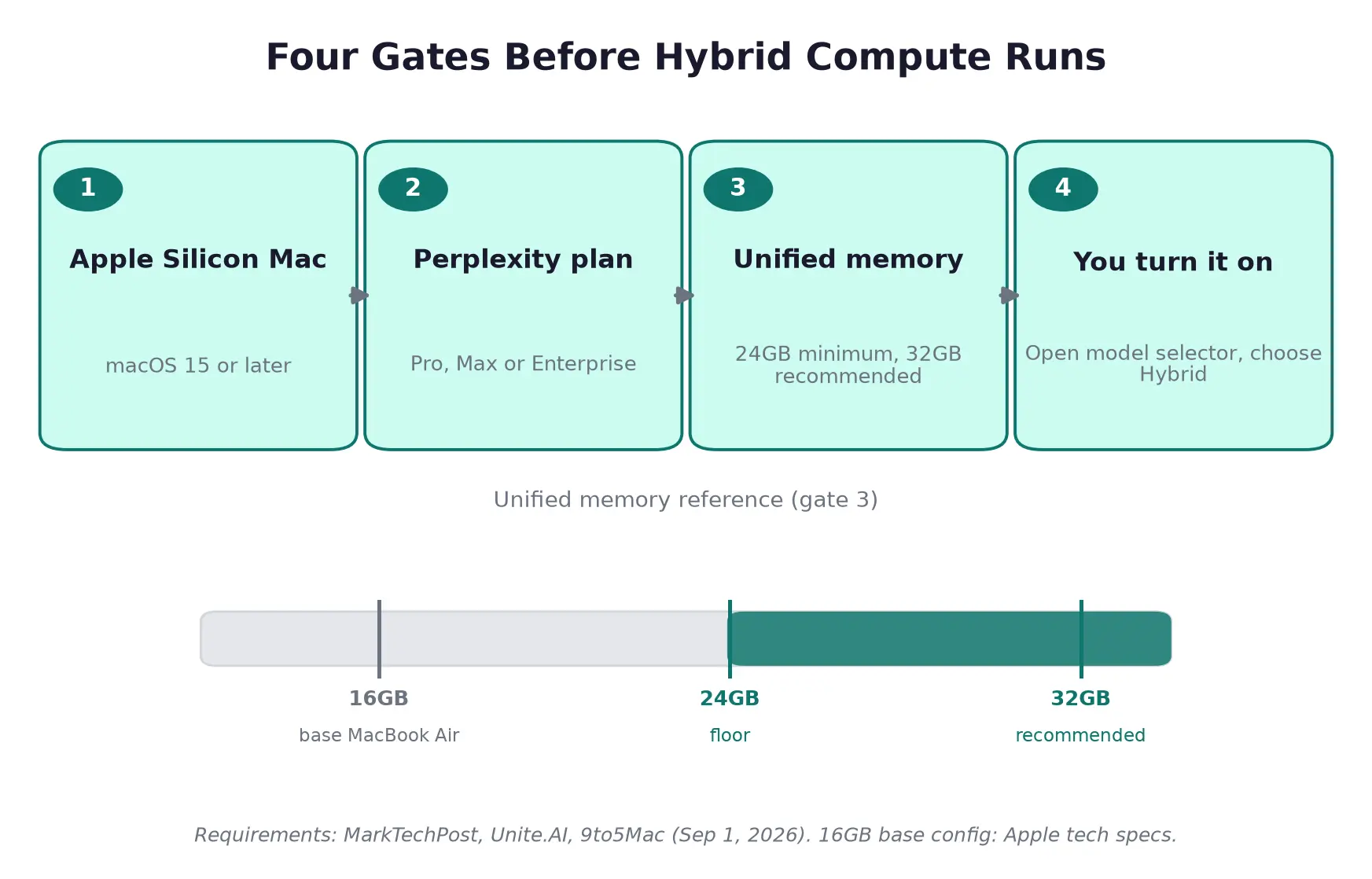
Four separate gates stand between an eligible Mac and a running feature, and the last one, the on/off toggle, is the one nobody covered.
The fourth gate is easy to miss. Hybrid compute is opt-in: install the current Mac app, download a local model, open the model selector, choose Hybrid, then choose the local and cloud models. An eligible account that never does this has none of the feature's protections running.
That is a setup detail for anyone handling sensitive documents. A headline can describe the capability without telling a reader whether it applies to their account or Mac. The practical comparison is still local versus cloud processing and the terms attached to each.
How Perplexity Hybrid Compute Works on Your Mac
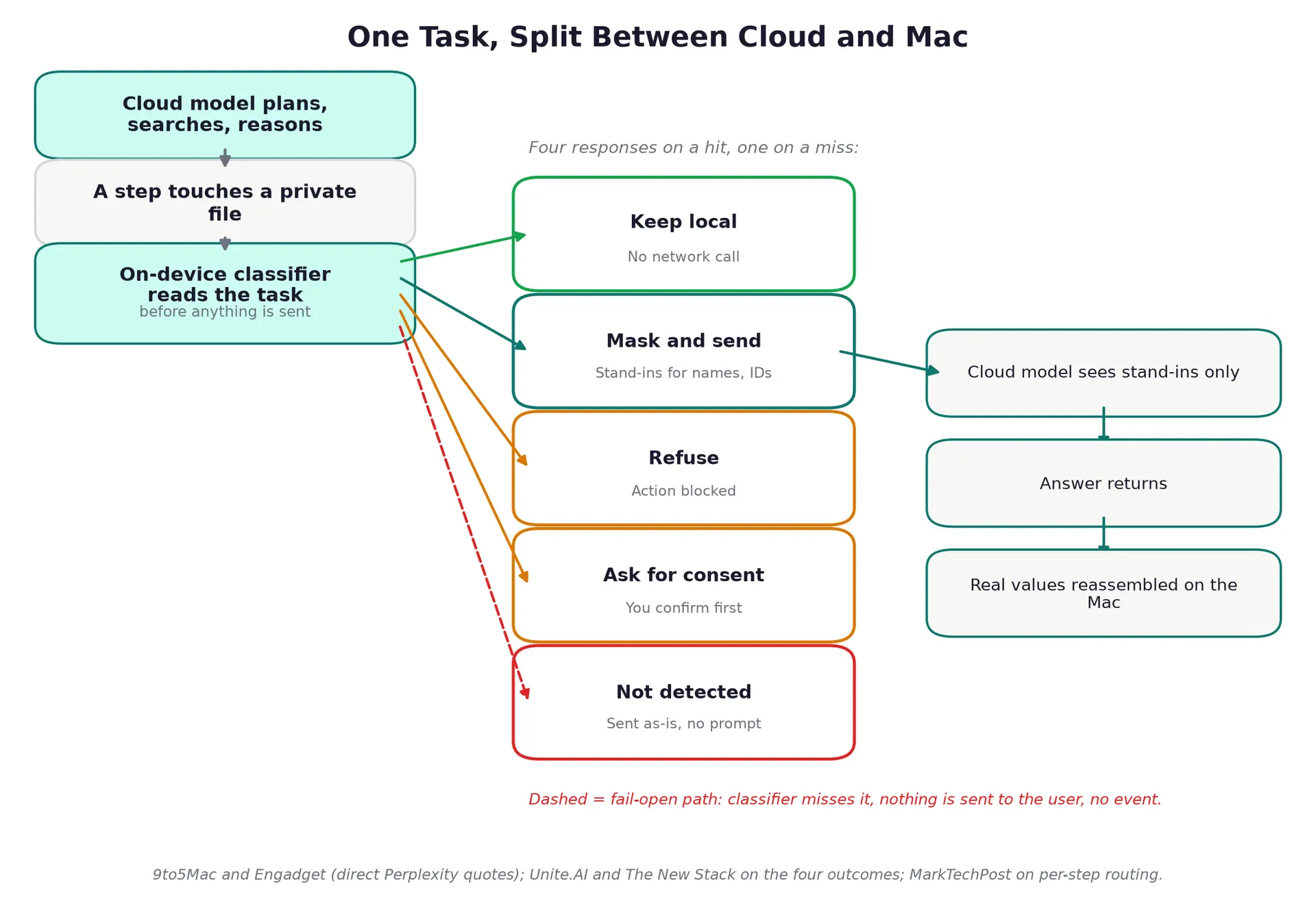
The classifier acts only when it catches something; a miss produces no prompt and no visible event.
- The cloud handles frontier reasoning, web search and planning. A private-file step can move to the Mac, where an on-device PII classifier reads it before transmission. Routing happens per step inside a task, not once per file or per token. Screening on the device first is the right architecture.
- The model card describes a 596,090,241-parameter bidirectional Qwen3 encoder under an MIT licence, offering more openness about the classifier than almost any comparable vendor has.
- It classifies nine PII categories, tracks their boundaries in the text, and rates the sensitivity of the full conversation.
- It reads up to 4,096 tokens, a few thousand words: enough for a long contract section or a medical record, not a lengthy file.
On a hit, names, addresses and account numbers become stand-ins before a cloud step, then return locally with the answer. Redacted text can still go to the cloud, and removing a name does not remove the confidential situation. The gate has four responses; credentials and payment data get the strictest handling.
- The local options are Gemma 4 E4B, Qwen3.6 35B-A3B, and a Perplexity post-trained Qwen3.6 35B variant.
- PPLX Qwen 3.8 27B belongs to Portable Computer, a different Perplexity product that has muddied search results.
- The gate can keep a step local, mask sensitive details, refuse the action, or ask for consent.
- Perplexity reports that a user can choose to send flagged content to the cloud after a consent prompt.
Every listed response starts with detection. A false negative produces no prompt or visible event, then the step can proceed. That is a fail-open choice, distinct from a hard block. The absence of a prompt is not proof that no sensitive meaning left the Mac.
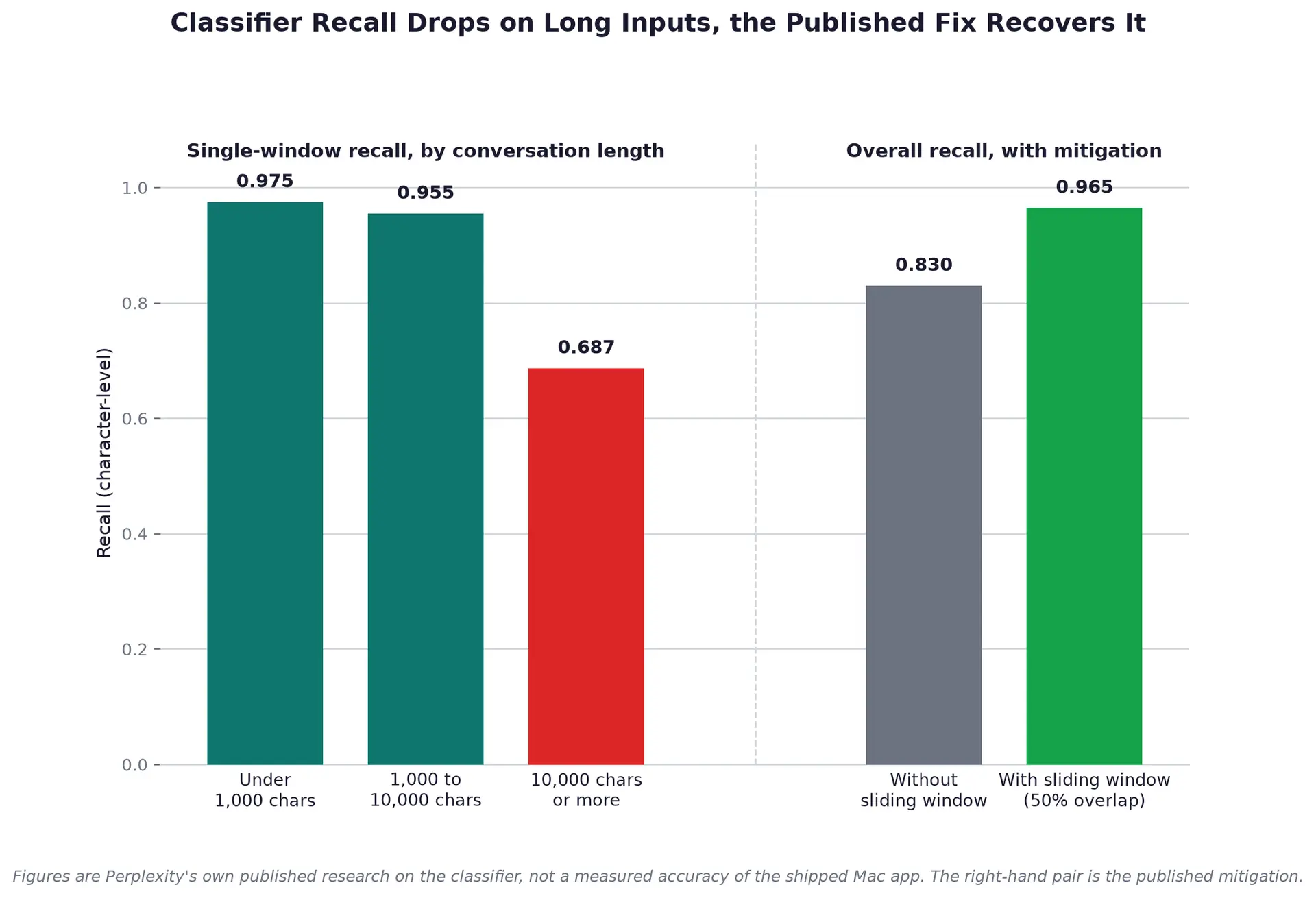
Recall drops on long conversations in Perplexity's own research on the classifier; the published sliding-window fix recovers most of it, and both halves are shown together on purpose.
Perplexity research reports recall of 0.975 under 1,000 characters, 0.955 from 1,000 to 10,000, and 0.687 at 10,000 characters or more. Fifty percent overlap sliding-window decoding raises overall recall from 0.830 to 0.965. These figures describe classifier research, not a promise for every long Mac-app document. The 4,096-token limit calls for review beyond one window.
The Compute Boundary Moved. The Professional Duty Test Did Not.
Hybrid compute changes token location. Vendor terms, a signed agreement and professional duty still govern whether a client file can enter the service. In United States v. Heppner, No. 25 Cr. 503 (JSR), S.D.N.Y., Judge Jed S. Rakoff ruled February 10, 2026. His February 17 opinion denied attorney-client privilege and work-product protection for Claude material.
- Perplexity's help centre says AI data retention for training is on by default for Free, Pro and Max accounts. It must be turned off manually in Account Settings > Preferences, without undoing past collection.
- Logged-out users have no opt-out.
- Enterprise data is not used for training by default.
- Nothing published says Perplexity trains on locally handled hybrid-compute steps; the relevant issue is the account-level training default underneath them.
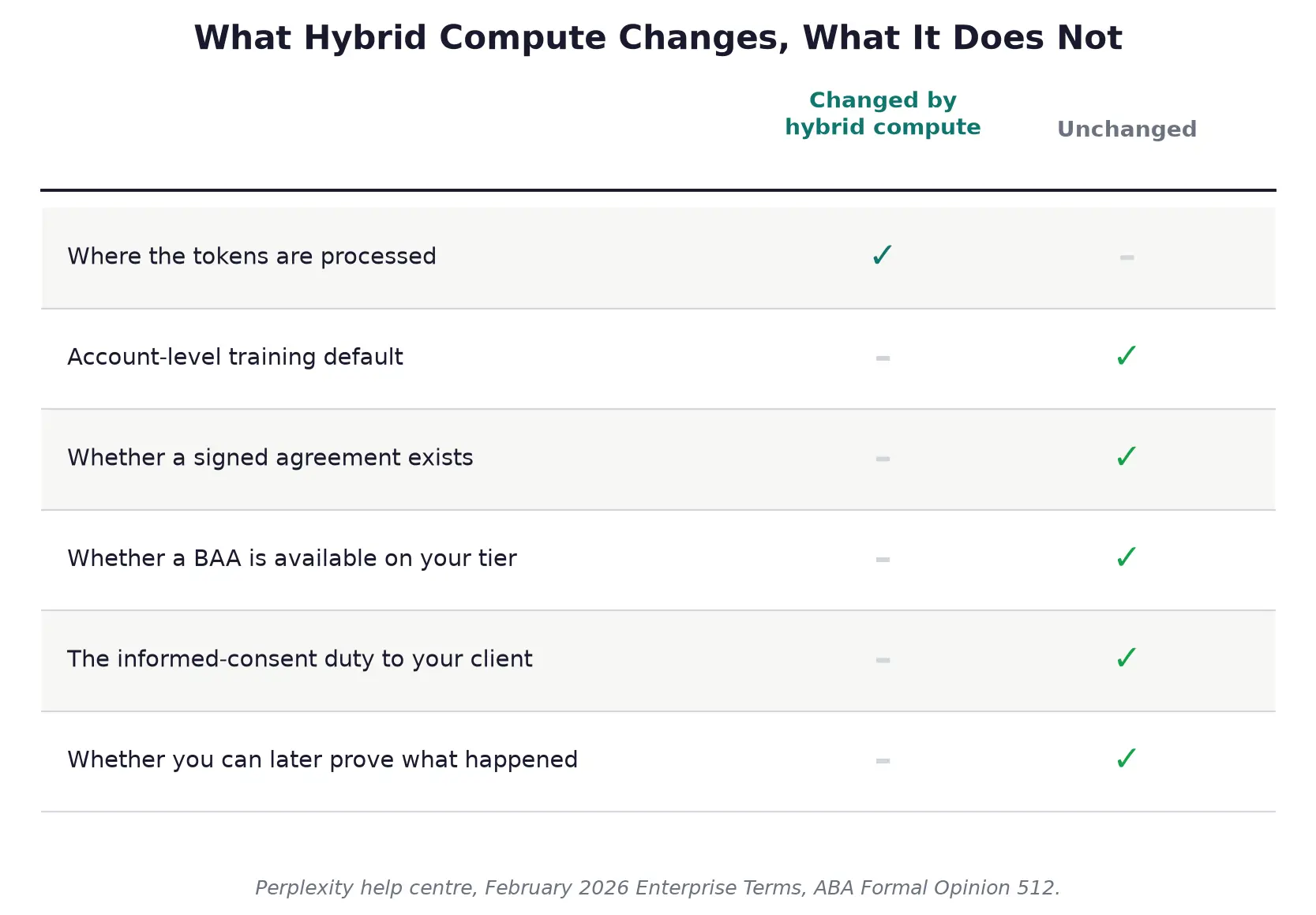
Where the tokens ran changed. The account terms, the signed agreement and the professional duty did not.
The Heppner court found Anthropic's policy told users inputs and outputs could be used for training and shared with third parties, including government regulators. Heppner ran the searches himself, counsel had not directed them, and the court said direction might have changed the answer. A Gibson Dunn client alert discusses the ruling.
Warner v. Gilbarco, Inc., No. 2:24-cv-12333, E.D. Mich., was decided February 10, 2026, the same day as the Heppner bench ruling and a week before its written opinion, and went the other way.
Magistrate Judge Anthony P. Patti held ChatGPT use did not waive work product because generative AI platforms are tools rather than people. Warner was self-represented, with no lawyer directing use. The outcomes show unsettled law.
- ABA Formal Opinion 512, dated July 29, 2024, requires informed client consent before representation information enters a self-learning AI tool. A generic engagement-letter clause is insufficient; the client needs the specific risk. Consent is unnecessary where no client-representation information goes into the tool.
- Perplexity's February 2026 Enterprise Terms prohibit PHI processing without a business associate agreement. A BAA is available through sales only on Enterprise Pro and Enterprise Max; Free, Pro and Max have no BAA option, as explained in this guide to HIPAA and AI.
- A patient reading personal bloodwork has no BAA duty. A clinician handling PHI faces a different rule: local inference is a compute choice, and a BAA is a contract.
- For a lawyer or accountant handling confidential client material, the consumer-tier answer today is no because training is on by default and ABA 512 requires informed consent for a self-learning AI tool. It becomes yes only after the “AI data retention” toggle is off in Account Settings > Preferences and the client gives informed consent.
- For a clinician handling PHI, the answer is no unless they use Enterprise Pro or Enterprise Max under a BAA; consumer tiers offer no BAA.
What You Can Verify Before You Upload
Personal files without a professional duty, such as a tax return, your own lab results, or a bank statement, get a qualified yes after you turn off “AI data retention” in Account Settings > Preferences. Hybrid compute reduces exposure. Informed-consent and BAA duties belong to professionals. Review longer documents: a classifier can miss content.
Apple's Private Cloud Compute sets a published bar: attestation, an outside research environment. VentureBeat: “But the pitch, at bottom, asks professionals to trust one AI to decide what another AI is allowed to see.” Perplexity says users can review what was flagged before anything is sent; Enterprise device-level audit logs are a control.
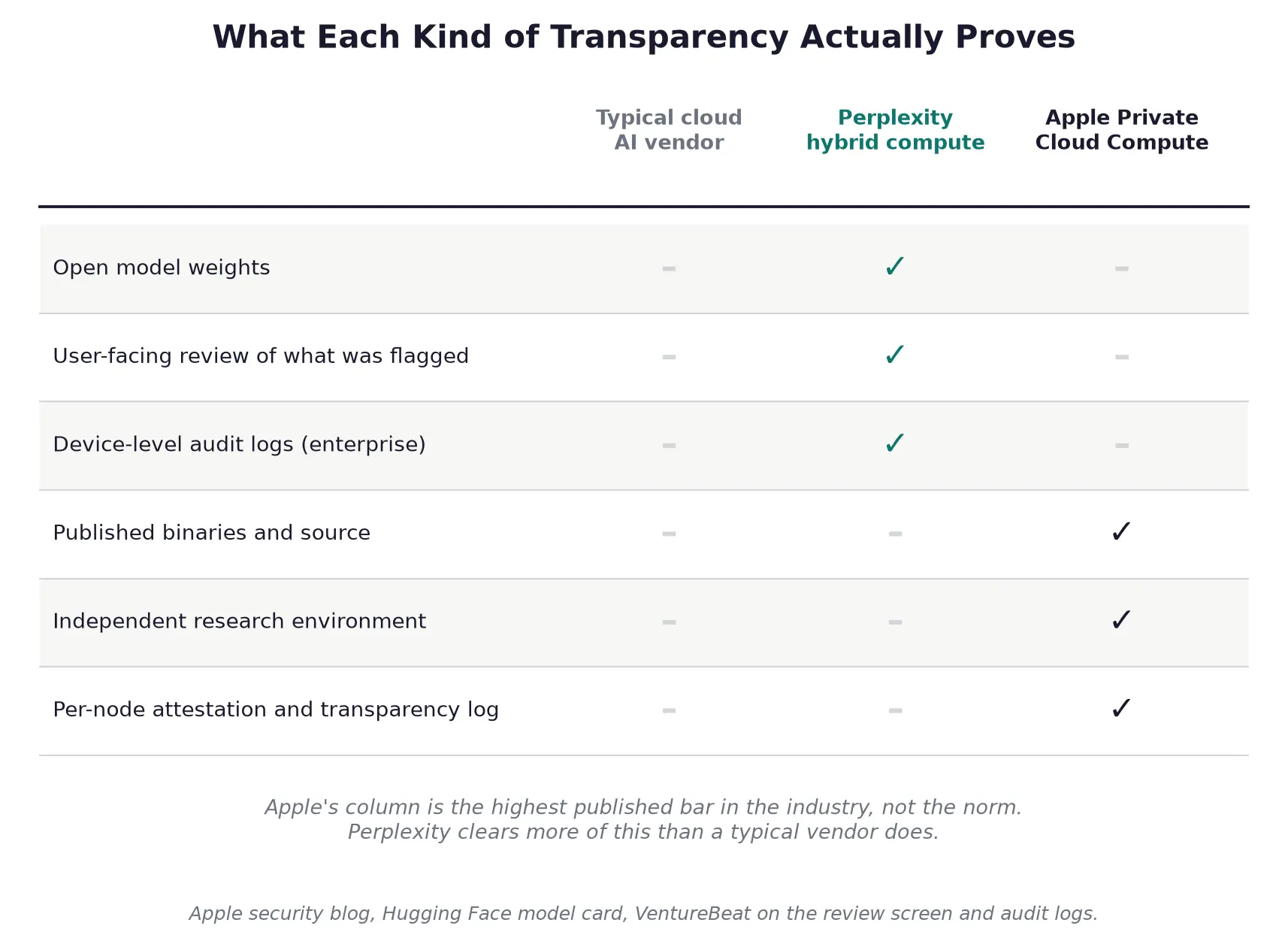
Apple's column is the highest published bar in the industry, not the norm; Perplexity clears more of this than a typical vendor does.
- Check your plan. Hybrid requires Pro, Max, or Enterprise.
- Turn off AI data retention in Account Settings > Preferences.
- Confirm an Apple Silicon Mac, macOS 15, and 24GB unified memory.
- Check whether agent-read web content and uploaded files receive the same screening.
The nine categories include people, account numbers, URLs, dates, addresses, emails, phone numbers, other PII and secrets. A matter number, docket caption, deal codename or trial-site identifier can be confidential without matching them. Long documents deserve review beyond a classifier result.
- Review documents past a few thousand words before upload.
- Check whether the sensitive content is more than a name or number.
- Professionals should send IT the subscription tier and BAA requirement.
- Reddit, Inc. v. SerpApi, Oxylabs, AWMProxy and Perplexity AI, No. 1:25-cv-08736 (S.D.N.Y.), filed October 22, 2025, is a scraping and data-licensing dispute with no connection to hybrid compute or the on-device classifier. On July 31, 2026, the court largely denied motions to dismiss, leaving DMCA claims while dismissing state-law claims; this is not a merits ruling.
Comet's security record is context.
- Brave published Comet prompt-injection findings in August and October 2025, the second building on the first. In August, Jesse Dwyer said the vulnerability was fixed, cited a bounty programme, and said Perplexity worked with Brave to repair it; Brave later disputed full mitigation.
- LayerX reported a related issue that Perplexity marked “not applicable.”
- Trail of Bits, commissioned by Perplexity, audited Comet around April 2025 before launch, but published in February 2026 after Comet shipped and the independent disclosures were public. Perplexity said its systematic approach helped identify and close gaps before launch. Comet is a different product, so this context does not show hybrid compute is broken. No testing covers this gate.
- Read the sensitive data guide before treating hybrid compute as settled.
How Elephas Handles the Same Problem on Any Mac
Elephas is a privacy-first AI knowledge assistant for macOS that works with your documents and chosen cloud model. Smart Redaction replaces names, companies, amounts, and identifiers on your Mac with placeholders before each cloud request. The cloud model receives only masked text, with real values restored on your Mac after the answer returns.
- Smart Redaction works with the cloud model in use, including Perplexity, rather than replacing it.
- For work that should not leave the Mac, the app includes built-in local LLM models.
- The mask-then-restore structure resembles Perplexity's, but Smart Redaction has no memory floor, hardware gate, or paid-plan requirement.
- Paid plans start at $19/month, and a free plan is available.
You do not need to switch Smart Redaction on for each prompt. Sensitive data is detected and redacted automatically before anything reaches a cloud model.
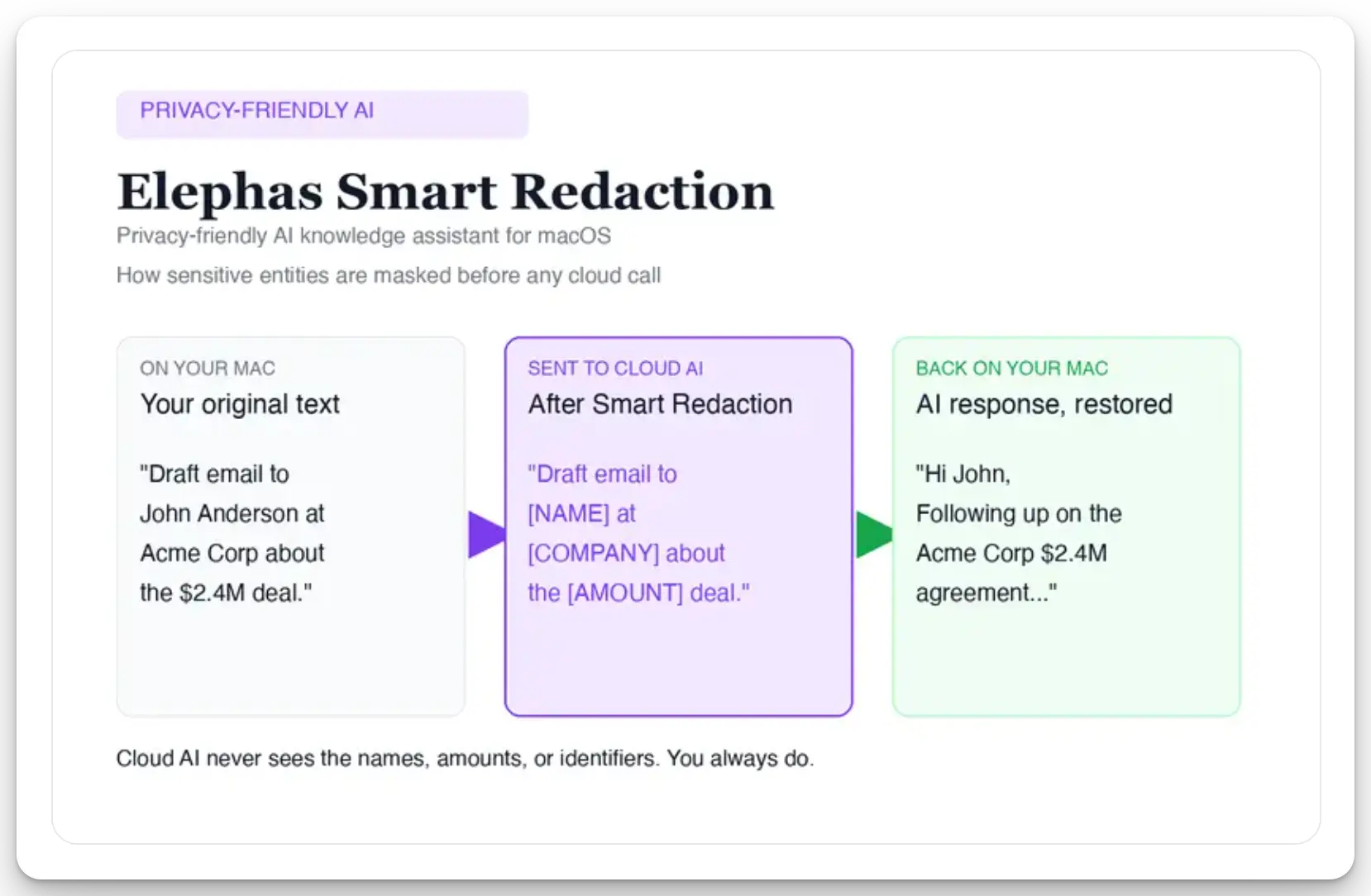
The cloud model never receives the real names, amounts or identifiers. Your Mac holds them the whole time.
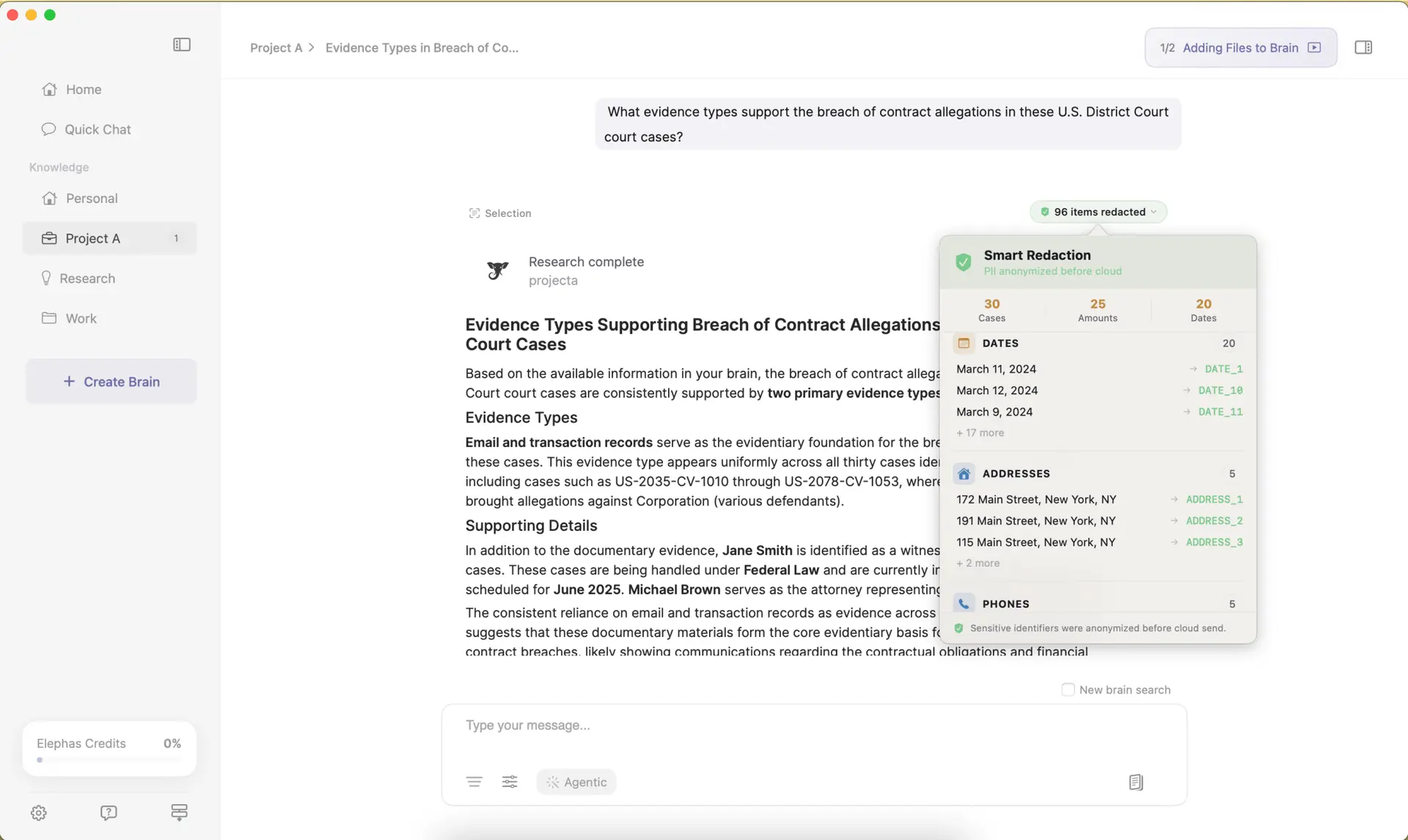
Every redacted item is itemised, so you can see exactly what was masked before anything was sent.
This panel itemises redacted items before sending, giving a per-request record to inspect. Perplexity has published open weights and a benchmark; Elephas has not published either. The missing benchmark does not make the itemised redaction record proof of accuracy. The difference is defaults, gating and training policy, not classifier accuracy.
Your content is never used to train AI models, stored on a vendor's server, or passed through a third-party reviewer's screen.
What to Watch Next
The feature is one day old, and details remain unpublished.
- Check the account's training default and subscription tier before a sensitive document goes in; those facts determine the decision.
- Logging, telemetry and model-improvement treatment for locally handled sessions remains unstated.
- The app's response and visibility after a classifier miss remains unstated.
- Elephas is a privacy-first AI assistant for Mac users handling private files who need itemised Smart Redaction before prompts reach the cloud model they already use.
Redaction on Your Mac, Before Anything Leaves It
Elephas runs Smart Redaction on every plan, including free, with no hardware gate, no memory floor, and no plan requirement. Sensitive details are masked on your Mac before a prompt reaches Perplexity or any other cloud model, and restored locally once the answer returns.
Try Elephas free →Frequently Asked Questions
Is Perplexity AI safe for personal files like tax returns or bloodwork?
Eligible private-file steps can stay local or be masked before a cloud call. Hybrid is opt-in and requires a Mac, memory, macOS, and subscription. Any cloud step remains subject to account terms. Turn off AI data retention in Account Settings > Preferences before uploading personal files.
Free, Pro and Max accounts have AI data retention for model training on by default. The opt-out is not retroactive, logged-out users cannot opt out, and Enterprise data is not used for training by default.
What Mac do I need for Perplexity hybrid compute?
You need an Apple Silicon Mac with macOS 15 or later and at least 24GB of unified memory. Perplexity recommends 32GB. Base MacBook Air configurations have 16GB. Intel Macs do not qualify.
What are the HIPAA rules for uploading bloodwork to Perplexity?
Patients reading personal lab results have no HIPAA agreement duty. Clinicians handling PHI need a business associate agreement under Perplexity's February 2026 Enterprise Terms. BAAs are available only on Enterprise Pro and Enterprise Max through sales. Free, Pro and Max do not have one.
How do I turn on Perplexity hybrid mode?
It is opt-in. Install the current Mac app and download a local model. Then open the model selector, choose Hybrid, and select the local and cloud models. A user who never opens that selector does not have hybrid compute active.
