ChatGPT for Business in 2026: The Complete Guide for Small Teams
Last updated: September 10, 2026
A staffer at your firm has probably already pasted a client email or a case note into their own personal ChatGPT account. OpenAI's own analysis says at least four million people in the US used ChatGPT in March 2026 to run parts of a business.
The guide ahead covers what changes when a 2-20 person firm moves from personal ChatGPT accounts to a paid ChatGPT Business workspace: what the product is, what a small team can do with it, which plan fits, where it stops being enough, and whether client work is actually safer inside it.
You will get a plain-language definition, five starter workflows with a human-review point each, a names-only plan comparison, the specific places Business runs out of road, a four-part safety breakdown, one better alternative for firms whose real requirement is keeping data off a vendor's server, and an FAQ built around cancellation and training.
Quick answer
- ChatGPT Business is OpenAI's paid, self-serve team workspace for business use: separate billing, admin roles, usage controls, and Standard or Premium seats, not a smarter model, a governance layer over the same models.
- By default, OpenAI does not train its models on Business data, and Business data is encrypted in transit and at rest.
- Self-serve Business is not OpenAI's documented route to a signed Business Associate Agreement (BAA) or Zero Data Retention. That requires a contracted plan instead.
- Seat prices are deliberately not in this guide. It covers which seat type and which data path fit your firm, and exact current numbers live in the dedicated pricing guide.
- If your priority is reducing what leaves the device in the first place, Elephas pairs with any cloud AI model you already use and adds automatic local redaction before anything is sent. Free plan, from $19/month.
What is ChatGPT Business?
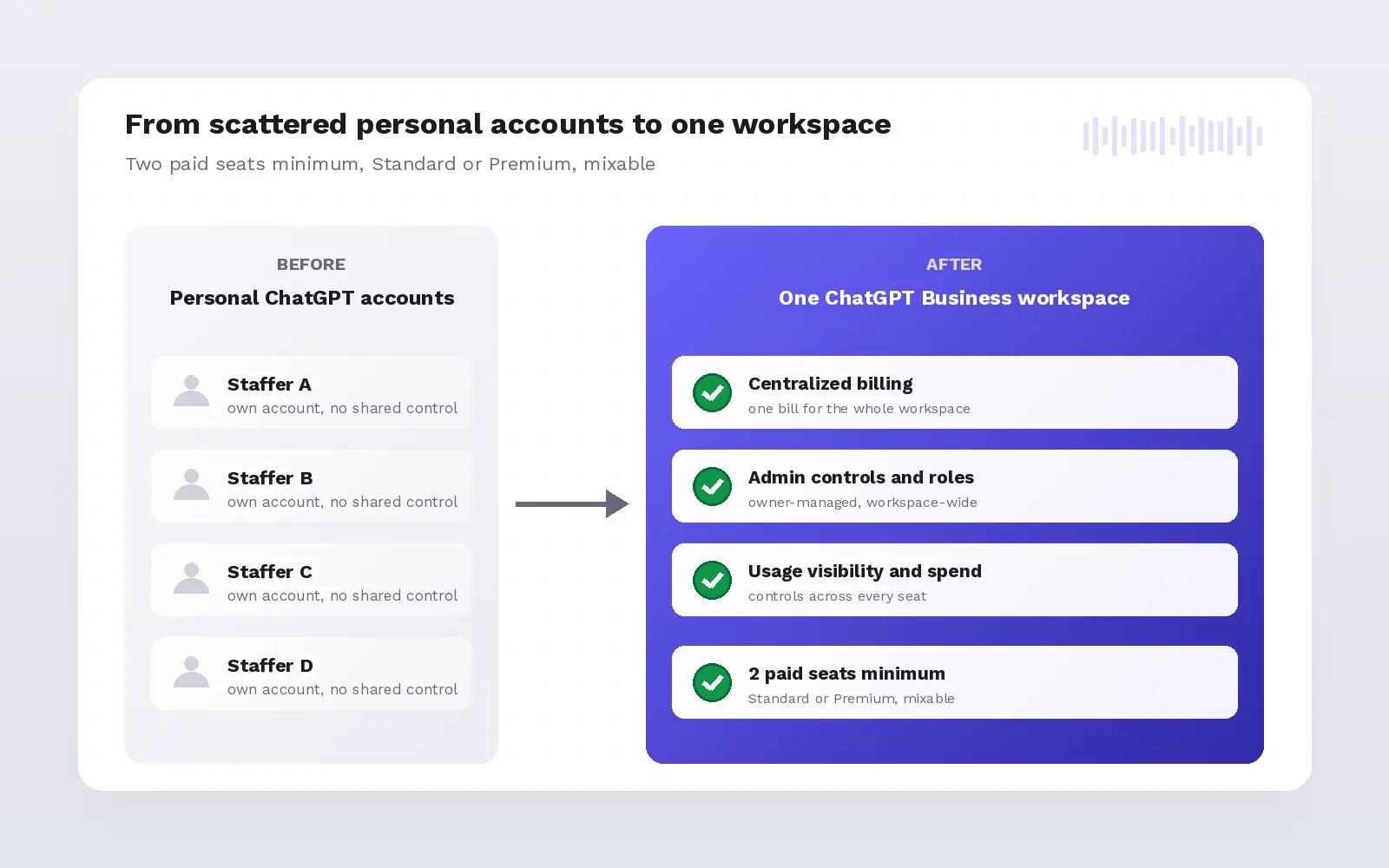
ChatGPT Business is OpenAI's self-serve workspace for teams, built around organizational control rather than a smarter model. A firm gets a separate workspace, centralized billing, admin controls that cover owner roles, usage visibility, and spend, with paid-seat access to ChatGPT, ChatGPT Work, and Codex.
A Business subscription doesn't include API access. API billing and rate limits stay separate from the seat-based subscription. That split matters because most "ChatGPT for business" guides skip a bigger distinction: buying Business is not the same decision as an employee using ChatGPT at work on their own account.
OpenAI's paid seat types are Standard and Premium, not two separate products. A workspace needs at least two paid seats in any mix, and Business currently caps new subscriptions at 200 paid seats combined.
- OpenAI's own overview and general FAQ, both from the OpenAI Help Center, are the ground-truth sources for this section.
- Codex is included on both seat types. Premium is a higher-allowance seat, not a separate product tier.
- The full Standard-versus-Premium comparison, including who each seat fits, is covered in the next section.
- Knowing what the workspace is does not answer how a team should use AI inside it on day one. The next section covers that.
What can a small team actually do with ChatGPT for business?
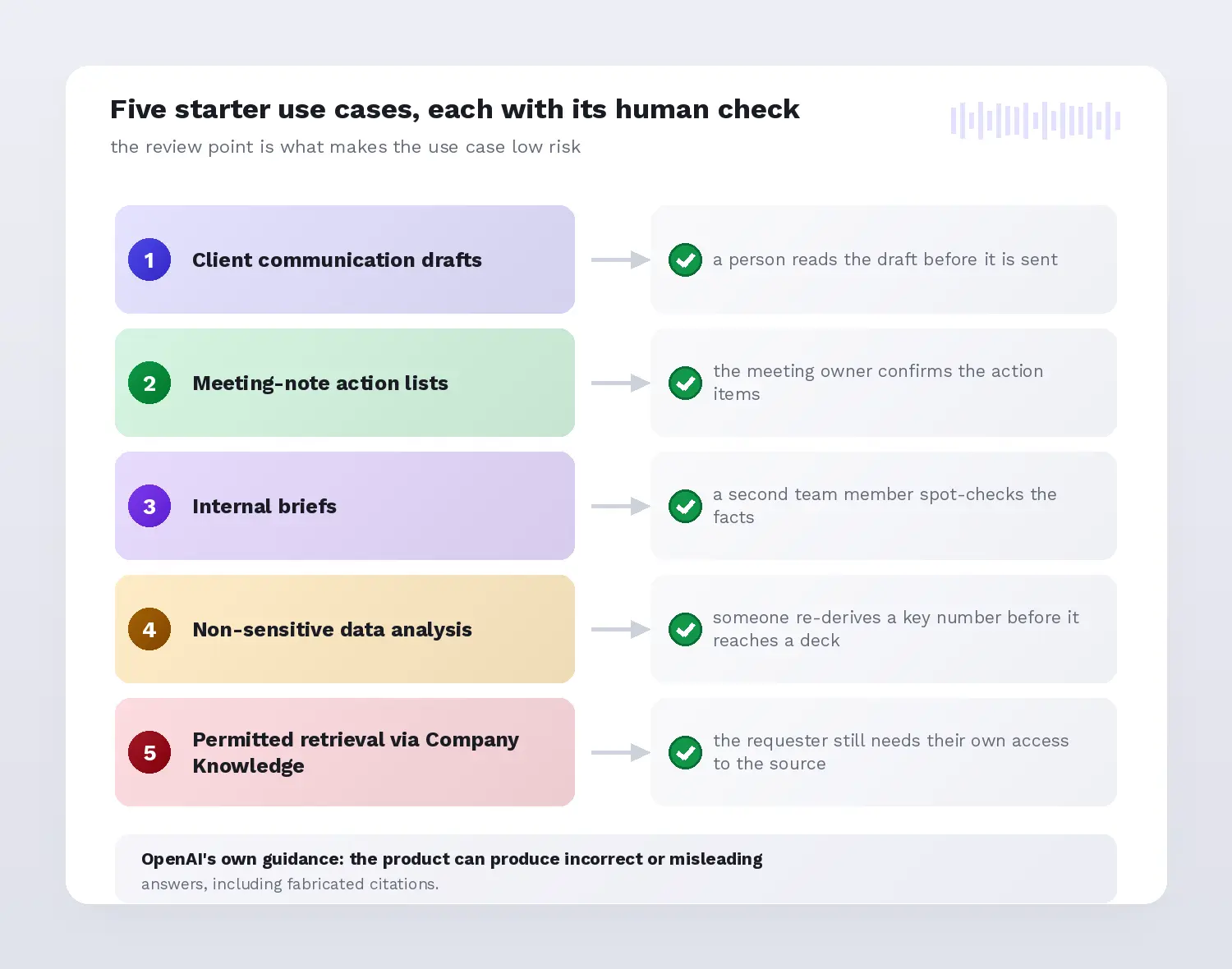
A small team gets the most value from five low-risk ChatGPT Business use cases, each with a named human-review point: client communication drafts, meeting-note action lists, internal briefs, non-sensitive data analysis, and permitted retrieval through Company Knowledge. OpenAI's own guidance is blunt: the product can produce incorrect or misleading answers, including fabricated citations.
Name each workflow's check: a person reads a client draft before sending; the meeting owner confirms action items; a second team member spot-checks an internal brief's facts; someone re-derives a key spreadsheet number before it reaches a deck; and a Company Knowledge requester still needs their own existing access to the source.
Within that same OpenAI analysis of small businesses, the work splits unevenly: marketing and copywriting made up 26 percent of activity, customer communication 11 percent, and legal or compliance questions 10 percent. Source The last of those three is the one that decides whether a workspace is enough.
A peer-reviewed study of 5,172 customer-support agents found a 15 percent average productivity gain from AI assistance, concentrated among less experienced workers, with small quality declines for top performers, according to the Quarterly Journal of Economics. Study It supports supervised, task-bounded use, not a blanket claim that AI improves everyone's output.
- Before Business, this activity happens as shadow AI use: staff pasting client material into personal ChatGPT accounts with no workspace controls at all.
- Company Knowledge only shows a user what they could already see in the connected source, which means it carries your existing sharing mistakes across rather than correcting them. Audit the folder or channel permissions before you connect it.
- Merging a new hire's personal ChatGPT workspace into Business is permanent and cannot be split back out, so treat it as a one-way decision made once per hire, not a default toggle.
- ChatGPT Work also gained event-triggered automation on August 25, 2026, letting a task automate a Gmail, Slack, or GitHub trigger, still worth a human check first.
- Five starter use cases only work if the firm buys the right seats for them, and that is a naming question the next section answers directly.
Which ChatGPT business plan is which?
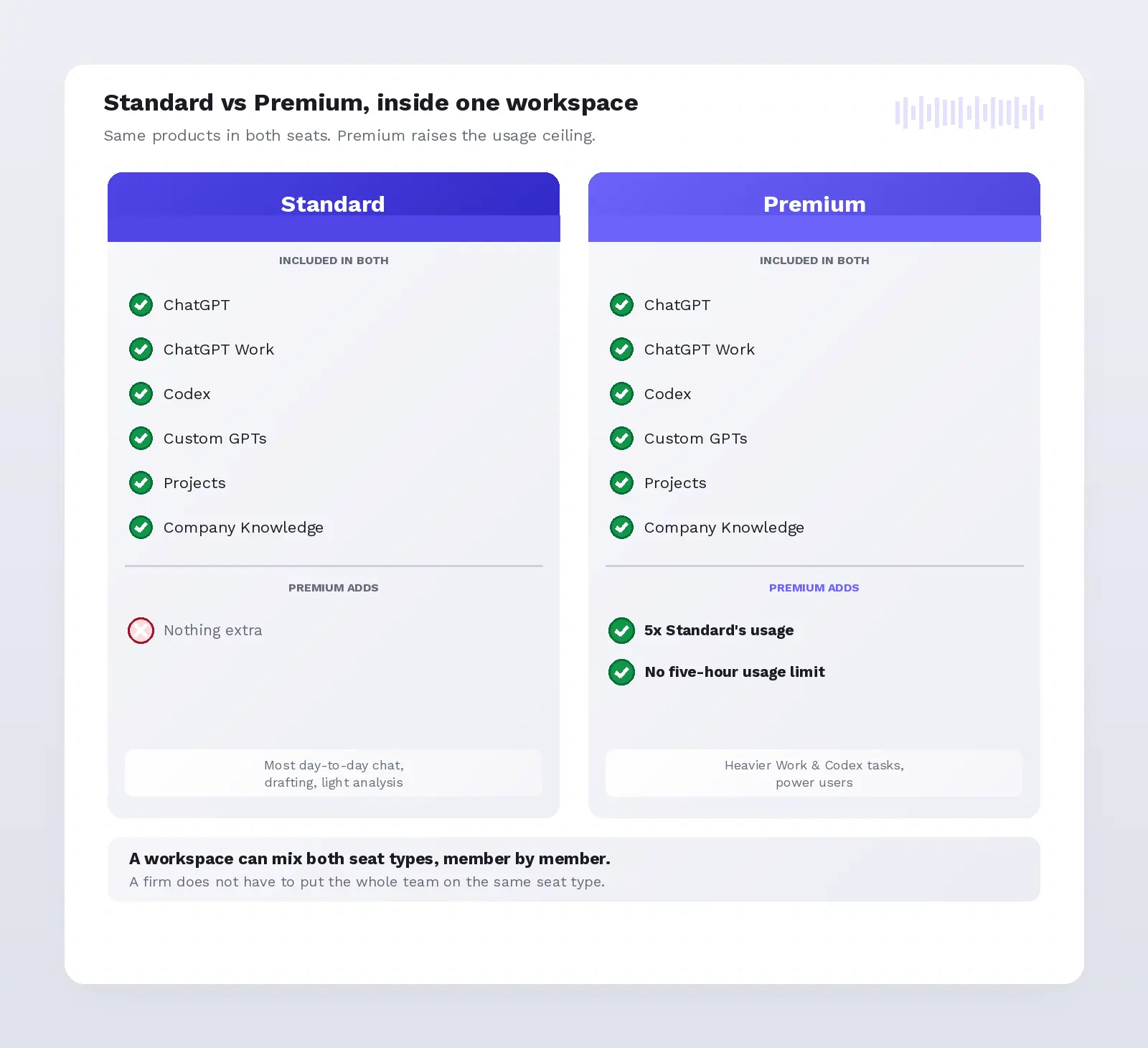
ChatGPT Business currently offers two seat types inside one workspace: Standard and Premium. Both include ChatGPT, ChatGPT Work, and Codex. Premium adds 5x more usage than Standard and removes the five-hour usage limit, per OpenAI's limits page. A workspace can mix both seat types.
Premium launched August 24, 2026, so most third-party ChatGPT for small business guides written before that date still describe a single undifferentiated seat. Legacy Codex-only seats are frozen to workspaces that had them before June 24, 2026, and new workspaces cannot add that seat type.
Lead with the naming fix, not a feature list: OpenAI renamed ChatGPT Team to ChatGPT Business, and Standard and Premium are seat types inside one product, not two competing plans. Guides written before the rename still present Team and Business as two separate products, which is wrong today.
Codex is included on both seat types. Premium ChatGPT seats fit people running longer Work or Codex tasks; Standard fits most day-to-day chat use. Price, seat cost, and billing mechanics are intentionally not covered here; see the dedicated pricing guide for exact current numbers.
| Seat type | Included in both | Premium adds | Who it fits |
|---|---|---|---|
| Standard | ChatGPT, ChatGPT Work, Codex, GPTs, Projects, Apps, Company Knowledge, ChatGPT Agent, Deep Research | None | Most day-to-day chat, drafting, and light analysis |
| Premium | ChatGPT, ChatGPT Work, Codex, GPTs, Projects, Apps, Company Knowledge, ChatGPT Agent, Deep Research | 5x Standard's included usage; no five-hour usage limit | Heavier Work and Codex tasks, power users |
- A workspace can mix Standard and Premium seats member by member. A firm does not have to put the whole team on the same seat type.
- New Business subscriptions cap at 200 paid seats combined. Older workspaces may retain a different cap from before the change.
- The safe reading of "chatgpt business plan" here is the workspace and its seats, not a business plan document written with ChatGPT's help, which is what most people searching that exact phrase actually want.
- A seat's usage allowance is a message quota, not a context window change: Premium removes the five-hour limit; the model's context window doesn't change.
- Even the right seat has a ceiling. The next section maps exactly where Business, Standard or Premium, stops being enough.
Where does ChatGPT Business run out of road?
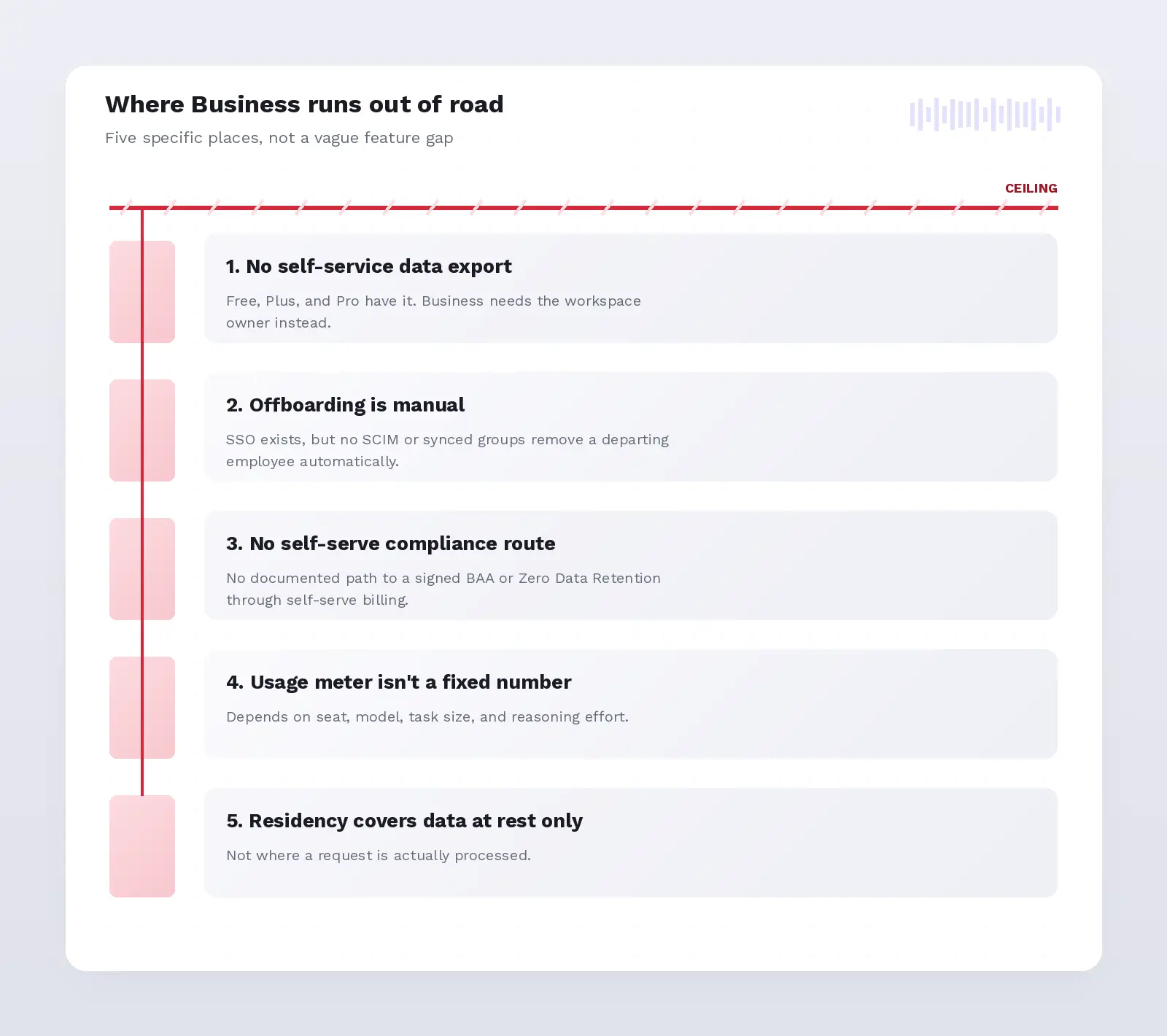
Business runs out of road in five specific places: no self-service data export, no automatic offboarding, no signed compliance agreement through self-serve billing, a usage meter that is not a fixed number, and storage residency that covers data at rest, not where a request is actually processed.
Export and provisioning have gaps. Business has no self-service data export the way the free version, Plus, and Pro do, so a firm needs its workspace owner for organization-managed access. Single sign-on (SSO) exists, but SCIM and synced groups do not, so a departing employee isn't removed automatically; someone has to do it by hand.
Compliance has a gap too: self-serve Business isn't OpenAI's documented route to a signed Business Associate Agreement (BAA) or Zero Data Retention, and it is absent from OpenAI's HIPAA-eligible product list. A firm handling protected health information needs a contracted offering, not a credit-card Business signup.
Premium adds five times Standard's included usage with no five-hour limit, documented here, but the meter is not a fixed number. One workspace owner reported hitting a usage-limit error while the usage page showed roughly 93 percent remaining, one unresolved report, not proof of a systemic bug.
- The 200-paid-seat cap on new Business subscriptions is itself a ceiling for a firm planning to scale past that headcount inside one workspace.
- Data residency, where a workspace has it, controls storage at rest only, not inference. A time-limited US copy of every prompt and response persists even with a non-US region selected.
- The gap between Business and Enterprise plans is narrower than that list suggests. Enterprise adds automated offboarding, a route to a signed compliance agreement, and a workspace-wide shared-link switch. Neither plan offers self-service export, and Enterprise usage is described as virtually unlimited rather than a fixed number.
- When any of these five ceilings is the deciding requirement, the next step up OpenAI's product line is the ChatGPT Enterprise plan, named here without a price and covered in more depth elsewhere.
- A ceiling on features is one thing. Whether the actual conversation is safe once it is inside the workspace is the next question, and it decides whether you buy at all.
Is your client work safe inside a ChatGPT Business workspace?
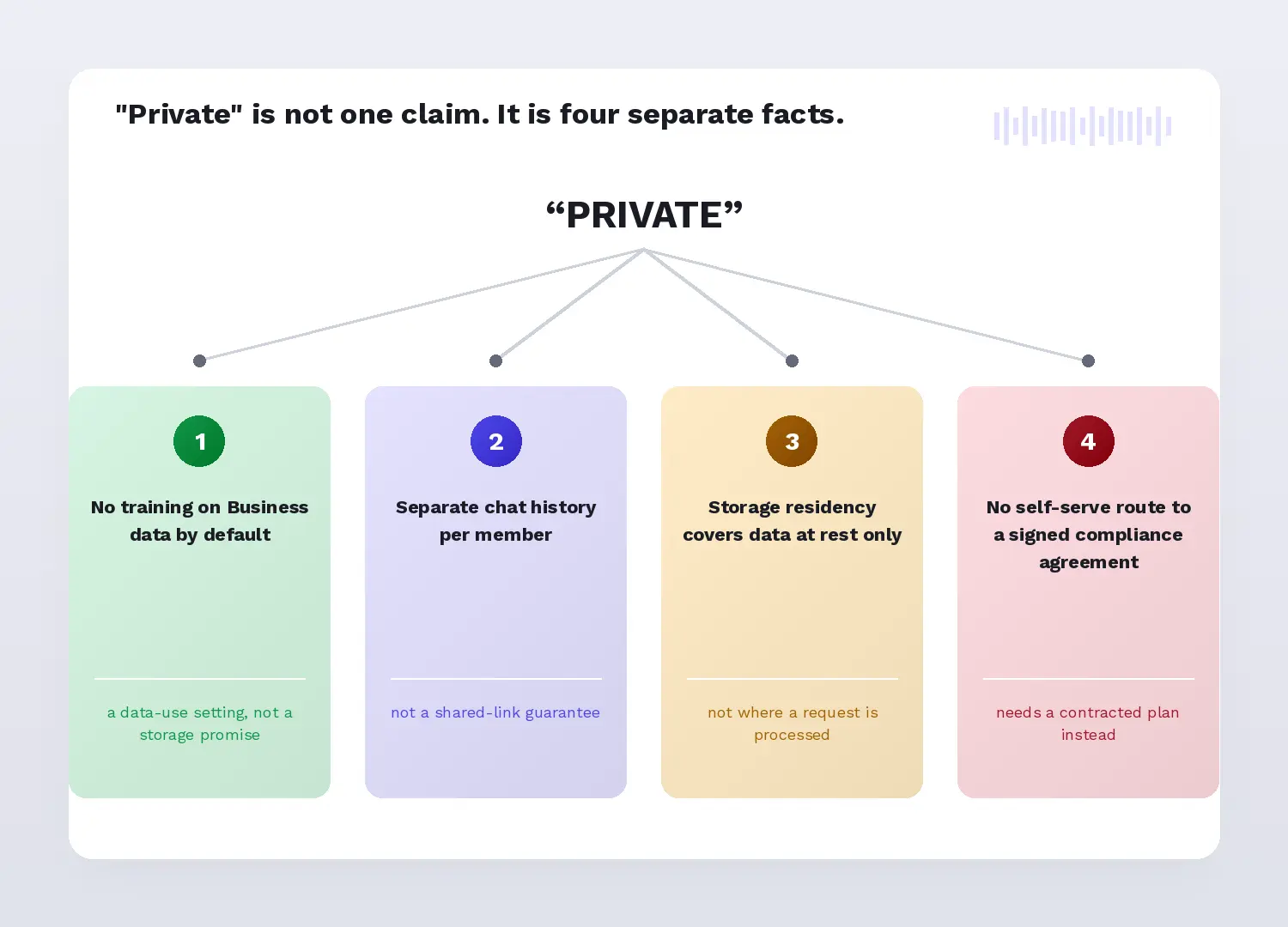
"Private" usually means one blanket claim. It is actually four facts: no training on Business data by default; a separate chat history per member; storage residency, where a workspace has it, covering data at rest, not where a request is processed; and no documented route to a signed compliance agreement through self-serve billing.
OpenAI states it will not train on workspace data: Business data is excluded from training by default and encrypted in transit and at rest. Source Each member has a separate chat and Codex history, and usage analytics do not automatically expose transcripts, though Business cannot disable shared links workspace-wide the way Enterprise can.
A 2024 Cisco survey found 48 percent of 2,600 privacy and security professionals across 12 geographies had entered non-public company information into generative AI (GenAI) tools, and 27 percent had banned GenAI applications, at least temporarily. Cisco study
A separate AAAI/AIES analysis found that six frontier developers' publicly posted privacy policies appeared to use chat data for training by default, some retaining it indefinitely, per researchers Jennifer King, Kevin Klyman, and colleagues. Study That finding covers consumer accounts, not Business.
- LayerX Security's 2025 enterprise AI telemetry found 77 percent of employees paste data into GenAI prompts, with 82 percent of those pastes from unmanaged accounts and 40 percent of uploaded files containing personal or payment-card data. LayerX report
- A removed member's chats, files, and canvas documents are retained indefinitely, and there is no self-service export to pull a backup first. Read more on private versus public AI.
- No OpenAI documentation describes what happens to the rest of a firm's conversations if a single device is phished. SSO governs sign-in, not post-compromise blast radius, and that question stays open.
- Any member can create a shared link to a conversation, and only that member can delete it. Business has no workspace-wide switch to turn shared links off, so a link carrying client-identifying text or files stays live until its author removes it.
- Encryption protects data while it sits on a server. Who at OpenAI can see it is a separate question, and OpenAI answers it: authorized staff handling engineering support, abuse investigation, or legal compliance, plus specialist contractors reviewing for abuse and misuse. Enterprise privacy
- Company Knowledge inherits the permissions your connected source already has. If a client folder in Drive or a channel in Slack is shared more widely than anyone remembers, connecting it imports that looseness into ChatGPT rather than fixing it.
- Malpractice or liability-insurance implications are a contract question for a firm's own carrier, not a ChatGPT setting.
- If those gaps land on your deciding requirement, the next section sets out the three data paths a small firm can actually choose between.
Is there a better alternative?
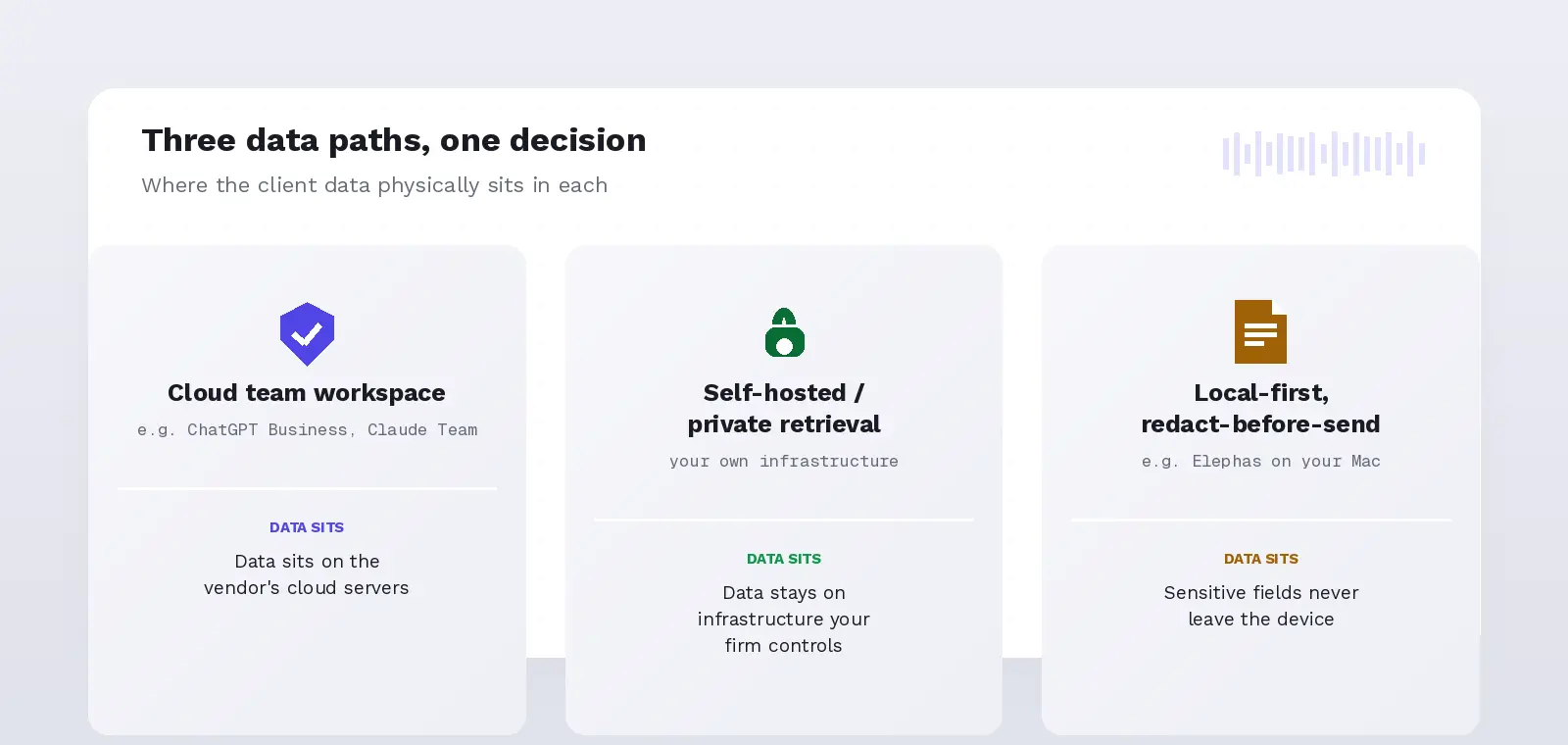
ChatGPT Business solves one problem well: making AI use governable instead of invisible. It is not the only answer, and if your deciding requirement is keeping client data off a vendor's server, it may not be the right one for you.
Three data paths exist: a cloud team workspace, a self-hosted or private-retrieval setup, and a local-first tool that redacts before anything leaves the device. Claude Team is a named example of the first path, the same cloud-workspace shape as Business, with a two-member minimum. More options are in alternatives for consultants.
Elephas is a private AI knowledge assistant for Mac that pairs with the cloud model your firm already uses, ChatGPT, Claude, Gemini, Grok, or Perplexity, and adds a local redaction step before anything leaves the device, or runs entirely offline with built-in local LLM models when a file should never reach a cloud model.
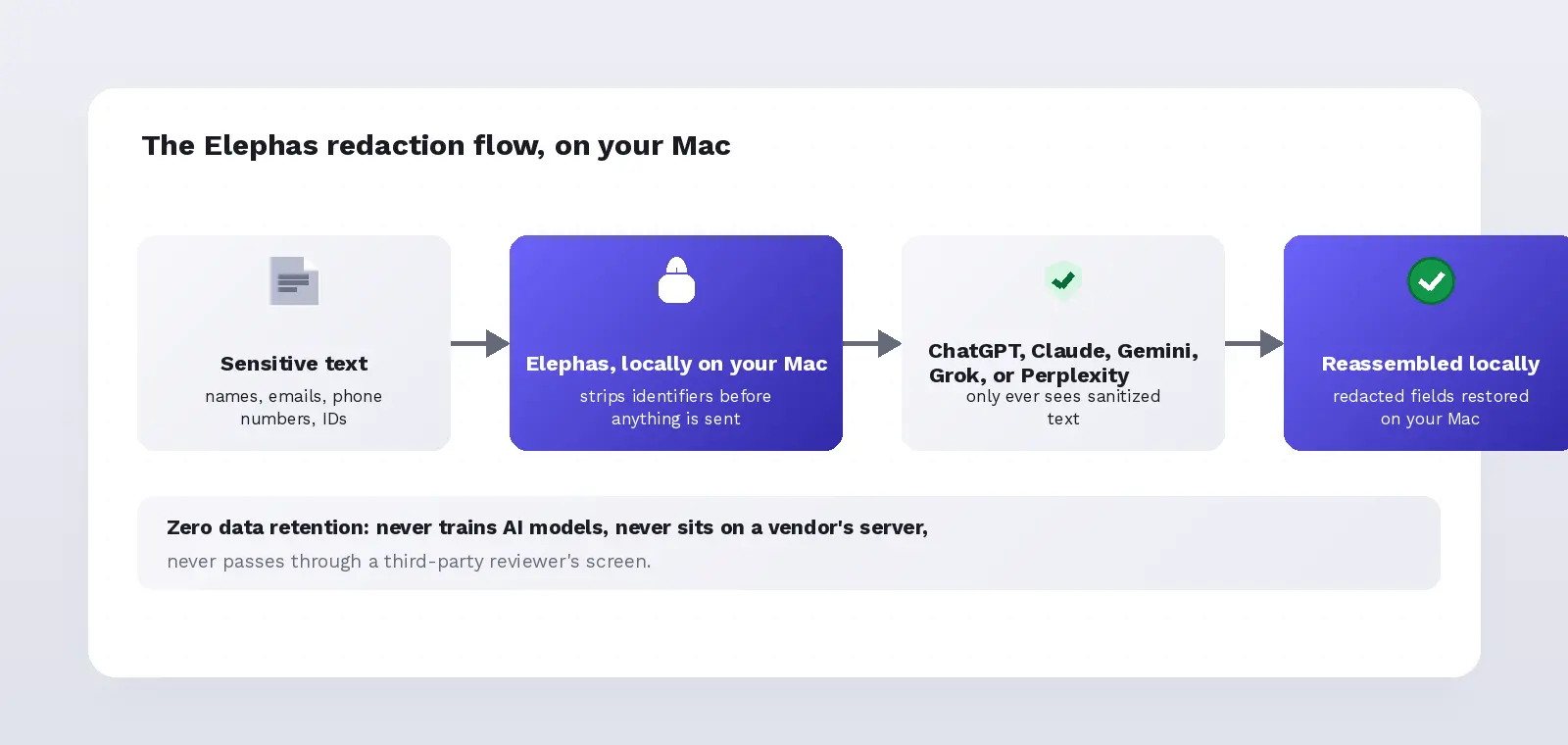
For firms that still want a leading cloud model, Elephas adds a second layer through automatic PII redaction. Before a prompt is sent to ChatGPT, Claude, Gemini, Grok, Perplexity, or any other cloud model, it strips sensitive names, emails, phone numbers, and identifiers on your Mac.
The cloud model only ever sees the sanitized text. When the answer comes back, the redacted fields are reassembled locally on your machine, so nothing identifiable leaves the device. Elephas pairs this with zero data retention: content never trains AI models, never sits on a vendor's server, and never passes through a third-party reviewer's screen.
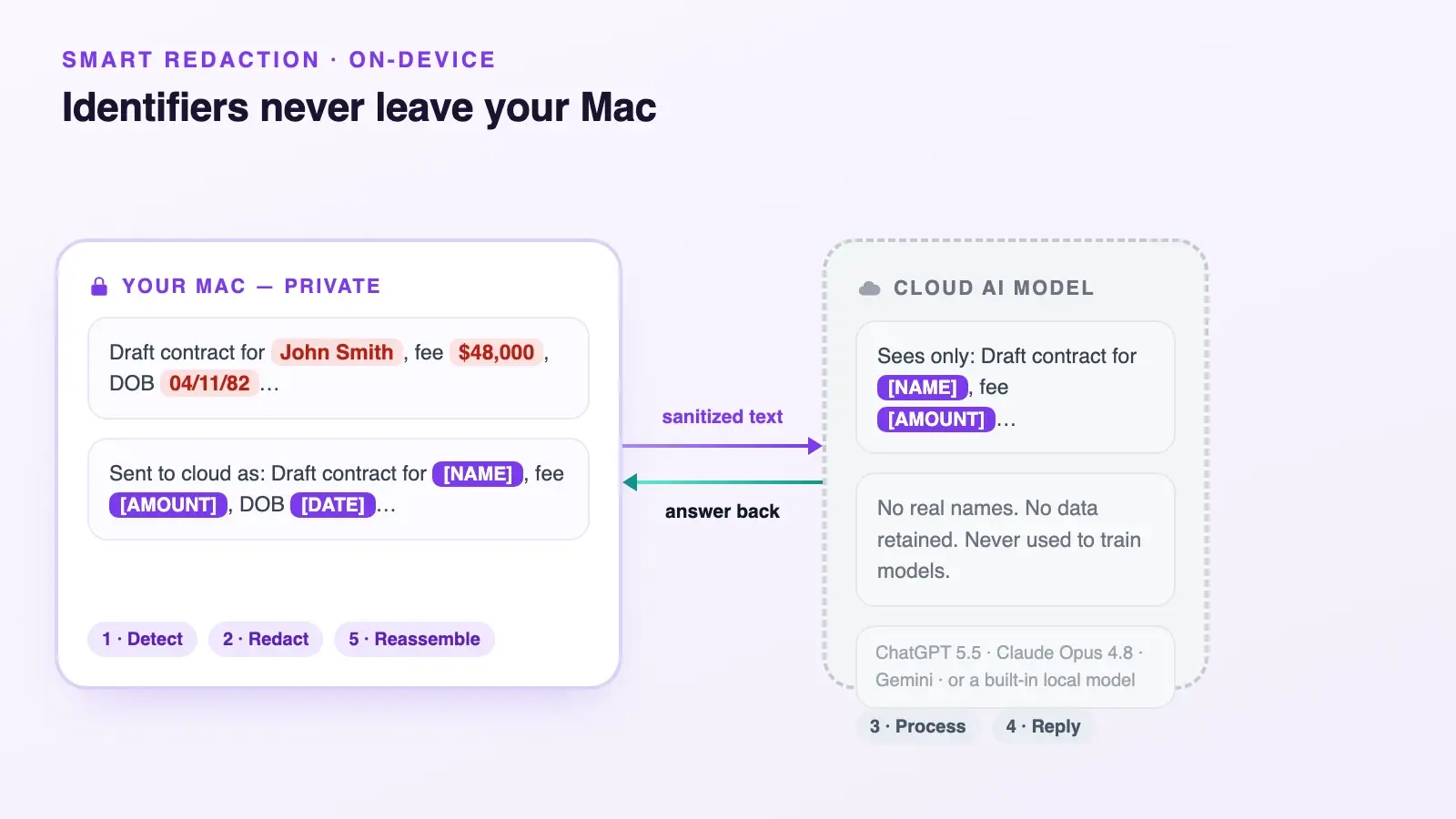
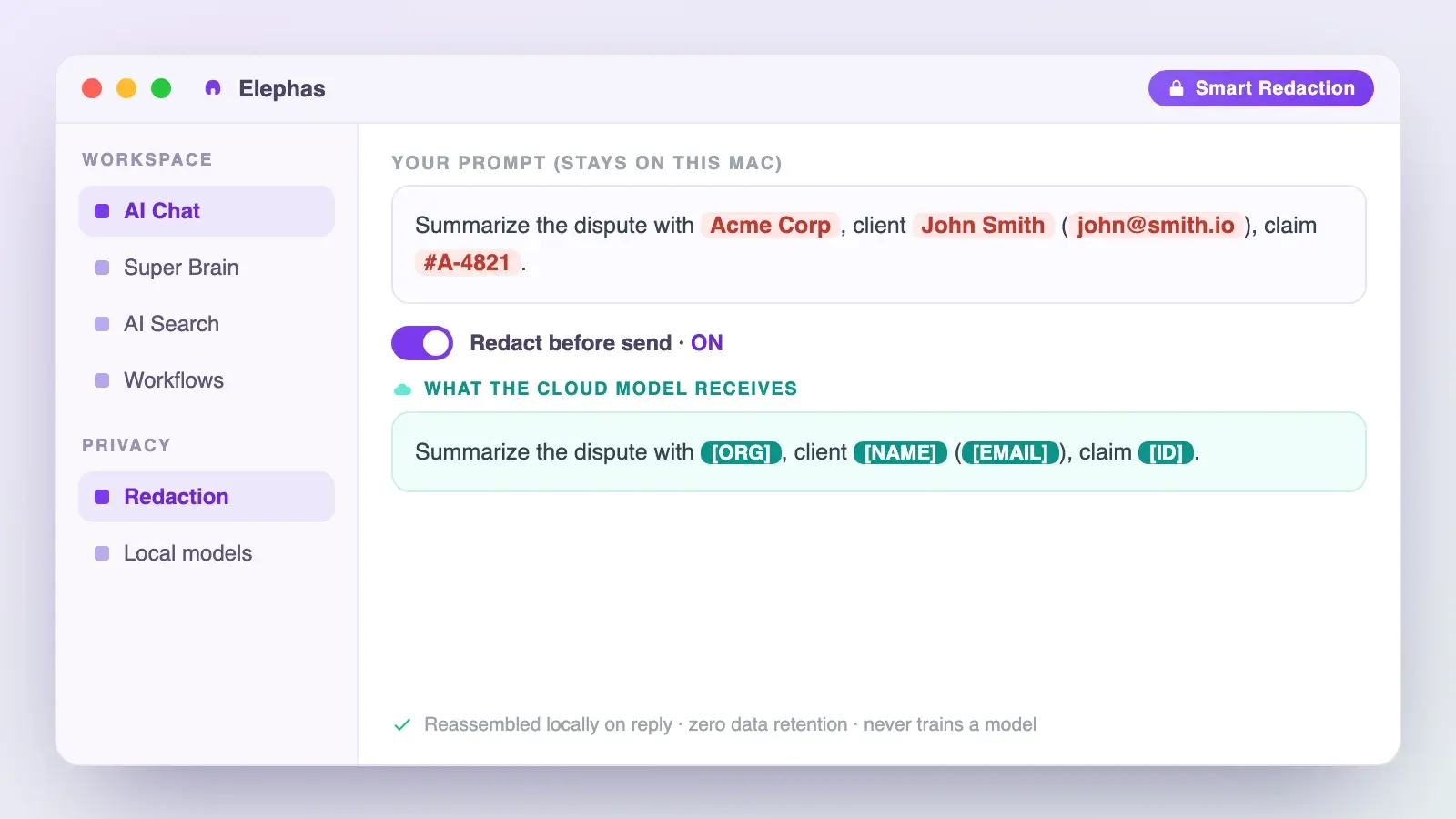
Elephas has a free plan and starts at $19/month, see current pricing, with automatic PII redaction available on every plan including Free. It is designed to reduce exposure for sensitive work. It doesn't carry a HIPAA or GDPR compliance badge, and no AI tool, Business included, can claim that without a contracted agreement.
- A cloud team workspace like Business or Claude Team fits you if your real requirement is centralized admin, shared billing, and collaboration, not data minimization.
- A self-hosted or private-retrieval setup fits a firm with its own IT capacity and a genuine regulatory mandate for infrastructure control.
- For a small firm whose real worry is what someone just pasted, the fix is a redaction step before the paste reaches a cloud model, a safer private AI choice than picking the nicest admin console.
- If you want the cloud model you already trust without sending raw client data to it, Elephas is a privacy-friendly AI knowledge assistant with built-in local LLM models and automatic redaction on every plan, including Free.
Frequently asked questions
Seven questions come up before most small firms commit. Two matter most for a firm handling client data: does OpenAI train on it, and what happens if the firm stops paying. The other five cover seats, API access, usage, regulated work, and outgrowing the plan.
Does OpenAI train its models on our business data?
No. By default, Business data, including inputs and outputs, is excluded from training and encrypted in transit and at rest. Source That is a data-use setting, not a promise the data never leaves the firm or is never stored; the safety section above covers what "excluded from training" does and does not include.
What happens to our data if we cancel the subscription?
Cancellation deactivates the workspace, it does not delete it. Data remains intact, but users lose access, and only the owner can reactivate it. Source Permanently deleting a workspace is a separate action, and OpenAI schedules a manually deleted chat for permanent removal within 30 days, with exceptions.
What's actually included in a Standard or Premium seat?
Both seat types include ChatGPT, ChatGPT Work, and Codex, plus GPTs, Projects, Apps, and Company Knowledge. Source Premium adds five times Standard's included usage and removes the five-hour usage limit. A workspace can mix both seat types across its members instead of standardizing on one.
Does the subscription include API access?
No. A Business subscription doesn't include API usage; API billing and rate limits are entirely separate from the workspace's seat-based subscription. Source A firm that needs programmatic access alongside its Business seats has to set up and pay for the API platform on its own terms.
How much usage is included, and when does it reset?
There is no fixed message count. Usage depends on seat type, model, task size, and reasoning effort, so a single long task can use far more allowance than many short ones. Source Test a real workload during the first billing period rather than trusting a static message-cap table.
Is ChatGPT Business eligible for a BAA or HIPAA-regulated work?
No. OpenAI's current HIPAA-eligible product list names six specific products or configurations, and ordinary self-serve ChatGPT Business is not one of them. Source A firm handling protected health information under a Business Associate Agreement needs a contracted offering, not a credit-card Business signup.
When does a small firm outgrow this and need ChatGPT Enterprise?
When a control Business lacks becomes your deciding requirement. Enterprise adds automated offboarding through SCIM, a route to a signed compliance agreement, and a workspace-wide switch for shared links. It does not add self-service export, and its usage is described as virtually unlimited rather than a fixed number. OpenAI routes contracted needs through sales.
