How to Use AI for Research Without Sharing Sensitive Information
Last updated: August 12, 2026
Learning how to use AI for research without sharing sensitive information is not a settings problem. It is a sorting problem. Most advice stops at three lines: do not paste sensitive data, turn off chat history, read the privacy policy. That is where researchers get caught. All three failed publicly in the past 12 months.
Quick answer
- Sort the file, not the tool: every asset routes to cloud, sanitized cloud, local only, or no AI.
- Strip direct and indirect identifiers on your own machine before anything reaches a browser tab.
- Treat every privacy toggle as risk reduction. Opt-outs, deletion, and sharing all failed in 2026.
- Elephas has a free plan and starts at $19/month with a free trial, so the on-device route costs nothing to test.
Where sensitive data actually leaks in AI research
Every file you hand to artificial intelligence (AI) takes one of four routes: cloud, sanitized cloud, local only, or no AI. Privacy toggles help, but each one has a documented failure mode.
Frontiers reports 77% of researchers use AI at some stage of their work (AI literacy).
Harmonic Security's analysis of 1 million prompts and 20,000 uploaded files found sensitive content in 4.37% of prompts and 21.86% of files (exposure report).
That second figure is browser-extension telemetry from one firm's customers, not a population estimate. A researcher on r/PhD (thread) wrote:
“Feeding raw data to ChatGPT let alone using its results 1-1 is a huge red flag in academia IMO.”
- You will decide the route for any file, raw data included, in seconds.
- Not covered: whether AI-assisted writing reads as machine-generated.
- Time cost: the routing decision is instant, the sanitizing takes 15 to 25 minutes on the first pass.
Prerequisites: what you need before Step 1
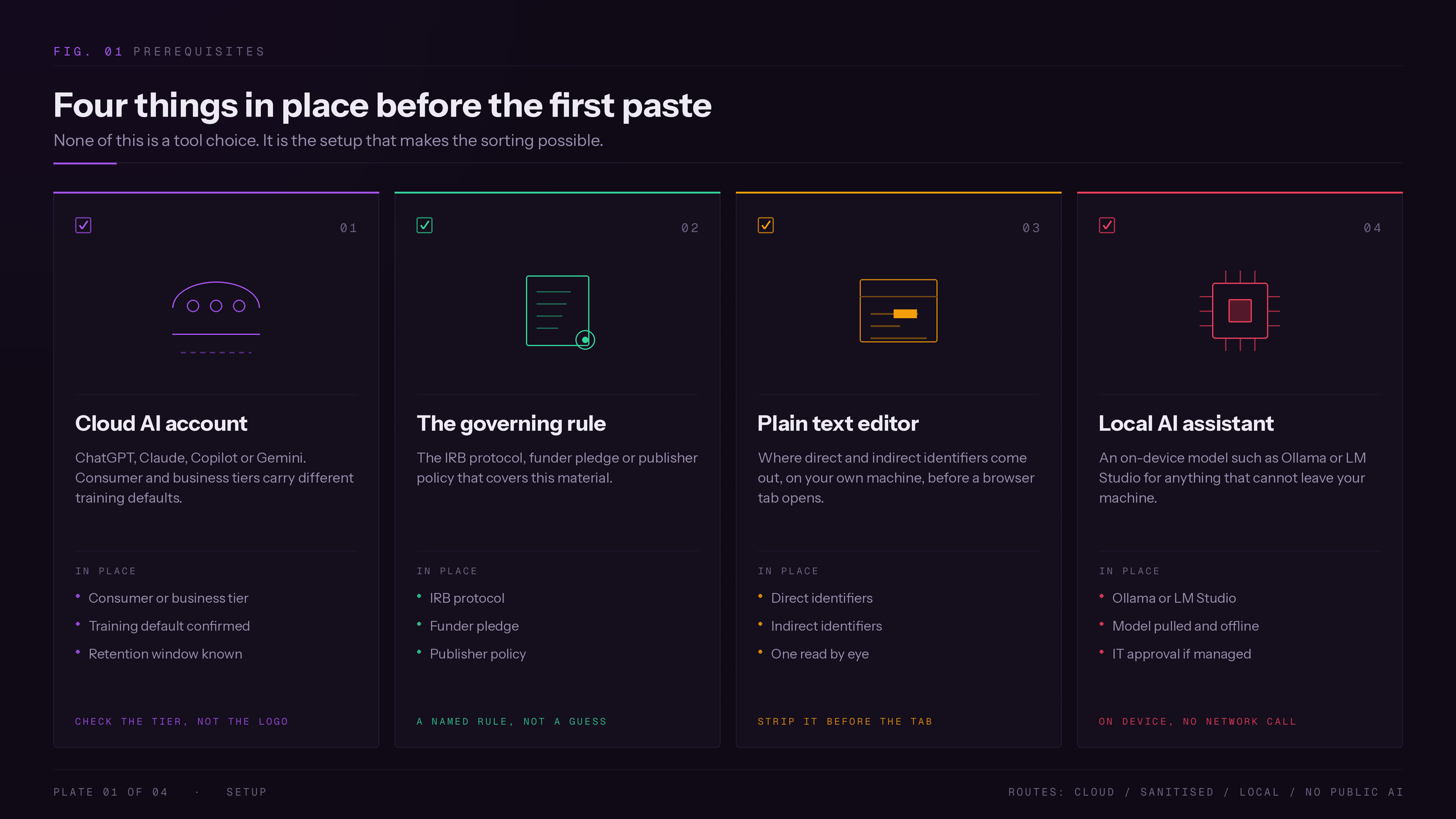
You need four things before Step 1: a cloud AI account, the governing rule, a plain text editor, and a local AI assistant for anything that cannot leave your machine.
Only the local route in Step 5 removes the vendor entirely. ByteByteGo's local-LLM guide shows what running a large language model on your own hardware involves.
- A cloud AI account (ChatGPT, Claude, Microsoft Copilot, or Gemini). Consumer and business tiers carry different training defaults.
- The rule governing this material: your institutional review board (IRB) protocol, funder pledge, or publisher policy.
- A plain text editor, for stripping personally identifiable information (PII) before anything reaches a browser tab.
- Optional, for the local-only tier: Ollama or LM Studio, free, on-device. On an IT-managed machine the install may be blocked, so ask IT first.
- Optional: an institution-provided instance. On r/dataanalysis (thread): “We have an internal secure AI system that we can use when working with sensitive data.”
LayerX's 2025 telemetry found 77% of employees pasted data into generative AI prompts, and 82% of those pastes came from unmanaged accounts (LayerX report). The labels themselves do not help. One r/ChatGPT thread (thread):
“There is a setting that talks about “chat history and training”. It appears that they can be turned on or off only together.”
Building this from scratch takes one pass through the routing table and one settings check. Researchers coming from a paste-everything habit find the hard part is sorting, not picking a tool. Upgrading an existing workflow starts with an audit.
7 steps to use AI safely for research
Seven steps take a research file from unsorted to safely used. Classify it, find the governing rule, set the vendor controls, strip identifiers locally, route local-only material on-device, send structure instead of content, then check shares and log it.
- Steps 1 and 2 happen before any browser tab is open.
- Steps 3 through 6 are the only ones that touch a tool.
- Step 7 is the one people skip.
Step 1: Classify the file first
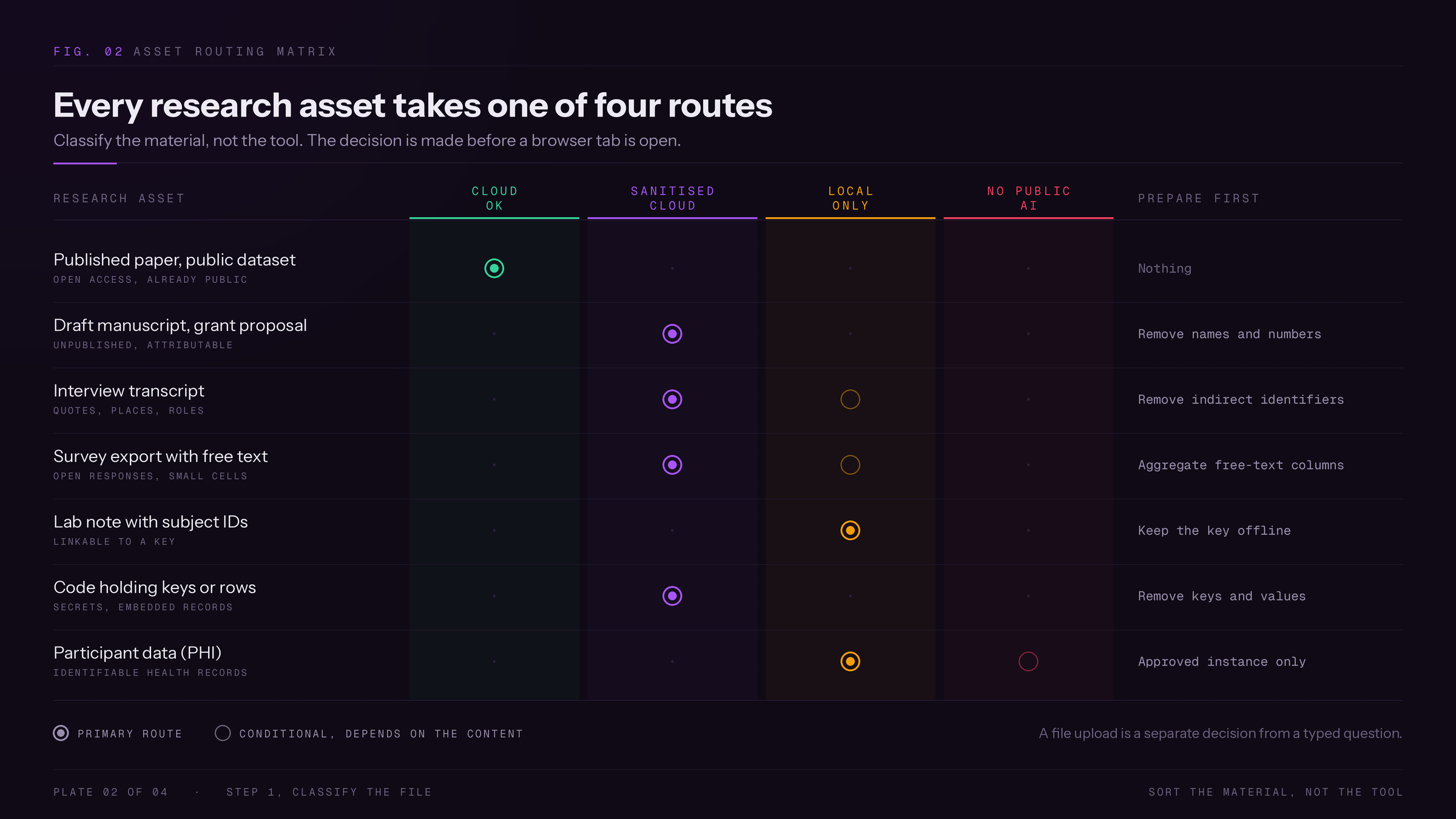
Sort the material into one of four routes: cloud OK, sanitized cloud, local only, or no AI, before a browser tab is open.
| Research asset | Route | Do this first |
|---|---|---|
| Published paper, public dataset | Cloud OK | Nothing |
| Your own draft manuscript or proposal | Sanitized cloud | Remove names and numbers. Anything you are reviewing for a funder or journal: no public AI |
| Interview transcript | Sanitized cloud, or local only | Remove indirect identifiers |
| Survey export with free text | Sanitized cloud, or local only | Aggregate free-text columns |
| Lab note with subject IDs | Local only | Keep the key offline |
| Code holding keys or rows | Sanitized cloud | Remove keys and values |
| Participant data (protected health information) | Local only, or approved instance | Route it there |
Uploading a file is a separate decision from typing a question. In the same Harmonic analysis, files caused 68.8% of employee PII incidents despite being 13.9% of events (exposure report).
Step 2: Find the rule governing generative AI for this material
Check the IRB protocol, funder pledge, or publisher policy for this file. Search your institution's AI policy page for “upload” and “generative AI”.
- The NSF notice prohibits reviewers from uploading any proposal or review record to non-approved generative AI tools.
- The ERC guidance is blunter: uploading proposals, or any part of them, to external AI systems is prohibited.
- A privacy policy governs what the vendor does, not whether your funder permits sending it.
The mistake is assuming “de-identified” satisfies every rule. Penn's IRB says sharing participant information with public AI services is not permissible under the Health Insurance Portability and Accountability Act (HIPAA) or Penn Medicine policy, even de-identified.
If your protocol covers only de-identified data, loading raw transcripts into a new tool is a new disclosure.
Step 3: Set the controls in your AI tools, then ask what they miss
Set the privacy settings before the first prompt. In ChatGPT, open Settings, Data Controls, and confirm “Improve the model for everyone” is off. In Claude, open Settings, Privacy, and turn off “Help Improve Claude”.
- Confirm whether the account is consumer or business tier, since that changes the training default.
- Confirm whether “not used for training” also means “not stored,” and note the retention window.
- Find out how long abuse-monitoring logs are kept, and who is able to read them.
- Find out whether a human reviewer can see the conversation, and what triggers that review.
- Check which connected apps or memory features pull in material without a prompt.
- Get a signed Business Associate Agreement on file, not just a public policy page.
OpenAI's business products are not used for model training by default, but abuse-monitoring logs can hold prompts and responses for up to 30 days unless Zero Data Retention is approved (OpenAI data guide).
Users read these defaults more carefully than the marketing pages do. One r/ChatGPT commenter (thread):
“on the paid account you have to opt in to them training on your data. (off by default) they keep logs (chats) for 30 days”
Step 4: Strip direct and indirect identifiers locally
Remove identifiers in your own editor before anything is pasted into a browser tab. Scan for leftovers, then read the file yourself.
- macOS or Linux:
grep -inE '[0-9]{3}-[0-9]{2}-[0-9]{4}|@[a-z0-9.-]+' excerpt.txt - Windows PowerShell:
Select-String -Pattern '\d{3}-\d{2}-\d{4}|@[a-z0-9.-]+' excerpt.txt
Before (illustrative, not real study data): “Dr. Priya Shah, the 52-year-old head of oncology at Riverside General, told us the January trial results for the new leukemia protocol looked worse than expected in patients over 60.”
After: “A senior oncologist at a mid-sized regional hospital described early-phase trial results for a leukemia protocol as worse than expected in an older patient subgroup.”
The name, age, hospital, and month are gone. Head of oncology becomes a senior oncologist, because a department head at a named hospital is close to unique.
- De-identification fails when the rule bans the service. HHS allows two routes, Expert Determination or Safe Harbor's removal of 18 identifier categories (HHS guidance).
- Anonymization fails if a record can be isolated, linked, or inferred, the three criteria the European Data Protection Board adopted on 8 July 2026 (EDPB guidelines).
- Pseudonymization fails because the key exists. Under the General Data Protection Regulation (GDPR) it is still personal data.
- Aggregation fails on small cells. One rare-disease row is its own aggregate.
- Synthetic data needs a formal guarantee, as Google scientists Alex Bie and Umar Syed showed (Google Research).
- Redaction fails when indirect identifiers survive. Diagnosis plus site plus date re-identifies a cohort.
A 2025 IJCNLP-AACL study by Krishna Kanth Nakka and coauthors found small query budgets could raise PII extraction rates fivefold, and fine-tuned models leaked more (study).
Practitioners land on the same rule. A data analyst on r/dataanalysis (thread):
“Never feed actual data to it. When you're writing code, redact/rename anything that is sensitive security information.”
Step 5: Route local-only material to an on-device model
Run a local large language model (LLM) instead of a cloud tool. The prompt runs on your hardware, and no network request carries the document to a vendor. Verify with ollama list.
- macOS: download the .dmg from Ollama.
- Windows: run the installer from the same page.
- Both:
ollama pull llama3, thenollama run llama3. - Stays on-device: the transcript, patient-level rows, unpublished results, and any index built from them.
- Goes onward: the sanitized version from Step 4, only.
Do not assume an app labelled “AI assistant” is local. Plenty of desktop apps are just front ends that send prompts to the cloud.
A lab posted a six-month report on r/LocalLLaMA (thread):
“keeps everything on-prem which makes the security folks happy”
Step 6: Send the structure, not the content
Describe the shape of the data instead of pasting it. You get a working formula back, then apply it locally, so the real values never leave your machine.
- Schema only: describe the columns and their types, no rows.
- Dummy data, as an r/dataanalysis commenter put it (thread): “I use dummy data with columns labeled a,b,c,d,etc and put fake numbers in to generate formulas that I need”.
- A sandboxed or institutional instance, when the task needs the real rows.
Re-read the prompt and check that only column names, types, and relationships are visible.
Step 7: Check your shares, then log the session
Revoke shared analysis links, then write one line in a running log. In Claude, go to Settings, Privacy, Shared chats, Manage, then Unshare. In ChatGPT, check history for chats you assumed were deleted.
- Date
- Tool and account tier
- What went in, in five words
- Which of the four routes it was
Stated retention windows are estimates, as one r/NoStupidQuestions commenter noted (thread): “30 days per their faq but I wouldn't be surprised if they have a backup or way to recover.”
Skipping the log for “just a quick question” is the failure mode.
Common mistakes that expose research data
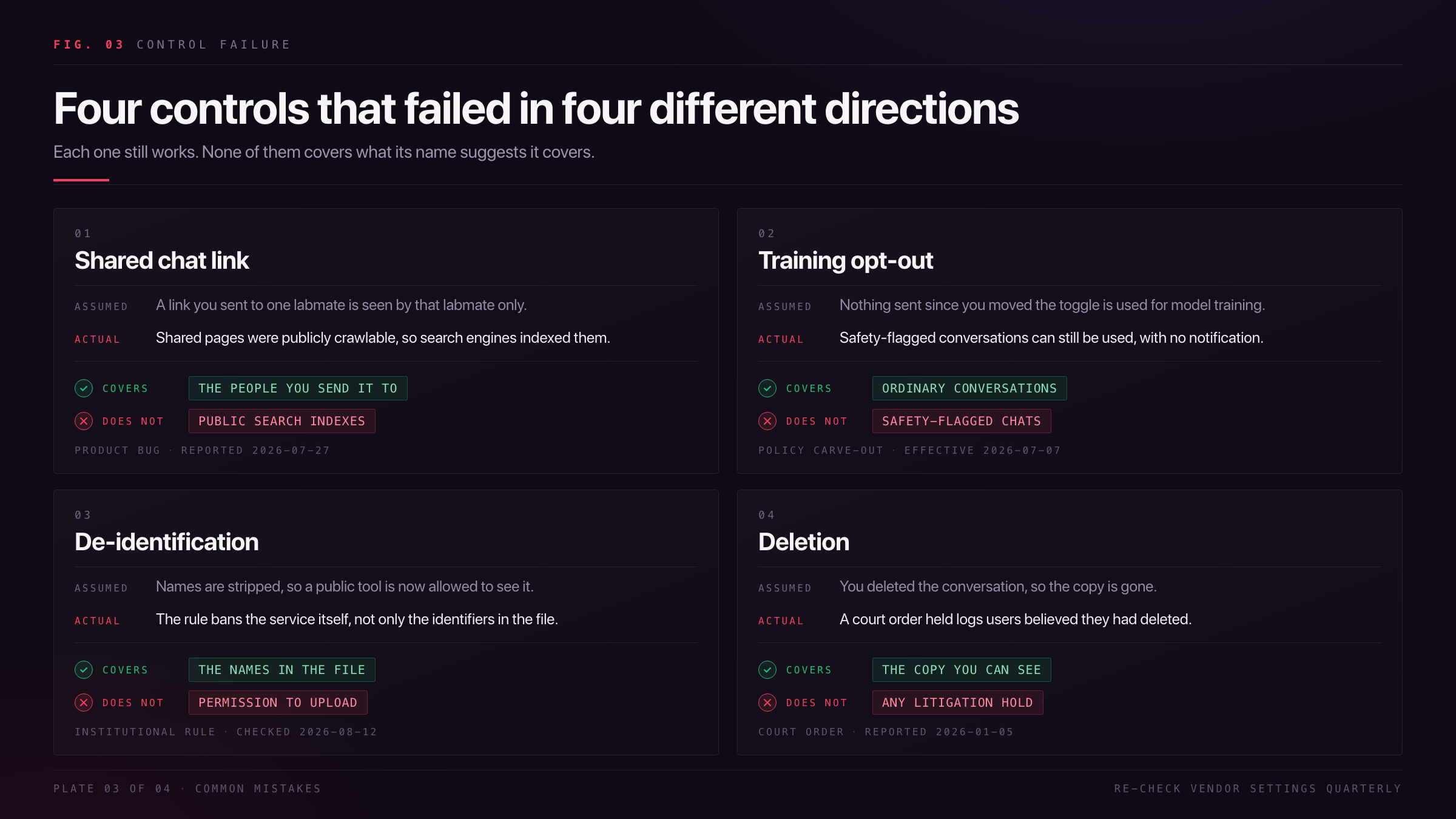
Four failures cause most research data exposure. All four come from trusting a control that does not do what its name suggests.
Check Point Research reported on 14 July 2026 that high-risk enterprise generative AI prompts doubled from 2% to 4% in a year, and that organizations used 10 AI applications a month (AI security report).
None of the four below shows up as a warning in the interface. People find them after the fact, in reporting or by accident (r/ChatGPT thread).
- Re-check vendor settings quarterly. The four below came from four different directions.
- Screenshot the settings page with the date visible.
- If something sensitive was sent, log it and tell whoever owns the rule.
Mistake 1: A shared chat link is a public page
A link shared with one labmate turns up in Google results, alongside medical records, clinical trial results with patient information, and internal documents. Shared chat pages were publicly crawlable, so search engines indexed them. Source: TechCrunch (2026-07-27).
Fix: revoke each share from Settings, Privacy, Shared chats. Deleting the chat does not retract the link. If the indexed page held participant data, report it as a data breach.
Mistake 2: The training opt-out leaves privacy risks in a carve-out
You turned the toggle off months ago and assume nothing since has been used for model training. Safety-flagged conversations can still be used after an opt-out, with no notification and no list of what triggers a flag. Source: TechCoffeeHouse (2026-06-09), reporting Anthropic policy effective 2026-07-07.
Fix: no override exists. Treat the opt-out as risk reduction and keep confidential material out.
Mistake 3: De-identification is not permission
Participant data is stripped of names and pasted into a public tool on the assumption that de-identification settles it. Policy bans the service, not just the identifiers: public AI services can use and share data regardless of HIPAA once uploaded. Source: Penn IRB, standing guidance, checked 2026-08-12.
Fix: route the file to a compliant institutional instance from Step 1, per this sensitive data guide.
Mistake 4: Deletion is a request, not a guarantee
You delete a conversation and treat that as the end of it. A court order forced OpenAI to produce 20 million de-identified ChatGPT logs, so conversations users believed they had deleted were kept under a litigation hold. Source: Data Privacy Security Insider (2026-01-05).
Fix: deletion can be suspended. The only safe material is material you never sent. A commenter on r/privacy (thread):
“the actual chat logs will be siphoned up for more AI training in a recursive loop”
Next steps to avoid sharing research data by accident
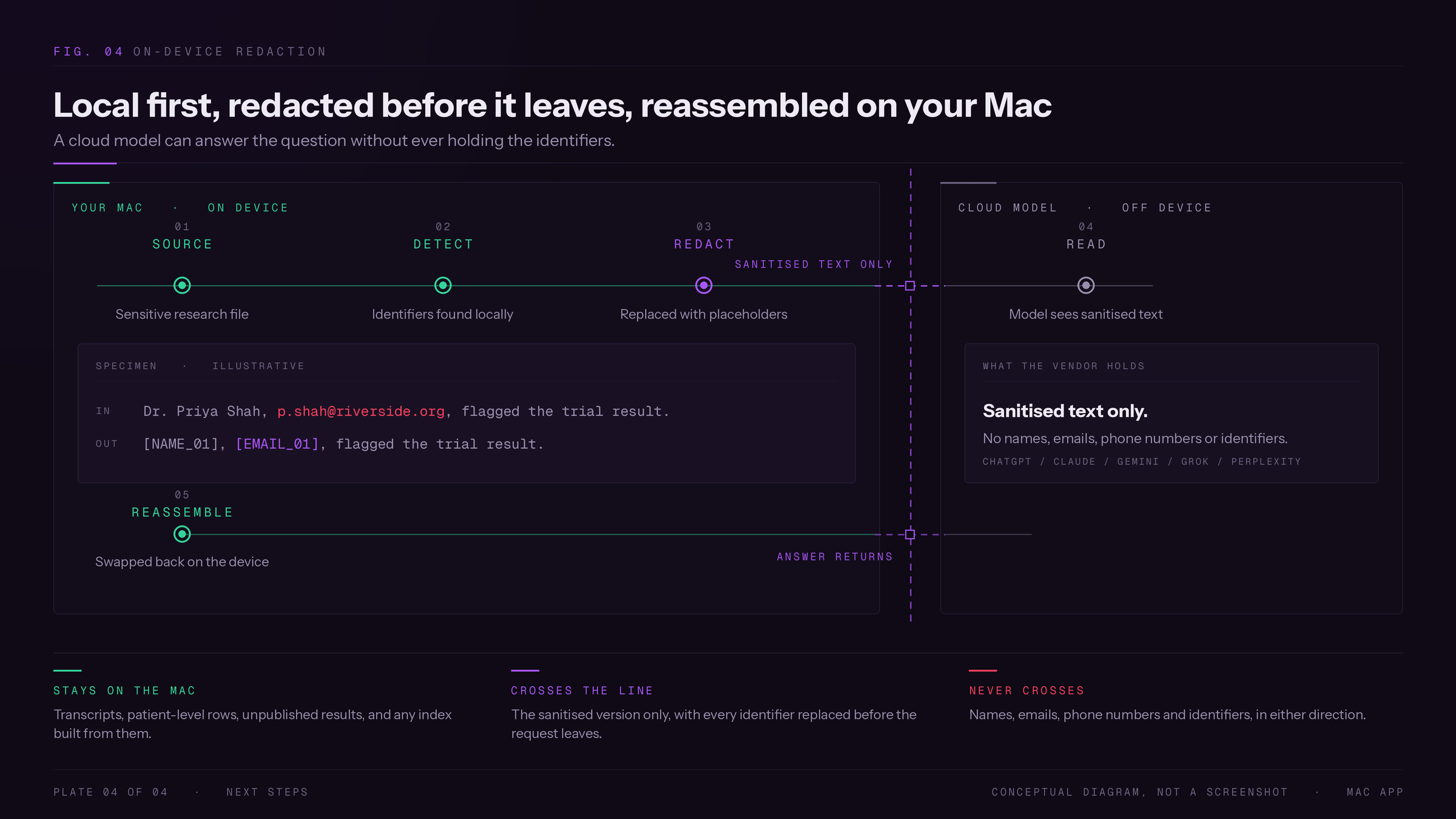
Keeping this workflow alive needs three habits, not a new system: run the routing question before every paste, re-check vendor settings quarterly, and keep the session log so you can answer an editor or an IRB later.
Start with the log, not the guilt, if you are coming from six months of pasting draft chapters into a chatbot. One step at a time beats a full restart when you are upgrading an existing workflow. Nobody has to rebuild a research setup from scratch to fix this.
None of this narrows what you use AI for, only what you send it. Graduate students on r/GradSchool describe their own use the same way (thread):
“I give it my shitty python code and ask it why it doesn't run.”
Elephas is a private AI knowledge assistant for Mac that answers only from documents you give it and keeps them on your machine. It runs on Mac, iPhone, and iPad only. On Windows, use the runner from Step 5.
For researchers who still want a major cloud model, Elephas adds automatic PII redaction. Before a prompt reaches ChatGPT, Claude, Gemini, Grok, Perplexity, or any other cloud model, it strips names, emails, phone numbers, and identifiers on your Mac. The cloud model only ever sees sanitized text. When the answer returns, the redacted fields are reassembled locally on your machine, so identifiable information never leaves the device. This pairs with zero data retention: content never trains AI models, never sits on a vendor's server, and never passes through a third-party reviewer's screen.
Automatic redaction covers the direct identifiers, names and emails and numbers. The indirect ones from Step 4, diagnosis plus site plus date, are still yours to spot before anything reaches a cloud model, which is why Step 1 routes participant data to local only rather than sanitized cloud.
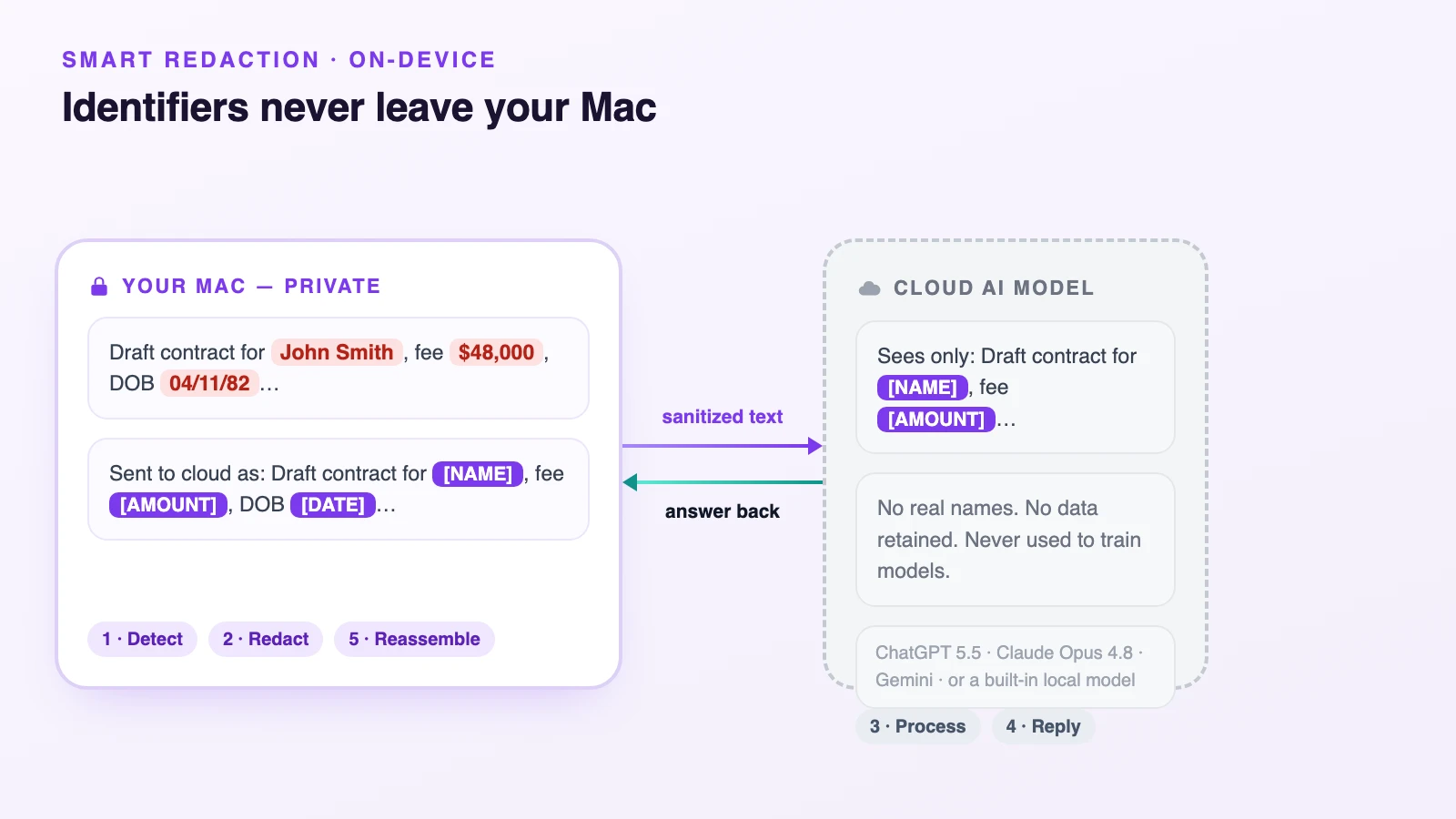
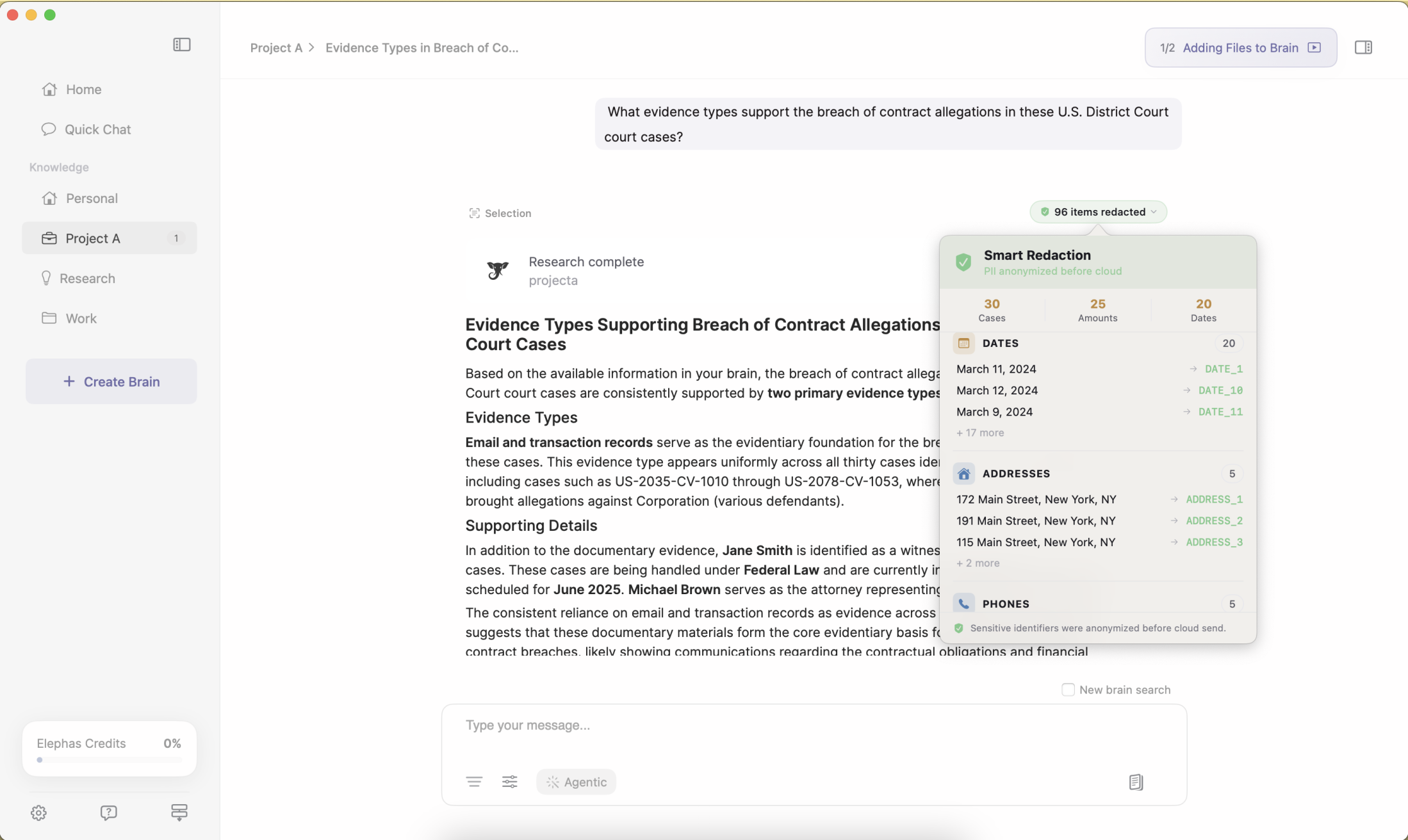
“Sensitive data is automatically detected and redacted before anything reaches a cloud AI model, your content is never used to train AI models, and nothing passes through a third-party reviewer's screen.”
- Automatic PII redaction runs on every plan, including the free one.
- Built-in local LLM models and an offline mode cover the local-only tier.
- Multi-model: keep using ChatGPT, Claude, Gemini, Grok, or Perplexity.
- A privacy-friendly AI knowledge assistant with built-in local LLM models keeps the file on your Mac. Free plan, paid from $19/month (Elephas pricing).
Frequently asked questions
Does turning off chat history stop my prompts training future models?
Partly. The toggle governs training use only. Retention, abuse-monitoring logs, and safety review sit outside it, and a flagged conversation can still be used after an opt-out. Two r/ChatGPT threads ask this (thread).
Is pasting unpublished thesis chapters into a chatbot prior disclosure?
For most journals, no: prior disclosure means public availability, and a private prompt is not public. The exposures are confidentiality and retention, not novelty. Check the journal's policy and tell your supervisor if participant data was involved.
Can a redacted corpus still leak through its embeddings?
Yes, in principle. Embeddings are numerical representations of the text, so identifying detail that survived redaction survives into the index, and retrieval can surface it. Redact before indexing, and keep the index local.
Does a rare-disease cohort re-identify even after I remove names?
Often, yes. Diagnosis plus site plus treatment date can be unique to one person with no name attached. That is why small cells are held back.
Can I use AI to help review someone else's manuscript?
Ask the journal first. The International Committee of Medical Journal Editors treats AI use in manuscript processing as a possible confidentiality breach, and expects reviewers to ask permission first (ICMJE recommendations).
