ChatGPT File Upload Limit: How Many Files and What Size
Last updated: October 6, 2026
OpenAI caps ChatGPT documents at 512 MB each, yet ChatGPT can still refuse a PDF far under that, read only part of it, or stop your uploads after a few files with no counter showing what you used.
This guide shows which ChatGPT file upload limit you actually hit, then the fix.
It covers size caps, upload counts and a troubleshooting table.
Quick answer
- Documents can be 512 MB but stop at 2 million tokens; spreadsheets near 50 MB, images at 20 MB.
- Up to 80 files every 3 hours, possibly fewer at peak hours; Free gets 3 uploads a day.
- Web: 20 files per message; Projects hold 5, 25 or 40; custom GPTs hold 10.
- Storage: 25 GB per user, or 500 MB to 100 GB of Library by plan.
- For confidential files, Elephas is a private AI knowledge assistant for Mac that redacts (beta) 28 types of sensitive data before cloud models see them. Paid plans start at $19/month, with 7 days of Pro, no credit card.
What Is the ChatGPT File Upload Limit in 2026?
The ChatGPT file upload limit is 512 MB and 2 million tokens per document. Uploads stop at 80 files every 3 hours (possibly fewer at peak times), and Projects, custom GPTs and storage have caps. You'll find them in OpenAI's File Uploads FAQ, Projects page and Library page.
| Limit | Current number | Source (checked 6 Oct 2026) |
|---|---|---|
| Documents and presentations | 512 MB per file | FAQ |
| Text and documents | 2 million tokens per file | FAQ |
| Spreadsheets and CSV | About 50 MB, by row size | FAQ |
| Images | 20 MB per image | FAQ |
| Files per message | Up to 20 on the web | Release notes, 13 Feb 2026 |
| Upload rate | Up to 80 files every 3 hours, may drop at peak; Free 3 per day | FAQ |
| Files per Project | Free 5, Go and Plus 25, Pro and Business 40 | Projects page |
| Custom GPT knowledge | 10 files for the GPT's lifetime | FAQ |
| Shared storage | 25 GB per user, 100 GB per organization | FAQ |
| Library storage | 500 MB Free, 4 GB Go, 20 GB Plus and Business, 100 GB Pro | Library page |
Several claims online don't match OpenAI's current upload documents: "Pro has unlimited uploads", "Free resets every 24 hours" and "20 files per GPT".
Why Does a PDF Under 512 MB Still Fail the ChatGPT File Size Limit?
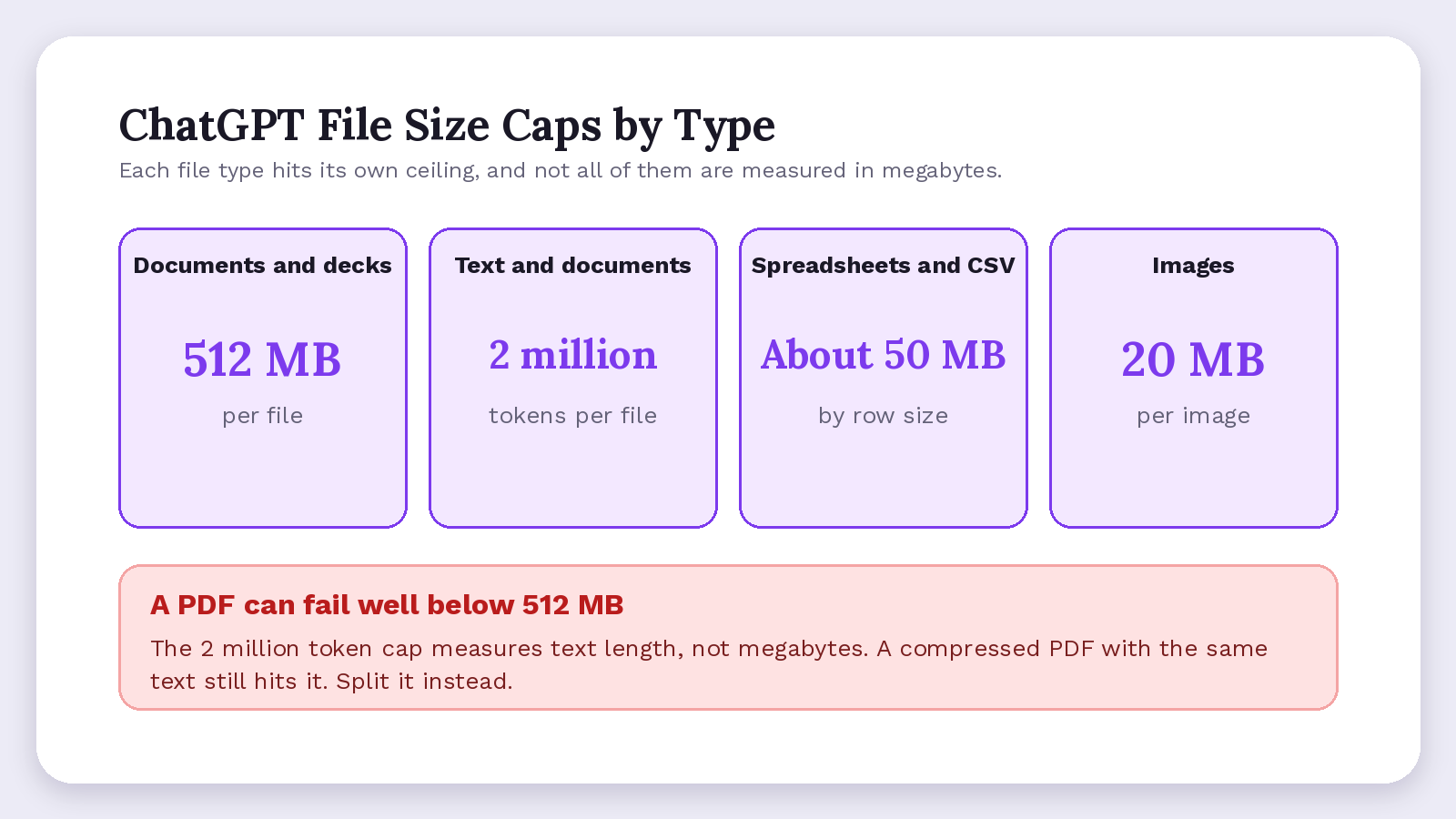
A PDF can hit a cap well below the 512 MB ChatGPT file size limit because text and document files stop at 2 million tokens per file. That is a cap on text length, not megabytes, and OpenAI says ChatGPT may not reliably pull exact values from your scans.
OpenAI's data analysis guide warns that a file can upload fine and still be too large or complex to analyze fully. So the bigger risk is partial reading of a long or image-heavy file.
Researchers behind the Lost in the Middle study found accuracy drops when the needed fact sits mid-document. In the 2025 NoLiMa test, researchers saw GPT-4o fall from 99.3% to 69.7% at 32K tokens.
ChatGPT File Size Limit by File Type
Spreadsheets cap near 50 MB by row size and images at 20 MB, per the File Uploads FAQ. OpenAI's supported file types page says the Google Docs file format can't be uploaded directly; export to PDF or DOCX first.
- Upload the text version or original spreadsheet when exact numbers matter.
- Split long reports into chapters well under 2 million tokens each.
- Ask about specific pages or sheets when an answer looks incomplete.
How Many Files Can You Upload to ChatGPT, and When Does the Limit Reset?
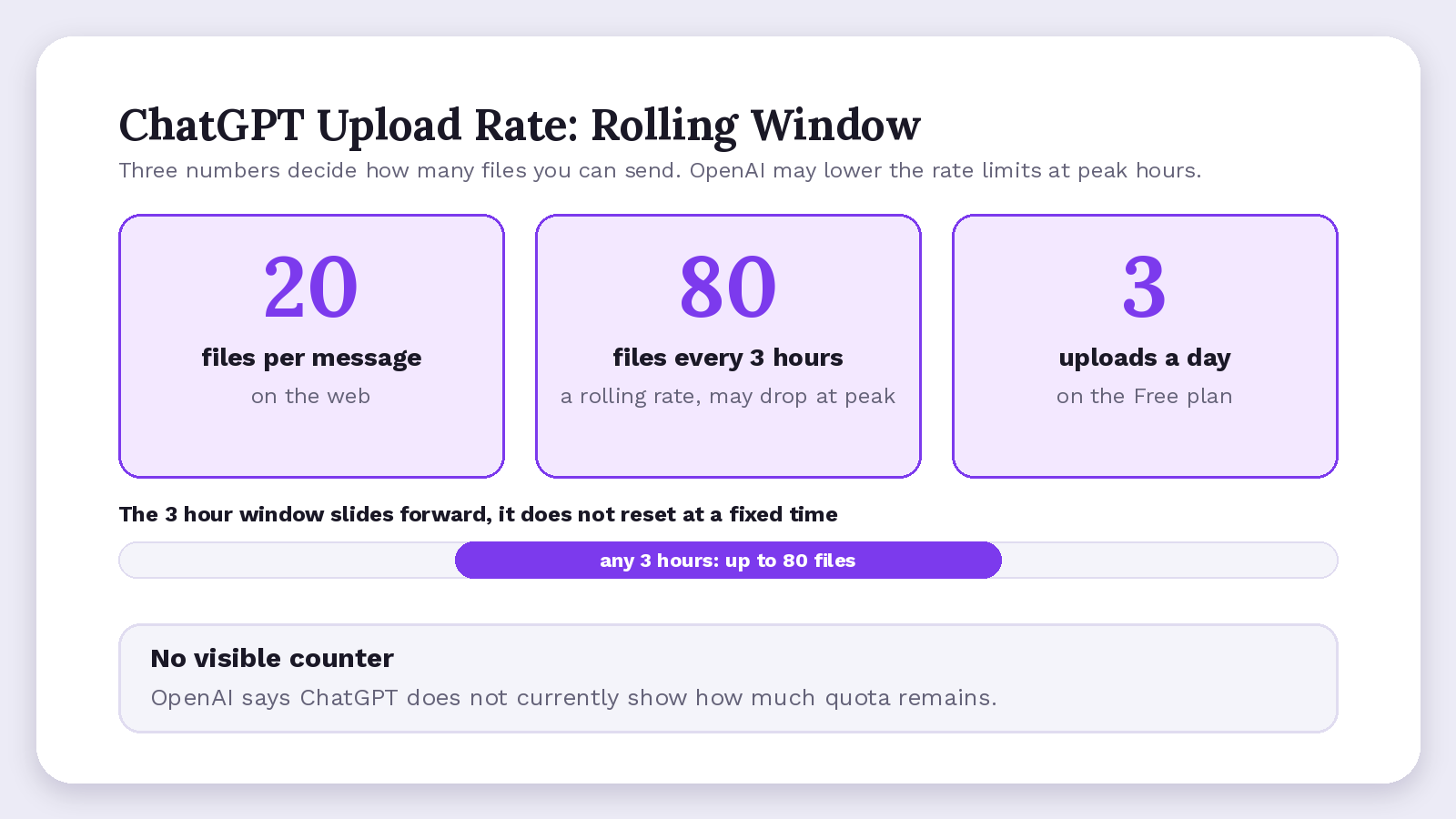
You can upload up to 20 files per message on ChatGPT web and up to 80 files every 3 hours, and Free users get 3 uploads per day. OpenAI may lower both at peak hours. It publishes no number for paid plans, though its pricing page promises Go "More uploads" and Plus expanded uploads.
ChatGPT Attachment Limit per Message
The ChatGPT attachment limit on the web is 20 files per message, up from 10 since 13 February 2026. To send more, merge files first. The count per conversation can still vary by model, plan and settings, per OpenAI's data analysis guide.
When the ChatGPT Upload Limit Resets
The ChatGPT upload limit of 80 files per 3 hours is a rolling rate. OpenAI publishes no reset time for your Free daily allowance.
OpenAI also says ChatGPT "does not currently show" how much quota remains. A user asked for a counter on the OpenAI Developer Community on 26 August 2026; support replied on 7 September with no timeline.
- Merge short related files first, so ten notes cost one upload.
- Stop retrying a failing upload, since failed attempts can sometimes count.
- Schedule big upload sessions outside busy hours.
Why Does ChatGPT Say You Hit the Upload Limit? A Troubleshooting Table
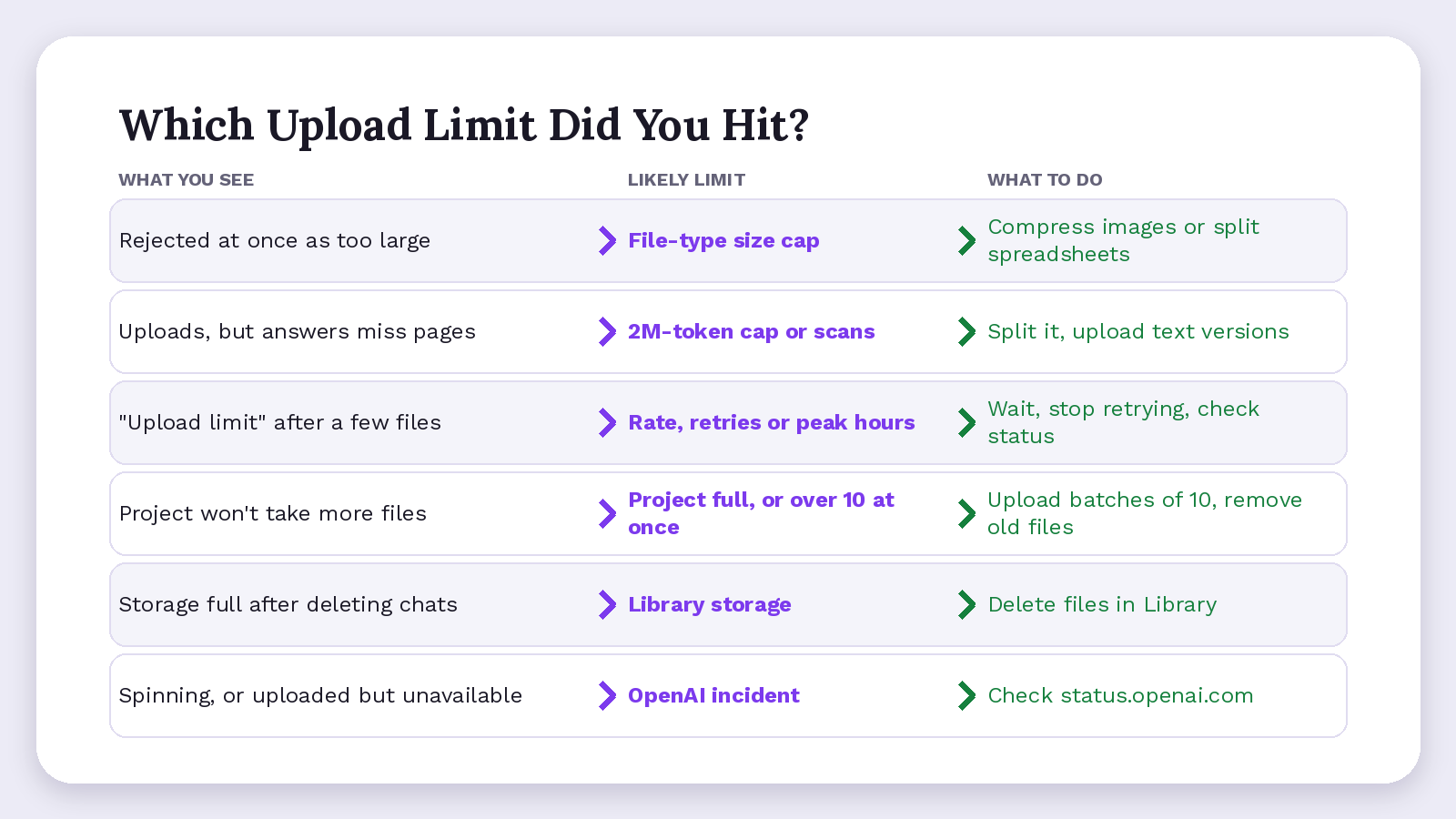
ChatGPT says you hit the upload limit when one of six limits runs out. They are file-type size, the 2-million-token document cap, the rolling upload rate, Project capacity, storage, or an OpenAI outage that only looks like a quota problem. Match your symptom below to its limit.
| What you see | Likely limit | What to do |
|---|---|---|
| Rejected at once as too large | File-type size cap | Compress images or split spreadsheets |
| Uploads, but answers miss pages | 2M-token cap or scans | Split it, upload text versions |
| "Upload limit" after a few files | Rate, retries or peak hours | Wait, stop retrying, check status |
| Project won't take more files | Project full, or over 10 at once (ChatGPT Projects limits) | Upload batches of 10, remove old files |
| Storage full after deleting chats | Library storage | Delete files in Library |
| Spinning, or uploaded but unavailable | OpenAI incident | Check status.openai.com |
On 8 September 2026, the OpenAI Status page logged an upload incident that was marked resolved about four and a half hours after its first post.
Upgrading isn't a proven fix. Paid plans get no published upload number.
- Check you're in the right account or workspace.
- Try a browser if only the ChatGPT app complains.
- Wait out recent retries before uploading again.
How Do You Work With 80 Documents Under the ChatGPT Upload Limit?
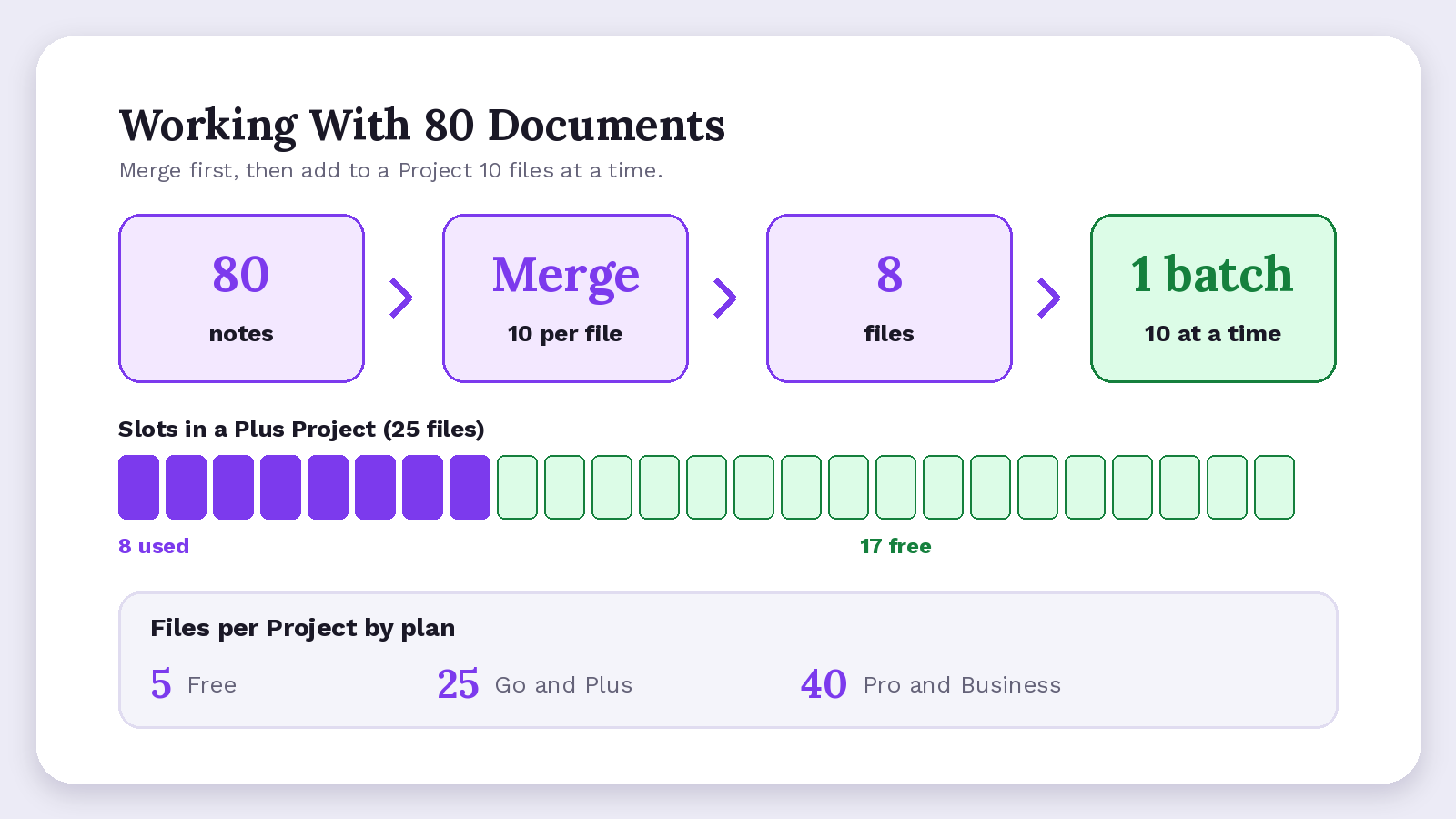
If you have 80 documents for one project, the realistic way to work with them is to merge them into fewer, focused files and add them to Projects 10 at a time. Projects hold up to 40 files on Pro, Business and Enterprise; OpenAI's guide for Enterprise says fewer, focused documents generally give higher accuracy.
If you have 80 interview notes, merging 10 to a file gives you 8 files: one Project batch and 8 uploads instead of 80, which leaves 17 of a Plus Project's 25 slots free. NotebookLM counts differently (NotebookLM source limits), and if you upload this much every week, compare ChatGPT alternatives.
- Convert scanned PDFs to text before you merge them.
- Split the set by topic across two or three Projects.
- Skip custom GPTs for big sets; they hold only 10 files.
- Reuse Library files instead of re-uploading.
Projects, Custom GPTs and Library Storage
Library storage runs from 500 MB on Free to 100 GB on Pro, per the OpenAI Library help page, yet the FAQ still lists a 25 GB per-user cap. OpenAI doesn't reconcile the two. Trust Settings > Storage.
Whether Uploaded Files Are Kept or Used for Training
On personal plans and Business, Library files stay until you delete them; Enterprise, Education and Healthcare follow workspace retention. Temporary Chat files aren't saved to Library. On personal plans, uploaded files can train models while the model-improvement setting is on; OpenAI excludes Business plans by default.
When Should Confidential Files Stay Out of ChatGPT Uploads?
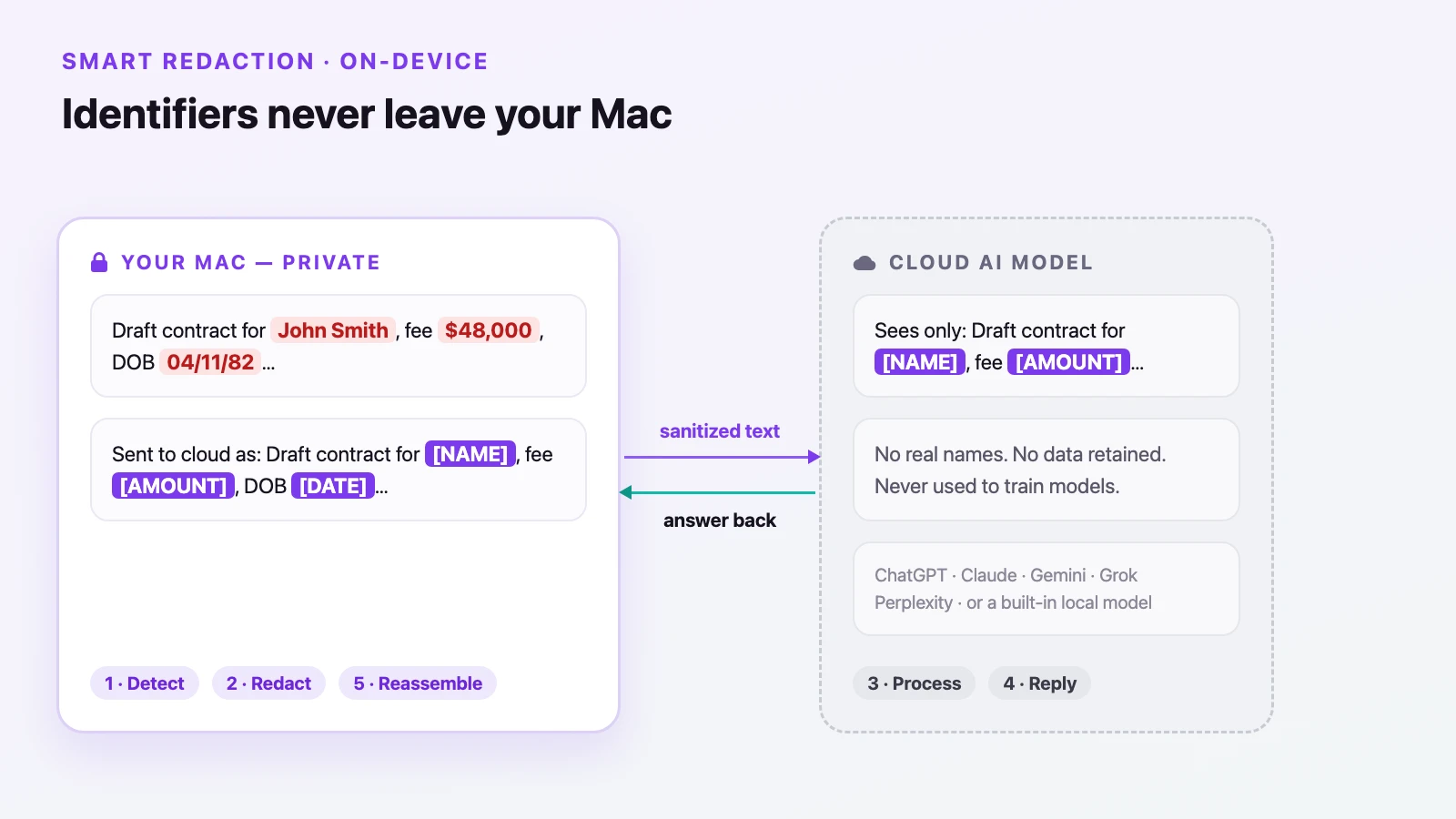
Confidential files should stay out of ChatGPT uploads when they hold personally identifiable information (PII) about others, such as a client report, interview transcripts or an investor deck. Upload a client or financial document to get around the limits, and it is stored in your Library until you delete it on personal plans and Business.
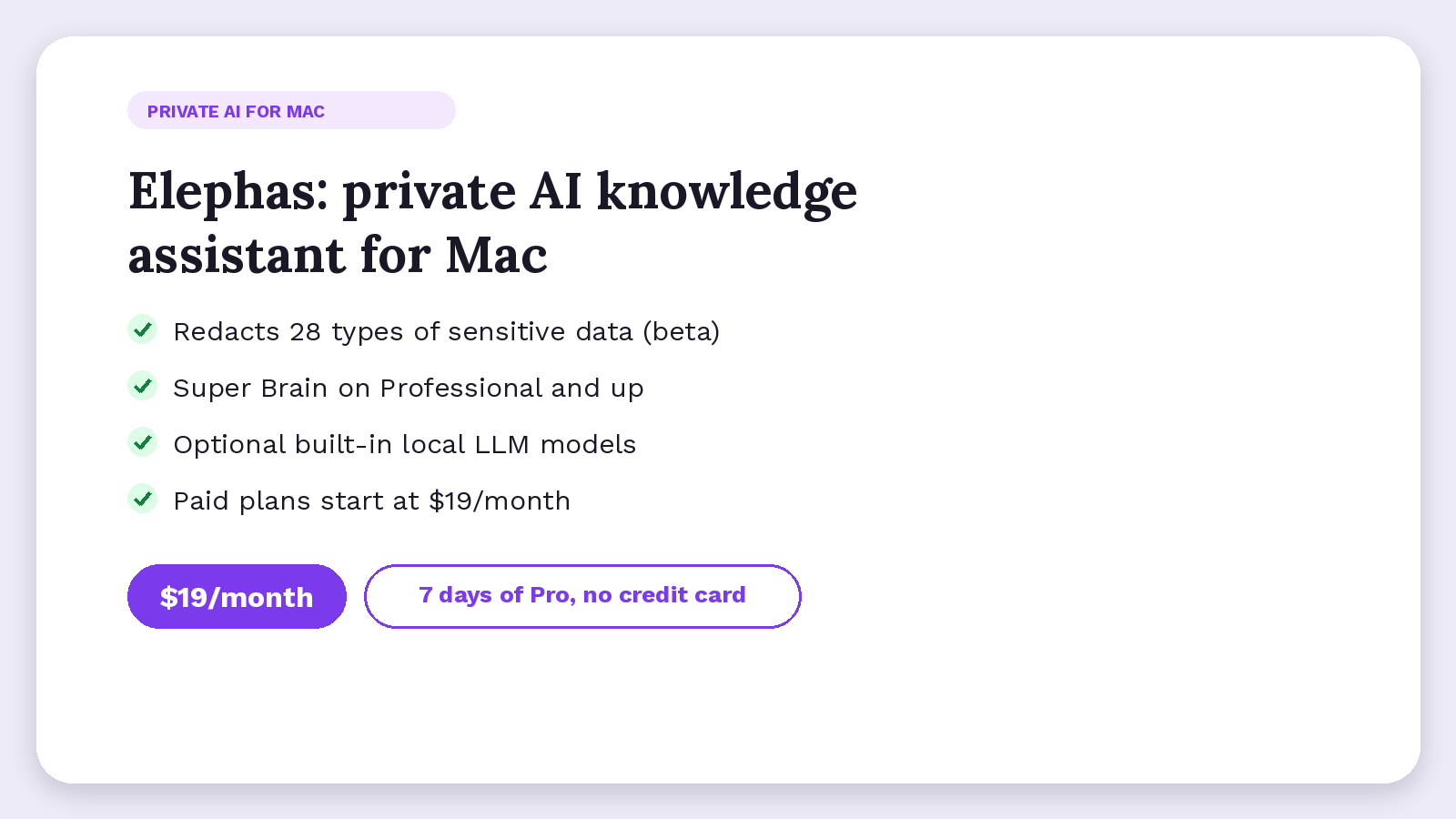
Elephas is a private AI knowledge assistant for Mac that redacts sensitive data before it reaches cloud models. Super Brain, on Professional and up, builds a persistent knowledge base from your files, so you stop re-uploading. Optional built-in local LLM models keep offline work on your Mac.
When a confidential file still needs a cloud model, Elephas adds a second layer through automatic PII redaction (beta). It redacts 28 types of sensitive data, from names and emails to account numbers and case numbers, on your Mac before any cloud call. Sensitive data is automatically detected and redacted before anything reaches a cloud AI model. Elephas's built-in cloud AI, powered by OpenAI and Anthropic models, runs with zero data retention: providers do not log, store, or train on what is sent. You can also bring your own API key from 15+ providers, including OpenAI, Claude and Gemini.
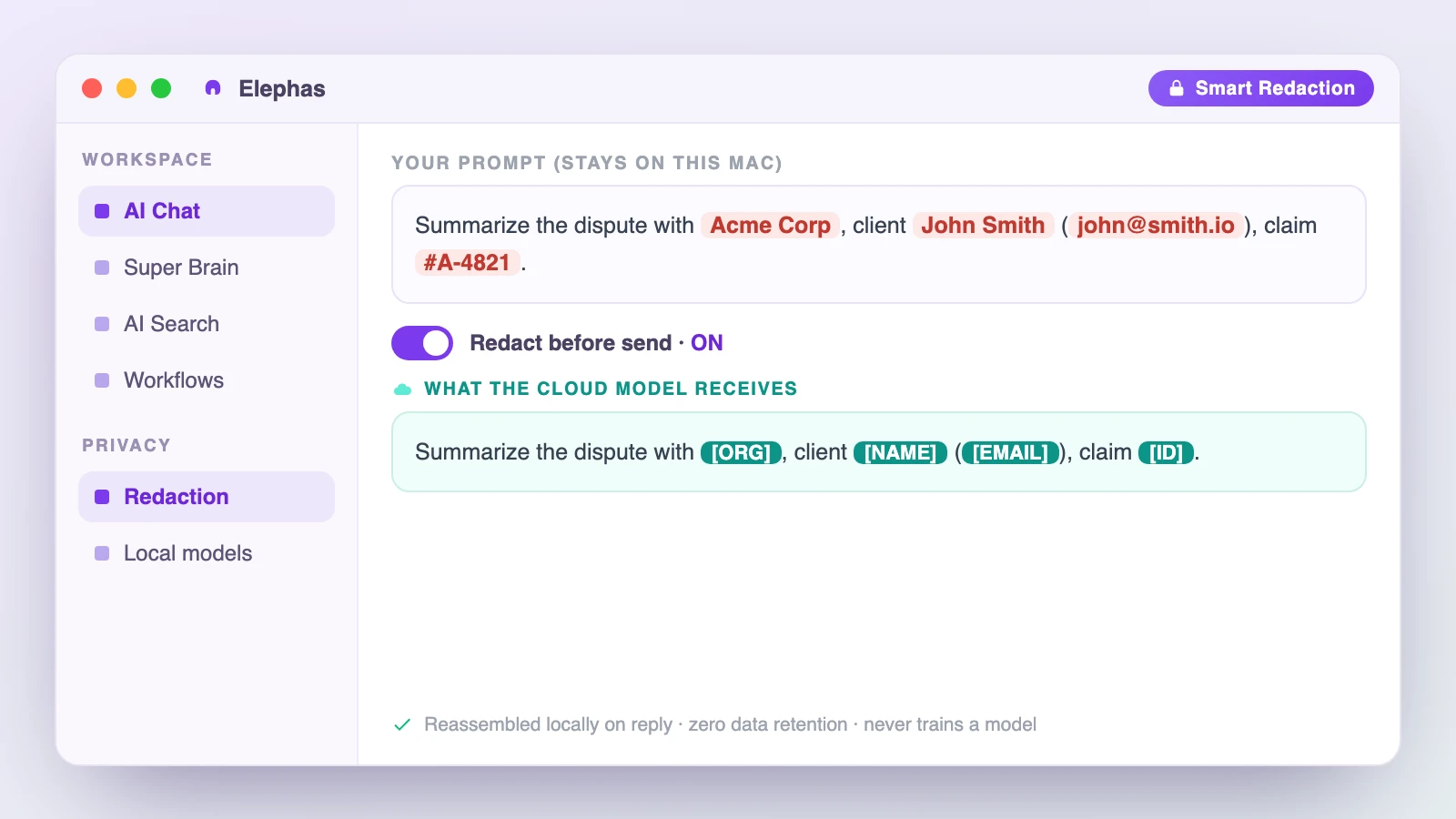
- Every plan redacts (beta) 28 types of sensitive data.
- Indexing of your files happens locally first.
- You choose where AI runs: offline on your Mac or in the cloud.
Elephas runs on Mac, iPhone and iPad, with Windows coming soon (join the waitlist). Paid plans start at $19/month, and new downloads include 7 days of Pro, no credit card.
ChatGPT File Upload Limit: Summary
The ChatGPT file upload limit is six separate limits; find the one you hit first.
- Length and scan quality, rarely the 512 MB cap, decide whether your document works.
- Paying more raises your Project and Library capacity and upload allowance, but OpenAI publishes no upload rate.
- For confidential files, Elephas is a privacy-friendly AI knowledge assistant with redaction (beta) and optional built-in local LLM models.
Frequently Asked Questions
Does OpenAI Publish a Separate Upload Rate for ChatGPT Plus?
No. OpenAI's File Uploads FAQ gives one general ceiling, up to 80 files every 3 hours, and one Free exception of 3 uploads a day. It publishes no Plus-specific number. Treat claims of 160 files every 3 hours as guesses.
Does Pasting Text Get Around Upload Caps?
Not reliably. A long paste instead becomes an attachment past 10,000 characters, and OpenAI doesn't say whether that counts toward the upload rate. Plus, Pro and Business began at 5,000; OpenAI release notes raised it to 10,000 as Free and Go joined on 22 June 2026. Paste very long text in chunks.
Does Compressing a PDF Get It Past the Size Cap?
Only for the size caps: 512 MB per document and 20 MB per image in the File Uploads FAQ. The 2 million token cap measures text length, so a compressed document with the same text still fails; split it instead.
Does ChatGPT Read Images Inside PDFs and Slide Decks?
Only PDFs on Enterprise. OpenAI's File Uploads FAQ says Enterprise reads images inside PDFs; other plans and document types use "text-based retrieval", which reads the text, not embedded images. Upload key charts and photos separately as images under 20 MB.
How Long Do Deleted ChatGPT Files Take to Disappear?
OpenAI schedules deleted chats and files for permanent deletion within 30 days. It may keep data longer for security or legal reasons, or if it has been de-identified from your account. OpenAI may also keep a copy of a Temporary Chat for up to 30 days.
Keep your AI chats private, on your own Mac
Elephas works with the AI you already use, or runs fully offline with optional local models, and redacts 28 types of sensitive data on your Mac before any cloud call.
