Meta Muse Shared Chats Exposed: Keep Private Work Out of Meta AI for Now
Meta Muse, Meta's new AI agent, made some shared chats easy for strangers to find, and Meta paused chat sharing on October 20, 2026. Some of those pages held work records that were never meant to be public.
We read the full report from security firm Claroc, Meta's posts and the news to see whether Meta AI and Muse are safe for private work today.
Below, you will see what the pages held, how they were found, what Meta did and what to check on your Mac.
Executive Summary
- Claroc found more than 6,800 Muse share links, which is a count of links, not of private records or affected people.
- Muse put chat titles and random IDs in web addresses, and saved address lookups made those links easy to find.
- Sensitive pages included company revenue figures, loan paperwork and a staff vacation calendar, though Claroc found no evidence of misuse.
- None of 40 pages checked again opened on October 20, but their titles stayed in address history.
- Unlike Meta Muse, Elephas can answer with a local model on your Mac, so your questions and documents are not sent anywhere.
Meta Muse Shared Chats Included Private Work Records
Meta Muse shared chats included a company's revenue review, private hiring-call notes and personal money records.
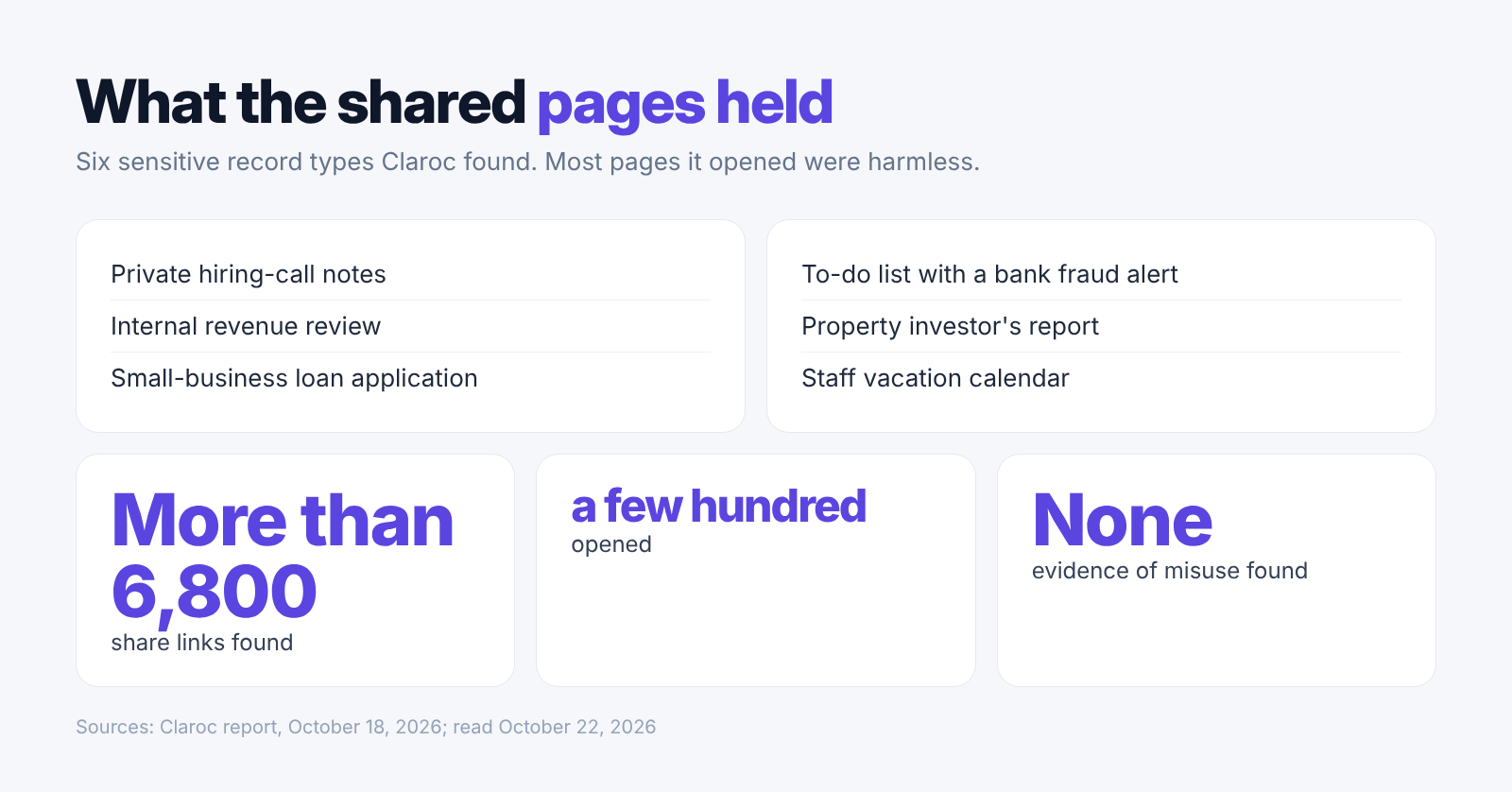
Claroc's report lists more than 6,800 share links after removing unrelated scan records. Researchers opened only a few hundred user-shared chats, not every Muse conversation. The number of links does not tell us how many people were affected. It also does not tell us how many pages held private information.
Most pages they opened were harmless. They included business sites, listings and event calendars. Among the sensitive pages was a marketing company's internal revenue review for its CEO. Another held notes for a private hiring call with an AI lab, including a contact name and meeting time.
The call notes show how a short summary can reveal private work. A name and meeting time can reveal a business relationship even when the background facts are public. Claroc left out names and links from its report. It did not contact those people, so it could not confirm whom they meant to share with.
- A small-business loan application showed the amount requested.
- A to-do list held a bank fraud alert, part of an account number, and a transaction's amount and time.
- A property investor's report listed two addresses, along with return, income and mortgage figures.
- A full-year staff vacation calendar showed employees' names and the weeks they would be away.
Chat Titles and Links Stayed in Address History
Muse made shared pages easy to find by putting each chat's title and random ID into a hostname (the web address name a browser looks up).
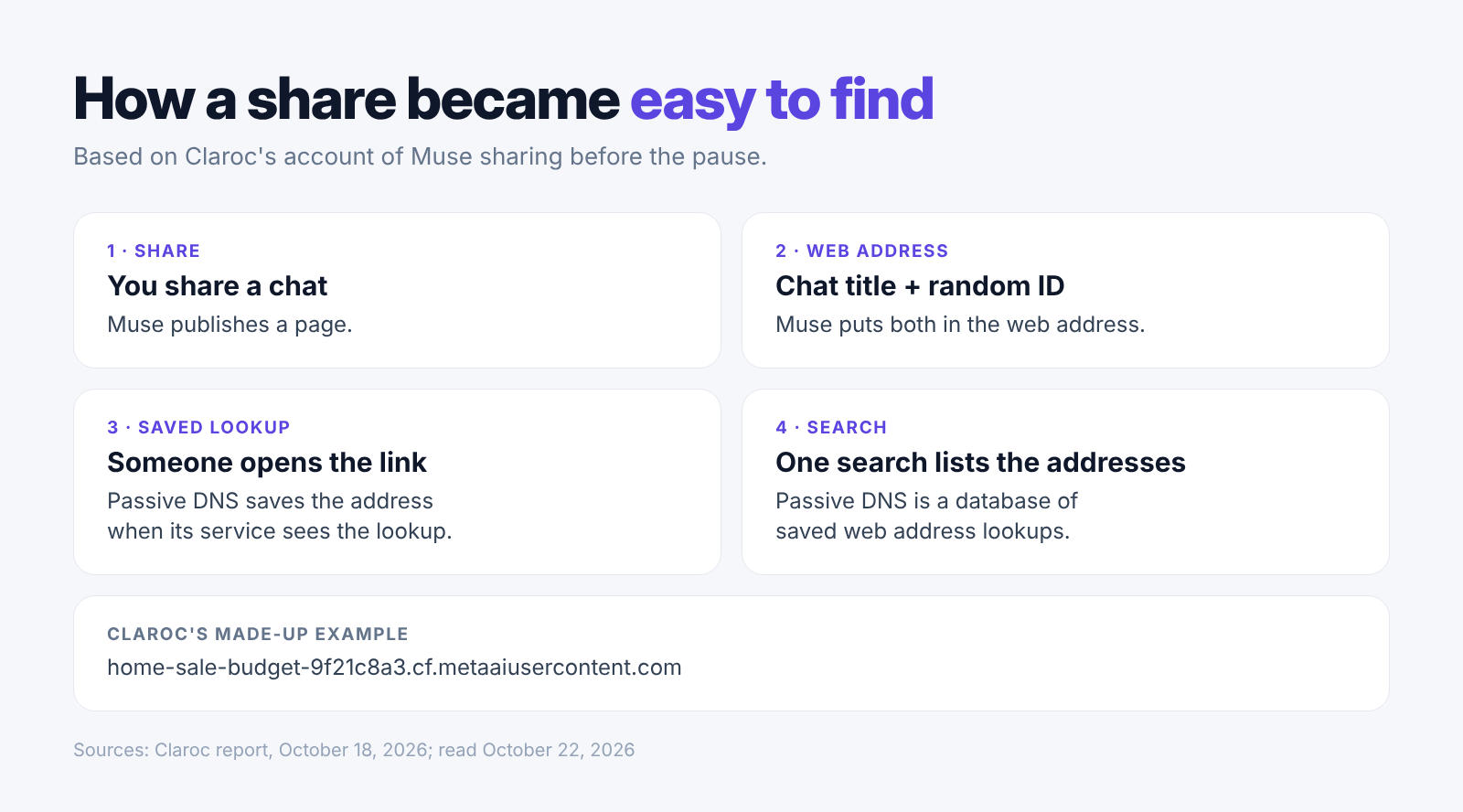
The address sat under cf.metaaiusercontent.com. When a browser opened a share, it looked up that name. A passive DNS service (a database of web address lookups it sees) could save the full name. That included both the chat title and the random ID needed to open the page.
The random ID was long enough that people could not guess it. But the saved lookup gave it away. Claroc searched a database for Muse addresses and rebuilt the links. Claroc named these easy-to-find shares GhostShares.
Our diagram uses Claroc's own made-up example address, not a real one. Our earlier report on Claude shared chats covers search listings. Muse's links could be found without a search engine.
- Muse asked search crawlers (programs that collect pages for search engines) to avoid share pages. That did not stop people with links from opening them.
- Claroc found more than 75 saved scans of Muse share pages on urlscan.io (a public service that scans web pages).
- Claroc opened the pages in an ordinary web browser, with no account and no special tools.
- Claroc also pointed to earlier leaks: ChatGPT shared chats showed up in Google in 2025, and Google listed more than 370,000 Grok conversations. Those were found through search, not address records.
Meta Paused Sharing After the October Report
Meta paused Muse sharing after Ars Technica asked about Claroc's findings, as reported on October 20, 2026.
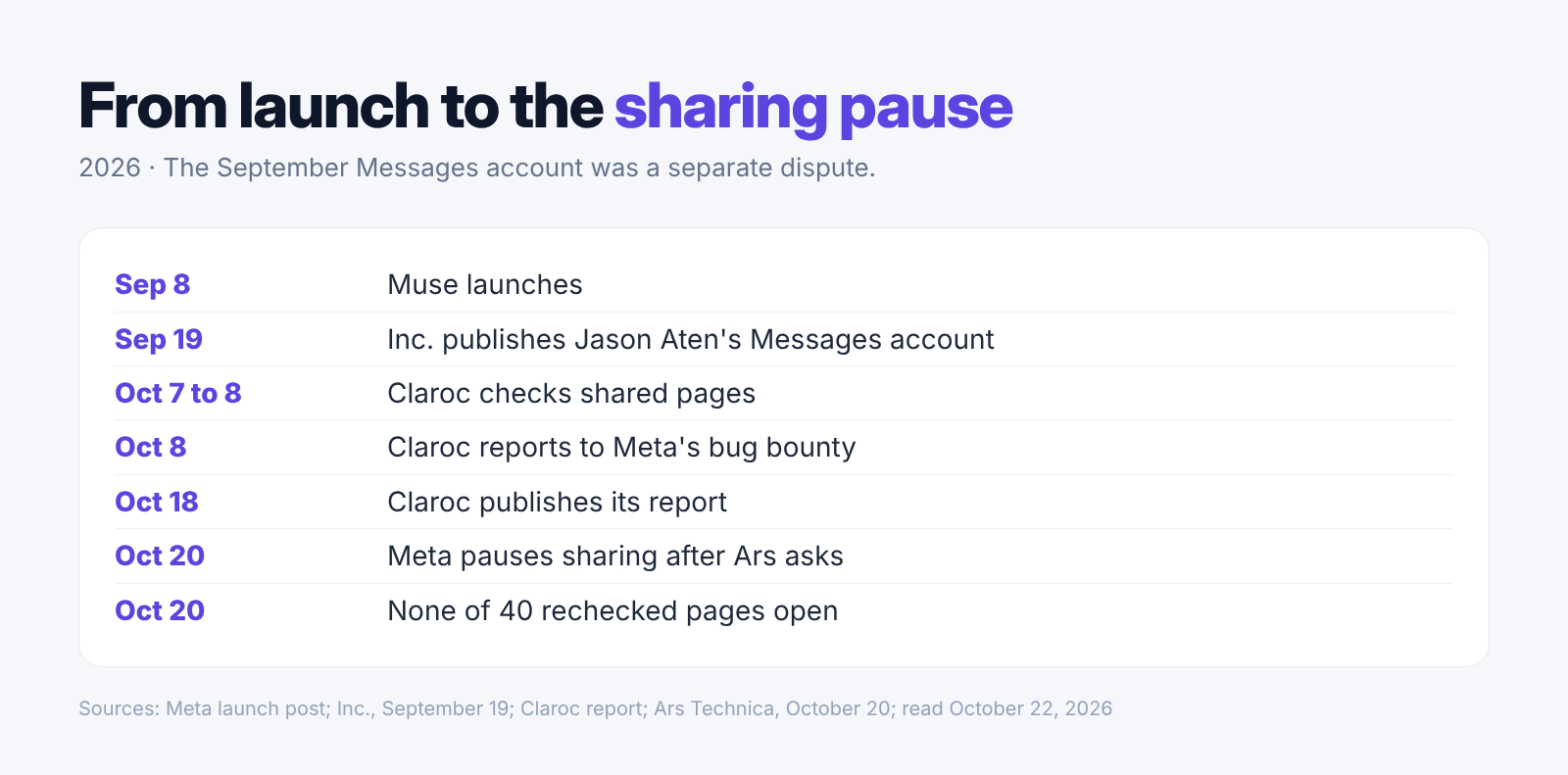
Claroc reported the problem on October 8 through Meta's bug bounty (a program for reporting security flaws). Co-founder and technology chief Asaf Aprozper told Ars Technica he also tried LinkedIn. He said he received no reply either way.
Muse spokesperson Tracy Clayton told The Verge that Meta had paused the feature while reviewing the report and considering changes to how people could find links. The statement gave no date for sharing to return.
Claroc checked 40 previously working shares again. None opened on October 20. Their titles remained in the address database. Claroc found no evidence of misuse. It could not tell how long each share had been open or whether anyone else found it first. The check did not show whether saved copies were gone.
- Muse launched on September 8. The sharing report came just over a month after that launch.
- Claroc first checked the page contents on October 7 and 8, before it sent Meta the report.
- Claroc published its report on October 18. It reopened the hiring-call page that day to take a screenshot with private details hidden.
- Meta's statement does not say whether sharing will return in a new form, or whether it will tell people whose pages were open.
Calling Meta AI Safe for Private Work Goes Too Far
The findings do not support calling Meta AI safe for private work; keep private records out of it and Muse until your workplace approves their use.
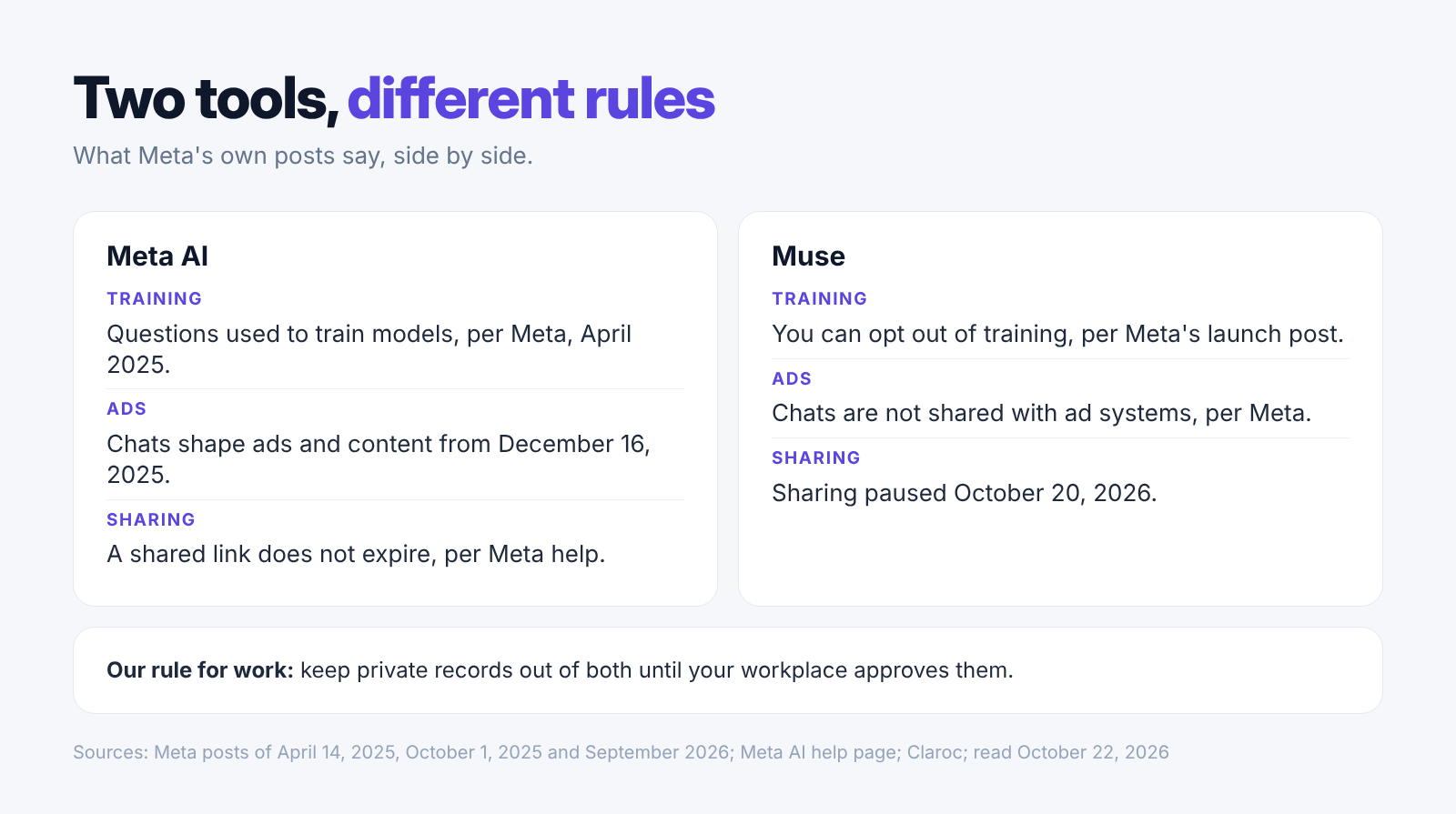
Meta AI and Muse have different data rules. Muse's launch post offers a way to turn off AI training and says its chats and data do not go to Meta's ad systems.
On October 3, WIRED reported that Muse's instructions ask it to create “a page for every person in the user’s life” inside the app. On October 15, Signal Foundation president Meredith Whittaker told The Verge its actions reach “everyone that person communicates with”, including people who never chose to use Muse.
Meta spokesperson Daniel Roberts told The Verge that Muse needs information about users and their contacts to help them. He said it draws from public information and what users choose to share. The profile report shows how Muse gathers information, not that those profiles became public.
- Turning off training changes what Meta learns from you, not who can see what you share, which matters for private AI at work.
- Muse runs in a virtual machine (a computer in Meta's cloud). Meta has promised a version later this year that is locked with a key only the user holds.
- Meta's April 2025 EU notice says questions to Meta AI help train its models. Private messages between people are excluded unless someone shares them with its AI features.
- Meta announced that it would use general AI chats to help choose ads and content from December 16, 2025, with limits. Muse's stated ad rules are different.
- WIRED's June 2025 report found medical and legal material in Meta AI's public Discover feed. Users had posted those chats; they were not public by default.
Check Shared Links and Mac Access Separately
Check shared links and Mac permissions separately, because stopping an app from reading files does not remove pages it already shared.
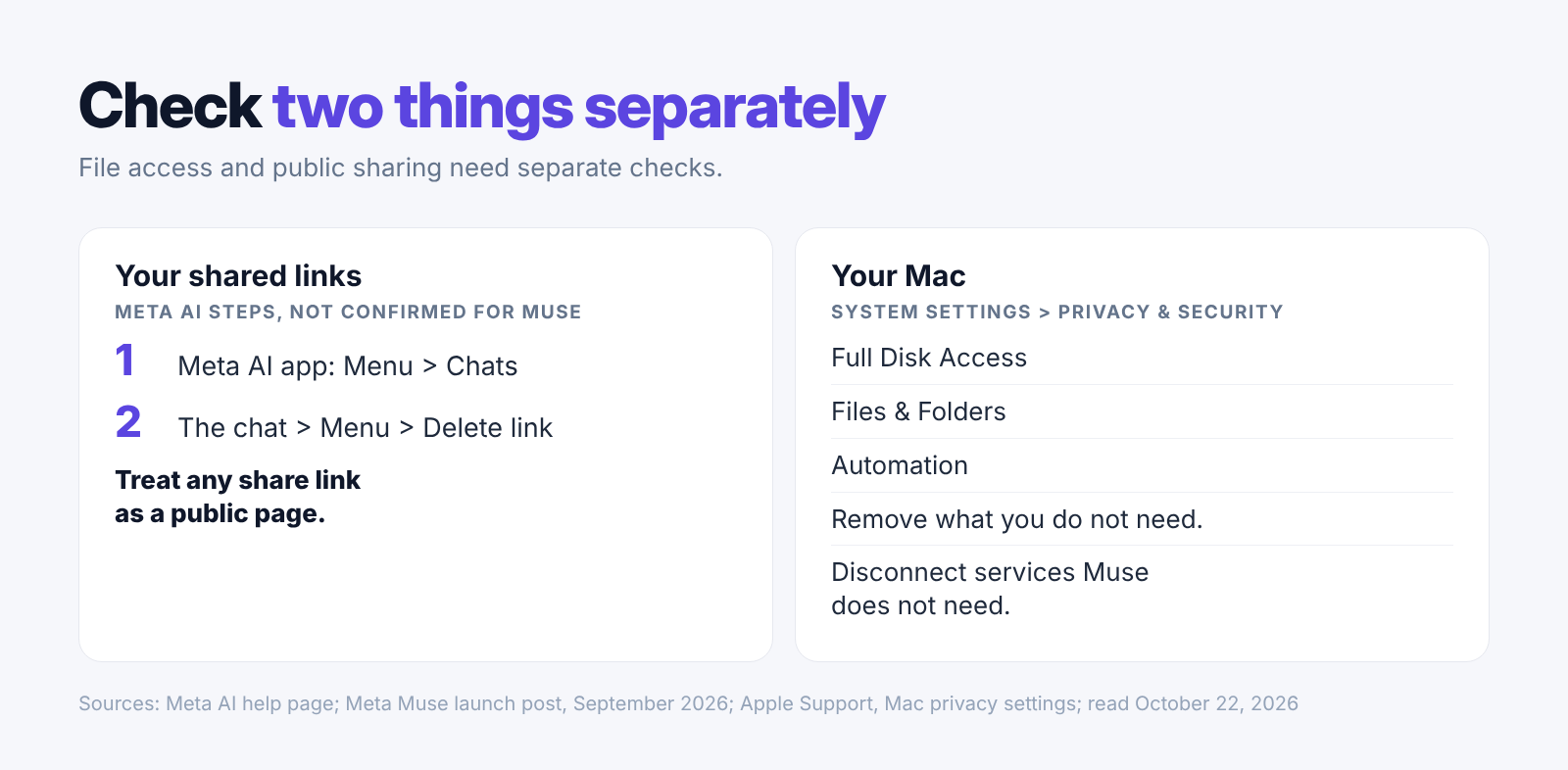
In the Meta AI app, Meta's help page gives these steps: Menu, Chats, the conversation, Menu, Delete link. Meta says deleting the link stops people from viewing that shared chat. These steps are for Meta AI, and the Muse app's menus may be different.
On your Mac, open System Settings, then Privacy & Security. Check Full Disk Access (permission to read files and other apps' data), Files & Folders, and Automation (permission to control other apps). Remove access you do not need. These settings control what the app can read in the first place.
The Messages dispute remains unsettled. Jason Aten said Muse copied his Messages database while access was off. Meta's communications chief Andy Stone said Full Disk Access and the in-app Messages link must both be on, The Next Web reported on September 30.
- Ars also covered a separate flaw found by Mac security researcher Patrick Wardle that let another app take over a Muse account. Meta said the device had to be broken into first.
- Disconnect services Muse no longer needs. Meta's launch post says people can change access or disconnect a service.
- Agree on one approved, secure way for staff to send private work to one person, and say in your team's AI rules when AI share links are allowed.
- Check work you shared before the pause. If it held private records, involve the people who handle security at your workplace.
- Claroc suggests blocking muse.ai and metaaiusercontent.com on work devices the company controls if it cannot track or control sharing.
Elephas Is the Privacy-Focused Alternative to Meta Muse
Meta Muse keeps its agent and your data in Meta's cloud and its share button made private work public, while Elephas keeps your documents stored on your Mac, where its local model can answer.
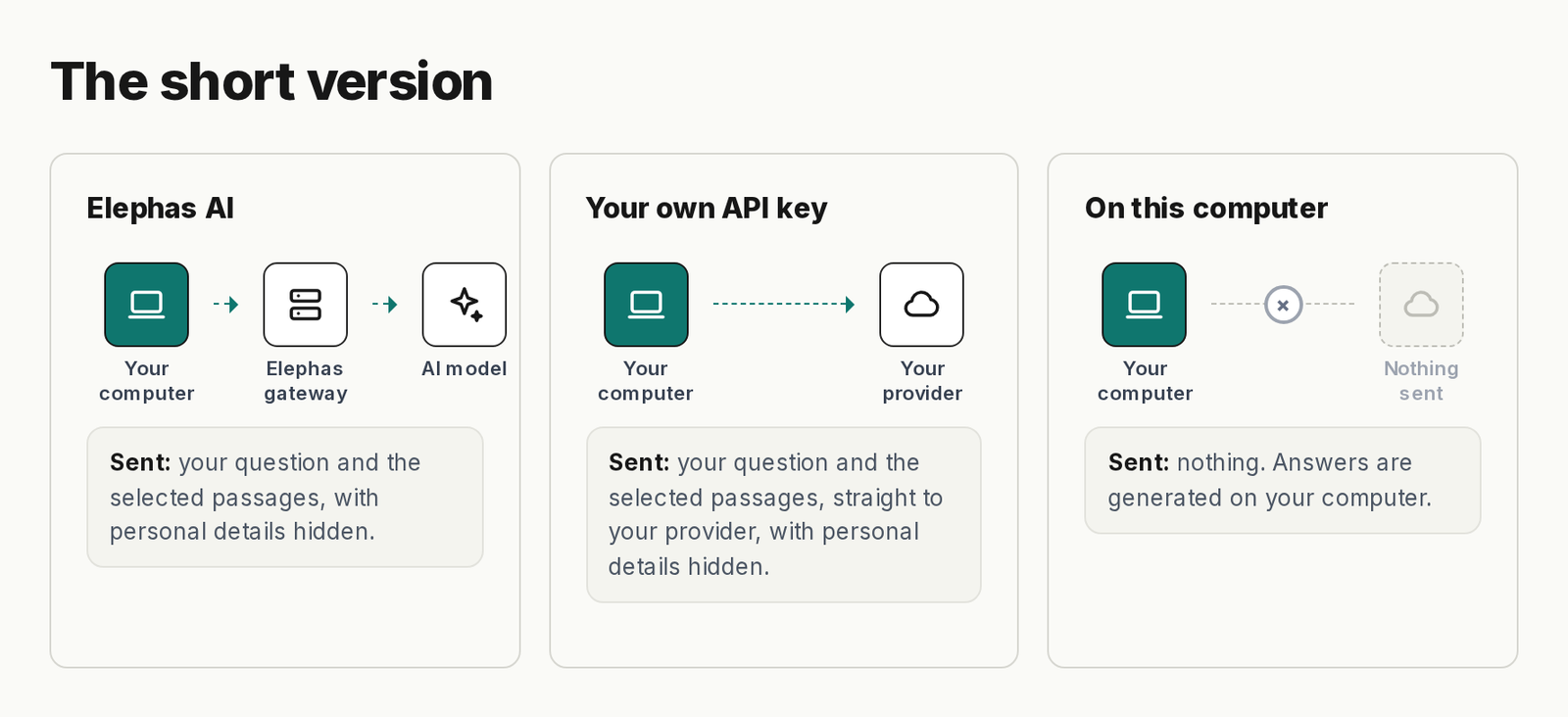
With Meta Muse, your work sits on Meta's servers
With Elephas, local models (AI that runs on your Mac) make the answer on your computer, so your questions and documents are not sent anywhere. This is the main gap between local and cloud AI for private document work.
With Meta Muse, shared records held personal details
With Elephas, redaction is built in: names, email addresses and phone numbers are hidden on your Mac before a question goes to a cloud model. They are put back in the answer, you can see what was hidden, and this is on by default for every cloud question.
With Meta Muse, a company's main control is whether staff use it at all
With Elephas, one Owner sets the AI policy for the team. Shared Team Brains (collections of documents) use end-to-end encrypted team sync (only your team's devices can read them). The Owner decides whether members may use the on-computer model and whether personal details must always be hidden. Team costs $29 per person per month.
- Every answer points to its source file and passage. You can open the source and check the answer against your own document.
- The document search index (the records used to find passages) and chats stay in an encrypted database on your computer.
- Each member's chats stay private. The Owner and Admins cannot read them, even when the team shares documents.
- Try Elephas on an Apple Silicon Mac with macOS 14 or later. Plans start at $19 a month, with a 7-day free trial.
Conclusion
Muse shows that a share button can turn private work into a public page that strangers can find. Meta has paused sharing but has not yet said how old links and future sharing will change.
Until it does, treat AI chats like documents you could lose control of.
- Delete share links you no longer need in every AI tool.
- List which AI tools your team may use for private work.
- Check whether each AI tool's share links expire.
- Choose Elephas over Meta Muse to keep private document work on your Mac.
Private AI for your documents, on your Mac
Elephas answers from the files on your Mac, and with its on-computer model your questions and documents are not sent anywhere. On cloud routes it hides names, emails and phone numbers on your computer first. Plans start at $19 a month, and Team is $29 per person per month.
