PHP2Shell Explained: The AI-Found PHP Flaw and How to Check Your Website Today
PHP2Shell is two flaws in PHP (the software that runs website code on a server), fixed on October 21, 2026. Wiz, which found them with help from AI, says PHP powers 70% of websites.
What you need to know is simple: a WordPress update does not fix this, and only your host or server admin can confirm the fix on your site. Governments in the US and Japan asked owners to act the same night.
Here is what the flaws do, what is confirmed so far, and the steps to check and update the PHP behind your own site today.
Executive Summary
- PHP released fixes on October 21, 2026 in versions 8.5.12, 8.4.27, 8.3.36 and 8.2.35.
- The flaws can let a stranger run their own code on a web server without logging in, and AWS saw attack attempts from October 17, four days before the fix.
- Updating WordPress or its plugins does not fix PHP2Shell; the PHP on your server must be updated, usually by your web host.
- Check your PHP version in WordPress under Tools, Site Health, Info, Server, then ask your host to confirm the fix in writing.
- For private AI work, Elephas hides personal details on your Mac before any cloud model sees them, and its local models send nothing at all.
PHP2Shell Lets Attackers Reach the Server Before Your Site Even Starts
The two flaws are CVE-2026-109618 and CVE-2026-109619 (public ID tags for security flaws), and they can let an attacker run code on a server without a password.
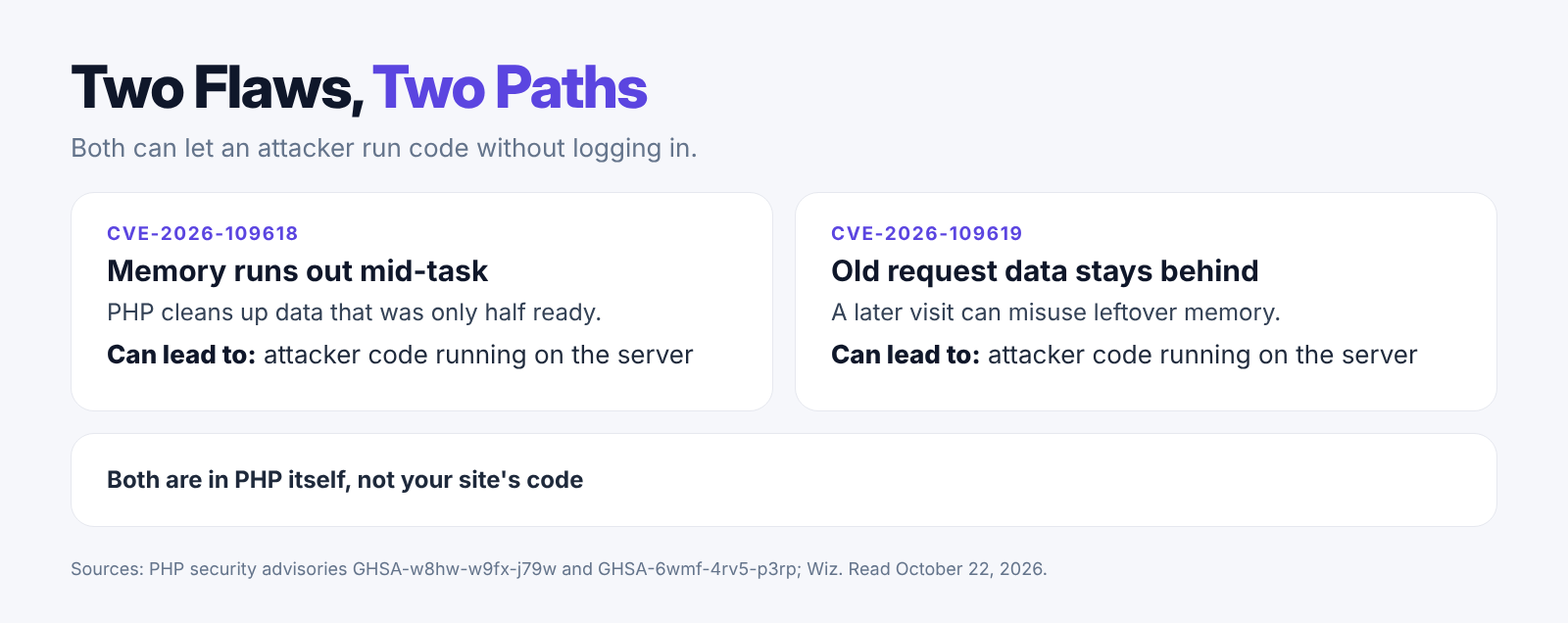
The first flaw happens when PHP runs out of memory halfway through a task and then cleans up data that was only half ready. The first PHP advisory confirms a working attack on mod_php (PHP running inside the Apache web server).
The second flaw leaves bits of an old visit behind in memory, and a later visit can misuse them. The second PHP advisory confirms attacks this way too, depending on how the site is set up.
Both flaws sit in PHP itself, not in your website's code. That is why a site with no buggy plugins can still be open.
- Wiz says it took over WordPress, Drupal and Joomla sites in its research.
- Researchers also showed PHP memory could leak passwords, tokens (digital access passes) and API keys (secret codes apps use to talk to each other).
- PHP-FPM (a common way of running PHP behind a web server) is affected too: PHP confirmed a working attack on it through the second flaw.
- The flaws go back many years: Wiz says releases as old as PHP 5.4 are affected.
AI Helped Find the Flaws, and Attacks Started Before the Fix
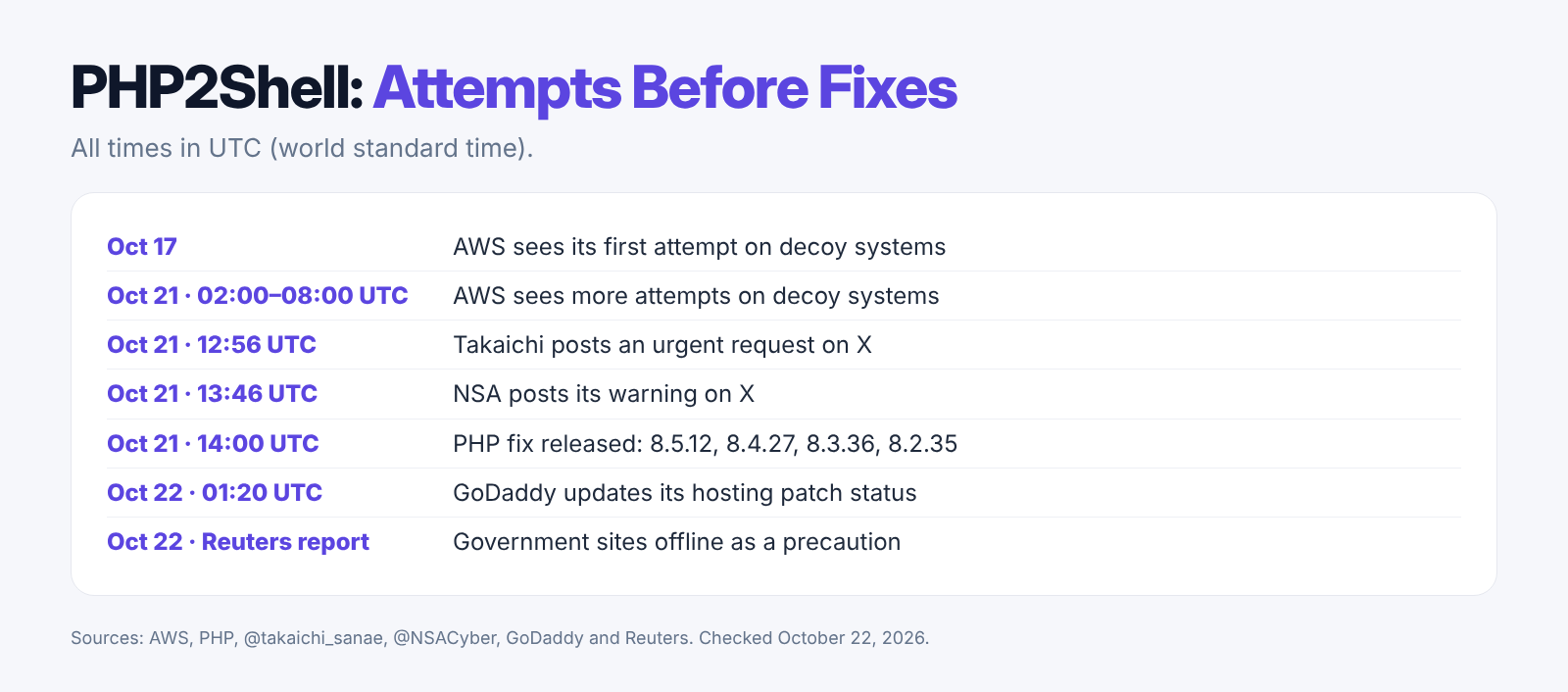
Wiz used AI models to build working attacks, and AWS spotted the first attack attempt on October 17, four days before the public fix.
Wiz's research says it used Gemini 4 Argon and GPT-5.6 Sol, and says Gemini played a big part in finding the flaws. That shows what AI can now do for researchers. It does not prove that criminals used AI in the attacks seen so far.
AWS's report found attempts against MadPot (fake servers AWS runs to watch attackers). AWS says it is unclear whether those attempts would have worked on real sites. The sources we checked do not name any confirmed hacked businesses.
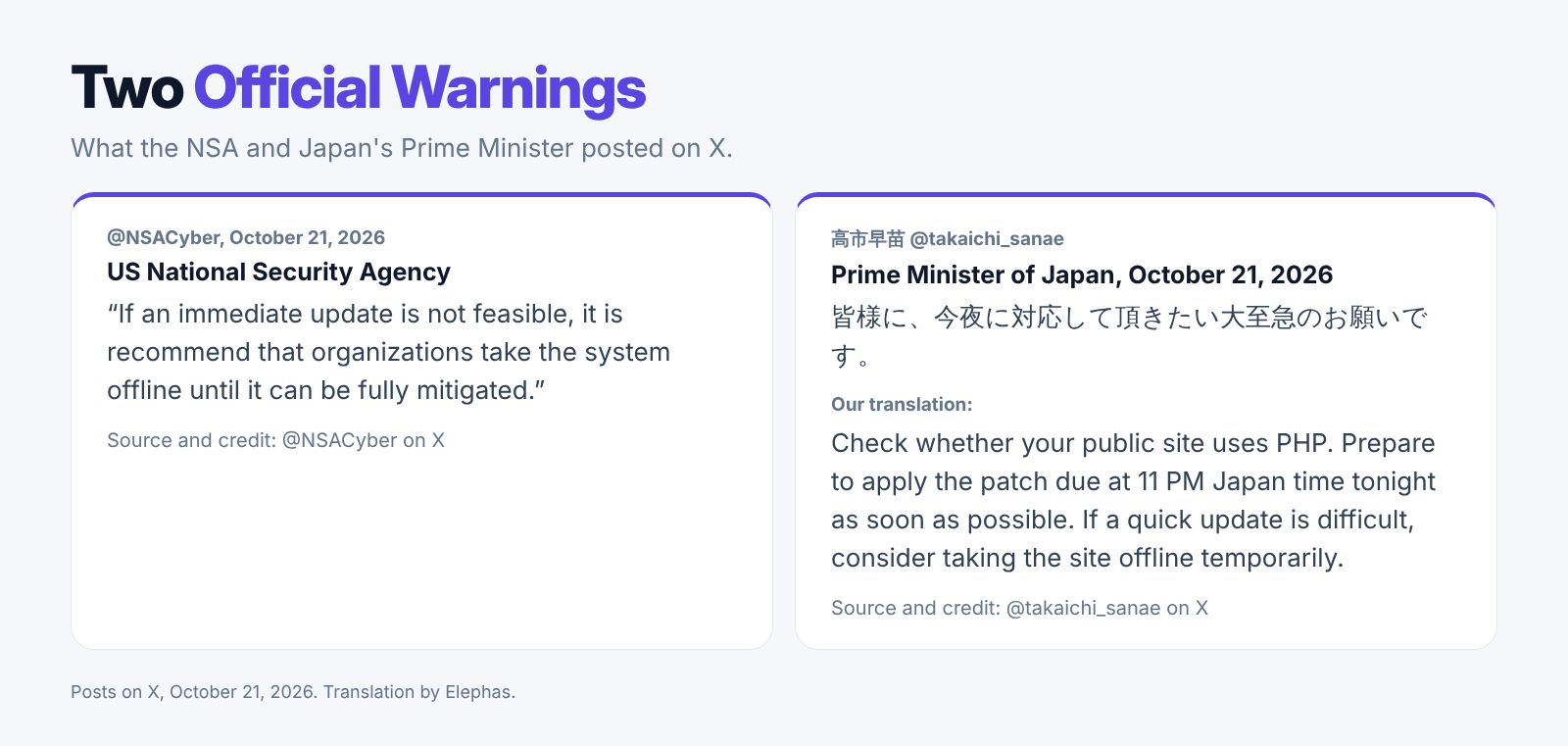
The NSA told organizations on X to take systems offline if they could not update right away. Japan's Prime Minister Takaichi Sanae posted that day. In our translation of her Japanese post, she asked owners to check if their sites use PHP and to get ready for the patch (the software fix) due that night.
- AWS saw more attempts between 02:00 and 08:00 UTC (world standard time) on October 21. The fix went public at 14:00 UTC.
- Takaichi's post named 11 PM Japan time on October 21 for the patch. That is the same moment, 14:00 UTC.
- Reuters reported that government sites in the Netherlands, Finland, Denmark and France went offline as a precaution, not because of a confirmed hack.
- AWS advises anyone checking for a break-in to look back to at least October 17, not just the day of the warning.
Four Fixed PHP Versions Came Out, but Each Site Still Needs a Check
We read PHP's public release data on October 22, and it listed four fixed versions, all dated October 21.
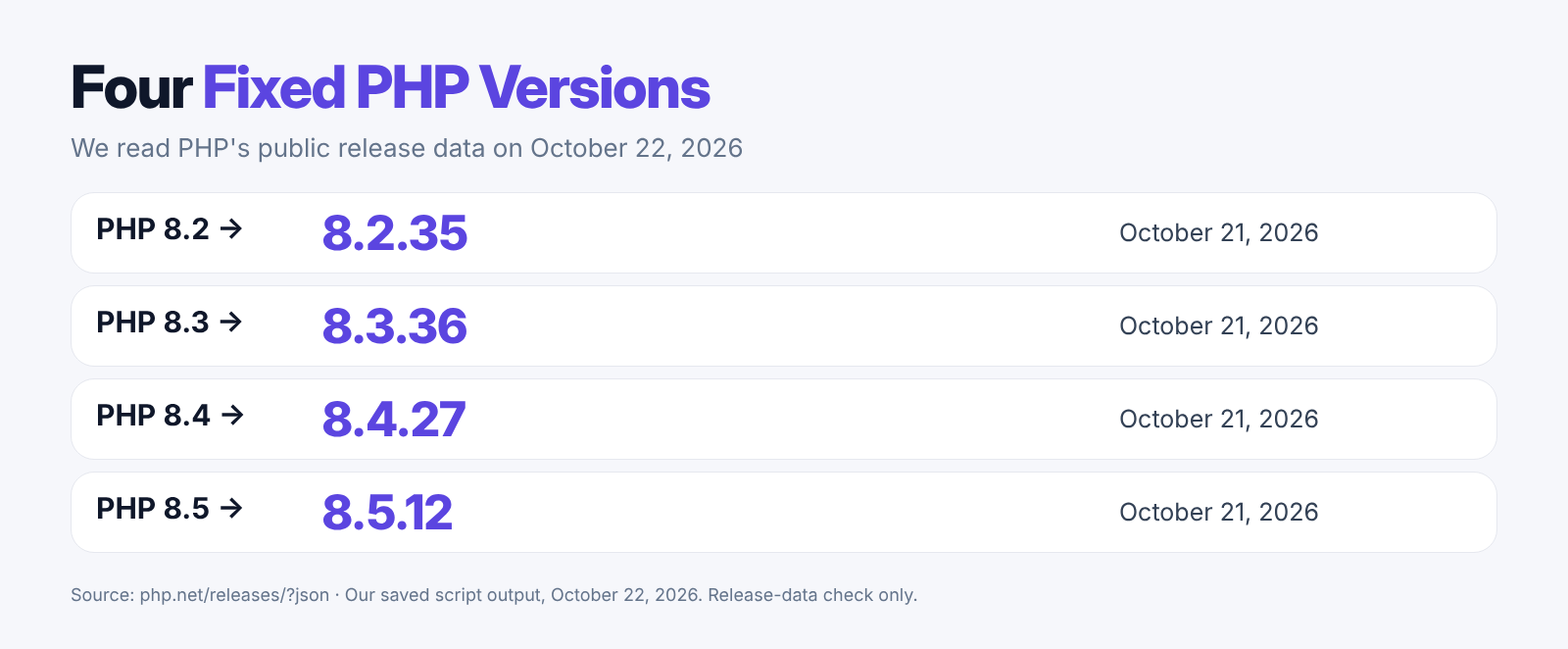
We ran a short script that asks PHP's release service for the newest version in each supported line. It printed 8.2.35, 8.3.36, 8.4.27 and 8.5.12, which match the PHP release notice. We only read release data. We did not test any attack or any site.
A fix being out is not the same as your site having it. The fixed PHP must be installed and running on the server that answers your visitors. We built the table below from the two PHP advisories to show what each setup means for you.
| Your setup | What the advisories say | What to do |
|---|---|---|
| Apache with mod_php | Working attacks confirmed, even before site code runs | Get fixed PHP installed and running |
| PHP-FPM | A working attack confirmed in some site setups | Update anyway; do not assume you are safe |
| PHP 8.1 or older | No longer fixed by the PHP project | Ask your host for a patched package or move to a fixed release of 8.2 or newer |
| Already updated | The version number alone may not prove it | Ask the host to confirm both CVE fixes |
For more on breaches and data safety, read our guides on whether ChatGPT got hacked and local versus cloud AI.
- Some hosts add the fix to older PHP lines through a backport (a fix copied into an older version), so the main version number may not change. cPanel lists such packages.
- If your account runs more than one PHP version, each one needs the fix. GoDaddy's guide says to check each one.
- A site made only of fixed pages, with no PHP running behind it, is outside these attacks, based on our reading of the advisories.
- PHP's advisory says a clean error log does not prove a site is safe, so a log check helps but is not a guarantee.
How to Update PHP on WordPress Today
To update PHP on WordPress, first check your version under Tools, then Site Health, then Info, then Server, and then ask your host to install the fix.
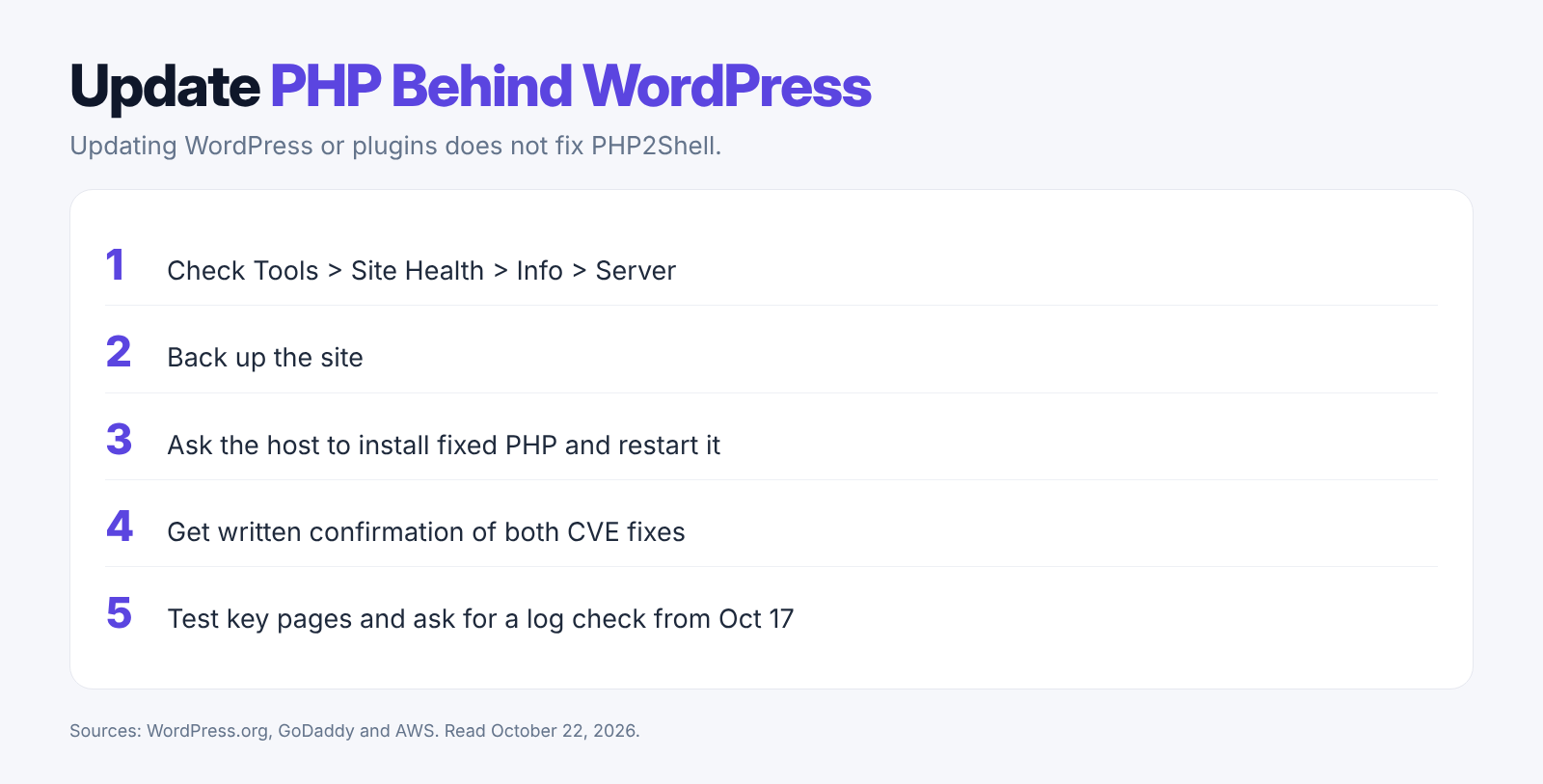
WordPress.org says no WordPress update is needed or planned for these flaws, and points owners to their hosting company. A WordPress PHP update means updating the PHP software on the server, not WordPress itself.
Take a backup first. Then ask your host to install the fixed PHP, restart PHP and confirm the new version. If you run your own server, you or your server admin must do these steps. Afterward, open your key pages, forms and checkout to make sure they still work.
A WAF (web application firewall, a filter that blocks bad traffic before it reaches your site) can help while you wait. Cloudflare turned on protection for its WAF customers, but still says you must update PHP.
Message to send your host: "Please confirm that the PHP running each of my sites has the fixes for CVE-2026-109618 and CVE-2026-109619.
Tell me the fixed version or package number, and confirm PHP was restarted. If the work is not done yet, tell me when it will be and what protects my site until then".
- GoDaddy said at 01:20 UTC on October 22 that Managed WordPress and Windows Hosting were patched, and normal Web Hosting was being patched. Customers with their own virtual server (VPS) must update it themselves.
- On cPanel hosting, ask about the PHP packages on the server, not only the PHP version you picked in the panel.
- A WordPress maintenance page does not protect you, because some attacks happen before WordPress loads.
- If you cannot patch soon, ask your host to take the site offline for a short time, as the NSA advised.
- Ask your host to check logs for strange files, logins or programs. Patching does not undo an earlier break-in.
Elephas Is a More Private Way to Use AI on Your Documents
Flaws like PHP2Shell show that online tools run on servers you cannot see, and cloud AI tools such as ChatGPT, Gemini and Claude work the same way.
What ChatGPT, Gemini and Claude Receive
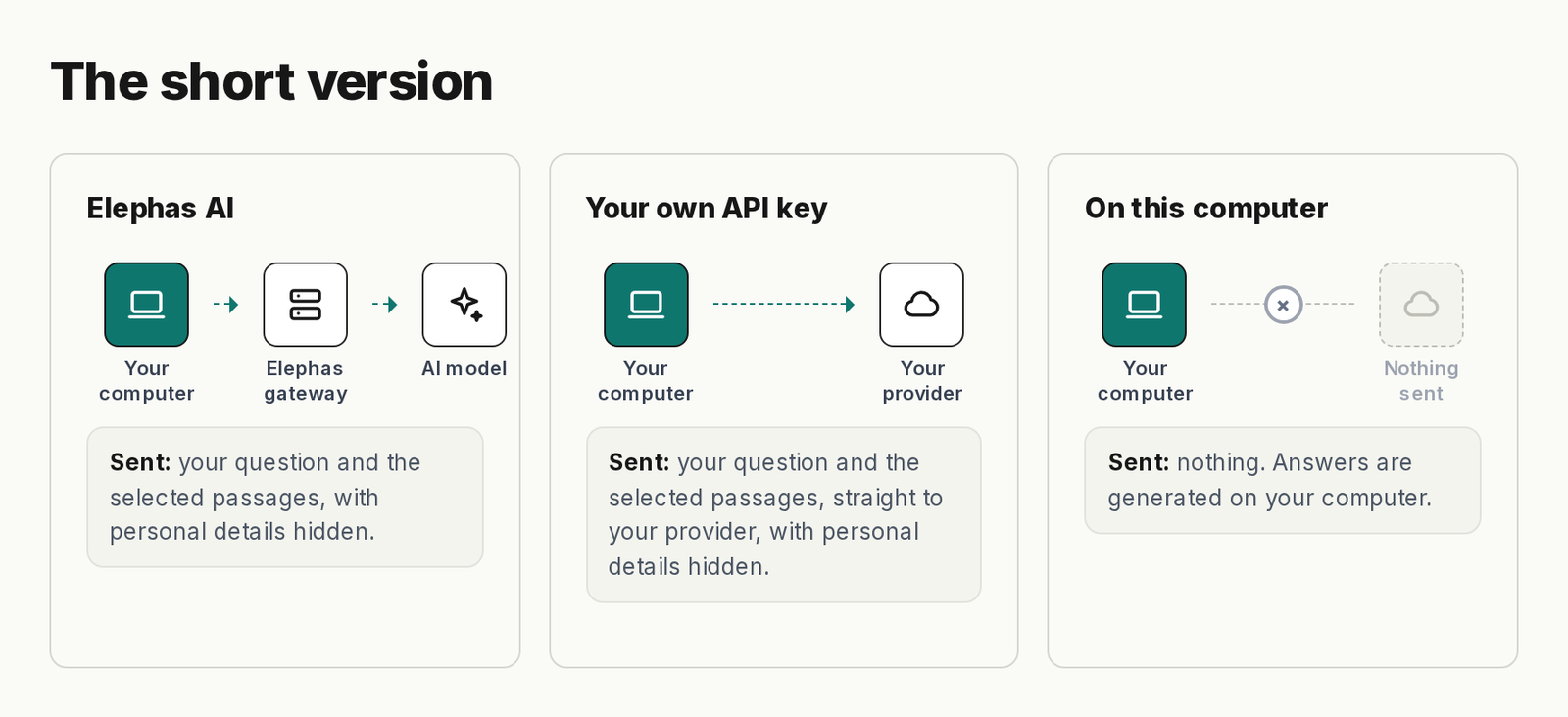
When you use ChatGPT, Gemini or Claude, every question you type and every file you upload goes to that company's servers to make the answer. Depending on your plan and settings, your chats can be kept and may be used to train their models.
Elephas Hides Personal Details Before a Cloud Model Sees Them
With Elephas, names, emails and phone numbers are hidden on your Mac before a cloud model sees your question. Elephas AI runs its models in Elephas's own cloud, and your question and passages are not stored or used to train AI.
Elephas Local Models Send Nothing at All
With an Elephas local model (AI that runs on your own computer), the answer is made on your Mac, so your questions and documents are not sent anywhere.
Elephas Team Sets One Privacy Policy
Team costs $29 per person per month. The owner decides which models members may use and whether hiding personal details is required, so the whole team follows one policy.
- Every answer cites its source file and passage, so you can check it.
- Your files stay stored on your computer, and your chats are saved in encrypted (locked) form.
- Runs on Apple Silicon Macs with macOS 14 or later.
- Plans start at $19 a month, with a 7-day free trial. Try Elephas.
Conclusion
PHP2Shell is serious, but the fix is clear: get the patched PHP running on your server and get proof from your host. A short record now saves you from guessing later.
- Save your host's written reply with your website records.
- Note the date you checked each site and what the host confirmed.
- Write down any work still waiting and who will do it.
- For private work with AI, Elephas hides personal details before the cloud, runs local models on your Mac, and gives teams one policy.
Private AI for your documents, on your Mac
Elephas answers from the files on your Mac, and with its on-computer model your questions and documents are not sent anywhere. On cloud routes it hides names, emails and phone numbers on your computer first. Plans start at $19 a month, and Team is $29 per person per month.
