LiteLLM Hacked Again: What October Took and What to Do Now
On October 21, 2026, attackers took over LiteLLM's release process and shipped version 1.107.0 with a credential stealer plus remote control tool. The LiteLLM hack targeted browser passwords, cloud logins and API keys (secret codes that let software use an account).
LiteLLM connects apps to different AI providers. That puts it close to the keys those apps need, often several providers' keys in one place. For a small team, the risk reaches beyond the AI tool itself.
The bad release has been removed. But removing it does not cancel keys already copied. Recovery starts with finding where it ran, then replacing the secrets that computer could reach. For this guide we read LiteLLM's incident post and six security research write-ups, and checked PyPI and Docker Hub ourselves on October 22.
Executive Summary
- LiteLLM 1.107.0 was poisoned on October 21, affecting its public Python packages and several public container tags.
- Starting Python (the programming language) in an affected environment could run the malware, even without opening LiteLLM itself.
- The targets included AI keys, cloud accounts, browser logins and secrets stored in LiteLLM's database, with the victim count still unknown.
- Before using pip (Python's package installer) for repairs, remove the malicious startup files, stop the background process, rebuild, and replace reachable secrets from a clean computer.
- For a more private choice than online cloud models such as ChatGPT, Gemini and Claude, Elephas answers from your documents on your Mac. It offers on-computer models, redaction of personal details and a Team plan.
The LiteLLM Hack Put a Bad Release Online on October 21
LiteLLM's poisoned Python packages were available from 11:39:51 to 13:23 UTC on October 21, 2026, about one hour and 44 minutes.
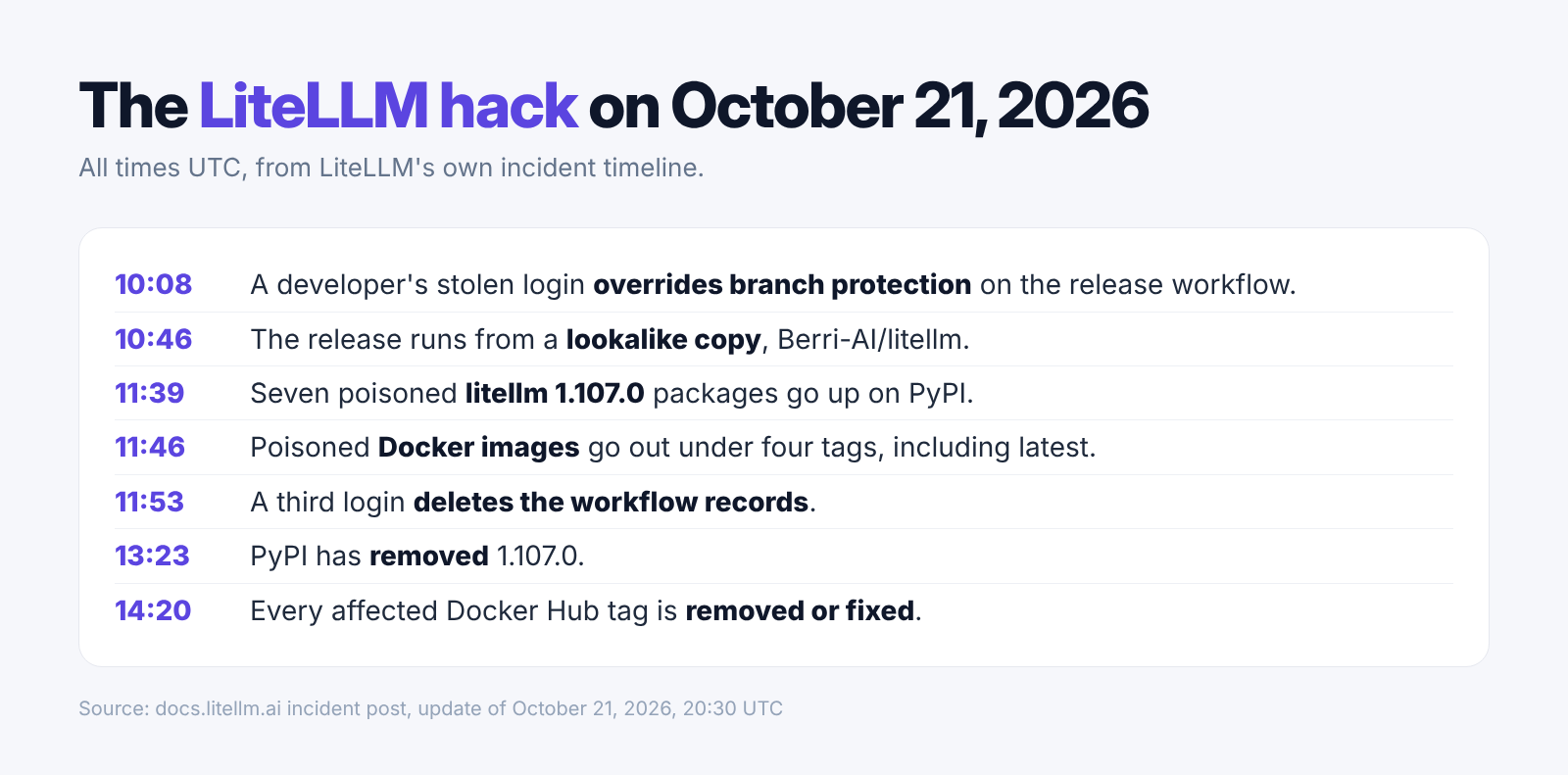
The incident post lists all seven wheels (ready-to-install Python packages) as affected on PyPI (the public directory for Python packages). The malware also shipped in a Docker image (a packaged environment for running software) through Docker Hub and GHCR (GitHub's directory for these packaged environments, called containers).
LiteLLM says an attacker used three developers' GitHub tokens (codes granting access to code and release controls). One belonged to an organization owner. The attacker disabled protection against unreviewed changes and directed the release at Berri-AI/litellm, a lookalike of the real BerriAI/litellm repository (code store).
We built this timeline from LiteLLM's account. It separates the three download services because their removal times differ. All times below are UTC on October 21.
| Time | Event in LiteLLM's timeline |
|---|---|
| 10:08:34 | A privileged credential overrides release protections. |
| 11:39:51 | Uploads of the seven bad Python packages begin. |
| 11:46:56 | Container publication jobs run. |
| By 13:23 | PyPI removes 1.107.0. |
| By 13:51 | Affected GHCR tags are unavailable. |
| 14:20 | Docker Hub's affected tags are removed or redirected to clean images. |
- Docker tags (labels pointing to images) included v1.107.0, latest, main-latest and main-stable.
- GHCR's affected releases included database and non_root variants.
- LiteLLM's official 1.107.0 code on GitHub did not contain the bad files. The poisoned packages were built from the attacker's lookalike copy, so checking the official code alone would miss them.
- LiteLLM's latest update to its post is from 20:30 UTC on October 21, and its investigation is still going.
The Malware Reached Beyond AI Keys Into Other Accounts
The three bad files went after AI keys, browser logins and cloud logins, and added a remote control tool that checks for new commands every hour.
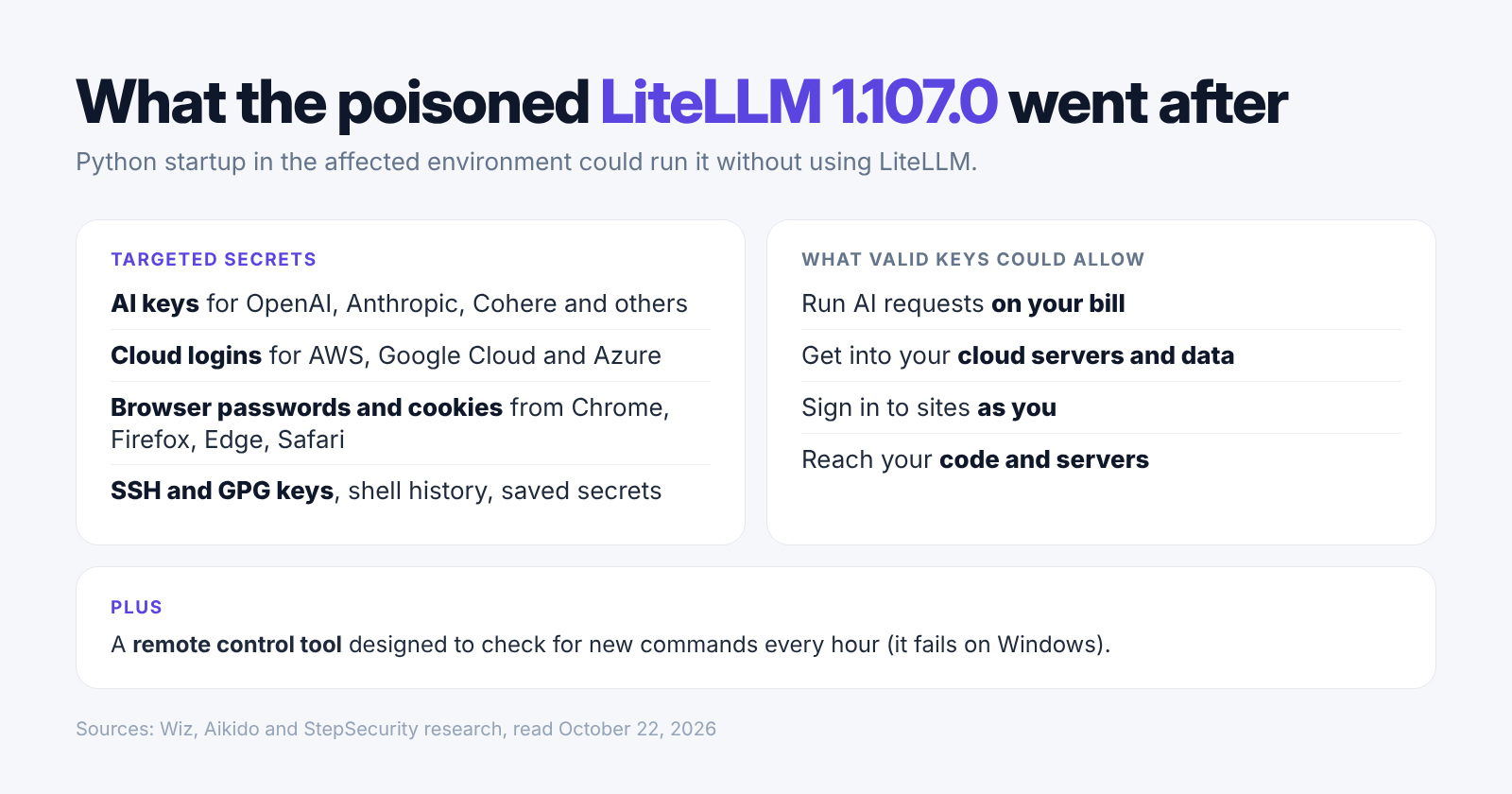
Aikido's analysis identifies cook.pth, which starts cook.py whenever Python starts in the affected environment. The third file, sitecustomize.py, launches the remote control loop. Running pip can trigger these startup files too.
The stealer locked (encrypted) everything it took and sent it to a lookalike web address. The table below translates the targets into account risks. These are possible uses within each credential's permissions, not proof that every account or file was accessed.
| Target | What it can let an attacker do |
|---|---|
| OpenAI, Anthropic, Cohere and other AI keys | Use the provider account within the key's permissions. |
| AWS, Google Cloud and Azure credentials | Act with the cloud identity's access rights. |
| Browser passwords and cookies (saved login data) | Attempt account access or reuse a signed-in session. |
| SSH keys (server login keys) | Enter servers that accept the key. |
| GPG keys (signing or decryption keys) | Sign or decrypt material where that key permits it. |
| Database passwords and environment variables (settings passed to running software) | Access connected services or recover more secrets. |
Wiz says stolen AWS role keys (temporary cloud account credentials) were used about 4.5 hours after theft. It observed requests to check the account identity and list available AI models, plus limited checks of account details. This makes replacing keys more urgent than simply restoring the app.
- The browser targets included Chrome, Firefox, Edge and Safari.
- Aikido's write-up says it also went after logins and settings for AI coding tools, including Claude Code, Cursor, GitHub Copilot, Windsurf, Gemini CLI, Amazon Q and Codex CLI.
- Endor and StepSecurity found the stealer also read saved keys from LiteLLM's own database, up to 500 rows from each table.
- StepSecurity says the hourly remote control loop fails on Windows because it uses unavailable operating-system features. The stealer can still run there.
- Wiz says it never saw the remote control tool's command address in use, so there is no sign yet that extra commands were sent.
Exposure Depends on the Computer That Ran the Bad Release
Treat a computer that ran Python with LiteLLM 1.107.0 installed, or ran an affected container image, as compromised.
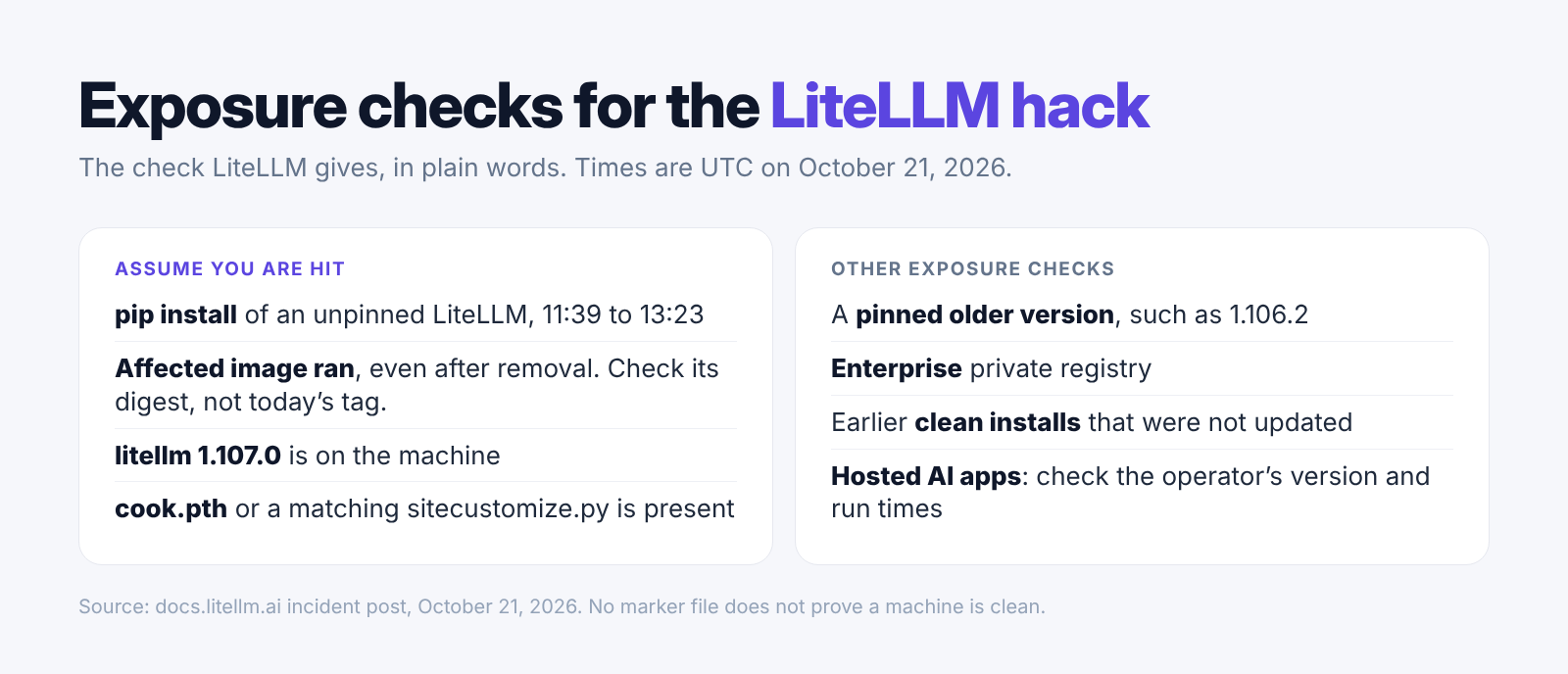
A freelancer's Mac, a hosted AI service and a CI machine (a computer that automatically builds and checks software) are different places to investigate. Using an AI tool does not by itself prove your own computer ran the bad package. Ask the company that runs the tool which LiteLLM version it used, and when.
When we checked PyPI on October 22 at 09:36 UTC, the newest version on offer was 1.106.2, uploaded at 10:44 UTC on October 21, about an hour before the poisoned upload. Version 1.107.0 could no longer be installed: PyPI's list of versions did not include it, and asking for it returned "not found" (error 404).
On Docker Hub, the v1.107.0 tag was gone (error 404). The latest and main-stable tags were live again, last changed at 17:50 and 17:51 UTC on October 21, respectively. That shows what is on offer now, not which image a machine pulled during the attack.
| Your setup | Evidence to check |
|---|---|
| LiteLLM installed on your computer | Package records on disk and evidence of Python starting. |
| A hosted tool that uses LiteLLM | The operator's deployed version, image identity and run times. |
| Containers using latest or main-stable | The actual image digest (fixed image identifier), not today's label. |
| Automated build machine | Install records, cached packages and secrets available during the build. |
| Private enterprise registry | Confirmation that the separate private release was used. |
- LiteLLM says earlier versions were unaffected by this October incident.
- Its private enterprise release was unaffected, according to the company. A paid account alone does not identify the release used.
- Endor says a file named /tmp/.pc_once_* means the theft ran. If that file is missing, it does not prove the machine is safe.
- Write down the version and image details for whoever handles the clean-up, without starting Python on that machine.
October Was a Separate Attack From the March Compromise
The October 21 release takeover was LiteLLM's second hack of 2026, with a different affected version from March.
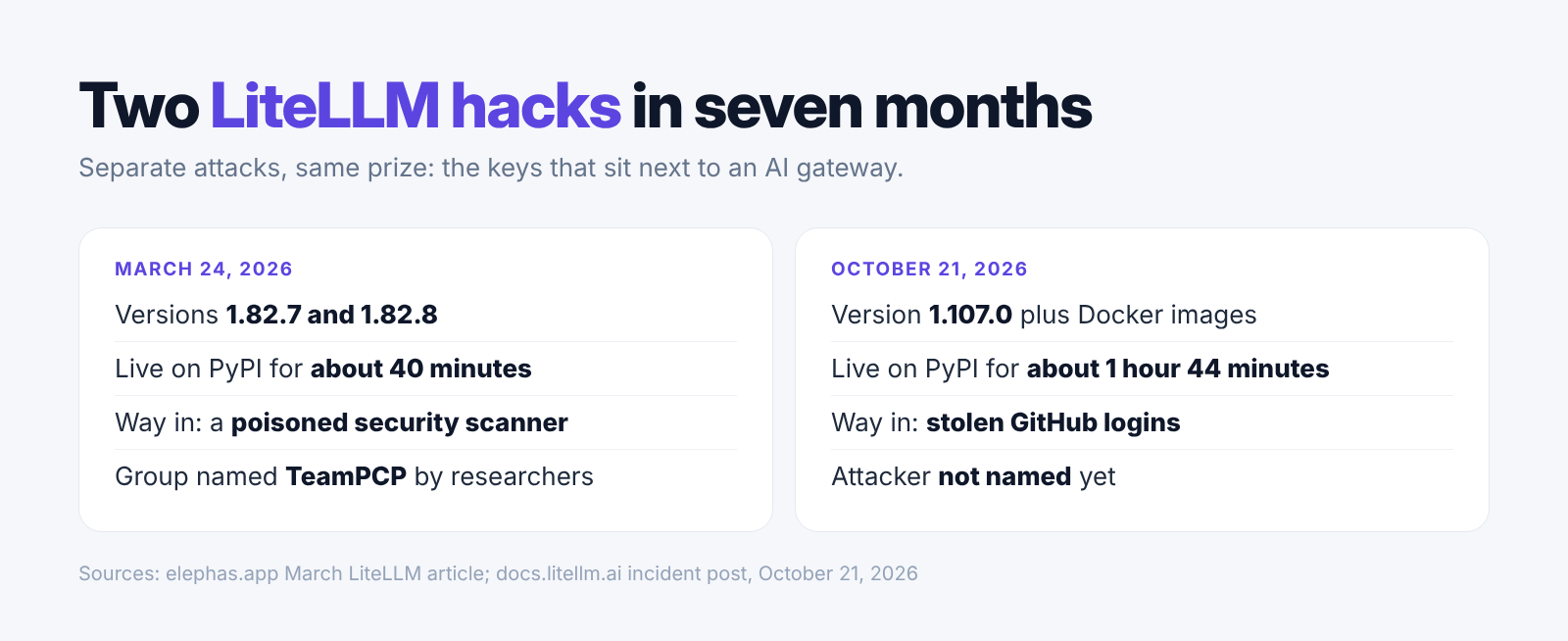
The March hack hit two earlier versions, was tied to a group researchers call TeamPCP, and lasted about 40 minutes. Its numbers do not apply to October.
LiteLLM says it tightened release controls after March: a private code store, trusted publishing (checking the release service's identity), fixed Docker tags and signed images. It says publishing rights were briefly widened for two engineers on Monday. The attacker ran that same release process, so the poisoned packages went out signed like real ones.
LiteLLM believes the attacker took the tokens from logs on its internal LiteLLM setup, which was open to the internet. It says Claude Code sometimes puts a user's GitHub login token inside a reply, which can end up in those logs. How the attacker got in is not confirmed; LiteLLM suspects a recently fixed bug.
- The stealer also took shell history (a list of past typed commands), which can hold passwords pasted into a terminal.
- Endor found the remote control tool would run code it downloaded without checking that it was genuine.
- The Register puts LiteLLM at about 23 million downloads a week. That is package popularity, not a victim count.
- The sources we checked give no reliable count of affected companies, stolen keys or money lost in the October attack.
Recovery Starts Before Reinstalling LiteLLM
LiteLLM recommends removing the malicious startup files and stopping the background Python process before reinstalling the pinned version 1.106.2.
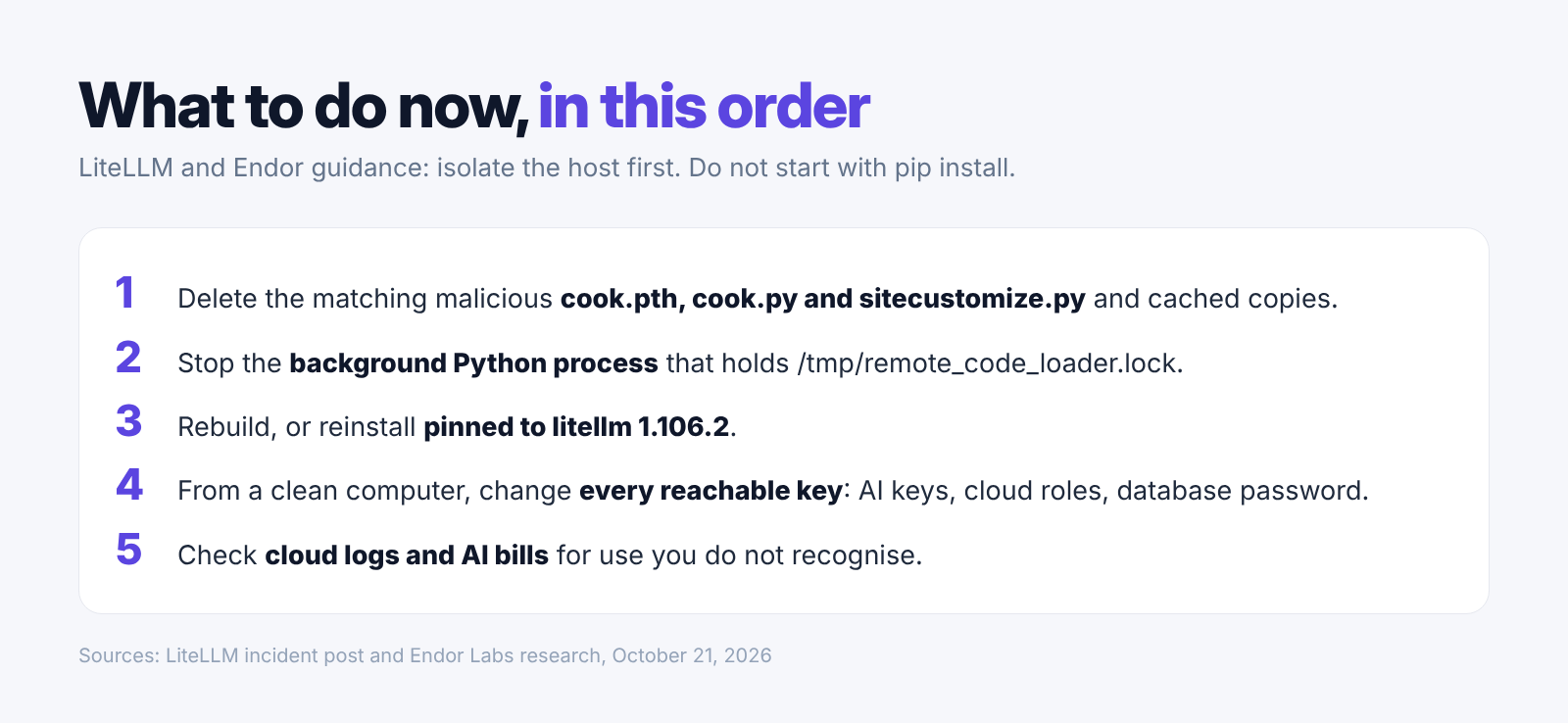
First, cut the affected machine off from the internet. Do not begin with pip install or pip show. Both start Python. Endor's guidance also calls for rebuilding and replacing credentials from a clean machine.
For a small team, assign one person to the affected machines and one to the accounts whose secrets were reachable. Keep the version, deployment and account records together. Replacing a key should include updating the legitimate tools that use it, then confirming they work with the replacement.
Our ordered checklist follows LiteLLM's response instructions. The distinction matters: rebuilding removes the poisoned environment, while rotating keys (revoking old codes and issuing replacements) cuts off access through copies already taken.
- Remove the matching malicious cook.pth, cook.py and sitecustomize.py files and their .pyc cached copies. Check contents or hashes (file fingerprints), since sitecustomize.py can also be legitimate.
- Stop the detached Python process holding /tmp/remote_code_loader.lock. Rebuild affected images and Python environments from clean sources, pinned to 1.106.2.
- From a clean computer, replace reachable cloud credentials, AI provider keys, LiteLLM master and virtual keys (gateway access codes), database passwords and other exposed secrets.
- Check AWS CloudTrail (AWS's account activity record), provider activity and unexpected usage. LiteLLM advises looking for the cloud role used outside your own systems.
- Assume theft succeeded if the affected host had internet access. Keep investigating browser sessions and other reachable accounts after the app runs again.
Elephas Is the More Private Choice Than Cloud AI Models
Incidents like the LiteLLM hack show that cloud AI rests on keys, gateways and servers you never see, and Elephas is the more private way to use AI on your documents.
ChatGPT, Gemini and Claude Receive Everything You Send
With online cloud models such as ChatGPT, Gemini and Claude, every question and every file you upload goes to the company's servers. Depending on your plan and settings, chats can be kept there and may be used to train models. The keys to those accounts are a target too, as this attack showed.
Local Models Keep Your Questions and Documents on Your Mac
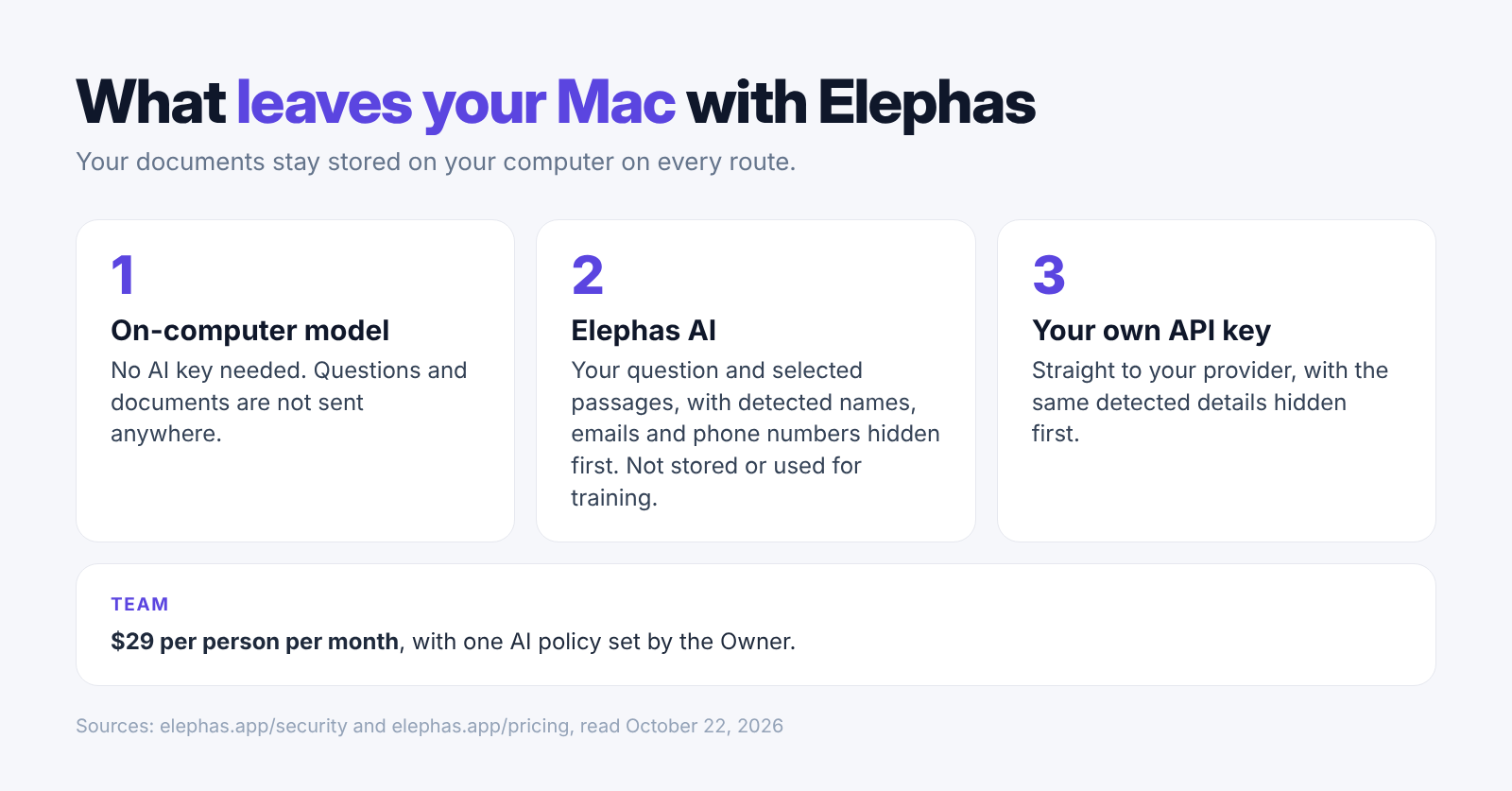
With Elephas, you can run a local model (an AI model downloaded once to your Mac). Answers are made on your computer, so your questions and documents are not sent anywhere, and there is no AI key to steal.
Personal Details Are Hidden Before a Cloud Model Sees Them
With Elephas, redaction runs on your Mac first when you use a cloud model. Elephas finds names, email addresses and phone numbers and hides them before the question leaves, then put back in the answer, and you can see what was hidden. Your documents stay stored on your Mac.
Team Support Gives Everyone One Private Setup
With Elephas Team, everyone shares one setup and one AI policy, so nobody wires up their own AI keys. Team costs $29 per person per month, with shared Team Brains and end-to-end encrypted sync (only your team's devices can read it). The owner decides whether members may use Elephas AI or the on-computer model.
- Answers cite your source files and passages, so you can check them.
- The search index (the record used to find document passages) and chats stay in an encrypted database.
- Elephas asks before it installs an update and verifies the update before applying it.
- Runs on Apple Silicon Macs with macOS 14 or later. Plans start at $19 a month, with a 7-day free trial. Try Elephas.
Conclusion
The bad release is gone, but copied keys can outlive it. Recovery depends on where the package ran and what that computer could reach.
A clean download today says nothing about a copy installed yesterday. Check which version ran and when, then check your accounts for activity you do not recognize.
- Confirm the deployed version and image from saved records.
- Rebuild affected environments from clean sources.
- Replace reachable secrets and investigate browser sessions and account activity.
- For a more private choice than cloud models like ChatGPT, Gemini and Claude, use Elephas: on-computer models, redaction of personal details and Team support, on your Mac.
Private AI for your documents, on your Mac
Elephas answers from the files on your Mac, and with its on-computer model your questions and documents are not sent anywhere. On cloud routes it hides names, emails and phone numbers on your computer first. Plans start at $19 a month, and Team is $29 per person per month.
