ChatGPT Business vs Plus: Which Plan Is Right for Your Firm?
Last updated: October 9, 2026.
The ChatGPT Business vs Plus decision starts when a second person joins your firm. Plus is a $20-a-month personal account; once client work spreads across several, the firm cannot see, keep, or close them. Business adds control over access, billing, and offboarding, but OpenAI requires two paid seats, a $40 to $50 monthly floor.
This guide settles when a personal Plus account stops being a handy habit and becomes a firm workflow nobody controls, and whether paying for Business actually fixes it.
Below, you'll find the criteria, each plan, real monthly bills, picks by firm size, and answers to common questions.
Quick answer
- ChatGPT Plus is a $20/month personal account; ChatGPT Business is a company workspace at $25 per seat monthly or $20 per seat on annual billing, with a two-seat minimum ($50 or $40 a month at the floor).
- Stay on Plus if you work alone on non-regulated material; move to Business once a second person or firm client data is involved.
- Business adds a company-owned workspace, admin roles, included SAML or OIDC single sign-on, and no model training on workspace data by default; it does not add a BAA or a self-service export, and data residency is only rolling out to some customers.
- For client files, Elephas is a privacy-friendly AI knowledge assistant with automatic PII redaction, starting at $19/month. Try Elephas for free.
What Actually Changes for a Firm: ChatGPT Business or Plus?
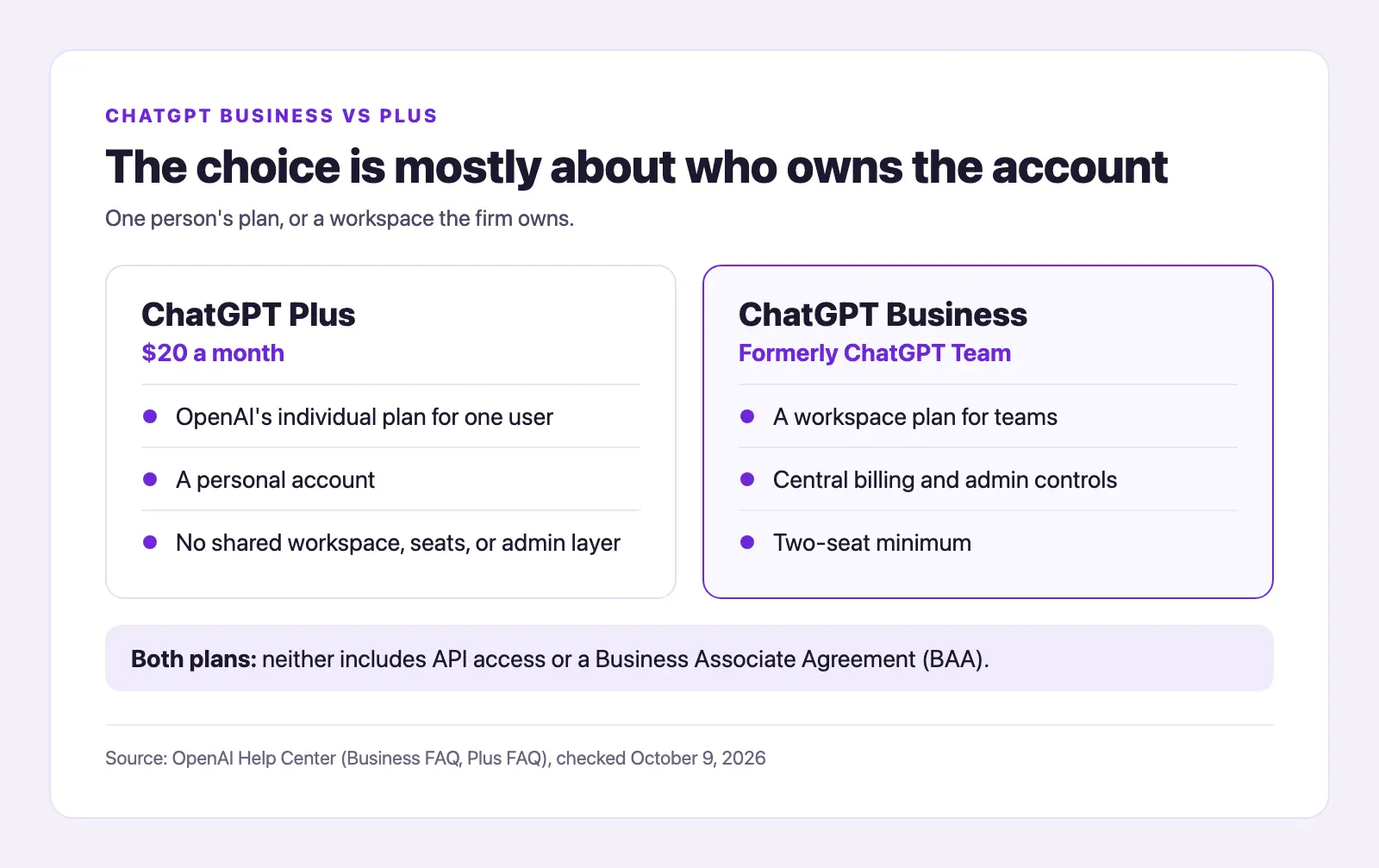
The choice is mostly about who owns the account. OpenAI says the August 29, 2025 rename was name-only.
- ChatGPT Plus: OpenAI's individual plan for one user.
- ChatGPT Business (formerly ChatGPT Team): a workspace plan for teams, with central billing, admin controls, and a two-seat minimum.
- Both plans: neither includes API access or a Business Associate Agreement (BAA).
A small firm often starts with one person on Plus. Then a second person joins, and client work spreads across personal accounts. One user listed what Business adds:
"Business is more about the workspace model: shared workspace, centralized billing, admin controls, business data settings, and multiple seats." (r/ChatGPT)
OpenAI's Business overview describes the same thing: a managed workspace for a team. A November 2025 Bosio Digital article on personal AI accounts at work adds the legal side: "When you use a personal ChatGPT, Claude, or Gemini account, you're subject to consumer terms of service, not business agreements."
For how firms roll it out, see our guide to ChatGPT for business.
Which Criteria Matter When Comparing Business Plans?
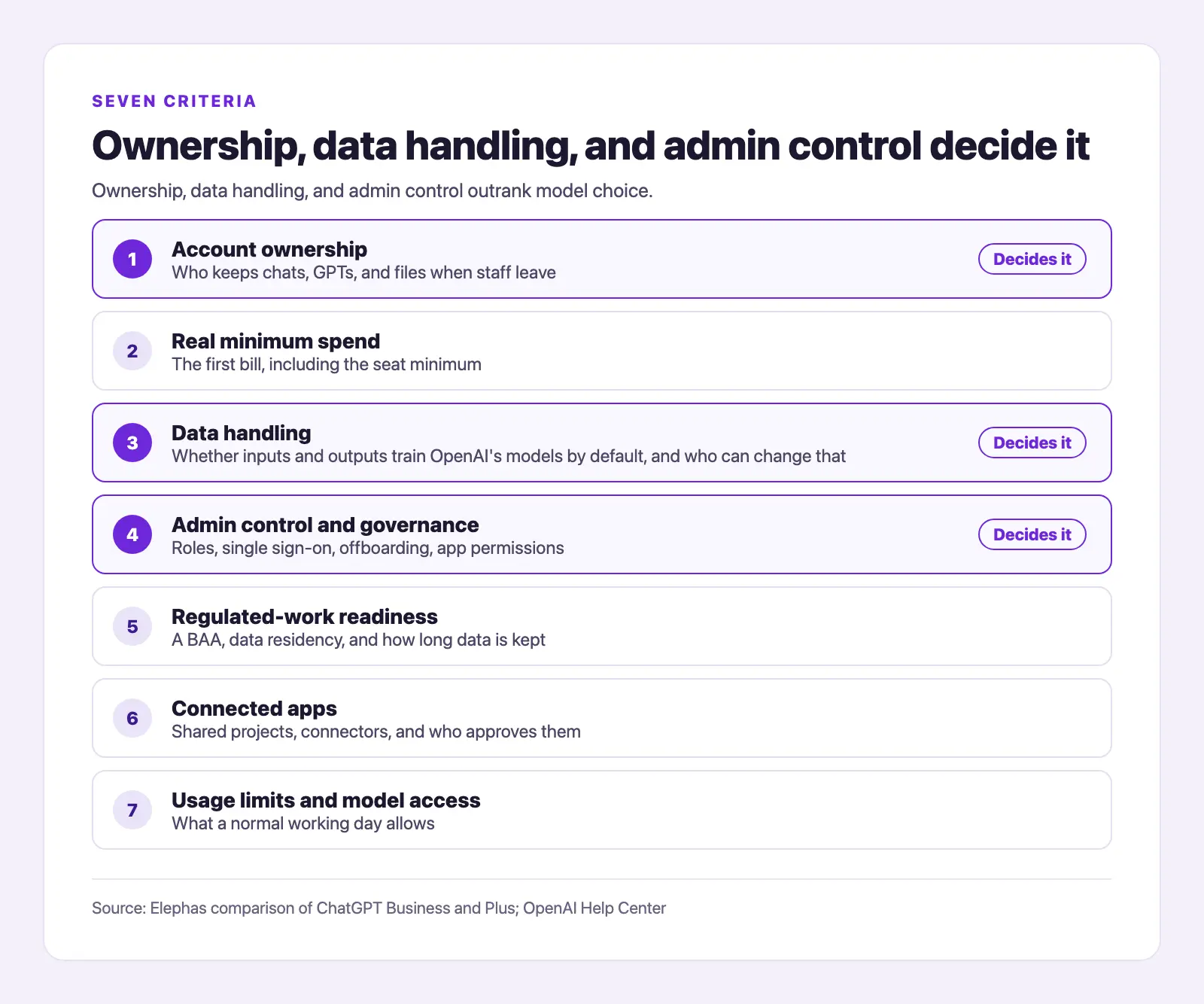
A small firm should compare ChatGPT Business and Plus on seven things: who owns the account, the real minimum bill, how data is handled, admin control, readiness for regulated work, connected apps, and usage limits.
- Account ownership: who keeps chats, GPTs, and files when staff leave.
- Real minimum spend: the first bill, including the seat minimum.
- Data handling: whether inputs and outputs train OpenAI's models by default, and who can change that.
- Admin control and governance: roles, single sign-on, offboarding, app permissions.
- Regulated-work readiness: a BAA, data residency, and how long data is kept.
- Connected apps: shared projects, connectors, and who approves them.
- Usage limits and model access: what a normal working day allows.
Ownership, data handling, and admin control outrank model choice. The Cyberhaven 2026 AI Adoption & Risk Report, vendor research based on real company data, found that 39.7% of data movements into AI tools involved sensitive data.
The seat floor is the main solo-owner objection. An OpenAI Community post from July 17, 2026 asks for a one-seat Business plan, and one commenter on a solo owner's r/ChatGPT thread described a workaround:
"Pooling the capacity from both seats for a single user by inviting another email you own is an acceptable method but they won't let you share history across the two different seats." (r/ChatGPT)
You still check ChatGPT's work on either plan. A commenter on r/smallbusiness who uses ChatGPT on ad data wrote, "...So I have to check every piece of input data manually to see if it is good."
ChatGPT Business (Formerly ChatGPT Team): What Does the Workspace Add?
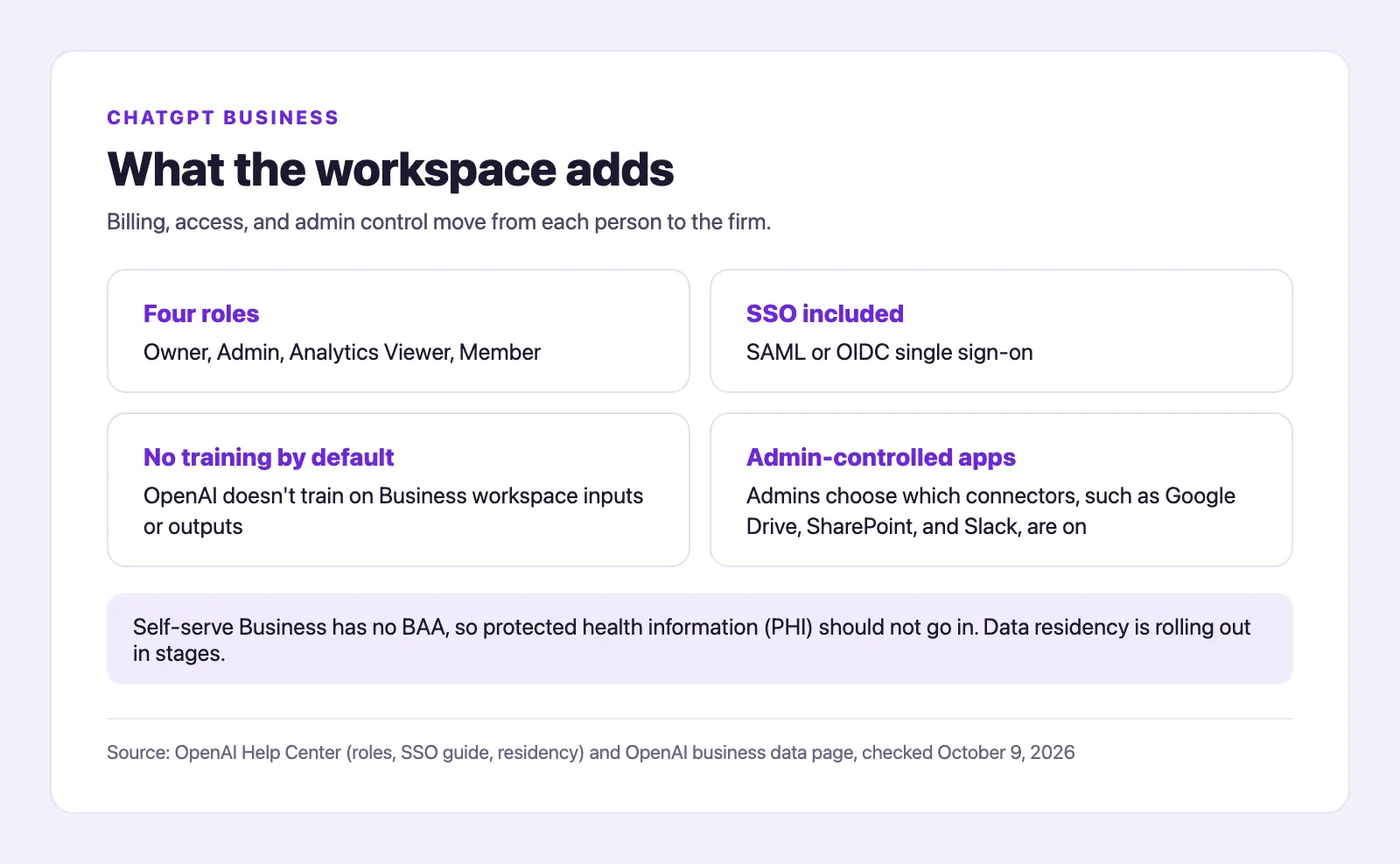
ChatGPT Business is OpenAI's managed workspace for organizations: Standard seats cost $25 per user monthly or $20 on annual billing, with at least two paid seats and a 200-seat cap for workspaces created since August 24, 2026 (Business FAQ). Billing, access, and admin control move from each person to the firm.
- Ownership: when an admin removes a member, their projects and GPTs go to a workspace owner; their private conversations and files do not transfer (removal rules).
- Real minimum spend: $50 a month on monthly billing, or $40 effective on annual billing.
- Data handling: OpenAI doesn't train on Business workspace inputs or outputs by default, and data is encrypted in transit and at rest (business data page).
- Governance: four roles (Owner, Admin, Analytics Viewer, Member), with SAML or OIDC single sign-on (SSO) included (SSO setup guide).
- Regulated work: no BAA for self-serve Business, so protected health information (PHI) should not go in; OpenAI offers BAAs through the API and sales-led plans such as ChatGPT Enterprise. Data residency is rolling out to Business in stages.
- Connected apps: connectors such as Google Drive, SharePoint, and Slack, and admins choose which are on (release notes).
- Usage: Standard seats have a five-hour usage limit; Premium seats do not.
Premium seats cost $125 per user monthly or $100 on annual billing and give 5x Standard's usage with no 5-hour limit. Give Premium only to the one or two people who keep hitting the cap, such as someone running long Codex sessions.
"ChatGPT business gives you a firewall so you can put sensitive data in there and not have to worry so much about it getting out. That protection is what you're paying extra for." (r/codex)
"...if you actually try to use it for real business purposes, it's frustrating." (a Business user in October 2025, r/ChatGPT)
What users praise in Business, as one r/codex commenter put it, is the protection you pay extra for. Business leads on ownership, offboarding, app control, and the training default; it falls short on solo cost, data export, and anything needing a BAA.
ChatGPT Plus: Is a Personal Account Enough for Firm Work?
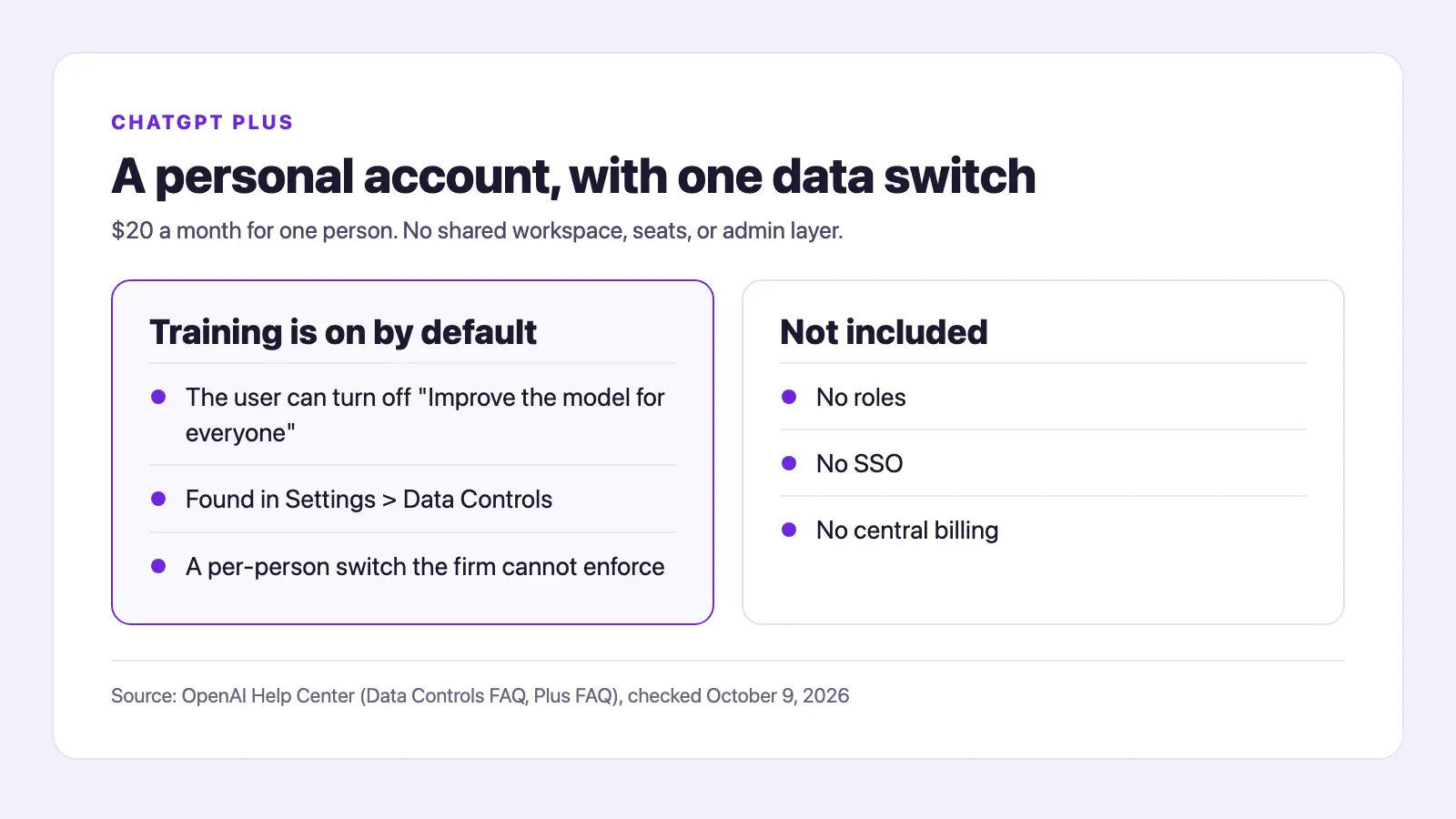
ChatGPT Plus is OpenAI's $20-a-month individual plan, one level above the free tier and Go ($8 a month in the US) and below Pro (Plus FAQ). It's a personal account with no shared workspace, seats, or admin layer.
- Ownership: under OpenAI's terms of use, the account is a personal one, so unless the firm is on Enterprise or Edu and claims the email domain, it gets no admin view, retention control, or offboarding path.
- Real minimum spend: $20 per month, one subscription, no seat floor.
- Data handling: training is on by default for personal accounts, but the user can turn off "Improve the model for everyone" in Settings > Data Controls (Data Controls FAQ). Temporary Chat may still be kept up to 30 days for safety purposes.
- Governance: no roles, no SSO, no central billing.
- Regulated work: no BAA for the Plus plan.
- Connected apps: personal connectors; nobody controls apps across users.
- Usage: OpenAI describes Plus limits as variable with demand.
Plus has its own step up for heavy users: ChatGPT Pro is a higher individual tier that starts at $100 a month. Like Premium on the Business side, Pro buys capacity for one person and adds no admin control, so it leaves the firm-ownership question where it was.
"Plus and Pro support self-service ChatGPT data export. OpenAI says Business does not currently provide an equivalent complete workspace/chat export..." (r/codex)
"I decided to purchase the monthly subscription of $20 instead of a $3000 lawyer..." (a $20-a-month ChatGPT subscriber handling high-stakes paperwork alone, r/Bankruptcy)
Personal accounts are already common at work: Cyberhaven's 2026 report found that 32.3% of ChatGPT usage happened through personal accounts, which security teams call shadow AI (work tools the firm cannot see or manage). Signs your Plus use has become shadow AI:
- A second person uses the output for client work.
- Client names or files go into a personal account.
- Nobody at the firm can see which settings are on.
- The work would leave if that person resigned tomorrow.
What Plus users appreciate is monthly flexibility and the self-service export one r/codex comparison points to. Plus is best for one person on non-client work, and weakest on ownership, offboarding, and firm-level controls.
Head-to-Head: How Do Business and Plus Compare on Pricing, Usage, and Compliance?
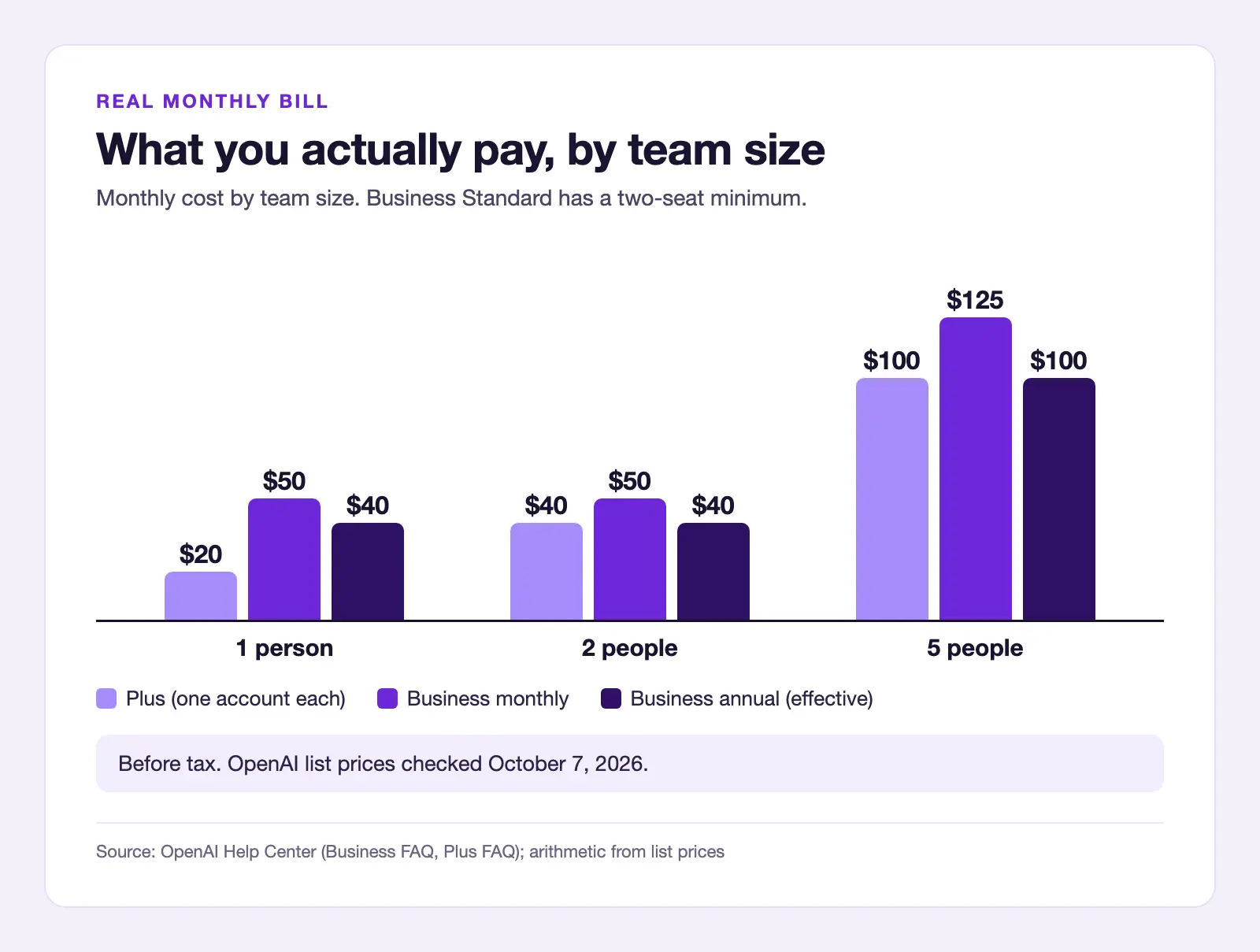
Under the same subscription business model, ChatGPT Plus costs $20 a month; ChatGPT Business (formerly ChatGPT Team) costs $25 per seat monthly or $20 on annual billing, with a two-seat minimum of $40 to $50. At five people, Business costs $100 to $125 against $100 for Plus, at most 25% more (ChatGPT Business pricing).
| People who need ChatGPT | Plus (one account each) | Business Standard, monthly | Business Standard, annual |
|---|---|---|---|
| 1 | $20 | $50 (2-seat minimum) | $40 effective (2-seat minimum) |
| 2 | $40 | $50 | $40 effective |
| 5 | $100 | $125 | $100 effective |
Arithmetic from OpenAI list prices, checked October 7, 2026; before tax.
| Criterion | ChatGPT Business | ChatGPT Plus | Checked Oct 7, 2026 |
|---|---|---|---|
| List price | $25/seat monthly, $20/seat annual | $20/month | Business FAQ, Plus FAQ |
| Minimum purchase | 2 paid seats; 200-seat self-serve cap for workspaces created since Aug 24, 2026 | 1 subscription | Business FAQ, Plus FAQ |
| Trains on your data by default | No | Yes, unless the user turns it off | Business data page, Plus data controls article |
| Admin roles and SSO | 4 roles; SAML or OIDC SSO included | None | Roles article, SSO guide |
| When staff leave | Projects and GPTs go to an owner; private chats do not | Everything stays with the person | Removal rules article |
| BAA / HIPAA path | No BAA on self-serve; BAAs come with the API and sales-led plans | No BAA for the Plus plan | BAA article |
| Data residency | Rolling out in stages; region chosen at checkout | Not offered | Business data residency article |
| Self-service export | Not available | Available | Migration article, Export article |
| Connected apps | Admin-controlled | Personal, no admin | Connected apps article, Release notes |
| Usage limits | Standard: 5-hour limit; Premium: 5x Standard, no 5-hour limit | Varies with demand | Premium seats post, Plus FAQ |
| Shared links | Workspace members only | Anyone with the link | Shared links article |
| API access | Not included | Not included | Business FAQ, Plus FAQ |
Business wins on ownership, admin control, training default, and app permissions. Plus wins on solo cost ($20 versus a $40 to $50 floor), export, and sharing. On both, a chat you delete leaves OpenAI's systems within 30 days (retention policies); saved chats stay until deleted.
- The broad New York Times preservation order ended September 26, 2025; as of October 2025, a narrow hold remained on chat logs already saved under it and on accounts the Times had flagged.
- Business lacks the controls that come only with ChatGPT Enterprise: automatic user provisioning (SCIM), customer-managed keys, audit logs, and a BAA through sales.
- Staff can still use personal accounts beside a Business workspace.
- Someone must still own shared-link and app choices.
"I can tell for sure that the low tier business seats ($25) get noticeably less than plus..." (r/OpenAI)
That's one report, so test your own workload before counting on extra capacity.
Which Should You Pick? It Depends on Where Your Firm Starts
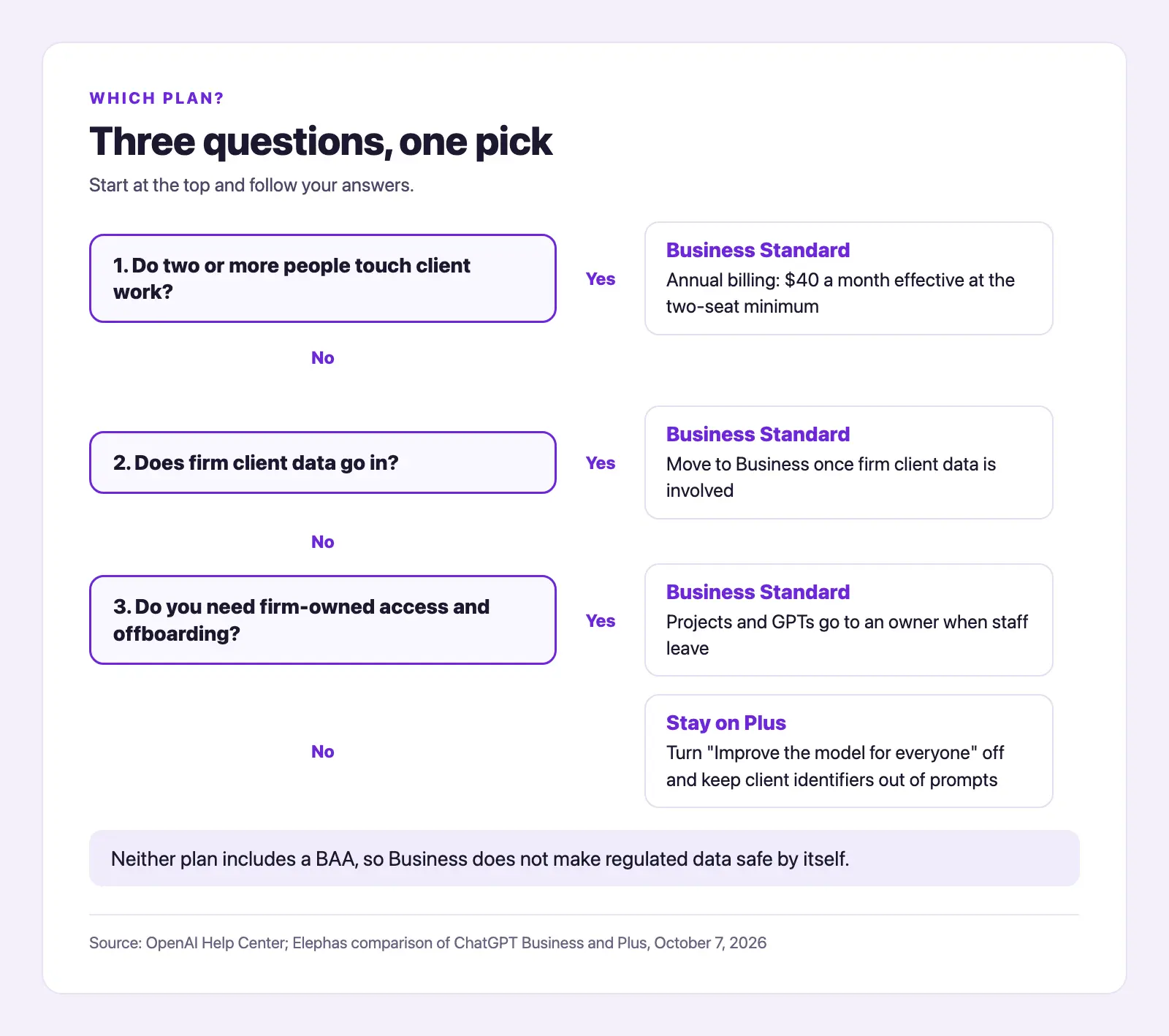
Your starting point decides the pick: choosing fresh, already working in personal ChatGPT accounts, or hearing Business is "the private version." One commenter on r/ChatGPT in April 2026 told an employee invited to a company workspace: "Never ever mix personal business with company assets."
Picking a Plan When You've Never Used Either
If you're choosing for a firm that has never used either plan, start with departing staff. On Business, removing a member hands their projects and GPTs to an owner, but private conversations and files don't transfer (removal rules). On Plus, everything leaves with the person.
So put instructions and reference files in shared projects; chats a member runs inside a project still stay with that member. For staff changes, one answer on r/ChatGPT from September 2026 suggests a "company-only handoff document containing the current instructions, approved reference files..."
Business gives the firm ownership plus a no-training default, a reasonable home for everyday client work. It doesn't make regulated data safe by itself: there is no BAA, and data residency is still rolling out. Plus with training off still depends on one person keeping that setting.
If two or more people touch client work, start on Business Standard with annual billing ($40 a month effective at the two-seat minimum, billed as $480 a year); if one person does non-client work, Plus is enough.
Switching From Plus When You're Already Using ChatGPT
If you're already using ChatGPT Plus for firm work, it becomes shadow AI once someone else relies on the output or client data goes in.
Each person can keep their personal workspace separate or merge it. The merge has no undo option; it cancels Plus and refunds unused time, except app-store subscriptions.
- Export each personal account first; Business has no self-service export. Note public sharing links clients use.
- If you cancel Plus instead of merging, access runs to the end of the paid period with no automatic refund, so cancel near your renewal date (cancel help).
- Check which app connections carried over and reconnect the rest (connected apps help); we estimate 10 to 20 minutes per app, plus 1 to 3 hours of admin setup.
On r/OpenAI in February 2026, one user warned, "The move is permanent." An OpenAI Community post from August 14, 2026 reports one user's entire chat history inaccessible after a Plus to Business migration.
Switch once a second person depends on the work, and export first.
What Changes When You've Heard of ChatGPT but Never Tried It
If you're hearing that Business is the private version of ChatGPT but haven't used it, three things change: a workspace no-training default, admin-controlled apps, and links limited to members. Prompts still go to OpenAI's cloud; a deleted chat leaves OpenAI's systems within 30 days, and there is no BAA or offline mode.
An owner doesn't see every chat by default. OpenAI's managed-account notice says an admin may be able to access, export, audit, retain, or delete account data, depending on setup and law. See Business data privacy for the full path.
Reddit is split: one user on r/ChatGPT in September 2026 says "the data security protocols between Team and Personal are the same" once training is off, while a self-described admin on r/ChatGPT in January 2026 says "Nobody can see your chats on ChatGPT Business." The official notice sits between them.
Pick Business for its ownership and training default, and treat it as a managed cloud account that still sends prompts to OpenAI.
The Verdict: The Right Plan by Firm Size, and What Neither Protects
ChatGPT Plus is the right choice when one owner works alone on non-regulated material; ChatGPT Business is better for firms where two or more people touch client work. If you're starting fresh, pick Business at two people; on Plus, export first, then switch; and if you heard Business is private, know it is managed.
"You can clean it off and make it anonymous prior to putting it in." (a commenter on client data, r/Accounting)
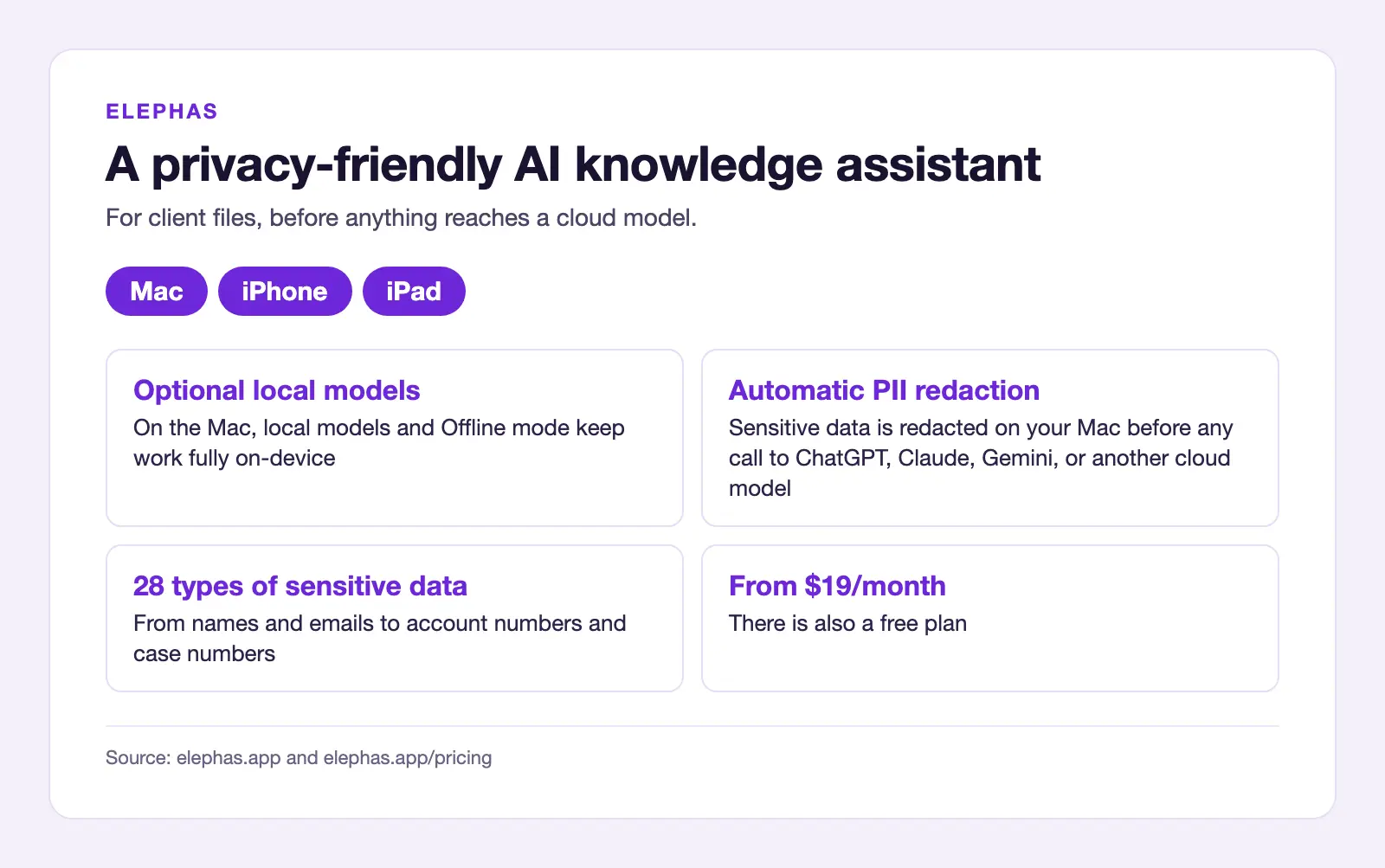
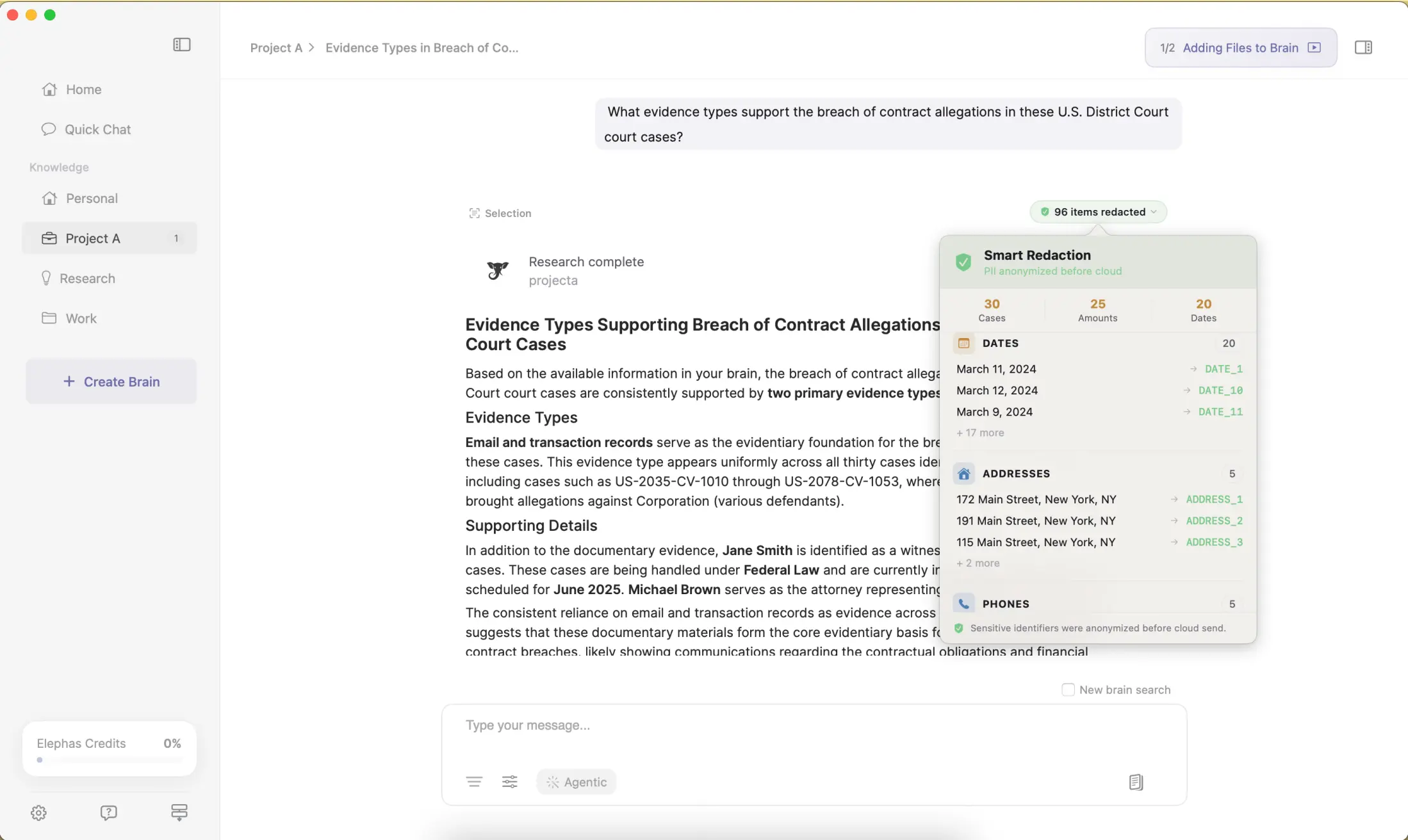
The privacy risk peaks when an owner pastes a client contract, tax return, HR file, or patient note into AI. Elephas is a privacy-friendly AI knowledge assistant for Mac, iPhone, and iPad; on the Mac, its optional local models and Offline mode keep that work fully on-device.
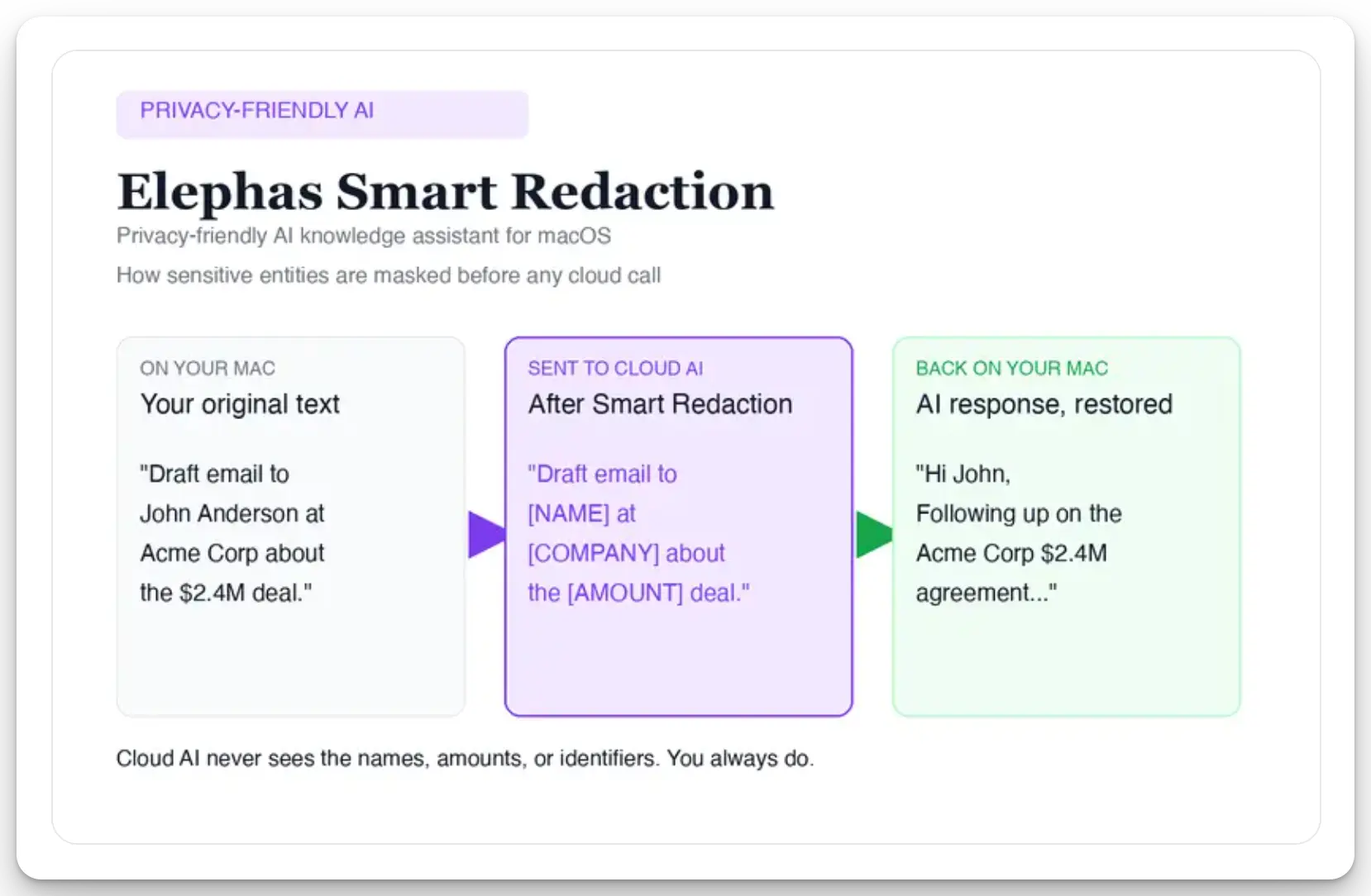
When a bigger task still needs ChatGPT, Claude, Gemini, or another cloud model, Elephas adds a second layer through automatic PII redaction. It redacts 28 types of sensitive data, from names and emails to account numbers and case numbers, on your Mac before any cloud call. Sensitive data is automatically detected and redacted before anything reaches a cloud AI model. Elephas's built-in cloud AI, powered by OpenAI and Anthropic models, runs with zero data retention: providers do not log, store, or train on what is sent. You can also bring your own API key from 15+ providers, including OpenAI, Claude and Gemini.
Elephas has a free plan and paid plans start at $19/month; see Elephas pricing. Elephas for Windows is coming soon (join the waitlist). Try Elephas for free.
- Solo owner on non-client work: Plus, which wins on cost ($20 against a $40 to $50 floor) and export; turn "Improve the model for everyone" off. A solo owner pasting client files should treat that as the Business case, or redact first.
- 2-4 people: Business Standard on annual billing ($20 per seat per month, billed annually), with instructions and reference files in shared projects.
- 5+ people: Business with a written policy on connectors, links, and admin access; talk to ChatGPT Enterprise when you need SCIM, audit logs, or a BAA.
- Regulated work (health, legal, tax): neither self-serve plan comes with a BAA, and HHS guidance says a covered entity that uses a cloud provider for electronic PHI without one violates the HIPAA Rules; start from data classification and client terms.
- Every plan: "no training by default" is narrower than zero retention or a BAA, and review stays human. A preregistered experiment of 758 BCG consultants on GPT-4 (Organization Science, 2026) found AI users 25.1% faster on in-scope tasks but 19% less likely to be right on one task deliberately outside the AI's abilities.
- For any of these firms, Elephas is a privacy-friendly AI knowledge assistant with optional local models and automatic PII redaction, designed to reduce what reaches ChatGPT in the first place.
Frequently Asked Questions
Is ChatGPT Business worth it for a small firm?
Yes, once two or more people touch client work. For one person on non-client work, Plus at $20 a month is enough. Business costs at least $40 to $50 a month; the extra pays for a company-owned workspace, admin roles, single sign-on, and a no-training default.
Can a Business admin see employees' chats?
Not automatically. Ordinary analytics and spend controls don't show chat transcripts, but OpenAI's managed-account notice says an administrator may be able to access, export, audit, retain, or delete account data, depending on configuration and law.
Can one person buy Business with a single seat?
No. Business requires at least two paid seats: $50 a month on monthly billing or $40 effective on annual (Business FAQ). Some solo owners give the second seat to another email they own; one user reports chat history does not carry between seats. OpenAI says invited members should be intended, ongoing team members.
Does Business train on my firm's data?
No, not by default. OpenAI excludes Business workspace inputs and outputs from model training (business data page). Plus users can get a similar result by turning off "Improve the model for everyone," but that's a per-person switch the firm cannot enforce. Our data privacy guide covers the rest.
Can I use ChatGPT Plus for business work?
Yes. OpenAI's terms for individuals do not bar work use. A personal account stays personal unless the firm is on Enterprise or Edu and claims the domain, so it's fine for a solo owner but risky once client files sit where the firm cannot see, keep, or close them.
Is ChatGPT Pro a better choice than Business for a small firm?
Usually not for a small firm. ChatGPT Pro is an individual plan at $100, $200, or $500 a month, with more included usage at each step up (Pro tiers). It adds capacity for one power user but no admin roles, SSO, or workspace no-training default.
Does ChatGPT Business get more usage than Plus?
Not necessarily. A Standard Business seat has a five-hour usage limit, while OpenAI describes Plus limits as varying with demand, so Standard buys control first; more capacity is not proven. Premium seats give 5x Standard's usage with no five-hour limit.
Can a law, accounting, or medical practice put client records into Business?
Not health records that are protected health information. Self-serve Business has no BAA; HHS guidance says a covered entity using a cloud provider for electronic PHI without one violates the HIPAA Rules.
ABA Formal Opinion 512 (July 29, 2024) says lawyers may need consent before confidential data goes into AI. IRC 7216 penalizes paid preparers who knowingly or recklessly disclose return information without the taxpayer's written consent, unless an exception applies.
