ChatGPT Projects Limits: Files, Size and How Many Projects
Last updated: 2026-09-08
In December 2024, a developer with a 240-file iOS codebase asked why ChatGPT Projects stopped him at 20 files, calling that cap "simply not useable for large coding projects." OpenAI's own help pages then disagreed with each other about the file number for close to 17 months.
Projects does not enforce one limit. It enforces five, and the ceiling people blame is rarely the one they actually hit, which is why the same complaint keeps resurfacing years later.
This article settles which ceiling you are hitting, the exact number for your plan, what OpenAI has and has not confirmed, and what breaks when you reach it.
Quick answer
- Files per Project: 5 on Free, 25 on Plus and Go, 40 on Pro, Team, Business and Enterprise. OpenAI's own post confirms the Free, Plus and Pro/Business/Enterprise numbers and does not mention Edu; community reports put Edu at 40, so check the count shown in your own account.
- Upload batch cap: 10 files per batch, on every plan.
- File size cap: 512MB per file, about 2 million tokens of extractable text.
- Storage: 25GB per user, 100GB per organization.
- No official cap on how many Projects you can have in ChatGPT. The sidebar gets unwieldy around 20.
- Elephas does the same job on your Mac: its Super Brain builds a searchable knowledge base from your files, with no 5, 25 or 40-file tier per brain. Free plan, starts at $19/month. Try Elephas for free.
You Just Hit ChatGPT's File Limit Mid-Project. Now What?
In December 2024, a developer posting under the handle Blocksain hit the ceiling of Projects. His iOS app came to 240 files; a Project would hold 20. He wasn't reporting a crash, he was asking why a fixed cap existed at all.
That post, on OpenAI's own developer forum, is still active. Support staff replied more than a year later, admitting the cap “isn't ideal.” A feature built to hold ongoing work was capped at a number they now agree is too low.
You're probably closer to that wall than you think. Here's the exact number, and why it might not match OpenAI's own help page.
How Many Files Can You Actually Upload to a ChatGPT Project?
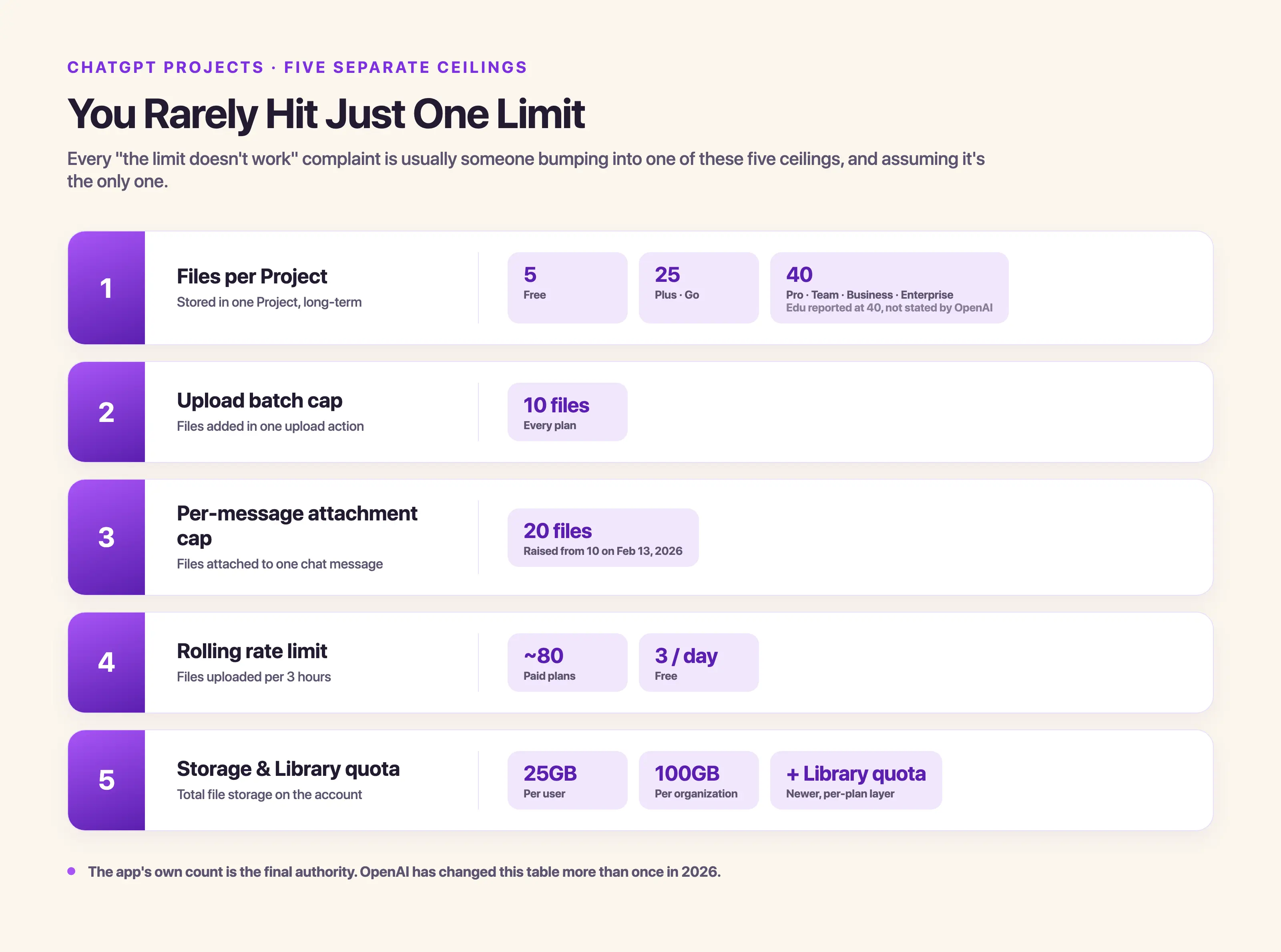
How many files a Project holds scales with your ChatGPT plan: 5 on Free, 25 on Plus and Go, and 40 on Pro, Team, Business and Enterprise. That file count is only one of five separate ceilings, and almost every “the limit doesn't work” complaint is someone hitting a different one.
| Ceiling | What it caps | The number |
|---|---|---|
| Files per Project | Files stored in a single Project long-term | 5 (Free), 25 (Plus, Go), 40 (Pro, Team, Business, Enterprise; Edu reported at 40, not stated by OpenAI) |
| Upload batch cap | Files added in a single upload action | 10, on every plan |
| Per-message attachment cap | Files attached to one chat message | 20, raised from 10 on February 13, 2026 |
| Rolling rate limits | Files uploaded per 3 hours | Roughly 80 on paid plans, 3 per day on Free |
| Storage and Library quota | Total file storage on your account | 25GB per user, 100GB per organization, plus a newer per-plan Library quota |
OpenAI's own account confirmed three of those numbers directly: a September 2025 post announcing the rollout lists "up to 5 for Free, 25 for Plus, 40 for Pro/Business/Enterprise." That post never mentions Edu, Go, or Team, so those tiers rest on community reports and on what your own account shows.
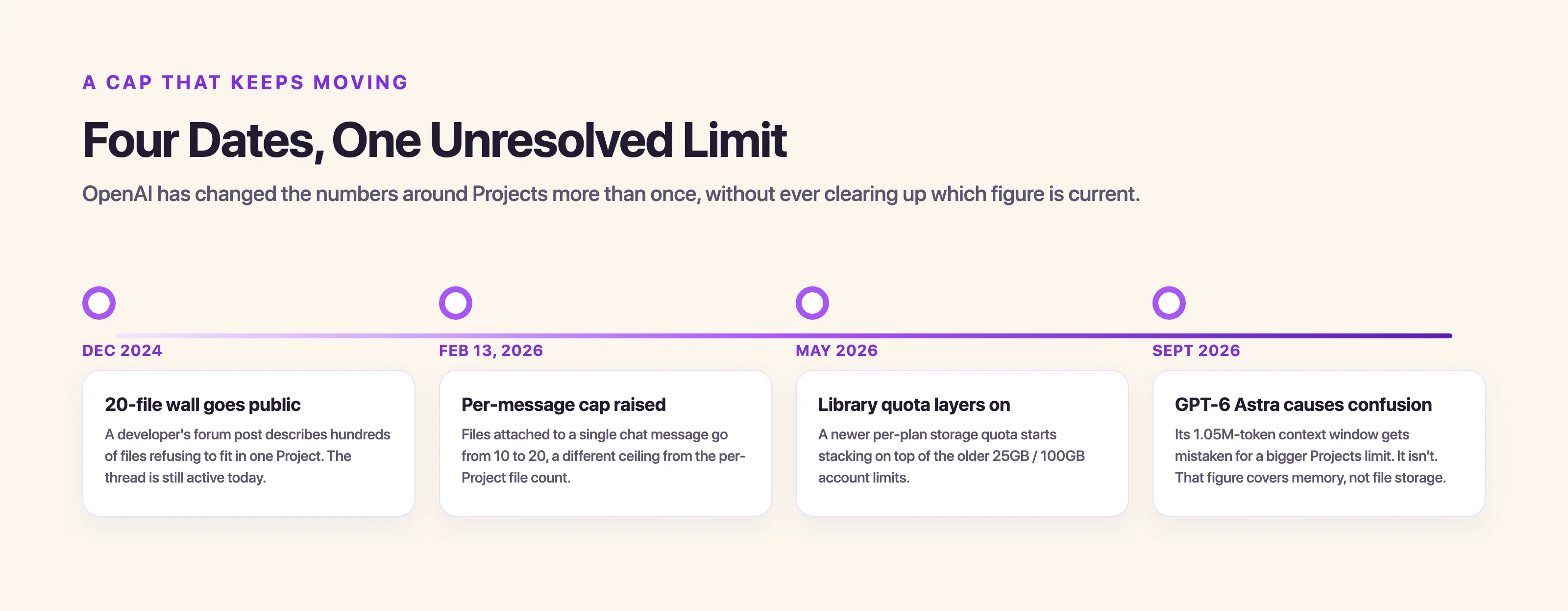
OpenAI's own Projects page and its separate File Uploads FAQ disagreed about the Plus-tier number for close to 17 months, leaving the file upload limits inconsistent. The forum thread opened in December 2024, and OpenAI staff had not published a corrected figure by May 14, 2026, so the app's own number remains final.
Files also carry per-type caps: around 20MB for images and around 50MB for spreadsheets, on top of the 512MB / 2 million-token ceiling above, per OpenAI's file uploads FAQ. Our ChatGPT file upload limit guide covers the per-message and rolling upload caps outside Projects.
Project-Level Custom Instructions Are a Different Limit Entirely
Project instructions, ChatGPT's term for project-level custom instructions, hold up to 8,000 characters. That is more than the global custom-instructions limit elsewhere in ChatGPT, which since July 15, 2026 has been 5,000 characters on Plus, Pro, Business, Enterprise and Edu, and 1,500 characters on Free and Go.
Most limits pages don't put both numbers side by side, which is exactly how someone hits a “too long” error in the wrong field and assumes the tool broke.
How Many Projects You Can Have in ChatGPT
You can create a project in ChatGPT any time, and there's no official cap on how many you can have. In practice, the sidebar becomes hard to manage once you pass roughly 20, and starting a new chat inside an old Project means scrolling past dozens of others first.
Our ChatGPT Projects guide covers setting one up, and our upload more files guide covers what to do when a Project fills. What happens to older, archived Projects past that point, and whether a 21st behaves any differently, isn't documented anywhere.
ChatGPT has more than 900 million weekly users, including over 9 million paying business users. The same conflated-limits confusion shows up on NotebookLM source limits, a similar constraint page for Google's tool.
The Stanford HAI 2026 AI Index Report found that generative AI is now used in at least one business function at 70% of organizations, which is why so many people keep running into a Project's fixed ceiling in the first place.
What Happens When You Hit the Ceiling? Real ChatGPT Projects That Broke It
Hitting the ceiling usually means a frozen upload or a rejected file, and the 240-file iOS coding project started the whole conversation. The cap has since moved to 25 for Go and Plus and 40 for the higher tiers, but a fixed number still doesn't match how large real projects get.
- Blocksain's December 2024 post put it plainly: "A 20 file limit is simply not useable for large coding projects."
- Two researchers on the same forum, three days apart in January 2025, described needing 100 to 300 source PDFs in one Project. Dubious518 called it “critical to be able to pull from all of them.” Sudhirkothari wrote, “For reseacrh I wanted to lookup from about 100 PDfs and papers,” typo included.
- A 37-file game-development Project fared no better: frsgalaxy said “almost half of my files cannot be placed in my project folder.”
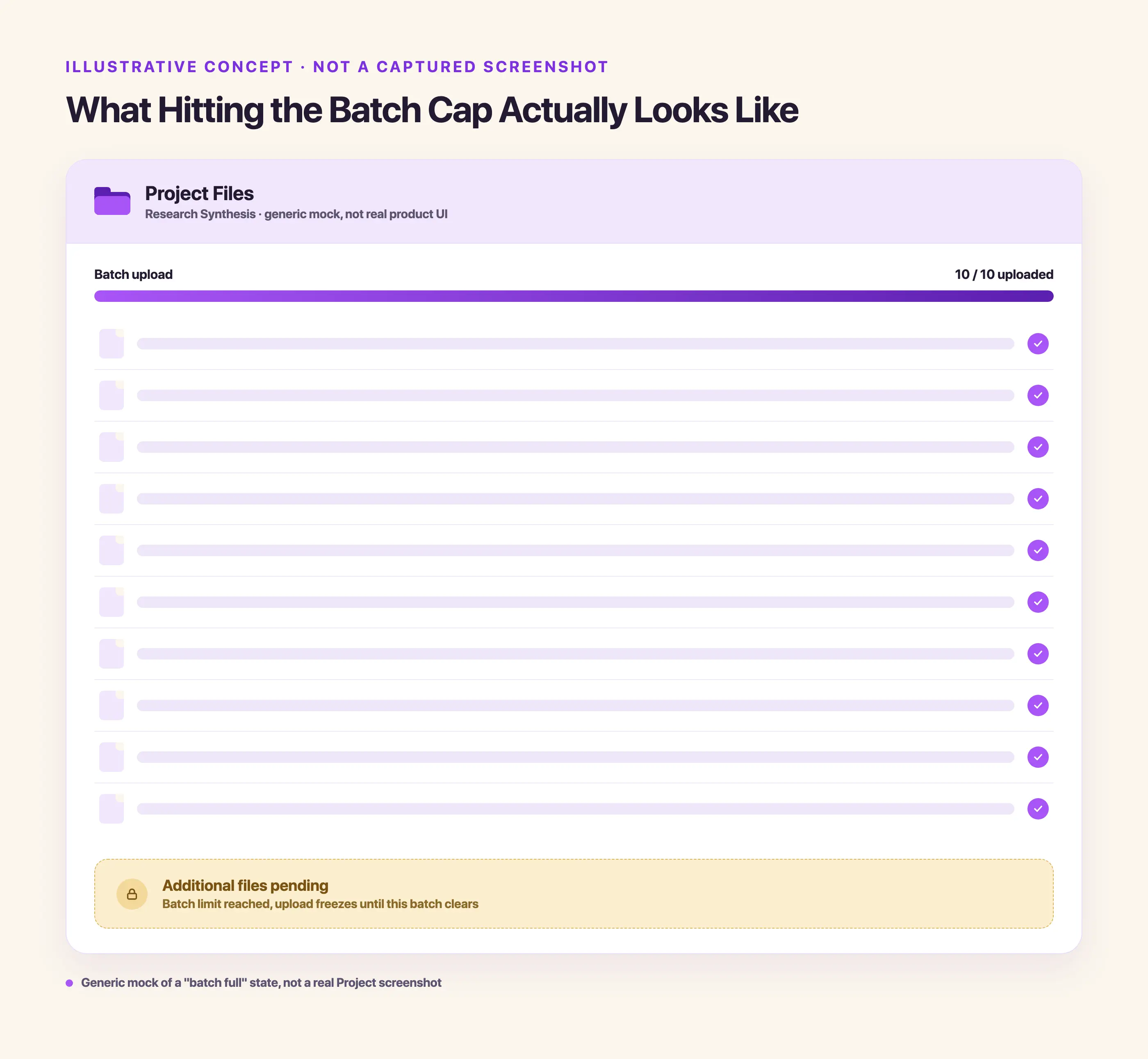
- The failure doesn't always look like a clean warning. ChatGPT Pro subscriber Frederick_Luders hit a hard 10-file wall in July 2025 despite a documented higher allowance: “Cannot upload more than 10 files.” Marcelomagal confirmed it the same day, saying the “upload just freezes” and nothing moves forward from there.
- In the same thread, jmosul tried deleting files from a 17-file Project and got "400 Bad Request response from the server" instead.
That's why a file gets rejected mid-Project: one of the five ceilings above, often surfacing as a freeze or a server error instead of a clear warning. The cost adds up.
- In April 2025, forum user qoiasdzxc gave the ceiling as the reason for leaving outright: "This is why I dropped the $200 chatgpt subscription and moved to a $20 Claude. It's that simple." The two tools cap work differently, which we break down in Claude vs ChatGPT Projects.
The caps moved to 25 and 40, but the complaints didn't stop. Real users kept hitting the 25-file wall into 2026:
- @bhanusankar, May 2026: "using projects in ChatGPT is frustrating as only 25 files can uploaded for the entire project which is useless. I am a premium user."
- @Daikichi1090, July 2026: "Mine is capped at 25 files, which isn't enough for a large, long-term project."
- @VerbalLag, September 2026: "And I'm limited to 25 files on ChatGPT's projects."
None of this is a data leak. It's lost time, and a tool you stop trusting with the work.
Why Does the File Cap Matter More If You're a Researcher, Consultant, or Founder?
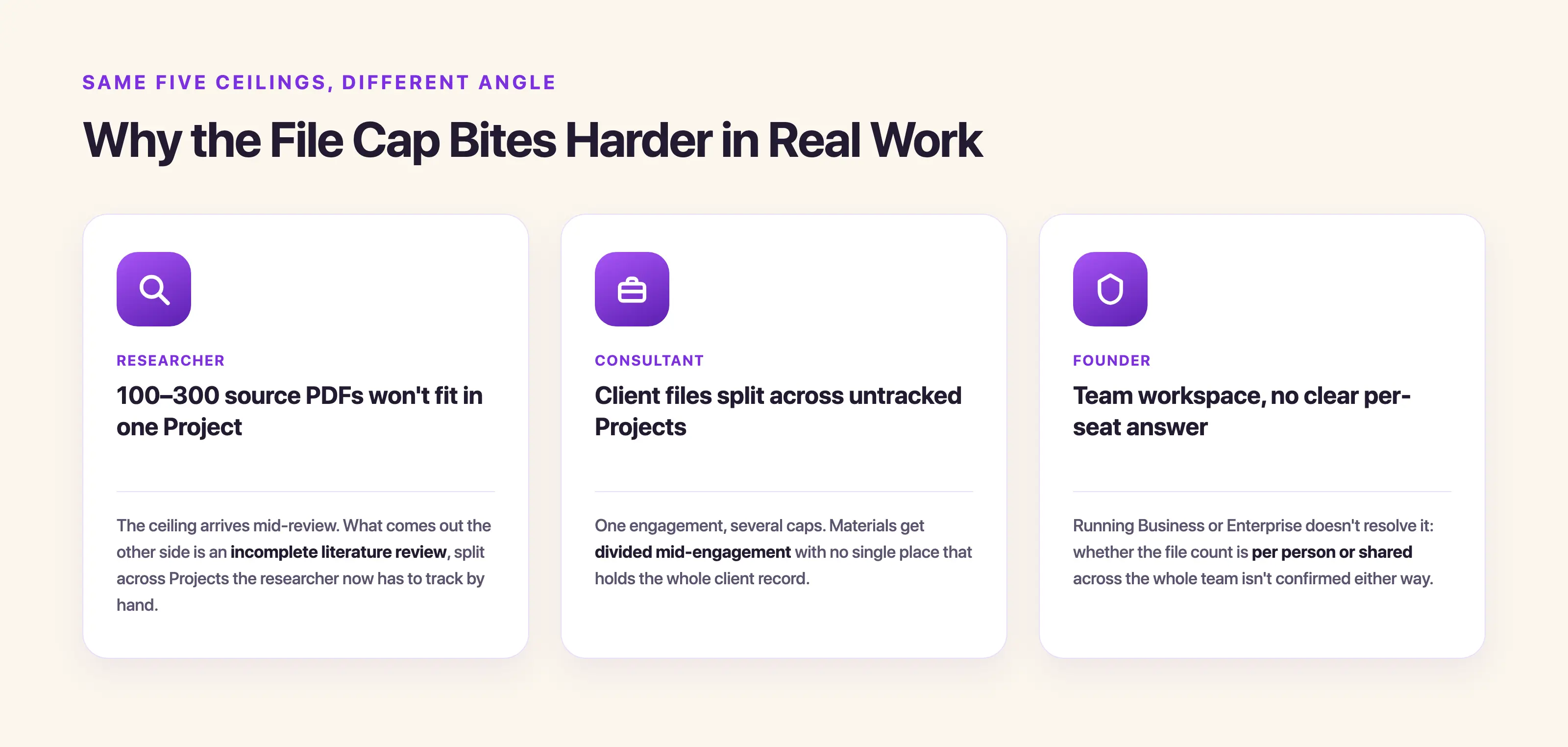
A researcher hitting the ceiling with 100 to 300 source documents, a consultant juggling several client Projects, and a founder running a ChatGPT Business or Enterprise workspace all hit the same five ceilings differently.
- The researcher gets an incomplete literature review.
- The consultant splits one client's materials across untracked Projects mid-engagement.
- The founder gets a team workspace with no clear answer on whether the number of files allowed is per person or shared.
Pasting text directly within a Project doesn't dodge the file-count limit either: pastes over roughly 10,000 characters auto-convert into a counted file attachment, so the workaround counts the same as an upload.
Splitting one matter across Projects to dodge the cap doesn't dissolve the underlying obligations either.
- A lawyer weighing Projects vs NotebookLM for a case is still bound by the informed-consent standard in ABA Formal Opinion 512.
- A clinician's patient files still sit outside HIPAA's Business Associate Agreement coverage on Free, Plus, or Pro plans.
Cyberhaven's 2026 AI Adoption & Risk Report found that 39.7% of all AI-tool interactions already involve sensitive data, so scattering one client matter across several untracked Projects only multiplies the places that data can end up.
Why Doesn't ChatGPT Warn You Before You Hit the Wall?
ChatGPT doesn't warn you before you hit a Project's ceiling, and as shown above, OpenAI's documentation left the conflict unresolved for the thread's entire run. The tier numbers circulating there came from other users, not OpenAI.
- OpenAI_Support's own reply captured the gap honestly, telling the developer “this isn't ideal, agreed.”
If a Project is already full, there's no confirmed evidence ChatGPT quietly drops your older files instead of telling you. The documented failure mode is a freeze or a server error, and what happens internally isn't documented anywhere.
- Whether deleting a file to make room changes earlier answers based on it is similarly undocumented.
- If you've been uploading files from a months-long project into it, you may have already hit a ceiling without realizing it.
- A newer per-plan Library quota, 500MB on Free, 4GB on Go, 20GB on Plus and Business, 100GB on Pro, started layering on top of the older 25GB and 100GB storage quota in May 2026. OpenAI hasn't explained whether the two stack or are the same allowance.
- GPT-6 Astra's 1.05 million-token context window, launched in September 2026, has been misread as a bigger Projects limit. It isn't: that figure is a memory mechanism, the prior model already carried 1.05 million tokens, and the Projects window, commonly cited around 128,000 tokens, hasn't moved.
Three questions stay open here, and no source confirms an answer to any of them:
- Whether connector-linked files (Google Drive, SharePoint, Dropbox, Box) count against the per-project cap or the storage quota. Closest real evidence: @kenjy82, June 2026: "I'm on Pro, but Google Drive folder sources fail at file #6 with "Cannot upload more than 5 files." Direct uploads work beyond 5, so it seems specific to Drive folder sync." One bug report, not an answer to the question above.
- Whether the July 2025 10-file freeze bug is still live as of September 2026.
- Whether the newer $100 Pro usage tier changes the 40-file ceiling that applies to the original $200 tier.
New surfaces keep shipping around the cap anyway. File uploads inside voice mode reached ChatGPT Projects in August 2026, without the cap getting any clearer.
What's the Fix When ChatGPT Projects Won't Hold Enough?
Elephas is a private AI knowledge assistant for Mac that does the same job a Project does, without the per-project file tier. Its Super Brain feature builds a searchable knowledge base out of your own files, and you can keep a separate brain per piece of work the way you keep separate Projects.
- Reads 20+ formats: PDF, Word, Apple Notes, Notion, Obsidian, Markdown, Excel, PowerPoint, HTML, code files, YouTube videos and audio.
- Indexes locally, so your files stay on your device.
- Answers cite the sources they came from and draw only from documents you added. ChatGPT doesn't have your files and can invent citations; Elephas uses only yours.
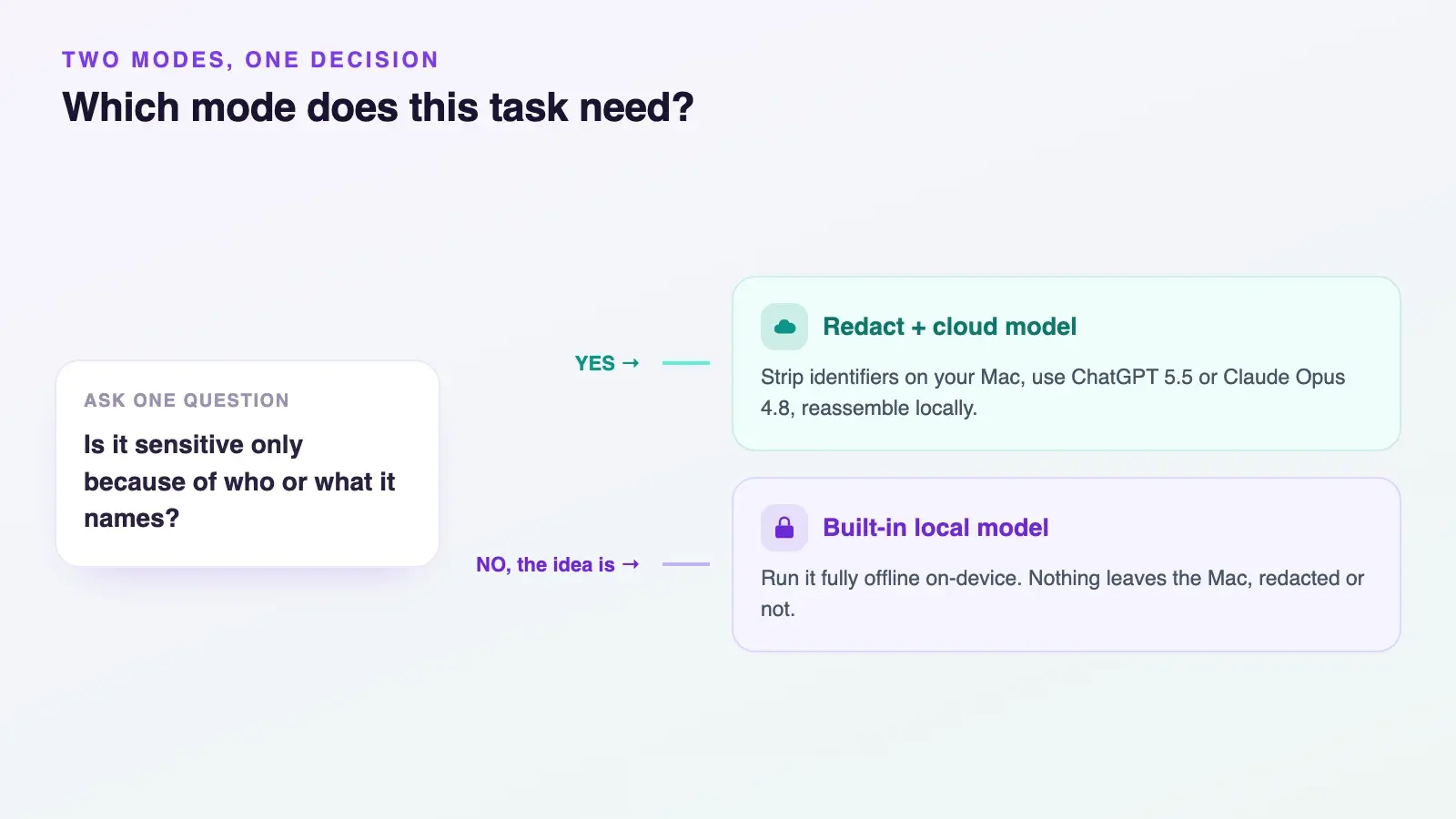
You also pick the model per task: ChatGPT, Claude, Gemini, Grok, or Elephas's own built-in local LLM models, from inside any Mac app.
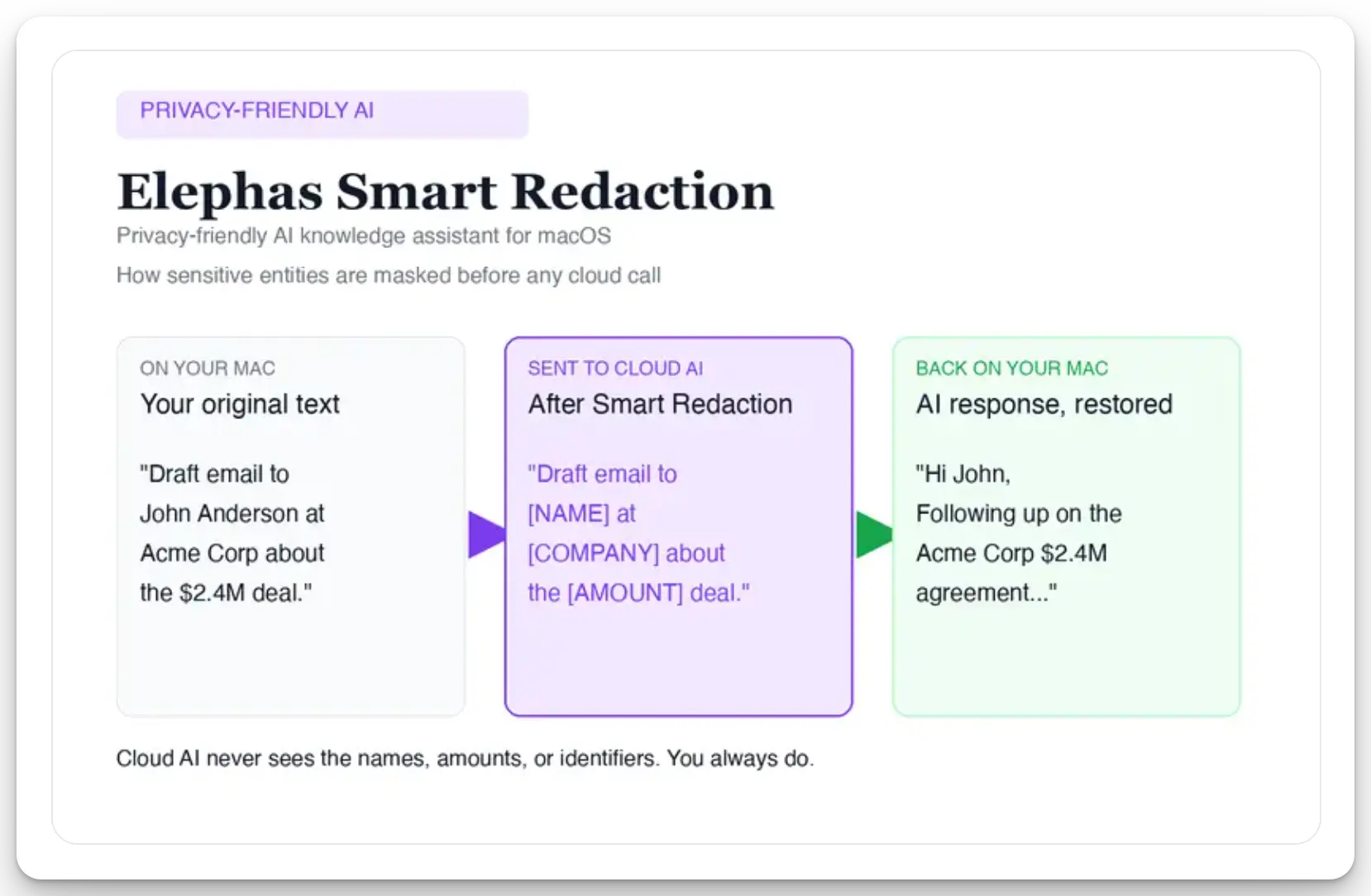
For researchers who still want a leading cloud model, Elephas adds a second layer through automatic PII redaction. Before a prompt is sent to ChatGPT, Claude, Gemini, Grok, Perplexity, or any other cloud model, Elephas strips sensitive names, emails, phone numbers, and identifiers on your Mac. The cloud model only ever sees the sanitized text, and the redacted fields are reassembled locally when the answer comes back.
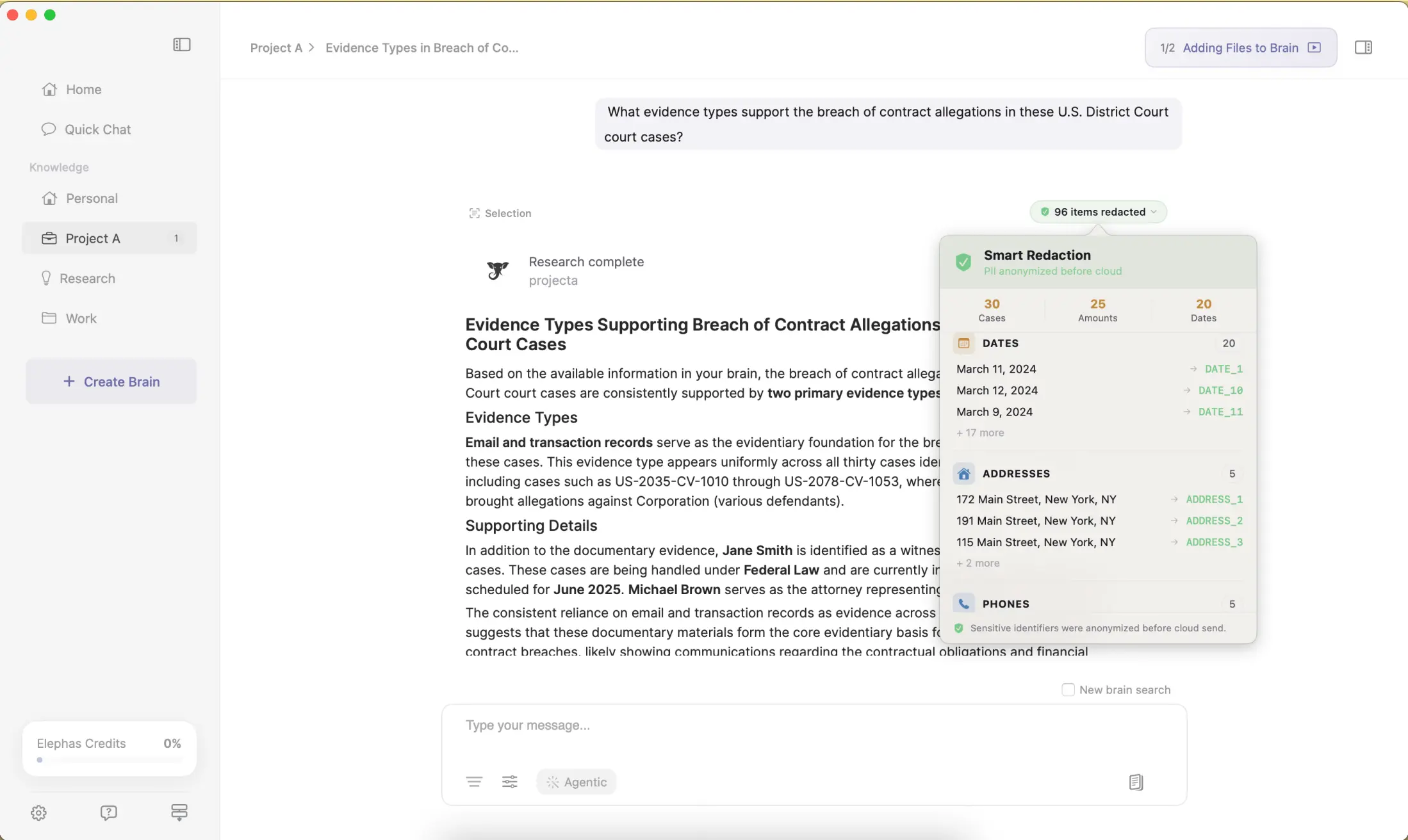
Elephas pairs this with zero data retention: content never trains AI models, never sits on a vendor's server, and never passes through a third-party reviewer's screen. Smart Redaction is on every plan including Free. Elephas has a free plan and starts at $19/month. Try Elephas for free.
Where This Leaves You
Five usage limits govern how ChatGPT Projects behave: files per Project, the 10-file batch cap, the per-message attachment cap, a rolling cap of roughly 80 uploads every 3 hours, and the storage and Library quota, all per OpenAI's file uploads FAQ.
Most “the limit is broken” complaints are someone hitting the wrong ceiling, and the failure is often a freeze or server error, not a clear warning.
One concrete next step: check which of the five ceilings you're actually near before your next upload. If you're already stacking workarounds, merging files, pasting raw text, upgrading plans, that's a sign the underlying problem is worth solving directly, not patching a second time.
Keep your AI chats private, on your own Mac
Elephas pairs with the AI model you already use, or runs fully offline with built-in local LLM models, and redacts sensitive data before it ever leaves your Mac.
Frequently Asked Questions
What happens if you go over the file limit in a ChatGPT Project?
Uploads typically freeze or a new file gets rejected outright, sometimes with a “400 Bad Request” error instead of a clear message. Forum reports describe a Project locking up above its cap, with no in-app explanation of which of the five ceilings was hit.
Can you delete files to make room in a ChatGPT Project?
Not reliably. One documented case shows a deletion attempt on a 17-file Project failing outright with a server error, leaving the user unable to add new files or remove old ones.
Does pasting text instead of uploading a file get around the cap?
No. Pastes over roughly 10,000 characters auto-convert into a counted file attachment inside a Project, so the workaround counts the same as an upload.
What's the difference between the file limit and the upload batch cap?
The file limit is how many files a Project can hold long-term: 5, 25, or 40, depending on plan. The batch cap is a separate ceiling of 10 files per single upload action, on every plan, so filling a large Project still takes multiple batches.
Do files from Google Drive or other connectors count toward the file cap?
It isn't documented. The closest evidence is a single Pro-plan bug report of Google Drive folder syncs failing at file six, while direct uploads worked past five, so connector syncing may follow a different rule than manual uploads.
Is there a limit on how many Projects you can create in ChatGPT?
No official cap exists. In practice, the sidebar becomes hard to manage once you pass roughly 20 Projects, and opening a new chat inside an old one means scrolling past dozens of others first.
Why did OpenAI's own help pages disagree about the file limit?
OpenAI's Projects page and its separate File Uploads FAQ gave different Plus-tier numbers for close to 17 months, and OpenAI staff had not published a corrected figure as of May 14, 2026. The current 5/25/40 tier numbers rest on OpenAI's own account posts and documentation, not a forum reply.
