Is It Safe to Upload Excel to ChatGPT?
Not if the sheet holds real customer names, unless your company has approved a ChatGPT business plan for that data. If you take the names out first, most of what you want from ChatGPT, like totals, trends and summaries, still works.
Quick answer
- On ChatGPT Free and Plus, OpenAI may train on what you upload until you switch training off.
- Business plans don't train on your data by default, but the sheet still leaves your computer.
- An Excel file also carries hidden sheets, comments and the author's name.
- Upload a copy with only the columns you need, and codes in place of names.
What happens to your spreadsheet after you upload it?
Your file goes to the AI company's servers. What happens next depends on your plan: whether it is used for training, and how long it is kept.
| Where you upload | Used for training by default | How long it is kept | Source |
|---|---|---|---|
| ChatGPT Free and Plus | Yes, unless you switch it off | Until you delete it, then scheduled for removal within 30 days | Notebookcheck |
| ChatGPT Business | No | Not confirmed | OpenAI |
| ChatGPT Enterprise | No | Set by your admin | OpenAI |
| OpenAI API | No | Logs usually up to 30 days | Anarlog |
| ChatGPT for Excel add-in | Enterprise: no. Others: not confirmed | Not confirmed | eWEEK |
| Microsoft Copilot in Excel (work account) | No | Set by your admin | Microsoft |
Two details catch people out. Deleting a chat does not delete a file you saved in your ChatGPT Library, so you have to remove both.
Personal accounts are common at work: Cyberhaven's 2026 report found 32.3% of ChatGPT use runs through personal accounts (Cyberhaven), and personal accounts follow the personal-plan training default unless the user switches it off.
Court orders can also force OpenAI to keep logs. A 2025 order that required it to keep all new chats ended on 9 October 2025, but older saved logs and flagged accounts are still kept (Engadget).
When is it fine to upload a spreadsheet as it is?
Plenty of sheets carry no personal data at all: a budget, stock levels, prices, or sales totals by month. Uploading those to any ChatGPT plan is low risk.
Sheets with people in them are fine to upload when your company has approved a plan that doesn't train on your data, like ChatGPT Business or Enterprise, and you are allowed to share that data with an outside service.
On a personal plan, switch off "Improve the model for everyone" in settings, or use Temporary Chat.
Two cases need more care. Health, pay and ID data should not go anywhere until whoever handles compliance has said yes, the same rule as for tax memos without SSNs.
Also be careful with AI add-ins on sheets you import from outside: in May 2026, PromptArmor showed that hidden text in an imported sheet made a ChatGPT add-on for Google Sheets leak other workbooks.
Sometimes you don't need AI at all. Excel formulas and PivotTables handle most sums with no upload.
What does an Excel file carry that you can't see?
An upload sends the whole workbook, not just the cells on screen. That includes hidden sheets, hidden rows and columns, comments, and the author's name in the file properties. A customer list you hid on a back tab goes along with the sales sheet you meant to share.
Files carry more risk than typed text. Harmonic Security's Q2 2025 study found that 21.86% of files uploaded to AI tools held sensitive data, against 4.37% of prompts, and that files were the source of 75.3% of customer profile leaks (Harmonic).
Excel has a built-in tool to clean this up. Go to File > Info > Check for Issues > Inspect Document, then remove what Document Inspector finds. Run it on the copy you plan to upload, never on your only original.
How do you remove the names but keep the numbers?
A sum, a sort or a trend needs numbers, not names. So the safe way is to swap each person for a code, keep the list of codes on your computer, and upload the coded copy.
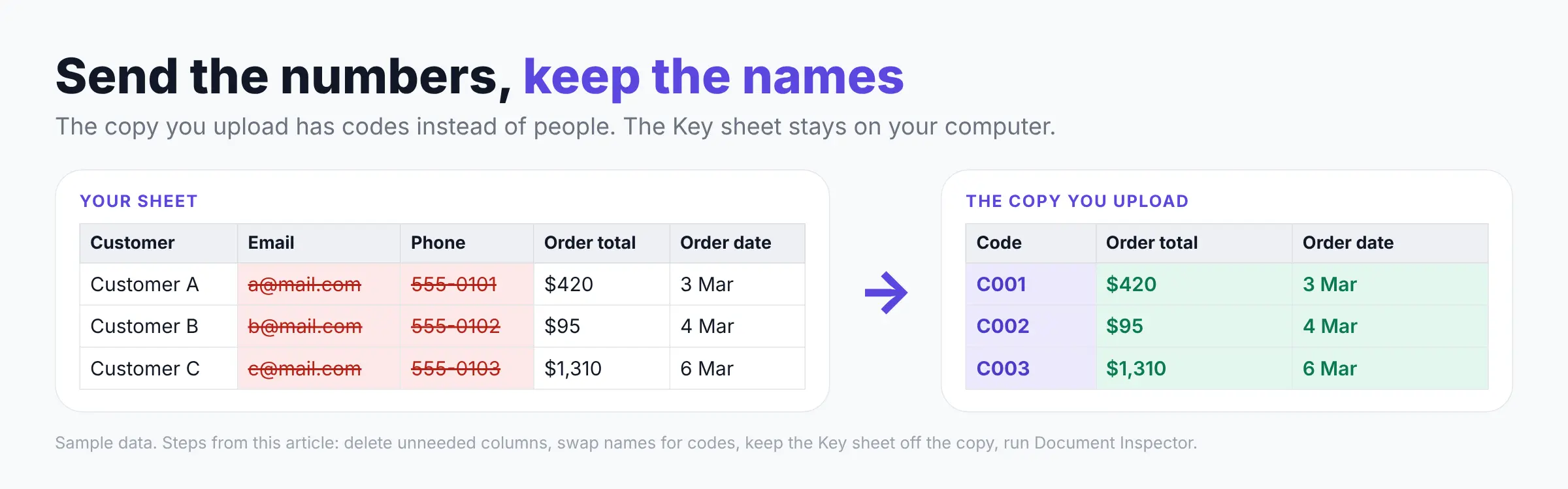
- Save a copy of the workbook and delete every column you don't need.
- Add a new sheet called Key. List each customer name with a code next to it, such as C001.
- In the copy, swap names for codes. Use Find and Replace (Ctrl+H) for a short list, or a lookup from the Key sheet for a long one, then paste the results as values.
- Move the Key sheet out of the copy and save it somewhere safe on your computer.
- Run Document Inspector on the copy, then upload it.
- When the answer comes back with codes, turn them back into names with XLOOKUP, which needs Excel 2021 or newer.
For free text, like notes about a customer, the free anonymize text tool can strip names before you paste.
Is a sheet with codes instead of names anonymous?
No. Codes make a sheet much safer to share, but the people in it can still be worked out.
Other columns can point to a person on their own.
A study by Latanya Sweeney found 87% of Americans could likely be singled out by just their 5-digit ZIP code, gender and date of birth (Data Privacy Lab). A later check by researcher Philippe Golle put it at 63%, which is still most people.
The law sees it the same way. Swapping names for codes is pseudonymization, and the UK's data regulator, the ICO, treats that as personal data for anyone who holds the key (Stevens & Bolton).
"Removing names and other identifying details does not change the confidential nature of the underlying information or eliminate your obligations." Kelly D. Mullins, AICPA Professional Ethics Division (Journal of Accountancy, November 2026)
So in a coded sheet, also drop or round the columns that give people away:
- ZIP codes and postcodes.
- Full birth dates (a birth year is usually enough).
- The Key sheet, which must never travel with the file.
Ask questions about a customer sheet without sending the names
If you want AI help with a sheet full of names but don't want to code it by hand every time, Elephas does that step for you.
It is a privacy-friendly AI knowledge assistant that reads Excel and CSV files on your computer. Before anything goes to a cloud AI, it hides many common personal details, then puts them back in the answer and shows you what it hid.
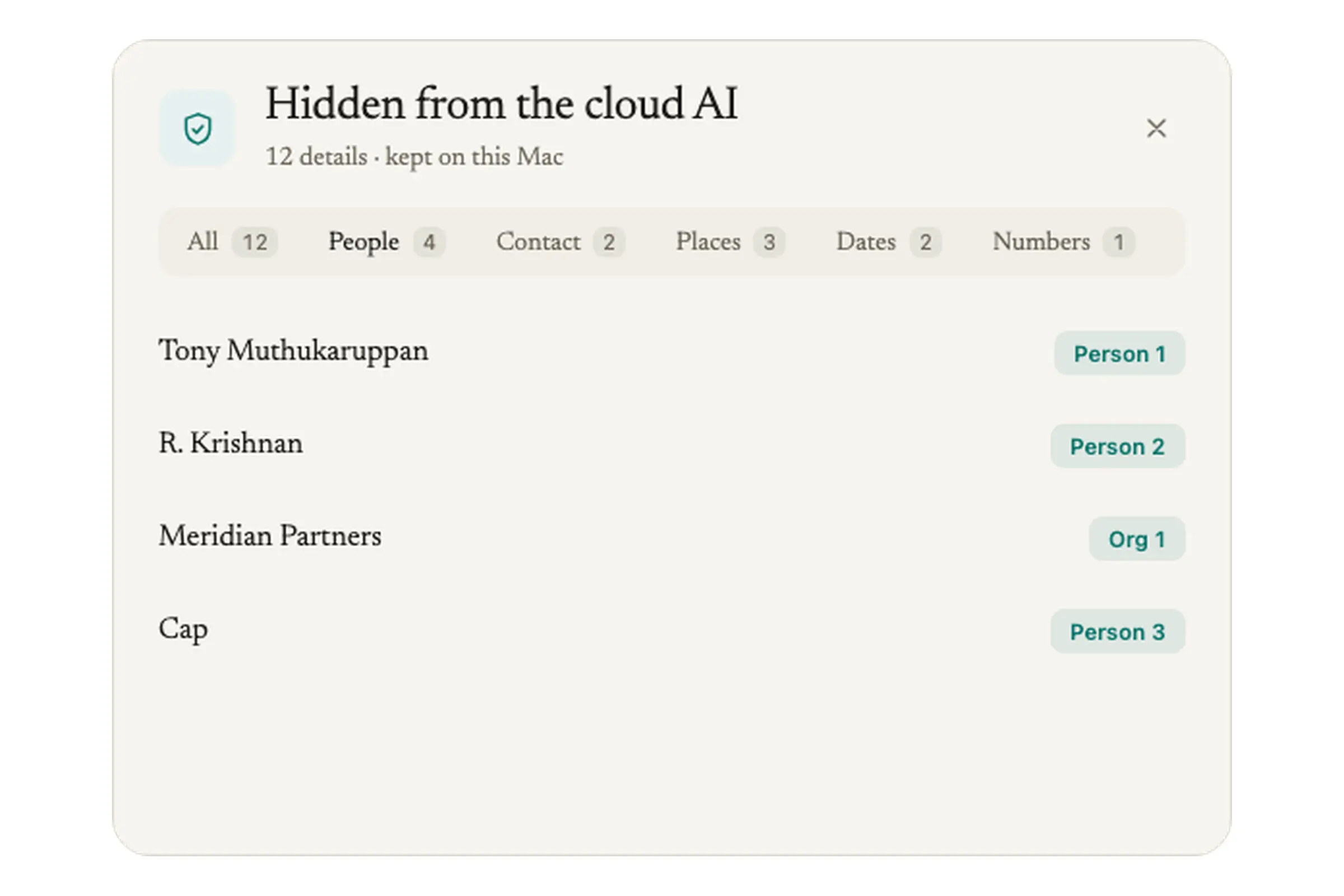
- What it hides: names, organizations, emails, phone and account numbers, and customer and employee IDs.
- What it keeps, so answers still make sense: amounts and ordinary dates. You can add your own terms under Protected Names.
- For the most private sheets, Elephas also offers optional local models, so nothing is sent to an AI provider at all.
Elephas runs on Mac (Apple Silicon, macOS 14 or later) and on Windows 10 or 11 (64-bit). There is a 7-day free trial with no card, and plans start at $19 a month.
FAQ
What should I do if I already uploaded a sheet with customer names?
Delete the chat and the file in your ChatGPT Library, then tell whoever handles compliance at your company the same day, because they may have to record it. On a personal plan, also switch off "Improve the model for everyone" so new chats are not used for training.
Does a password on the Excel file protect it once it is uploaded?
No. A password only protects the file while it sits on your disk or in an email. Once you upload it or paste its contents, the AI company has the data itself, so remove the personal columns before any upload.
Is the ChatGPT for Excel add-in safer than uploading a file?
Not by default.
OpenAI launched ChatGPT for Excel in beta in March 2026 (eWEEK), and it works right inside your workbook. If your work account is on Microsoft 365, Copilot in Excel follows your admin's rules and does not train on your data, so ask IT which one you are allowed to use.