Best AI Chat App for Mac Without a Subscription
Last updated: August 26, 2026
On r/macapps, Mac users ask weekly which AI setup skips the monthly bill; one thread wanted exactly that: "No subscription and allows me to enter my own API keys." That question about a subscription-free chat setup sharpened August 25, 2026, when Raycast gated its free bring-your-own-key option behind a $10-a-month Pro plan.
So can you actually get a ChatGPT-like chat app on your Mac without paying a subscription? Yes, and this article prices out every no-subscription artificial intelligence app for Mac with current numbers: what a free tier, a BYOK app, and a fully offline setup cost, which AI features each includes, and which fits which reader.
Quick answer
- Yes: a free tier, a BYOK app, an offline model, or Apple's built-in AI extension all skip the recurring fee, though none are truly free; a metered bill, a license, or your own hardware cost fills in instead.
- Light BYOK use at 2026-07-30 rates runs $0.24 to $2.40 a month, far under the official Plus plan's $20, though Raycast just proved "free BYOK" can vanish overnight.
- A fully offline model costs $0 in software; the bill shifts to hardware, like 16GB of RAM for a 7B model.
The Short Answer
Yes, you can get an AI chat app for Mac without a subscription in four ways: ChatGPT's free tier, a one-time bring-your-own-key AI app that only bills for API tokens, a fully offline model, or the free ChatGPT extension in Apple Intelligence. None are automatically free, since BYOK still meters usage by the token.
How Can You Get a ChatGPT-Like Chat App on Mac Without Paying a Subscription
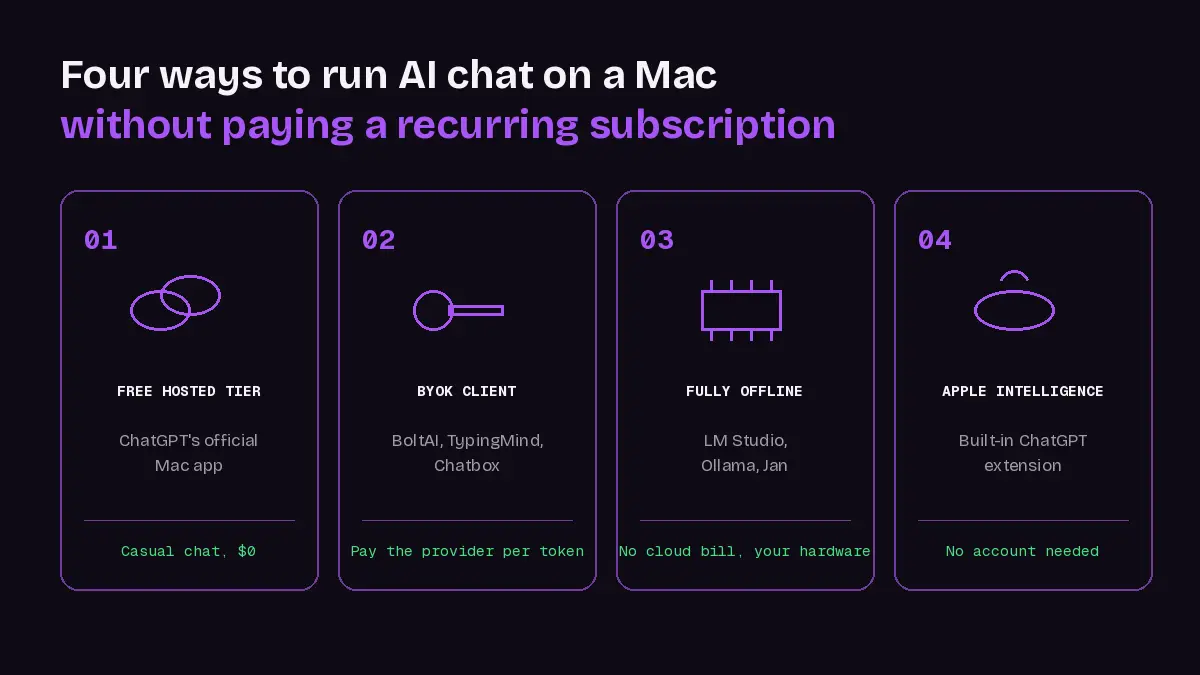
"Bring your own key," or BYOK, means apps like BoltAI connect to OpenAI, Anthropic, Google, or another provider using an API key you pay for yourself, separate from any chatbot subscription. A one-time app price or a $0 offline model still carries a bill: metered tokens, or your own hardware and setup time. On a Claude Max or Team plan, Anthropic now includes monthly Claude API credits that API calls made with a key from your linked Console organization draw from.
Any of the four paths below gives your Mac an AI-powered assistant with a real-time chat interface, without the platform fee. Four honest no-subscription paths exist on a Mac today:
| Path | What You Actually Get |
|---|---|
| ChatGPT Free (official Mac app) | Casual chat, separate upload/tool limits |
| BYOK AI app (BoltAI, TypingMind, Chatbox, MacGPT) | Pay the provider for tokens only; some free to use |
| Fully offline setup (LM Studio, Ollama, Jan, Msty) | No cloud bill, real hardware needs |
| Free ChatGPT extension in Apple Intelligence | Completely free, no account, no saved history unless signed in |
The recurring objection lives on r/macapps, where one poster explained switching to BYOK bluntly: "I'm currently subscribed to ChatGPT, but as a student, I find it quite expensive. Therefore, I'm seeking alternatives where I can use an API key instead." That API key math is why Raycast gating BYOK behind Pro stings.
Which of these matters most depends on whether you're worried about the worst case, trying to make this work, or trying to understand the nuance.
How Much Does Each No-Subscription Path Actually Cost in 2026
ChatGPT Plus, Claude Pro, and Gemini Advanced are the three most-used official AI subscriptions, and stacking any two of them for side-by-side answers gets expensive fast, since each one bills separately every month.
One r/ChatGPTPro user did the exact math: "Paying $20 each for ChatGPT Plus, Claude Pro, and Gemini Advanced adds up way too fast. That's literally $60 a month just so I can switch models depending on what I need."
The Real Cost of a BYOK AI App for Mac
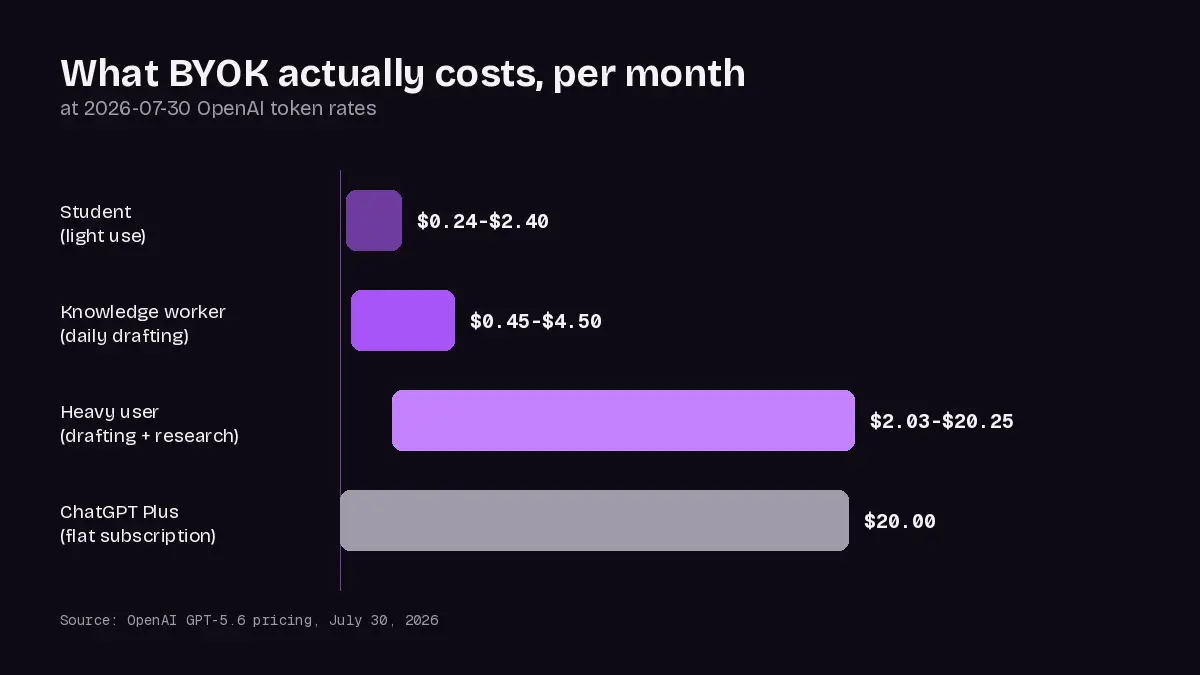
OpenAI cut GPT-5.6 prices on July 30: Luna now costs $0.20 per 1 million input tokens and $1.20 per 1 million output tokens; Terra costs $2 and $12 per 1 million tokens for input and output. No dataset tracks typical Mac usage, so treat these as estimates.
- Student, light use: about $0.24 to $2.40 a month.
- Knowledge worker, daily productivity use: about $0.45 to $4.50 a month.
- Heavy drafting/research: $2.03-$20.25 a month, nearing the official Plus plan's price.
Even heavy BYOK use rarely approaches subscription price: light use at these 2026-07-30 rates runs roughly 8x to 83x cheaper than the official Plus plan's flat $20 a month.
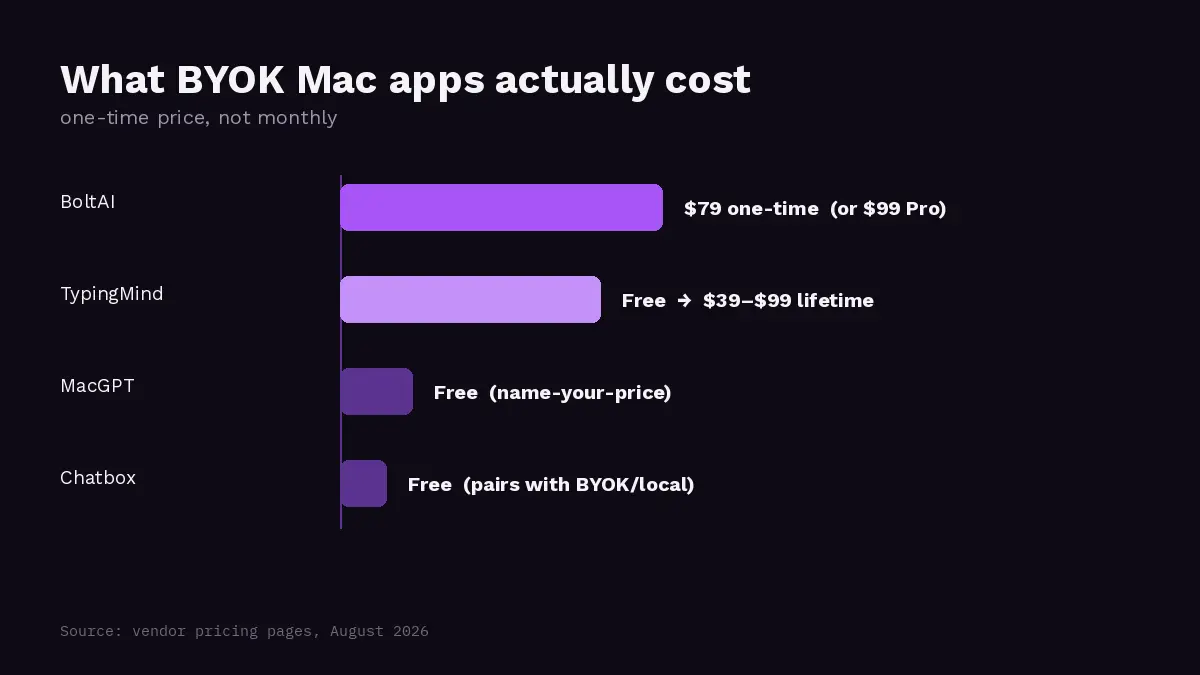
Named clients, all desktop apps, add their own price: BoltAI ($79 one-time, or $99 promotional Pro), TypingMind (free version, or $39-$99 lifetime), MacGPT (name-your-price from $0), Chatbox (free, pairs with BYOK or local).
What a Local AI Assistant Costs You Instead of Money
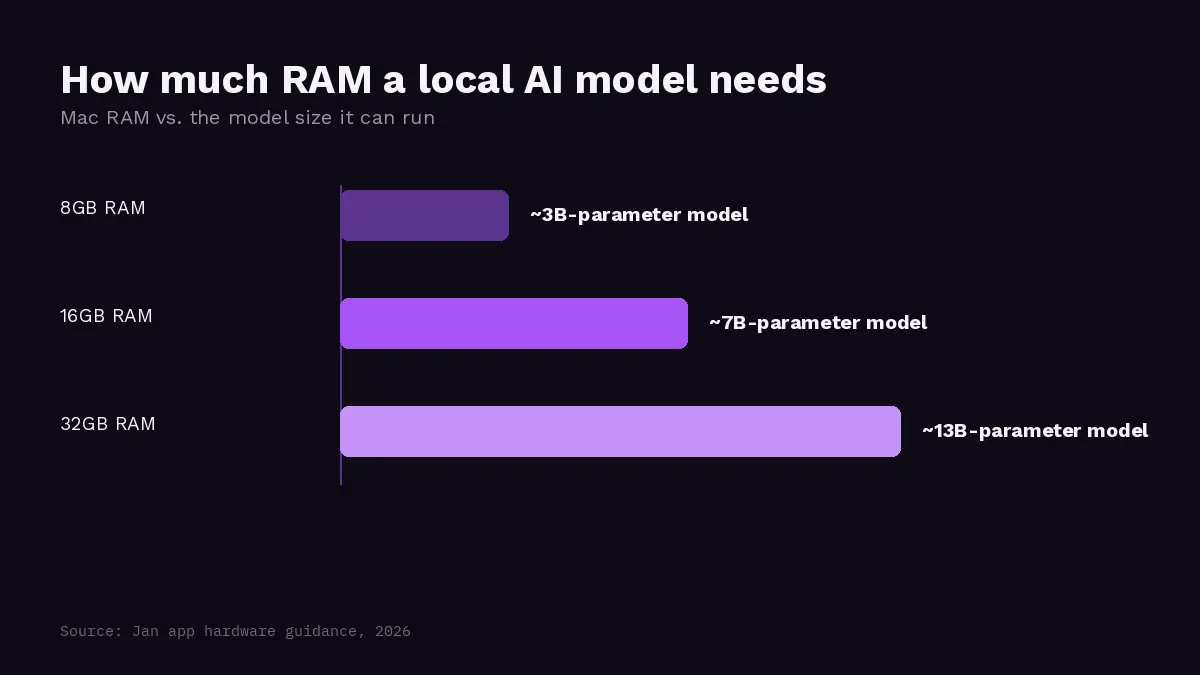
A fully offline AI setup runs free in software on your Mac; 16GB or more of RAM on a MacBook Pro or Mac Studio, and your own setup time, become the real cost instead of money.
- 8GB runs a 3B-parameter local model, 16GB about 7B, 32GB about 13B, per Jan's guidance.
- Model files run a few GB to over 100GB, so storage matters.
- macOS 14 is the minimum; Apple Silicon gets GPU support, an Intel Mac is CPU-only.
Typer's larger local model, for comparison, normally downloads in 3 to 4 minutes on a roughly 500 MB app, per Typer's own listing.
Local isn't automatically fast. One r/LocalLLM user's reality check: "256GB+ M3 Ultra is expensive and still slow, especially at prefill/prompt processing."
The Raycast Warning: "Free BYOK" Can Disappear Overnight
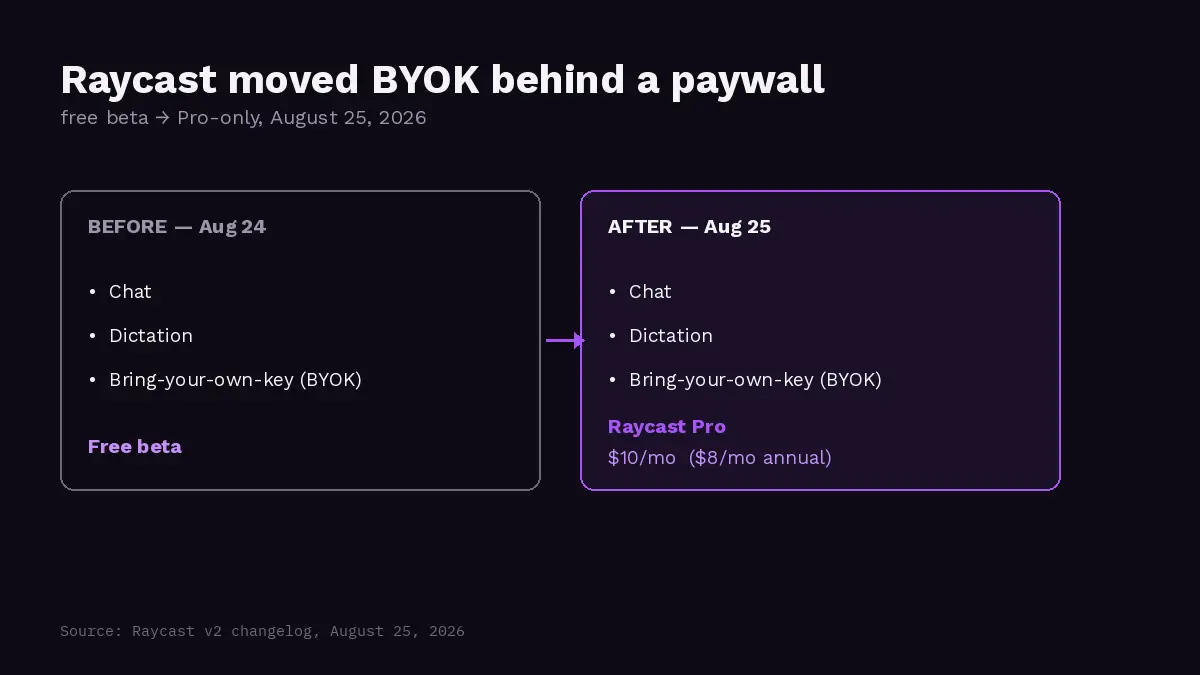
Raycast v2, released August 25, moved chat, dictation, and BYOK from its free beta into Raycast Pro ($10/month, or $8/month annual). Co-founder Thomas Paul Mann explained on r/raycastapp: "We think the clearest principle is that Raycast should be the interface layer, not the inference layer."
One Mac user's reaction on r/macapps: "Putting BYOK behind Pro is a strange bundle, the whole reason I use it is to pay the model provider directly instead of stacking another AI subscription on top." Verify pricing before trusting any "free BYOK" claim.
None of this makes BYOK the obvious choice. Occasional chatters get real value from the official Plus plan's flat $20: zero setup, no key to manage, no surprise bill, full search and upload access. A flat fee beats a cheaper, fiddlier bill for anyone who'd rather not think about tokens.
It Depends on Who You Are
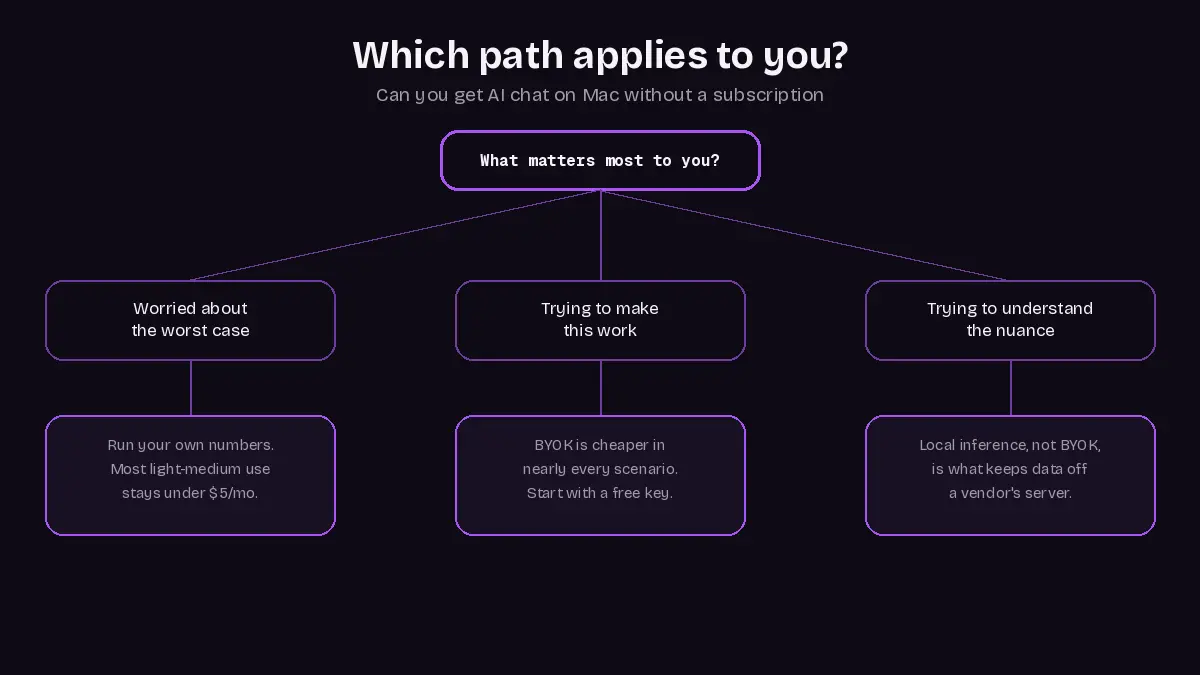
Which case applies depends on how much certainty you want, how often you actually chat, and whether your usage stays casual or climbs toward the power-user end of a heavier daily workflow.
- Worst-case budgeting: a knowledge worker's heavy drafting stays under $5 a month at 2026-07-30 rates, and only genuinely heavy use on the pricier Terra model nears $20.25. On-device 7B-8B models reportedly handle everyday conversation fine, though no independent benchmark confirms they match a frontier cloud model on harder reasoning.
- Making the switch pay off: BYOK is cheaper in nearly every scenario. On r/raycastapp, one daily user reported spending just $0.27 in a month on daily AI use, mostly fixing grammar, and noted it exposes how much margin a flat $8-a-month Pro plan carries. Three stacked $20 subscriptions run about $60 a month for what one key covers.
- Understanding the privacy nuance: switching to your own key doesn't reduce how much data reaches the provider's servers; OpenAI says API inputs aren't used for training by default, but data still flows to OpenAI just as through the consumer app. Raycast's free BYOK vanished on August 25 (r/raycastapp), and API prices dropped on July 30, so verify pricing before trusting any "free" claim.
What This Means for Choosing Free AI Apps on Your Mac
Four no-subscription paths cover every price bracket among the best AI apps for Mac. Pick the path by habit: casual users do fine with the free official cloud-based AI chatbot or a $0 BYOK client. Daily chatters should run the formula above first; anyone wanting zero cloud bill should go local.
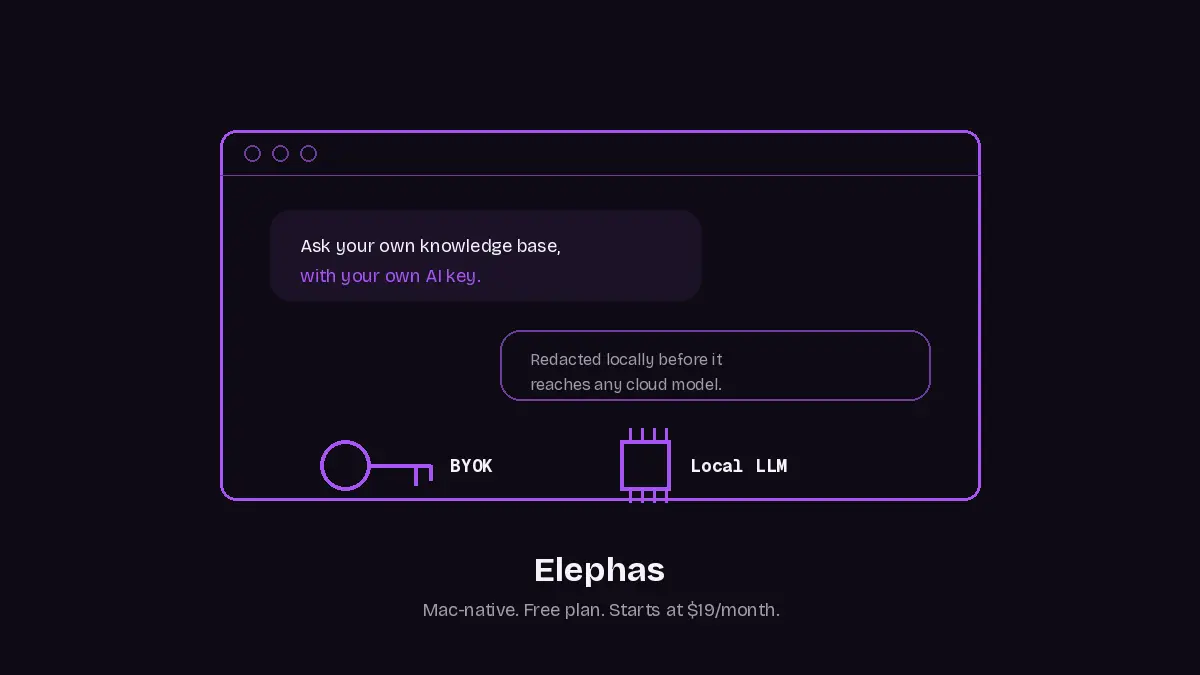
Elephas is a Mac-native, privacy-friendly personal AI knowledge assistant. It pairs with the OpenAI, Anthropic, or Google key you already use for BYOK, and ships built-in local LLM models for the offline path.
Elephas has a free plan and starts at $19/month, building a searchable AI brain from your files. Check plan gating in-app first. See the full plan list. Try Elephas for free.
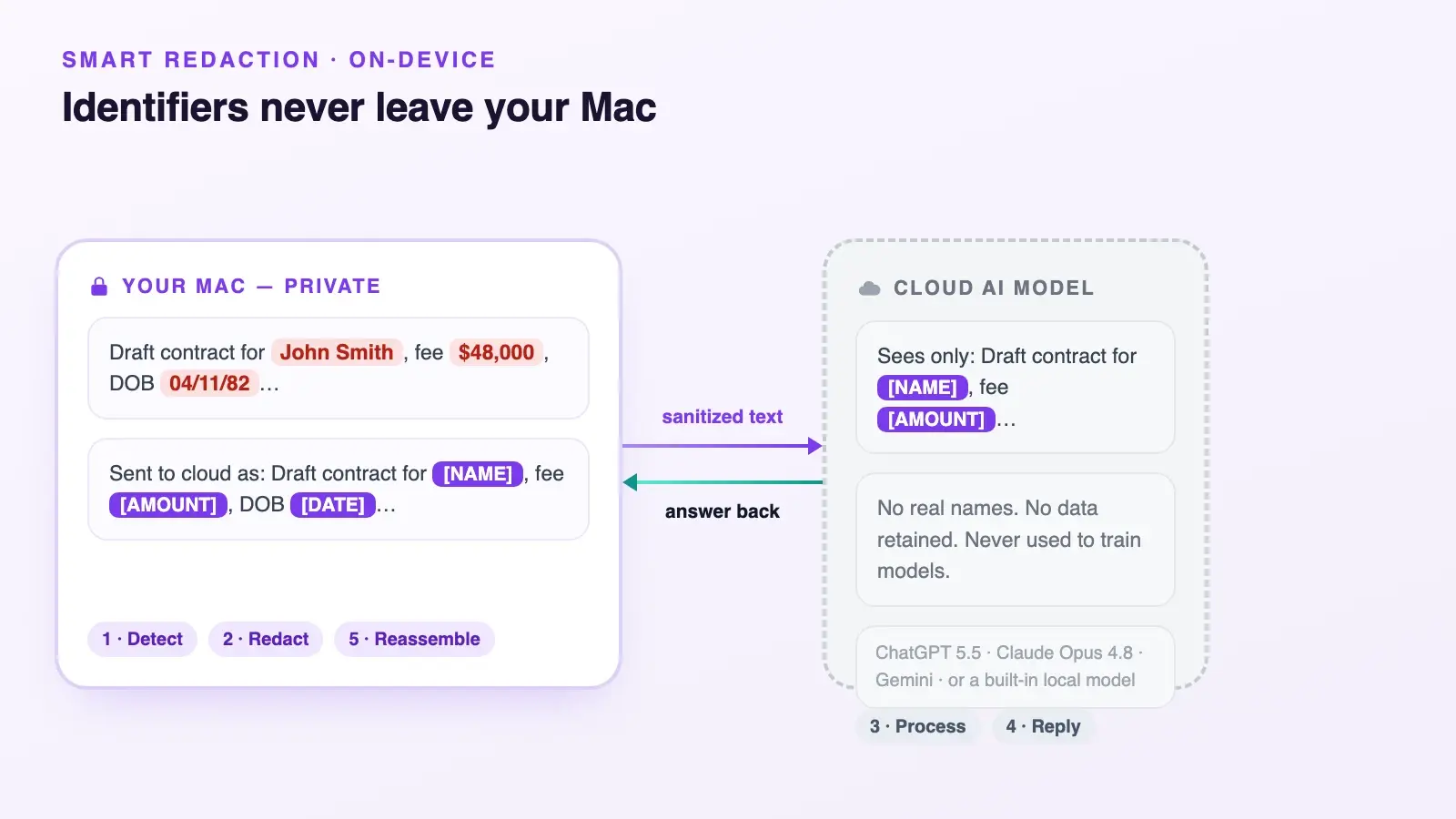
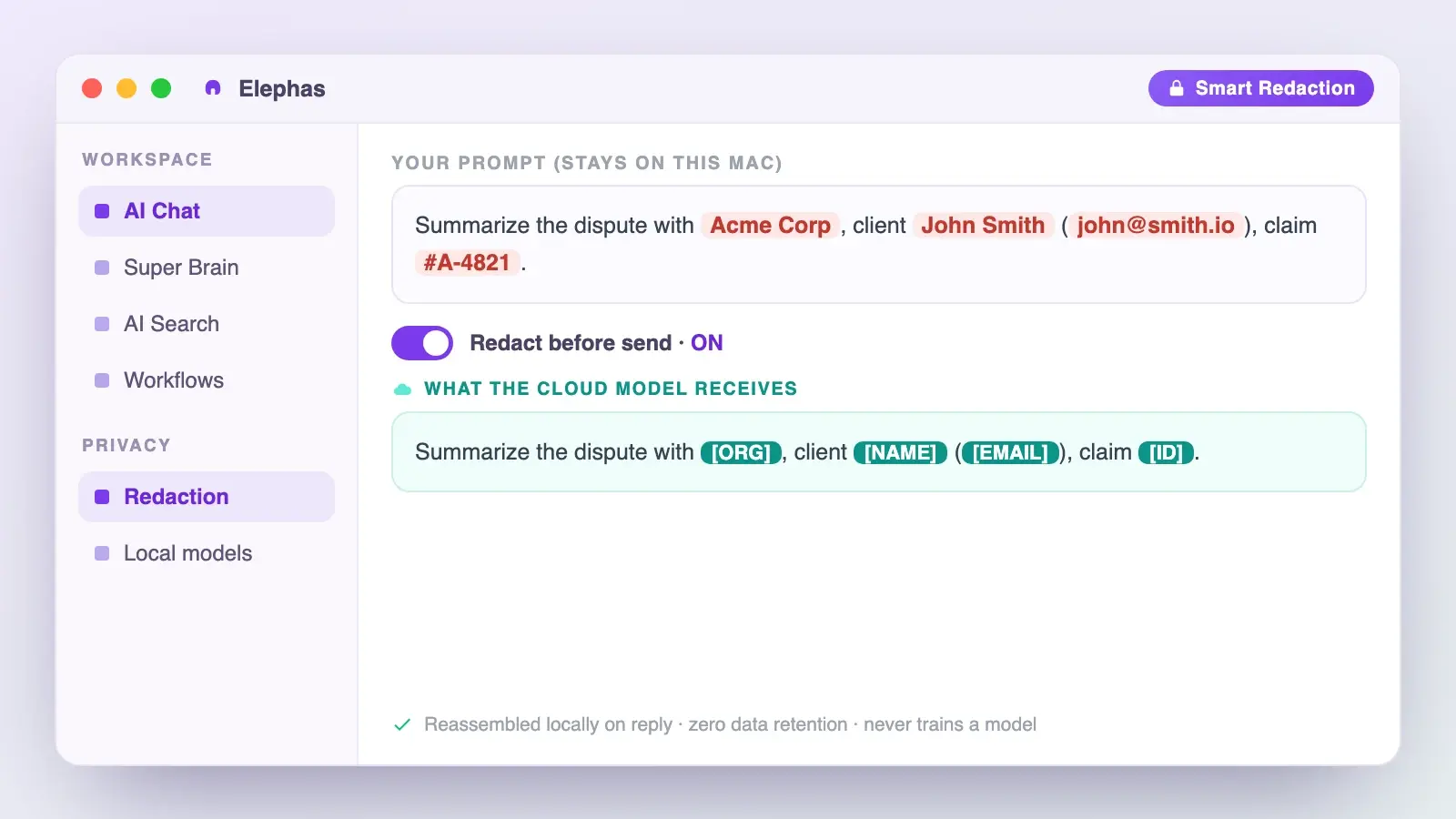
If you'd rather keep using a BYOK key with a frontier cloud model instead of going fully local, Elephas adds a layer the raw API call skips: automatic PII redaction. Before a prompt reaches ChatGPT, Claude, Gemini, Grok, Perplexity, or any other cloud model, Elephas strips sensitive names, emails, phone numbers, and identifiers on your Mac, so the cloud model only sees sanitized text; when the answer returns, the redacted fields are reassembled locally, so identifiable information never leaves your device. This pairs with zero data retention: content never trains AI models, never sits on a vendor's server, and never passes through a third-party reviewer's screen.
- For skeptics: run your own numbers; most light-to-medium users land under $5 a month even on the pricier model.
- For advocates: track your actual spend for 30 days; long threads and heavy uploads push a light user into heavy-user territory.
- For neutral evaluators: local inference, not BYOK, keeps data off a vendor's servers.
- On the trust question: one r/artificial reader put BYOK security bluntly: "No one sane will trust you with the keys. If they won't pay $10 up front then the service isn't valuable anyway." That's a fair worry: never hand your API key to an app you don't trust.
- OpenAI's pricing update (2026-07-30) cut GPT-5.6 token rates; the estimates above hold from that date forward.
- Raycast's changelog (2026-08-25) confirms messaging, dictation, and BYOK moved into Pro; cross "free BYOK" off your list until that reverses.
- Elephas pairs a privacy-friendly AI knowledge assistant with built-in local LLM models and BYOK support in one app. Try Elephas.
A few more specifics worth knowing before you pick an AI tool for your Mac:
Related Questions
Are local AI models on a Mac actually as good as ChatGPT?
Partially. Apple's OpenELM research reports a 2.36% accuracy improvement over its named comparator at roughly 1 billion parameters, using 2x fewer pre-training tokens, per Apple's paper.
Reports suggest 7B-8B on-device models handle everyday conversation and writing fine, and 14B is a reasonable floor for tool-using tasks. No independent recent benchmark has tested Mac-sized models against a frontier cloud model, so treat "good enough" claims as unverified for harder work.
Is the ChatGPT Mac app free without a subscription, or do you still need Plus?
The official ChatGPT Mac app is free to download and actually use, no Plus required. As one r/macapps poster put the ask: an app that "looks & works like the original ChatGPT from OpenAI."
The catch: free-tier chat has separate limits on uploads, images, and tools, and needs macOS 14. Plus, at $20 a month, removes those caps but isn't required for basic conversation.
Does Raycast AI still offer a free BYOK option?
No, as of the August 25, 2026 v2 release. Chat, dictation, and bring-your-own-key access moved behind Raycast Pro, priced at $10 a month or $8 annually. Raycast's own billing docs still contain a stale paragraph describing free BYOK; treat the current pricing grid as authoritative.
How much RAM do you need to run AI models locally on a Mac?
Per Jan's guidance, 8GB comfortably handles roughly 3B-parameter models, 16GB about 7B, and 32GB around 13B, depending on quantization. Model files run from a few GB to well over 100GB, so factor storage in too.
Is my data still private if I use my own API key instead of a subscription?
Not automatically. Swapping a subscription for your own key still sends prompts to the same provider's servers. That provider says its inputs aren't used for training by default, but that's a training-use policy, not zero transmission.
A local AI setup, not BYOK, keeps data off a vendor's servers entirely. Redaction tools help too: OpenAI's own research reported 96% F1 accuracy for its Privacy Filter on a PII-masking benchmark, per OpenAI's release, though the release itself says it's not a compliance substitute.
Keep your AI chats private, on your own Mac
Elephas pairs with the AI model you already use, or runs fully offline with built-in local LLM models, and redacts sensitive data before it ever leaves your Mac.
